ruphaa

3K posts

ruphaa banner
ruphaa

ruphaa

@ruphaaganesh

Fun-tastic Frontend Dev @Canva 🌟 prev @DeepSourceHQ 🌟 prev @FreshworksInc ✍ Writes at https://t.co/Zuc4L1KuFI 🤓 Proud geek | Speaker | Her

参加日 Ekim 2015
1.3K フォロー中1.2K フォロワー
ruphaa がリツイート
Addy Osmani
Addy Osmani@addyosmani·
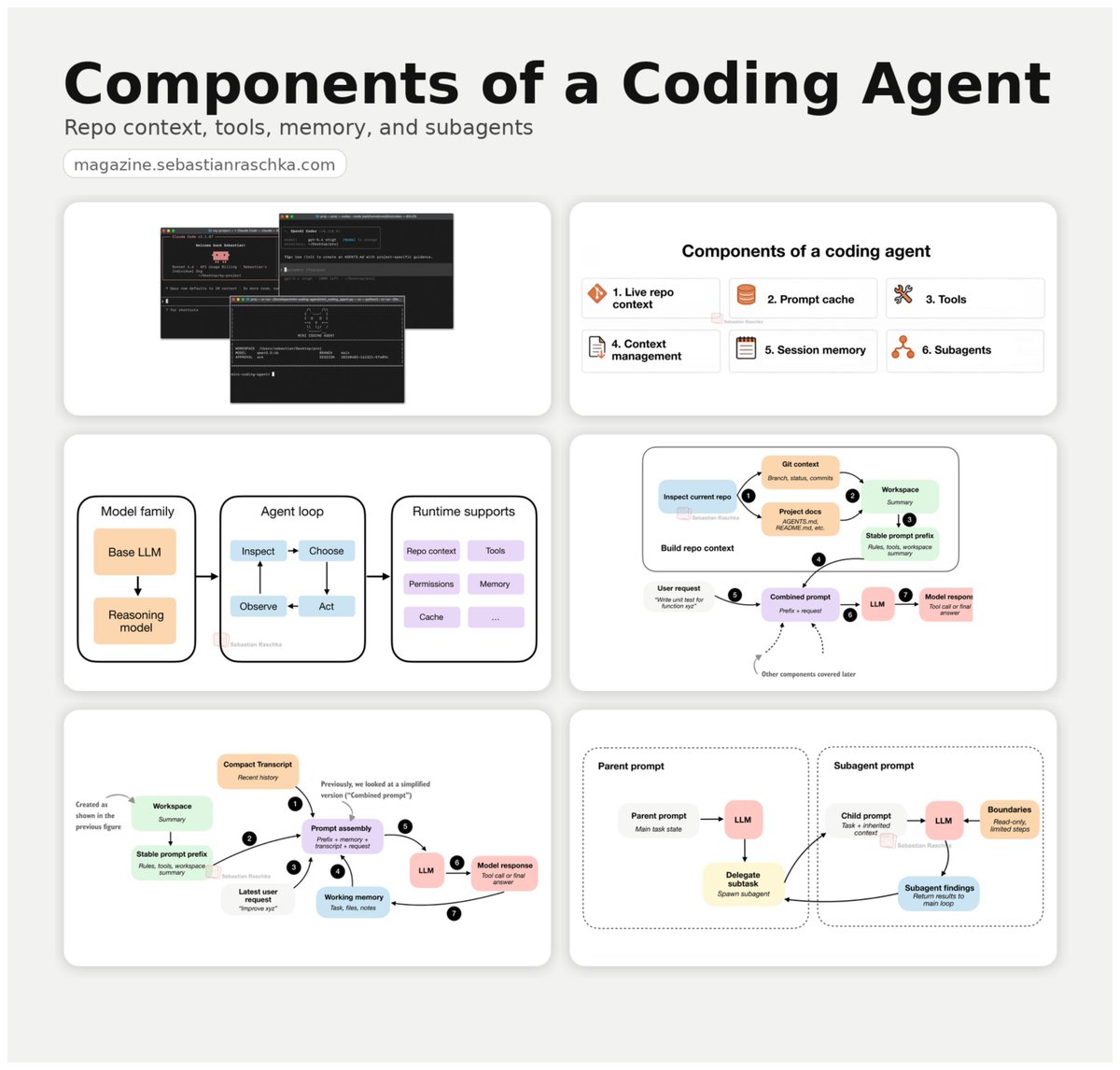
Memory makes your agent smarter over time. The agent harness is key to the memory layer. You can't bolt one onto the other after the fact. Every decision the harness makes - what goes in context, what survives compaction, how skills get surfaced, how the working directory is exposed etc - is a memory decision. A well written write-up by @hwchase17
Harrison Chase@hwchase17

x.com/i/article/2042…

English
20
59
546
116K
ruphaa がリツイート
Charly Wargnier
Charly Wargnier@DataChaz·
🚨 You need to see this. @addyosmani from Google just dropped his new Agent Skills and it's incredible. It brings 19 engineering skills + 7 commands to AI coding agents, all inspired by Google best practices 🤯 AI coding agents are powerful, but left alone, they take shortcuts. They skip specs, tests, and security reviews, optimizing for "done" over "correct." Addy built this to fix that. Each skill encodes the workflows and quality gates that senior engineers actually use: spec before code, test before merge, measure before optimize. The full lifecycle is covered: → Define - refine ideas, write specs before a single line of code → Plan - decompose into small, verifiable tasks → Build - incremental implementation, context engineering, clean API design → Verify - TDD, browser testing with DevTools, systematic debugging → Review - code quality, security hardening, performance optimization → Ship - git workflow, CI/CD, ADRs, pre-launch checklists Features 7 slash commands: (/spec, /plan, /build, /test, /review, /code-simplify, /ship) that map to this lifecycle. It works with: ✦ Claude Code ✦ Cursor ✦ Antigravity ✦ ... and any agent accepting Markdown. Baking in Google-tier engineering culture (Shift Left, Chesterton's Fence, Hyrum's Law) directly into your agent's step-by-step workflow! `npx skills add addyosmani/agent-skills` Free and open-source. Repo link in 🧵↓
Charly Wargnier tweet media
English
60
352
2.6K
413.1K
ruphaa がリツイート
Thariq
Thariq@trq212·
/buddy
Thariq tweet media
English
489
172
4K
540.1K
ruphaa がリツイート
Ruben Hassid
Ruben Hassid@rubenhassid·
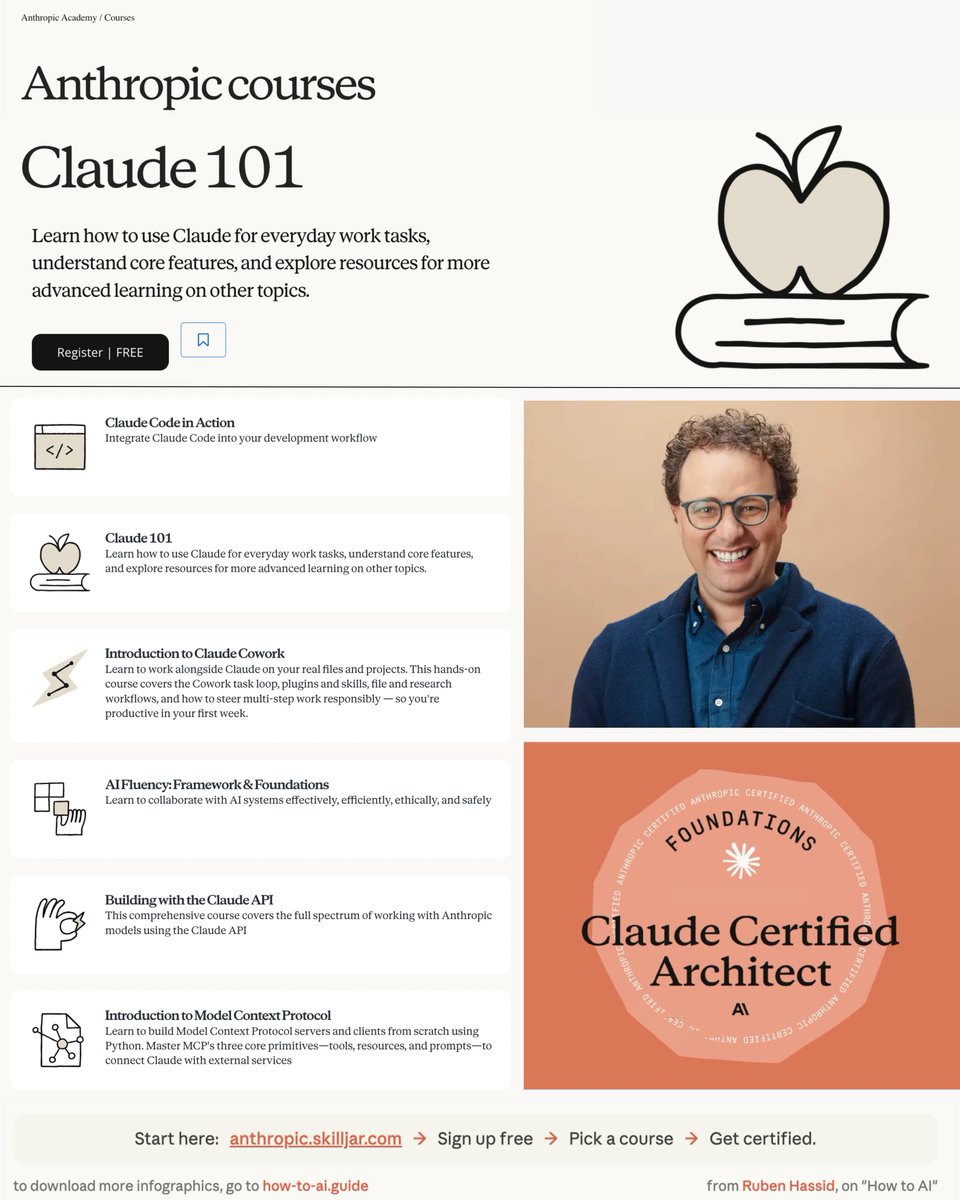
Claude is offering 13 AI courses & certificates. All free. Here are all 13 links (+ my own guides): 1. Go to each link below. Enroll. It's free. 2. But honestly? My newsletter covers it better. 3. I'll explain at the end. Start with the official ones: --- 1 - Claude 101. Learn Claude for everyday work. ↳ anthropic.skilljar.com/claude-101 2 - AI Fluency: Frameworks & Foundations. ↳ anthropic.skilljar.com/ai-fluency-fra… 3 - Introduction to Agent Skills. ↳ anthropic.skilljar.com/introduction-t… 4 - Building with the Claude API. ↳ anthropic.skilljar.com/claude-with-th… 5 - Claude Code in Action. ↳ anthropic.skilljar.com/claude-code-in… 6 - Intro to Model Context Protocol. ↳ anthropic.skilljar.com/introduction-t… 7 - MCP: Advanced Topics. ↳ anthropic.skilljar.com/model-context-… 8 - AI Fluency for Students. ↳ anthropic.skilljar.com/ai-fluency-for… 9 - AI Fluency for Educators. ↳ anthropic.skilljar.com/ai-fluency-for… 10 - Teaching AI Fluency. ↳ anthropic.skilljar.com/teaching-ai-fl… 11 - AI Fluency for Nonprofits. ↳ anthropic.skilljar.com/ai-fluency-for… 12 - Claude with Amazon Bedrock. ↳ anthropic.skilljar.com/claude-in-amaz… 13 - Claude with Google Cloud's Vertex AI. ↳ anthropic.skilljar.com/claude-with-go… --- Official courses are good. But they're theoretical. I wrote how-to guides that show you what to do. Here's how to master Claude (for free): 1. Start here: how-to-claude.ai ☑ The basics of Claude. ☑ How to prompt it the right way. ☑ The different types of Claude to master. 2. Move to Cowork: claude-co.work ☑ The more advanced Claude is Claude Cowork. ☑ How to prompt it and set it up properly. ☑ It's a long process. But worth every minute. 3. Set up Claude for teams: how-claude.team ☑ Setting up Claude for teams is different. ☑ This is the easiest 5-day plan I could find. ☑ 5 steps so your team runs on Claude in a week. 4. Use Claude Skills: ruben.substack.com/p/claude-skills ☑ Stop prompting, build your first skill. ☑ 7 favourite hacks of Claude Skills. ☑ Access Claude's team skills. 5. Claude Computer: ruben.substack.com/p/claude-compu… ☑ Access Claude Computer. ☑ Use cases of Claude Computer. ☑ Schedule tasks with Claude. 6. Claude Code: ruben.substack.com/p/claude-code ☑ English is the new code. ☑ Code 100x faster. ☑ Prompt Claude Code the right way. 7. Bonus (to go even deeper). ☑ Claude for Excel. ☑ Claude interactive charts. ☑ How to move from ChatGPT to Claude. --- All of this is free. Here's how to get it: 1. Go to how-to-ai.guide. Add your email. 2. A pop-up will ask you to pay. Do not pay. 3. Open my welcome email & enjoy the free guides. 431,000+ people read it weekly. Join them. ♻️ Repost this so others get free AI education.
Ruben Hassid tweet media
Ruben Hassid@rubenhassid

x.com/i/article/2039…

English
69
906
4.8K
1.1M
ruphaa がリツイート
Roan
Roan@RohOnChain·
This 2 hour Stanford lecture on AI careers will teach you more about winning in the AI race than every piece of AI content you have scrolled past this year. Bookmark this & give it 2 hours, no matter what. It'll be the most productive thing you could do this weekend.
English
137
2.3K
11.7K
1.6M
ruphaa がリツイート
Andrej Karpathy
Andrej Karpathy@karpathy·
Wow, this tweet went very viral! I wanted share a possibly slightly improved version of the tweet in an "idea file". The idea of the idea file is that in this era of LLM agents, there is less of a point/need of sharing the specific code/app, you just share the idea, then the other person's agent customizes & builds it for your specific needs. So here's the idea in a gist format: gist.github.com/karpathy/442a6… You can give this to your agent and it can build you your own LLM wiki and guide you on how to use it etc. It's intentionally kept a little bit abstract/vague because there are so many directions to take this in. And ofc, people can adjust the idea or contribute their own in the Discussion which is cool.
Andrej Karpathy@karpathy

LLM Knowledge Bases Something I'm finding very useful recently: using LLMs to build personal knowledge bases for various topics of research interest. In this way, a large fraction of my recent token throughput is going less into manipulating code, and more into manipulating knowledge (stored as markdown and images). The latest LLMs are quite good at it. So: Data ingest: I index source documents (articles, papers, repos, datasets, images, etc.) into a raw/ directory, then I use an LLM to incrementally "compile" a wiki, which is just a collection of .md files in a directory structure. The wiki includes summaries of all the data in raw/, backlinks, and then it categorizes data into concepts, writes articles for them, and links them all. To convert web articles into .md files I like to use the Obsidian Web Clipper extension, and then I also use a hotkey to download all the related images to local so that my LLM can easily reference them. IDE: I use Obsidian as the IDE "frontend" where I can view the raw data, the the compiled wiki, and the derived visualizations. Important to note that the LLM writes and maintains all of the data of the wiki, I rarely touch it directly. I've played with a few Obsidian plugins to render and view data in other ways (e.g. Marp for slides). Q&A: Where things get interesting is that once your wiki is big enough (e.g. mine on some recent research is ~100 articles and ~400K words), you can ask your LLM agent all kinds of complex questions against the wiki, and it will go off, research the answers, etc. I thought I had to reach for fancy RAG, but the LLM has been pretty good about auto-maintaining index files and brief summaries of all the documents and it reads all the important related data fairly easily at this ~small scale. Output: Instead of getting answers in text/terminal, I like to have it render markdown files for me, or slide shows (Marp format), or matplotlib images, all of which I then view again in Obsidian. You can imagine many other visual output formats depending on the query. Often, I end up "filing" the outputs back into the wiki to enhance it for further queries. So my own explorations and queries always "add up" in the knowledge base. Linting: I've run some LLM "health checks" over the wiki to e.g. find inconsistent data, impute missing data (with web searchers), find interesting connections for new article candidates, etc., to incrementally clean up the wiki and enhance its overall data integrity. The LLMs are quite good at suggesting further questions to ask and look into. Extra tools: I find myself developing additional tools to process the data, e.g. I vibe coded a small and naive search engine over the wiki, which I both use directly (in a web ui), but more often I want to hand it off to an LLM via CLI as a tool for larger queries. Further explorations: As the repo grows, the natural desire is to also think about synthetic data generation + finetuning to have your LLM "know" the data in its weights instead of just context windows. TLDR: raw data from a given number of sources is collected, then compiled by an LLM into a .md wiki, then operated on by various CLIs by the LLM to do Q&A and to incrementally enhance the wiki, and all of it viewable in Obsidian. You rarely ever write or edit the wiki manually, it's the domain of the LLM. I think there is room here for an incredible new product instead of a hacky collection of scripts.


English
1.1K
2.8K
26.3K
6.8M
ruphaa がリツイート
himanshu
himanshu@himanshustwts·
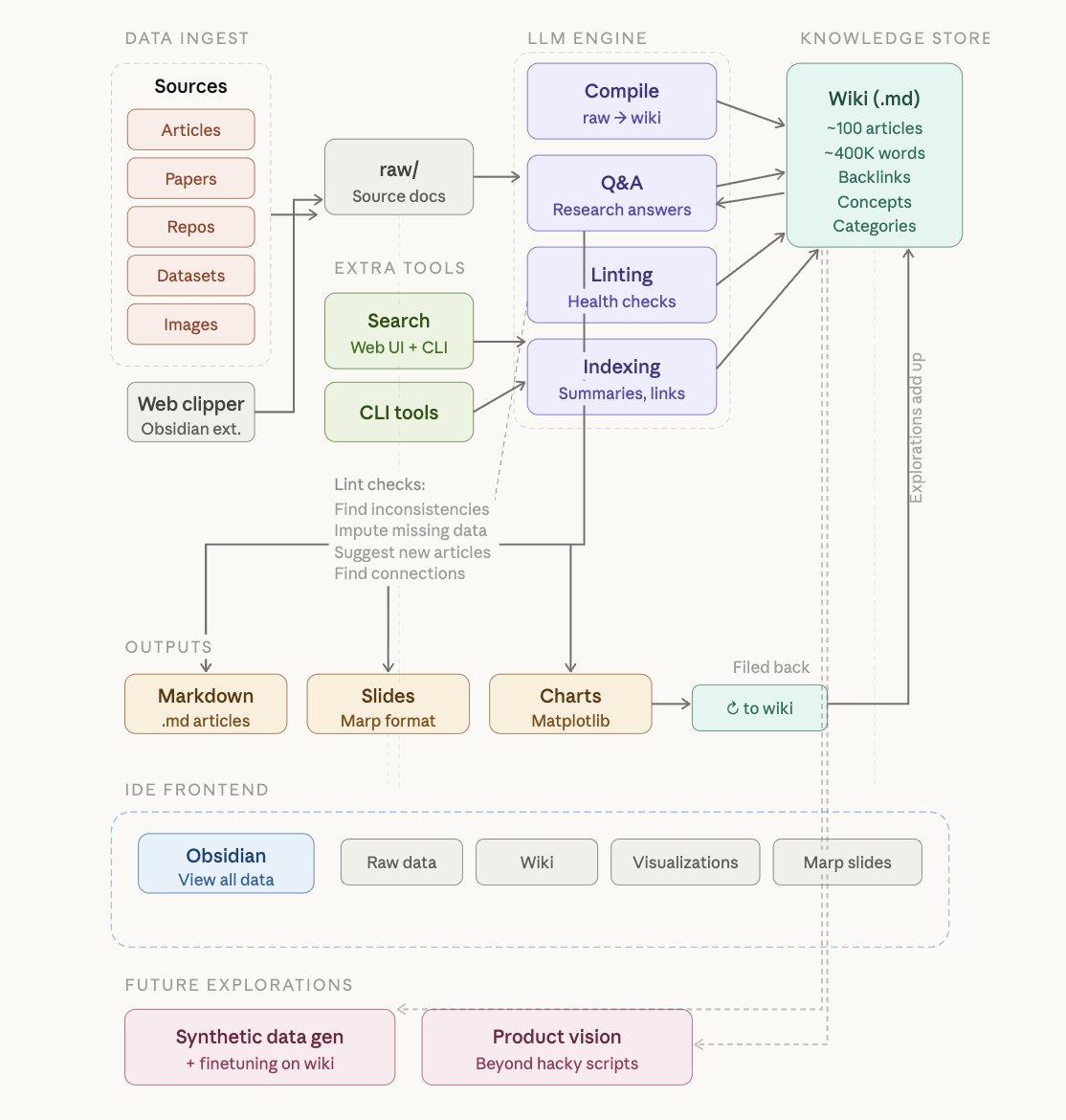
and here is the full architecture of the LLM Knowledge Base system covering every stage from ingest to future explorations.
himanshu tweet media
Andrej Karpathy@karpathy

LLM Knowledge Bases Something I'm finding very useful recently: using LLMs to build personal knowledge bases for various topics of research interest. In this way, a large fraction of my recent token throughput is going less into manipulating code, and more into manipulating knowledge (stored as markdown and images). The latest LLMs are quite good at it. So: Data ingest: I index source documents (articles, papers, repos, datasets, images, etc.) into a raw/ directory, then I use an LLM to incrementally "compile" a wiki, which is just a collection of .md files in a directory structure. The wiki includes summaries of all the data in raw/, backlinks, and then it categorizes data into concepts, writes articles for them, and links them all. To convert web articles into .md files I like to use the Obsidian Web Clipper extension, and then I also use a hotkey to download all the related images to local so that my LLM can easily reference them. IDE: I use Obsidian as the IDE "frontend" where I can view the raw data, the the compiled wiki, and the derived visualizations. Important to note that the LLM writes and maintains all of the data of the wiki, I rarely touch it directly. I've played with a few Obsidian plugins to render and view data in other ways (e.g. Marp for slides). Q&A: Where things get interesting is that once your wiki is big enough (e.g. mine on some recent research is ~100 articles and ~400K words), you can ask your LLM agent all kinds of complex questions against the wiki, and it will go off, research the answers, etc. I thought I had to reach for fancy RAG, but the LLM has been pretty good about auto-maintaining index files and brief summaries of all the documents and it reads all the important related data fairly easily at this ~small scale. Output: Instead of getting answers in text/terminal, I like to have it render markdown files for me, or slide shows (Marp format), or matplotlib images, all of which I then view again in Obsidian. You can imagine many other visual output formats depending on the query. Often, I end up "filing" the outputs back into the wiki to enhance it for further queries. So my own explorations and queries always "add up" in the knowledge base. Linting: I've run some LLM "health checks" over the wiki to e.g. find inconsistent data, impute missing data (with web searchers), find interesting connections for new article candidates, etc., to incrementally clean up the wiki and enhance its overall data integrity. The LLMs are quite good at suggesting further questions to ask and look into. Extra tools: I find myself developing additional tools to process the data, e.g. I vibe coded a small and naive search engine over the wiki, which I both use directly (in a web ui), but more often I want to hand it off to an LLM via CLI as a tool for larger queries. Further explorations: As the repo grows, the natural desire is to also think about synthetic data generation + finetuning to have your LLM "know" the data in its weights instead of just context windows. TLDR: raw data from a given number of sources is collected, then compiled by an LLM into a .md wiki, then operated on by various CLIs by the LLM to do Q&A and to incrementally enhance the wiki, and all of it viewable in Obsidian. You rarely ever write or edit the wiki manually, it's the domain of the LLM. I think there is room here for an incredible new product instead of a hacky collection of scripts.

English
101
579
5.8K
653.6K
ruphaa がリツイート
Andrej Karpathy
Andrej Karpathy@karpathy·
LLM Knowledge Bases Something I'm finding very useful recently: using LLMs to build personal knowledge bases for various topics of research interest. In this way, a large fraction of my recent token throughput is going less into manipulating code, and more into manipulating knowledge (stored as markdown and images). The latest LLMs are quite good at it. So: Data ingest: I index source documents (articles, papers, repos, datasets, images, etc.) into a raw/ directory, then I use an LLM to incrementally "compile" a wiki, which is just a collection of .md files in a directory structure. The wiki includes summaries of all the data in raw/, backlinks, and then it categorizes data into concepts, writes articles for them, and links them all. To convert web articles into .md files I like to use the Obsidian Web Clipper extension, and then I also use a hotkey to download all the related images to local so that my LLM can easily reference them. IDE: I use Obsidian as the IDE "frontend" where I can view the raw data, the the compiled wiki, and the derived visualizations. Important to note that the LLM writes and maintains all of the data of the wiki, I rarely touch it directly. I've played with a few Obsidian plugins to render and view data in other ways (e.g. Marp for slides). Q&A: Where things get interesting is that once your wiki is big enough (e.g. mine on some recent research is ~100 articles and ~400K words), you can ask your LLM agent all kinds of complex questions against the wiki, and it will go off, research the answers, etc. I thought I had to reach for fancy RAG, but the LLM has been pretty good about auto-maintaining index files and brief summaries of all the documents and it reads all the important related data fairly easily at this ~small scale. Output: Instead of getting answers in text/terminal, I like to have it render markdown files for me, or slide shows (Marp format), or matplotlib images, all of which I then view again in Obsidian. You can imagine many other visual output formats depending on the query. Often, I end up "filing" the outputs back into the wiki to enhance it for further queries. So my own explorations and queries always "add up" in the knowledge base. Linting: I've run some LLM "health checks" over the wiki to e.g. find inconsistent data, impute missing data (with web searchers), find interesting connections for new article candidates, etc., to incrementally clean up the wiki and enhance its overall data integrity. The LLMs are quite good at suggesting further questions to ask and look into. Extra tools: I find myself developing additional tools to process the data, e.g. I vibe coded a small and naive search engine over the wiki, which I both use directly (in a web ui), but more often I want to hand it off to an LLM via CLI as a tool for larger queries. Further explorations: As the repo grows, the natural desire is to also think about synthetic data generation + finetuning to have your LLM "know" the data in its weights instead of just context windows. TLDR: raw data from a given number of sources is collected, then compiled by an LLM into a .md wiki, then operated on by various CLIs by the LLM to do Q&A and to incrementally enhance the wiki, and all of it viewable in Obsidian. You rarely ever write or edit the wiki manually, it's the domain of the LLM. I think there is room here for an incredible new product instead of a hacky collection of scripts.
English
2.8K
6.9K
57K
20.2M
ruphaa がリツイート
Rakhi
Rakhi@atbrakhi·
I work on a browser rendering engine. I write Rust. No, it's not frontend, backend or systems engineering. I have struggled to explain what I do. So here's my attempt. You know when you write "display: flex" in your CSS and it just works? Someone had to make it work. Here's how a language feature goes from idea to your screen: Someone proposes a new feature in HTML/CSS/JS language. for example a new CSS property or a new way to handle text. A standards body (W3C for CSS, WHATWG for HTML, TC39 for JavaScript) discusses it, debates it, refines it. If it gets accepted, they publish a specification. A document that describes exactly how the feature should behave. Now browser engines (Chrome uses Blink, Firefox uses Gecko, Safari uses WebKit, and there's Servo which is written in Rust) need to actually implement it. Someone reads the spec, writes the code in the engine that says "when you encounter this property, here's how to calculate it, here's how to lay it out, here's how to paint it." Then it gets tested against thousands of web platform tests. Then it ships in a browser release. Then you install a browser update. Then you write that CSS property in your project. Then your users see it render correctly on their screen. That middle step, turning the specification into working code inside the engine, that's what I do. These days I am working on making sure one is able to debug things in Servo DevTools!
English
52
79
1.5K
78.5K
ruphaa がリツイート
Grady Booch
Grady Booch@Grady_Booch·
Fascinating. It would be even more fascinating to reach out to Margaret Hamilton to see if she concurs with this analysis. airealist.ai/p/reverse-engi…
English
9
38
188
15.7K
ruphaa がリツイート
Cheng Lou
Cheng Lou@_chenglou·
Jeeesus, I wake up and it's like my timeline claimed that Pretext cured cancer or something lol. Thanks for the sliiightly hyperbolic affection folks Anyway, here's the standard rich text demo! But ofc, manually laid out, with full awareness of box height, so you can do occlusion (virtualization) easily without observers and other mess chenglou.me/pretext/rich-n…
Cheng Lou@_chenglou

My dear front-end developers (and anyone who’s interested in the future of interfaces): I have crawled through depths of hell to bring you, for the foreseeable years, one of the more important foundational pieces of UI engineering (if not in implementation then certainly at least in concept): Fast, accurate and comprehensive userland text measurement algorithm in pure TypeScript, usable for laying out entire web pages without CSS, bypassing DOM measurements and reflow

English
71
90
2.4K
178.3K
ruphaa がリツイート
Cheng Lou
Cheng Lou@_chenglou·
My dear front-end developers (and anyone who’s interested in the future of interfaces): I have crawled through depths of hell to bring you, for the foreseeable years, one of the more important foundational pieces of UI engineering (if not in implementation then certainly at least in concept): Fast, accurate and comprehensive userland text measurement algorithm in pure TypeScript, usable for laying out entire web pages without CSS, bypassing DOM measurements and reflow
English
1.3K
8.3K
65.3K
23.8M
ruphaa がリツイート
Lydia Hallie ✨
Lydia Hallie ✨@lydiahallie·
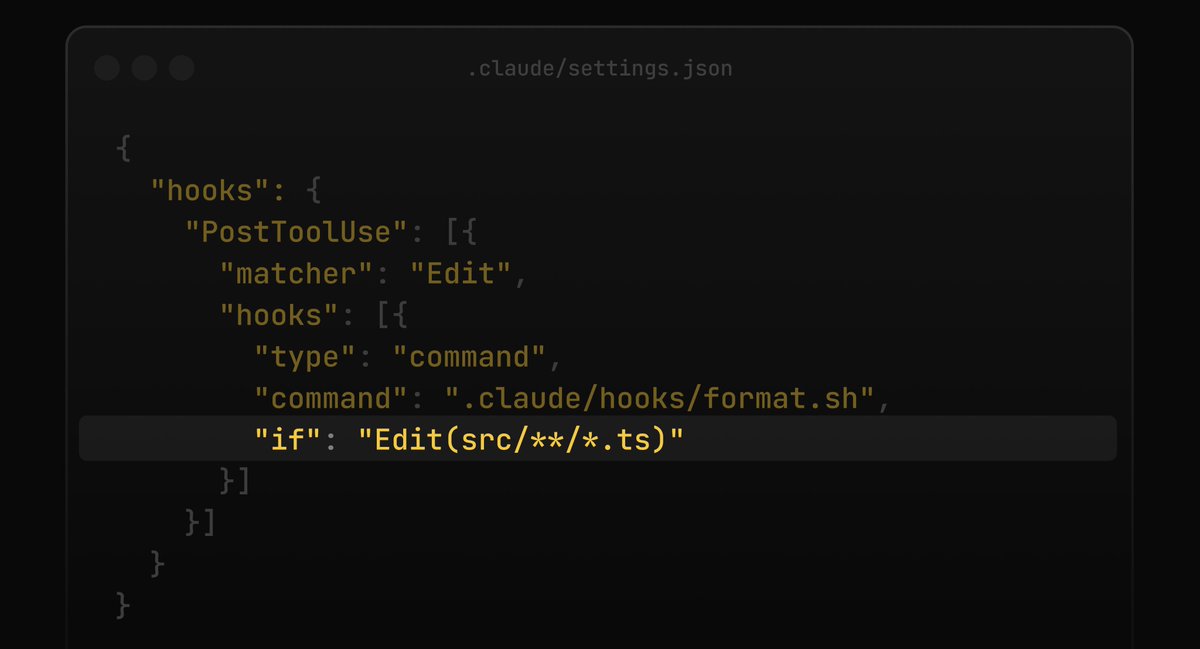
Claude Code now supports an `if` field in hooks It uses permission rule syntax to filter when a hook runs, which is useful when you want a hook on some bash commands but not every single one!
Lydia Hallie ✨ tweet media
English
77
134
1.3K
196.1K
ruphaa がリツイート
Paweł Huryn
Paweł Huryn@PawelHuryn·
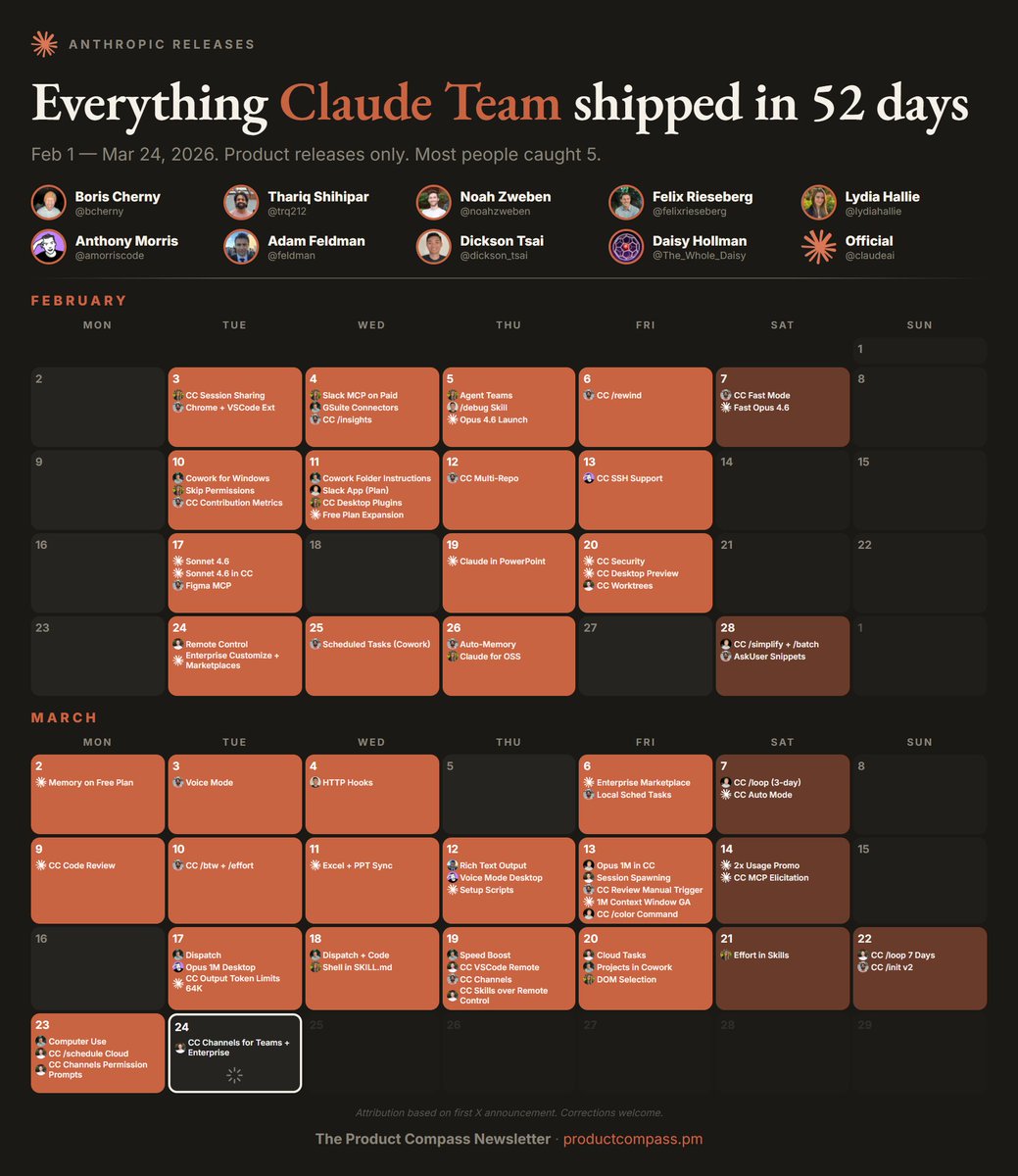
73 product releases in 52 days. That's not a launch cadence — that's a different kind of company. I tracked every Anthropic release from Feb 1 to Mar 23 by going through @bcherny, @trq212, @noahzweben, @felixrieseberg, @lydiahallie, @amorriscode, @feldman, @dickson_tsai, and @claudeai. Built a calendar with first-announcement attribution. Look at the acceleration. February had bursts with gaps between them. March 9 onward is almost every single day — Code Review, Channels, Dispatch, Computer Use, back to back. The individual features get coverage. The shipping velocity doesn't. It should.
Paweł Huryn tweet media
English
114
422
2.4K
533.2K
ruphaa がリツイート
Claude
Claude@claudeai·
Your work tools in Claude are now available on mobile. Explore Figma designs, create Canva slides, check Amplitude dashboards, all from your phone. Give it a try: claude.com/download
English
1.4K
1.6K
21.2K
7.5M
ruphaa がリツイート
Lydia Hallie ✨
Lydia Hallie ✨@lydiahallie·
If you're building a read-only tool with the Claude Agent SDK, make sure to mark it with `readOnlyHint: true` This tells Claude Code it has no side effects and is safe to parallelize. Otherwise no other tool can run alongside it, essentially creating a "serializing barrier"!
English
41
33
641
51.1K