MSFenzo

5.8K posts

MSFenzo banner
MSFenzo

MSFenzo

@FenzoMs

🤟🥶 |||||| 🥶🤟

Katılım Ocak 2021
1.2K Takip Edilen32 Takipçiler
MSFenzo retweetledi
Nav Toor
Nav Toor@heynavtoor·
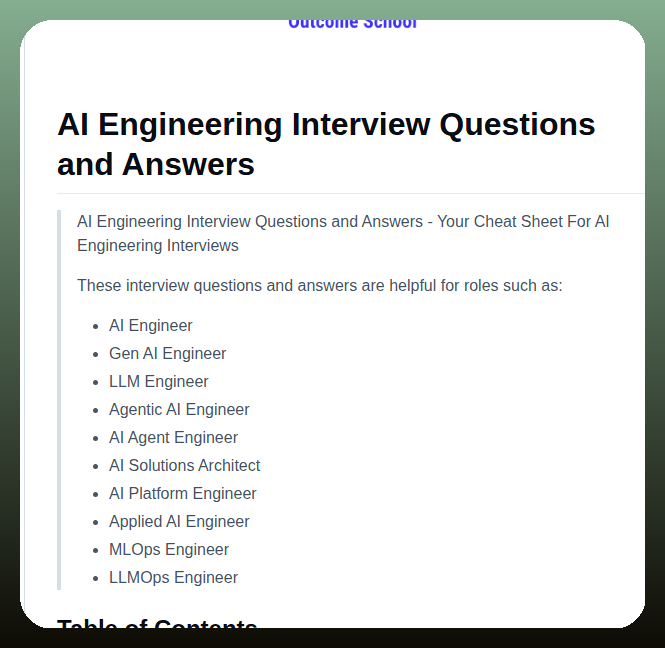
Here are 10 GitHub repos that quietly print money while you sleep. 1. Cal. com Open-source Calendly. Fork it, white-label it, sell to dentists and lawyers for $200/month. The founders hit $5M ARR in 3 years doing exactly this. Repo → github.com/calcom/cal.com 2. Plausible Analytics Privacy-first Google Analytics. Self-host it, resell to agencies for $50/month per client. Two founders bootstrapped this to 7 figures. Repo → github.com/plausible/anal… 3. Ghost Open-source Substack with 100% margin. 1,000 readers at $5/month equals $60,000 a year. Forever. Repo → github.com/TryGhost/Ghost 4. n8n Open-source Zapier. Sell automation services for $500-$2,000 per setup. n8n raised $14M because the agency model behind it works. Repo → github.com/n8n-io/n8n 5. Supabase Free Firebase replacement. Build a SaaS in a weekend, charge $29-$99/month. They raised $116M for a reason. Repo → github.com/supabase/supab… 6. Medusa Open-source Shopify. Take 5% on every sale forever. Zero rev share to Shopify. Repo → github.com/medusajs/medusa 7. AppFlowy Open-source Notion. Sell self-hosted to enterprises worried about data privacy. They raised $30M because this market is massive. Repo → github.com/AppFlowy-IO/Ap… 8. Coolify Open-source Vercel and Heroku. Charge developers $20/month to manage their deployments. Replace their $200 Vercel bill. Repo → github.com/coollabsio/coo… 9. Listmonk Open-source Mailchimp. Send unlimited emails for the cost of an AWS bill. Resell to agencies at 10x markup. Repo → github.com/knadh/listmonk 10. Penpot Open-source Figma. Sell self-hosted design tools to agencies who refuse to upload client files to the cloud. Repo → github.com/penpot/penpot The difference between developers who build features and developers who build businesses is one decision. Pick one of these. Fork it this weekend. Ship it next week. The founders behind these repos already proved the model. Save this. Share it with the developer in your life who deserves to break free. 100% free. 100% open source.
Nav Toor tweet mediaNav Toor tweet mediaNav Toor tweet mediaNav Toor tweet media
English
108
792
6.1K
430.4K
MSFenzo retweetledi
Tech with Mak
Tech with Mak@techNmak·
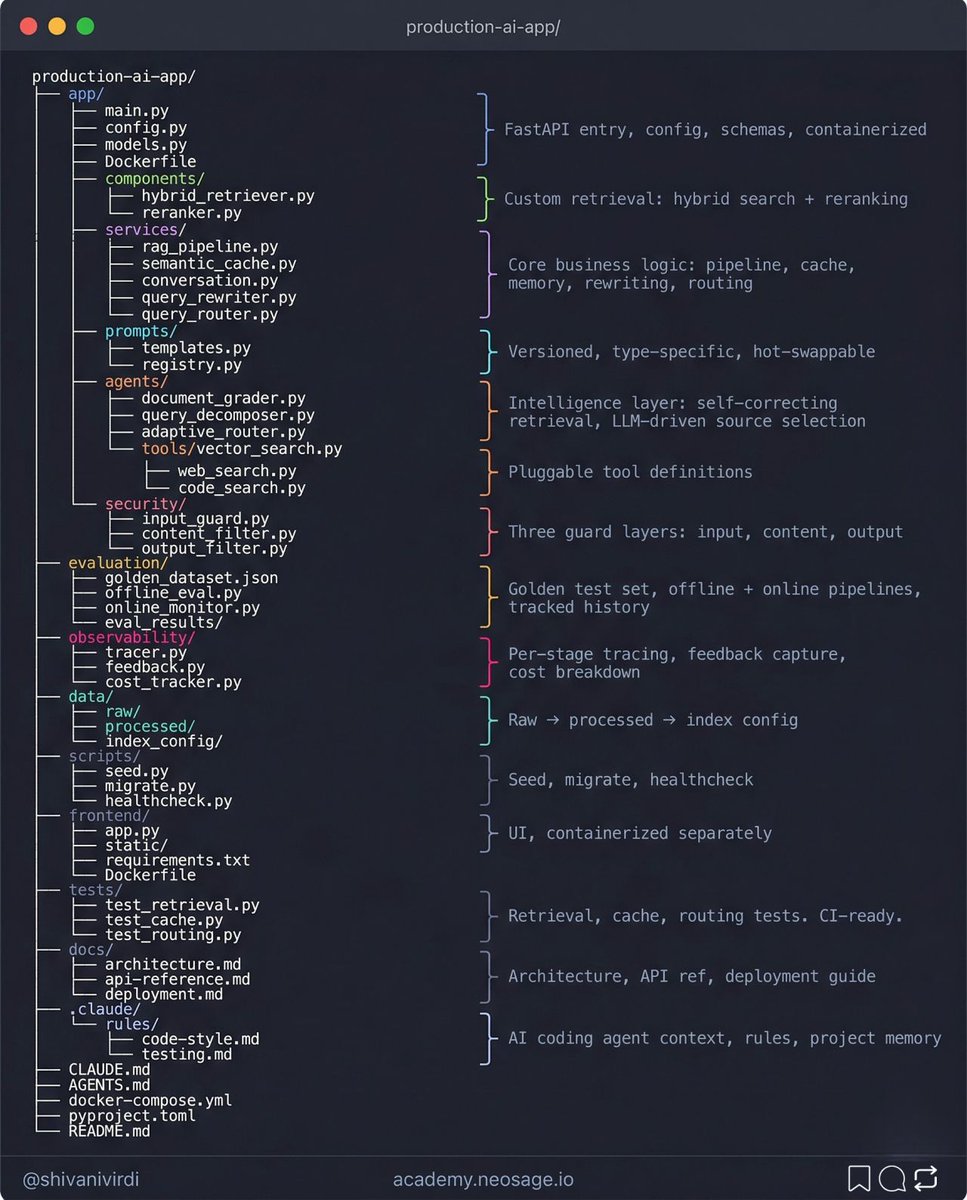
This is probably the most honest AI architecture breakdown on the internet right now. 9-layer AI production architecture services/ - RAG pipeline, semantic cache, memory, query rewriter, router. Not one file. Five. agents/ - document grader, decomposer, adaptive router. Self-correcting by design. prompts/ - versioned, typed, registered. Never hardcoded. security/ - input, content, output. Three guards not one. evaluation/ - golden dataset, offline eval, online monitor. Most people skip this entire layer and ship blind. observability/ - per-stage tracing, feedback linked to traces, cost per query. .claude/ - agent context so your AI coding assistant knows the codebase before it touches a file. The demo is one file. Production is this.
Tech with Mak tweet media
English
68
373
2.7K
169.4K
MSFenzo retweetledi
Yiwei Ho
Yiwei Ho@1weiho·
Introducing open-slide - The slide framework built for agents. Prompt your agent, get a polished deck. $ npx @⁠open-slide/cli init 👇
English
72
225
2.9K
448.2K
MSFenzo retweetledi
self.dll
self.dll@seelffff·
ex-Googlers published a map of every internal tool Google uses and its open-source equivalent. 15,200 stars. 1,100 forks. 99 contributors. → Borg = Kubernetes → Spanner = CockroachDB → Colossus = HDFS → Dremel = DuckDB / Presto → Chubby = Zookeeper → Stubby = gRPC → Zanzibar = SpiceDB → Blaze = Bazel → MapReduce = Spark everything Google engineers use every day. all of it has an open-source equivalent. none of it requires working at Google. like+bookmark
self.dll@seelffff

x.com/i/article/2049…

English
26
131
1.5K
232.4K
MSFenzo retweetledi
Mike Bespalov
Mike Bespalov@bbssppllvv·
Agents make ugly UIs because they've never seen good design. We've been fixing that, 2,000 DESIGN.md files from the world's best products, structured for a model to read and learn. Colors, type, spacing, layouts and more. Free. styles.refero.design
English
206
887
10.5K
1.5M
MSFenzo retweetledi
Ole Lehmann
Ole Lehmann@itsolelehmann·
POV: claude traveled 6 months into the future and told you exactly how your next move failed. it's called a premortem. daniel kahneman (nobel prize-winning psychologist behind "thinking fast and slow") called it his single most valuable decision-making technique. google, goldman sachs, and procter & gamble all use it before major launches. here's the problem it solves. when you ask claude "is this a good plan?" it finds all the reasons to say yes. that's what it was trained to do. so you walk away feeling confident. you execute, and spend weeks / months building on top of that plan. then it blows up. and you realize the problem was obvious in hindsight, you just never stress-tested it because claude told you it was solid. a premortem fixes this by flipping the frame. instead of asking "what could go wrong?" you tell claude "it's 6 months from now and this is already dead. tell me how it died." that shift turns off claude's optimism because there's nothing to be optimistic about. the premise already says it failed. so claude stops looking for reasons your plan will work and starts explaining how it fell apart. claude comes back with every way your plan could die, each one with a full failure story and the early warning signs to watch for. then a synthesis pulls it all together: > which failure is most likely > which failure is most dangerous > the single biggest hidden assumption you're making (often the most valuable part) > a revised version of your plan with the gaps closed you say "premortem this" and give it your plan. the skill handles the rest.
Ole Lehmann tweet media
English
144
619
6.1K
670.2K
MSFenzo retweetledi
Y Combinator
Y Combinator@ycombinator·
AI has stopped being a feature and started being the foundation. We're excited about a new wave of startups rebuilding software, services, and silicon— and pushing AI into the physical world. ycombinator.com/rfs
Y Combinator tweet media
English
210
959
8.9K
4.4M
MSFenzo retweetledi
CyrilXBT
CyrilXBT@cyrilXBT·
ANTHROPIC JUST KILLED THE DEMO AGENT ERA. Their Agents team showed exactly what production grade looks like. Not theory. Not a tutorial. A four layer framework for multi agent systems built to actually work in the real world. 30 minutes. This is the video I wish existed 6 months ago.
English
69
189
1.9K
200K
MSFenzo retweetledi
Andrej Karpathy
Andrej Karpathy@karpathy·
LLM Knowledge Bases Something I'm finding very useful recently: using LLMs to build personal knowledge bases for various topics of research interest. In this way, a large fraction of my recent token throughput is going less into manipulating code, and more into manipulating knowledge (stored as markdown and images). The latest LLMs are quite good at it. So: Data ingest: I index source documents (articles, papers, repos, datasets, images, etc.) into a raw/ directory, then I use an LLM to incrementally "compile" a wiki, which is just a collection of .md files in a directory structure. The wiki includes summaries of all the data in raw/, backlinks, and then it categorizes data into concepts, writes articles for them, and links them all. To convert web articles into .md files I like to use the Obsidian Web Clipper extension, and then I also use a hotkey to download all the related images to local so that my LLM can easily reference them. IDE: I use Obsidian as the IDE "frontend" where I can view the raw data, the the compiled wiki, and the derived visualizations. Important to note that the LLM writes and maintains all of the data of the wiki, I rarely touch it directly. I've played with a few Obsidian plugins to render and view data in other ways (e.g. Marp for slides). Q&A: Where things get interesting is that once your wiki is big enough (e.g. mine on some recent research is ~100 articles and ~400K words), you can ask your LLM agent all kinds of complex questions against the wiki, and it will go off, research the answers, etc. I thought I had to reach for fancy RAG, but the LLM has been pretty good about auto-maintaining index files and brief summaries of all the documents and it reads all the important related data fairly easily at this ~small scale. Output: Instead of getting answers in text/terminal, I like to have it render markdown files for me, or slide shows (Marp format), or matplotlib images, all of which I then view again in Obsidian. You can imagine many other visual output formats depending on the query. Often, I end up "filing" the outputs back into the wiki to enhance it for further queries. So my own explorations and queries always "add up" in the knowledge base. Linting: I've run some LLM "health checks" over the wiki to e.g. find inconsistent data, impute missing data (with web searchers), find interesting connections for new article candidates, etc., to incrementally clean up the wiki and enhance its overall data integrity. The LLMs are quite good at suggesting further questions to ask and look into. Extra tools: I find myself developing additional tools to process the data, e.g. I vibe coded a small and naive search engine over the wiki, which I both use directly (in a web ui), but more often I want to hand it off to an LLM via CLI as a tool for larger queries. Further explorations: As the repo grows, the natural desire is to also think about synthetic data generation + finetuning to have your LLM "know" the data in its weights instead of just context windows. TLDR: raw data from a given number of sources is collected, then compiled by an LLM into a .md wiki, then operated on by various CLIs by the LLM to do Q&A and to incrementally enhance the wiki, and all of it viewable in Obsidian. You rarely ever write or edit the wiki manually, it's the domain of the LLM. I think there is room here for an incredible new product instead of a hacky collection of scripts.
English
2.9K
7.1K
59.1K
21.2M