Ramu Chelloju

176 posts

Ramu Chelloju banner
Ramu Chelloju

Ramu Chelloju

@RamuChelloju

DevSecOps | AWS | Terraform | Kubernetes

Karimnagar Katılım Ocak 2017
196 Takip Edilen37 Takipçiler
Sabitlenmiş Tweet
Ramu Chelloju
Ramu Chelloju@RamuChelloju·
25 Linux commands every DevOps engineer should know — and when you actually use them. You don’t need 300 commands. You need the right 25 when production is on fire. Here’s the real-world Linux toolkit I’ve used in incidents, outages, and late-night debugging sessions: ⸻ 🔥 Process & CPU Debugging 1️⃣ top / htop → See what’s eating CPU & memory right now 2️⃣ ps aux → List every running process with ownership 3️⃣ strace → Trace system calls (last-resort debugging) ⸻ 🌐 Networking & Connectivity 4️⃣ lsof -i → Which process owns which port 5️⃣ ss -tulnp → Active connections & listening sockets 6️⃣ netstat -rn → Routing table (when traffic disappears) 7️⃣ tcpdump → Capture real packets when curl lies to you 8️⃣ curl -v → Full HTTP request/response with headers & TLS 9️⃣ dig / nslookup → DNS resolution debugging 🔟 traceroute / mtr → Track packet path & failure point 1️⃣1️⃣ iptables -L → Firewall rules (often the silent culprit) ⸻ 💾 Memory, Disk & System Health 1️⃣2️⃣ df -h / du -sh → Disk usage before “no space left” hits 1️⃣3️⃣ free -m → Memory overview (buffers & cache included) 1️⃣4️⃣ vmstat 1 → Real-time CPU, memory & IO snapshot 1️⃣5️⃣ iotop → Identify disk-heavy processes 1️⃣6️⃣ uptime → Quick node health via load averages 1️⃣7️⃣ dmesg -T → Kernel logs (OOM kills show up here) ⸻ 📜 Logs & Services 1️⃣8️⃣ journalctl -b -1 → Logs from previous boot 1️⃣9️⃣ systemctl status → Service state, exit codes & recent logs 2️⃣0️⃣ crontab -l → Scheduled jobs (often forgotten until they fail) ⸻ 👤 Access & System Info 2️⃣1️⃣ who / last → Who logged in & when 2️⃣2️⃣ env / printenv → What environment variables are actually set ⸻ 📂 Files & Permissions 2️⃣3️⃣ find / -name → Locate files across the system 2️⃣4️⃣ tar -xvf / gzip → Compress & extract archives 2️⃣5️⃣ chmod / chown → Fix permission issues (classic production task) ⸻ You don’t need to memorize all of them. But if one of these saves you 20 minutes during an incident… It was worth knowing. Linux isn’t optional in DevOps. It’s the foundation. #DevOps #Linux
English
0
0
1
88
Ramu Chelloju
Ramu Chelloju@RamuChelloju·
Most people think VPC subnets are just IP ranges. They're not. They're trust boundaries. Public subnet → has a route to the Internet Gateway → anything here is reachable from the internet. Private subnet → no direct internet route → resources here can't be reached from outside. This is why your Load Balancer goes in public, your EC2 app servers go in private, and your RDS goes in an isolated subnet with no internet at all. One wrong placement = your database is open to the internet. Design subnets by who should talk to what. Not by convenience.
English
0
0
0
12
Ramu Chelloju
Ramu Chelloju@RamuChelloju·
Kubernetes in 60 seconds. More users = more traffic More traffic = more containers More containers = chaos Unless you use Kubernetes. It scales, manages, and heals your system automatically. This is why every modern system relies on it. #Kubernetes #DevOps #Cloud #Tech
English
0
0
1
34
Ramu Chelloju
Ramu Chelloju@RamuChelloju·
AWS just fixed one of the most frustrating errors in cloud engineering. Yes… the legendary: BucketAlreadyExists You try to create a simple S3 bucket like: company-data-prod And AWS says: Already taken. Why? Because S3 bucket names had to be globally unique across ALL AWS accounts. Which led to bucket names like: company-prod-data-final-v2-us-east-1 Not exactly beautiful. But AWS just released a small feature that removes this headache. Amazon S3 Account-Regional Namespaces Now bucket names are scoped to: • your AWS account • your AWS region Instead of the entire internet. Which means you can finally use clean bucket names like: logs backups datasets Even across multiple accounts. For teams managing multi-account AWS architectures, this is actually a big quality-of-life improvement. Official announcement: aws.amazon.com/about-aws/what… Quick question for fellow engineers: What’s the weirdest S3 bucket name you’ve ever created just to make it unique?
Ramu Chelloju tweet media
English
0
0
2
27
Ramu Chelloju retweetledi
Google
Google@Google·
Today @GoogleMaps is getting its biggest upgrade in over a decade. By combining our Gemini models with a deep understanding of the world, Maps now unlocks entirely new possibilities for how you navigate and explore. Here’s what you need to know 🧵
English
1.1K
4K
44.5K
28.8M
Ramu Chelloju
Ramu Chelloju@RamuChelloju·
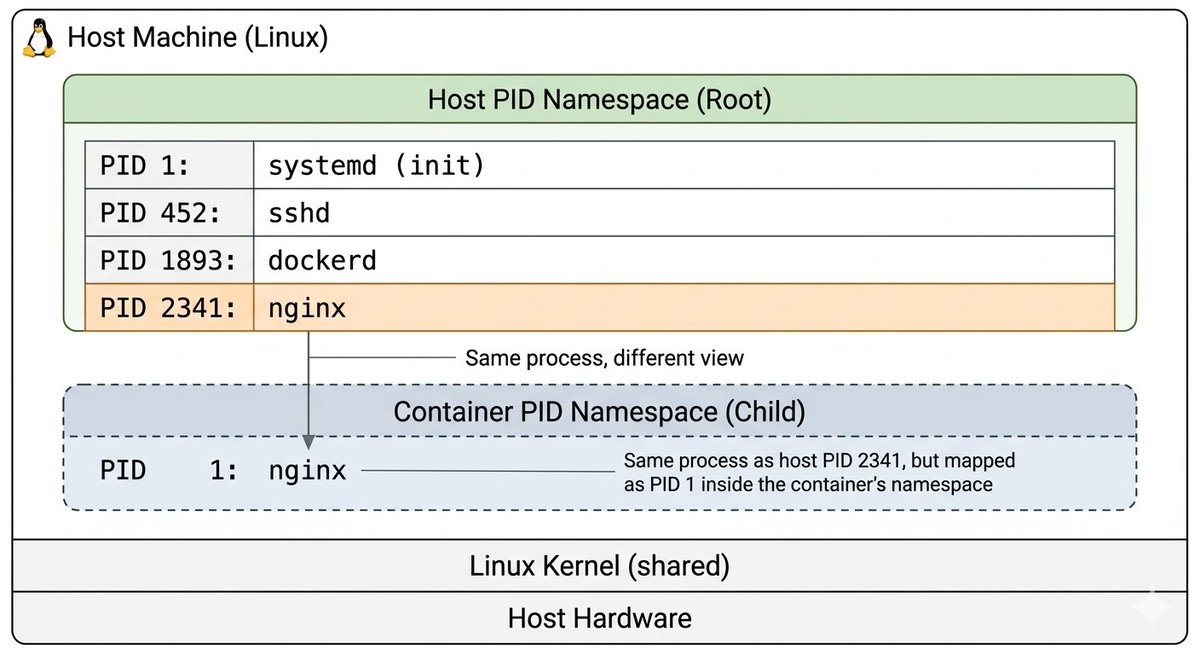
A container is just a Linux process. Read that again. ↳ Host sees: PID 2341 → nginx ↳ Container sees: PID 1 → nginx Same process. Same kernel. Different namespace. No guest OS. No hypervisor. No virtualization. This one diagram explains what most DevOps courses Take 3 hours to teach. Save this. You'll need it.
Ramu Chelloju tweet media
English
0
0
2
23
Ramu Chelloju
Ramu Chelloju@RamuChelloju·
Terraform in simple terms: Instead of clicking 100 buttons in the cloud console… Write it once in code Run terraform apply Let automation do the rest. Infrastructure as Code for the win. #DevOps #Terraform #aws
English
1
0
1
31
Ramu Chelloju
Ramu Chelloju@RamuChelloju·
Every engineer has that one server where the home directory looks like this… 🫠 At first: ls Everything looks clean. Organized. Perfect. Then one day… ls -a And suddenly you discover years of forgotten files, logs, temp folders, backups, and chaos. The funny part? It’s never because of: • Traffic spikes • Kubernetes issues • Broken deployments It’s usually just: “Disk space: 100% full.” And now you can’t even SSH into the server. Lesson learned 👇 Automate your cleanup jobs. Monitor disk usage. Delete what you don’t need. Because your future self (and your on-call alerts) will thank you.
Ramu Chelloju tweet media
English
0
0
1
12
Ramu Chelloju
Ramu Chelloju@RamuChelloju·
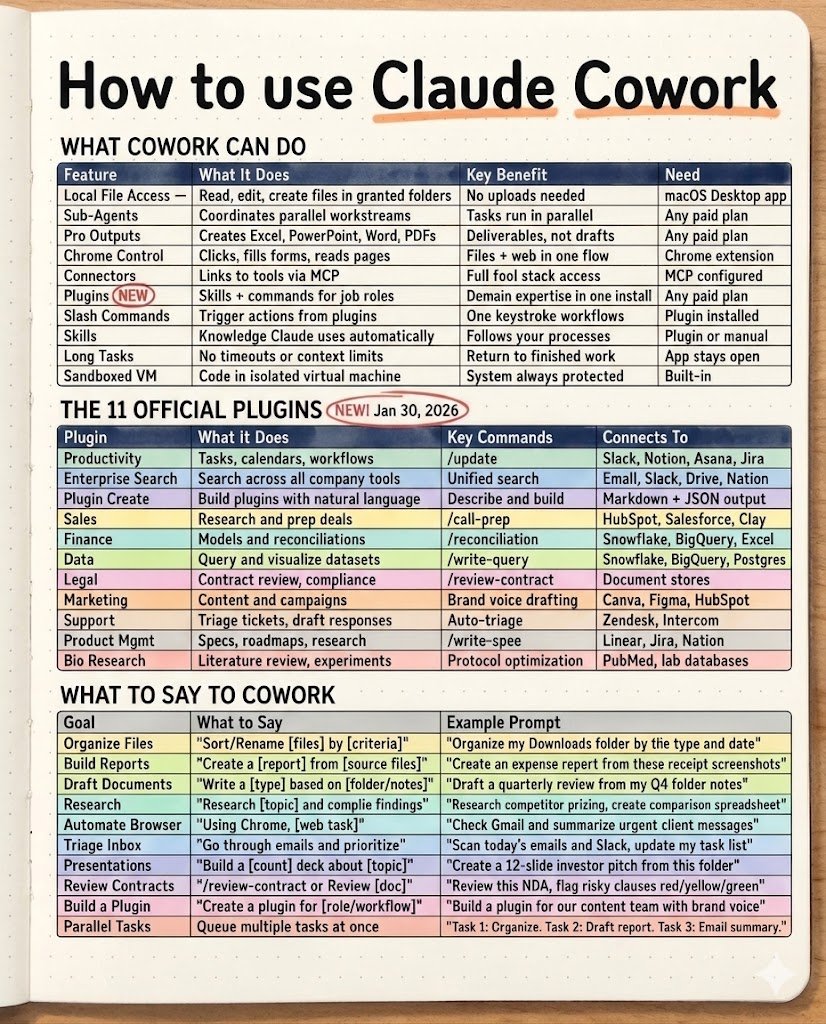
Most people are using Claude AI completely wrong. Anthropic quietly released Claude Cowork — an AI system that can actually do work, not just answer questions. It can: • Organize files • Run tasks in parallel • Control your browser • Build plugins • Generate full reports And almost nobody is talking about it. Here’s a quick breakdown 🧵 🧠 What Claude Cowork can actually do • Access local files (no uploads required) • Run multiple AI agents in parallel • Control Chrome to complete tasks • Generate real outputs (Excel, PowerPoint, Docs, PDFs) • Connect with external tools using MCP • Run code inside a sandboxed VM In simple terms: Claude is moving from chatbot → AI coworker. ⚡ 11 official Claude plugins Productivity — task & workflow automation Enterprise Search — company-wide knowledge search Plugin Create — build plugins using prompts Sales — deal research & preparation Finance — reconciliation & financial models Data — dataset querying & analysis Legal — contract review & compliance Marketing — campaign planning & content Support — ticket triage & responses Product — specs, roadmaps, research Bio Research — literature review & experiments 🧩 Prompts that unlock Claude’s power Try commands like: • Organize my downloads folder by type and date • Create an expense report from these screenshots • Research competitor pricing and build a spreadsheet • Scan Gmail and summarize urgent messages • Build a 12-slide investor pitch deck from this folder 💡 The real shift Claude isn’t just answering questions anymore. It’s executing tasks. Think of it like: AI = Operator You = Director Save this cheat sheet for later. #AI #ClaudeAI #Anthropic #AIagents #Automation Follow @RamuChelloju
Ramu Chelloju tweet media
English
0
0
0
41
Ramu Chelloju
Ramu Chelloju@RamuChelloju·
As a DevOps engineer in 2026, these 11 core skills will keep you relevant in the cloud job market. Stop chasing tools. Focus on mastering the fundamentals. Linux fundamentals — processes, systemd, permissions, networking basics Networking — DNS, TCP/IP, HTTP/HTTPS, load balancers, TLS Cloud platforms — AWS, Azure, GCP core services, IAM, VPC, compute, storage Containers — Docker, image builds, registries, container security best practices Kubernetes — deployments, services, ingress, autoscaling, debugging pods Infrastructure as Code — Terraform, state management, modules, drift detection CI/CD pipelines — GitHub Actions, GitLab CI, Jenkins, automated releases Observability — logs, metrics, tracing, Prometheus, Grafana, OpenTelemetry Security — secrets management, least privilege, RBAC, vulnerability scanning Reliability engineering — SLOs, incident response, postmortems, capacity planning Automation & scripting — Bash, Python, cron jobs, system automation, APIs Tools change. Fundamentals stay relevant.
English
1
1
1
61
Ramu Chelloju
Ramu Chelloju@RamuChelloju·
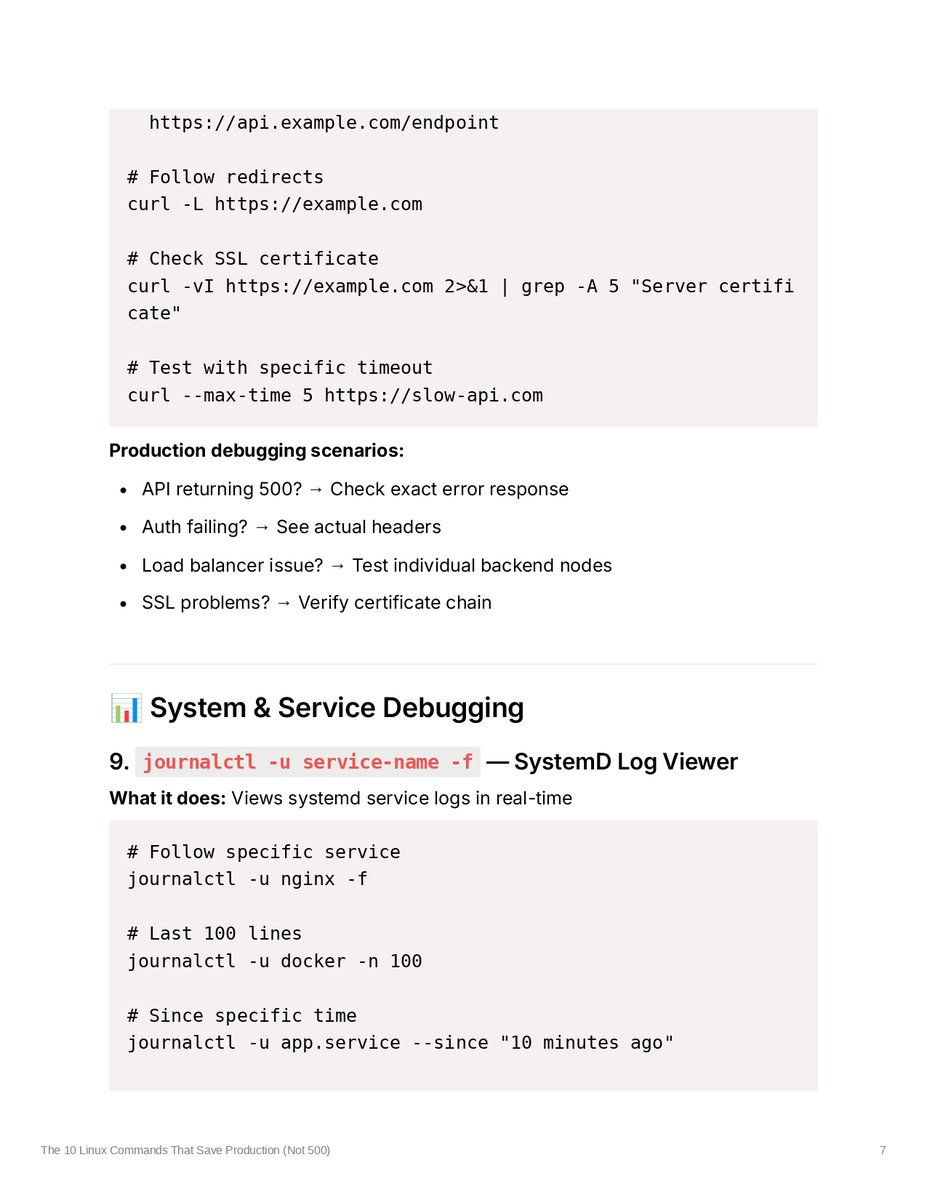
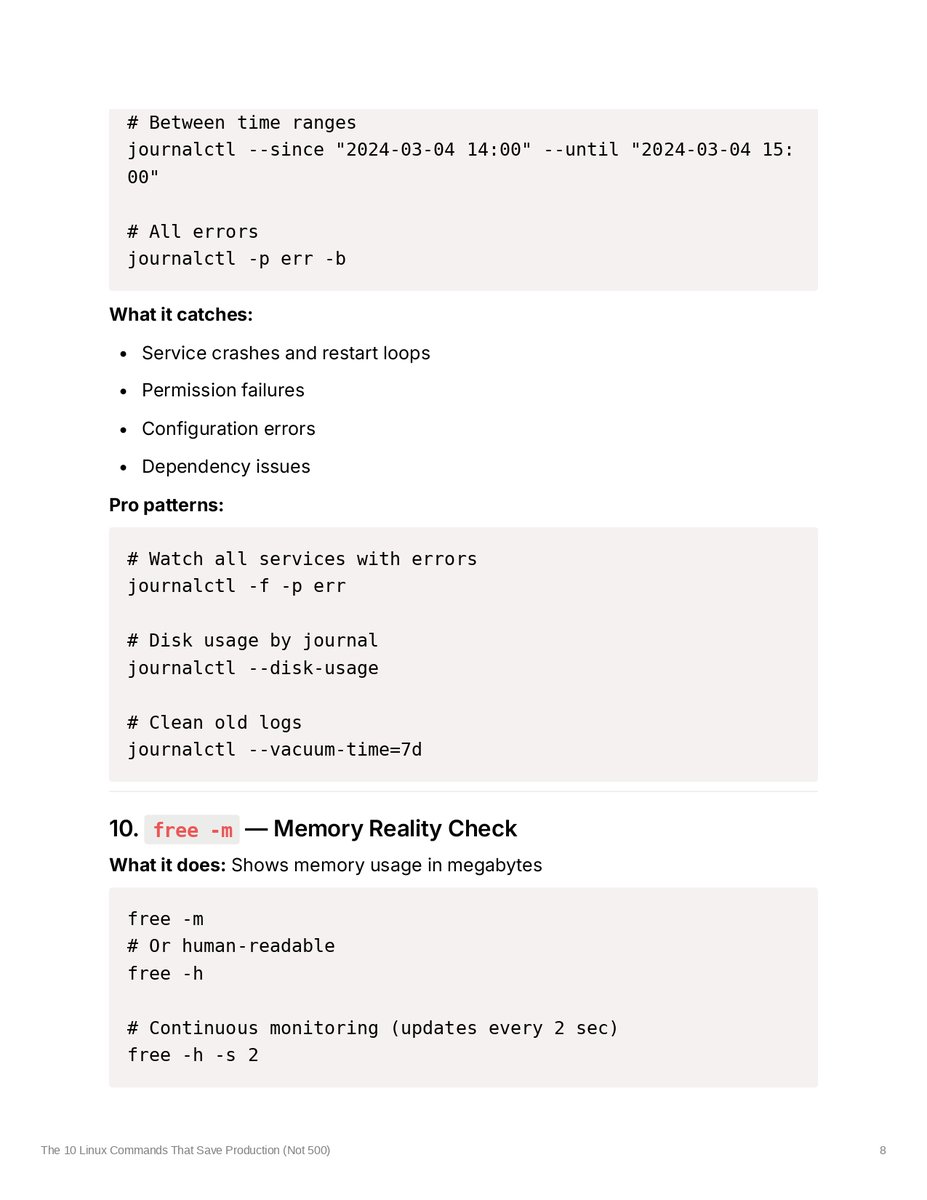
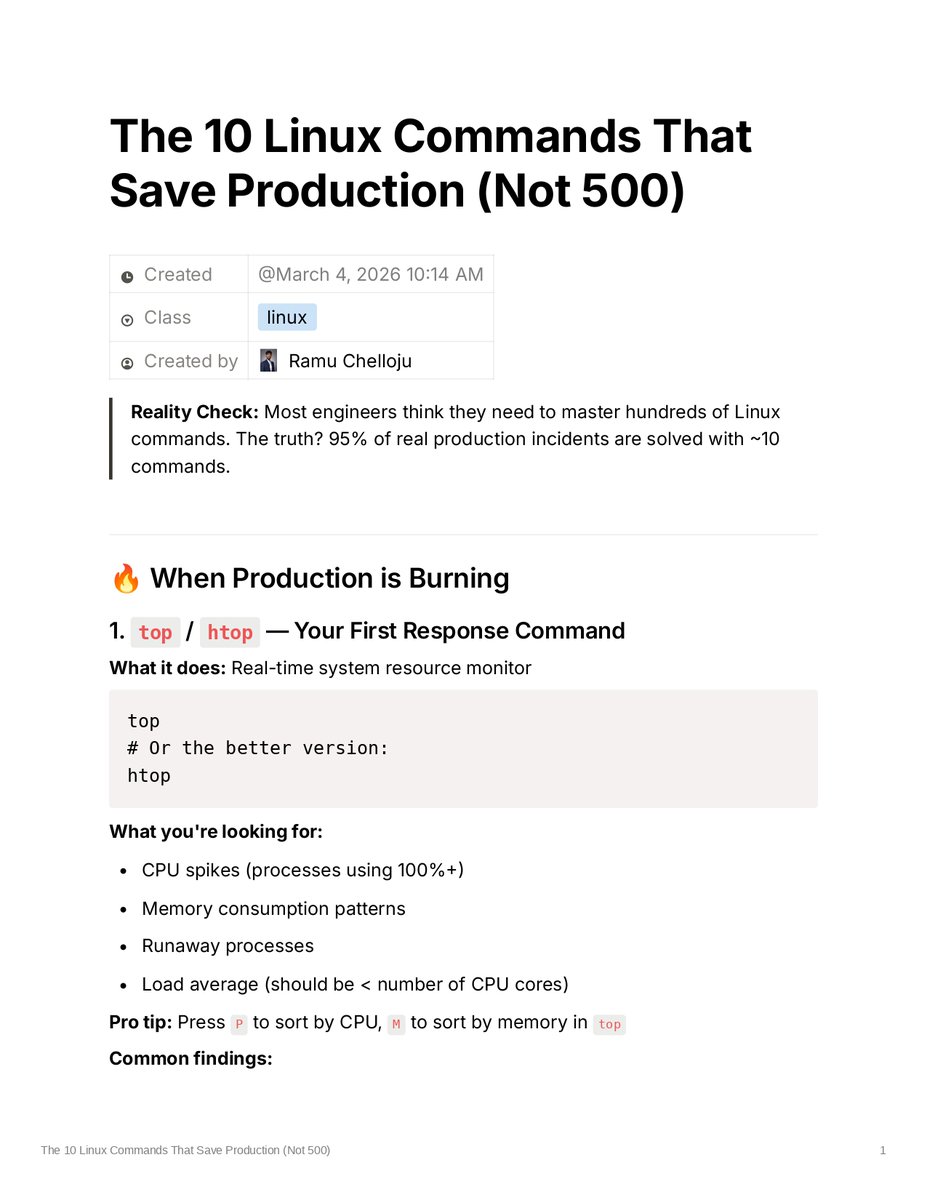
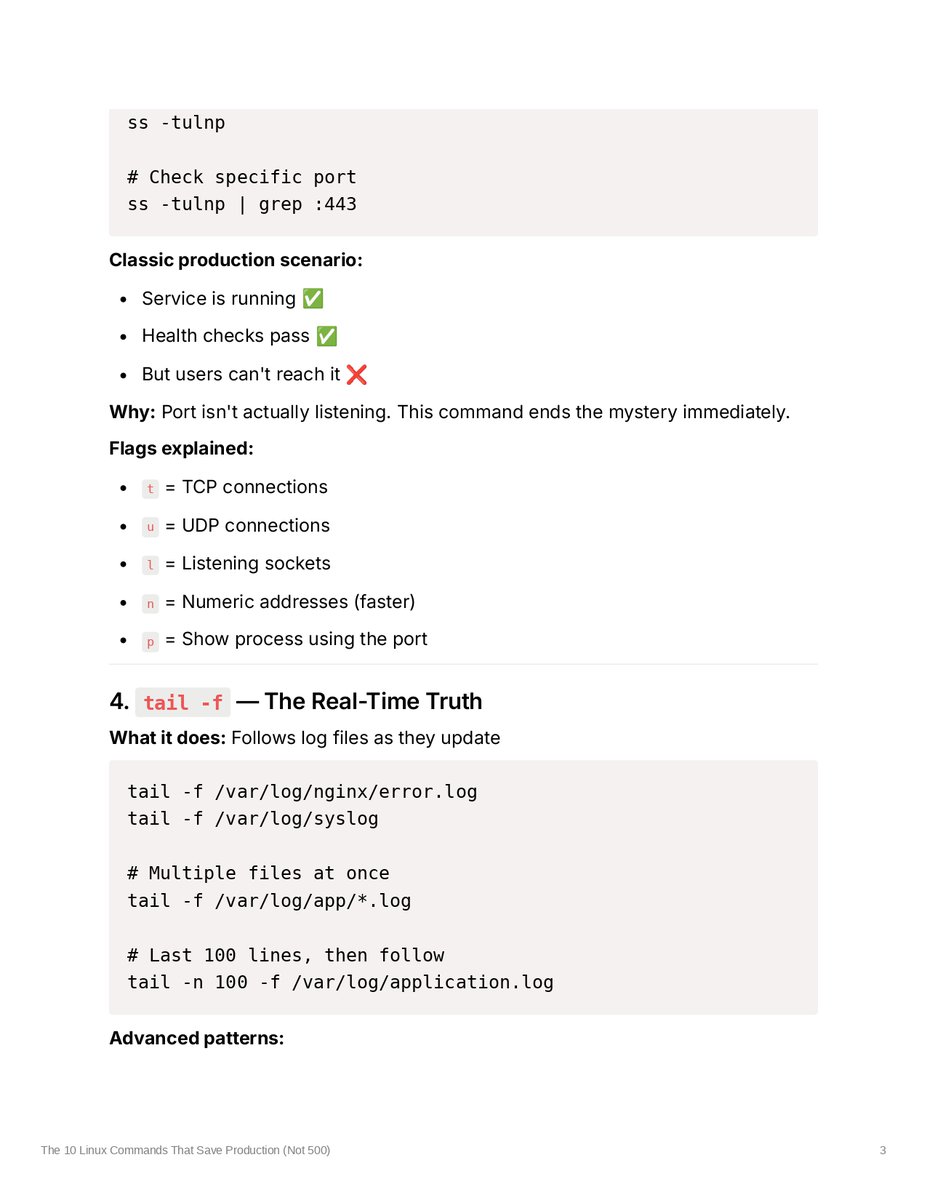
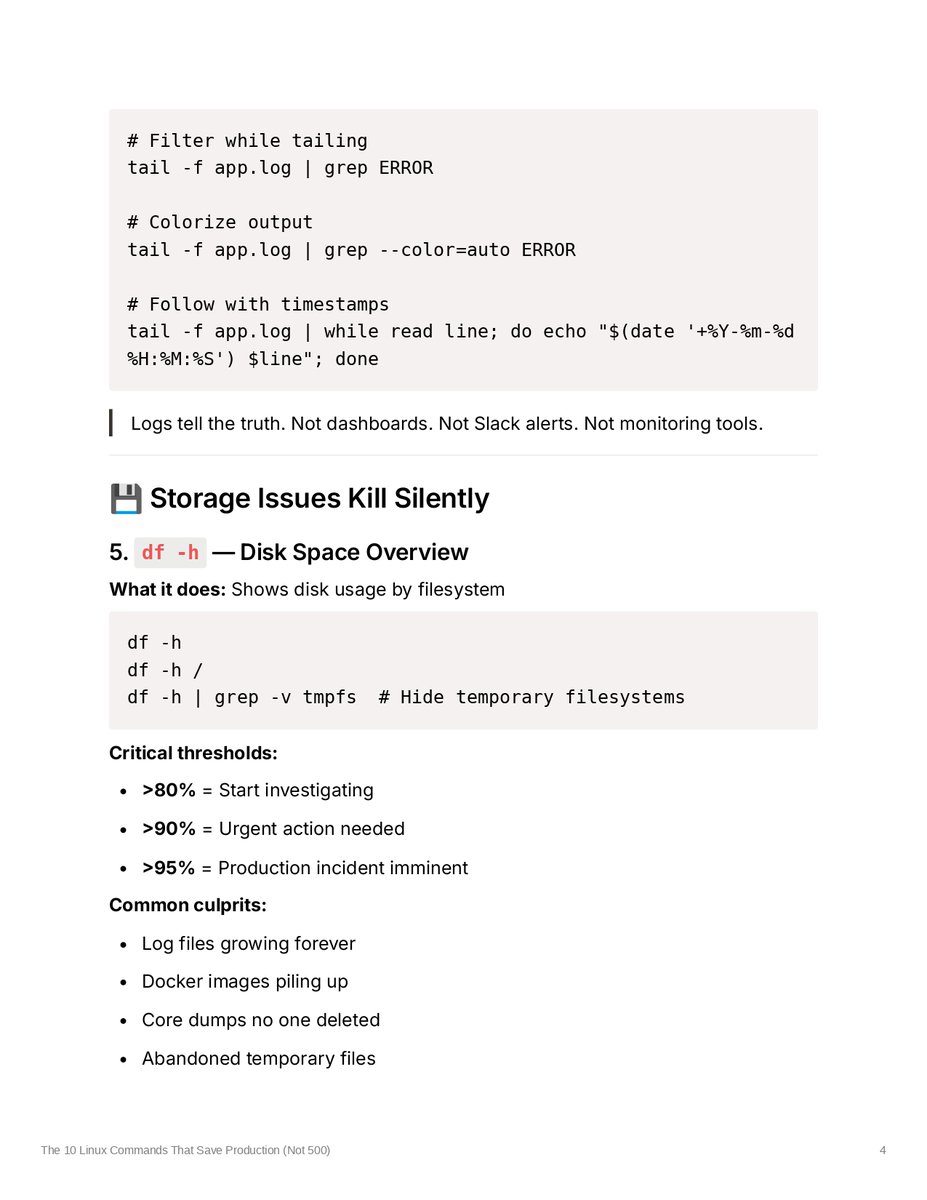
Quick reference guide for Linux debugging commands that actually get used in production. I put together examples and use cases for the commands that come up most often when something goes wrong. Nothing fancy — just practical examples for: Process monitoring Network checks Log tailing Disk diagnostics Service debugging 📄 Full breakdown in the attached images. Feel free to save it for reference.
Ramu Chelloju tweet mediaRamu Chelloju tweet mediaRamu Chelloju tweet mediaRamu Chelloju tweet media
English
1
0
3
50
Ramu Chelloju
Ramu Chelloju@RamuChelloju·
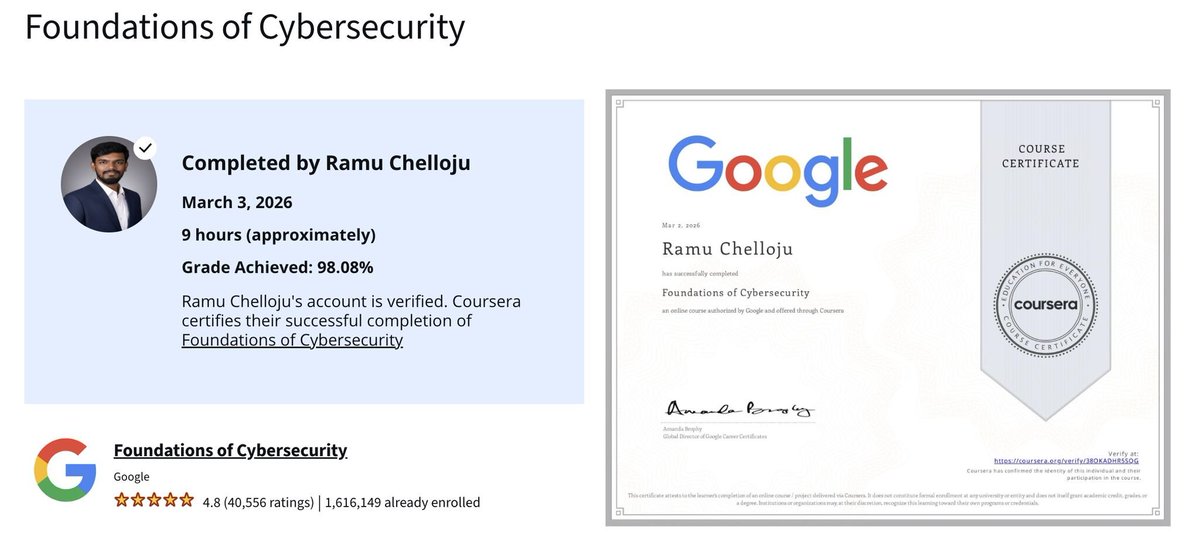
Excited to share that I've completed the "Foundations of #Cybersecurity certificate by @GoogleIndia on @coursera ! 🛡️ This first step provided a solid grounding in the core pillars of security, including: The CIA Triad (Confidentiality, Integrity, and Availability) NIST Cybersecurity Framework (CSF) for managing risk Security Ethics and Professional Responsibility Compliance & Regulations Looking forward to diving deeper into the technical modules as I continue this professional certificate journey.
Ramu Chelloju tweet media
English
0
1
3
38
Ramu Chelloju retweetledi
Megh Updates 🚨™
Megh Updates 🚨™@MeghUpdates·
BREAKING: AMAZON AWS DATA CENTER BOMBED IN UAE BY IRAN Amazon’s main Middle East data center hit. ME-CENTRAL-1 just went fully offline. Damages reported
English
56
971
6.9K
451K
Ramu Chelloju
Ramu Chelloju@RamuChelloju·
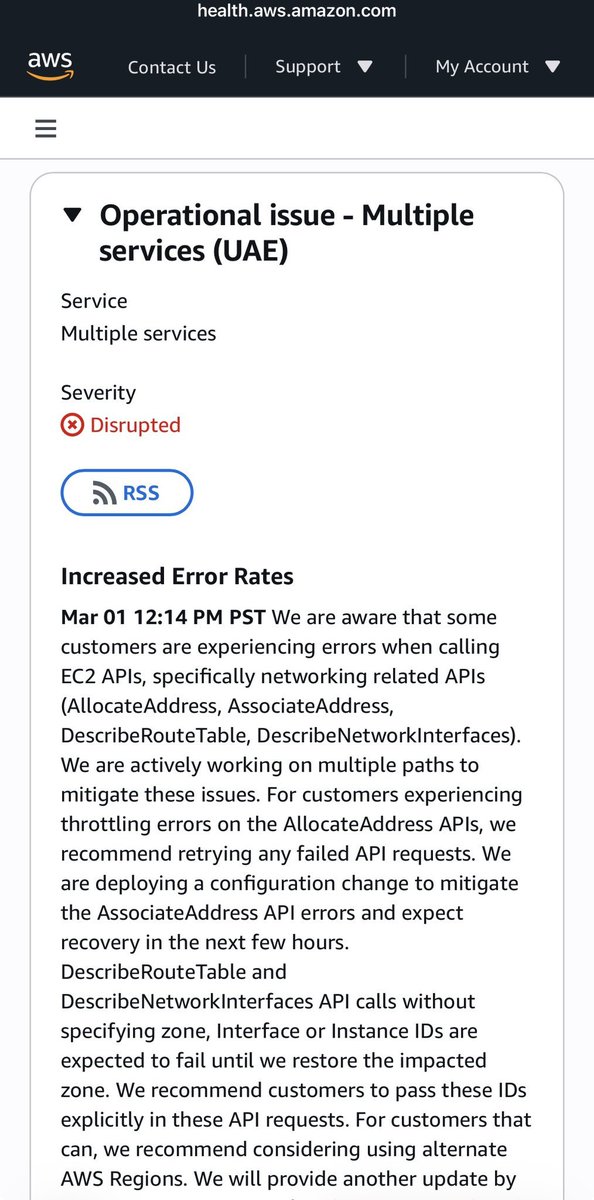
🚨 AWS Data Center Outage in UAE — Real News, Not Rumor Amazon Web Services reported that one of its data center availability zones in the UAE went offline after unidentified objects struck the facility, causing sparks and a fire and triggering a temporary power shutdown. 🇦🇪🔥 This is happening amid ongoing regional tensions with missile and drone activity across the Gulf, but AWS has not confirmed any direct link to missile strikes. Here’s what we know: • AWS said “objects struck” the data center and caused a fire. • Power was shut off by emergency responders to control the blaze. • The affected Availability Zone (mec1-az2) remains disrupted, and services like networking APIs have shown error rates. • AWS recommends rerouting to other regions while recovery continues. • Other zones in the UAE remain operational. ⚠️ AWS declined to confirm or deny if this was caused by an external conflict. What this teaches us as engineers: every cloud service still relies on physical infrastructure, and outages can impact production systems unexpectedly — whether due to hardware failure, environmental damage, or geopolitical events. #AWS #CloudOutage #UAE #DevOps #CloudInfrastructure
Ramu Chelloju tweet mediaRamu Chelloju tweet media
English
0
0
1
285
Ramu Chelloju
Ramu Chelloju@RamuChelloju·
Most DevOps beginners fail in their first 90 days. Not because they’re dumb. Not because they didn’t study enough. Because nobody tells them what DevOps actually requires. After 5 years in production, here’s what I wish I knew 👇 Mistake 1: Learning tools, not context Watching 10 hours of Kubernetes tutorials isn’t the same as debugging a crashed pod at 3 AM. Tutorials teach syntax. Production teaches ownership. Mistake 2: Chasing certifications before building anything AWS Certified ✅ CKA Certified ✅ Terraform Associate ✅ Zero real deployments ❌ Certifications open doors. But production questions expose gaps. Mistake 3: Ignoring Linux fundamentals Everything in DevOps runs on Linux. If you can’t read systemctl failures, debug networking with ss, or trace disk spikes with iostat — production will humble you. Mistake 4: Skipping networking “The infrastructure team will handle it.” In cloud environments, you are the network team. If you don’t understand VPCs, security groups, NACLs, DNS, and incidents become guessing games. Mistake 5: Never breaking things intentionally The fastest-growing engineers: Crash clusters in staging. Misconfigure IAM. Kill pods deliberately. Controlled failure builds real confidence. Mistake 6: Underestimating communication DevOps sits between Dev and Ops. You’ll explain outages. Defend release decisions. Push back on unsafe changes. Communication is not optional. What separates those who survive: • They built something real • They broke it and fixed it • They read logs, not just docs • They asked “why” repeatedly • They stayed consistent for 90 days You’re not failing because you’re not smart. You’re failing because tutorials don’t simulate responsibility. Build. Break. Fix. Repeat. #DevOps #Kubernetes #Linux #AWS #CloudComputing
English
0
0
0
27
Ramu Chelloju
Ramu Chelloju@RamuChelloju·
Stop trying to learn “everything” in Linux for DevOps. ❌ Most beginners waste months on commands they’ll never touch in production. I’ve worked as a DevOps Engineer for 5 years. Here’s the REAL Linux checklist I use daily in production 👇 1️⃣ Networking (Where most “bugs” actually live) • ss / netstat → Check open ports • curl / wget → Test APIs quickly • ip addr → Inspect network interfaces • /etc/resolv.conf → DNS troubleshooting Most DevOps issues = networking issues. 2️⃣ Process & Resource Management • htop → Real-time CPU & memory view • kill -9 → Stop runaway processes • systemctl → Start/Stop/Enable services • journalctl -u → Service-specific logs If you can’t debug a process, production will humble you. 3️⃣ “Where did my disk space go?” toolkit • df -h → Disk usage overview • du -sh * → Find heavy directories • lsblk → Inspect block devices Storage issues cause real outages. 4️⃣ Log Surgery (Critical Skill) • grep / awk → Extract patterns from logs • tail -f → Watch logs in real time • sed → Fast text replacement • chmod / chown → Fix permission errors Logs tell the truth. Learn to read them. 5️⃣ The SSH Standard Password authentication in production? 🚩 Use SSH keys. Master ~/.ssh/config for faster, cleaner access. 6️⃣ Automation Foundation If you do something twice, script it. At minimum, master: • Variables • Loops • Exit codes ($?) Automation starts here. Linux isn’t just an OS. It’s the foundation of the Cloud. ☁️ If this helped, follow for practical DevOps insights. #DevOps #Linux #CloudComputing #SRE #AWSCommunityBuilders
English
0
0
0
30
Ramu Chelloju
Ramu Chelloju@RamuChelloju·
Kubernetes is orchestration. Terraform is foundation. If the foundation is weak, orchestration only makes failure faster.
English
1
0
0
12
Ramu Chelloju
Ramu Chelloju@RamuChelloju·
Before you learn Kubernetes, understand this: Kubernetes does NOT fix bad infrastructure. It just scales it. Here’s what most engineers get wrong 👇
English
1
0
0
15