Sabitlenmiş Tweet
Gazelle
1.6K posts


Gazelle
@_aigazelle
Just a girl who loves AI | Sharing insights, tips, and the latest trends in AI🤖 | Stay informed – Newsletter launching soon! ✨📩
Dm for collab 💬 Katılım Mayıs 2025
14 Takip Edilen63 Takipçiler



I SPENT 3 WEEKS TESTING EVERY AI AGENT PEOPLE ACTUALLY USE IN 2026.
Honestly speaking 20% automated my entire workflow & 80% wasted my 2 hours and did nothing.
Here are the my 9 Best AI agents for you.👇
🔖 Bookmark before this gets buried.
1. OpenAI Operator / AutoGPT
Best overall AI agent for end-to-end automation.
↳ Full web navigation without human intervention
↳ Cross-platform task execution
↳ Handles multi-step workflows from research to execution
↳ Automates repetitive browser tasks and data collection
If you need one agent to replace 5 manual processes, start here.
2. OpenClaw
Built specifically for revenue-generating automation.
↳ Affiliate marketing automation from discovery to posting
↳ Lead qualification workflows that save 10+ hours a week
↳ Social media scheduling with AI-driven timing
↳ Built-in monetization-focused logic
This one pays for itself if you run any online business.
3. Devin AI
Top-tier coding agent for engineers and builders.
↳ Works across full codebases, not just snippets
↳ Handles debugging, refactoring, and feature implementation
↳ Executes multi-step engineering tasks autonomously
↳ Reads context across hundreds of files
If you ship code, this is the agent replacing junior devs.
4. Perplexity AI Agent
Optimized for research and real-time information.
↳ Pulls live data with cited sources automatically
↳ Transparent sourcing so you can verify every claim
↳ Faster than manual research by 10x
↳ Works for market analysis, competitive research, and trend tracking
I use this daily for content research and fact-checking.
5. Adept AI
Focused on workflow automation across software interfaces.
↳ Operates applications exactly as a human would
↳ Learns your workflow and replicates it
↳ Works inside Excel, CRMs, design tools, and browsers
↳ No API integrations needed
This is automation for people who do not want to code.
6. Rewind AI
Designed for personal productivity and memory recall.
↳ Records your digital activity across all apps
↳ Makes everything searchable instantly
↳ Find any conversation, file, or idea from weeks ago in seconds
↳ Privacy-first, all data stays local
If you forget things or lose files constantly, this fixes that.
7. AgentGPT
No-code AI agent that runs directly in your browser.
↳ Perfect for beginners and quick automation experiments
↳ Deploy agents in minutes without installations
↳ Open source and customizable
↳ Ideal for testing ideas before building full systems
Start here if you want to learn how AI agents work.
8. Claude Code
Advanced coding assistant with unmatched context handling.
↳ Code review and refactoring at scale
↳ Generates accurate documentation from existing code
↳ Understands project structure and dependencies
↳ Best-in-class for long-context coding tasks
Engineers trust this for production-level work.
9. Manus AI
Web-based agent requiring zero installation.
↳ Built for lightweight automation and non-technical users
↳ Works immediately without setup friction
↳ Automates data entry, form filling, and repetitive web tasks
↳ Free tier with no credit card required
Perfect for small teams who need automation without complexity.
Selecting the right AI agent depends on your use case:
↳ Coding: Devin AI or Claude Code
↳ Research: Perplexity AI Agent
↳ Revenue generation: OpenClaw
↳ Workflow automation: Adept AI or Operator
↳ No-code experiments: AgentGPT or Manus AI
But here is what most people miss.
For users scaling automation across multiple accounts, the browser environment matters just as much as the agent.
A stable, isolated setup ensures agents execute tasks without triggering platform restrictions or getting flagged.
Save this thread. Test the ones that match your workflow. These are the tools people are actually using to automate 20+ hours a week in 2026.

English
Gazelle retweetledi


Someone just built a 100% OFFLINE MAP for bike trails, hiking routes, and road trips.
I tested it, worked offline every single time. Zero tracking. No ads. It is called CoMaps.
It does everything Google Maps does. Except it NEVER tracks your location.
Works 100% offline:
↳ No signal needed for full navigation
↳ Voice announcements work offline
↳ All maps download to your phone
↳ Zero internet dependency
Shows places Google Maps deliberately hides:
↳ Hiking trails off the beaten path
↳ Campsites with zero cell service
↳ Water sources on mountain peaks
↳ Cycling paths Google has zero incentive to show because they cannot advertise to you there
Available on every device you own:
↳ Android, iOS, MacOS, Linux
↳ Android Auto and CarPlay built in
↳ One app that syncs everywhere
Think about what Google Maps actually knows about you right now:
↳ Your exact home address
↳ Where you work and what time you leave
↳ Every doctor you have visited
↳ How long you stayed at each location
↳ Every late-night trip you took and where it ended
That profile is being sold to advertisers WHILE you navigate to the grocery store.
CoMaps knows nothing. Tracks nothing. Sells nothing.
It has been privacy audited by Exodus Privacy and scored 100% FOSS. That means zero hidden trackers. No ad SDKs. Nothing running in the background profiling you for cash.
Best part:
Every single donation is publicly visible on Open Collective. You can see exactly where the money goes. This is what happens when developers build for people instead of shareholders.
Download it today: comaps.app
Available on App Store and Google Play.
Share this before Google buries it.

English

GOODBYE EXCEL 👋
No more hassle of creating Microsoft Excel from scratch.
With Claude 4.7, you can create a clean, automated spreadsheet in less than a minute.
Use these 5 prompts consistently, and you'll have a ready-to-use spreadsheet 👇👇
📌 Save it—it'll come in handy later.

English

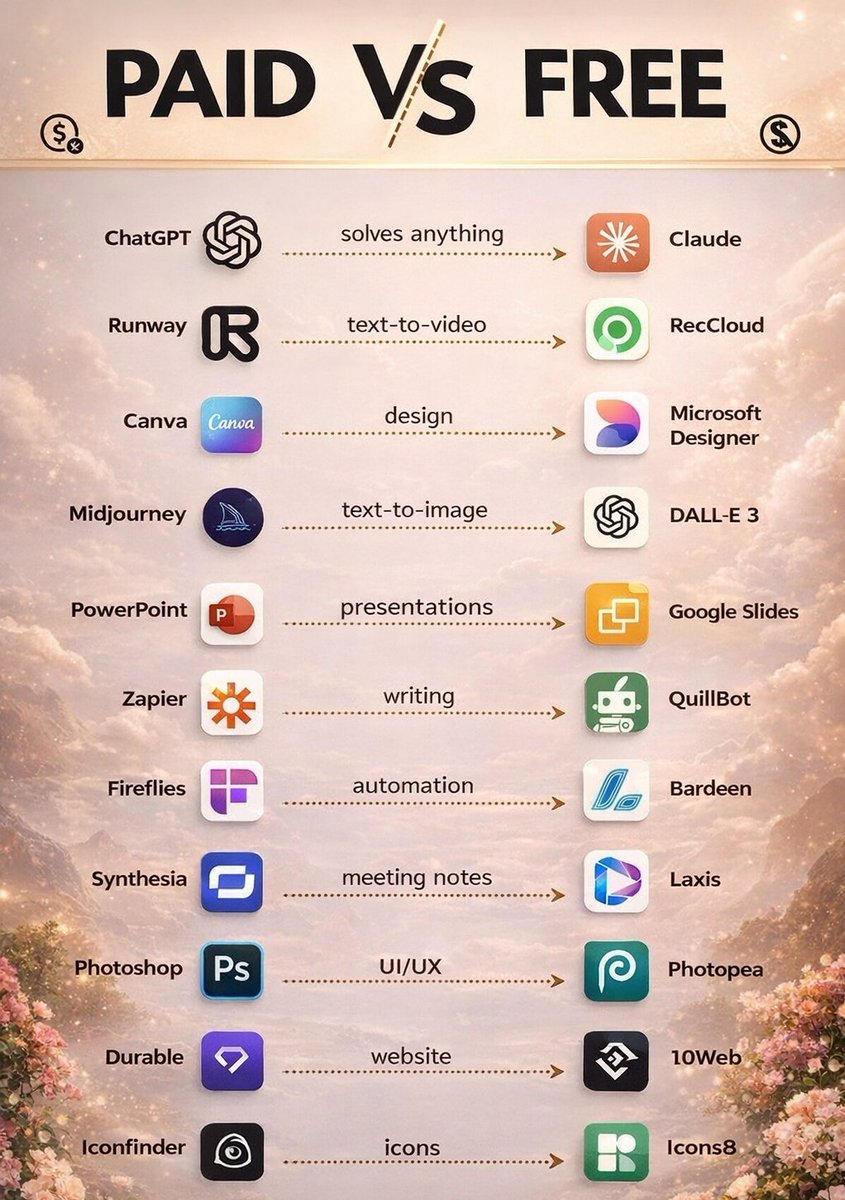
Hidden Secret 2.0 🤫
Most Popular Paid Apps Have FREE Alternatives!”
English

You spent 2 hours building a SKILL. MD.
Claude still gave you the wrong output.
Here is why, and the 7 components to fix:
☑ 1. YAML Frontmatter (Your Skill's ID Card)
→ This is what Claude reads first to know your skill exists.
→ Get this wrong and nothing else matters.
→ Think of it as the front door; Claude won't enter without it.
☑ 2. Instructions Block (The Do/Don't Command)
→ Tell Claude exactly what to do and what never to do.
→ Specific beats general every single time.
→ This is where 80% of your skill quality comes from.
☑ 3. Examples Section (The Output Mirror)
→ Drop a sample input and the exact output you expect.
→ Two examples cut Claude's mistakes in half.
↳ One example teaches. Two examples lock it in.
☑ 4. Supporting Files (The Link Block)
→ Extra templates or scripts? Link them here.
→ Don't paste everything in one SKILL. Md.
→ Claude reads linked files. Use that to your advantage.
☑ 5. The Trigger Rule (The Activation Phrase)
→ Claude reads your skill description to decide when to load it.
→ Weak description = skill gets ignored 100% of the time.
→ Write this like a job posting, not a filename.
☑ 6. Negative Instructions (The Output Guard)
→ Tell Claude what NOT to do. Be specific.
→ This one section alone prevents 80% of wrong outputs.
↳ Most people skip this. Most people get bad results.
☑ 7. Composability (The Stack Strategy)
→ Skills combine. Claude loads multiple at once.
→ The order you stack them changes the output quality.
→ Build skills that are meant to work together.
For more AI breakdowns like this: 👇
→ Go to @humzakhalid" target="_blank" rel="nofollow noopener">substack.com/@humzakhalid
→ Subscribe to my free newsletter (don't pay anything)
→ Get more free daily cheatsheets
Which of the 7 did you not know about? Let me know below.
♻️ Repost this so your network finally builds SKILL. MD files that actually work.

Hamza Khalid@humzaakhalid
English