Marcin Moskala Android

400 posts

Marcin Moskala Android banner
Marcin Moskala Android

Marcin Moskala Android

@marcinm_android

Fullstack Kotlin, founder of @KtDotAcademy, JetBrains partner, GDE in Kotlin, author of Effective Kotlin and Kotlin Coroutines. Workshops: https://t.co/xUZVd4J4Jl

Warsaw / Poland Присоединился Ocak 2025
6 Подписки441 Подписчики
Marcin Moskala Android ретвитнул
Marcin Moskała
Marcin Moskała@marcinmoskala·
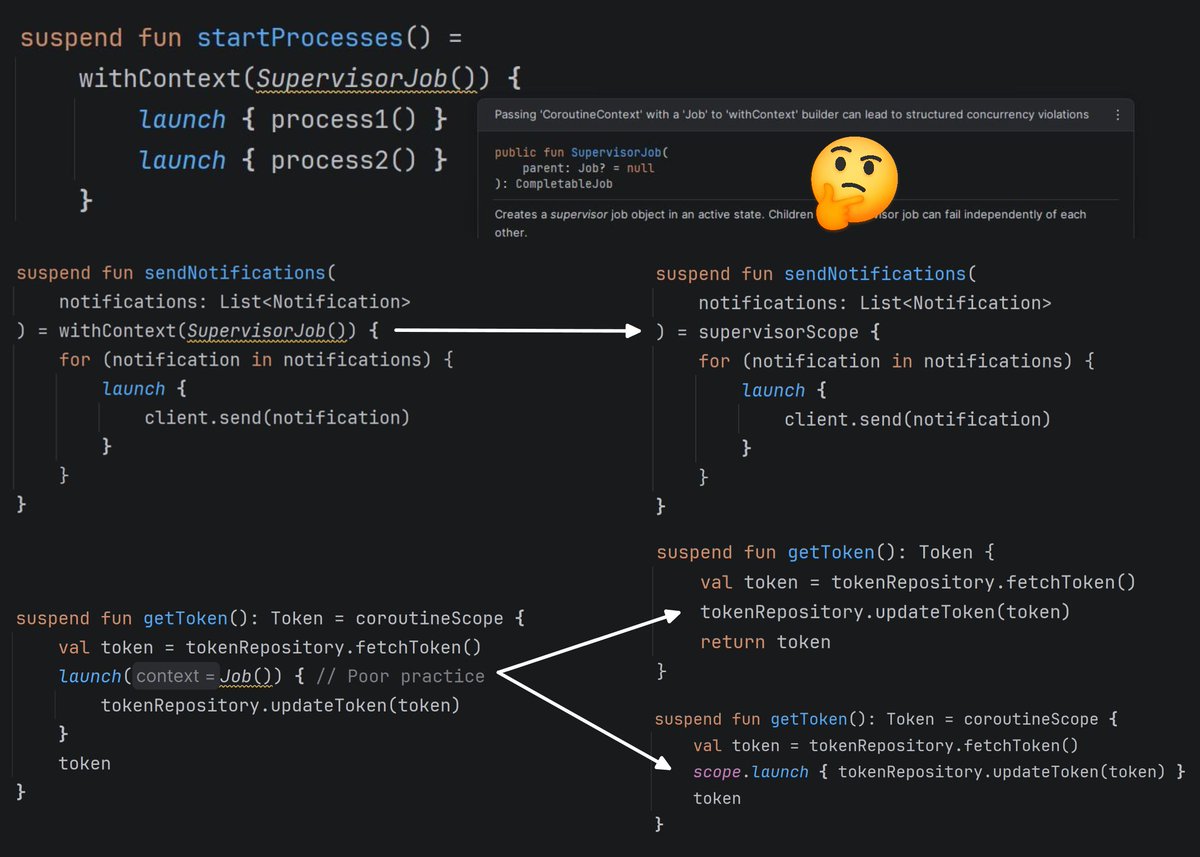
I waited years for this warning! I’ve seen so many issues that are a consequence of using a job as an argument for a coroutine starter, I explained this best practice in my book and taught it in my workshops, and yet I could still see it in so many projects. With this warning I hope this will finally change. Let’s explain it for the last time why Job shouldn’t be used as an argument for a coroutine. The key misunderstanding here is that Job is the only context that cannot be overridden by an argument. If you use any other context, it will be used in the coroutine and its children, but not Job. Why? Because every coroutine creates its own job. A job contains the state and relations of a coroutine, it cannot be shared or enforced from outside. The Job that is used as an argument isn’t going to be a job of this coroutine; instead, it overrides Job from the scope and becomes a parent. This breaks structured concurrency. Let’s see an example. Using withContext(SupervisorJob()) { … } works completely differently than supervisorScope { … }. supervisorScope creates a coroutine that is a child of the caller of this function, and uses a supervisor job (so it doesn’t propagate its children’s exceptions). On the other hand, withContext(SupervisorJob()) creates a regular coroutine, which is a child of SupervisorJob, so it has no relation to the caller. A Job used as an argument breaks the relationship with the caller. In the case belo,w updateToken won’t be related to the caller of getToken. This is generally discouraged, as it breaks structured concurrency. The standard approach would be to just sequentially call updateToken. If we really want to detach updateToken from getToken, it is a better practice to start the launch on a different scope, like the backgroundScope we define in our application for background tasks. This way new coroutine is still attached to a scope, just a different one.
Marcin Moskała tweet media
English
1
7
32
1.8K
Marcin Moskala Android ретвитнул
Marcin Moskała
Marcin Moskała@marcinmoskala·
Here is a short fragment from Effective Kotlin about one of the simplest rules that can make your Kotlin code better: limit mutability. Watch the video, and if you want the full picture, check out the whole book. youtu.be/aoFTfSG0jto 📖 Effective Kotlin: Best Practices: kt.academy/book/effective…
YouTube video
YouTube
Marcin Moskała tweet media
English
0
4
13
567
Marcin Moskala Android ретвитнул
kt.academy
kt.academy@ktdotacademy·
Testability is one of the most important advantages of Kotlin Coroutines. It supports operating in virtual time, which lets us write precise, fast, and deterministic tests for cases that are hard to test with other libraries. You can easily check any scenario and assert how much time it would take.  If you’re planning a broader Kotlin upskilling initiative, a complete path is Kotlin Coroutines for hands-on practice, supported by Kotlin Coroutines: Deep Dive book. Join the course that starts in November: coroutinesmastery.com
kt.academy tweet media
English
0
5
8
529
Marcin Moskala Android ретвитнул
Marcin Moskała
Marcin Moskała@marcinmoskala·
Specifying a key in a lazy column or grid is really important for recomposition❗ Without it, elements are identified by position, so if an element is added or removed, all next elements needs to recompose 😨
GIF
English
2
4
23
1K
Marcin Moskala Android ретвитнул
kt.academy
kt.academy@ktdotacademy·
One common compose suggestion is to wrap lambdas in composables with remember. The problem is that this suggestion is 𝐰𝐫𝐨𝐧𝐠❗ When we use strong skipping mode (it is used since Kotlin 2.0.20 by default, and it can be considered a modern standard), remembering lambdas is done automatically, so custom remember blocks are only obfuscating our code and giving space for accidental incorrect keys. Use strong skipping mode, and do not remember lambdas explicitly.
kt.academy tweet media
English
1
4
13
765
Marcin Moskala Android ретвитнул
Marcin Moskała
Marcin Moskała@marcinmoskala·
Advanced Compose has already started, and I’m really happy to see so many developers diving deep into how Compose actually works. What comes next is a bit different. Because once your UI is correct, the next challenge is often making it feel really good: more consistent, better styled, smoother, and simply more polished. This is a topic I care about a lot lately, and together with Jov we’ll be sharing more about it soon.
Marcin Moskała tweet media
English
0
4
6
350
Marcin Moskala Android ретвитнул
kt.academy
kt.academy@ktdotacademy·
Are Compose modifiers applied from top to bottom or from bottom to top? This article explains why the real answer is more nuanced and depends on which phase of the UI system you are looking at. It covers: - how constraints, measurement, and placement work during layout - why drawing follows a different logic - why modifiers are easier to understand when treated as decorators over what is inside them A useful read for developers who want a more reliable mental model of Compose. 👉 kt.academy/article/compos… #Kotlin #Compose #JetpackCompose #AndroidDevelopment #UIEngineering #SoftwareDevelopment
kt.academy tweet media
English
0
4
7
527
Marcin Moskala Android ретвитнул
Marcin Moskała
Marcin Moskała@marcinmoskala·
Making animations in Compose is easy! Let’s overview everything you need to know to make your applications stunning. ☺️🪄
GIF
English
1
5
22
824
Marcin Moskala Android ретвитнул
Marcin Moskała
Marcin Moskała@marcinmoskala·
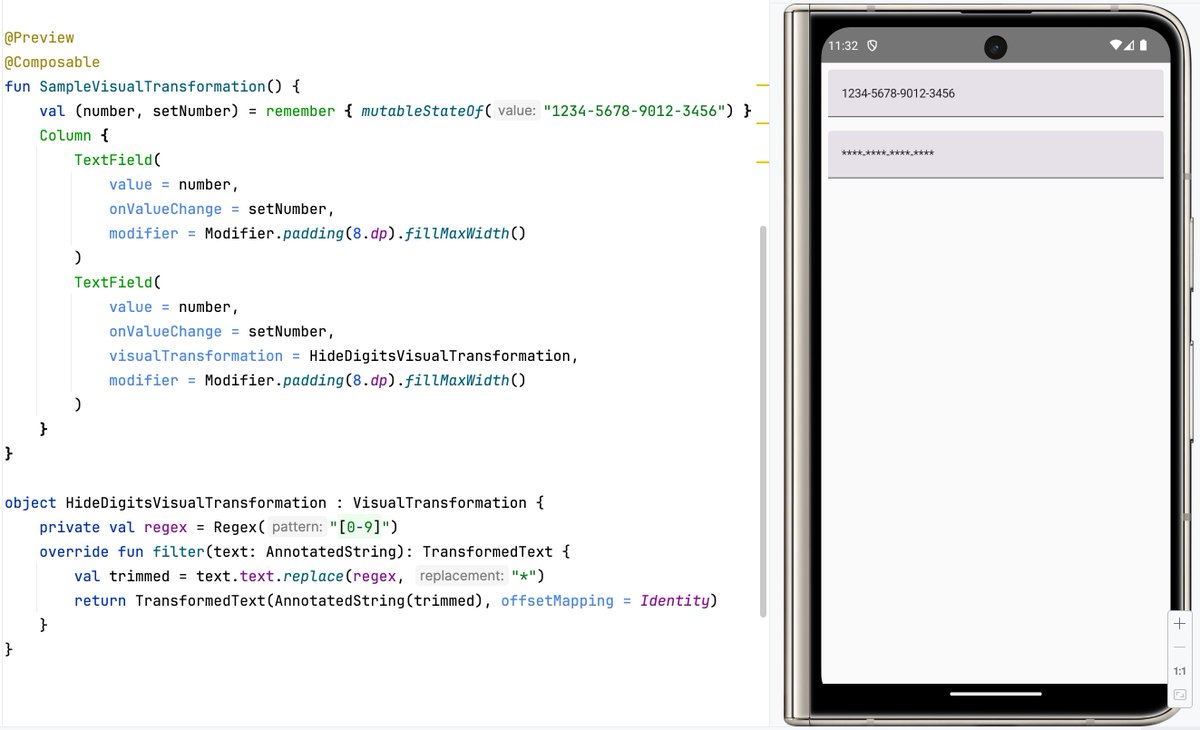
𝚅𝚒𝚜𝚞𝚊𝚕𝚃𝚛𝚊𝚗𝚜𝚏𝚘𝚛𝚖𝚊𝚝𝚒𝚘𝚗 is a tool in Jetpack Compose that lets you change how text looks in a TextField without altering the actual input. For example, it can be used to hide numbers, or even add dashes, when user types credit card. 💎
Marcin Moskała tweet media
English
3
7
44
2K
Marcin Moskala Android ретвитнул
kt.academy
kt.academy@ktdotacademy·
Clickable modifier can be disabled by argument, do not use conditional modifier for that!
kt.academy tweet media
English
1
5
10
759
Marcin Moskala Android ретвитнул
Marcin Moskała
Marcin Moskała@marcinmoskala·
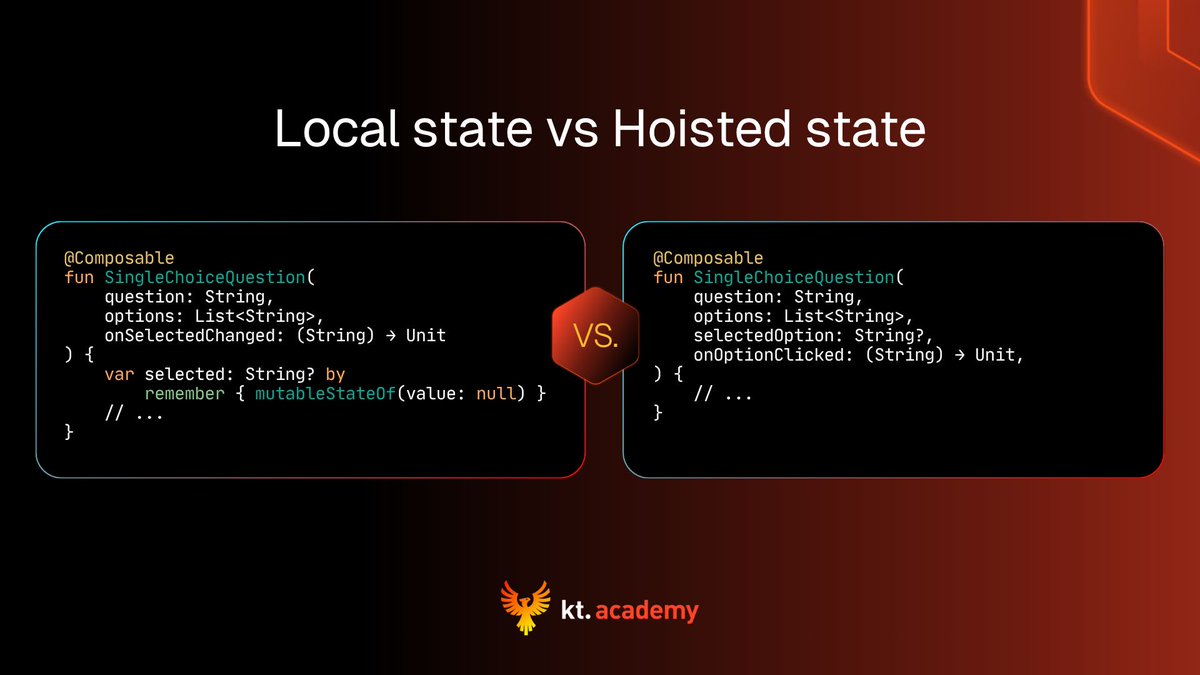
One of the most important decisions you need to make when defining custom composables is wrather you want to store mutable state locally or hoist it. When state is local: 👉 Logic can be reused. 👉 Component has simpler API. When we hoist it: 😨 There are more (or more complex) parameters. 👉 Logic can be more easily customised. 👉 Caller can decide how state is stored and how persistent is it. 👍 We can easily preview all different states. I would say, that local state is more React-like, but hoisting this state it much more Compose-like. It is a popular approach hoist all state up to view models.
Marcin Moskała tweet media
English
2
4
15
1K
Marcin Moskala Android ретвитнул
kt.academy
kt.academy@ktdotacademy·
One of the simplest ways to animate transition between components is using Crossfade. 🤩 It gives the same effect as AnimatedContent with transitionSpec fadeIn() togetherWith fadeOut().
GIF
English
0
4
10
508
Marcin Moskala Android ретвитнул
Marcin Moskała
Marcin Moskała@marcinmoskala·
keepScreenOn() is such a simple yet so powerful modifier. For as long as a component with this modifier is visible, screen will not dim. Say goodbye to dimming device while watching a video or even waiting for something to happen in application.
Marcin Moskała tweet media
English
3
7
60
2.5K
Marcin Moskala Android ретвитнул
kt.academy
kt.academy@ktdotacademy·
The only guide to structured concurrency you'll ever need. Article by Pato Moschcovich. 👇 kt.academy/article/struct…
kt.academy tweet media
English
0
5
10
417
Marcin Moskala Android ретвитнул
Marcin Moskała
Marcin Moskała@marcinmoskala·
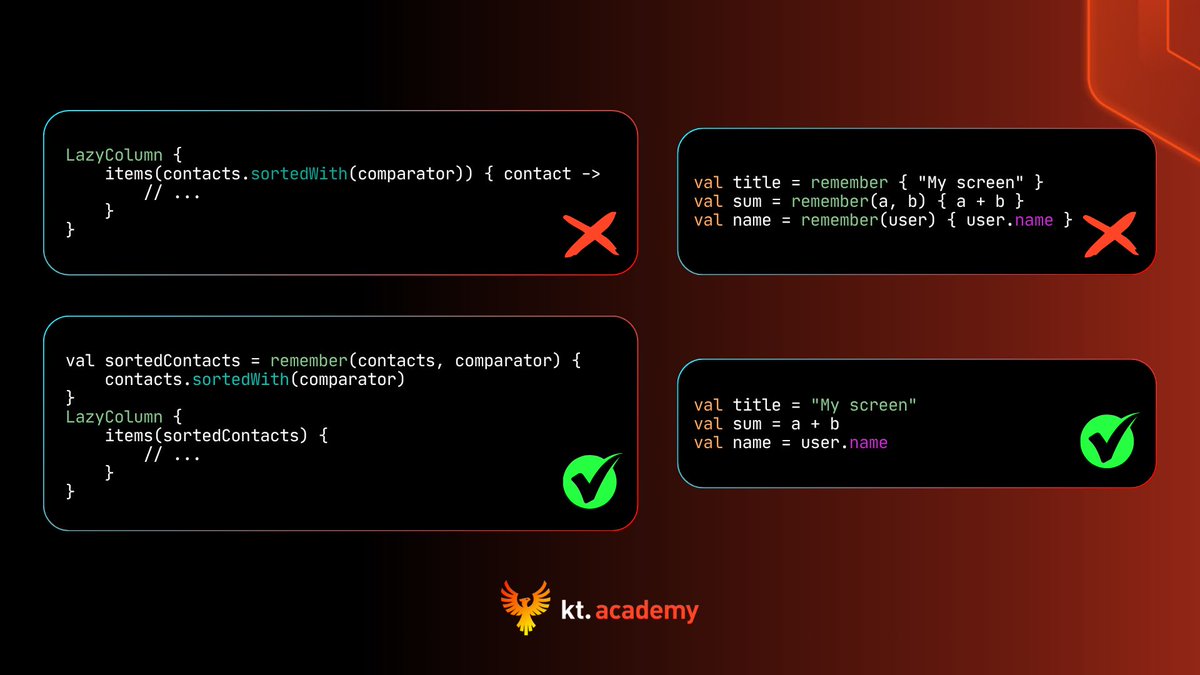
Do you have operations in composables that kill your application performance? ☠️ Composable functions can be executed many times, sometimes with every frame. If such composables include any complex calculations, they will be recalculated unnecessarily again and again. The solution is to use 𝗋𝖾𝗆𝖾𝗆𝖻𝖾𝗋 block. 🥷
Marcin Moskała tweet media
English
1
4
17
1.1K
Marcin Moskala Android ретвитнул
Marcin Moskała
Marcin Moskała@marcinmoskala·
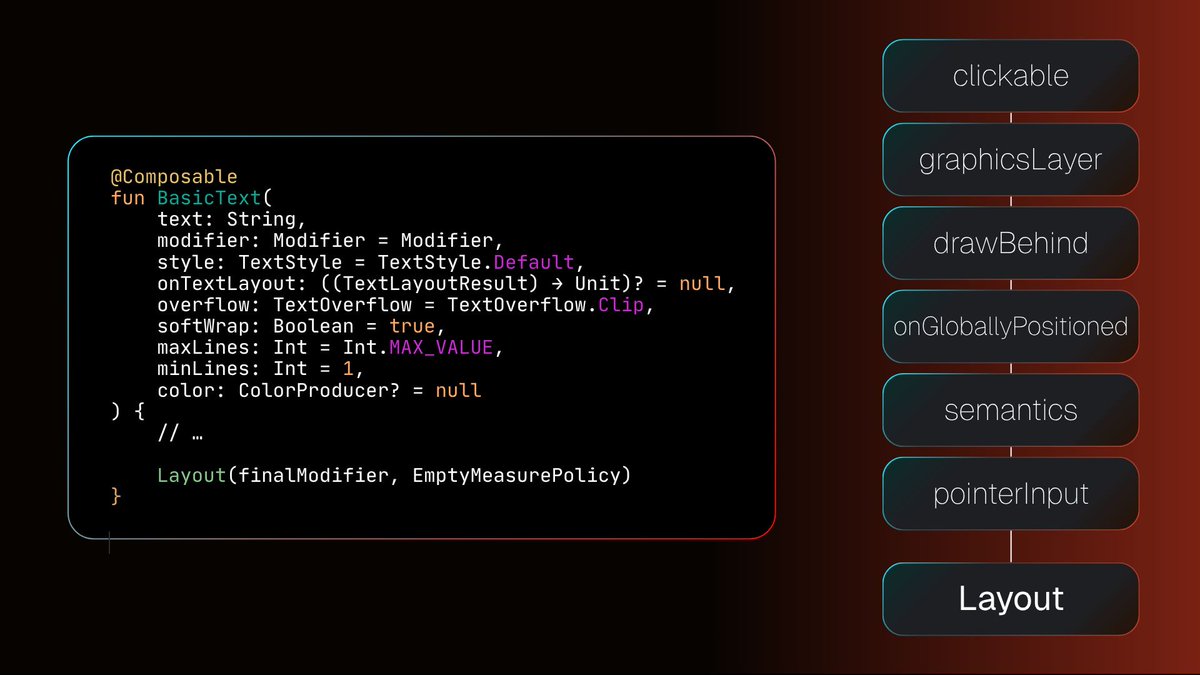
If you strip composables from all the layers of abstraction, you will see that everything is just Layout and modifiers. Practically everything you see drawn on the screen is drawn by modifiers.
Marcin Moskała tweet media
English
1
4
17
963
Marcin Moskala Android ретвитнул
Marcin Moskała
Marcin Moskała@marcinmoskala·
Here is what developers said after our previous cohort. Advanced Compose and Polish Compose have the same rich cohort learning format—lessons, hands-on exercises, interactive games, Q&As, and an active community. Join Advanced Compose → advancedcompose.com Join Polished Compose → polishedcompose.com
Marcin Moskała tweet media
English
0
4
7
397
Marcin Moskala Android ретвитнул
kt.academy
kt.academy@ktdotacademy·
You need to be very careful when using mutable objects in Compose, because their changes do not trigger recomposition. Though there are some mutable objects that are safe to be used, like view models, but when we observe properties of such objects, we need to property transform them into State, that is observable in compose❗ Bundle is for people who want both: strong mental models + clean, shippable UI practices: advancedcompose.com + polishedcompose.com
GIF
English
0
4
9
601
Marcin Moskala Android ретвитнул
Marcin Moskała
Marcin Moskała@marcinmoskala·
Compose modifiers are applied from top to the bottom. Here background draws background behind, then padding makes internal drawing area smaller.
GIF
English
1
5
16
747
Marcin Moskala Android ретвитнул
kt.academy
kt.academy@ktdotacademy·
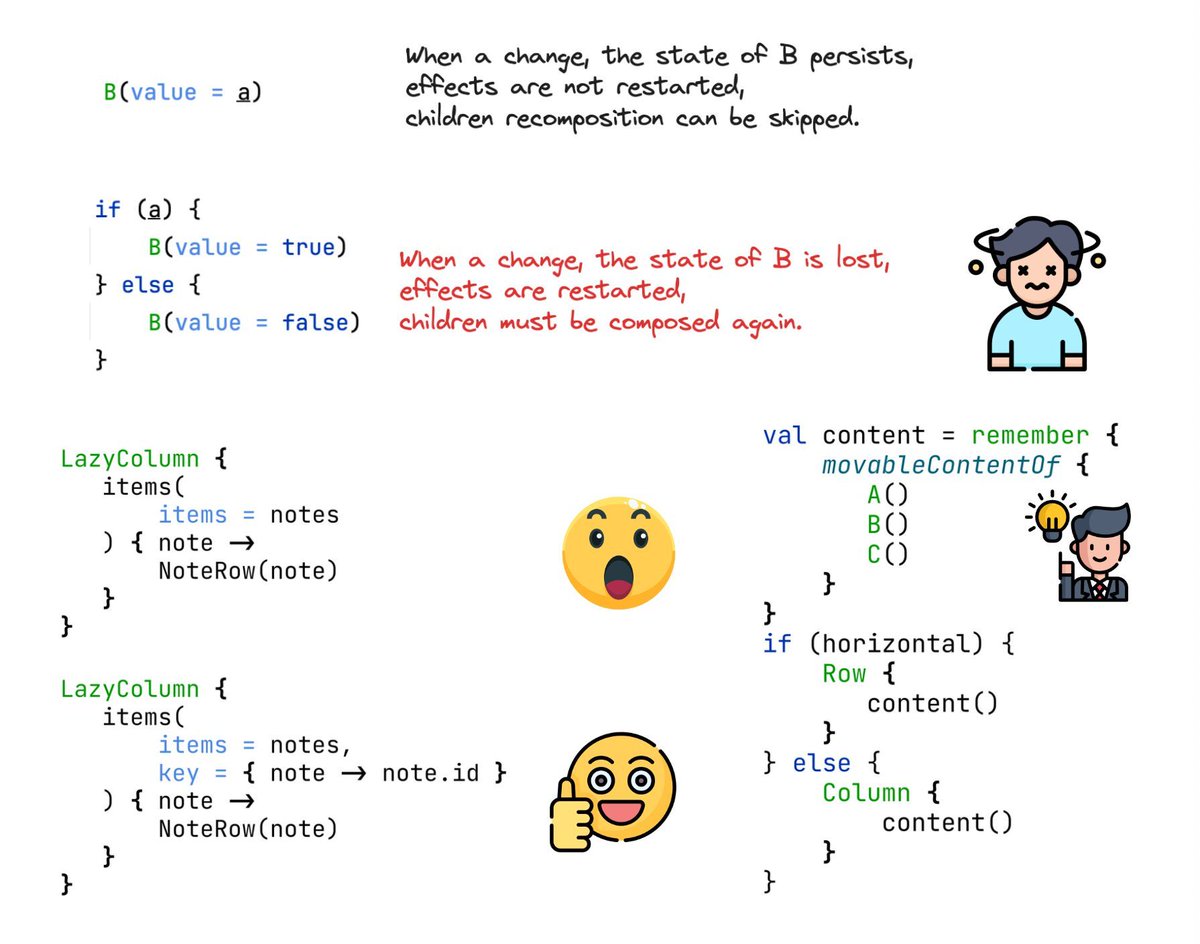
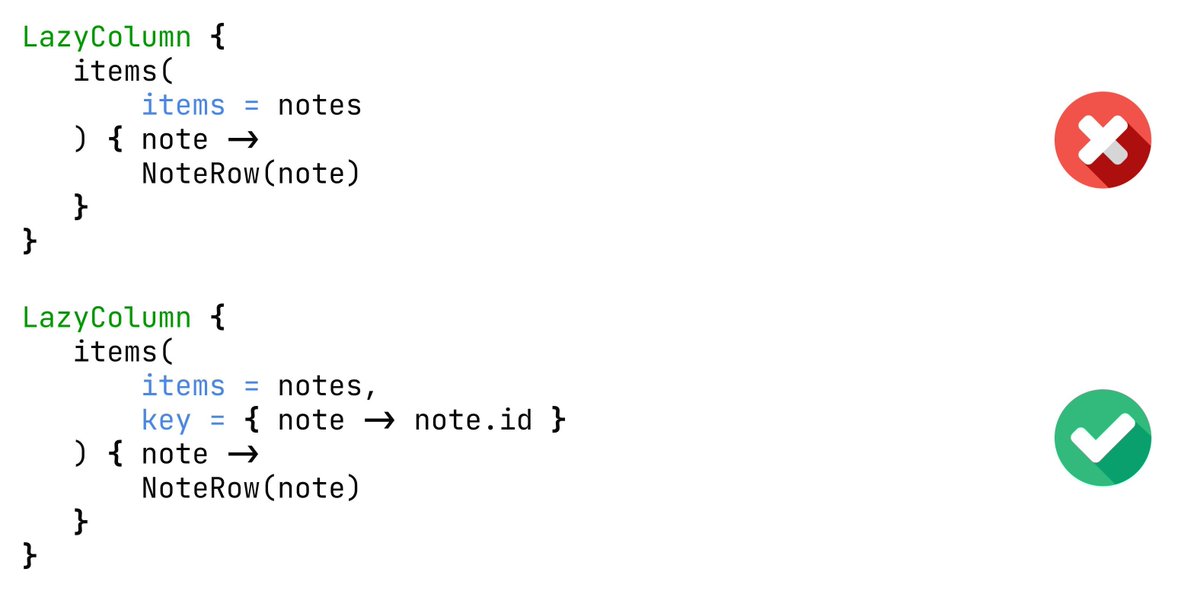
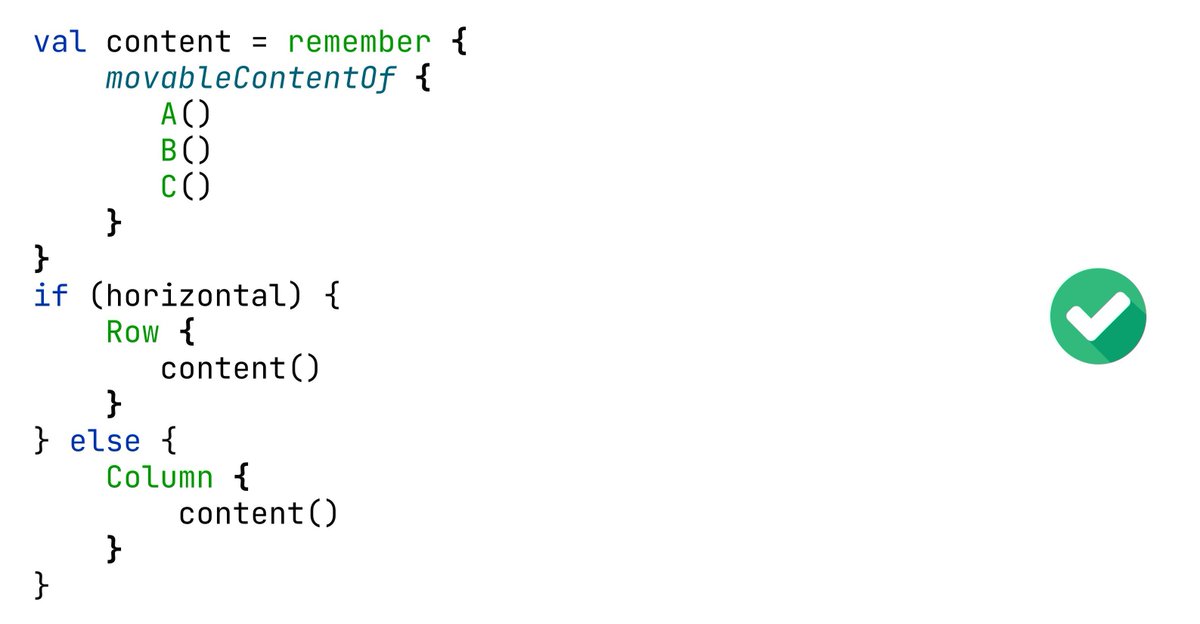
When is a composable considered the same one, and when is it considered a different one? Let’s discuss the identity of composables for a moment. 🤔 When you define a composable, each composable it calls received unique ID. State is persisted for the same ID path, even if arguments are different. Unless this composable disappears, even for a moment, because in such case its state is lost. 🤯 When composables are created from enumerations, like loops, they are by default identified by position. That means, adding an element at the beginning or in the middle causes recomposition of later composables. We improve that by specifying a key for identifying composables. If you need to persist identity of a component that changes place, that can be achieved with movableContentOf. It allows using the same composable objects as children of different parents. That is especially useful when we define adaptive layouts. ✅ Advanced foundations + production refinements — that’s why the Bundle exists: advancedcompose.com + polishedcompose.com
kt.academy tweet mediakt.academy tweet mediakt.academy tweet mediakt.academy tweet media
English
0
4
10
777