Visual Design Cafe

153 posts

Visual Design Cafe banner
Visual Design Cafe

Visual Design Cafe

@VDCafe

Helping game developers build better worlds. We create Nature Renderer, Nature Shaders, and Open World Nature Kit for Unity

انضم Ağustos 2017
229 يتبع264 المتابعون
Visual Design Cafe
Visual Design Cafe@VDCafe·
@DominicdeGraaf They support motion vectors, but Unity's terrain system does not support rendering motion vectors. If you want to render motion vectors for terrain vegetation then you'll need Nature Renderer as well. If you use only Game Objects then you don't need Nature Renderer
English
0
0
0
68
The Naked Dev
The Naked Dev@DominicdeGraaf·
@VDCafe Do these shaders also support motion vectors? Or do I need the nature renderer asset for that as well?
English
1
0
0
54
Visual Design Cafe
Visual Design Cafe@VDCafe·
@shellyalon Yes, they work with Open World Nature Kit. Using overlay for snow may be difficult though, that usually requires different textures. You can get close by adjusting the material saturation with color correction and adding a color overlay.
English
0
0
0
0
Pixel Art Society
Pixel Art Society@PixelArtSociety·
@VDCafe Supports mobile ? When I switch the project to mobile shaders has warnings
English
1
0
0
0
Visual Design Cafe
Visual Design Cafe@VDCafe·
@CitrionMC Yes, the added details will be saved on the terrain and you can use the built-in paint tools to place them.
English
0
0
1
0
CitrioN 🇺🇦
CitrioN 🇺🇦@CitrionMC·
@VDCafe Considering to upgrade to Nature Renderer 2021. With the ability to add details directly in the Nature Renderer component to support LODs, will those also be added to the actual Unity Terrain component allowing me to select it and use the built-in paint tools?
English
1
0
0
0
BABA YAGA
BABA YAGA@xaviconlonstale·
@VDCafe i understand its not advance version. So how do i use this Essential free limited version. How do I start/enable/ or activate it ? according to your documentation i right click a prefab and a menu option appears. But it does not
English
1
0
0
0
Pixel Art Society
Pixel Art Society@PixelArtSociety·
@VDCafe Nature shaders essential that comes with nature renderer menu does not come up. What I miss ?
English
1
0
0
0
Visual Design Cafe
Visual Design Cafe@VDCafe·
@Laxmi_Jenny Select the prefab in the Project window and change its position to 0,0,0 in the Transform component. (If the prefab intentionally has an offset then you can ignore the warning)
English
1
0
0
0
Visual Design Cafe
Visual Design Cafe@VDCafe·
@Laxmi_Jenny It looks like you didn't import all the packages. There are 4 packages in total that need to be imported. The import should start automatically, you just need to click "import" on the import popups. More info here: #installation" target="_blank" rel="nofollow noopener">v3.visualdesigncafe.com/nature-rendere…
English
1
0
0
0
Pixel Art Society
Pixel Art Society@PixelArtSociety·
@VDCafe imported asset but there is no nature renderer component
Pixel Art Society tweet media
English
1
0
0
0
Ben
Ben@zimmo121·
@VDCafe You have no idea how much I'm looking forward to seeing this!!
English
1
0
1
0
Ben
Ben@zimmo121·
@VDCafe Hey, I'm desperate to buy your Renderer asset but before I do, can you explain please how you got terrain details working in HDRP? I get the following...
Ben tweet media
English
1
0
0
0
Visual Design Cafe
Visual Design Cafe@VDCafe·
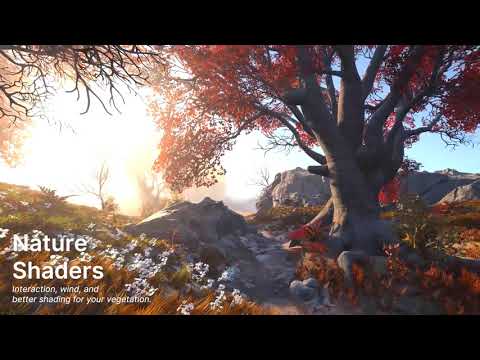
And of course Twitter compression is butchering the video quality🤷Here is a link to the trailer on YouTube for better quality: youtu.be/C6F2QHXUvFw
YouTube video
YouTube
English
0
0
0
0
Tijmen vd Heuvel
Tijmen vd Heuvel@tjheuvel·
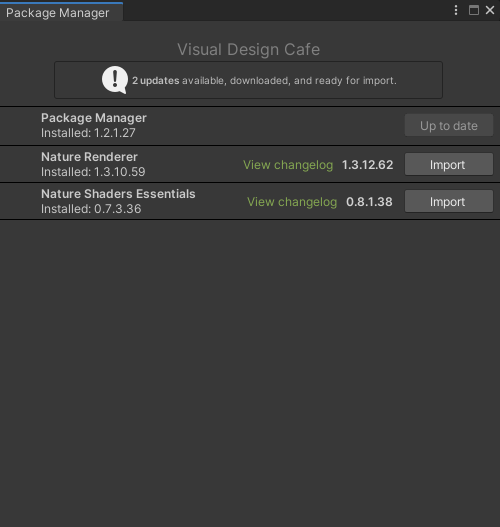
@VDCafe My colleague installed one of your plugins and now the entire team is spammed with this popup every time they start the editor. How can we disable this?
Tijmen vd Heuvel tweet media
English
1
0
0
0
Visual Design Cafe
Visual Design Cafe@VDCafe·
@tjheuvel 3. Delete the files "Library/com.VisualDesignCafe.PackageManager.queue-install.json" and "Library/com.VisualDesignCafe.PackageManager.queue-download.json". This clears the list of pending updates.
English
1
0
0
0
Visual Design Cafe
Visual Design Cafe@VDCafe·
@tjheuvel 1. Search for "t:Package" in the project window. 2. Select all packages and disable "Download in Background" in the inspector. This will disable checking for updates.
English
1
0
0
0