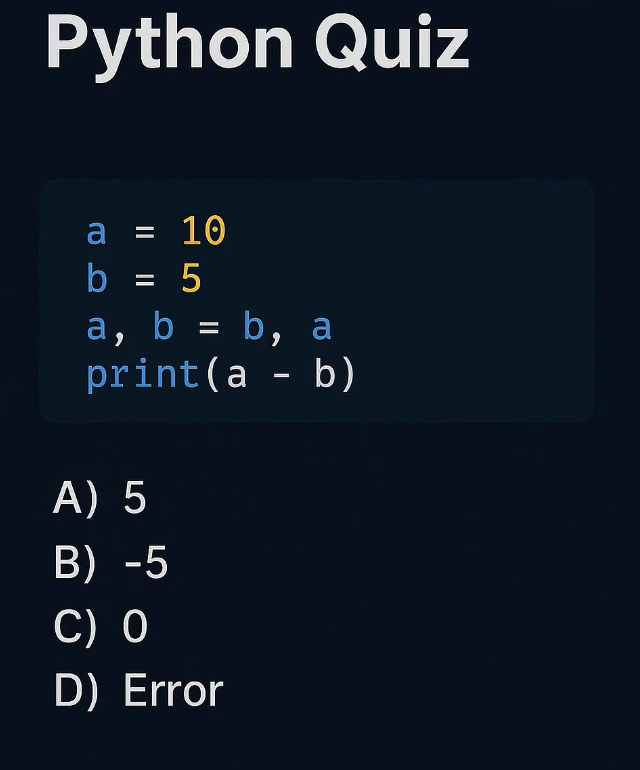
@PythonPr Answer: B) -5
Step by step:
› Start: a=10, b=5
› a, b = b, a swaps them → a=5, b=10
› print(a - b) → 5 - 10 = -5
For beginners: This is Python's elegant way to swap! No temp variable needed. Technically, the tuple (b, a) gets unpacked into variables a, b in order.
@PythonPr The correct answer is B) -5.
This code demonstrates Python's elegant way of swapping variables using tuple unpacking.
Understand:
Initialization: a is 10, b is 5.
The Swap (a, b = b, a):
Python evaluates the right side first, creating a temporary tuple (5, 10).
@PythonPr The "magic" line secret is :
a, b = b, a -> means: "new a = old b" and "new b = old a". Swap the variables and that called <tupple unpacking>
@PythonPr Ans-->B) -5
Key concept
Python evaluates the right-hand side first, creates a tuple (b, a), and then assigns it to (a, b) that’s why swapping works without a temp variable.
@PythonPr B) -5
a, b = b, a swaps them simultaneously, so a becomes 5 and b becomes 10.
5 - 10 = -5
Python's tuple unpacking is elegant until you forget it evaluates the right side first and your entire debugging session was for nothing 😂
@PythonPr D) Error is the only correct answer if you value your sanity 😂 Variable swapping in Python is the kind of magic that makes you question reality. Beautiful AND dangerous!