ASLTV retweetet

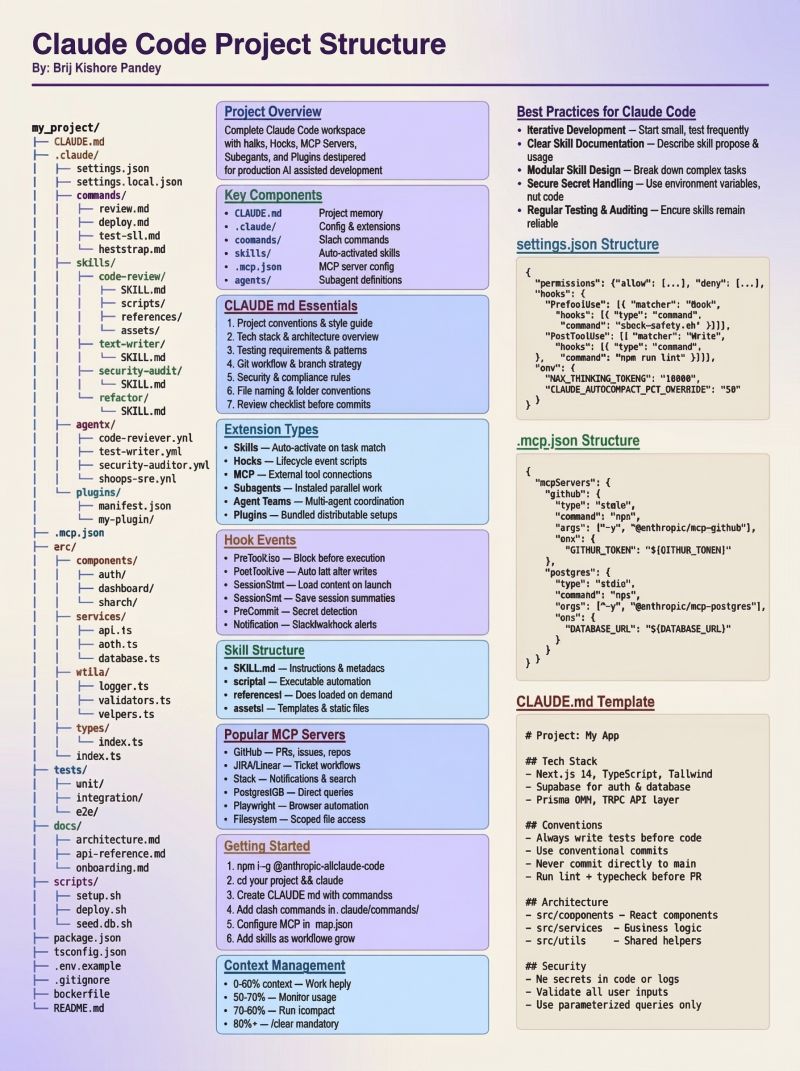
You don’t need another Claude Code setup.
Just this one.
Everyone kept asking:
→ Where do Skills go?
→ How do Hooks work?
→ How do you connect MCP servers?
So here’s the definitive Claude Code structure👇
---
Core layout
• CLAUDE.md → your project’s memory layer
• .claude/ → extensions hub
• commands/ → reusable slash commands
• skills/ → auto-triggered workflows (SKILL.md)
• agents/ → sub-agents (.yml)
• plugins/ → packaged setups
• .mcp.json → external tool connections
---
What most people miss
This isn’t just folders.
It’s a system:
• 6 extension types (how everything plugs in)
• Hook events → when + how automation runs
• Skill structure → scripts, refs, assets
• MCP servers → real tool integrations
• Context limits → when Claude starts dropping info
• Setup flow → from zero → production
---
Most people use Claude Code like a chatbot.
That’s why it breaks at scale.
This setup turns it into a real engineering system.
---
Share it.
Bookmark it.
Use it.
This is the only structure you’ll need.
Bookmark this. ♻️
#AI #Claude #AIAgents #LLM #GenAI #DevTools
English