LocalAI

33 posts

LocalAI banner
LocalAI

LocalAI

@LocalAIx

I love seeing what we can do when running AI locally, at home, on modest hardware. GPU poor AF.

Internet Beigetreten Mart 2026
6 Folgt144 Follower
LocalAI
LocalAI@LocalAIx·
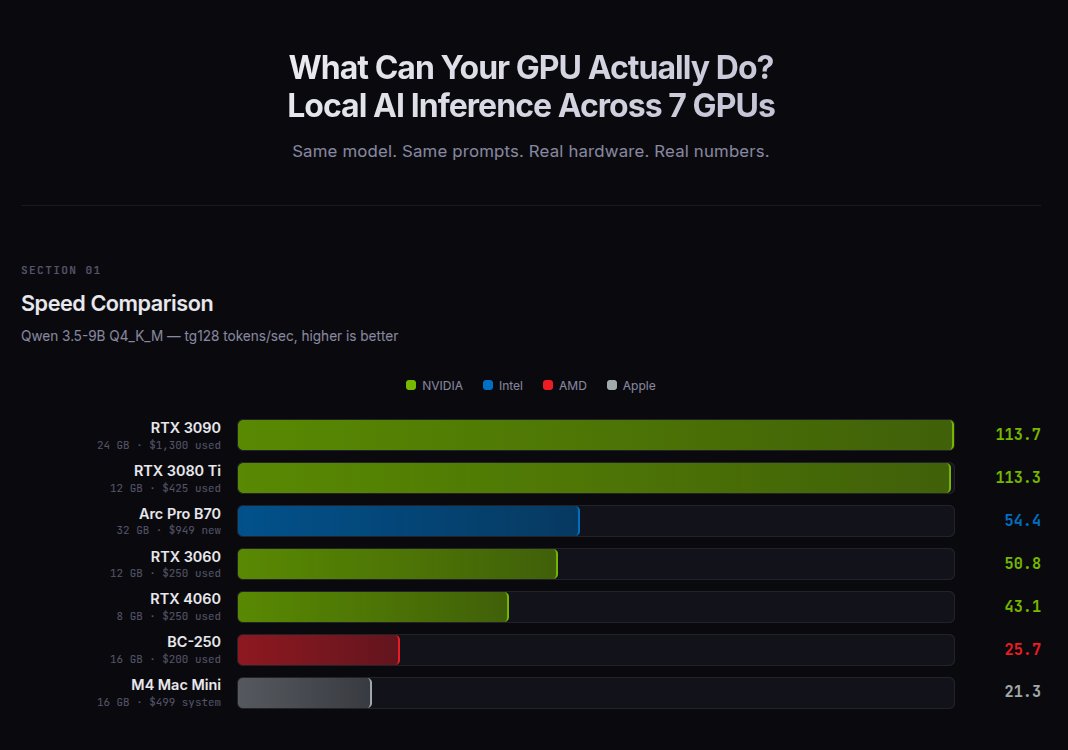
I ran the same 9B model on 7 GPUs from $200 to $1,300. RTX 3080 Ti: 113 t/s ($425) RTX 3090: 113 t/s ($1,300) Arc Pro B70: 54 t/s ($949) RTX 3060: 51 t/s ($250) RTX 4060: 43 t/s ($250) BC-250: 26 t/s ($200) M4 Mac Mini: 21 t/s ($499) The 3080 Ti matches the 3090 at 1/3 the price. But both are capped at models that fit in VRAM. More VRAM = bigger models = smarter AI. The B70 runs a 35B model on one card. Two cards run 80B.
LocalAI tweet mediaLocalAI tweet media
English
44
17
330
37K
LocalAI
LocalAI@LocalAIx·
@loktar00 I have both, 3090 is faster, but 32 GB VRAM is niiiice.
English
0
0
1
58
Loktar 🇺🇸
Loktar 🇺🇸@loktar00·
I can either grab a 3090 this week or a B70 trying to determine which one honestly. 3090 is older obviously, used no warranty etc. B70 is new 32gb vram (not as fast as the 3090) less software support. lol I considered just getting both and throwing them into one machine.
English
29
0
38
5.4K
LocalAI
LocalAI@LocalAIx·
@XAKDUBYUH As for Hermes vs OpenClaw, they're both good. Really depends on what you want to do. I switched to Hermes to act more as a reliable assistant, that I can depend on to do things regularly. OpenClaw really excels in being easy at telling it what to do (like in a Telegram message).
English
0
0
1
27
XAKREE
XAKREE@XAKDUBYUH·
@LocalAIx I'm currently using OpenClaw, but I'm curious about Hermes. Which would you recommend? I have a 2 B70s as well. Also, what have you found the most successful platform? I'm currently on LM Studio. I'm on Windows, and I'm thinking I may need to switch to Linux.
English
2
0
0
44
LocalAI
LocalAI@LocalAIx·
OpenClaw or Hermes Agent? After digging into both: OpenClaw is the better assistant platform; more chat surfaces, device nodes, channel routing. Hermes is the better actual 'agent'; stronger memory, cleaner automation, tighter security, better sub-agent isolation. One is the interface layer. The other is the work engine. Which are you running, and why'd you pick it?
English
1
0
3
187
LocalAI
LocalAI@LocalAIx·
@XAKDUBYUH I'm a huge proponent of LM Studio as an easy way to get into running LLMs locally. Nice chat interface, easy to get models that fit the hardware, and provide API endpoints on the network if wanted. That being said, it works on Windows well, but I strongly suggest Linux!
English
1
0
1
28
LocalAI
LocalAI@LocalAIx·
I benchmarked vLLM vs llama.cpp on dual Intel Arc Pro B70 GPUs (32GB each). Results are interesting. The good: vLLM's prefill is 8-16x faster than llama.cpp. Same model, same precision (BF16 vs FP16), same hardware. The gap is real. The bad: vLLM can't run Qwen3.5 on XPU (GDN attention unsupported). It also OOMs on Qwen2.5-14B on a single 32GB card at FP16. llama.cpp handles both fine. Qwen2.5-14B, dual GPU, BF16/FP16: pp128: llama.cpp 268 t/s vs vLLM 2,069 t/s pp2048: llama.cpp 692 t/s vs vLLM 11,385 t/s tg128: ~35 t/s both (tie) Root cause: llama.cpp's SYCL flash attention uses scalar FP16 ops. vLLM uses Intel's XMX/DPAS matrix units via CUTLASS FMHA. The code literally has a "// Todo: Use the XMX kernel if possible" comment. Token generation is a dead tie because both engines are memory-bandwidth-bound during decode - XMX doesn't help there. For B70 owners today: llama.cpp is the practical choice (runs everything, great quant support, no Docker needed). But there's a massive fixable gap in prefill that the community should know about.
English
2
2
5
389
LocalAI
LocalAI@LocalAIx·
@outsource_ I don't have a ton of hardware to test on, but the bits I've collected over the years and will start with. RTX 3060, 4060, 3080 ti, 3090, mac mini m2, mac mini m4 (both 16gb), the odd-ball AMD BC-250.
English
0
0
1
78
LocalAI
LocalAI@LocalAIx·
@outsource_ That's exactly what I've been working on lately. A full local LLM benchmarking suite on all the hardware I have available. Two separate tests: race (model loading time, time to first token (hot/cold), tokens per sec, etc. Then the more difficult, 'grading' mode for capability.
English
2
0
1
37
Eric ⚡️ Building...
All these new OpenSource models release What benchmarks are useful? What tk/s can you run?? What can my hardware run? We need answers for these questions
English
7
0
7
1.3K
LocalAI
LocalAI@LocalAIx·
Two Intel Arc Pro B70s. 64GB VRAM total. Running a 70B model locally at 11 t/s, fully in GPU memory. They're not the fastest cards. A 4090 will beat them on speed for smaller models. But a 4090 can't run 70B at all without crawling through system RAM. Two 5090's can! For around $7,000 though 😂 - DeepSeek-R1 70B Q4_K_M: 11.3 t/s (dual GPU) - Qwen3.5-27B Q4_K_M: 20 t/s, 40K context (single GPU) - Gemma 4 31B Q4_K_M: 22.6 t/s (single GPU) - Gemma 4 26B-A4B MoE Q4_K_M: 30 t/s (single GPU) The software side is still maturing. SYCL has its quirks and you'll spend some late nights with Intel's docs. But 64GB of VRAM I can actually afford, running models I never thought I'd run locally? That feels pretty great. 😄
English
1
0
3
176
LocalAI
LocalAI@LocalAIx·
Update: Found the root cause AND a fix path. Tested IOMMU off, ACS disable, NEO debug keys — nothing helped at the config level. But then we tested Level Zero's zeCommandListAppendMemoryCopy directly: 16 GiB GPU-to-GPU copy: +113 MiB system RAM, 7.8 GB/s. Same data via SYCL: +46 GiB system RAM. Turns out kernel 7.0's xe driver HAS a working P2P/SVM path — but SYCL's buffer sharing triggers the older DMA-buf export path instead, which forces VRAM→RAM migration via TTM. Two kernel paths, one good, one bad. SYCL uses the bad one. Intel's own llm-scaler uses Level Zero directly and avoids this. Fix: modify llama.cpp's SYCL backend to use zeCommandListAppendMemoryCopy for cross-device transfers. Full writeup on Reddit. reddit.com/r/LocalLLaMA/c…
English
0
0
2
127
LocalAI
LocalAI@LocalAIx·
Update: Went deep on this. Tried disabling IOMMU, ACS, kernel debug keys, nothing helps. The xe driver simply doesn't implement PCIe P2P DMA. There are zero p2pmem entries, zero P2P symbols in the module. ALL cross-device sharing goes through host RAM via TTM. Intel's own multi-GPU stack (llm-scaler/vLLM) works around this by using Level Zero IPC handles via oneCCL, completely bypassing the DMA-buf/TTM kernel path. But llama.cpp's SYCL backend doesn't have that option. So, frustratingly, cards marketed for multi-GPU, but the kernel driver's only cross-device path mirrors VRAM into system RAM at ~3x the model size. No config fix. Need either driver P2P support or a different inference stack.
English
1
0
1
130
LocalAI
LocalAI@LocalAIx·
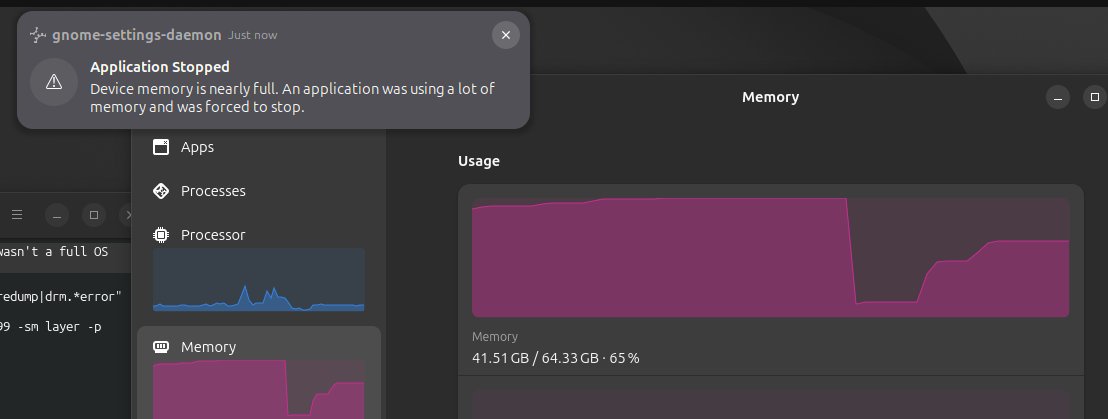
PSA for Intel Arc / Battlemage multi-GPU users: Running dual-GPU inference (tensor parallel) on Intel dGPUs can eat your entire system RAM, even if the model fits entirely in VRAM. We hit this running Qwen3.5-27B across two Arc Pro B70s (32GB each, 64GB total VRAM). Four OOM crashes in 25 minutes. 64GB system RAM, 100% consumed.
LocalAI tweet media
English
1
0
4
176
LocalAI
LocalAI@LocalAIx·
@XAKDUBYUH So far most of my testing has been with llama.cpp, vllm, "IPEX-LLM". BUT! Since LM Studio uses llama.cpp, It's very likely to work. I'll start testing with that in the next day or 2. These will be one of the best values for running a model capable of powering openclaw IMO.
English
0
0
1
53
XAKREE
XAKREE@XAKDUBYUH·
@LocalAIx Are you running these through LM Studio? Also, had you gotten it to work with OpenClaw? I have 1 B70, 2nd one is coming in on Thursday.
English
1
0
0
43
LocalAI
LocalAI@LocalAIx·
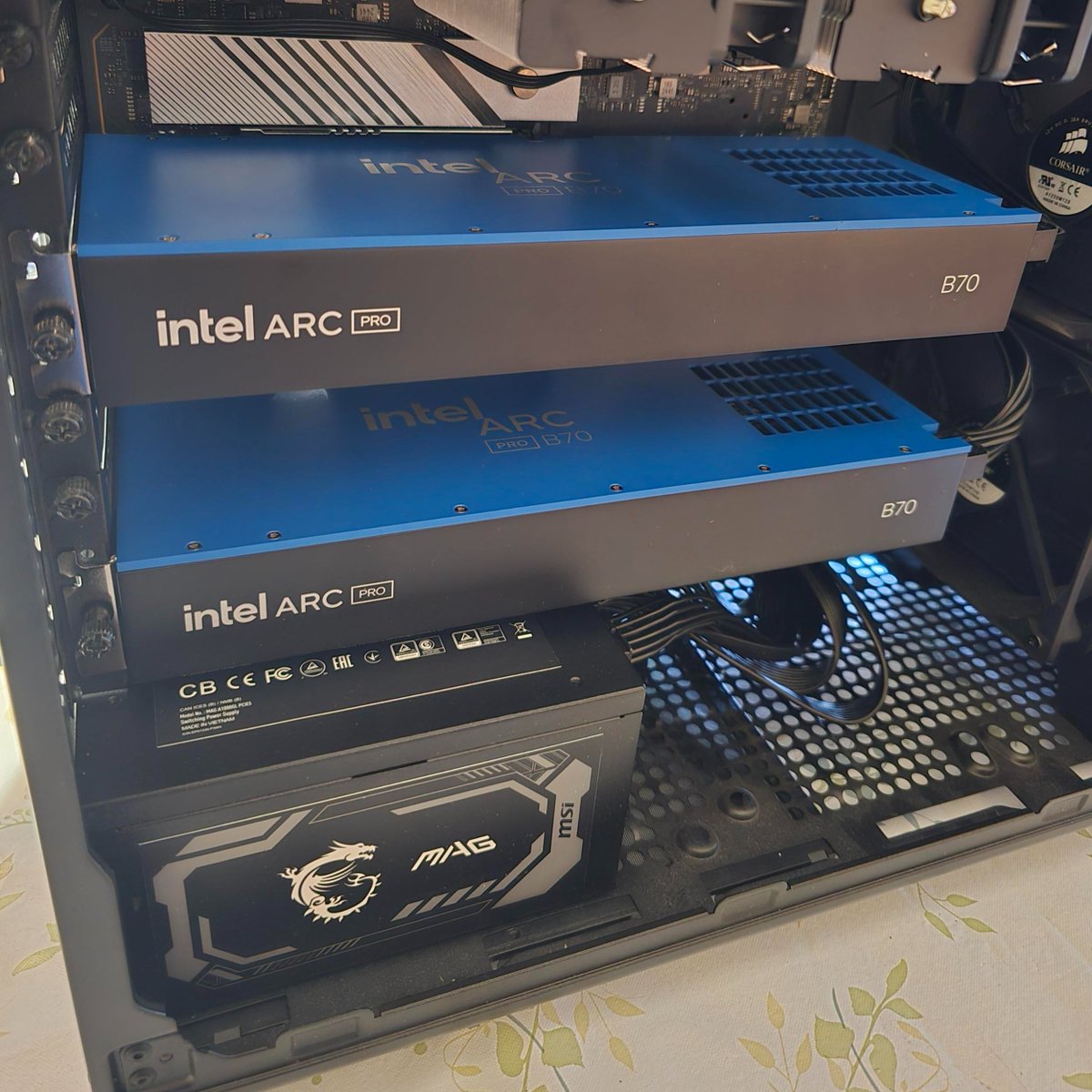
We all know that NVIDIA is the king of AI right now. CUDA is unmatched. But to get 32 GB of VRAM there, you're either spending $4,000+ on a 5090 or hunting for old, used, power-hungry hardware. AMD has their offering around $1,350+. Solid, but still a big ask for a local AI setup. Then Intel comes along with the Arc Pro B70. 32 GB GDDR6 ECC. 608 GB/s bandwidth. $950. I knew it was a risk. The ecosystem is immature, the software stack has rough edges, and driver support is still catching up. But I decided to take the chance, and more importantly, share everything I learn so others can make an informed decision. So I bought two of them. Here's what I've found so far running local LLMs: The good: - 32 GB VRAM fits Qwen3.5-27B at Q8 with ~20K context, or Q4_K_M with ~63K context - Q4 inference runs at 20 t/s on Qwen 3.5 27B. usable - After finding and fixing a Q8_0 kernel issue in llama.cpp, Q8 now runs at 15 t/s (it was 5 before) - The hardware is legitimately capable The rough: - SYCL JIT compilation on first run takes minutes. Minutes. - Some code paths segfault on Battlemage that work fine on older Arc - vLLM's XPU backend crashes during initialization on B70 - Intel's own IPEX-LLM doesn't even recognize this GPU's PCI device ID - You will be debugging things that CUDA users never have to think about Is it for everyone? No. But if you want 32 GB of VRAM for under $1,000 and you're willing to either figure things out or wait for updates, it looks to be a decent value. I'll be posting benchmarks, fixes, and honest takes as I go. @IntelGraphics #IntelArc #Battlemage #LocalAI #LLM
LocalAI tweet media
English
1
0
2
124
LocalAI
LocalAI@LocalAIx·
@LLMJunky @DugganJared @centralcomputer Have to run older models with a B70? Not even kind of. lol They're not on par with Nvidia, but they're very capable, and probably the best value card IF VRAM size is a priority.
English
0
0
1
22
am.will
am.will@LLMJunky·
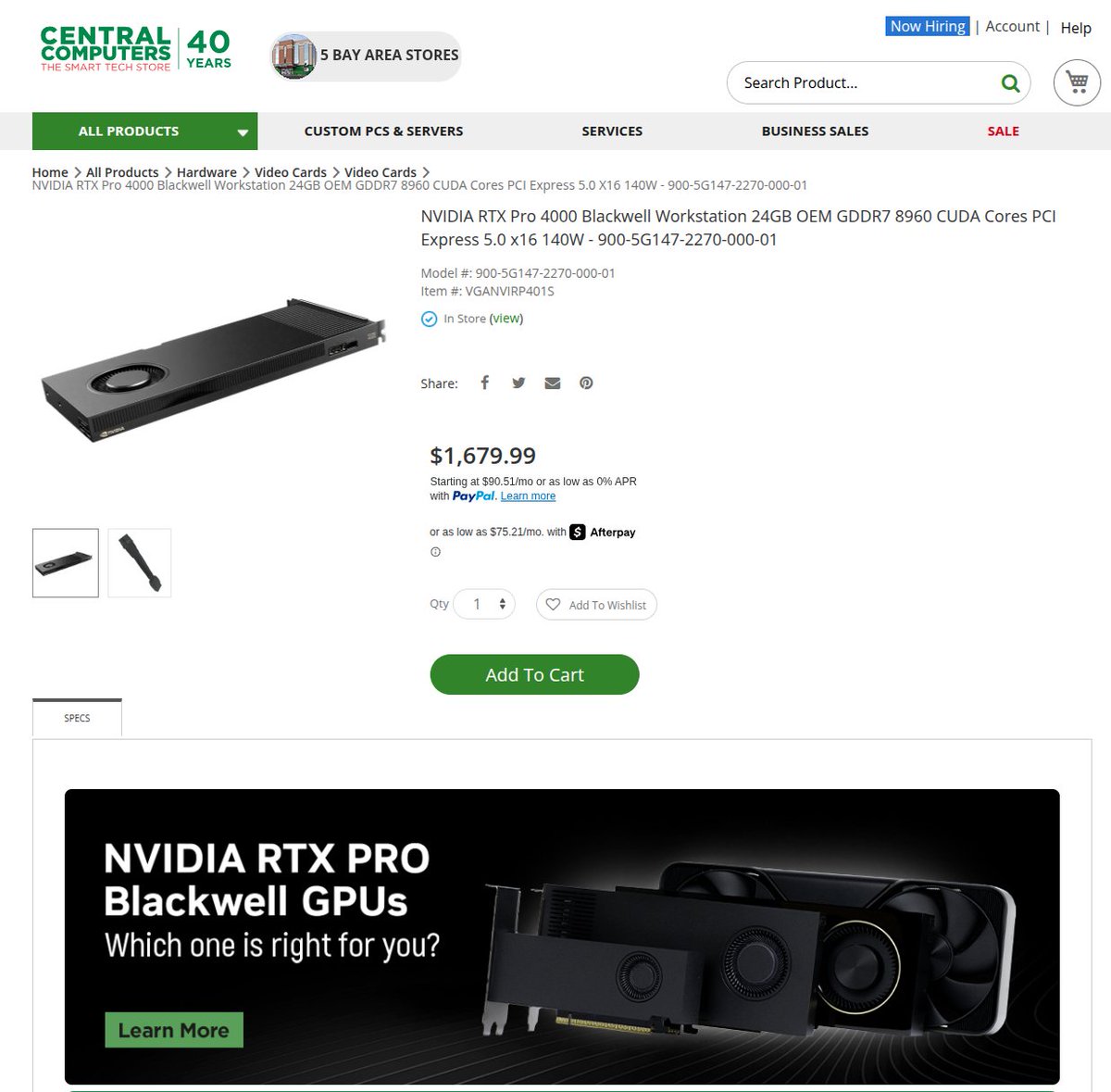
I'm curious why I dont see any of the Local LLM guys recommending these? With 3090s going for ~$1200 or so, these seem like a very viable upgrade to DDR7 and new architecture versus a 6 year old card... They are super narrow so you can stack them easily. Why aren't more people looking at these?
am.will tweet media
English
154
18
447
157.5K
LocalAI
LocalAI@LocalAIx·
The root cause: llama.cpp's SYCL backend had a "reorder" optimization that separates quantization scales from weights for coalesced GPU reads. It existed for Q4_0, Q4_K, Q6_K, but Q8_0 was never added. The most critical fix was literally one line. Q8_0 wasn't in a type check, so the optimization was silently skipped. Full writeup in the PR: github.com/ggml-org/llama…
English
0
0
0
69
LocalAI
LocalAI@LocalAIx·
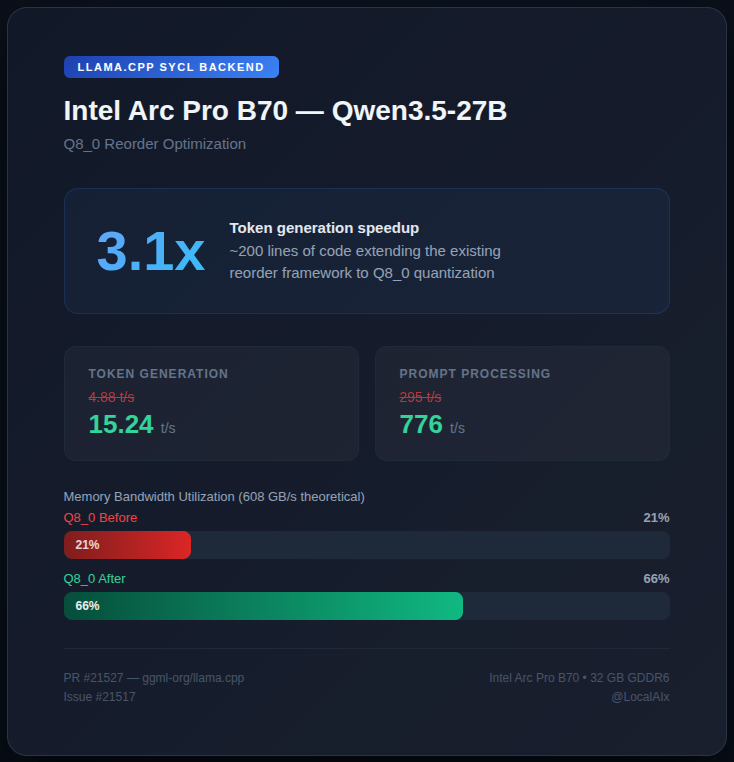
5 tokens/sec on a brand new, just released GPU. I was hoping for more with the Intel Arc Pro B70. Luckily, it doesn't seem like it was a hardware issue! Qwen 3.5 and Gemma 4 at Q4 got me about 20 t/s, so I figured something was wrong specifically with Q8. I tried different drivers, Vulkan, env vars. Nothing helped at first. With @AnthropicAI Claude's help, I dug into Intel's IPEX-LLM and found their Q8 kernels actually hit 61% bandwidth. But their stack doesn't support modern models and crashes on this brand new GPU. So we binary-patched their closed-source code to prove the fix was possible, reverse-engineered the optimization, and built it for upstream llama.cpp. ~200 lines. 3.1x speedup on Q8_0! Works with every model. PR: github.com/ggml-org/llama… If you have an Arc A770/A750, test this and let me know if it helps! @IntelGraphics @intel #llamacpp #IntelArc #Battlemage #LocalAI
LocalAI tweet media
English
1
0
1
190