
SenseQuality

5.6K posts

SenseQuality banner
SenseQuality

SenseQuality

@SenseQuality

Boost your FPS, lower internet latency, & increase stream quality at 🎮https://t.co/8zbD2UhRYQ 💻 Max FPS PC Builds: @TunedPC

Miami, FL Beigetreten Mayıs 2019
203 Folgt26.8K Follower
Angehefteter Tweet
SenseQuality
SenseQuality@SenseQuality·
You are probably wondering what do we even do? Let me explain with this video ▶ Boost your FPS✅ Enhance your Audio✅ Build your @TunedPC ✅ Optimize your Gaming and Content Creation experience at SenseQuality.com You have fun, let us take care of the rest🚀
English

19
10
137
0
SenseQuality retweetet
KIRNEILL
KIRNEILL@KIRNEILL·
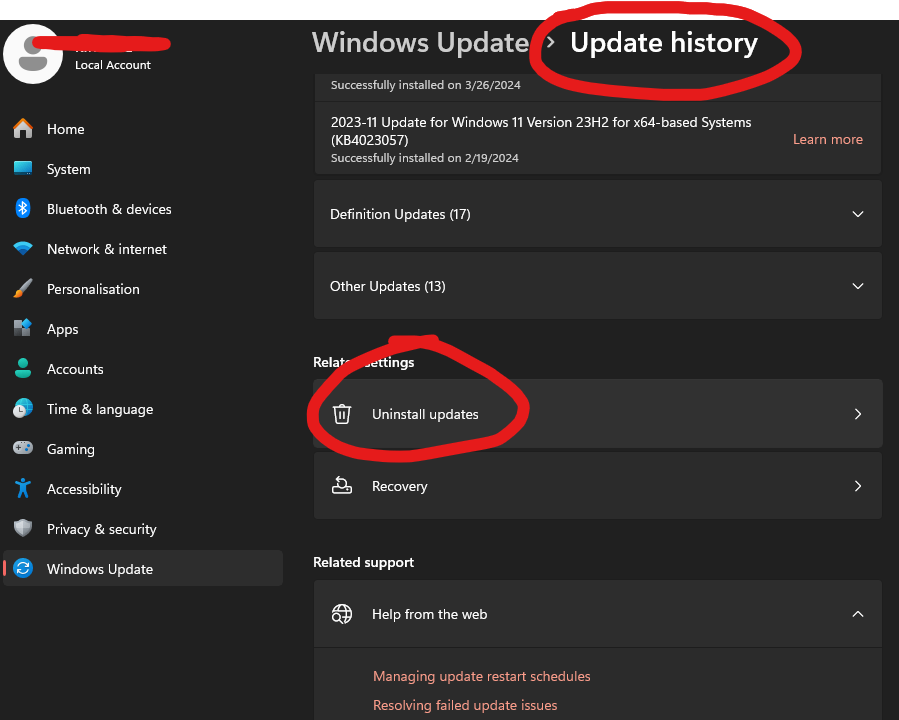
AMD GPU Users! If you updated to Windows Version 25H2 and your FPS dropped, then roll back to 24H2! Multiple people on microsoft Q&A are reporting 60-80 FPS drops in game! FIX: 🔹Settings → Windows Update → Update History → Uninstall the 25H2 feature update 🔹Or: Roll back within 10 days at Settings → Recovery → Go Back
KIRNEILL tweet media
English
6
17
269
35.3K
SenseQuality retweetet
KIRNEILL
KIRNEILL@KIRNEILL·
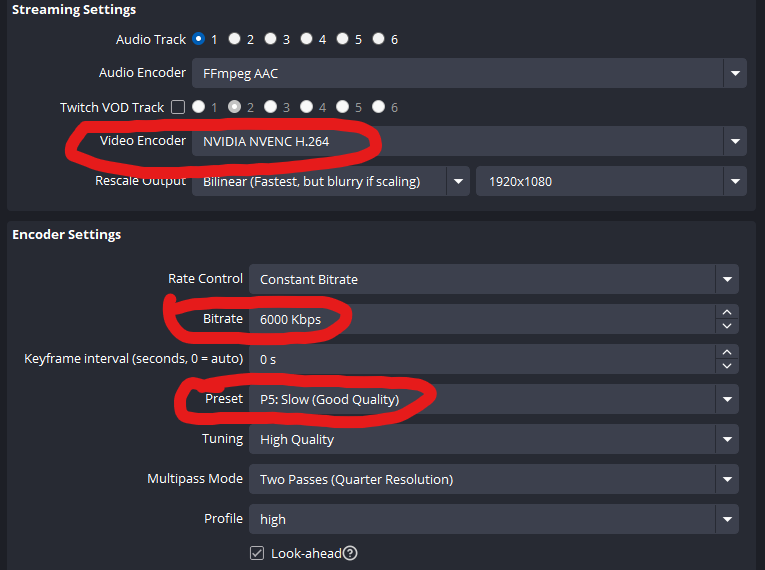
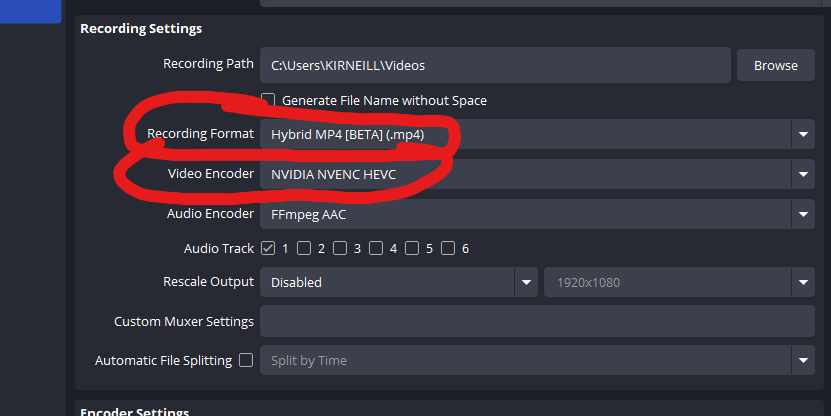
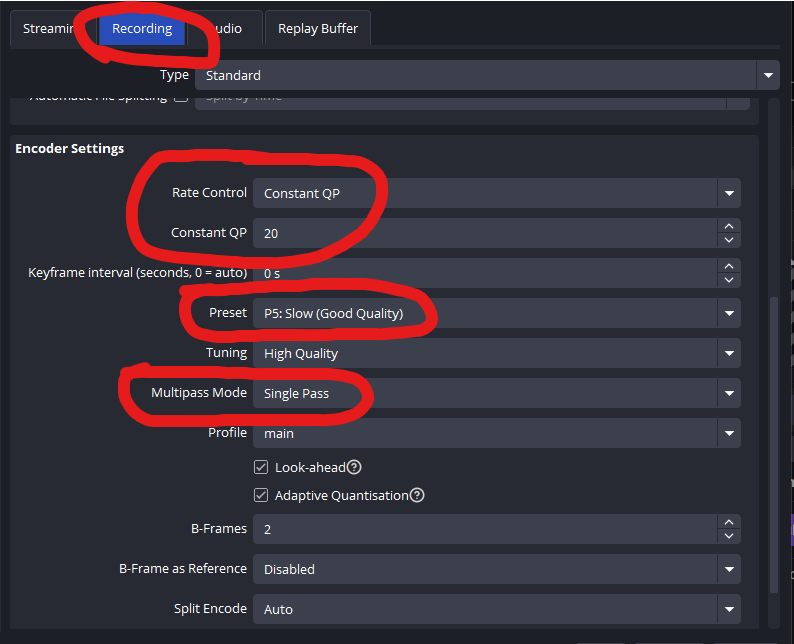
Best OBS Streaming & Recording Settings: If you don't have a great GPU, switch the preset to P3: Fast
KIRNEILL tweet mediaKIRNEILL tweet mediaKIRNEILL tweet media
English
31
225
3.4K
140.2K
SenseQuality retweetet
KIRNEILL
KIRNEILL@KIRNEILL·
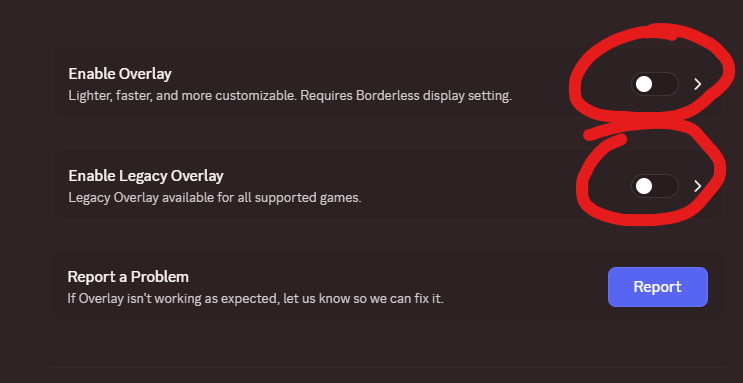
If you use Discord, please, I beg you to disable the Discord Overlay if you game. It takes away performance from your games and causes issues like input delay, stuttering, etc. Go to Settings -> Game Overlay -> Disable Overlay and Legacy Overlay You will not regret it
KIRNEILL tweet media
English
19
100
2K
111.3K
SenseQuality retweetet
KIRNEILL
KIRNEILL@KIRNEILL·
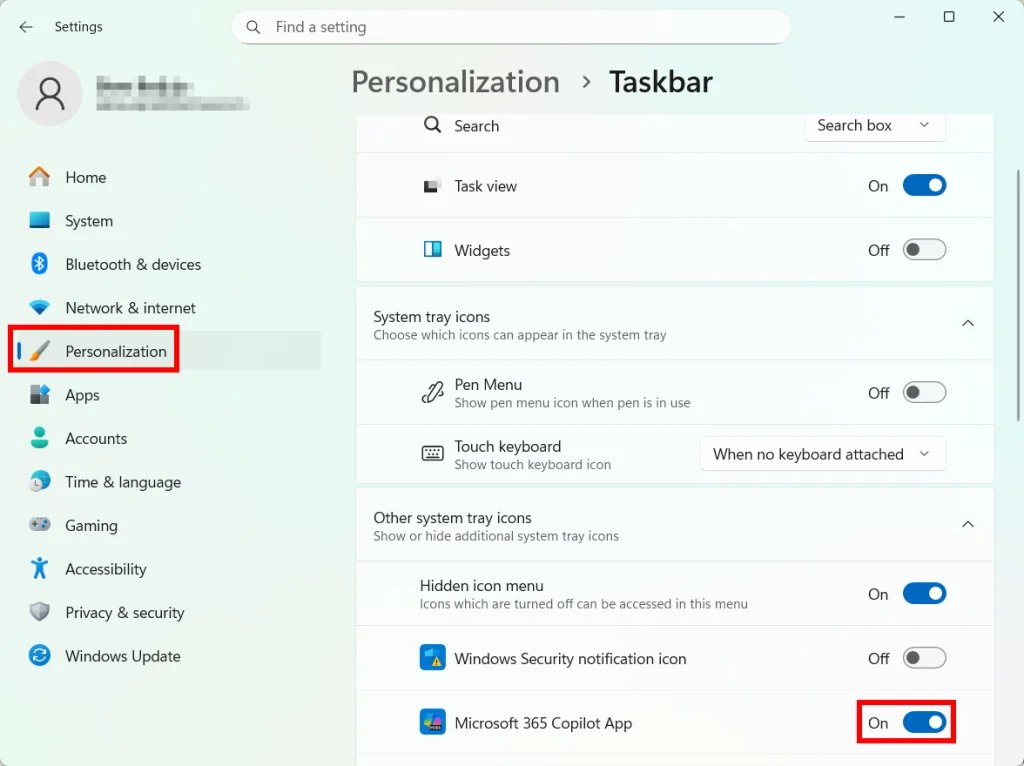
Windows 11 Copilot can use memory in the background while you game taking away FPS. If you never use it, turn it off and free up system resources. Settings → Personalization → Taskbar → Copilot → OFF Or permanently: Group Policy Editor → User Configuration → Administrative Templates → Windows Components → Windows Copilot → "Turn off Windows Copilot" → Enabled
KIRNEILL tweet media
English
3
62
838
57.4K
SenseQuality retweetet
KIRNEILL
KIRNEILL@KIRNEILL·
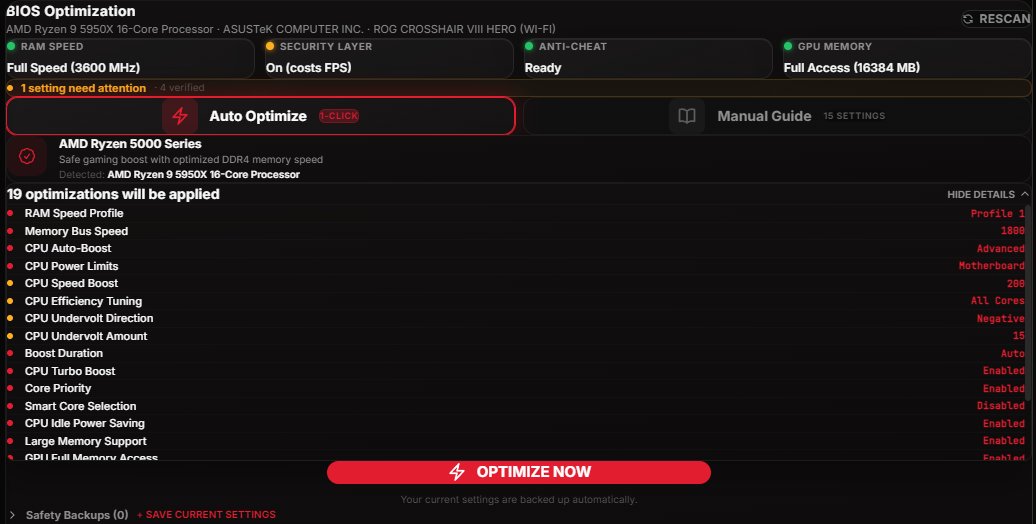
Overclocking used to mean 2 hours in your BIOS watching YouTube tutorials and praying you don't brick your PC. Now it's 1 click. Just added the BIOS Optimizer to @TunedPC which auto-overclocks your CPU and RAM for max FPS. No guides. No risk. Just frames.
KIRNEILL tweet media
English
22
21
451
62.7K
SenseQuality retweetet
KIRNEILL
KIRNEILL@KIRNEILL·
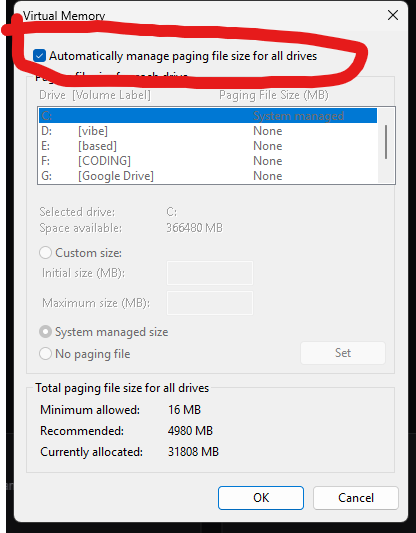
If you constantly crash in games, please make sure to check this: 🔹Open View advanced system settings. 🔹Go to the Advanced tab. 🔹Under Performance, click Settings. 🔹Open the Advanced tab again. 🔹Under Virtual memory, click Change. 🔹Make sure Automatically manage paging file size for all drives is enabled. 🔹Restart
KIRNEILL tweet media
English
1
23
268
31K
SenseQuality retweetet
KIRNEILL
KIRNEILL@KIRNEILL·
Most of you guys should download the Vesktop instead of the Discord app because it uses less RAM and CPU resources which provides you more performance in game. Oh, and it also blocks telemetry/tracking that the official discord app sends. More FPS, same Discord functionality.
KIRNEILL tweet media
English
135
300
7.2K
523.9K
SenseQuality
SenseQuality@SenseQuality·
@JeseMartinez @AlmostAdulting1 @KIRNEILL For some reason we couldn't see this from our main page, but our website doesn't look anything like yours? The only thing that was similar was generic warranty logos?
English
3
0
1
51
ALMOST_ADULTING
ALMOST_ADULTING@AlmostAdulting1·
@SenseQuality @KIRNEILL Sure would be nice if you would show up for the 350$ appt I paid for. I took off work to be able to get this done. Out of 3 times I have booked you have shown up on time once!! No respect for others time. But you will charge if I am late.
English
4
0
0
183
SenseQuality retweetet
KIRNEILL
KIRNEILL@KIRNEILL·
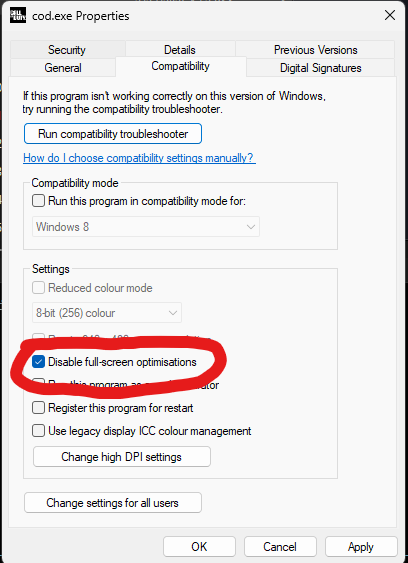
Windows update KB5077181 may be causing stutters in your games. It's may be caused by Fullscreen optimization. Fix: Right-click your game .exe → Properties → Compatibility → check "Disable fullscreen optimizations" If you updated recently & your games feel off, try this.
KIRNEILL tweet media
English
36
257
2.8K
191.8K
SenseQuality retweetet
KIRNEILL
KIRNEILL@KIRNEILL·
Best Internet Service Providers for Gamers: 1. Verizon Fiber 2. Frontier Fiber 2. Bell Fiber (Canada) 3. AT&T Fiber 4. Any other kind of fiber internet If you don’t have one of these, you are pretty much a at a disadvantage.
English
60
31
595
90K
SenseQuality retweetet
WR3X
WR3X@_WR3X·
I don’t know what y’all did in this newest @TunedPC update but Apex is now running at 200+ fps with most settings at Max. Just bought a new monitor to keep up with the performance gains. Keep up the good work @KIRNEILL
WR3X tweet mediaWR3X tweet media
English
1
3
7
8.8K
SenseQuality retweetet
KIRNEILL
KIRNEILL@KIRNEILL·
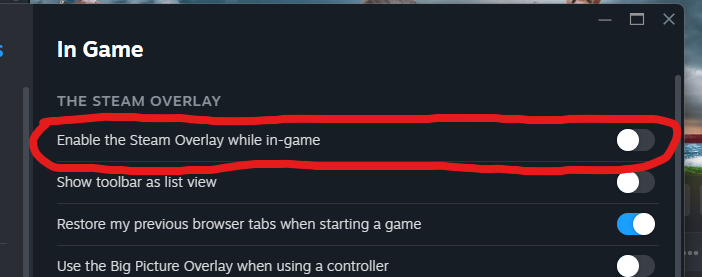
If you play on Steam, turn off the in-game overlay. Steam → Settings → In-Game → uncheck "Enable Steam Overlay" It hooks into your game's render pipeline and costs FPS even when you're not using it. Instant FPS Boost.
KIRNEILL tweet media
English
28
46
790
91.5K
SenseQuality retweetet
KIRNEILL
KIRNEILL@KIRNEILL·
Windows 11 has a setting called Memory Integrity that's ON by default It runs a hypervisor-level check on EVERY driver call your GPU makes This costs you 5-15% FPS in every game Fix: Windows Security → Device Security → Core Isolation → turn Memory Integrity OFF -> Restart
KIRNEILL tweet media
English
128
196
3.4K
1.2M
SenseQuality retweetet
KIRNEILL
KIRNEILL@KIRNEILL·
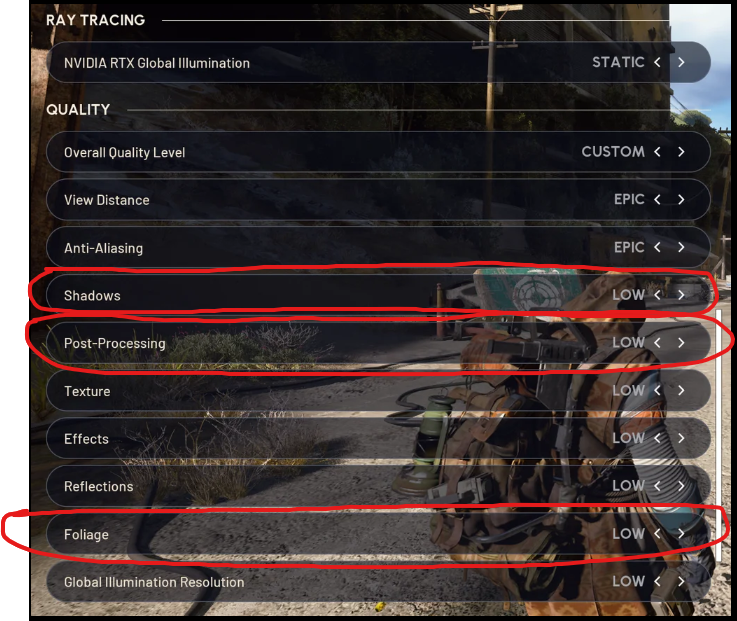
If you play Arc Raiders and your FPS tanks during ARC fights, do this immediately: Set Shadows to Low, Post-Processing to Low, and Foliage to Low. Foliage on Low makes it easier to spot players hiding in bushes. 20-40+ FPS boost with barely any visual loss.
KIRNEILL tweet media
English
30
76
2.2K
143.4K
SenseQuality retweetet
KIRNEILL
KIRNEILL@KIRNEILL·
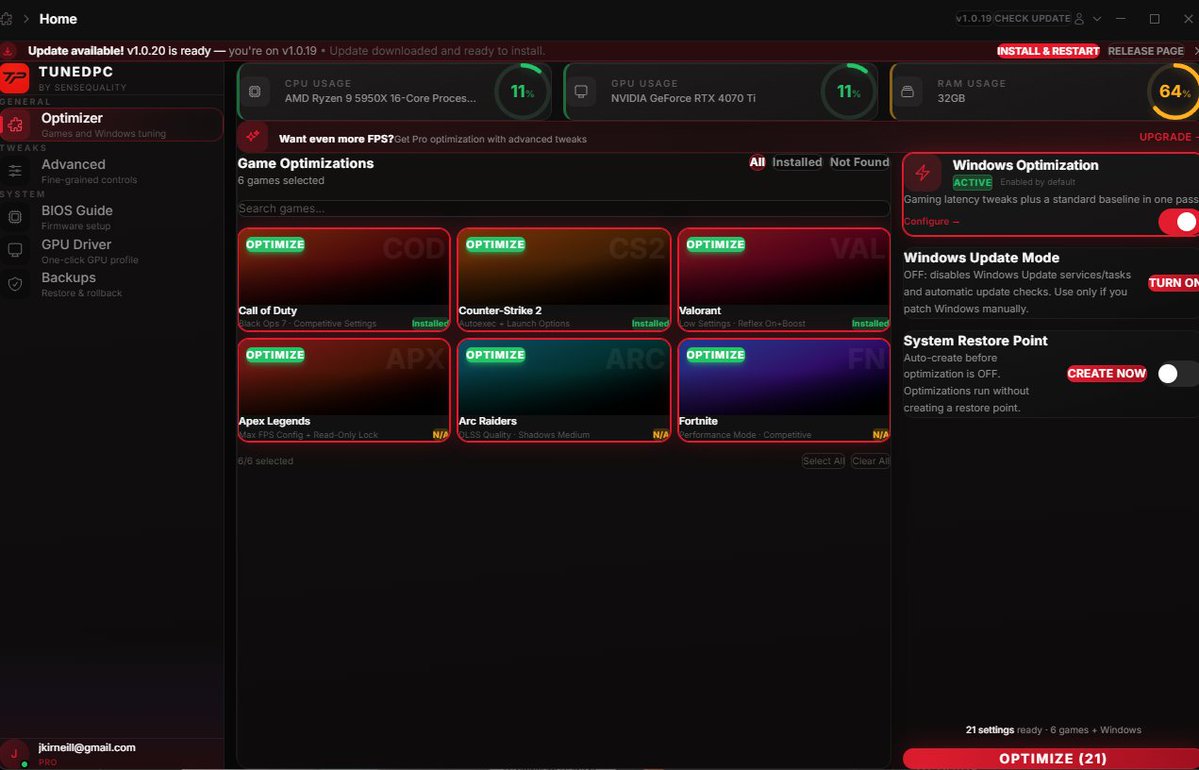
Hey guys, so i checked the @TunedPC app database and 50% of you are still on the first version without any of the bug fixes. It should look like the picture below. please update to the newest version. i'll link it below 👇
KIRNEILL tweet media
English
15
3
120
14.8K
SenseQuality retweetet
KIRNEILL
KIRNEILL@KIRNEILL·
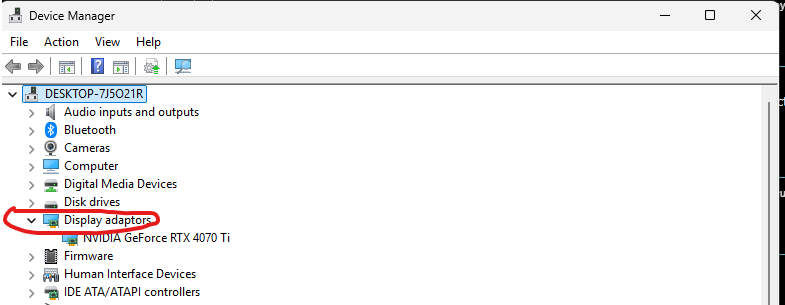
A lot of you guys still have your integrated graphics card on which can reduce your FPS in games Go to Device Manager -> Display Adaptors -> Right Click the graphics card that isn't your main GPU -> Disable it This will let your PC know that you want to only use your MAIN GPU.
KIRNEILL tweet media
English
22
29
899
108.2K
SenseQuality retweetet
Birthofmac
Birthofmac@birthofmac·
Bro u are a master mind this is amazing. @KIRNEILL
Birthofmac tweet media
English
1
3
8
6.7K
SenseQuality retweetet
TunedPC
TunedPC@TunedPC·
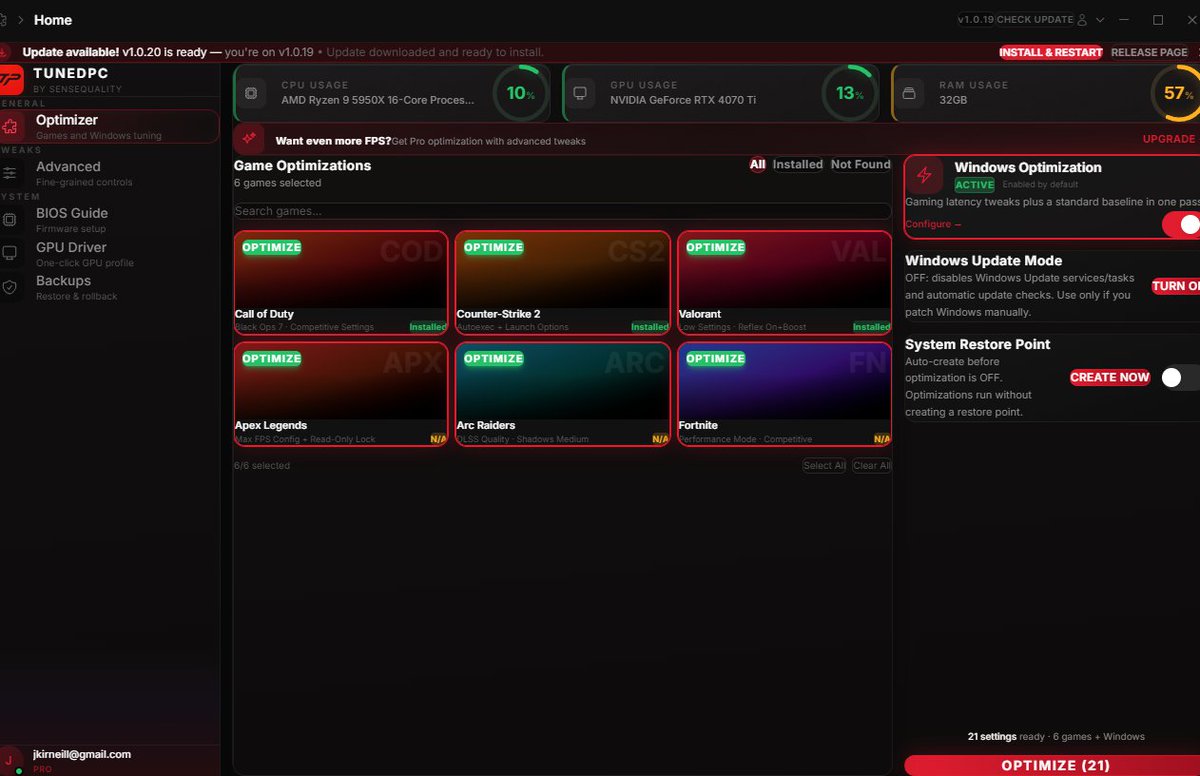
TunedPC Update 1.0.20: - Fixed GPU Error where it prioritized your integrated GPU as primary instead of your main GPU - Fixed Arc Raiders Detection and Optimization for more FPS - Added Steam Path Coverage Download below
TunedPC tweet media
English
10
6
97
11.9K