TheGuideLog

139 posts

TheGuideLog banner
TheGuideLog

TheGuideLog

@TheGuideLog

I do Quick No-BS Hytale content... basically i don't farm you for watchtime.

Beigetreten Ocak 2026
47 Folgt83 Follower
Angehefteter Tweet
TheGuideLog
TheGuideLog@TheGuideLog·
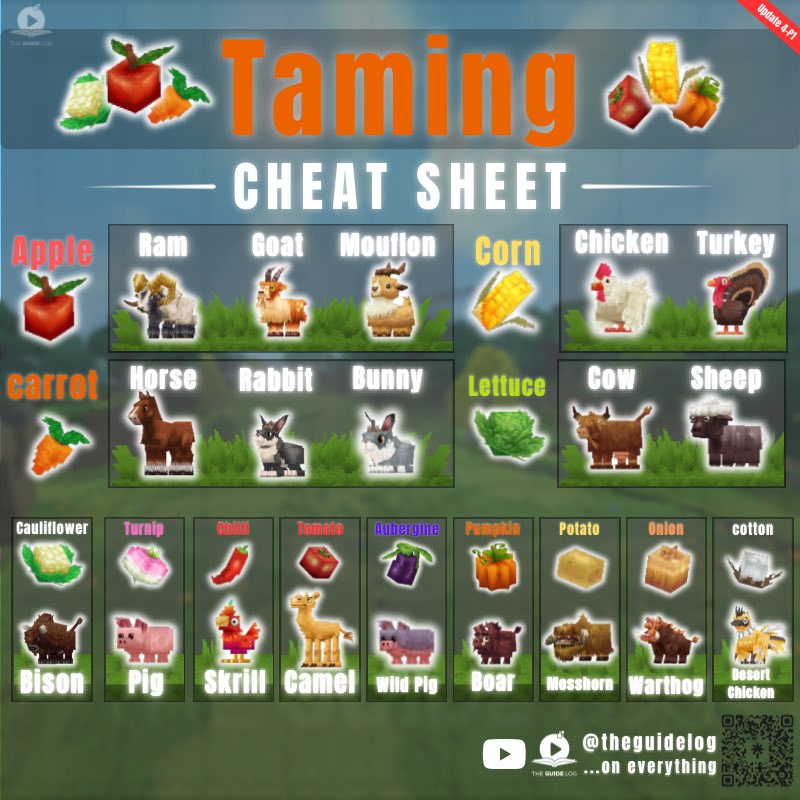
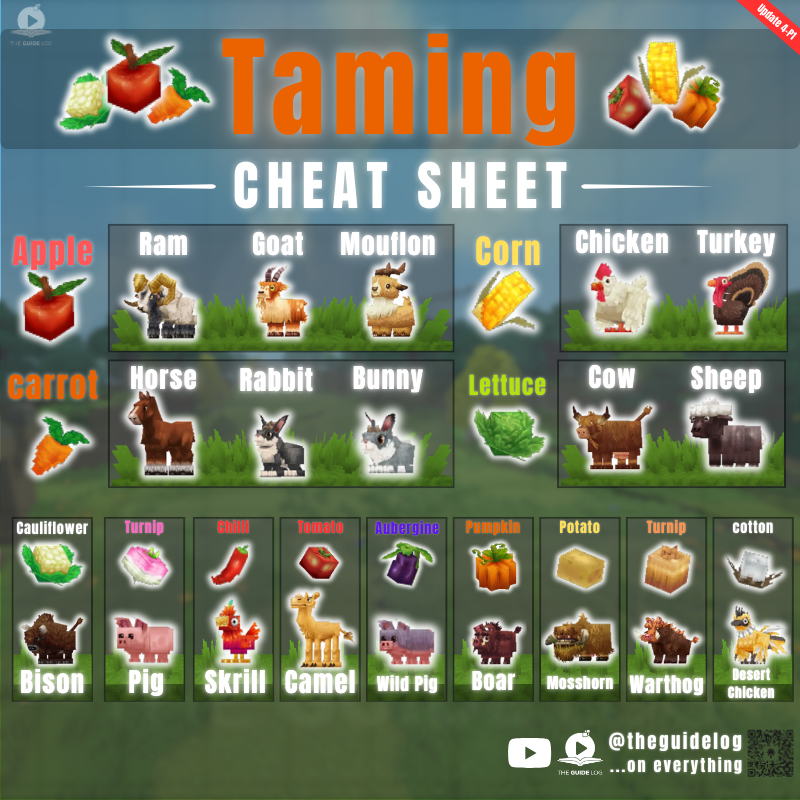
Updated Taming Cheat sheet - Hope it saves you some time 😍 bookmark & share it - it'll come in handy #hytale #hytaletaming
TheGuideLog tweet media
English
4
11
76
2.5K
Hytale Alerts
Hytale Alerts@HytaleAlerts·
Which one do you prefer?
Hytale Alerts tweet media
English
97
35
1.9K
88.2K
TheGuideLog
TheGuideLog@TheGuideLog·
Proximity chat is here!
Simon@Simon_Hypixel

Pre-Release Patch Notes (Mar 5, 2026) Update 4 (Part 3) Enable via Launcher → Settings → Pre-Release I promised to bring proximity voice chat before buying back Hytale, and here we are! Friendslop minigames are gonna be crazy fun! 𝗛𝗘𝗔𝗗𝗟𝗜𝗡𝗘 𝗙𝗘𝗔𝗧𝗨𝗥𝗘𝗦 - Proximity Voice Chat is here! You can now communicate with others via spatial, distance-attenuated voice in the game worlds! - Voice Chat is disabled by default. You may enable it from the Audio Settings menu. - New console commands for client and server can be found for Proximity Voice Chat at .voice and /voice respectively. - Modify your audio preferences, including input device, input level, noise suppression, and input mode. If you prefer using Push to Talk, you can also bind your preferred hotkey. - The farther you are from others, the more distant they'll sound, and these settings can be configured by a server op. - Players communicating within range of you will be displayed, along with how they currently appear. Talking will also animate your Avatar! - Players who find themselves submerged or in reverberant locations might notice that they sound a little different. 𝗔𝗩𝗔𝗧𝗔𝗥 & 𝗖𝗢𝗦𝗠𝗘𝗧𝗜𝗖𝗦 - Added 7 new Hairstyles: - Afro, Big Afro, Frizzy Buns, Long Dreadlocks, Puffy Twin Dreads, Dreads Fade, and Star Puffs - Updated 3 Hairstyles: - Puffy Bubble Braids, Afro Puffs, and Puffy Bun 𝗜𝗧𝗘𝗠𝗦 & 𝗘𝗤𝗨𝗜𝗣𝗠𝗘𝗡𝗧 - A new Decorative_Potion_Template has been added. Blue, Green, Iridescent, Pink, Purple, and Orange Potions are now Decorative Potion items. - All consumable potions now use the Potion_Template and have item Quality levels. - Normal and Large potions have updated models. - Iridescent potions have updated textures. - The crafting requirements for Health, Stamina, and Energy potions have been reworked. - Health Potions: - Lesser Health Potions now restore 15% health instantly and another 15% after 5 seconds for 30% total restored. They have a stack size of 5. - Small Health Potions now restore 15% health instantly and another 30% after 5 seconds for 45% total restored. They have a stack size of 10. - Health Potions now restore 25% health instantly and another 35% after 5 seconds for 60% total restored. They have a stack size of 5. - Greater Health Potions now restore 25% health instantly and another 50% after 5 seconds for 75% total restored. They have a stack size of 10. - Large Health Potions now restore 35% health instantly and another 55% after 5 seconds for 90% total restored. They have a stack size of 1. - Stamina Potions: - All Stamina Potions are consumed faster to account for default stamina regeneration. - Lesser Stamina Potions now restore 30% stamina instantly and have a stack size of 5. - Small Stamina Potions now restore 45% stamina instantly and have a stack size of 10. - Stamina Potions now restore 60% stamina instantly and have a stack size of 5. - Greater Stamina Potions now restore 75% stamina instantly and have a stack size of 10. - Large Stamina Potions now restore 90% stamina instantly and have a stack size of 1. - Energy Potions: - Lesser Energy Potions now generate 30% signature energy over 30 seconds and have a stack size of 5. - Small Energy Potions now generate 45% signature energy over 30 seconds and have a stack size of 10. - Energy Potions now generate 60% signature energy over 30 seconds and have a stack size of 5. - Greater Energy Potions now generate 75% signature energy over 30 seconds and have a stack size of 10. - Large Energy Potions now generate 90% signature energy over 30 seconds and have a stack size of 1. - Added Copper and Iron Sickles, craftable at the Farming Workbench. - Sickles may now be swung repeatedly by holding down the input. - Added Pink Crystal Shards, dropped from Pink Crystals. - Added the Crystal Shard resource type, and parented all other Crystal Shard colours to Ingredient_Crystal_White. - Gold Ingots can now be converted to Gold Bricks using the Builder's Workbench. - Empty Small and Large Potion Bottles can now be crafted at the Alchemy Bench. - Blood, Storm and Azure crop seeds are now crafted at the Alchemy Bench and have had their crafting requirements changed. - Crystal Fertilizer has been added which is a requirement for Blood, Storm and Azure crops. - Blood Leaf, Storm Sapling and Azure Kelp now each have unique requirements to grow. - Blood, Storm and Azure plants no longer drop seed recipes as they are no longer required. - Blood, Storm and Azure plants can be salvaged at the Salvager's Workbench to produce their respective petals. 𝗪𝗢𝗥𝗟𝗗 & 𝗕𝗟𝗢𝗖𝗞𝗦 - Removed Tiers 9 and 10 from the Farming Bench. - Added Tiers 3, 4 and 5 to the Alchemy Bench. - Updated the Zone1 Plains biome weather patterns. Fireflies will now appear more regularly. - Overhauled world-gen's Prop system, adding new modular features and deprecating monolithic ones. 𝗘𝗡𝗧𝗜𝗧𝗜𝗘𝗦 & 𝗘𝗡𝗖𝗢𝗨𝗡𝗧𝗘𝗥𝗦 - Defeated NPCs will now trigger death particles and drop items when their body disappears. - Temple Golems now each drop their respective gem type. - Earth Crystal Golems drop Emeralds. - Flame Crystal Golems drop Rubies. - Frost Crystal Golems drop Sapphires. - Sand Crystal Golems drop Zephyrs. - Thunder Crystal Golems drop Topazes. - Implemented conditional entity effect systems. This enables entity effects to be configured enabling them to be conditionally applied or removed. - Implemented a non-scaled switch response curve for the Combat Action Evaluator. This will enable the returning of an initial state value before a defined switch point and a final state value upon reaching it. 𝗔𝗨𝗗𝗜𝗢 - Added block sound clustering so that looping ambient sounds can be applied to large bodies, such as raindrops on water. - Added conditional ambient sounds so that ambient sounds can be applied to blocks during certain conditions, such as raindrops on windows. 𝗨𝗜 & 𝗤𝗨𝗔𝗟𝗜𝗧𝗬 𝗢𝗙 𝗟𝗜𝗙𝗘 - Introduced two configurable world map radius limits: per-world and server-wide. - Added the ability to configure a per-world override on minimap radius. - Added the ability to configure a server-wide clamp on minimap radius. - Gatherable items now result in a 'Pick' interaction hint. - Doors, fences and trapdoors now result in an 'Open' interaction hint. - The mouse wheel can now be used to navigate through the emote pages. - Items used for Creative Tooling may now be marked as 'Technical'. - Added the 'Tools' category for bug reports and feedback. - Updated the localization that takes place upon disconnecting to cover more cases. - Cleaned up localization code. 𝗠𝗢𝗗𝗗𝗜𝗡𝗚 & 𝗧𝗢𝗢𝗟𝗦 - Added an Asset Pack Save Browser that lets users select or create asset packs to save prefabs into. This replaces the previous behaviour of always saving to the server's default prefabs directory. - Merged the Anchor Tool into the Prefab Selector Tool. You may now set an anchor with SHIFT+R. - Added a hotkey to travel between the Prefab Editor World and the last world visited. By default, this is ALT+T. - Improved the Paste Tool preview performance. - Tints now support blending and varying opacities - Changes made with tints are saved to the tool's history. - Updated the NodeEditor to Noesis 3.2.1 - Added the /npc descriptors command, which generates an NPC descriptors file. - NPC templates have had the following adjustments: - They now have the following parameters visible: DeathParticles, DropDeathItemsInstantly and DeathAnimationTime - Action elements can now be selectively disabled with the Enabled flag. - The Beacon action's Range field can now be computed from template variables. 𝗕𝗨𝗚 𝗙𝗜𝗫𝗘𝗦 𝗖𝗢𝗠𝗕𝗔𝗧, 𝗡𝗣𝗖 & 𝗜𝗧𝗘𝗠 𝗙𝗜𝗫𝗘𝗦 - Fixed a crash that could occur when a referenced entity effect was missing or had an invalid network index. - Tilling with hoes will now be prioritised over blocking if both a hoe and shield are equipped. - Updated farming tools to require specific items to build rather than specific resource types. - Watering cans should no longer skip valid blocks when watering. - Crude shovels now correctly reference Stone Rubble in their recipe. - Feedbags and Fertilizer are now categorized as Tools rather than Potions. - Updated the descriptions for Petal items. - Updated the descriptions for Rubble items to use the parent description only. - Burnt Praetorian Skeletons should now better adhere to gravity when using their charge attacks. - Mount movement settings should no longer linger if the mount is killed by a teleporter. - Spawn particles should now be fixed for NPCs. 𝗪𝗢𝗥𝗟𝗗 & 𝗕𝗟𝗢𝗖𝗞 𝗙𝗜𝗫𝗘𝗦 - Updated the River & Tile worldmap density to allow multiple biomes to be spawned. This should result in redwood biomes appearing within taiga portal worlds. - Floating torches may no longer be placed on the north side of Stone Pillars. - Furnaces should no longer attempt to process items when disabled. - Fixed an issue with Salvage Benches not processing items correctly. - Fixed BaseHeight positions not working with Offset Positions - Crops that are growing in the sunlight will no longer benefit from additional nearby artificial lights. 𝗖𝗥𝗘𝗔𝗧𝗜𝗩𝗘 𝗧𝗢𝗢𝗟, 𝗠𝗢𝗗𝗗𝗜𝗡𝗚 & 𝗣𝗟𝗨𝗚𝗜𝗡 𝗙𝗜𝗫𝗘𝗦 - Fixed a crash when adding a number in the timeline editor. - Fixed a crash that occurred when selecting nodes on the Node Editor. - Fixed a number of stability issues relating to Undo/Redo with the Node Editor. - Fixed an issue preventing models being displayed within the Asset Previewer if the texture was too small. - Fixed an issue preventing 1x1x1 selections with the Selection Tool. 𝗨𝗜 & 𝗗𝗜𝗦𝗣𝗟𝗔𝗬 𝗙𝗜𝗫𝗘𝗦 - Fixed a crash when swapping cameras during world transitions. - Fixed an issue where holding down the 'Invert camera' key and changing between items on the hotbar could cause the camera to reposition rapidly. - Map markers now take into account map scaling when determining if they are being hovered over. - Updated some emote names to better reflect the animations played. - Fixed various issues related to localization.

English
0
0
0
136
Smithy MC
Smithy MC@SmithyMCPlays·
Road to 50k Subs - My YouTube channel achieved 45,000 Subscribers on February 28, 2026! @vidIQ is helping.....And Thank You for all those people that watch the channel..
Smithy MC tweet media
English
5
0
6
224
TheGuideLog
TheGuideLog@TheGuideLog·
@HytaleAlerts Tree cutting is the most satisfying in Hytale. Having huge tree sitting on one log then you break it and it goes trrrrrrrr. Perfection
English
2
0
14
566
Hytale Alerts
Hytale Alerts@HytaleAlerts·
Now that we’re finally playing Hytale: What’s one feature that you can’t live without anymore when compared to other sandbox games? ⚔️✨
Hytale Alerts tweet media
English
24
7
157
5.9K
TheGuideLog
TheGuideLog@TheGuideLog·
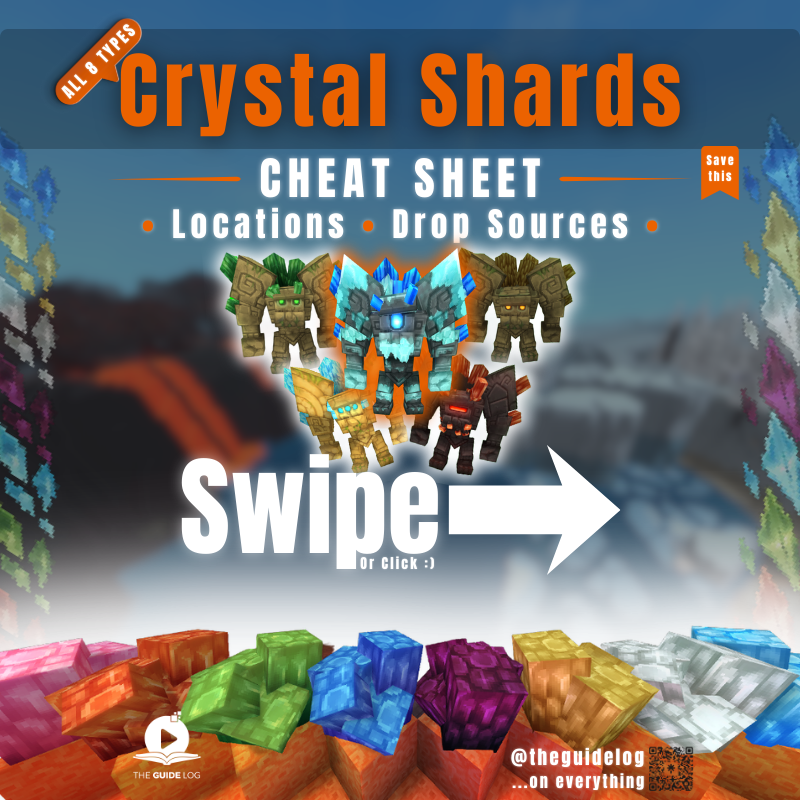
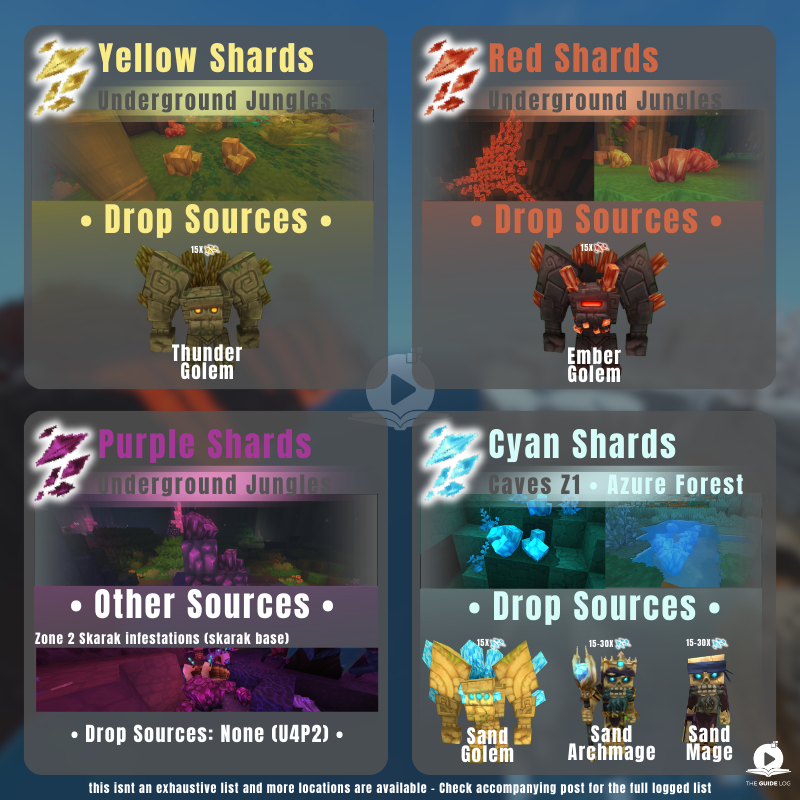
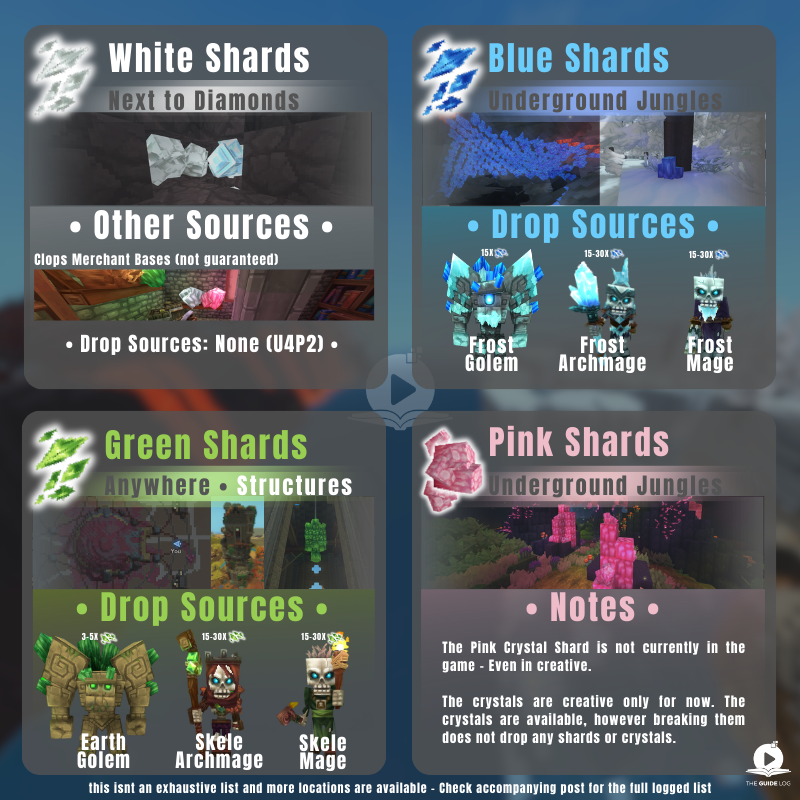
Not all locations fit on the image. If you’ve found shard spawns, comment like this: Color — Zone — Landmark/structure — Screenshot (optional) I’ll update the thread in the future using your info + credit. #Hytale Hope this saves you some time :)
TheGuideLog tweet mediaTheGuideLog tweet mediaTheGuideLog tweet media
English
0
0
9
256
TheGuideLog
TheGuideLog@TheGuideLog·
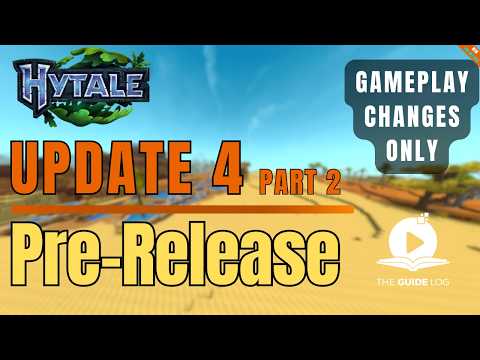
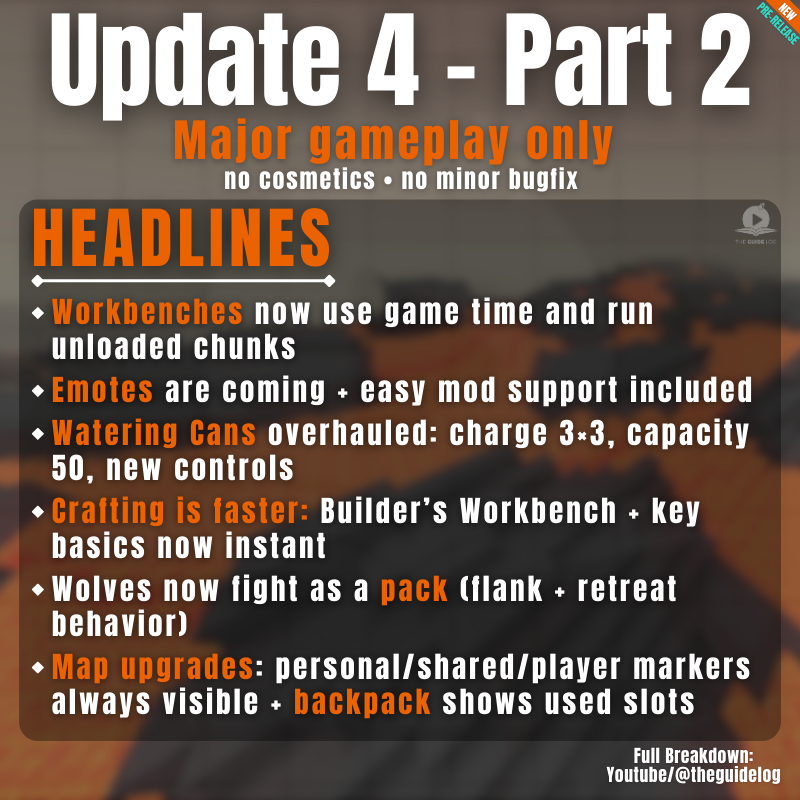
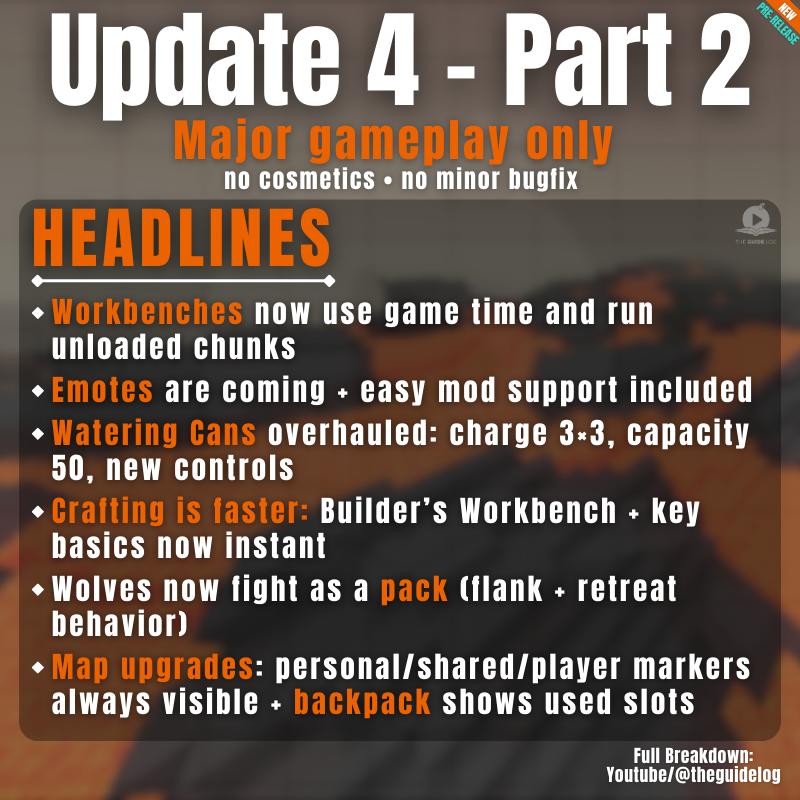
Updated headlines for update 4 (Part 2) #hytale Video on channel, breakdown in under 3 minutes
TheGuideLog tweet media
English
2
0
3
163
TheGuideLog
TheGuideLog@TheGuideLog·
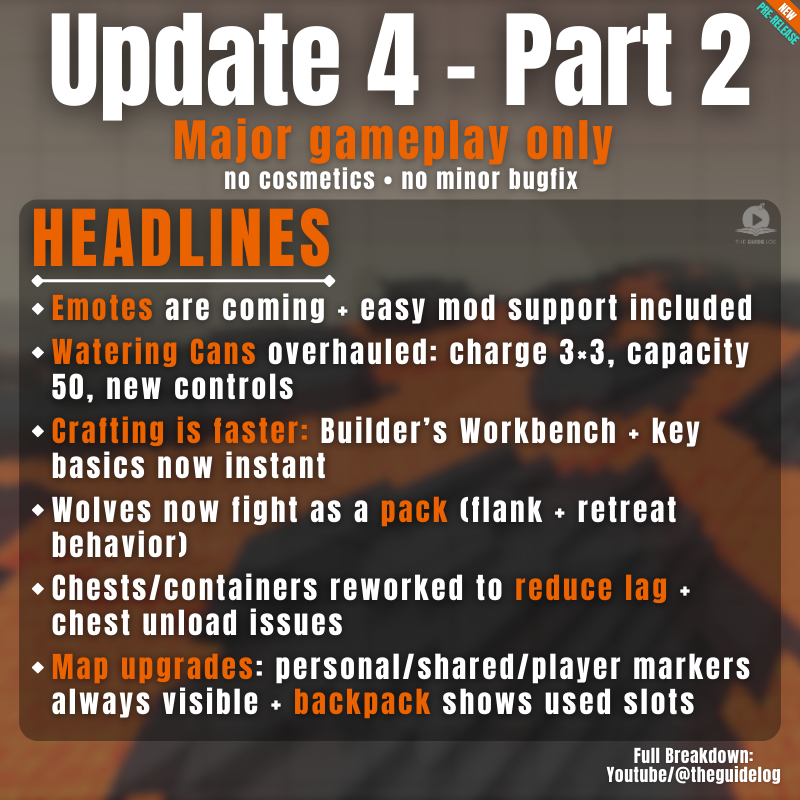
Heres the updated headlines! Missed a major headline! my brain didn't comprehend it but wow headline number 1 needs to be discussed! #hytale Credit to reddit user (u/FireBest59) for pointing out a missed headline
TheGuideLog tweet media
English
0
0
2
88
TheGuideLog
TheGuideLog@TheGuideLog·
Update 4 Part 2 is now on pre release. Here are the major headlines. #Hytale #hytaleupdate4 Full Video coming soon
TheGuideLog tweet media
Simon@Simon_Hypixel

Pre-Release Patch Notes (Feb 26, 2026) Update 4 (Part 2) Enable via Launcher → Settings → Pre-Release Headline Features - Added an Emote Wheel! Express yourself in-game by holding down the ‘X’ key. This keybinding can be changed in the Settings menu. - Added a new Creative Tool: Revolve. This new tool allows you to paste rotations of your current selection any number of times or fully around a center point. - Overhauled the /replace command: - Moved swap and regex from flags into subcommands, allowing each variant to use arguments without conflicts - Added block mask support to the ‘from’ argument, enabling spatial mask syntax like >Block or !Block - Added additional validation. - Black and white wolves will now fight as a pack, periodically attempting to flank their prey and attempting to retreat when injured. - Implemented dual source blending with a center source to improve the audio experience with the Headphones (Stereo) setting. Positional audio should now feel less in one ear. Avatar & Cosmetics - The player Avatar will now face the camera when using free camera or third person camera modes. - The player Avatar will now animate differently when falling from a great height. - Added the ‘Chicken’, ‘Kill’, ‘Laugh’, ‘Punch’ and ‘Tongue’ emotes. - Added the ability for some emotes to loop. Items & Equipment - Numerous changes to how Watering Cans function: - They now use a Template parent and have configurable width and depth for area of effect watering - They can now be charged to water a 3x3 area - Their capacity has increased from 20 to 50 - They can be placed on the ground when crouching, returning empty Watering Cans if broken - They now water exclusively with the Secondary interaction key for consistency with the Hoe. - The Builder’s Workbench has had its crafting time reduced from 2 seconds to instant. - The Campfire, Crude Bedroll and Wooden Chest have had their crafting time reduced from 1 second to instant. - The Crude Torch has had its crafting time reduced from 0.5 seconds to instant. - ‘Seaweed - Middle’ is now referred to as ‘Stacked Seaweed’. - ‘Red Cobble Blocks’ are now referred to as ‘Red Sandstone Cobble Blocks’. - ‘White Cobble Blocks’ are now referred to as ‘White Sandstone Cobble Blocks’. - The previews for the ‘Crude Bed’, ‘Crude Repair Kit’ and ‘Iron Repair Kit’ have been updated. - The entity stat MagicCharges has been hidden from item tooltips. World & Blocks - Improved handling of extreme coordinates. - Reworked item containers to block components, reducing lag and preventing issues with chests when unloading. - Workbenches will now continue processing items even if their chunks are unloaded. - Workbenches will now resume processing items if their full output slot is emptied. - Workbenches will now use the world game for their calculations instead of real time. - Workbench assets are now configured to have a BenchBlock component, rather than exist with a ‘crafting’ state. NPCs & Encounters - Reduced the number of checks required to be performed whether an NPC was able to breathe. - Skrill can now lay eggs. Audio - Recording and restoring memories now plays sound effects. - Zone 1 mountain ambience will now differ based on the player’s altitude. - Placeholder music and ambience has been added to Zone 4 caves and sewers. UI & Quality of Life - Implemented support for CJK fonts. - Added localization support for the Machinima tool. - Personal, shared and player markers will now always be visible on the Map. - The backpack in the Player Inventory now shows how many item slots are currently being used. - Moved the Noesis UI folder from Game/ to Shared/ - Moved the Fonts/ folder into the Noesis UI project folder UI/ Modding & Tools - Error messaging has been added to the /copy command for when too many blocks are selected. - Added the ‘/pedit back’ command to quickly alternate to and from the prefab editor world. - Empty brush and tool edits no longer get registered to the tool history, or trigger notifications. - The deselect command will now be registered to the tool history. - Fluid changes now contribute towards the block count when saving Creative Tool edits to history. - The Laser Pointer tool may now be used to direct others’ attention towards the sky. - The Selection Tool will now allow you to select a region without holding down the left mouse button. - Updated the Selection Tool’s Rotation Gizmo to make rotating selections more intuitive. - Updated the size scaling and made it easier to select various Creative Tool Gizmos. - The ‘.mach speed’ command will now only target the active actor. - Added ‘Time of Day’ and ‘Weather’ to the Creative Mode Quick Settings menu that will adjust the environment for the client only. - Added a ‘Reset Environment’ button to the Creative Mode Quick Settings menu that resync’s the client and server’s environmental settings. - Added PlayerRemovedFromWorldEvent that allows plugin developers to create customisable, optional messages that can be broadcast when someone leaves the world. - Added ‘Spawn’ settings to the PortalType asset, including SpawnProviderOverride, allowing developers to specify where a return portal is placed. - Started work to move the server to use the JOML math library. - You can now use any unique substring of a command argument to access that command argument. For instance, if there are only the arguments ‘--cat’ and --dog’, ‘--at’ will return the former. - Players can now select which mods folder to create their asset pack in. - Added item HUD UI support, allowing for Custom UIs to be created for all items. - Significantly improved the performance of the Creative Tool’s previews. Accessibility - Implemented support for Windows ClickLock feature. Bug Fixes Combat & Item Fixes - Wheat is no longer edible. - Stacked Seaweed can no longer be eaten to cause a missing interaction error. - Placed Cane Ornaments are no longer unbreakable. - Ammo is no longer consumed in Creative Mode. World & Block Fixes - All half blocks should now stack correctly and drop the correct number of items when broken. - Fixed Tamed Chickens not being recognised by Chicken Coops, they will now lay eggs in them just like their untamed counterparts. - Fixed a NPE that can occur when a Crafting Bench is broken whilst in use. - Mounts will no longer be able to sprint indefinitely in fluids. - NPCs will no longer follow items at an infinite range. - Gravel blocks made up of two vertical Gravel slabs will no longer unexpectedly break if adjacent blocks are broken. - Player avatars will now enter Minecarts instead of Minecarts teleporting under the player. - Fixed a bug where some encounters did not properly inherit the weather of surrounding areas. - Chunks will now correctly generate cave networks within Zone 4. - Lava will now correctly burn entities as entity effects no longer incorrectly overwrite themselves. - Portal devices will now refund fragments if the portal worlds fail to generate. - Decayed tilled soil will now update correctly once it has fully decayed. Creative Tool, Modding & Plugin Fixes - Fixed a crash that could occur when attempting to use Creative Tools with invalid or missing data. - Fixed a bug causing players to die in the Crossroads if the player exited out of the prefab editor. - Fixed a bug with the prefab editor menus causing players to sometimes be teleported to the wrong location. - Fixed a bug causing prefab anchors to incorrectly despawn. - Players can no longer find themselves rotated and translated with the Selection Tool. - Fixed interpolation issues with the Brush tool on the axis plane. - The Selection Tool’s selection box will now remain stationary when rotating its contents. - The Selection Tool’s Rotation Gizmo position will now correctly reset to center after undoing an action. - Fixed a bug where incorrect blocks would appear when rotating or translating fluids. - Fixed a bug with Single Player worlds and image importing permissions. - Fixed a bug preventing the .mach speed command from applying to the whole scene. - Fixed a bug preventing NPC scaling with the Entity Tool. UI & Display Fixes - Fixed a crash that could occur with nameless map markers. - Fixed a crash that can occur with Entity UI elements. - The Player Backpack is now hidden in Creative Mode. - Fixed various issues with localized text extending outside of the default UI. - Fixed plural localization for mod and asset packs that failed to load or are outdated. - Fixed map markers sometimes not appearing on the compass. - Cleared first person animations when mounting NPCs. - Fixed an issue where certain inputs could result in item stacks being dropped from the inventory rather than single items. - Fixed an issue with the Utility item wheel being offset when dragging and dropping stacks within the wheel. - Fixed an issue where player marker toggle settings didn’t persist across sessions.

English
1
1
5
390
TheGuideLog
TheGuideLog@TheGuideLog·
@not_mynes looks like its doing well :) Good luck friend
English
0
0
1
74
Myne
Myne@not_mynes·
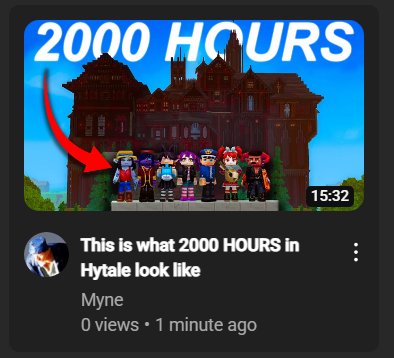
If you can't beat em, join em I have had a community smp open since launch and there has been over 2000 combined hours logged. I tour the craziest builds in my latest video 🫣
Myne tweet media
Myne@not_mynes

Words cant describe how much I hate the current state of Hytale YouTube. It's just Minecraft people coming over and doing A SINGLE FORMAT. There is ZERO originality and all of these videos are the exact same. The worst part is that they're all like 2-3 hours. Excuse me?
English
4
3
53
2.3K
TheGuideLog
TheGuideLog@TheGuideLog·
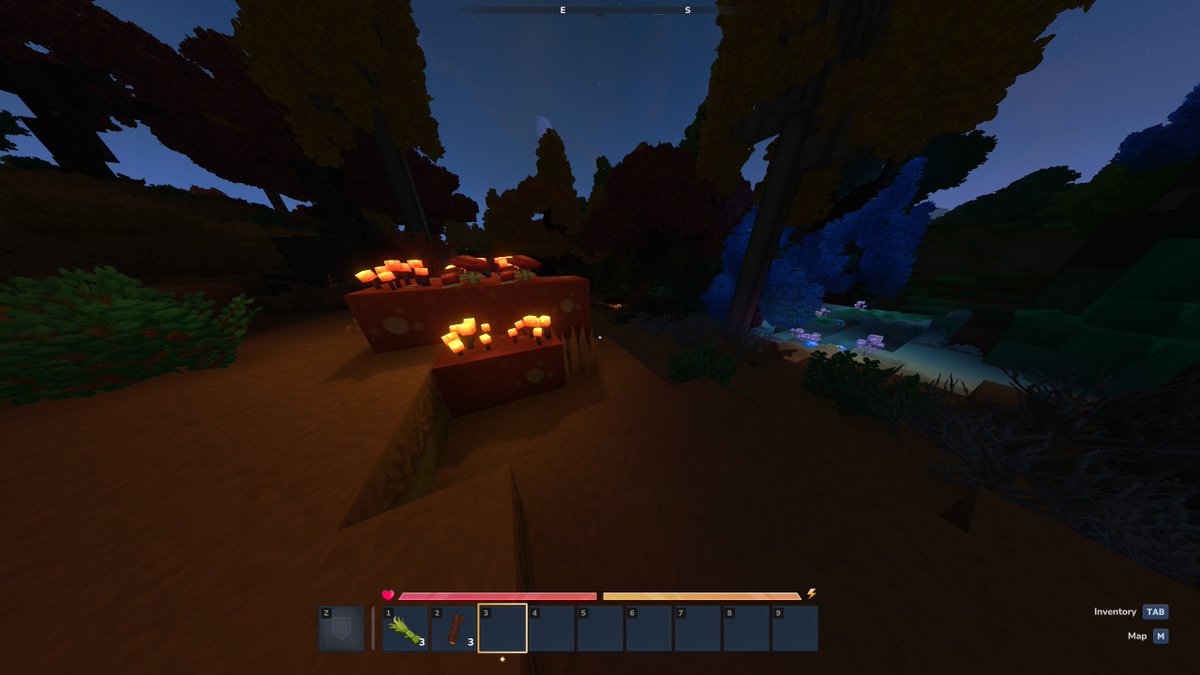
@RuneteriaServer i love walking around and finding plants and blocks that emit light. Those are amazing
TheGuideLog tweet media
English
1
0
9
111
Runeteria
Runeteria@RuneteriaServer·
The nights in #Hytale are so cosy and atmospheric, what's your favourite part about this time of day? 🌙🎑
English
6
2
32
1.7K
TheGuideLog
TheGuideLog@TheGuideLog·
i cant believe that animals can use teleporters... so much time wasted walking around with tamed animals, when we could be doing this instead #Hytale Did you know this?
English
0
0
12
470
Hytale Alerts
Hytale Alerts@HytaleAlerts·
A boxing match in Hytale? This is actually so creative! 🤩
English
2
3
106
4.6K
TheGuideLog retweetet
TheGuideLog
TheGuideLog@TheGuideLog·
Updated Taming Cheat sheet - Hope it saves you some time 😍 bookmark & share it - it'll come in handy #hytale #hytaletaming
TheGuideLog tweet media
English
4
11
76
2.5K
TheGuideLog
TheGuideLog@TheGuideLog·
@playceplayz ALS check the posts comment, there’s an updated sheet. One typo fixed
English
0
0
0
8