Zheeeng

344 posts

Zheeeng banner
Zheeeng

Zheeeng

@Zheeeng

hunan Se unió Aralık 2011
211 Siguiendo70 Seguidores
Zheeeng retuiteado
balconychy(贝壳里奇)
balconychy(贝壳里奇)@balconychy·
用Cherry studio和高德地图MCP,整了个旅游规划智能体。 -自带景点地图,一键导航 -详细时间规划,预约提醒
中文
38
132
680
171.4K
Zheeeng retuiteado
katon
katon@hellokaton·
🤯 AI 写 UI,总是“漂亮一点,有设计感”?效果拉胯? 我发现了神器 uiprompt,让你的 UI 设计瞬间起飞 ✓ 汇集大量精美UI + 对应提示词 ✓ 一键生成同款Prompt,告别描述无力 ✓ Claude/Cursor/Deepseek/豆包... 通通适用! 告别垃圾UI,让AI真正懂你的设计! 赶紧体验,点赞收藏不迷路!
中文
24
165
704
61.4K
Zheeeng retuiteado
jhey ʕ•ᴥ•ʔ
jhey ʕ•ᴥ•ʔ@jh3yy·
content wave with CSS scroll animation li { animation: grow both var(--custom-in-out-ease); animation-timeline: view(inline); } @​keyframes grow { 50% { width: var(--desired-size); } } bonus javascript for drag to scroll with inertia ✨
Will Thomson@willthomson__

This widget looks pretty nice.

English
8
45
649
40.1K
Zheeeng retuiteado
Ana Tudor 🐯 (find me on Bluesky/ Mastodon)
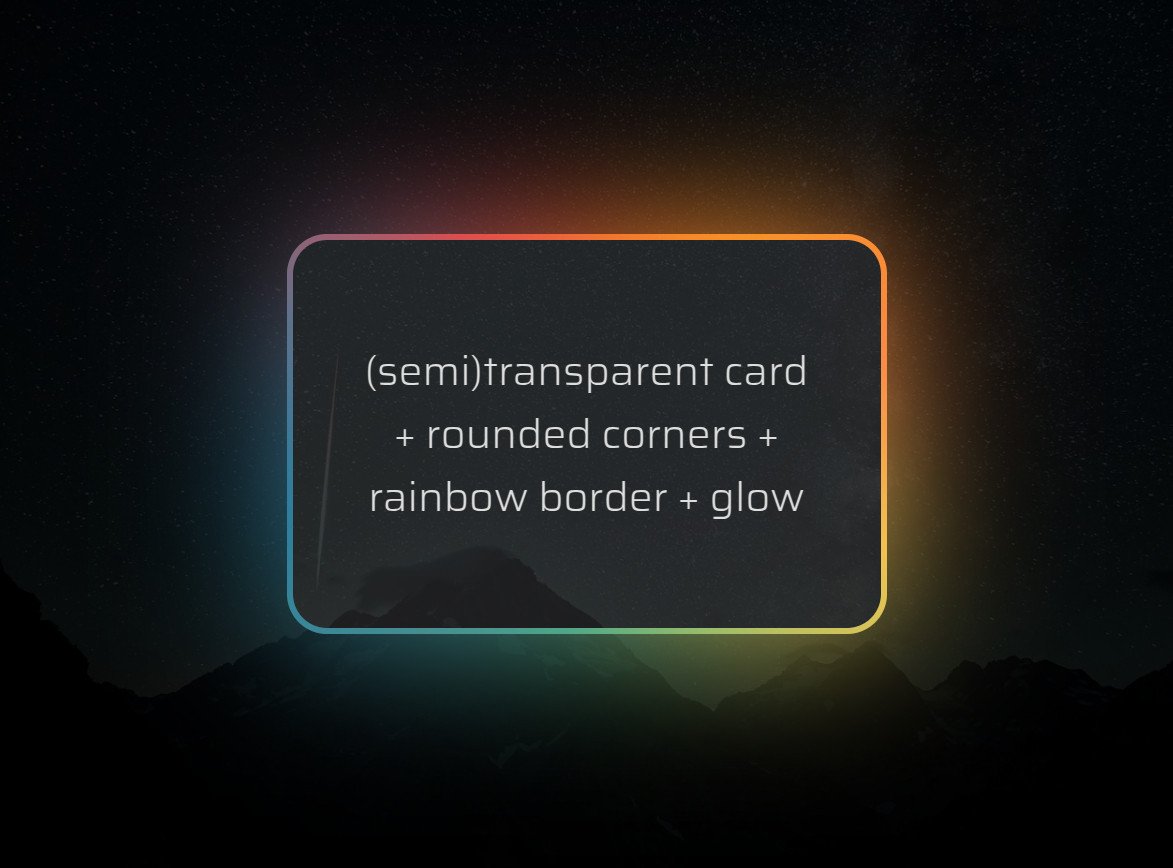
Know the animated 🌈 border + glow effect that's all the rage? It's normally done by adding an opaque cover on top of two 🌈 layers. But what if we wanted a (semi)transparent background within the border? It's possible with pure #CSS! Heavily commented: codepen.io/thebabydino/pe…
Ana Tudor 🐯 (find me on Bluesky/ Mastodon) tweet media
English
6
16
191
9K
Zheeeng retuiteado
歸藏(guizang.ai)
歸藏(guizang.ai)@op7418·
Cursor 员工在编辑器中经常使用的快捷键推荐
歸藏(guizang.ai) tweet media
ian@shaoruu

list of keybindings i use all the time in @cursor_ai composer: - cmd-backspace to cancel generation - cmd-enter/backspace to accept/reject all - tab/shift-tab to cycle between messages to prompt more and resubmit - cmd-alt-/ to open model toggle - cmd-n/r to create new composer - cmd-shift-K to open composer as bar - cmd-[ ] to cycle through composers - cmd-alt-l to open histories - cmd-w to close composer what other keybindings would people want added?

中文
1
51
292
69.5K
Zheeeng retuiteado
CJ Zafir
CJ Zafir@cjzafir·
Complete step-by-step guide on Cursor: 🧵
CJ Zafir tweet media
English
17
217
2.1K
363K
Zheeeng retuiteado
Gradio
Gradio@Gradio·
Text3D - a nice little gradio app that generates images that can be used to generate 3D artefacts downstream.
English
3
102
612
42.5K
Zheeeng retuiteado
CSS by T. Afif
CSS by T. Afif@ChallengesCss·
💡 CSS Tip! Do you want to detect the overflow of an element? Does it have a scrollbar or not? It's possible with only CSS (No JavaScript!) You can even style any element on the page using this information 🤩 See reply for code and demo👇
English
2
25
106
9.3K
Zheeeng retuiteado
James
James@samejr·
Each day of our launch week comes with a fancy animation built using @rive_app. You'll only see it if you click through to our blog, so i'll be posting them here every day as well.
English
13
15
287
25.8K
Zheeeng retuiteado
jhey ʕ•ᴥ•ʔ
jhey ʕ•ᴥ•ʔ@jh3yy·
extra little details™ animate a CSS custom property to sync scrollbar-color with the active item ✨ html { scrollbar-color: oklch(65% 0.3 var(--p)) #0000; animation: sync; animation-timeline: --ul; animation-range: entry 50% exit 50% } @​keyframes sync { to { --p: 320; } }
jhey ʕ•ᴥ•ʔ@jh3yy

CSS position: sticky, scroll-snap + progressively enhanced scroll animation 📜 li { animation: bright; animation-range: calc(50% - 1lh) calc(50% + 1lh); animation-timeline: view(); scroll-snap-align: center; } @​keyframes bright { 50% { opacity: 1; }}
English
7
83
1.1K
59.3K
Zheeeng retuiteado
卡尔的AI沃茨
卡尔的AI沃茨@aiwarts·
👼 神级Prompt多到用不完,我用Claude将它们重构了一遍 Anthropic @AnthropicAI 将自家的提示语生成升级成了提示语优化之后,并把整个过程拆成了五步: 1️⃣ 前三步是了解用户想要什么、生成执行的流程图、从样本里学习生成规则、这时候会生成第一版提示语。我都没有输入样本,Claude 就会主动去分析预期的样本会长什么样。 2️⃣ 后面两步就更有意思了,值得单独讲讲: - 补充执行步骤的细节:这次我优化的是长文摘要的提示语,最终生成的执行步骤从阅读文本、确定信息点、列出要素、确定目标受众、分析原文语气和风格,给出合适的hook以及原因,还限制了句子数量。说实话这比我自己写推文的思路都详细。 - 动态调整输入文本、样本、输出模块在整个提示语的顺序:打个比方,Claude 会主动推测用于总结的文章内容可能会比较长,这一part就会被移动到更前面。 我把优化的过程都录制下来了👇:
中文
8
120
572
49.2K
Zheeeng retuiteado
jhey ʕ•ᴥ•ʔ
jhey ʕ•ᴥ•ʔ@jh3yy·
CSS-only magnetic link effect 🤯 li:has(a:is(:hover, :focus-visible)) {anchor-name: --a; } ul::before { left: anchor(--a left); width: anchor-size(--a width); } using CSS anchor positioning, declare an anchor on hover for the indicator 🚀
English
50
329
4.3K
233.8K
Zheeeng retuiteado
AI Will
AI Will@FinanceYF5·
100多个Cursor AI提示模板,帮助用Python、TypeScript、React等构建全栈应用。 此外,你还可以使用模板让其具备API、LLM和智能代理的专业功能。
中文
11
73
312
40.5K
Zheeeng retuiteado
Yating Zhao
Yating Zhao@yatingzhao_ux·
推荐这个一键生成网站设计的AI工具,叫Relume,目前发现的最佳,没有之一。使用感很丝滑,如沐春风,生成结果质量也很高。以后网站设计可以不用找我了👋🏻😂
中文
29
370
1.3K
128.5K
Zheeeng retuiteado
Mattia
Mattia@mattiapomelli·
✨ Build @nextjs, @tailwindcss & @shadcn UIs with a visual editor. Export the code with one click. Link below.
English
29
62
947
107.1K
Zheeeng retuiteado
Adham Dannaway
Adham Dannaway@AdhamDannaway·
Animated icons crafted by @pqoqubbw using Lucide icons, one of my favourite icons sets 🤩 Link below 👇 #icons
English
21
184
1.7K
112.7K