
Om Patel
3.5K posts


Om Patel
@om_patel5
16 year old saas dev growing https://t.co/Tr6rRuOdX9 ($10k/m) + https://t.co/K8xdwRDHqX building cool stuff
my best stuff 👉 Se unió Mayıs 2024
244 Siguiendo14.7K Seguidores

@om_patel5 idk why he gate kept this but here lol: github.com/lightningpixel…
English
NVIDIA JUST DROPPED NEMOCLAW:
(and it is way bigger than most people realize)
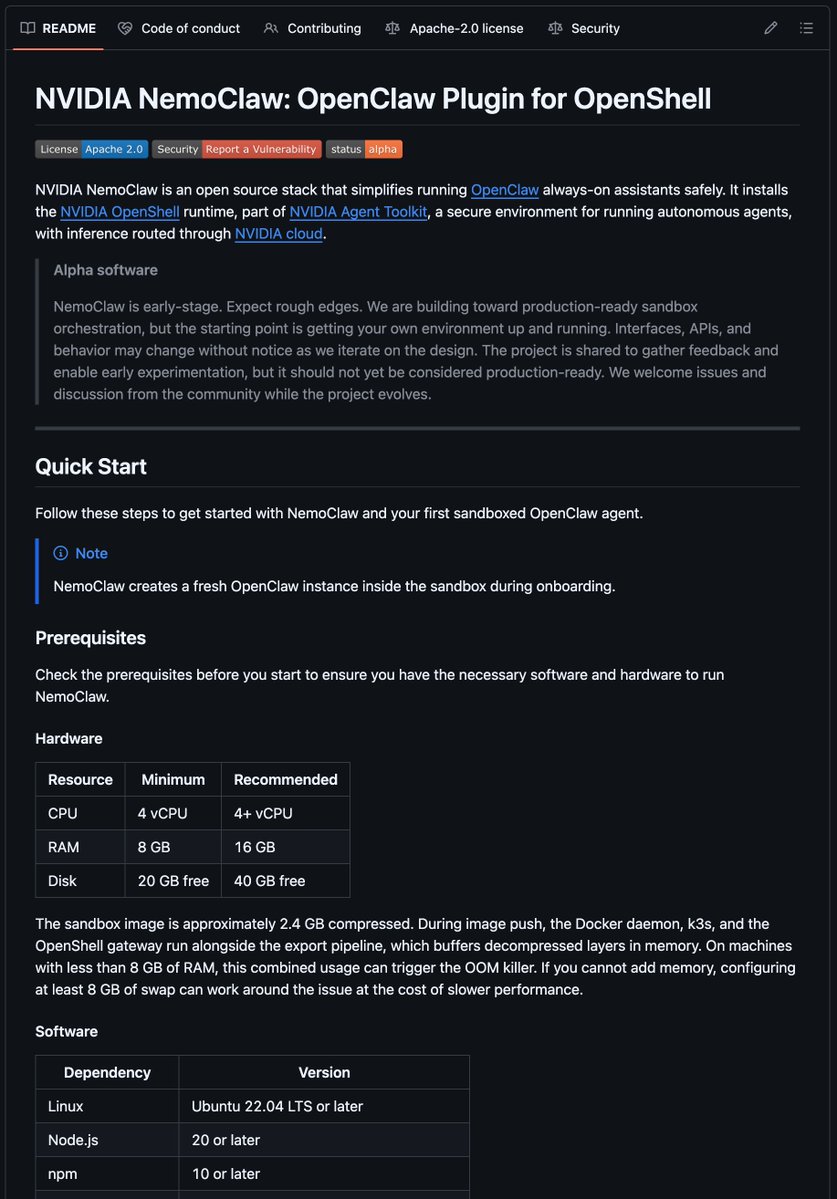
for starters, NemoClaw is an open source stack for running always-on AI assistants inside a sandboxed environment.
so instead of giving an agent broad access and hoping nothing goes wrong, NemoClaw sets up a controlled runtime where:
> the agent runs inside an isolated OpenShell sandbox
> network requests are governed by policy
> file access is restricted to safe locations
> inference gets routed through NVIDIA cloud
> operators can review and approve blocked access attempts
it is basically NVIDIA's attempt to make autonomous agents safer to run in the real world.
1. IT IS NOT JUST "ANOTHER AGENT TOOL"
most people hear "agent framework" and think prompt wrapper.
that is not what this is.
NemoClaw installs the OpenShell runtime and creates a versioned sandboxed environment for OpenClaw agents.
that means it is focused on execution, isolation, and control.
> plugin handles launch, connect, status, and logs
> blueprint orchestrates sandbox creation, policy, and inference setup
> sandbox isolates the agent runtime
> inference is routed through controlled backends instead of direct model calls
the big idea is simple:
agents should not be trusted with raw system access by default.
2. THE WHOLE THING IS BUILT AROUND SANDBOXING
this is the part that matters.
NemoClaw starts with a strict baseline policy that controls:
> network egress
> filesystem access
> privilege escalation
> dangerous syscalls
> model inference routing
filesystem access is limited to places like /sandbox and /tmp.
unauthorized outbound connections get blocked.
if the agent tries to hit an unapproved host, OpenShell surfaces it for operator approval.
that is a much more serious security posture than "just let the agent run and pray."
3. IT TRIES TO MAKE AGENTS PRACTICAL
the workflow is designed to be usable, not just impressive in a demo.
you install it, onboard an agent, then connect and chat through either:
> an interactive TUI
> a CLI command for single-shot prompts and full terminal output
so you are not just reading docs about agent safety.
you are actually standing up a real isolated assistant and interacting with it.
4. NVIDIA IS PUSHING CLOUD-REROUTED INFERENCE
one of the more interesting design choices:
the agent does not send inference requests straight out on its own.
OpenShell intercepts those calls and routes them to NVIDIA cloud.
right now the main production model path is:
> nvidia/nemotron-3-super-120b-a12b via NVIDIA Cloud API
that matters because inference becomes part of the controlled environment too.
not just files.
not just networking.
the model pathway itself.
5. THIS IS VERY EARLY
important context:
NemoClaw is alpha software.
NVIDIA is pretty direct about that.
> rough edges are expected
> interfaces and APIs may change
> plugin commands are still under active development
> some setups may need manual workarounds
> production-ready orchestration is the direction, not the current state
so this is not "replace your whole stack tomorrow" territory.
this is "serious early infrastructure for safe autonomous agents" territory.
6. WHAT THIS ACTUALLY SIGNALS
the interesting part is not just the repo.
it is what the repo represents.
for the last year, most people focused on making agents more capable.
NemoClaw is part of the shift toward making them more governable.
that means:
> tighter execution environments
> declarative policy layers
> controlled tool use
> operator visibility
> safer always-on assistant deployment
in other words:
the next wave is not just smarter agents.
it is smarter containers around the agents.
REAL TAKEAWAYS:
> if you care about always-on AI assistants, this is worth watching
> if you care about agent security, this is more important than most prompt-layer tools
> if you want production-ready polish today, it is too early
> if you want to see where agent infrastructure is heading, this is one of the clearer signals
most people are still judging AI agents by how good the demo looks.
NemoClaw is about something deeper:
what happens when the agent actually has to live on a machine, touch files, make calls, and keep running without becoming a security nightmare.
that is the real problem.
and NVIDIA is clearly trying to build for it.
English
HOW TO SET UP CLAUDE COWORK:
(the full playbook):
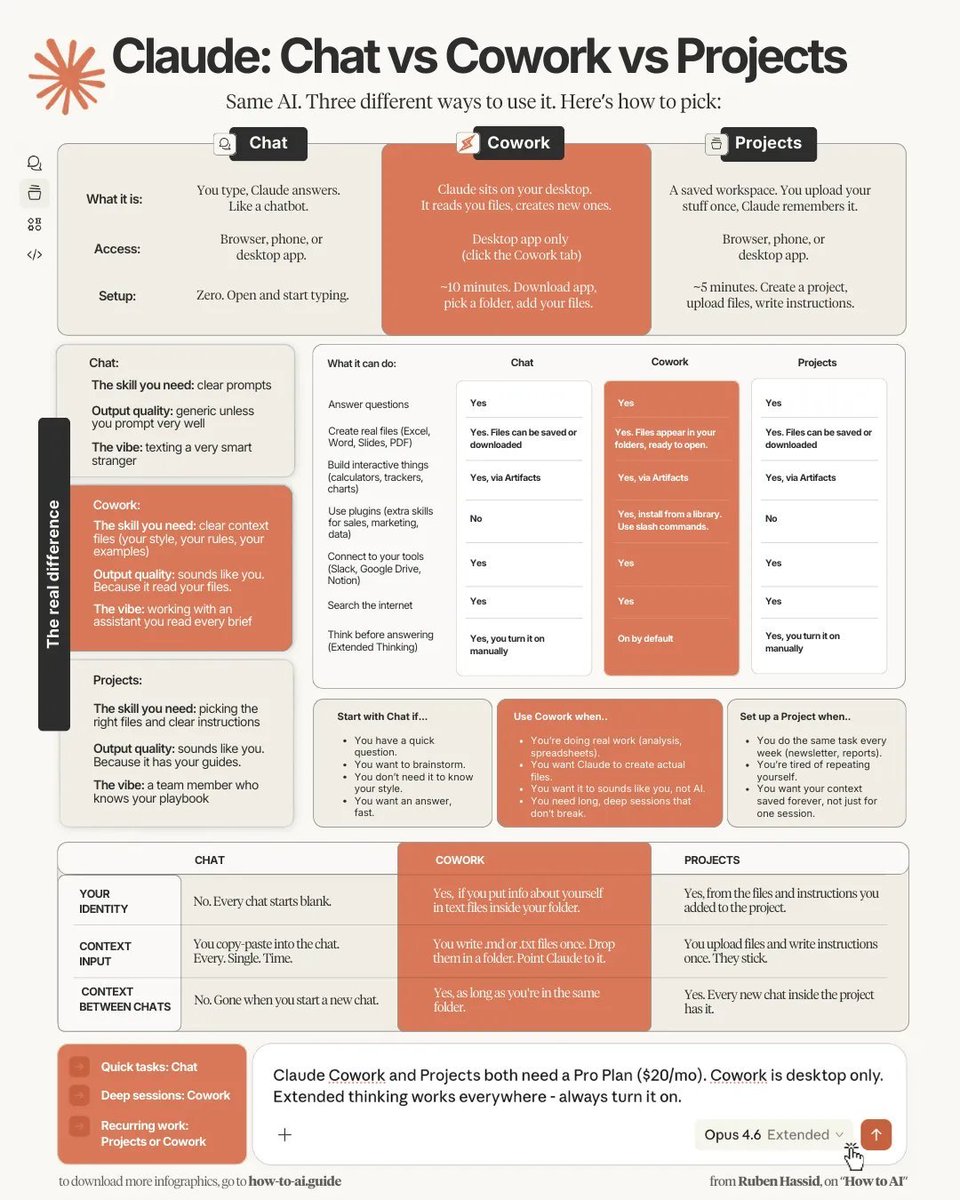
for starters, Cowork is basically Claude but it can read and write files on your computer.
so instead of copy-pasting stuff into a chat window, you point it at a folder and it:
> reads your documents, briefs, past work, style guides
> does multi-step tasks (research, write a report, create a spreadsheet)
> creates actual files and saves them to your computer
> runs multiple agents in parallel on complex tasks
> connects to your favourite tools (Slack, Google Drive, Notion, etc.)
1. FORGET PROMPTS. USE FILES.
ChatGPT trained you to write longer prompts. Cowork changes that.
> take everything you know (writing style, company rules, past work, best examples)
> put it all in text files (.md files)
> drop them in a folder
> point Claude to that folder
the more context you give as files, the less prompting you need. output goes from "generic AI" to "this sounds like a full-time employee."
2. BUILD YOUR FOLDER
create a folder called "Claude Cowork" with 4 subfolders:
> ABOUT ME. who you are, what you do, your writing style
> PROJECTS. live work. one subfolder per project
> TEMPLATES. finished work so good you reuse the structure
> CLAUDE OUTPUTS. where Claude delivers everything
this keeps things organized and limits what Claude can access. if something goes wrong, the damage is contained.
3. CREATE YOUR CORE FILES
about-me.md - who you are, your priorities, what matters right now
anti-ai-writing-style.md - rules so Claude never writes like an AI
one great markdown file is worth more than 50 random uploads. be intentional.
4. SET GLOBAL INSTRUCTIONS
Settings > Cowork > Edit Global Instructions
paste rules like:
> always read ABOUT ME before any task
> never edit files in read-only folders
> deliver all work to CLAUDE OUTPUTS
> if the brief is unclear, ask questions first. don't fill gaps with filler
you set this once. it runs every time. never type it again.
5. THE ONLY PROMPT YOU NEED
80% of Cowork sessions start with this:
"i want to [TASK] for [SUCCESS CRITERIA]. explore my folder first. then ask me questions using AskUserQuestion before you execute."
Claude reads your files. generates a clickable form asking about your goals, audience, preferences. you click through in under a minute.
it shows a plan. you approve. it executes and creates real files in your folder.
the entire process feels like directing someone smart instead of wrestling with a text box.
6. INSTALL PLUGINS
Cowork has official plugins for marketing, sales, legal, finance, data analysis, product management.
> click Customize in the sidebar
> browse plugins
> install
> type / to see available commands
the legal plugin alone is what wiped $285 billion off the stock market. Claude reads contracts, flags risky clauses, explains them in plain english, and suggests alternatives.
7. CONNECT YOUR TOOLS
Settings > Connectors
plug Claude into Slack, Google Drive, Notion, Figma, and 50+ others. it reads your tools, searches your messages, pulls from your docs mid-conversation.
connectors are free.
REAL USE CASES:
> writing - Claude reads your style guide, past work, and references. asks you questions. produces a draft that actually sounds like you. you edit instead of write from scratch
> consulting deliverables - drop a client brief in the folder next to your templates. Claude reads everything, asks clarifying questions, creates a .docx in your output folder
> research - drop 5 competitor articles in a subfolder. Claude reads all of them, builds a comparison table, finds research gaps nobody else has covered yet
> automated weekly briefings - schedule Claude to research competitors every Monday at 7am and save a summary. you wake up to a briefing doc ready to read
literally anything.
WHERE IT FALLS SHORT:
> burns through usage fast. if you use it daily on Pro ($20/mo) you'll feel it within a week
> needs the desktop app open. no mobile or web version
> not for quick questions. use Chat for that. Cowork is for multi-step work
> agents go in weird directions about 10% of the time. always review the output
the pattern is always the same: short task + context folder + "ask me questions first"
most people downloaded Claude and still use it like ChatGPT. just typing prompts and hoping for good output.
Cowork is completely different. when Claude released it, software stocks lost $830 billion in 6 days.
this will completely change how you use AI.
English
the 8 stages of vibe coding:
> super pumped about an idea
> "let's build this thing"
> ship it in one weekend
> bugs start rolling in
> "wait was this even a good idea"
> existential crisis at 2am
> questioning every life decision
> "i will never escape the underclass"
> quietly bury the project and never speak of it again
English

gave out $20k and threw pie at the winners 🥧
hosting this hackathon with @CalBlockchain was lit - big thank you to our sponsors @liquidtrading @Ripple @SuiNetwork @CoinbaseDev @Polymarket @solana @Polymarket @ETHGlobal @AnthropicAI
stay tuned for the next one 👀
English



THIS GUY USED CLAUDE CODE TO DESIGN CUSTOM FURNITURE
then handed the PDF to a carpenter and actually built it
he described a full wall unit to claude. wardrobe, drawers, mirror, fragrance display, hidden vault, laundry section. all in one piece
claude wrote 1400 lines of python that generates carpenter-ready technical drawings as a PDF.
front elevation, plan view, construction notes. all dimensioned in centimeters
claude updated the script each time. added LED lighting positions, ventilation specs, push-to-open latches, soft-close hinges
he handed the PDF directly to his carpenter. built exactly to spec. zero modifications needed
this is the most real world use of vibe coding i've seen.


English
ANTHROPIC JUST DROPPED A MASSIVE GUIDE
on how they use claude code skills internally
tl;dr for people who don't want to read the whole thing:
9 types of skills worth building:
> 1. library & API reference - teach claude your internal tools and SDKs
> 2. product verification - automated testing with playwright, tmux, etc
> 3. data fetching & analysis - connect to your dashboards and event sources
> 4. business process automation - standup posts, ticket creation, weekly recaps
> 5. code scaffolding & templates - generate boilerplates for your specific codebase
> 6. code quality & review - spawn a subagent to critique code until findings degrade to nitpicks
> 7. CI/CD & deployment - monitor PRs, retry flaky CI, auto-rollback on regression
> 8. runbooks - take a symptom, investigate across tools, produce a structured report
> 9. infrastructure ops - find orphaned resources, manage dependencies, investigate cost spikes
tips that actually matter:
> don't state the obvious. claude already knows how to code. focus on what pushes it out of its default behavior
> build a gotchas section. this is the highest signal content in any skill
> use the file system for progressive disclosure. split references into subfolders so claude reads them when needed not all at once
> the description field is for the model not for humans. write it as "when to trigger" not "what this does"
> store scripts and libraries in your skill so claude composes instead of reconstructing from scratch every time
> skills can include on-demand hooks. /careful blocks destructive commands. /freeze locks files outside a specific directory
> skills can store memory in log files or JSON so claude remembers what it did last time
how anthropic distributes skills internally:
> small teams: check skills into your repo under .claude/skills
> at scale: internal plugin marketplace where engineers upload and others install
> skills start in a sandbox folder. once they get traction the owner PRs them into the marketplace
> they log skill usage with a hook to find popular skills and ones that aren't triggering enough
most of their best skills started as a few lines and one gotcha. they got better because people kept adding to them as claude hit new edge cases
Thariq@trq212
English
it took whop 4 years with a team of engineers
imagine if they had claude code
(you have claude code)
Whop@whop
We spent 4 years building a payments network for the new internet. Entrepreneurs now earn $3.3B annually on Whop. Millions of people are clipping, labeling data, deploying agents, and starting businesses to get paid. Today we're opening Whop Payments Network to everyone.
English
people thought reCAPTCHA was just there to block bots
turns out it was also one of the biggest data-labeling operations in history
it started with distorted words to stop spam
then evolved into helping digitize text that computers couldn't read on their own
after Google acquired it, the challenges changed again:
> traffic lights
> crosswalks
> buses
> storefronts
every click was labeling real-world imagery for computer vision systems
which means millions of people weren't just proving they were human
they were unknowingly helping train the tech that maps streets, reads roads, and powers self-driving cars
Sharbel@sharbel
English
> be Durable
> launch an AI that builds your entire business in minutes
> website, brand, SEO, domain, CRM, payments, revenue plan
> then deploy agents that bring you customers while you sleep
> 3M+ business owners already using it
every development agency charging $10k for a website right now:
James Clift@jamesclift
Introducing Durable. The first AI business builder that replaces your 9-5 income. RT + comment “Durable” and we'll build your business for FREE.
English
this guy got tired of re-explaining his entire project to Claude Code every single session
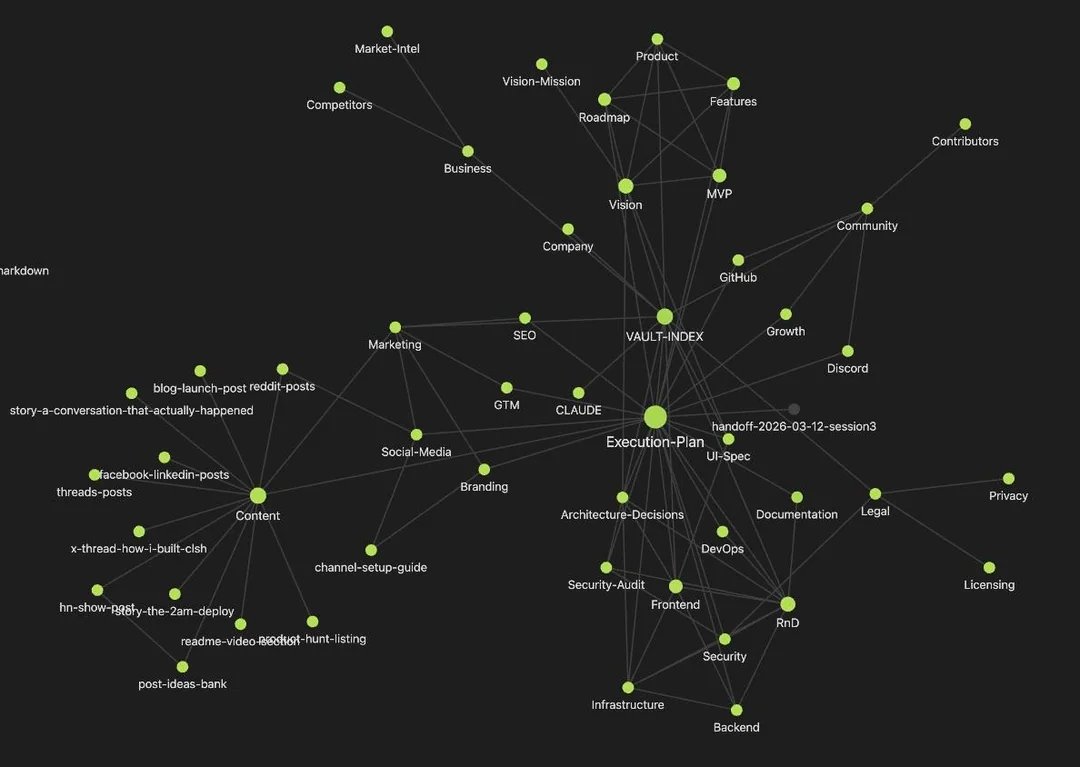
so he used Obsidian and built a vault that acts like a persistent brain for his projects
structured it like a company with departments
> RnD folder for architecture decisions
> Product folder for feature specs
> Marketing folder for all content
> Legal folder for compliance stuff
> execution plan with dependency graphs between tasks
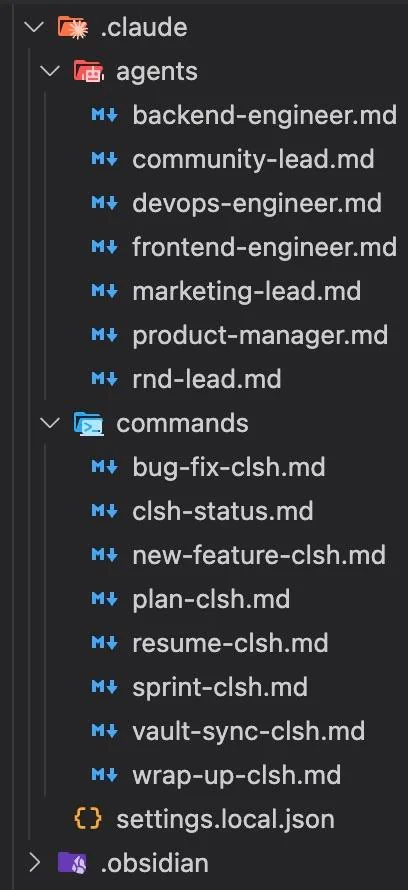
then he wrote 8 custom Claude Code commands that read from and write to this vault
here's how it works:
1\ start session: /resume reads the execution plan + handoff notes, tells him exactly where he left off
2\ during work: Claude reads relevant vault files for context. it KNOWS the architecture because it's in the vault. it KNOWS the product decisions because they're documented
3\ end session: `/wrap-up` updates the execution plan, updates all department files, creates handoff notes for the NEXT session
the crazy part is the parallel execution
his execution plan has dependency graphs so he can spawn multiple Claude agents at once
one agent does backend, another does frontend, simultaneously working on unblocked tasks
over one weekend he shipped:
> full monorepo with backend + frontend + CLI + landing page
> 3 npm packages published
> demo videos built with Remotion
> marketing content for 6 platforms
> Discord server with custom bot
> complete security audit with fixes
> full SEO infrastructure
34 Claude sessions. 43 handoff files. completely solo.
which is insane because most people spend 30% of their Claude time just re-explaining what they built yesterday
English
HERE ARE 7 OPEN-SOURCE AI TOOLS YOU NEED RIGHT NOW:
1\ AGENCY AGENTS
free agent templates for every startup role:
> front-end developer
> back-end developer
> security engineer
> growth hacker
> twitter engager
combine them in claude code. go from zero to product without learning every skill yourself
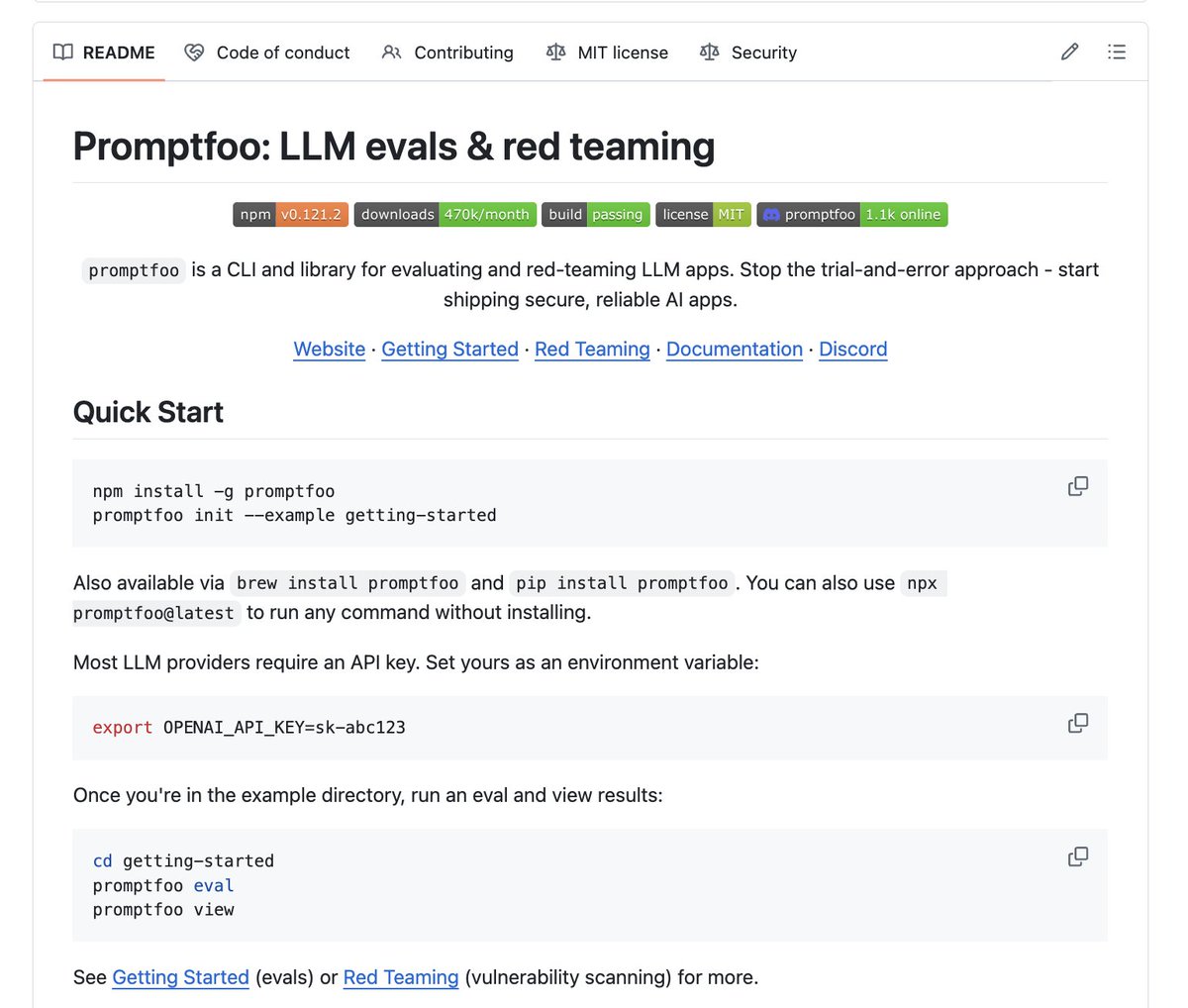
2\ PROMPTFOO
unit testing framework for your prompts
> test different prompts with different models
> find what actually performs best in your app
> automated red team attacks to find prompt injection vulnerabilities
> prevents others from stealing your API keys (security is huge when vibe coding)
it just got acquired by OpenAI
3\ MIROFISH
multi-agent prediction engine
> scrapes the internet for breaking news and financial trends
> creates a digital world where agents with independent personalities discuss the data
> basically a miniature artificial social network that evolves on its own
spin it up to analyze macro and micro trends. it even predicts strategies.
4\ IMPECCABLE
optimized for front-end design. 17 different commands to make your UI not suck
> distill command simplifies overly complex AI-generated UIs
> colorize adds your brand colors
> animate and delight make it look unique instead of purple gradients like every other vibe coded app
5\ OPEN VIKING
database designed specifically for AI agents
> organizes agent memory, resources, and skills into file system instead of jamming everything into vector database
> tiered loading system dramatically reduces token consumption
> automatically compresses content and refines long-term memory
> agent gets smarter the more you use it
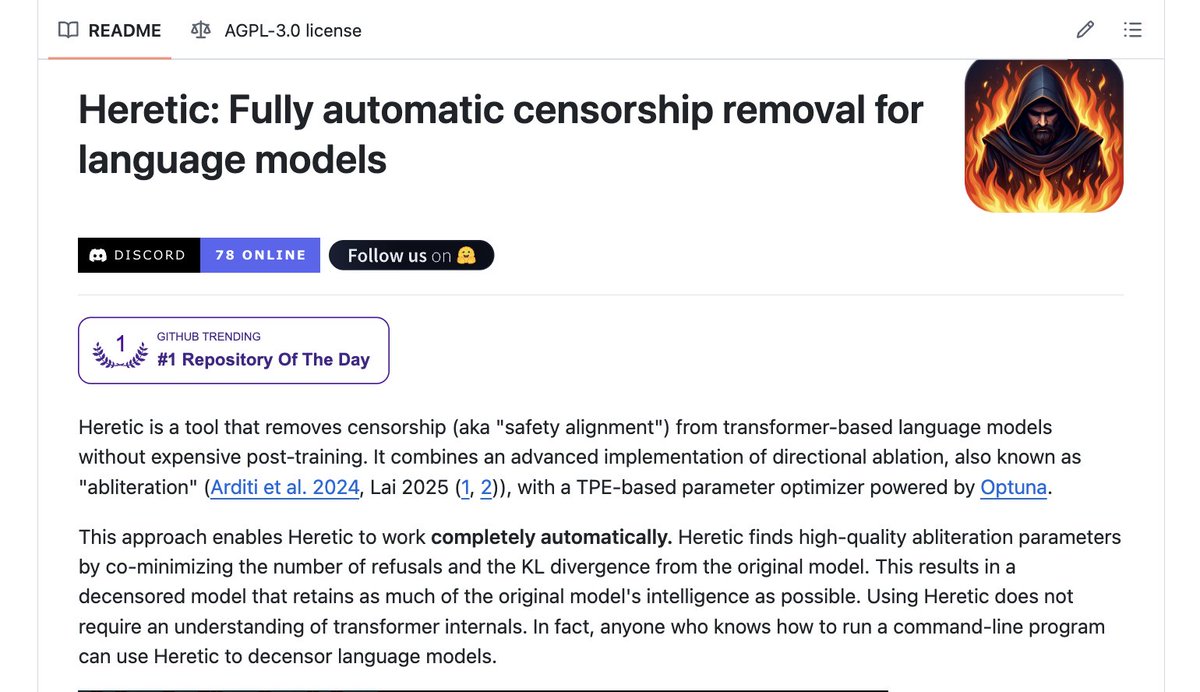
6\ HERETIC
removes guardrails from censored models using the obliteration technique
> completely automatic
> no expensive post training required
> take Google's Gemma, run this tool, now you have a model that obeys any command
7\ NANO CHAT
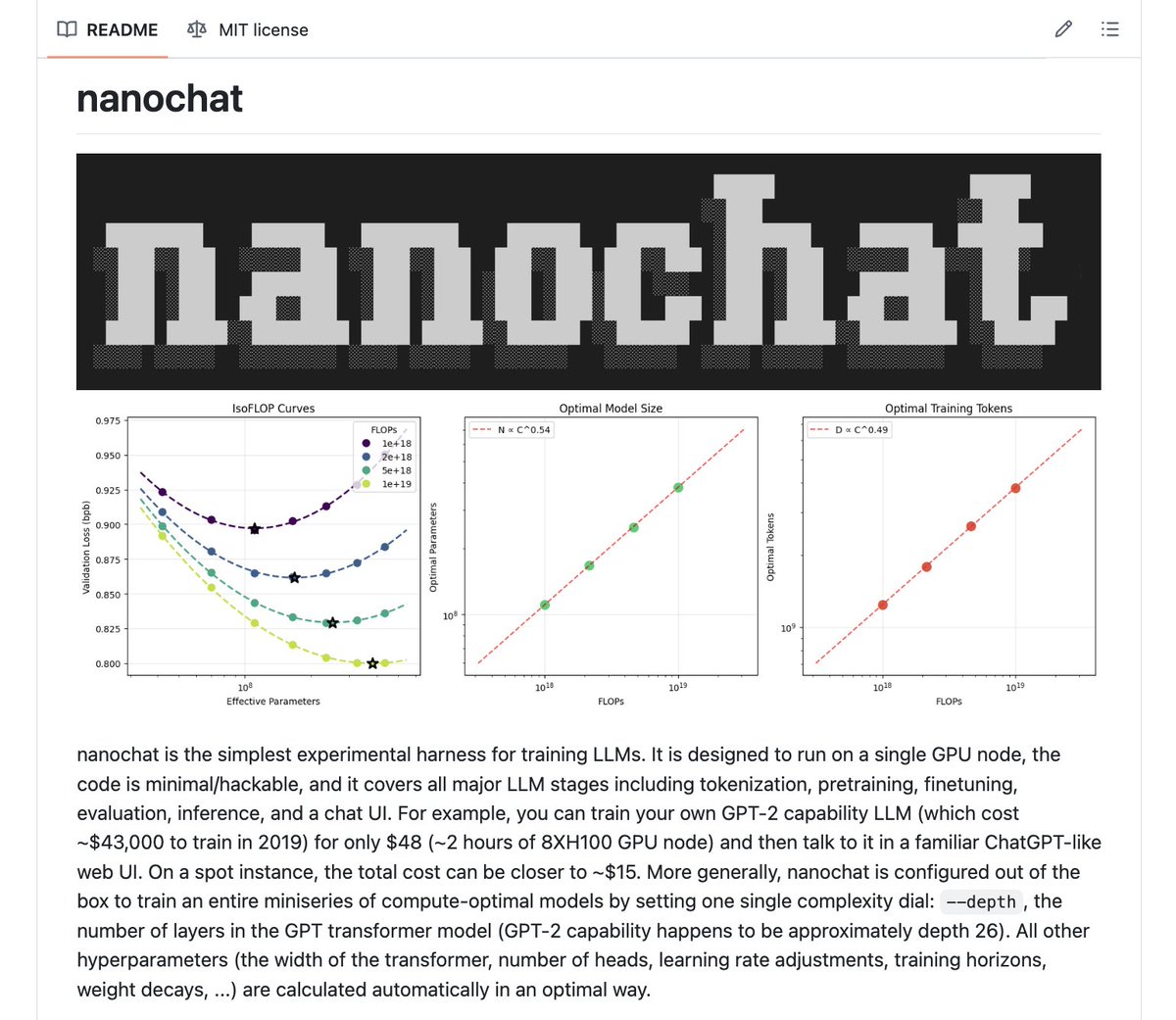
build your own LLM from scratch
> implements entire pipelines: tokenization, pre-training, fine-tuning, evaluation, web UI
> train your own small language model for about $100
> won't be Opus 5.0 but you have absolute control over it

English

students realizing they can get 70+ free subscriptions just for having a .edu email:
DEV & IDEs:
> Cursor Pro — free for 1 year
> GitHub Copilot — free
> JetBrains (IntelliJ, PyCharm, WebStorm) — free
> JetBrains Space Pro — free
> Replit Pro — free
> GitKraken — free
> Postman Student Expert — free
CLOUD & HOSTING:
> AWS Educate — free labs + credits
> Microsoft Azure — $100 credits
> Google Cloud — student credits
> DigitalOcean — $200 credits
> Oracle Cloud — free tier forever
> Heroku — free credits
> Netlify — free
> Railway — student discount
> Cloudflare Pro — free
DATABASES:
> MongoDB Atlas — $50 credits + free certification
DESIGN:
> Figma — free Education plan
> Canva Pro — free
> Sketch — 50% off
> Autodesk (AutoCAD, Maya) — free for 1 year
> Miro — free Education plan
> Blender — completely free
LEARNING:
> Educative — 6 months free
> LinkedIn Learning — free
> Coursera — financial aid available
> edX — free course audits
> Udemy — free courses periodically
> Pluralsight — student plan
> IBM SkillsBuild — free
> Meta Blueprint — free certifications
> Microsoft Learn — free
> Google Developer Student Clubs — free
> Hack The Box — student labs
> TryHackMe — student plan
> Kaggle — free
> LeetCode — student discount
> HackerRank — free certifications
> Red Hat Developer — free
> SAP Learning Hub — student access
DOMAINS & SSL:
> Namecheap — free domain + SSL
> free .me domain — via GitHub Pack
> Let's Encrypt — free SSL forever
PRODUCTIVITY:
> Notion Pro — free
> Microsoft 365 — free
> Grammarly EDU — free via university
> Obsidian — free
> Todoist Pro — student discount
> Evernote — student discount
> Linear — student plan
> ClickUp — free Education plan
> Asana — student access
> Airtable — free Education workspace
> Loom — free Education plan
COMMUNICATION:
> Zoom — free Education plan
> Slack — free Education plan
MUSIC & MEDIA:
> Spotify — 50% off
> Apple Music — 50% off
> YouTube Premium — 50% off
DEALS & MARKETPLACES:
> Amazon Prime — 6 months free
> Apple Education Pricing — discounts on Mac & iPad
> Samsung Student Store — device discounts
> UNiDAYS — discounts at 1000+ brands
> Student Beans — discounts worldwide
AI TOOLS:
> Perplexity Pro — student discount
> Google Gemini — via Google One Education
> OpenAI API Credits — via partner programs
PAYMENTS & DEVOPS:
> Stripe — no fees on first $1,000
> Nvidia — student resources + credits
> Intel Developer Zone — free access
that's over $10,000/year in free tools
most of it unlocks from one single application: the GitHub Student Developer Pack
if you're a student and not using this you're throwing away thousands of dollars a year
kaize@0x_kaize
English