
Tweet épinglé
Code Monkey
3K posts


Code Monkey
@UnityCodeMonkey
Teaching Game Development and Programming using Unity and C# https://t.co/YvPfuTJmIz
Inscrit le Nisan 2018
161 Abonnements26.6K Abonnés
Unreal Engine 6 revealed! and Why games cost so much to make
Also Witcher 3 gets an expansion 11 years later!
gamedevreport.beehiiv.com/p/unreal-engin…

English
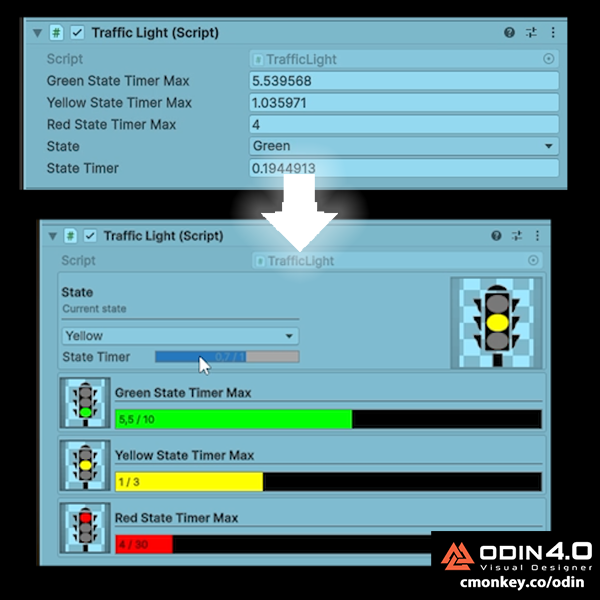
Have you looked at a Unity Inspector and thought: "I have no idea what I’m even looking at"?
That's probably because you're using the default Unity inspector. Technically it works, sure, but it's not exactly helping you move fast.
- What if instead of a sprite field you could see a preview of the sprite?
- What if instead of a textbox for a number you could see a slider?
- What if instead of a drop down for an enum you had various buttons?
- What if you could easily organize all the inspector data in whatever layout works best?
Well you can! And now not only can you do that but you can do it in seconds!
It's all thanks to an update to already one of the best Unity Tools that exist. Odin now has a Visual Designer. This is a drag and drop tool where you can easily make custom inspectors (literally in seconds) which in turn helps you be a lot more efficient helping you make BETTER games FASTER!
Just two clicks to open the Visual Designer, then pick what field you want to customize, open the search window and easily locate what Attribute you want to use (like PreviewField) and just add it. No compilation needed, no attibutes cluttering your code, in seconds you have something objectively better that will make you more efficient than the default inspector.
Plus now they even have a completely FREE 90 day trial so you can verify that it really is an awesome tool that will help you immensely.
I have a fully detailed Tutorial video on my channel youtube.com/watch?v=ywDrln…
Check out Odin at cmonkey.co/odin
#sponsored

YouTube
English
English
Some "unnecessary" features that are MUST-HAVES for hardcore players:
- Shift-click inventory moves
- Auto-sort loot
- Customizable HUDs
- Left/right shoulder toggle in 3rd-person shooters
- Pet the dog!
For some players these features might be meaningless, but for your more hardcore players (your biggest fans) they will probably appreciate if your game has them.

English
How to change Background Color (Scene View and Camera | Unity Tutorial)
English
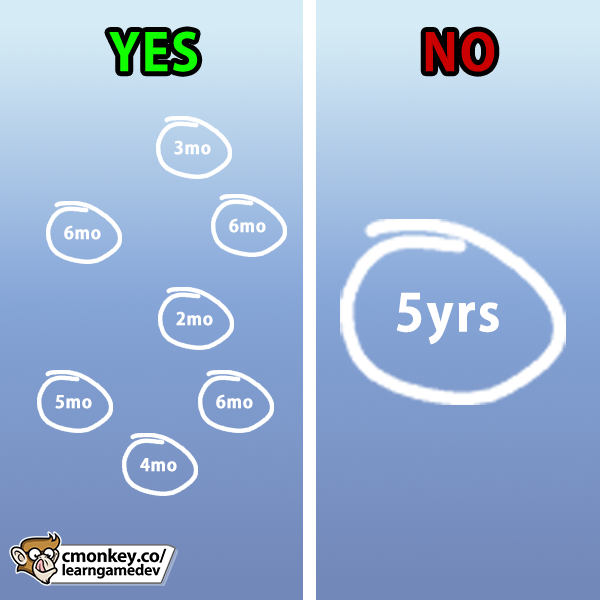
My #1 recurring tip to all Game devs: Make many SMALL games, not one big "dream" game.
Every finished project teaches you:
- Scope management
- Realistic estimates
- Real player feedback
- What genres actually sell!
If you spend 5 years working on a single game, you will only learn those lessons once, whereas if you make 10 games in those 5 years, you will learn 10 TIMES the lessons in the same timeframe!
This is the closest thing to a "secret" behind long-term indie success.
If you truly desperately want to make massive games then my advice is make them in parts. For example make one small game all about your Combat mechanics, then another small game about your Exploration mechanics and another one all about your clever Building system.
Once you've made all 3 of those games, you can analyze what worked and what you could improve in all those individual systems/mechanics and put them all together in one massive game!
English
There are many ways to make a living in game dev, the obvious one is selling games, but becoming an asset publisher is also a valid path!
You can make either visual assets, or you can make all kinds of tools to help developers make their own games.
However while it's definitely a viable path, do keep in mind how it's basically just as crowded as Steam. Don't expect to just put up a random Low Poly pack and suddenly make $10,000, that likely won't happen.
The Asset Store doesn't have a robust discovery algorithm like Steam, so it requires a lot of marketing on your end which is quite difficult to do. Asset marketing doesn't really have wishlist or any of that Steam marketing meta.
You need something very special to get a ton of visibility, or you need a following to market the asset. That's how I was able to find sucess with my Toolkit asset, cmonkey.co/toolkit it was because I spent the last 8 years building an audience. Without it I don't think it would have found success, even if it was as useful as it actually is.
On the Asset Store it is very important to find success right at launch. You need to sell enough copies to have your asset rise above the rest in order to be invited into future sales, and that's where you actually make money.
And just like with Steam you need to think of a marketable idea, you need something that developers actually need. They probably don't need yet another Low Poly Weapon pack, there's already thousands of those. So think of what unique visual assets or tools might developers need, and then find a way to reach those developers.
So it is a viable path that you should know about and maybe experiment with, but do be aware it's not easy. Best of luck!

English
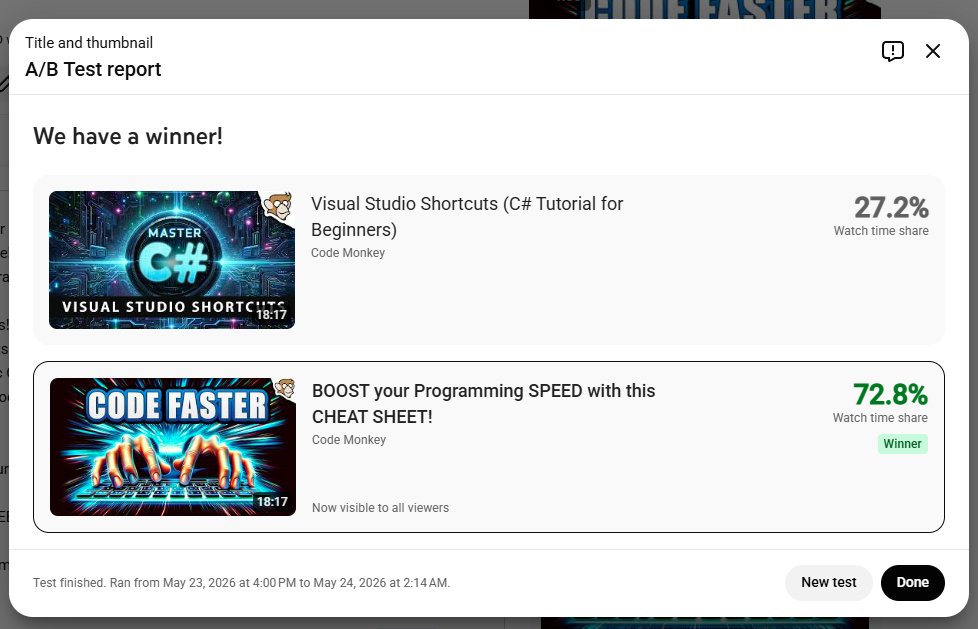
A lot of people complain that titles on anything are way too sensationalized these days, but this is the reality. A very straightforward 100% descriptive title yields almost no clicks/views, they have to be very enticing, borderline clickbaity in order to work.
Clickthrough Rate on the first title/thumb combo was about 1.5%, whereas the second one had about 8%, that's a massive difference.
I wish I could just write the most descriptive title and let the actual content in the video speak for itself, but if no one clicks then it doesn't matter how good the content is because no one will ever see it. And of course if I want to keep making educational content for many years in the future then the content needs to get clicks/views. So sadly I have to play the YouTube game and write titles/thumbnails that people will actually click as opposed to being 100% descriptive.
English
#### ANSWER ####
#### ANSWER ####
#### ANSWER ####
#### ANSWER ####
#### ANSWER ####
#### ANSWER ####
#### ANSWER ####
#### ANSWER ####
#### ANSWER ####
#### ANSWER ####
#### ANSWER ####
#### ANSWER ####
(B)
You cannot **implicitly** convert a string into an int.
In order to do that you can use the function int.Parse(); or int.TryParse();
int healthAmount = int.Parse(savedHealthData);
Or you can use something like JSON to handle the type conversion for you, that's how I normally handle saving and loading in my games and I never have to manually parse numbers.
Simple Saving and Loading with JSON to a File youtube.com/watch?v=6uMFEM…

YouTube
English
Let's say I saved my game data in a text file and I am now trying to load it, does this work?
string savedHealthData = "100";
int healthAmount = savedHealthData;
A) Yes
B) No
C) Yes but healthAmount will be 0
(answer in reply below)
English
The best code separates concerns.
For example the Player class shouldn't update the UI directly, instead it should fire an event which in turn the UI script should listen to it and do whatever it needs to do.
Separating the UI from the underlying logic is one of the best (and also slightly easiest) things you can do to keep your code quality high. Ideally your game should be able to compile and work just fine without any UI at all, because none of the logic scripts should depend on the visual interface.
Another example, if you have score in your game, it shouldn't be the Enemy class' responsibility to increase the score when an enemy dies, instead it should fire off an OnAnyEnemyDiedEvent which some kind of ScoreManager should listen to in order to update the total.
Decoupling is one of the best things you can do to keep your code quality high. It keeps things smaller so you don't have to maintain a huge amount of data in your brain's working memory as you're building something.

English
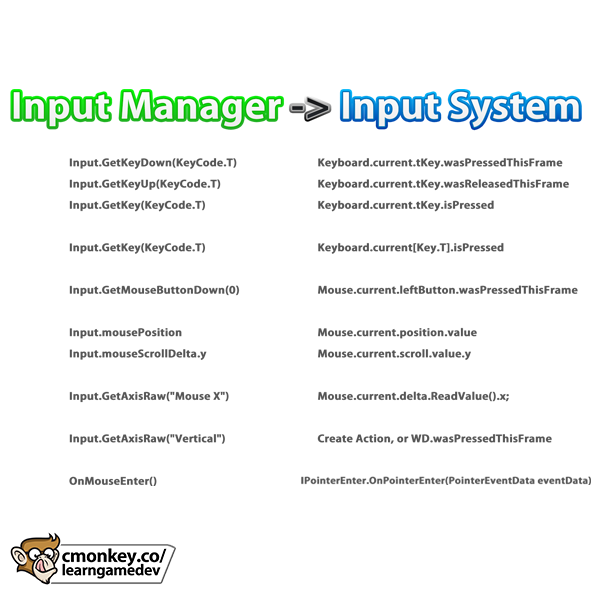
With Input Manager becoming deprecated after Unity 6.3, your scripts using Input.GetKey, Input.mousePosition, or GetMouseButtonDown will need to change. Modern Input System covers all these, and is just as simple for basic needs!
Check out my cheat sheet to see how easy it is to convert your code to stay up to date.
BUT for OnMouseEnter or similar MonoBehaviour callbacks they do NOT work with the Input System! You'll need to switch to event interfaces like IPointerEnterHandler, plus make sure you've got a Physics Raycaster & EventSystem in your scene. So upgrading that part is a bit trickier, but the rest are easy.
English
Every programming problem has a million solutions!
If you build something one way, and you see a tutorial building it another way, it does NOT necessarily mean your way is wrong or the tutorial is wrong. Both options can be perfectly valid!
As long as the solution fulfills all the requirements then it is correct!

English
High Level Overview on making a Turn Based Strategy Game!
English
#### ANSWER ####
#### ANSWER ####
#### ANSWER ####
#### ANSWER ####
#### ANSWER ####
#### ANSWER ####
#### ANSWER ####
#### ANSWER ####
#### ANSWER ####
#### ANSWER ####
#### ANSWER ####
#### ANSWER ####
(A)
There's no error so A) is correct, but option B) is also valid.
The compiler automatically adds return when receiving a delegate into a Func parameter so it's not necessary but works both ways.
The technical term for the inline function is a Lambda expression, super useful and compact learn.microsoft.com/en-us/dotnet/c…
Func and Action are types of delegates which can be super useful, I covered them in detail here:
##REF##video_small, 3ZfwqWl-YI0, What are Delegates? (C# Basics, Lambda, Action, Func)##REF##
Also, this particular pattern, setting a Camera class to receive a Func instead of a single Vector3, is a super easy way to make your Camera (or other objects) follow something that moves.
For example this is how in my game Dinky Guardians I handle a lot of the tutorial logic which shows an arrow dynamically pointing to a Dinky which is moving. The Arrow indicator class receives a Func which it then executes on every Update to figure out what position to point to.
##REF##video_small, 7m2EJYFDgWI, My game is RELEASED! I hope you like it!##REF##
English
Is there a problem with this code?
private void SetCameraFollowFunc(Func cameraFollowFunc) { }
SetCameraFollowFunc(() => new Vector3(1, 0, 0));
A) No
B) Should be: SetCameraFollowFunc(() => return new Vector3(1, 0, 0));
C) Should be: SetCameraFollowFunc((Vector3(1, 0, 0)) => { });
(answer in reply below)
English