Liquidity Scanner

84 posts

Liquidity Scanner banner
Liquidity Scanner

Liquidity Scanner

@LiquidityScan_

⚙️ Automated OB / HOB scans 🎯 Built for the Moneytaur trading community ⏱️ On-demand scans via Telegram 📄 Docs & access via Telegram No trading advice

参加日 Aralık 2025
1 フォロー中67 フォロワー
固定されたツイート
Liquidity Scanner
Liquidity Scanner@LiquidityScan_·
⚙️ The Liquidity Scanner automates OB / HOB scans across many perp pairs, timeframes and exchanges. 📄 It applies a fixed rule set and outputs structured Excel files with pre-filtered liquidity blocks.
English
1
0
2
585
Liquidity Scanner
Liquidity Scanner@LiquidityScan_·
📊 HYPEUSDT Current blocks on HYPE as identified by the Scanner. A clean example of MTF refinement: HTF OBs refined into MTF HOBs
Liquidity Scanner tweet media
English
0
0
0
72
Liquidity Scanner
Liquidity Scanner@LiquidityScan_·
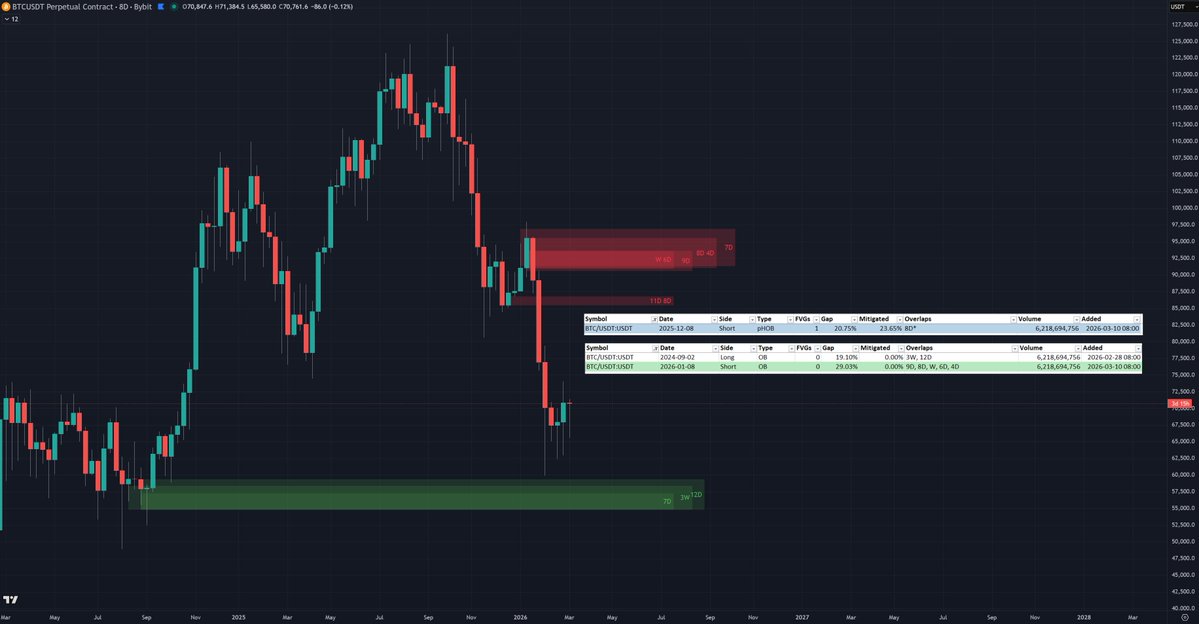
📊BTCUSDT Current blocks as identified by the Scanner.
Liquidity Scanner tweet media
English
0
0
0
52
Liquidity Scanner
Liquidity Scanner@LiquidityScan_·
💡 Did you know? Even if you trade mainly from HTF levels, adding MTF/LTF to your scan can give you an extra edge. The Overlaps column highlights where HTF blocks align with lower-TF blocks – ideal for precise refinements.
English
0
0
1
52
Liquidity Scanner
Liquidity Scanner@LiquidityScan_·
⚙️ Dev update Volume filters extended: 20M, 50M, 100M added (on top of 2M, 5M, 10M). New configuration step: choose max distance to current price (5/10/15/20/30/50% instead of fixed 20%). → More customization options for your runs.
English
0
0
0
61
Liquidity Scanner
Liquidity Scanner@LiquidityScan_·
⚙️ Dev update Backend migration is complete & live. Liquidity Scanner runs are now ~60% faster, so you should notice snappier scans. 💡Next step: evaluating how to plug in stocks on top of the existing crypto perp coverage.
English
0
0
3
76
Liquidity Scanner
Liquidity Scanner@LiquidityScan_·
⚙️ Dev update New backend currently in testing; migration likely next week. → Faster, more consistent run times for your scan → Lays the groundwork to add support for stocks and other TradFi markets
English
0
0
1
69
Liquidity Scanner がリツイート
Liquidity Scanner
Liquidity Scanner@LiquidityScan_·
Did you know? Even on quiet days a run gives you a structured overview of liquidity blocks. If the file shows nothing interesting, you don’t need to dig through charts. 📌 See if it’s worth opening charts or if your time is better spent learning or backtesting.
English
0
1
3
136
Liquidity Scanner
Liquidity Scanner@LiquidityScan_·
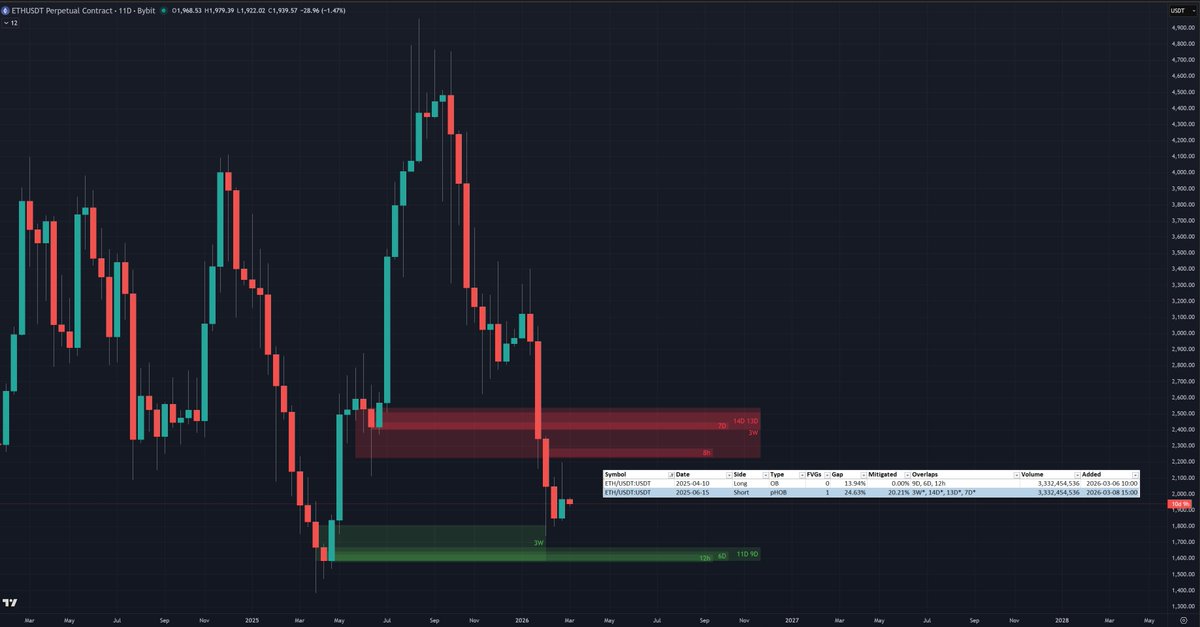
📊 ETHUSDT on Bybit price is trading between a fresh, refined HTF demand and a partially mitigated supply HOB. These are exactly the HTF blocks and overlaps automatically identified by Liquidity Scanner from a 27-timeframe scan.
Liquidity Scanner tweet media
English
1
0
3
353
Liquidity Scanner
Liquidity Scanner@LiquidityScan_·
⚙️ Volume buckets per exchange This table shows how many perp pairs currently pass different 10-day average volume thresholds on Binance, MEXC, Bybit and Bitget. 📌 See how your selected volume threshold pre-filters the market and changes how many pairs show up in your runs.
Liquidity Scanner tweet media
English
0
0
2
91
Liquidity Scanner
Liquidity Scanner@LiquidityScan_·
🧠 Reminder You can start a 10 day trial via the Telegram bot in the bio. Trials started before 31 January 00:00 UTC qualify for the current 40% discount, which you keep as long as the subscription remains active.
English
0
0
0
76
Liquidity Scanner
Liquidity Scanner@LiquidityScan_·
⚙️ Timeframe and plan update The scanner now supports 5 additional timeframes: 3M, 2M, 14D, 7D and 3h, bringing the total to 27 timeframes. 📌 All plans can choose from the full list; plan limits only define how many timeframes you include in a single run.
English
2
0
1
89
Liquidity Scanner
Liquidity Scanner@LiquidityScan_·
📌 Per-run limits have been raised: Starter 15→18 TFs, Advanced 18→21, Professional 21→27. 💡 You benefit from this immediately – no action required, but you may want to update your run configurations if you want to use the new limits and timeframes.
English
0
0
1
79
Liquidity Scanner
Liquidity Scanner@LiquidityScan_·
⚙️ Overlap logic update 💡An issue with the overlap identification has been fixed and the rule set slightly adjusted for a more consistent detection. 📍On top of the recent performance update, further changes make runs with many timeframes complete even faster.
English
0
0
2
95
Liquidity Scanner
Liquidity Scanner@LiquidityScan_·
⚙️ Performance update Recent backend changes removed a bottleneck and reduced runtime for scans by around 50% (depending on exchange, volume filter and number of timeframes). 📌 Run your usual setup and see how much faster the files arrive.
English
0
0
3
115
Liquidity Scanner
Liquidity Scanner@LiquidityScan_·
📌 Trial & discount Use the 10 day trial via the Telegram bot in the bio to see if the scanner fits your workflow. Start your trial before 31 January to lock in the current 40% discount for as long as your subscription stays active.
English
0
0
1
128
Liquidity Scanner
Liquidity Scanner@LiquidityScan_·
⚙️ Run types in the Liquidity Scanner Normal run: configure your scan step by step. Quick run: repeat your last setup with 1 click. Auto run: performs a scan daily at your chosen time.
English
0
0
3
153
Liquidity Scanner
Liquidity Scanner@LiquidityScan_·
👋 Welcome to all new followers. The posts here and the documentation should give you a good overview of what the Liquidity Scanner does and where its limits are. 📌 If you have questions about runs, settings or files, feel free to ask.
English
0
0
3
137
Liquidity Scanner
Liquidity Scanner@LiquidityScan_·
@taratoo69 @barnc0re In the 3D you find the information about the 3D blocks incl. the indication of overlaps. Detais about the overlaps are in the respective sheets. So for more information about the 2D you go to the 2D sheet. Or you switch TFs in the chart to identify the shown overlapping block.
Liquidity Scanner tweet media
English
2
0
1
27
Liquidity Scanner
Liquidity Scanner@LiquidityScan_·
🙏 Thanks for the detailed write-up @barnc0re. 🧠 If you came here from this thread and have questions about the Liquidity Scanner, runs or Excel files, feel free to ask. The bot and documentation are linked in this post: x.com/LiquidityScan_…
Barncore@barnc0re

Dear Moneytaur traders, you just found your new secret weapon... Have you ever spent hours charting various coins, only to realize there's no actionable OBs in the bunch? Have you ever wished there was some kinda tool that automates the "screening" process and just somehow delivers you a map of ALL the relevant/nearby OBs from HUNDREDS of charts to your door at the click of a button? If so then you'll seriously wanna check this out... WHAT IS IT: - It's a tool that generates a spreadsheet on command, which contains lists of nearby OBs (yes and HOBs) across multiple coins of an ENTIRE exchange, across MULTIPLE TIMEFRAMES. - The tool is essentially a FILTER, it shows only the relevant OBs that withstood a rigorous filtration process. E.g. Only OBs within 20% of current price, coins must be over a certain volume amount, OB candle bodies must not be under a certain size, stuff like that (see website for details). It delivers only the very finest. - Then you can filter the actual spreadsheet yourself. Maybe you'll choose to only chart the HOBs instead of just the OBs. Or maybe you'll only chart the OBs with 0% mitigation. But you wanna hear the REAL game changer? It also shows you if an OB has OVERLAPPING OBs from OTHER TIMEFRAMES. 🔥🔥🔥 This thing is the king for finding A+ setups quickly. I'll show you my workflow in the comments. SO WHAT DOES THIS MEAN 4 ME: - It means that you only have to focus on JUST CHARTING. It will feed you the LOCATION of the various relevant OBs, but it's still up to you to assess MS context, find confluence with fibs etc, read PA, and execute. - If you're a serious trader, this thing will not only save you tons of time, but brain power too. Everybody's brain has only so many "micro decisions" they can make per day, and this tool reduces those so you can focus on what matters: charting / execution / management. - Minimize decision fatigue. Maximize time. I SAID WHAT IS IT: It's called the Liquidity Scanner - @LiquidityScan_ Essentially the main design principle is that showing you the nearby OBs allows you to act on it soon after charting it, while it's still fresh in mind. - Site: liquidity-scanner.gitbook.io/liquidity-scan… - TG bot: t.co/mJ6uVSVGXW WHAT'S THE CATCH: - It takes 10-60 mins for the spreadsheet to generate (depending on how many timeframes you choose) - It costs money (it's for serious traders only) - It just filters the relevant OBs for you, you still have to actually chart it up, find confluence etc - Once you use it you wont be able to live without it- Warning! WHY ARE YOU SHOWING ME THIS: Straight up: because i want the dev to get more subscribers so he keeps the tool running lol. It's THAT fkn useful. That's my bias. But what that should tell you is this: I value this tool enough to put effort into this post even though i don't get money out of it. This thing is seriously handy. I've been feeding feature requests to Simon for almost a year and he has been very receptive, he adds suggested features quicker than you can say "liquidity scanner". The thing has steadily improved every month, and he still has more improvements in mind for the future. But here's the thing guys, right now this thing apparently has only 5 regular daily users, so this is still a very hidden edge. Whoever signs up after reading this will be among a small group of smart cookies. I don't get any kickback by the way, i just want the lights to stay on. ENOUGH TALK SHOW ME: See comments for workflow... 🧵
English
2
0
3
471