Ebokify

1.7K posts

Ebokify banner
Ebokify

Ebokify

@ebokify

The 1st Technology & Business Bookstore in the world

参加日 Ağustos 2025
50 フォロー中49 フォロワー
固定されたツイート
Ebokify
Ebokify@ebokify·
🤖 𝗔𝗜 𝗔𝗴𝗲𝗻𝘁𝘀 𝗶𝗻 𝗔𝗰𝘁𝗶𝗼𝗻, 𝗧𝗵𝗲 𝗨𝗹𝘁𝗶𝗺𝗮𝘁𝗲 𝗚𝘂𝗶𝗱𝗲 AI isn’t just about prompts anymore — it’s about Agents that think, plan & act on your behalf. ⚡ From LangChain to AutoGPT, this guide covers everything you need to understand how modern AI agents work, with real examples and implementation notes. 💡 Gain hands-on experience in these areas: 🟡 Understand and implement AI agent behavior patterns 🟡 Design and deploy production-ready intelligent agents 🟡 Leverage the #OpenAI Assistants API and complementary tools 🟡 Implement robust knowledge management and memory systems 🟡 Create self-improving agents with feedback loops 🟡 Orchestrate collaborative multi-agent systems 🟡 Enhance agents with speech and vision capabilities 📘 FREE for the first 500 people! To claim your copy 👇 1️⃣ Like & Repost 2️⃣ Comment “AGENT” 3️⃣ Follow (so I can DM you the book) 🚀 The future belongs to those who build with #AI — start today!

Ebokify tweet media
English
0
0
1
214
Ebokify
Ebokify@ebokify·
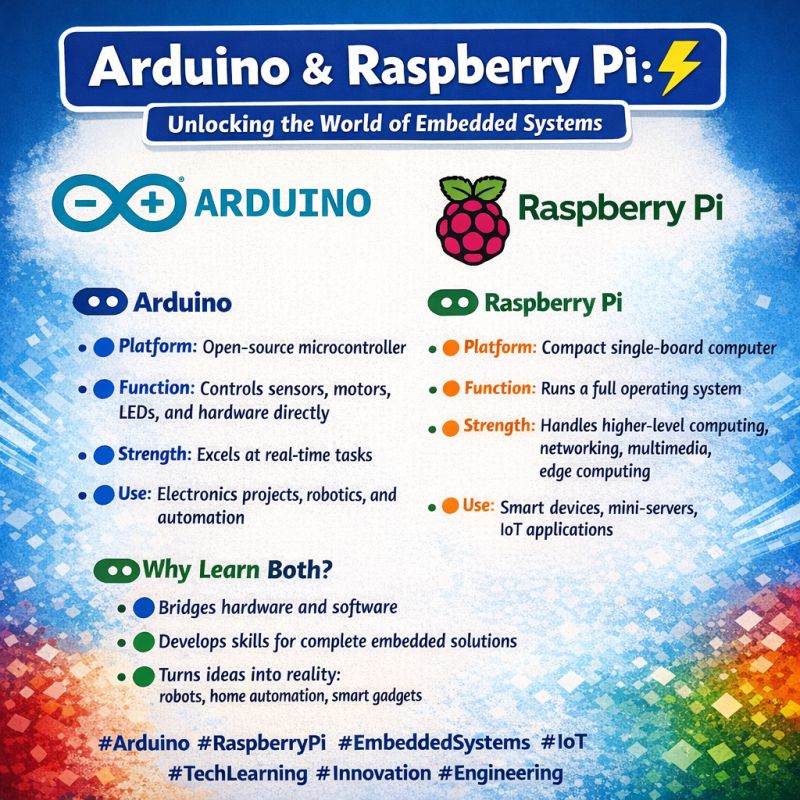
🤖 Arduino & Raspberry Pi: Unlocking the World of Embedded Systems ⚡ 🔵 Arduino 🔹 Platform: Open-source microcontroller 🔹 Function: Controls sensors, motors, LEDs, and hardware directly 🔹 Strength: Excels at real-time tasks 🔹 Use: Electronics projects, robotics, and automation 🟢 Raspberry Pi 🔸 Platform: Compact single-board computer 🔸 Function: Runs a full operating system 🔸 Strength: Handles higher-level computing, networking, multimedia, edge computing 🔸 Use: Smart devices, mini-servers, IoT applications 🟢 Why Learn Both? 🔹 Bridges hardware and software 🔹 Develops skills for complete embedded solutions 🔹 Turns ideas into reality: robots, home automation, smart gadgets 🔥 Top 6 Raspberry Pi eBooks V1 ebokify.com/top-6-raspberr… 🔥 Top 6 Arduino eBooks V1 ebokify.com/top-6-arduino-… #Arduino #RaspberryPi #EmbeddedSystems #IoT #TechLearning #Innovation #Engineering
Ebokify tweet media
English
0
0
1
6
Ebokify
Ebokify@ebokify·
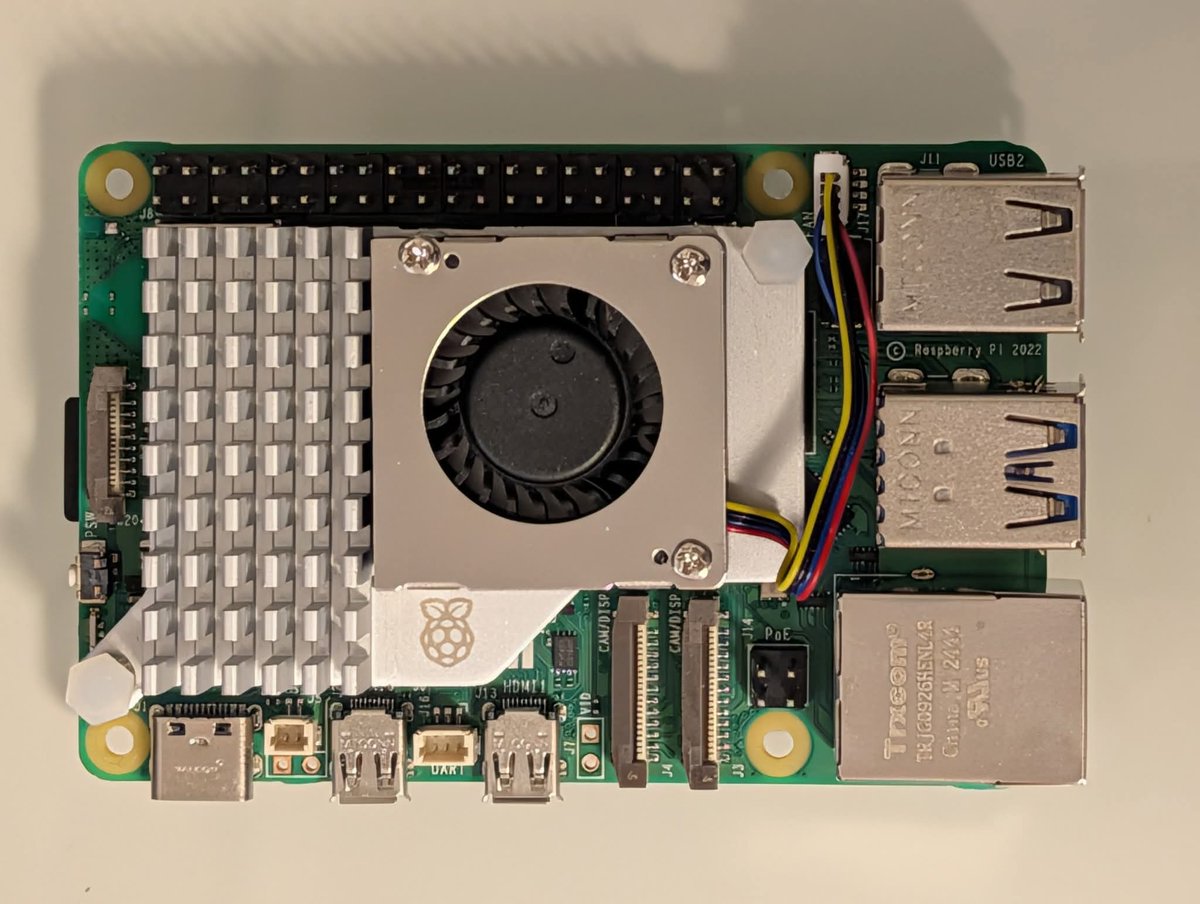
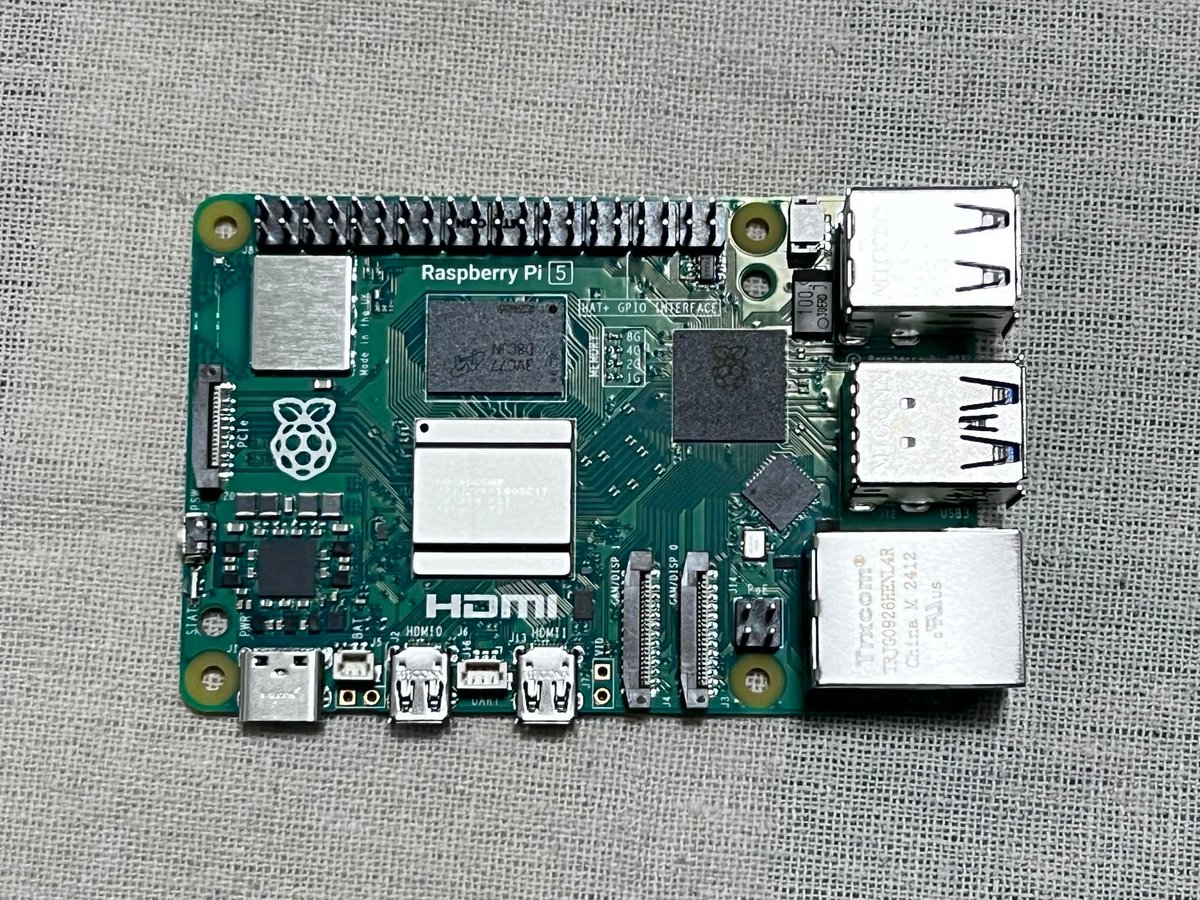
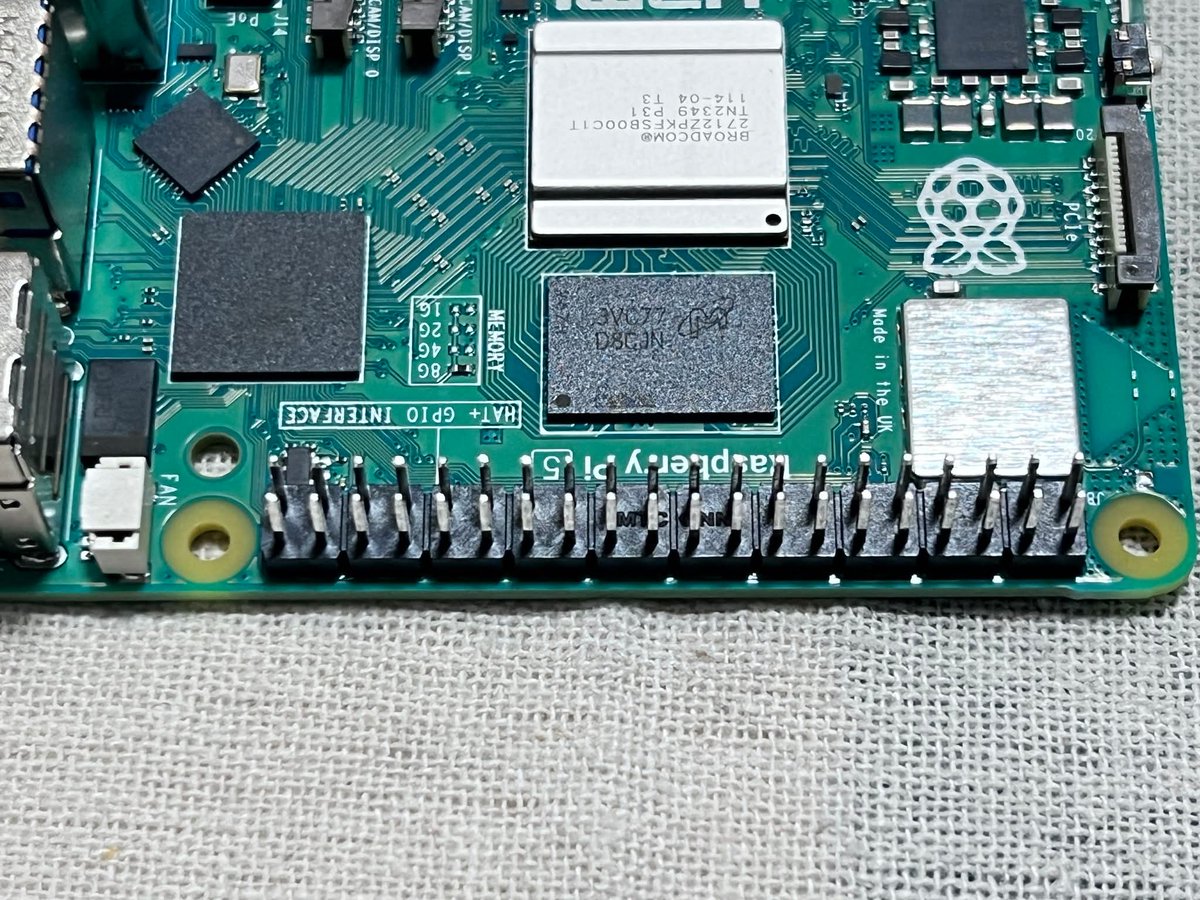
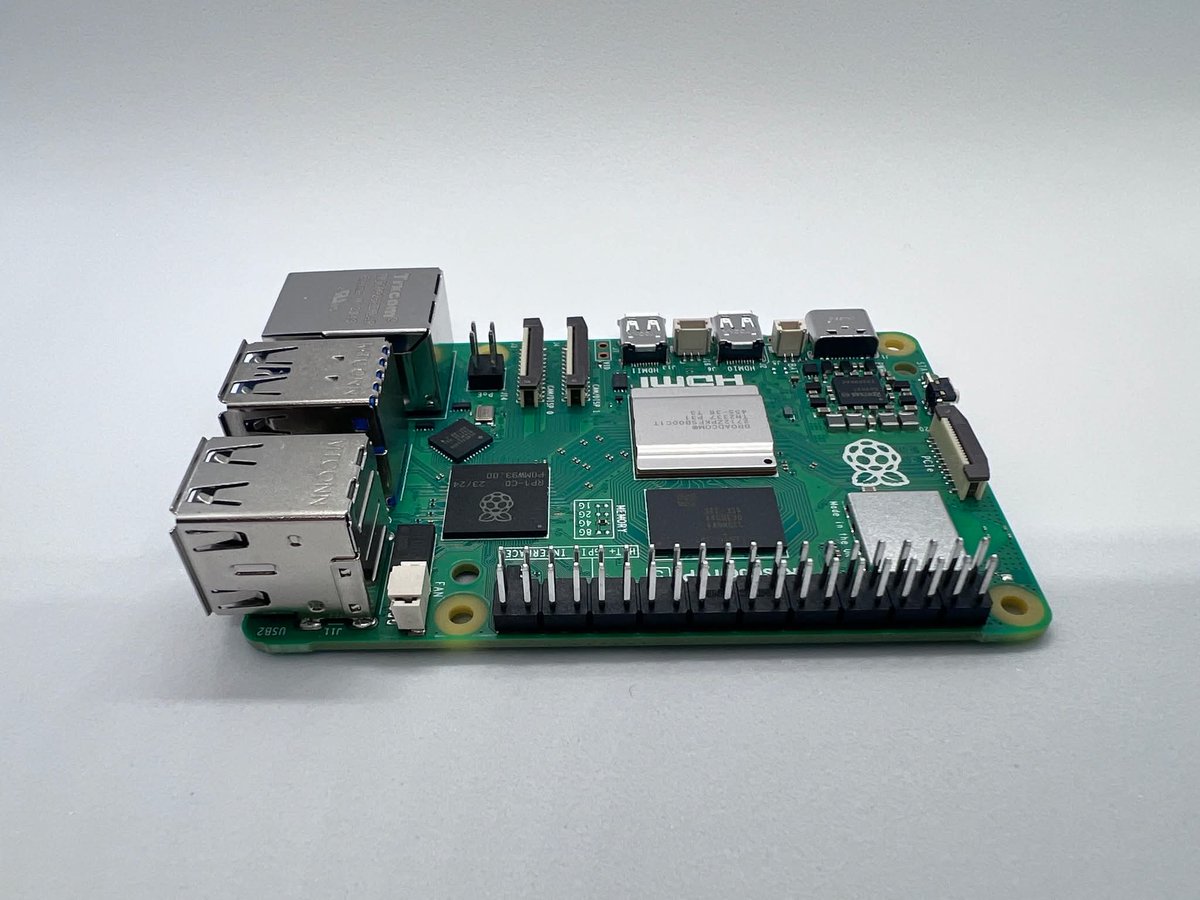
🍓 Raspberry Pi – The Tiny Computer That Powers Big Ideas The Raspberry Pi is a powerful, credit-card-sized computer designed to make programming, electronics, and innovation accessible to everyone. Originally created to promote computer science education, it has become one of the most popular single-board computers in the world — trusted by students, developers, engineers, and tech enthusiasts. 🔧 What Can You Do With It? 💡 The Raspberry Pi can be used for: 💻 Learning programming (Python, C++, Linux) 🤖 Building robotics and automation systems 🌐 Creating web servers and IoT projects 🎮 Designing retro gaming consoles 📡 Developing smart home solutions 📊 Experimenting with AI and computer vision ⚡ Why It’s So Powerful Modern models like the Raspberry Pi 5 offer: 🔹 Quad-core processor 🔹 Up to 8GB RAM 🔹 Dual HDMI output 🔹 USB 3.0 ports 🔹 Built-in Wi-Fi & Bluetooth 🔹 40 GPIO pins for hardware control 🔹 All of this in a compact, low-power device. 🌍 Why Developers Love It: ▪️ Affordable and accessible ▪️ Portable and energy efficient ▪️ Strong open-source ecosystem ▪️ Massive global community ▪️ Ideal for prototyping real-world projects 🔥 From beginners writing their first script to engineers building smart systems — Raspberry Pi proves that innovation doesn’t require a massive machine, just a powerful idea. 🔥 Raspberry Pi Projects, Guides and Tutorials ebokify.com/raspberry-pi-p… #RaspberryPi #EmbeddedSystems #IoT #Programming #Electronics #TechInnovation
Ebokify tweet media
English
0
0
1
7
Ebokify
Ebokify@ebokify·
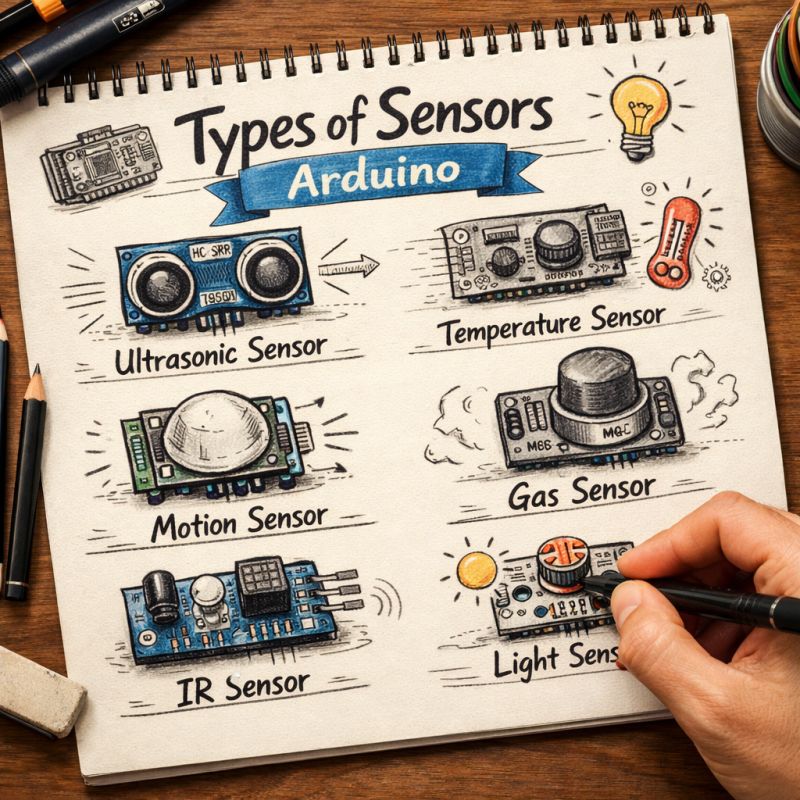
🔍 Types of Arduino Sensors Every Embedded Developer Should Know Exploring the world of Arduino sensors opens the door to endless IoT and embedded system possibilities. Here are 6 essential sensors every developer should understand: 📏 1️⃣ Ultrasonic Sensor Measures distance using sound waves. Perfect for obstacle detection, robotics, and smart parking systems. 🌡️ 2️⃣ Temperature Sensor Monitors environmental temperature. Used in weather stations, smart homes, and industrial control systems. 🚶 3️⃣ Motion (PIR) Sensor Detects human movement using infrared radiation. Common in security systems and automatic lighting. 💨 4️⃣ Gas Sensor Detects gases like LPG, methane, smoke, and CO₂. Critical for safety systems and environmental monitoring. 🔴 5️⃣ IR Sensor Uses infrared light for object detection and remote signal reading. Widely used in line-following robots and remote-controlled devices. 💡 6️⃣ Light Sensor (LDR) Measures light intensity. Ideal for automatic brightness control and smart lighting systems. 🚀 Why Sensors Matter? Sensors are the bridge between the physical world and digital systems. They allow microcontrollers like Arduino to interact with real-world data and make intelligent decisions. 🔥 Top 6 Arduino eBooks V1 ebokify.com/top-6-arduino-… #EmbeddedSystems #Arduino #IoT #Electronics #Sensors #Engineering #Robotics
Ebokify tweet media
English
0
0
1
1
Ebokify
Ebokify@ebokify·
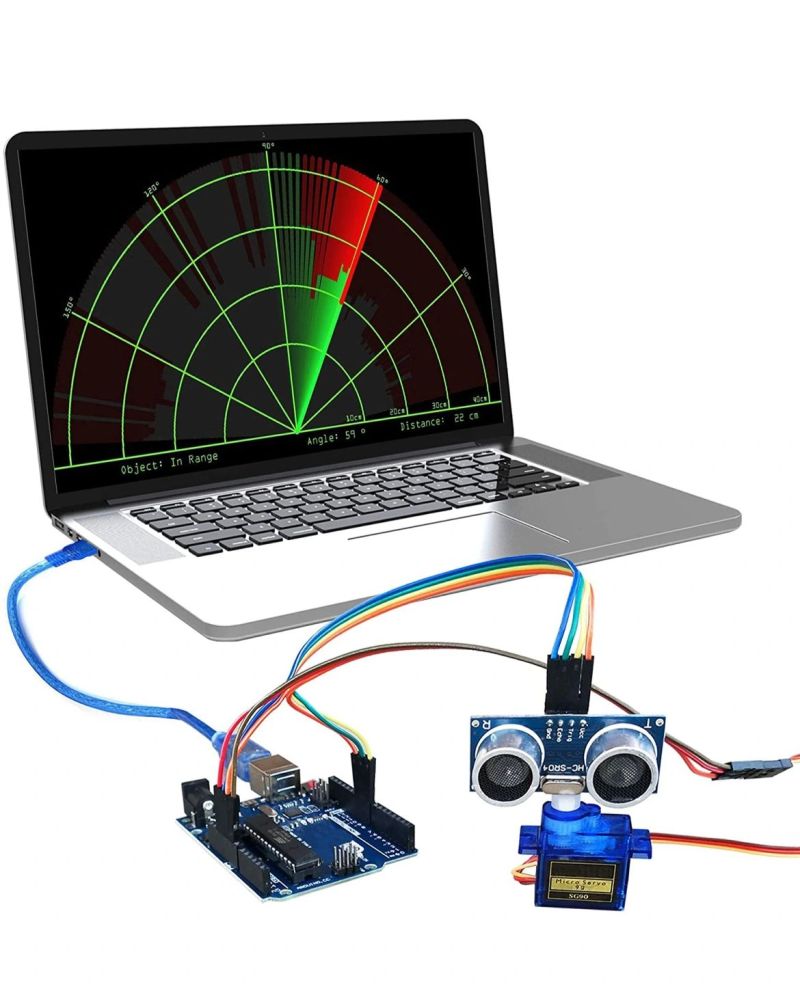
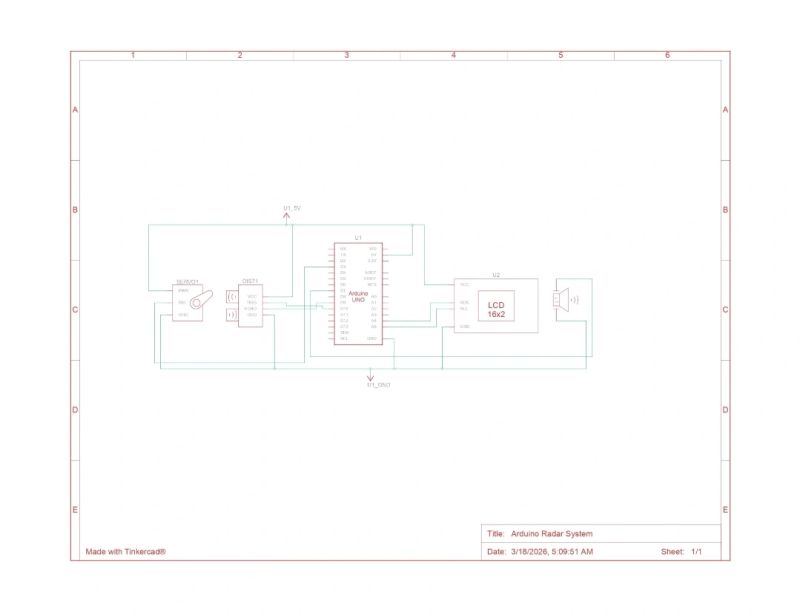
🚀 Thrilled to Share My First Hands-On Project: Radar System! I recently completed my first practical electronics project, a hands-on Radar System, designed to detect distances and display them in real-time with precision. This project marks the beginning of my journey into learning electronics practically. This project combines multiple electronic components, demonstrating the power of embedded systems and DIY electronics. ✨ Components Used: 🟢 Arduino Uno – the brain of the project 📟 16x2 I2C LCD Display – to visualize distance readings 🌊 Ultrasonic Sensor – for accurate distance measurement 🔄 Micro Servo Motor 180° – enables scanning motion 🛠️ Breadboard & 5V Buzzer – for prototyping and alerts 💡 Project Highlights: Real-time distance measurement and display Servo scanning mechanism for a dynamic radar effect Integrated buzzer for audio feedback Clean, modular setup for easy replication and upgrades This project was an incredible journey into practical electronics, sensors, and embedded systems programming. Seeing all the components work together seamlessly was extremely satisfying and inspiring! ⚡ I hope this inspires other makers and electronics enthusiasts to explore, create, and innovate! 🔥 Top 6 Arduino eBooks V1 ebokify.com/top-6-arduino-… #Electronics #Arduino #RadarSystem #DIYProject #STEM #EmbeddedSystems #Maker #Innovation #Tech
Ebokify tweet mediaEbokify tweet mediaEbokify tweet media
English
0
0
1
5
Ebokify
Ebokify@ebokify·
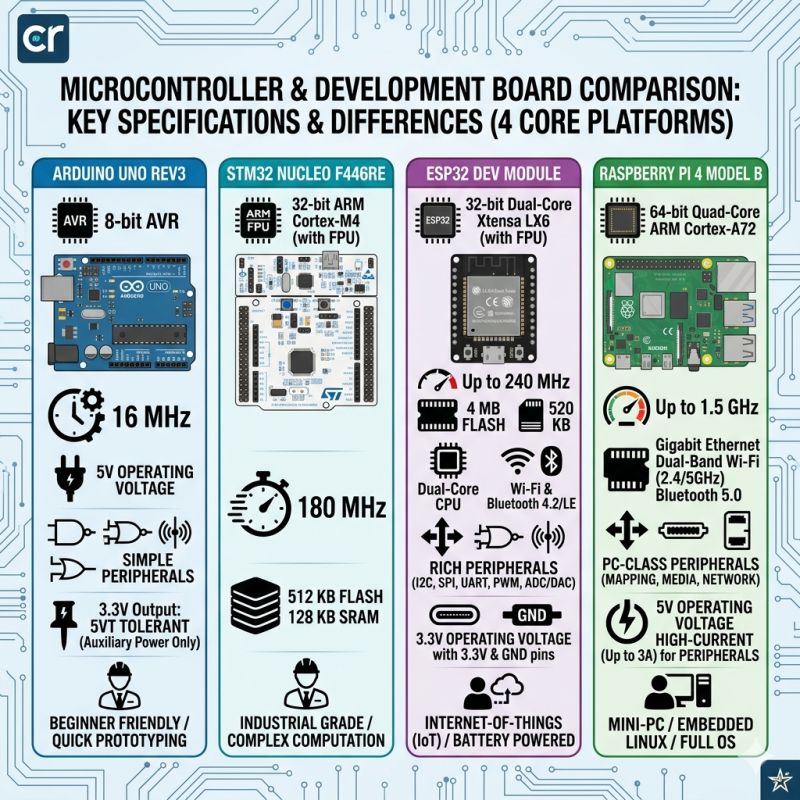
🔹 Microcontroller & Development Board Comparison: Key Specs & Differences In the rapidly evolving world of electronics and embedded systems, choosing the right microcontroller or development board is crucial. Here's a detailed comparison of four core platforms: 1️⃣ Arduino Uno Rev3: ⚙️ Processor: 8-bit AVR ⏱️ Clock Speed: 16 MHz 🔋 Voltage: 5V Operating 🔌 Peripherals: Simple (sensors, logic gates) ✨ Additional Features: 3.3V Output (5V tolerant), Beginner-friendly & quick prototyping 2️⃣ STM32 Nucleo F446RE: ⚙️ Processor: 32-bit ARM Cortex-M4 (with FPU) ⏱️ Clock Speed: 180 MHz 💾 Memory: 512 KB Flash, 128 KB SRAM ✨ Additional Features: Industrial-grade, supports complex computation 3️⃣ ESP32 Dev Module: ⚙️ Processor: 32-bit Dual-Core Xtensa LX6 (with FPU) ⏱️ Clock Speed: Up to 240 MHz 💾 Memory: 4 MB Flash, 520 KB SRAM 🌐 Connectivity: Wi-Fi & Bluetooth 4.2/LE 🔌 Peripherals: Rich (I2C, SPI, UART, PWM, ADC/DAC) ✨ Additional Features: 3.3V operating voltage, IoT-friendly, battery-powered 4️⃣ Raspberry Pi 4 Model B: ⚙️ Processor: 64-bit Quad-Core ARM Cortex-A72 ⏱️ Clock Speed: Up to 1.5 GHz 🌐 Connectivity: Gigabit Ethernet, Dual-Band Wi-Fi, Bluetooth 5.0 🔌 Peripherals: PC-class (mapping, media, network) ✨ Additional Features: 5V high-current support (up to 3A), Mini-PC capabilities, full Linux OS support 💡 Conclusion: From beginner-friendly prototyping with Arduino to high-performance IoT applications with ESP32, industrial computation with STM32, and mini-PC capabilities with Raspberry Pi 4, each platform serves unique needs. Choosing the right board depends on your project’s complexity, power requirements, and connectivity needs. 🔥 Top 6 ESP32 eBooks ebokify.com/top-6-esp32-eb… 🔥 Top 6 Raspberry Pi eBooks V1 ebokify.com/top-6-raspberr… 🔥 Top 6 Arduino eBooks V1 ebokify.com/top-6-arduino-… #Microcontrollers #IoT #Arduino #STM32 #ESP32 #RaspberryPi #Electronics
Ebokify tweet media
English
0
0
1
3
Ebokify
Ebokify@ebokify·
🚀 C++ vs. Rust: The Battle for Embedded Systems Choosing the right language for Embedded Systems isn’t just about performance anymore — it’s about safety, ecosystem, and long-term maintainability. Let’s break it down 👇 --- 🛠️ C++ — The Industry Titan 👨💻 Creator: Bjarne Stroustrup (Bell Labs, 1979) ✅ Strengths: 🔹 Mature and massive ecosystem (Drivers, RTOS, Libraries) 🔹 Direct hardware control 🔹 High performance with zero-cost abstractions 🔹 Widely used in real-world embedded products ⚠️ The Catch: 🔸 Manual memory management can lead to bugs (if misused) 🔸 Complex tooling and build systems 🔸 Requires discipline for safe code 🏁 Verdict: Trusted and dominant — best for legacy systems and hardware with strong C++ support --- 🛡️ Rust — The Safety Revolution 👨💻 Creator: Graydon Hoare (Mozilla, 2010) ✅ Strengths: 🟢 Memory safety without Garbage Collector 🟢 Ownership & Borrowing system prevents bugs at compile-time 🟢 Fearless concurrency 🟢 Modern tooling (Cargo) ⚠️ The Catch: 🔸 Steep learning curve 🔸 Smaller ecosystem (especially in embedded) 🔸 Limited support for some microcontrollers 🏁 Verdict: Modern and secure — ideal for new projects and safety-critical systems --- 📊 Quick Comparison ⚙️ Memory: 🔸 C++ → Manual / Smart Pointers 🔹 Rust → Ownership Model 🧰 Tooling: 🔸 C++ → Diverse & complex 🔹 Rust → Unified (Cargo) ⚡ Performance: 🔥 Both → High performance & zero-cost abstractions 🌍 Ecosystem: 🔸 C++ → Huge & mature 🔹 Rust → Growing rapidly --- 🎯 Final Thoughts for Developers 👑 Choose C++ if you need: ✔️ Stability ✔️ Hardware compatibility ✔️ Industry-proven solutions 🚀 Choose Rust if you want: ✔️ Maximum safety ✔️ Modern development experience ✔️ Fewer runtime bugs 🔥 Top 6 ESP32 eBooks ebokify.com/top-6-esp32-eb… --- 🔥 Conclusion: C++ is the present king of embedded systems Rust is the rising future — fast, safe, and powerful --- #EmbeddedSystems #RustLang #Cpp #SoftwareEngineering #Microcontrollers #Programming #Tech
Ebokify tweet media
English
0
0
1
3
Ebokify
Ebokify@ebokify·
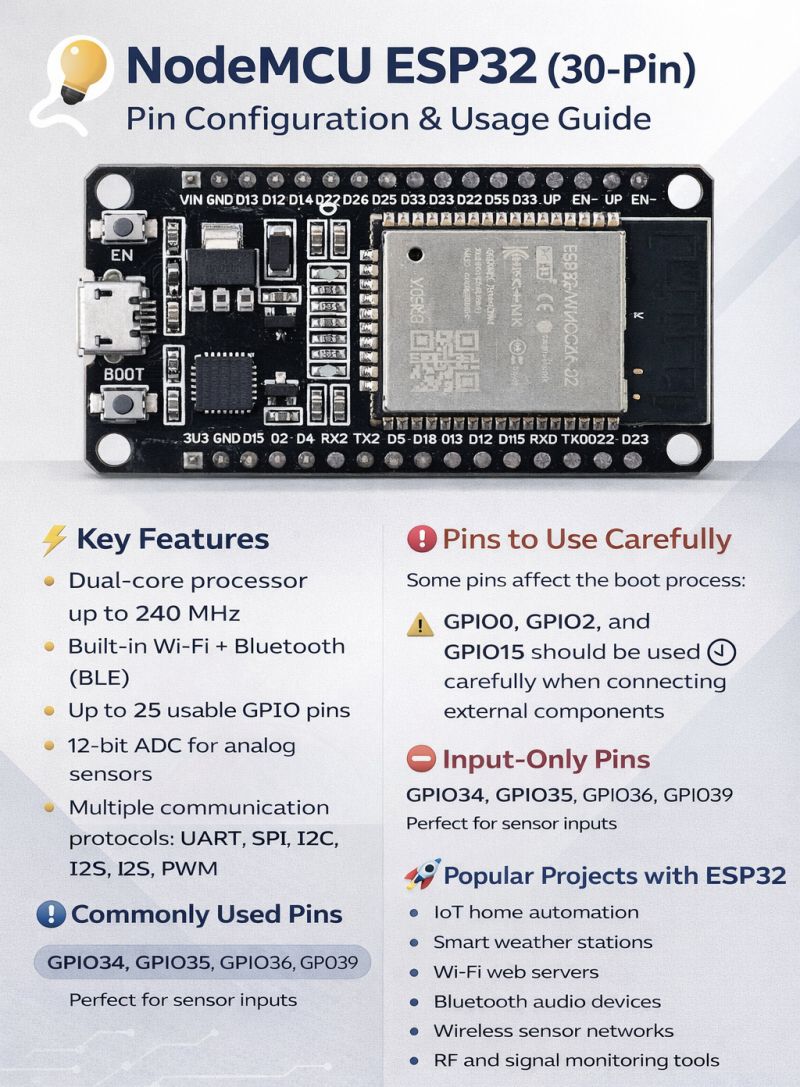
If you're building IoT or embedded projects, the NodeMCU ESP32 30-pin development board is one of the most powerful and beginner-friendly microcontrollers available today. Powered by the ESP32‑WROOM‑32 module from Espressif Systems, this board combines Wi-Fi, Bluetooth, and high-performance processing in a compact development platform. Here’s a quick overview every developer should know 👇 ⚡ Key Features • Dual-core processor up to 240 MHz • Built-in Wi-Fi + Bluetooth (BLE) • Up to 25 usable GPIO pins • 12-bit ADC for analog sensors • Multiple communication protocols: UART, SPI, I2C, I2S, PWM 📌 Commonly Used Pins • I2C: SDA → GPIO21 | SCL → GPIO22 • SPI: MOSI → GPIO23 | MISO → GPIO19 | SCK → GPIO18 | CS → GPIO5 • UART: TX0 → GPIO1 | RX0 → GPIO3 ⚠️ Pins to Use Carefully Some pins affect the boot process: GPIO0, GPIO2, and GPIO15 should be used carefully when connecting external components. 🚫 Input-Only Pins GPIO34, GPIO35, GPIO36, GPIO39 (Perfect for sensor inputs) 💡 Popular Projects with ESP32 • IoT home automation • Smart weather stations • Wi-Fi web servers • Bluetooth audio devices • Wireless sensor networks • RF and signal monitoring tools Compared to boards like ESP8266 NodeMCU, the ESP32 offers more GPIO, Bluetooth support, and much higher performance, making it ideal for modern IoT applications. Whether you're building smart devices, automation systems, or wireless sensors, the ESP32 continues to be one of the best microcontrollers for makers and developers. 🔧 What’s your favorite ESP32 project so far? 🔥 Top 6 ESP32 eBooks ebokify.com/top-6-esp32-eb… #ESP32 #IoT #EmbeddedSystems #Electronics #Microcontroller #HardwareDevelopment #Arduino #Makers #TechInnovation
Ebokify tweet media
English
0
0
1
45
Ebokify
Ebokify@ebokify·
🔥 M5Stack x AliExpress 16th Anniversary Sale 🔥 Whether you're a pro engineer or a DIY hobbyist, it's time to gear up with the best IoT hardware. Turn your concepts into reality with M5Stack. 🎁 8% OFF + Extra savings with AliExpress Anniversary coupons 📅 Mar. 15, 23:00 – Mar. 26, 14:59 (CST) 🛒 Shop now: ebokify.com/m5stack #M5Stack #AliExpress #IoT #Maker #STEM #DIY #TechSale #ESP32
Ebokify tweet media
English
0
0
1
28
Ebokify
Ebokify@ebokify·
If your Raspberry Pi's SD card breaks, everything will be lost. Do you have a backup? 💾 Using rsync, you can perform incremental backups of important files to an external USB drive or network destination. After the initial backup, only changes are transferred, making it fast. Basic command: rsync -av /home/pi/ /mnt/usb/backup/ Remote backup: rsync -avz -e ssh /home/pi/ user@server:/backup/ Complete automation with cron: 0 2 * * * rsync -av --delete /home/pi/ /mnt/usb/backup/ Bookworm may not pre-install rsync, so it's best to install it beforehand with sudo apt install rsync. How do you back up your Raspberry Pi? rsync? Copying the entire SD card? 🔥 Top 6 Raspberry Pi eBooks V1 ebokify.com/top-6-raspberr… #RaspberryPi #Linux #Backup
Ebokify tweet media
English
0
0
1
18
Ebokify
Ebokify@ebokify·
An attack on your server might have already been detected by someone in the world! 🛡️ CrowdSec is a community-based security tool where over 70,000 users share attack information they've detected. The mechanism is simple: Detect an attack on another server → Share with the community → Blocklists facilitate proactive defense. Users from over 190 countries share threat information, and even the free plan allows you to automatically block up to 15,000 malicious IP addresses (up to 3,000 depending on contributions). Raspberry Pi installation: curl -s install.crowdsec.net | sudo sh sudo apt install crowdsec sudo apt install crowdsec-firewall-bouncer-iptables *If using nftables, add -nftables to the end. fail2ban is a personal defense that uses your own logs to detect attacks. CrowdSec is a community defense that uses everyone's detection results to proactively defend. Both can be used together. What security measures do you use for your servers? 🔥 Top 6 Raspberry Pi eBooks V2 ebokify.com/top-6-raspberr… #RaspberryPi #security
Ebokify tweet media
English
0
0
1
16
Ebokify
Ebokify@ebokify·
Have you ever experienced an unstable Wi-Fi connection loss while running an apt upgrade over SSH into your Raspberry Pi...and the process died along with it? 💻 Using tmux, processes can continue running even if the SSH connection is lost. 🔧 Three basic commands: tmux → Start a new session Ctrl+b → d → Disconnect (detach) while maintaining the session tmux attach → Reconnect (attach) That's it. 💡 What's convenient: ✅ No need to worry if your SSH connection drops during an apt upgrade ✅ No need to worry if your connection is unstable during docker compose up ✅ You can leave long builds and downloads running ✅ Split the screen to check multiple tasks simultaneously When using a Raspberry Pi as a server, you often need to run long processes. tmux is your insurance against such situations. 🛡️ Install it with sudo apt install tmux. Once you use it, you'll never want to let go. How do you manage processes during an SSH connection: tmux / screen / nohup / nothing in particular? 🔥 Top 6 Raspberry Pi eBooks V1 ebokify.com/top-6-raspberr… #RaspberryPi #Linux
Ebokify tweet media
English
0
0
1
18
Ebokify
Ebokify@ebokify·
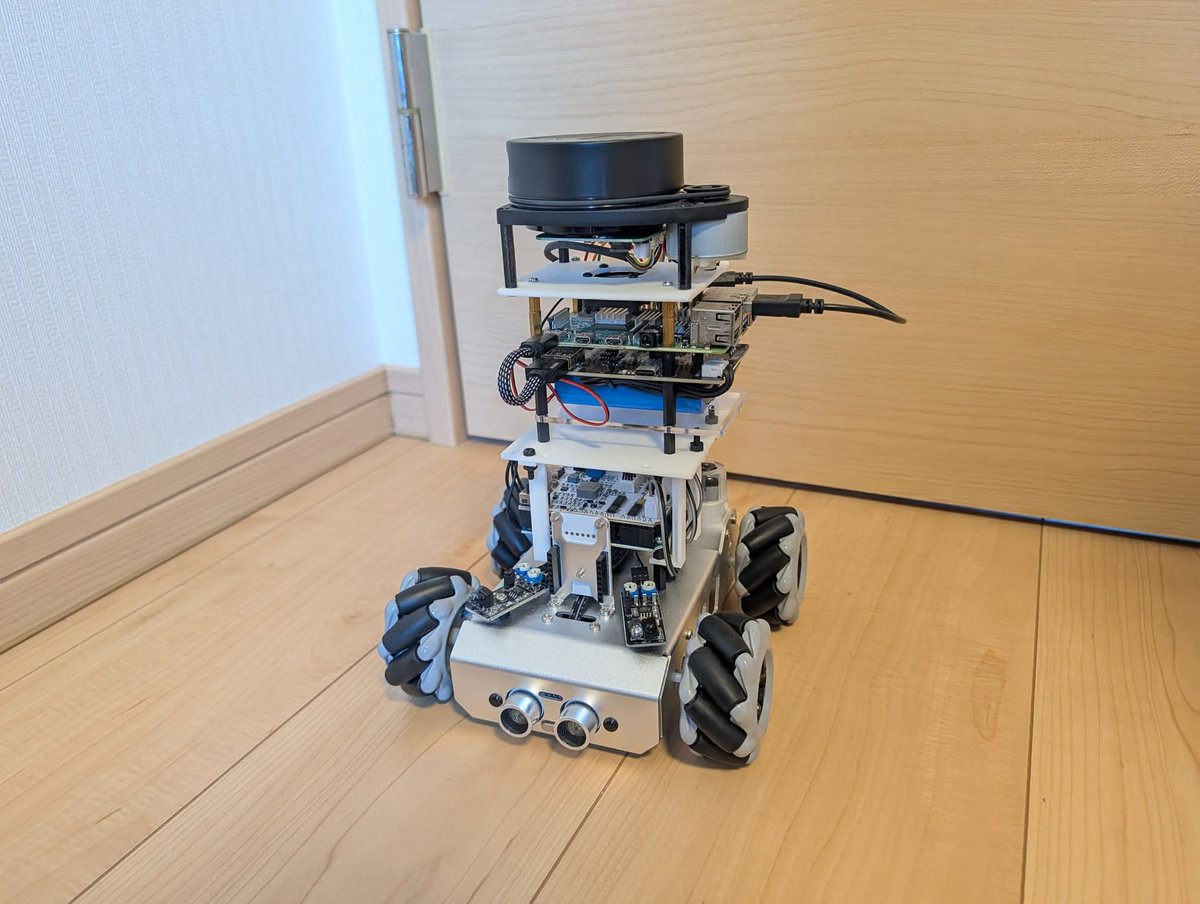
I'm building a robot with Raspberry Pi. I've gotten to the point where I can automatically generate a room map using LiDAR. 🤖 Using ROS2 (Robot Operating System 2) and SLAM, I'm creating a room map from the LiDAR scan data mounted on the robot. 🗺️ 🔧 Configuration: ✅ Raspberry Pi 4 → Robot brain (ROS2 Jazzy) ✅ SLAMTEC A1M8 LiDAR → 360-degree distance measurement ✅ ICM42688-P IMU → Attitude and acceleration detection ✅ 2 DC motors + L298N → Drive control ✅ Battery-powered → Movement without cables As I manually move the robot and scan with LiDAR, slam_toolbox estimates the positions of walls and obstacles and generates a 2D map. Visualizing it with RViz2, I can see the layout of my room being drawn in real time. 📊 ROS2 is the same framework used for industrial robots. It's interesting that it runs on Raspberry Pi. The next step is autonomous navigation (Nav2) using this map. 🛠️ Have you ever built a robot? Are you interested? Or is a radio-controlled robot enough? 🔥 Top 6 Raspberry Pi eBooks V1 ebokify.com/top-6-raspberr… #RaspberryPi #ROS2
Ebokify tweet media
English
0
0
1
31
Ebokify
Ebokify@ebokify·
Have you ever recorded the temperature and humidity in your room? With the Raspberry Pi Pico 2W, you can create your own sensor! 🌡️ The Pico 2W is a Raspberry Pi series microcontroller board. It features built-in Wi-Fi, allowing you to transmit sensor data over the network. 📡 My setup: ✅ Pico 2W → Wi-Fi-enabled microcontroller ✅ DHT11 → Temperature and humidity sensor ✅ Breadboard + jumper wires 💻 Just write about 10 lines of code in MicroPython: import dht, machine, network sensor = dht.DHT11(machine.Pin(15)) sensor.measure() print(f"Temperature: {sensor.temperature()}°C") Send the measurement data to the Raspberry Pi (server) via Wi-Fi and graph it with Grafana. 📊 It's battery-powered, so you can place it anywhere. What sets it apart from commercially available smart sensors is that you can freely decide the measurement interval and notification conditions. With just a few lines of code, you can set up things like a notification on Discord when the humidity exceeds 60%. Which do you use to record your indoor environment: SwitchBot, Nature Remo, or nothing at all? 🔥 Top 6 Raspberry Pi eBooks V2 ebokify.com/top-6-raspberr… #RaspberryPi #IoT
Ebokify tweet media
English
0
0
1
45
Ebokify
Ebokify@ebokify·
There are actually two types of GPIO pin numbers on the Raspberry Pi 🔌 Physical pin number: PCB location (1-40) GPIO number: Signal line name (GPIO2-GPIO27) "Connected to GPIO17" = physical pin 11. This is usually where you make your first wiring mistake. 💡 Type "pinout" in the terminal to check the pinout. 🔥 Raspberry Pi Projects, Guides and Tutorials ebokify.com/raspberry-pi-p… 🔥 Top 6 Raspberry Pi eBooks V1 ebokify.com/top-6-raspberr… #RaspberryPi #Electronics
Ebokify tweet media
English
0
0
1
14
Ebokify
Ebokify@ebokify·
Are you still accessing your home server services via HTTP? 🔓 You can get a free SSL certificate with Let's Encrypt. Certbot has an automatic renewal feature, but you'll need to reload your web server after renewal and check for renewal failures, so be sure to check regularly. 💡 Why do I need HTTPS on my home server? ✅ Browser warnings will be eliminated. ✅ Passwords and personal information will be encrypted. ✅ Many services, such as Nextcloud and Vaultwarden, require HTTPS. 🔧 Obtain with Certbot (official client): sudo apt install certbot sudo certbot certonly --standalone -d your.domain.com ⚠️ --standalone will have Certbot itself listen on port 80. Your server must be reachable from the Internet via that domain. If your existing web server is using port 80, you'll need to suspend it. Using a public domain name is usually the easiest option. For local use only, you can also set up and trust a private CA (such as smallstep). Are you enabling HTTPS on your home server? Let's Encrypt / self-signed certificate / still HTTP / VPN only? 🔥 Top 6 Raspberry Pi eBooks V1 ebokify.com/top-6-raspberr… #RaspberryPi #homeserver
Ebokify tweet media
English
0
0
1
12
Ebokify
Ebokify@ebokify·
Do you always manage your Raspberry Pi via SSH? 🖥️ Install Cockpit to manage your server from your browser without SSH. It's an official Red Hat project and a highly reliable tool used in corporate server management. 💡 What you can check and operate from your browser: ✅ CPU, memory, and disk usage (graph display) ✅ Network settings and traffic checks ✅ Start and stop services (systemd) ✅ Storage management ✅ In-browser terminal (execute commands without SSH) ✅ Docker container management (add plugins) 📦 Installation: sudo apt install cockpit → Simply access https://raspberrypi:9090 in your browser Installs with just apt, so you don't need Docker. It's included in the standard Raspberry Pi OS repository. If you don't need advanced visualization features like Grafana, but still want a quick check on your server's status, Cockpit is the perfect tool. Do you use SSH, Cockpit, Webmin, or another tool for server management? 🔥 Top 6 Raspberry Pi eBooks V2 ebokify.com/top-6-raspberr… #RaspberryPi #HomeServer
Ebokify tweet media
English
0
0
1
12
Ebokify
Ebokify@ebokify·
Are you still using a USB flash drive for home file sharing? 💾 By installing Samba on your Raspberry Pi, you can access shared folders from PCs and smartphones on the same Wi-Fi network. 📦 Setup: sudo apt install samba → Just edit a few lines in the configuration file. What you can do: ✅ View your Raspberry Pi folders in Windows Explorer ✅ Access them from Mac Finder ✅ Save photos and videos from your smartphone 💡 Connect a USB SSD and create your own NAS! 📁 Before buying a commercially available NAS (Synology, QNAP), we recommend trying it out with a Raspberry Pi first. Do you use NAS, cloud storage, USB flash drives, or nothing at all for home file sharing? 🔥 Top 6 Raspberry Pi eBooks V1 ebokify.com/top-6-raspberr… #RaspberryPi #HomeServer
Ebokify tweet media
English
0
0
1
38
Ebokify
Ebokify@ebokify·
DNS is a mechanism that translates domain names into IP addresses 🌐 When you type google.com in your browser: ① Your PC queries the DNS server ② The DNS server returns 142.250.xx.xx ③ Connect to that IP address 💡 Check on Raspberry Pi: nslookup google.com dig google.com → You can check which IP address it resolves to. cat /etc/resolv.conf → Check the DNS server being used. Running AdGuard Home and DNS caching on your home server also utilizes the DNS mechanism. 🔥 Top 6 Raspberry Pi eBooks V1 ebokify.com/top-6-raspberr… #RaspberryPi #Network
Ebokify tweet media
English
0
0
1
12
Ebokify
Ebokify@ebokify·
Are you getting enough cloud storage space? ☁️ By installing Nextcloud on a Raspberry Pi, you can have your own personal cloud storage running at home. Unlimited storage capacity. Only electricity costs (¥150-200/month). 💡 What you can do: ✅ Automatic file synchronization from PC and smartphone ✅ Automatic backup of smartphone photos ✅ Calendar and contact management (CalDAV/CardDAV) ✅ Collaborative document editing (Collabora Online integration) ✅ Expandable storage capacity with USB SSD (1TB or 2TB) ✅ 2FA login protection 🐳 Docker Compose (AIO version recommended): docker compose up -d → The setup wizard completes the initial setup. GitHub Stars 28,000+. Used worldwide, from personal use to businesses. The peace of mind of having your data at your fingertips is a value that cloud services lack. Using it in conjunction with other services is also recommended. It's also convenient for keeping only important data at your fingertips. How do you manage your files? Cloud only / Self-hosted / Both / No particular management? 🔥 Top 6 Raspberry Pi eBooks V1 ebokify.com/top-6-raspberr… #RaspberryPi #HomeServer
Ebokify tweet media
English
0
0
1
11
Ebokify
Ebokify@ebokify·
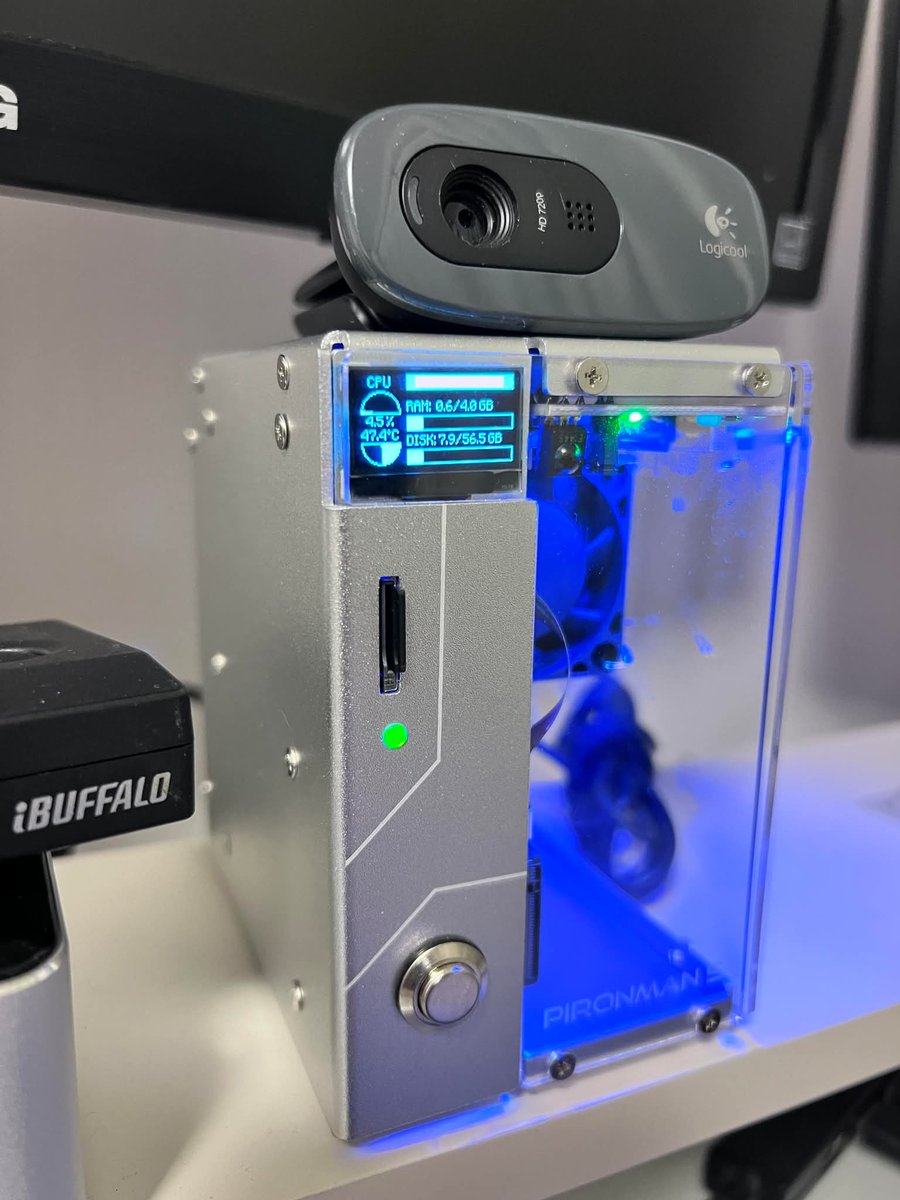
Have you ever experienced your Raspberry Pi's microSD card suddenly failing? 💾 By switching to booting from a USB SSD, you can increase read/write speeds several times over and eliminate the lifespan issues of SD cards. 💡 Benefits of USB SSD Booting: ✅ Significantly increased read/write speeds (you'll notice faster OS startup and applications) ✅ Higher write endurance compared to SD cards ✅ Comfortable operation of multiple Docker services ✅ Large capacity (500GB and up) available at affordable prices 🔧 Migration Procedure: ① Write the OS to the USB SSD using Raspberry Pi Imager ② Change the boot order to USB using raspi-config ③ Remove the SD card and verify that it boots from the USB SSD Both Pi 5 and Pi 4 support USB booting by default. If you're using your Pi as a 24/7 server, upgrading to an SSD is the most cost-effective improvement. A 2,000-3,000 yen SSD can significantly improve stability. What storage options do you use for your Raspberry Pi? SD card, USB SSD, NVMe HAT, or eMMC? 🔥 Top 6 Raspberry Pi eBooks V1 ebokify.com/top-6-raspberr… #RaspberryPi #HomeServer
Ebokify tweet media
English
0
0
1
12