Android Studio

1.4K posts

Android Studio banner
Android Studio

Android Studio

@AndroidStudio

The official IDE for Android application development. Explore the latest stable and canary releases → https://t.co/dBSe3faZtU

가입일 Temmuz 2013
85 팔로잉91.1K 팔로워
고정된 트윗
Android Studio
Android Studio@AndroidStudio·
Android Studio Quail.1 is STABLE! 🚀 We're bringing efficiency gains to your debugging workflows, letting you fix complex crashes seamlessly with AI-generated code→ goo.gle/quail1 Here’s what’s new: ⬇️
English
8
24
163
9.7K
Android Studio 리트윗함
Android Developers
Android Developers@AndroidDev·
Android CLI is stable at v1.0 🛠️ Version 1.0 adds Journeys support and a new ‘studio’ command so agents can integrate directly with @AndroidStudio to access profilers and Compose Previews. @antigravity also now supports Android via the resources bundle.
Android Developers tweet media
English
2
2
32
3.1K
Android Studio
Android Studio@AndroidStudio·
@helperone_ai The AQI agent is built to analyze your local code and propose a step-by-step fix plan for your review before making any changes. In the AQI panel in Quail.1, click "Fix with AI" on a crash and let us know how it goes! 🛠️
English
0
0
0
37
HelperOne.ai
HelperOne.ai@helperone_ai·
@AndroidStudio Parallel conversations look promising, but can the AQI Agent reliably fix complex stack traces without false positives?
English
1
0
0
89
Android Studio
Android Studio@AndroidStudio·
Android Studio Quail 1 is in canary and it brings features that upgrade your agentic workflow. 1. Run multiple AI tasks simultaneously with Parallel Conversations 2. Use the AQI Agent to turn stack traces into code fixes automatically → goo.gle/3xeLhKL #GoogleIO
Android Studio tweet media
English
5
12
71
4K
Android Studio
Android Studio@AndroidStudio·
@EdenKollcinaku Side-by-side setups are great, but having the agent live directly in Android Studio keeps you in your flow state with direct context of your local code, VCS, and build tools. Give it a try in Quail.1 and let us know what you think!
English
0
0
1
19
Eden
Eden@EdenKollcinaku·
@AndroidStudio ... or you can open Antigravity and Android Studio side by side, which is faster and produces less bugs (you also can see logcats, test it on different virtual devices, etc)
English
1
0
5
241
Android Studio
Android Studio@AndroidStudio·
This is a total game changer for rapid prototyping. Once your initial draft is ready, you can download the project files as a zip and seamlessly hand it off to Gemini in Android Studio for fine-tuning. ⚡
Logan Kilpatrick@OfficialLoganK

We just launched the ability to build native Android apps directly in Google AI Studio for free! Since launch last week, people have created more than 250,000 Android apps. Likely >99% of these folks never built an Android app before, everyone can now build, no coding required!

English
11
21
215
12.4K
Android Studio
Android Studio@AndroidStudio·
Fix crashes faster with Android Studio. ⚡ App Quality Insights is now fully integrated with Gemini. You can view a crash summary within the AQI panel, and have the agent apply the needed code changes to resolve the crashes, all under your control → goo.gle/4dKOK5y
English
0
2
33
2.3K
Android Studio
Android Studio@AndroidStudio·
Quail 1 is now stable 🐦🎊 What should we name our adorable quail?
English
6
2
33
9.5K
Android Studio
Android Studio@AndroidStudio·
🛠️ Quality & Stability Beyond the new AI workflows, Quail.1 brings essential bug fixes and the latest IntelliJ platform improvements to elevate your daily development. Download the latest version to get started ⬇️ goo.gle/4dKOK5y
English
0
0
16
1.4K
Android Studio
Android Studio@AndroidStudio·
🐞➡️✨ Fix Crashes with agents App Quality Insights is now fully integrated with Gemini! Click a crash for an instant summary, or click "Fix with AI" to let the agent analyze the issue, propose a step-by-step plan, and apply the code changes for you.
GIF
English
1
0
18
1.5K
Android Studio
Android Studio@AndroidStudio·
Android Studio Quail.1 is STABLE! 🚀 We're bringing efficiency gains to your debugging workflows, letting you fix complex crashes seamlessly with AI-generated code→ goo.gle/quail1 Here’s what’s new: ⬇️
English
8
24
163
9.7K
Android Studio 리트윗함
Chris Sinco
Chris Sinco@csinco·
Agent Mode prototyping Agent Mode in @AndroidStudio : quick action to send device screenshot to chat 📸
English
5
6
74
10K
Android Studio
Android Studio@AndroidStudio·
@happy_ships Having that dedicated AI capacity right in your IDE means you can stay focused on building without constantly breaking your momentum. ⚡
English
0
0
1
26
Abhishek Srivastava
Abhishek Srivastava@happy_ships·
@AndroidStudio This is a fantastic step. Having a truly dedicated capacity for Gemini directly in Android Studio really feels like a game-changer for day-to-day development flow. Less context switching is always a win.
English
1
0
1
69
Android Studio
Android Studio@AndroidStudio·
Your Google AI subscription now includes Gemini in Android Studio. 🤖 Google AI Pro and Ultra subscribers now have higher limits and dedicated capacity for Gemini in Android Studio → goo.gle/4dtC42E #GoogleIO
English
6
12
84
4.3K
Android Studio
Android Studio@AndroidStudio·
Android Studio + @Antigravity = the new power couple. 💚 Run them together so your agent can leverage capabilities like finding usages, declarations, and analyzing files. Then transition to Android Studio for that production-grade polish → goo.gle/CLI_IO26 #GoogleIO
English
8
26
287
8K
Android Studio 리트윗함
Google
Google@Google·
Gemini 3.5 Flash is available now globally to: ✨ Everyone: @GeminiApp and in AI Mode in Google Search ✨ Developers: In Google @Antigravity and Gemini API in @GoogleAIStudio & @Android Studio ✨ Enterprises: In Gemini Enterprise Agent Platform We’re just getting started — Gemini 3.5 Pro is coming next month.
English
21
51
675
88.6K
Android Studio
Android Studio@AndroidStudio·
Save time with the New Project workflow in Android Studio. Gemini takes your prompt, plans the tech stack, and writes the code, iterating until it’s error-free. Download the latest version of Android Studio to start using Gemini → goo.gle/3OuHC4q
English
5
13
88
9K
Android Studio
Android Studio@AndroidStudio·
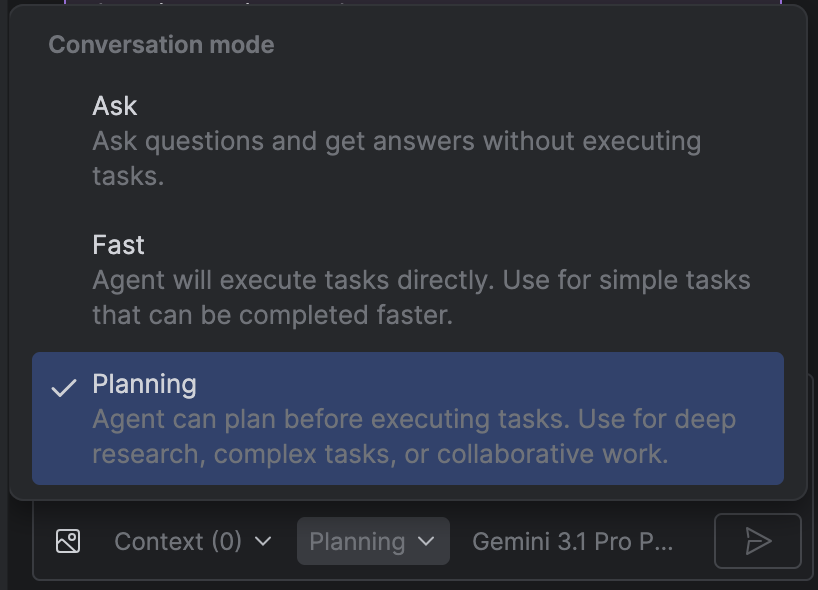
We're not wasting tokens in 2026 🙅🏽 With Planning Mode in Android Studio, your AI Agent creates a plan before a single token is spent. Switch your conversation mode to "Planning" to see a full project breakdown. goo.gle/4cwypRi
Android Studio tweet media
English
8
17
157
6K