Smooze

34 posts

Smooze

Smooze

@SmoozeApp

가입일 Ocak 2017
0 팔로잉77 팔로워
Smooze
Smooze@SmoozeApp·
1.7.5 is out. You can now enter values manually by double clicking on the sliders knob
English
3
0
1
0
Smooze
Smooze@SmoozeApp·
@jeohist Hey @jeohist, that never worked as those buttons are not identified as links. I'll add it as a feature request. Thanks!
English
0
0
1
0
Andrew Leedham
Andrew Leedham@AndrewJLeedham·
@SmoozeApp Is it possible to change the key, as my browser and Illustrator use option by default?
English
1
0
0
0
Andrew Leedham
Andrew Leedham@AndrewJLeedham·
@SmoozeApp Would it be possible to add a key to disable Smooze when pressed. Use case being zooming, in applications like Adobe Illustrator and the browser, the smooth scrolling makes zooming in and out with the scroll wheel very laggy.
English
1
0
0
0
Smooze
Smooze@SmoozeApp·
Version 1.6.0 is out with bug fixes and improvements.
English
1
0
0
0
Smooze
Smooze@SmoozeApp·
@premierexecuto2 Disable scroll acceleration and select the number of lines you want to scroll on each tick are free features. Others such as Smooth Scrolling will be gone once the trial ends.
English
0
0
0
0
Smooze
Smooze@SmoozeApp·
@StrasnieDuzoJes Please update Smooze to the latest version 1.5.0. Cycling between tabs with animated scrolling off and rev. vet. scroll on works as expected
English
0
0
0
0
Smooze
Smooze@SmoozeApp·
v1.4.0 is out! Improved Grab Scroll, Auto Scroll, Multi-display support and more.
English
0
0
0
0
Smooze
Smooze@SmoozeApp·
@Roller_ No problem. I’m seeing the same behavior with Smooze on and off.
English
1
0
0
0
Smooze
Smooze@SmoozeApp·
@Roller_ This won't happen when selecting icons on the desktop but will happen when you CMD+SHIFT+4 to capture a screen rect (Even without Smooze on)
English
2
0
0
0
Smooze
Smooze@SmoozeApp·
@Roller_ Doesn't seem like a bug, just specific app behavior when pressing Shift while Left Button is pressed.
English
0
0
0
0
Smooze
Smooze@SmoozeApp·
@Roller_ Make sure you scroll your mouse while your mouse is hovering over the left table (Under the Name & Action table)
English
1
0
0
0
Smooze
Smooze@SmoozeApp·
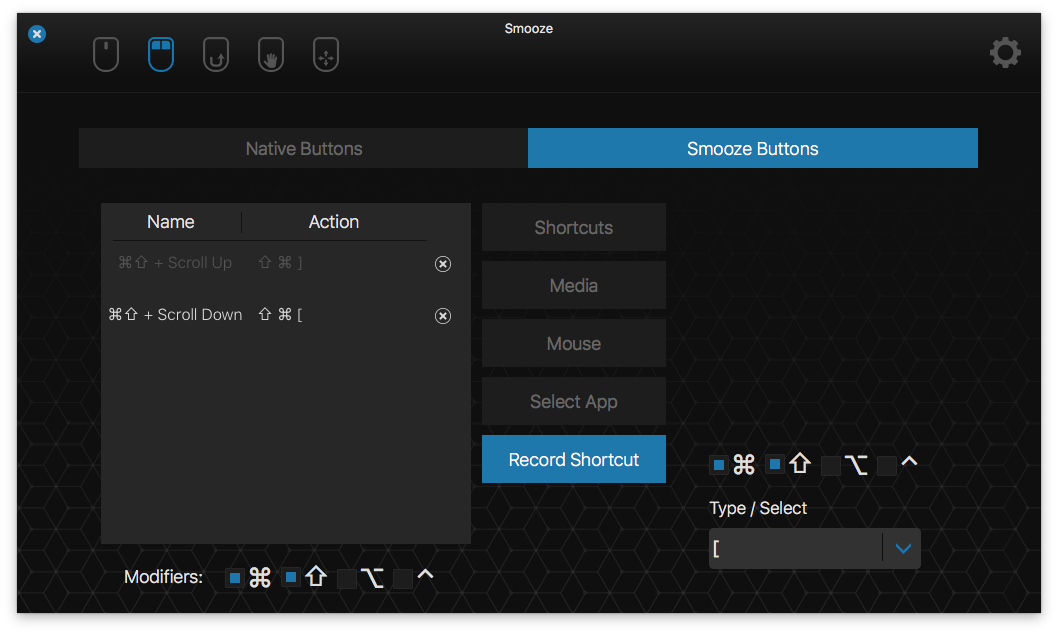
@Roller_ No problem. Instead of a mouse button you can attach it to scroll up or down with a modifier key.
Smooze tweet media
English
1
0
0
0
Smooze
Smooze@SmoozeApp·
@Roller_ Sure, You can set one of your mouse buttons attached to the tab switching shortcut -> Shift-Command-] or Shift-Command-[
English
2
0
0
0
Smooze
Smooze@SmoozeApp·
@fabianoarruda I wasn't able to reproduce this on a couple of my machines. In order for the menu bar icon to be hidden, Smooze window needs to be closed.
English
1
0
0
0
Smooze
Smooze@SmoozeApp·
@Roller_ Cool. Shoot me an email with a scenario you see that behavior and I'll try to reproduce this.
English
1
0
0
0