Andrew Bolis (private) retweetledi
Andrew Bolis (private)
56 posts

Andrew Bolis (private)
@AndrewBol1S
Al & Marketing Consultant ¡ Former CMO Get My Free Guides: https://t.co/VEZQDVTYG2 [email protected] A Follow for Al & business growth tips
Chicago, IL Katılım Ocak 2010
924 Takip Edilen191 Takipçiler
Andrew Bolis (private) retweetledi

Many people use ChatGPT for writing or research.
Top performers use ChatGPT as a thinking partner.
Here are 8 prompts for planning, decision making and strategic thinking:
[ 🔖 bookmark this post for later ]
1. Stress-Test My Thinking
This is the plan I’m working on: [insert your idea, plan, or strategy]. Act as a reasoning analyst. Evaluate my logic, assumptions, or potential flaws, but don’t make edits. I want to pressure-test my thinking, not to explore new ideas.
2. Shift the Perspective
Here’s the main idea I’m working with: [insert your idea]. Act as a perspective strategist. Explore new ways to present it, such as targeting a fresh audience, using a different emotional driver, or shifting the brand message.
3. Translate My Gut Feeling
Something about this doesn’t feel right, but I can’t explain it: [describe the situation, message, or tactic]. Act as a clarity finder. Help me figure out what feels off, what could be confusing, out of place, or sending mixed signals.
4. Organize My Messy Thoughts
Here’s a rough mix of my thoughts and notes: [insert notes, fragments, half-formed ideas]. Act as a structure builder. Take what I’ve shared and turn it into a clear outline, but keep my tone and don’t add anything new.
5. Help Me Face the Decision
Here’s the situation I’m dealing with: [insert project or context]. Act as a decision coach. Show me where I might be stalling, overthinking, or avoiding a clear choice, and reflect on what’s keeping me stuck.
6. Surface the Deeper Question
Here’s the situation I’m working through: [insert idea or challenge]. Act as a strategic advisor. Help me uncover the core question behind this. What bigger issue or choice should I really be focusing on?
7. Spot Execution Risks
Here’s the plan I’m about to put into action: [insert strategy or outline]. Act as an operations analyst. Review my plan and call out where it could fall apart, like missed timelines, lack of resources, coordination issues, or anything else that might delay execution.
8. Make Sense of My Instinct
Here’s the idea I’m leaning toward, and it feels right: [insert your idea or insight]. Act as a reasoning guide. Help me explore what’s behind my instinct, what signals, patterns, or logic might be driving this choice.
Make better decisions.
Use ChatGPT as your thinking partner.
📌 Get Advanced ChatGPT Guide (free): bit.ly/3StIB3z
👉 Follow me @AndrewBolis for more and 🔄 Repost this to help others use AI

English
Andrew Bolis (private) retweetledi

I reached my DM limit. Get my Faceless YouTube Channel Guide for free here: bit.ly/41C23jI
English
Andrew Bolis (private) retweetledi

9. Rapid Application Development with Large Language Models
• Find and experiment with pretrained models using HuggingFace.
• Work with encoder and decoder models for various NLP tasks.
• Use LangChain for data pipelines and agentic workflows.
Course: bit.ly/4qaUD0u
English
Andrew Bolis (private) retweetledi

Learn AI, build new skills, and advance your career!
📌 Get top 100 Free AI Courses from Google, Amazon, Microsoft & IBM: bit.ly/47H9hq6
👉 Follow me @AndrewBolis for more and 🔄 Repost this to help others learn AI
English
Andrew Bolis (private) retweetledi

People underestimate the power of great prompts.
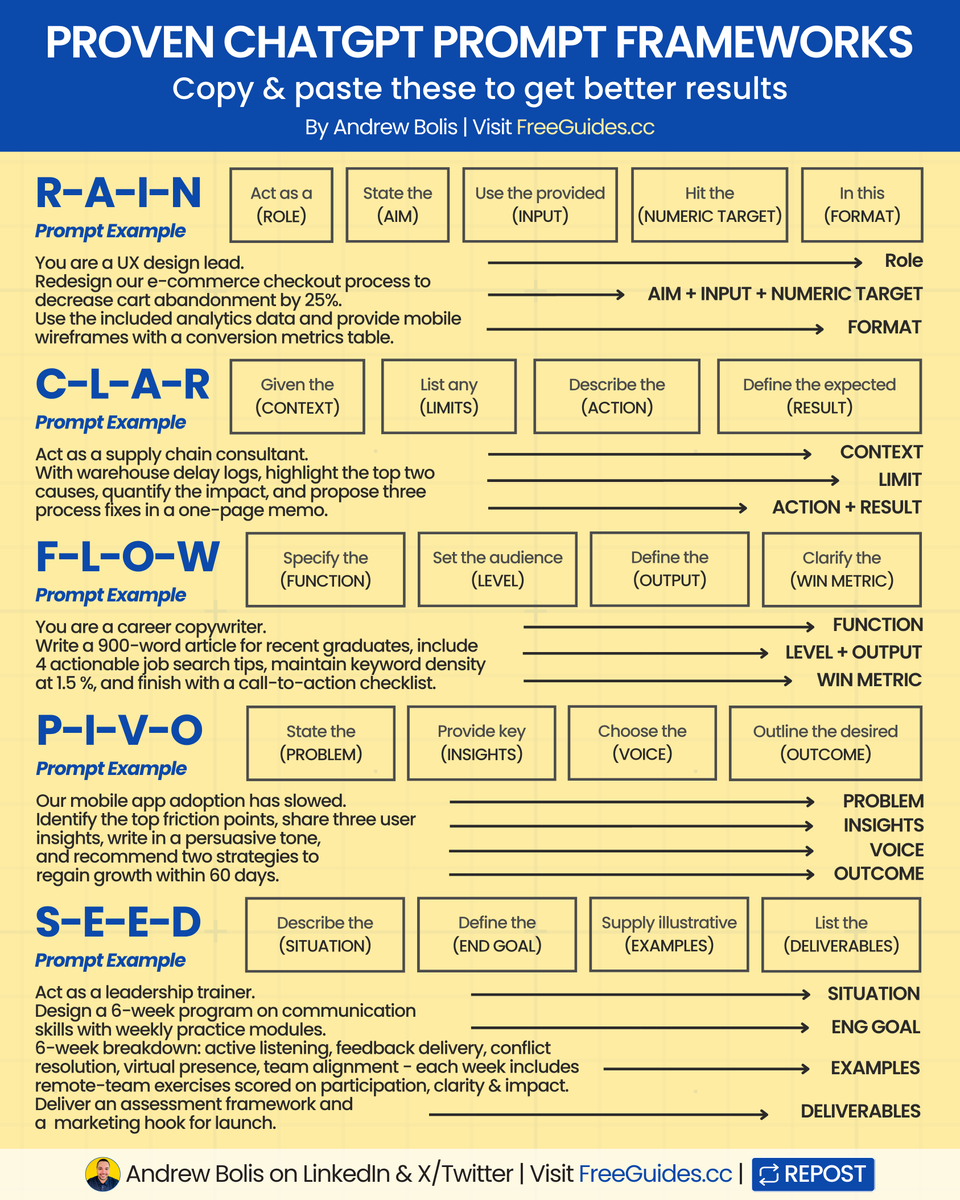
Here are 5 frameworks you can copy & paste:
[ bookmark 🔖 this post for later ]
1 - R-A-I-N
➟ Act as a (ROLE)
➟ State the (AIM)
➟ Use the provided (INPUT)
➟ Hit the (NUMERIC TARGET)
➟ In this (FORMAT)
R-A-I-N Example:
➟ ROLE: UX design lead
➟ AIM: Redesign e-commerce checkout to lower cart abandonment by 25%
➟ INPUT: Analytics data
➟ NUMERIC TARGET: 25% decrease
➟ FORMAT: Mobile wireframes + conversion metrics table
2 - C-L-A-R
➟ Given the (CONTEXT)
➟ List any (LIMITS)
➟ Describe the (ACTION)
➟ Define the expected (RESULT)
C-L-A-R Example:
➟ CONTEXT: Warehouse delay logs
➟ LIMITS: Focus on the top two causes
➟ ACTION: Quantify impact + propose three fixes
➟ RESULT: One-page memo
3 - F-L-O-W
➟ Specify the (FUNCTION)
➟ Set the audience (LEVEL)
➟ Define the (OUTPUT)
➟ Clarify the (WIN METRIC)
F-L-O-W Example:
➟ FUNCTION: Career copywriter
➟ LEVEL: Recent graduates
➟ OUTPUT: 900-word article with 4 job search tips
➟ WIN METRIC: 1.5% keyword density + CTA checklist
4 - P-I-V-O
➟ State the (PROBLEM)
➟ Provide key (INSIGHTS)
➟ Choose the (VOICE)
➟ Outline the desired (OUTCOME)
P-I-V-O Example:
➟ PROBLEM: Mobile app adoption is slowing
➟ INSIGHTS: Identify friction points + share 3 user insights
➟ VOICE: Persuasive
➟ OUTCOME: Two strategies to regain growth in 60 days
5 - S-E-E-D
➟ Describe the (SITUATION)
➟ Define the (END GOAL)
➟ Supply illustrative (EXAMPLES)
➟ List the (DELIVERABLES)
S-E-E-D Example:
➟ SITUATION: Create a 6-week communication program
➟ END GOAL: Skills in listening, feedback, conflict resolution, presence, alignment
➟ EXAMPLES: Weekly remote-team exercises scored on clarity & impact
➟ DELIVERABLES: Assessment framework + marketing hook
📌 Get Advanced ChatGPT Guide (free): bit.ly/3StIB3z
👉 Follow me @AndrewBolis for more and 🔄 Repost this to help others use AI

English
Andrew Bolis (private) retweetledi

If you want ChatGPT to do high-quality research.
Start by improving the prompts you’re using.
Here are 15 prompts to help you structure research from idea to output.
[ 🔖 bookmark this post for later ]
1. Create a Research Plan
2. Brainstorm Research Topics
3. Review Recent Studies
4. Build Research Questions
5. Map a Research Timeline
6. Analyze a Dataset
7. Find Research Gaps
8. Design a Research Method
9. Check Source Credibility
10. Forecast Research Trends
11. Review Ethical Issues
12. Summarize an Abstract
13. Generate Research Hypotheses
14. Link Interdisciplinary Topics
15. Create a Topic Quiz
Better research comes from refined prompts at every step.
📌 Get Advanced ChatGPT Guide (free): bit.ly/3StIB3z
👉 Follow me @AndrewBolis for more and 🔄 Repost this to help others use AI

English
Andrew Bolis (private) retweetledi

Most people treat Perplexity like Google.
And they skip its powerful research features.
Perplexity is a full research engine built for depth and accuracy.
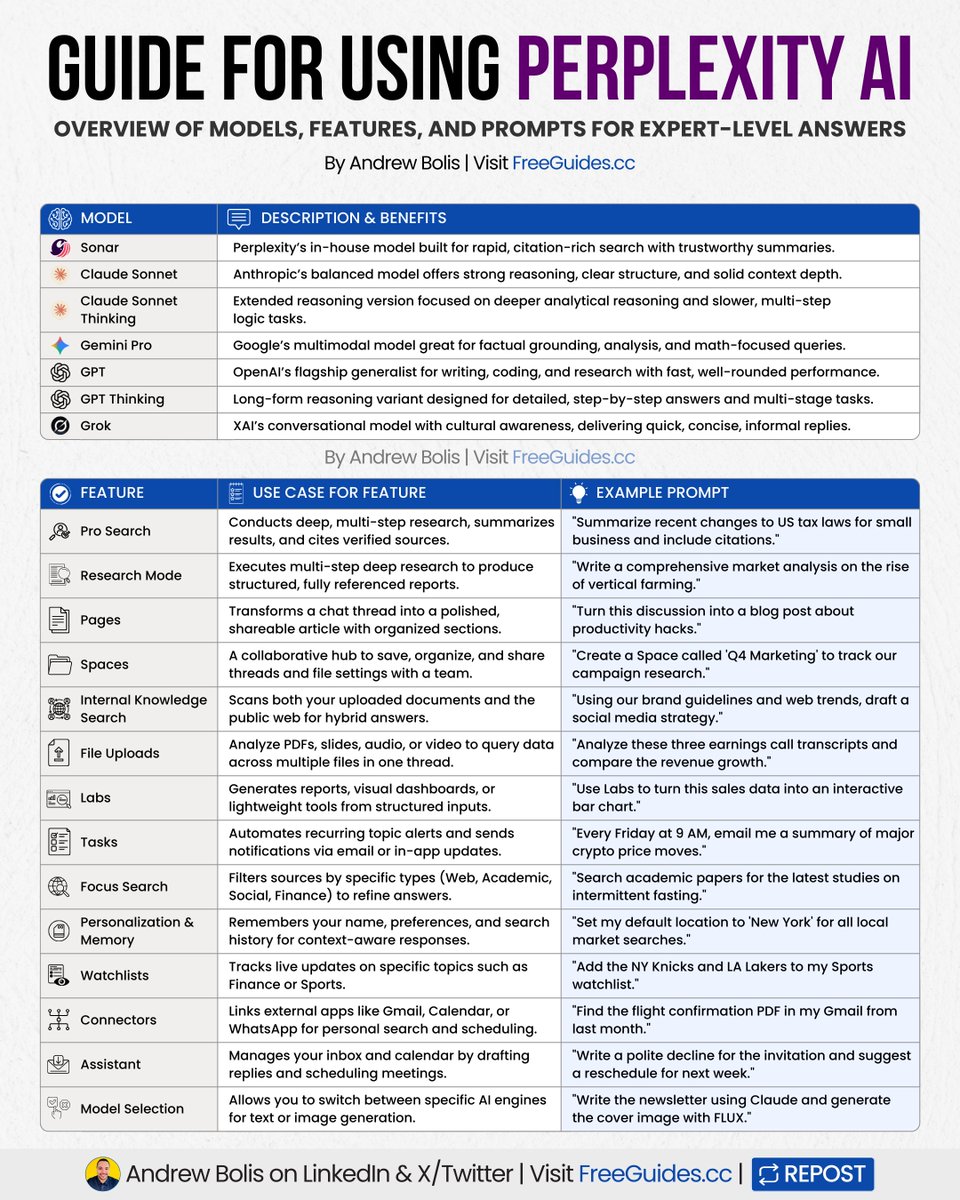
To use it effectively, start with the right Model:
Think of these as different "brains," each specialized for a specific type of work.
1. Sonar
Fast, source-backed live search.
Use it for real-time facts and breaking updates.
2. Claude Sonnet
Balanced, structured reasoning.
Strong in writing and summarizing.
3. Claude Sonnet Thinking
Slower, deeper step-by-step logic.
Best for detailed analysis.
4. Gemini Pro
Handles text, images, data, and math.
Great for technical or visual tasks.
5. GPT
Versatile and quick for general tasks.
Works well for everyday workflows.
6. GPT Thinking
Designed for long, structured reasoning.
Ideal for strategy and complex planning.
7. Grok
Casual, fast, and culture-aware.
Good for quick explanations and lighter queries.
Then use the right Features:
1. Pro Search
Instant answers with citations and live results.
Prompt: "Summarize recent changes to US tax laws with citations."
2. Research Mode
Builds organized, multi-step research automatically.
Prompt: "Write a comprehensive market analysis on the rise of vertical farming."
3. Pages
Turns chats into clean, formatted reports.
Prompt: “Turn this discussion into a blog post about productivity hacks."
4. Spaces
Shared folders for saved threads and notes.
Prompt: "Create a Space called 'Q4 Marketing' to track our campaign research."
5. Internal Knowledge Search
Search your own documents + the web together.
Prompt: "Using our brand guidelines and web trends, draft a social media strategy."
6. File Uploads
Upload PDFs, slides, or videos and extract insights.
Prompt: "Analyze these three earnings call transcripts and compare the revenue growth."
7. Labs
Quickly turn data into small dashboards.
Prompt: "Use Labs to turn this sales data into an interactive bar chart."
8. Tasks
Automate recurring updates in your inbox.
Prompt: "Every Friday at 9 AM, email me a summary of major crypto price moves."
9. Focus Search
Filter results by type or source.
Prompt: "Search academic papers for the latest studies on intermittent fasting."
10. Personalization & Memory
Recalls your role and preferences.
Prompt: "Set my default location to 'New York' for all local market searches."
11. Watchlists
Track topics, companies, or trends.
Prompt: "Add the NY Knicks and LA Lakers to my Sports watchlist."
12. Connectors
Pull data from Gmail, Drive, or Calendar.
Prompt: "Find the flight confirmation PDF in my Gmail from last month."
13. Assistant
Writes emails, plans meetings, and handles small tasks.
Prompt: "Write a polite decline for the invitation and suggest a reschedule for next week."
Now you can use Perplexity’s powerful research engine.
📌 Learn 30 free AI tools in 30 days: bit.ly/48woPL4
👉 Follow me @AndrewBolis for more and 🔄 Repost this to help others use AI

English
Andrew Bolis (private) retweetledi

The right prompts don’t just save time ➟ they build leverage.
Use these to get results others can’t replicate.
📌 Get Advanced ChatGPT Guide (free): bit.ly/3StIB3z
👉 Follow me @AndrewBolis for more and 🔄 Repost this to help others use AI
English
Andrew Bolis (private) retweetledi

11. ChatGPT For IT: (24 Prompts)
academy.openai.com/public/clubs/w…
English
Andrew Bolis (private) retweetledi