Dovyz159 retweetledi
Dovyz159
211 posts

Dovyz159 retweetledi


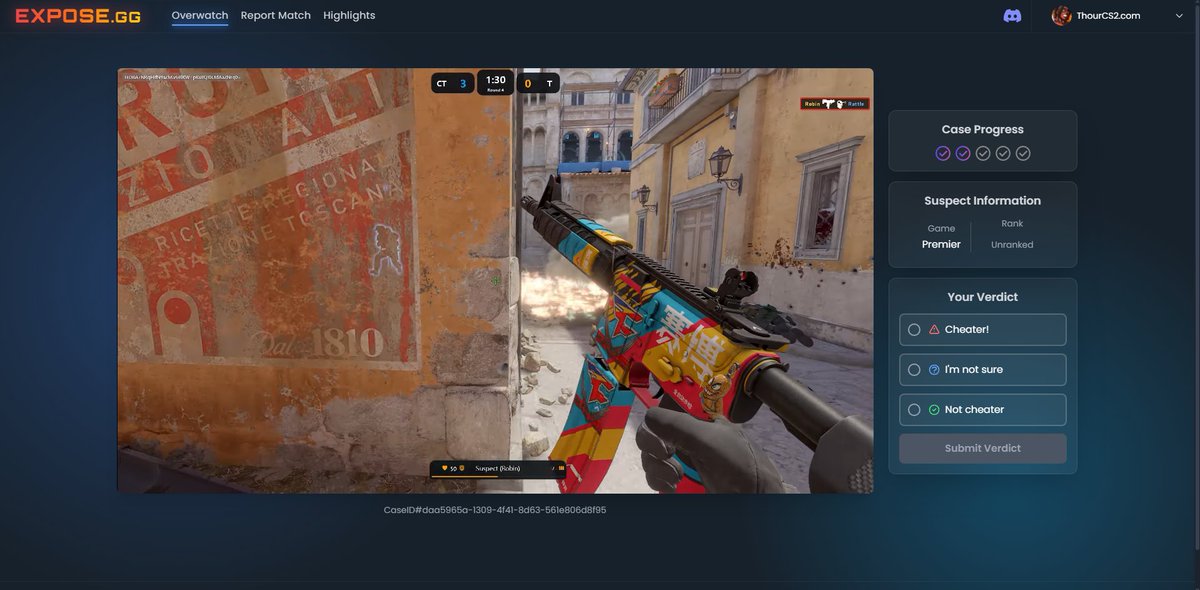
Since @CounterStrike hasn't added in-game Overwatch, the community built their own platform to review cases and submit verdicts. You can also upload your own demos. I'm not affiliated just found it interesting and wanted to share.

English
Dovyz159 retweetledi

Boosted my 1% FPS by 30%‼️
- Set Reflex to Disabled
- Cap FPS in Nvidia Control Panel
- Launch option: -noreflex
Most of you couldn't replicate @fREQUENCYCS's tweak because you missed -noreflex, it's the key. In-game FPS cap is bugged + bad Reflex Implementation. 🫤

English
Dovyz159 retweetledi

Perfect B Backsite molly 🚉
Essential Train utility already available in NADR at @OfficialRefrag
English
Dovyz159 retweetledi

So, @WraethCSGO and I might have found the most ridiculous smoke so far on the de_train remake. ☁️
English
Dovyz159 retweetledi

Friendly Reminder If your CS2 is lagging or stuttering recently:
- Verify Integrity of Game Files
- Delete DirectX/NVIDIA Shader Cache
- Set Power Plan to High Performance
- Update Audio Drivers
- Clean Re-install Older NVIDIA Version (537.58)
Thour@ThourCS2
I was having stutter issues in CS2 and found an old reddit post called "If you have microstutter issues delete your DirectX shadercache" from Tom Clancy's subreddit. Solution is to delete the DirectX Shader Cache: - Delete DirectX Shader Cache from Temporary Files Option - Delete Files in DXCache Folder (%USERPROFILE%\AppData\LocalLow\NVIDIA\PerDriverVersion\DXCache) - Restart your PC It definitely worked for me, I am not stuttering as I previously was. Give it a try once.
English
Dovyz159 retweetledi

How to Check if you are GPU or CPU Limited in CS2 (by @3kliksphilip)
- Launch any map offline.
- Set cl_showfps 2.
- Disable FSR and check the FPS.
- Set FSR to "Performance" and check the FPS again.
If the FPS increases, you are GPU-limited. You should keep the graphics settings to Low. Otherwise, you are CPU-limited. If you are CPU-limited, setting graphics to high won’t significantly affect your FPS.

English