Linux Inside: The Ideal Blog for Sysadmins & Geeks

14.3K posts

Linux Inside: The Ideal Blog for Sysadmins & Geeks banner
Linux Inside: The Ideal Blog for Sysadmins & Geeks

Linux Inside: The Ideal Blog for Sysadmins & Geeks

@tecmint

Tecmint - Linux, AI & Open-Source Made Simple 🐧🚀 Follow us for: - Easy Linux Tips and Tutorials 💡 - The Latest on Open-Source & AI 📰 - Fun Linux & AI 🤣

India Katılım Mayıs 2012
19 Takip Edilen135.4K Takipçiler
Sabitlenmiş Tweet
Linux Inside: The Ideal Blog for Sysadmins & Geeks
🚀 Pro TecMint now has 16 Linux courses live! 🟢 Beginner: Learn Linux in 7 Days → pro.tecmint.com/learn-linux/ 100+ Essential Linux Commands → pro.tecmint.com/linux-commands… 11 Best Linux Distributions → pro.tecmint.com/best-linux-dis… Linux Interview Handbook → pro.tecmint.com/linux-intervie… SSH Complete Course → pro.tecmint.com/ssh-complete-c… 🔵 Advanced: AI for Linux → pro.tecmint.com/ai-for-linux/ Bash Scripting → pro.tecmint.com/learn-bash-scr… Ubuntu Handbook → pro.tecmint.com/ubuntu-handboo… Linux Performance Monitoring → pro.tecmint.com/linux-monitori… Golang for DevOps → pro.tecmint.com/learn-go/ Claude for Linux → pro.tecmint.com/claude-code-fo… 🏆 Certifications: RHCSA → pro.tecmint.com/rhcsa-certific… RHCE → pro.tecmint.com/rhce-certifica… LFCS → pro.tecmint.com/lfcs-certifica… LFCA → pro.tecmint.com/lfca-certifica… All courses included in the Root plan at $8/month or $59/year. Lifetime access at $199 one-time. 👉 pro.tecmint.com #Linux #SysAdmin #DevOps
English
0
20
87
6.3K
Linux Inside: The Ideal Blog for Sysadmins & Geeks
💡 Quick Linux Tip #53 You want to quickly create or add text to a file. Run: echo "The echo command is one of the most commonly and widely used built-in commands for Linux bash and C shells, typically used in a scripting language and batch files to display a line of text/string on standard output or a file." > hello.txt This creates a new file named `hello.txt` and saves the text in it. To view the file, run: cat hello.txt You can also try: echo "Welcome" > welcome.txt echo "New line" >> notes.txt echo $HOME echo $PATH What these do: echo "Welcome" > welcome.txt - Creates or overwrites the file echo "New line" >> notes.txt - Adds a new line to the end of the file echo $HOME - Displays your home directory echo $PATH - Displays your PATH environment variable Perfect for creating files, adding content, testing commands, and writing shell scripts. Follow @tecmint for more #LinuxTips
Linux Inside: The Ideal Blog for Sysadmins & Geeks tweet media
English
1
5
28
806
Linux Inside: The Ideal Blog for Sysadmins & Geeks
Still wondering which Node.js framework to choose for your next web application? Explore 17 of the best Node.js frameworks, including Express, Fastify, NestJS, Hono, Koa, Strapi, and more. Learn what each framework offers, where it works best, and how to choose the right one for your project. Read: tecmint.com/best-nodejs-fr… Follow @tecmint for more #Linux, #NodeJS, #JavaScript, #WebDevelopment, #Programming, and #OpenSource tips.
Linux Inside: The Ideal Blog for Sysadmins & Geeks tweet media
English
1
5
20
1.8K
Linux Inside: The Ideal Blog for Sysadmins & Geeks
Still fixing broken wikilinks, Base files, or Canvas layouts after your AI edits your Obsidian vault? obsidian-skills teaches AI coding agents like Claude Code, Codex, and OpenCode how Obsidian actually works. It enables them to create proper wikilinks, understand Bases and Canvas files, respect Obsidian Markdown, and even extract clean Markdown from web pages with the Defuddle skill. Read: tecmint.com/obsidian-skill… Follow @tecmint for more #Linux, #OpenSource, #AI, and #Obsidian tips.
English
2
2
21
1.7K
Linux Inside: The Ideal Blog for Sysadmins & Geeks
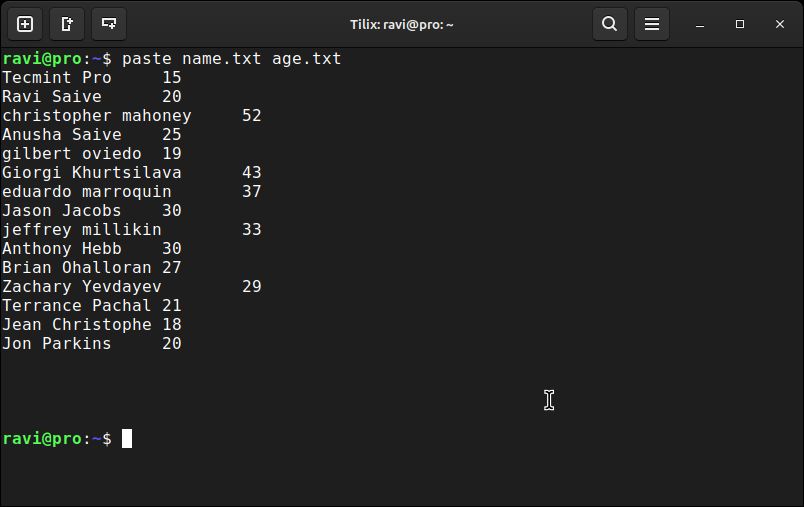
💡 Quick Linux Tip #52 You have data in separate files and want to combine them side by side. Run: paste file1 file2 For example: paste name.txt age.txt This combines matching lines from both files into a single output. You can also try: paste users.txt emails.txt paste cities.txt countries.txt paste file1.txt file2.txt Perfect for merging related data, comparing files, or creating simple reports. Follow @tecmint for more #LinuxTips
Linux Inside: The Ideal Blog for Sysadmins & Geeks tweet media
English
3
14
102
4.1K
Linux Inside: The Ideal Blog for Sysadmins & Geeks
In Chapter 45 of our SSH course, you'll learn how to secure SSH with Multi-Factor Authentication (MFA) using Google Authenticator, TOTP, and PAM. You'll configure two-factor authentication, test your setup, troubleshoot common issues, and apply MFA to specific users or groups for stronger server security. Read it here → pro.tecmint.com/ssh-multi-fact… Follow @tecmint for new #SSH chapters every week.
English
3
4
41
3.5K
Linux Inside: The Ideal Blog for Sysadmins & Geeks
Still opening separate terminal tabs for OpenCode, Claude, and other AI coding tools? OpenCode is a terminal-based AI coding agent that can read an entire project, analyze code, debug issues, and apply changes directly from your terminal. It works with real codebases, supports multiple AI providers, and lets you review every change before it's written to disk. Read: tecmint.com/opencode-ai-co… Follow @tecmint for more #Linux, #OpenSource, and #AI tips.
English
2
2
23
2.4K
Linux Inside: The Ideal Blog for Sysadmins & Geeks
💡 Quick Linux Tip #51 A file is too large, and you want to break it into smaller files. Run: split -l 100 filename For example: split -l 100 names.txt Suppose `names.txt` contains 250 lines. The command above will split the file into smaller files with 100 lines each. The split files will be: xaa - Lines 1–100 xab - Lines 101–200 xac - Lines 201–250 To verify the number of lines in each file, run: wc -l x* Perfect for sharing large files, processing huge datasets, or breaking logs into manageable chunks. Follow @tecmint for more #LinuxTips
Linux Inside: The Ideal Blog for Sysadmins & Geeks tweet media
English
2
21
138
5.8K
Linux Inside: The Ideal Blog for Sysadmins & Geeks
💡 Quick Linux Tip #50 You want to replace or convert characters in text. Run: tr 'a-z' 'A-Z' For example: echo "hello linux" | tr 'a-z' 'A-Z' This converts all lowercase letters to uppercase. You can also use: echo "HELLO" | tr 'A-Z' 'a-z' echo "linux" | tr 'a-z' 'A-Z' echo "a,b,c" | tr ',' ' ' Perfect for changing letter case, replacing characters, and transforming text directly from the command line. Follow @tecmint for more #LinuxTips
Linux Inside: The Ideal Blog for Sysadmins & Geeks tweet media
English
4
24
160
5.8K