UX Links

19.4K posts

UX Links banner
UX Links

UX Links

@uxlinks

Massively increase your UX skills and knowledge with our daily resources, tutorials and insights. Join our thriving community and stay ahead in UX.

Katılım Şubat 2009
29 Takip Edilen70.3K Takipçiler
UX Links
UX Links@uxlinks·
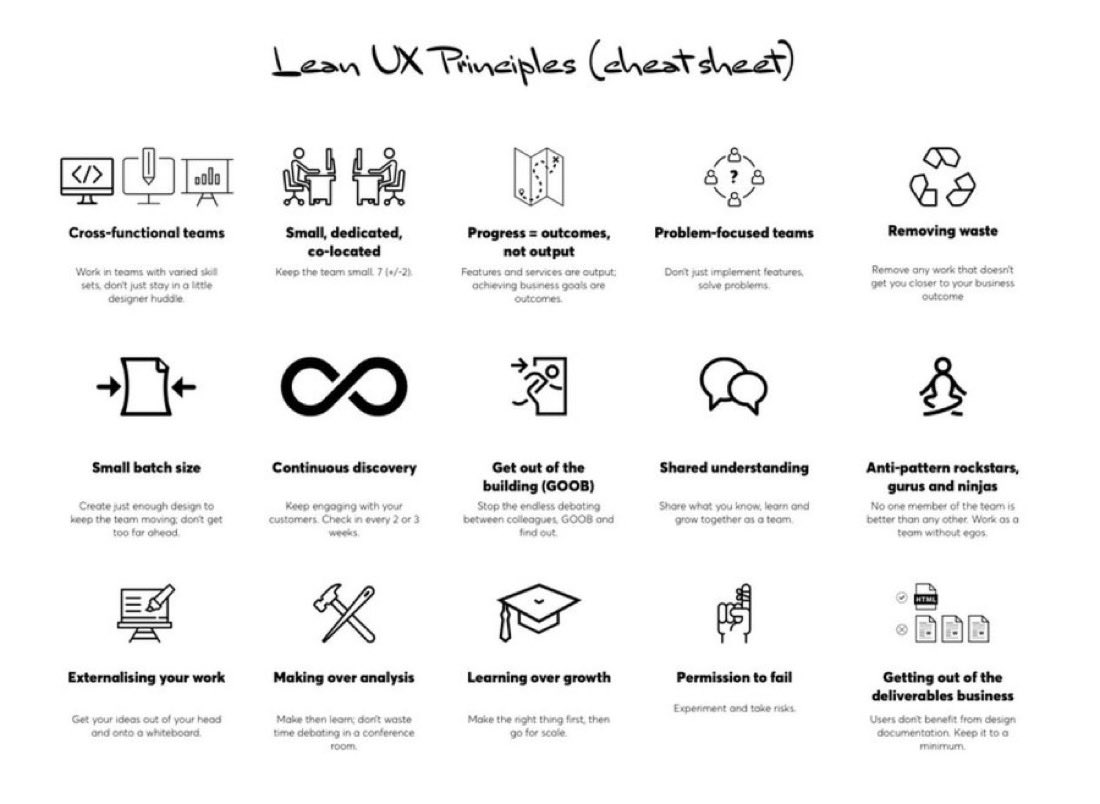
Excellent Lean UX Principles Cheat sheet 🙌 FREE cheatsheet attached 🔖 Overview: Cross-functional teams Work in teams with varied skill sets, don't just stay in a little designer huddle. Small, dedicated, co-located Keep the team small. 7 (+/-2). Progress = outcomes, not output Features and services are output; achieving business goals are outcomes. Problem-focused teams Don't just implement features, solve problems. Removing waste Remove any work that doesn't get you closer to your business outcome Small batch size Create just enough design to keep the team moving; don't get too far ahead. Continuous discovery Keep engaging with your customers. Check in every 2 or 3 weeks. Get out of the building (GOOB) Stop the endless debating between colleagues, GOOB and find out. Shared understanding Share what you know, learn and grow together as a team. Anti-pattern rockstars, gurus and ninjas No one member of the team is better than any other. Work as a team without egos. Externalising your work Get your ideas out of your head and onto a whiteboard Making over analysis Make then learn; don't waste time debating in a conference room. Learning over growth Make the right thing first, then go for scale. Permission to fail Experiment and take risks. Getting out of the deliverables business Users don't benefit from design documentation. Keep it to a minimum. #UX #UI #UXDesign #UIDesign #ProductDesign
UX Links tweet media
English
0
3
13
460
UX Links
UX Links@uxlinks·
7 Excellent Tips to Create Great UI Animations 🙌 1. Make the content in tabs slide - A good animation fades the content in and out from one state to another. - A great animation shows continuity in a transition by making the content move between states. 2. Connect the shared elements of a card - A good animation uses transitions like push left or slide up to show the content on a detail screen. - A great animation establishes a connection between two states by animating the shared content. 3. Use a cascading effect in your content - A good animation changes the position and opacity of the material when it enters the screen. - A great animation quickly staggers the appearance of each group or element. 4. Make the content push other elements out of the way - Good animations move and show elements in context. - Great animations show elements affecting their surroundings when they change. 5. Make menus appear in context - Good animated menus show the content appearing from the direction of the button that opened them. - Great animated menus emerge from the action that created them, growing from the point of touch. 6. Use buttons to show different states - Good interactions display the events next to the button. - Great interactions use the button itself to show the different states. 7. Bring attention to something important - Good design uses colour, size, and position to highlight an important action the user needs to notice or act upon. - Great design uses animation to bring attention to that important action, without being disruptive. Save to Bookmarks 🔖 #UX #UI #UXDesign #UIDesign #ProductDesign
English
1
5
39
1.5K
UX Links
UX Links@uxlinks·
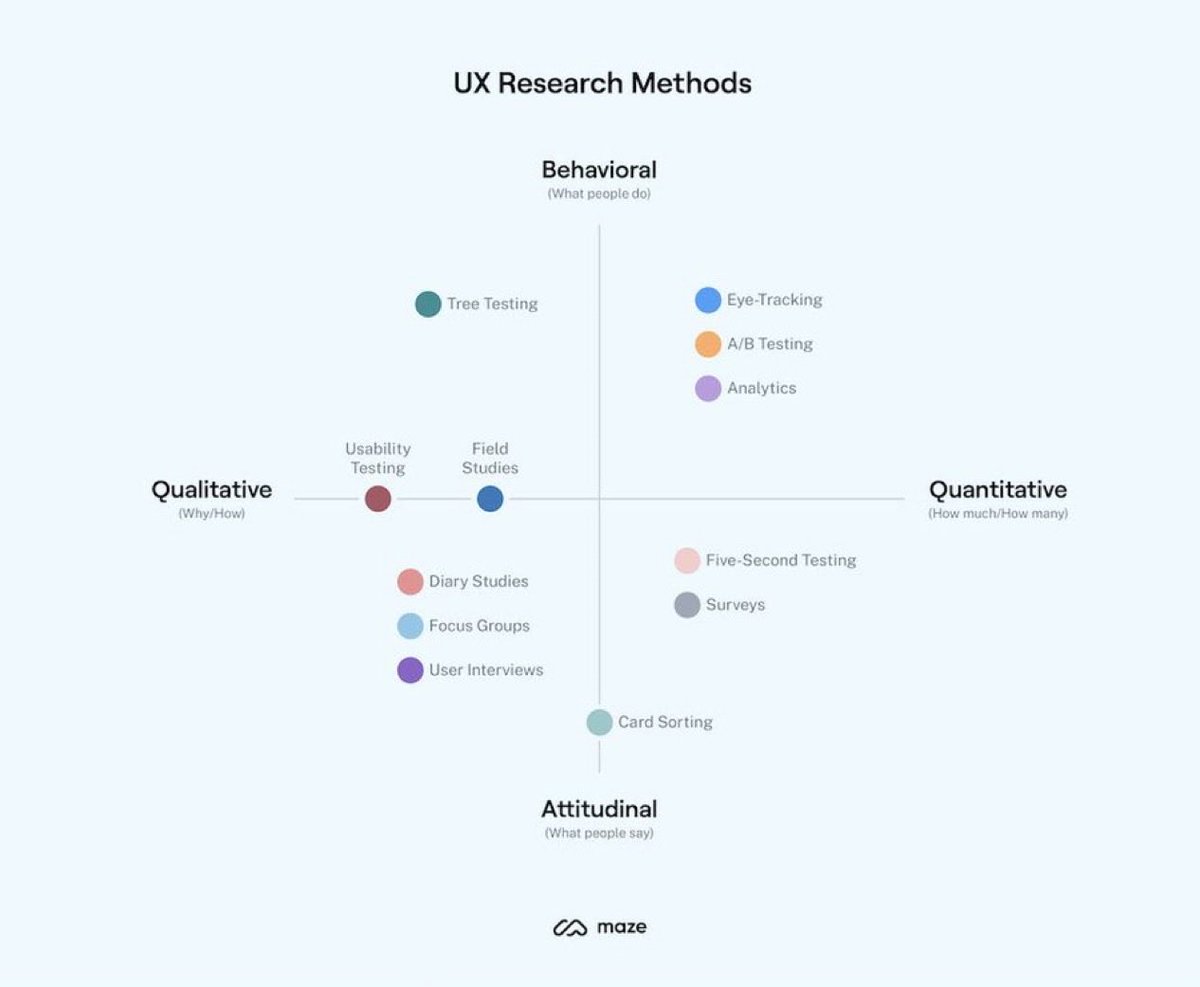
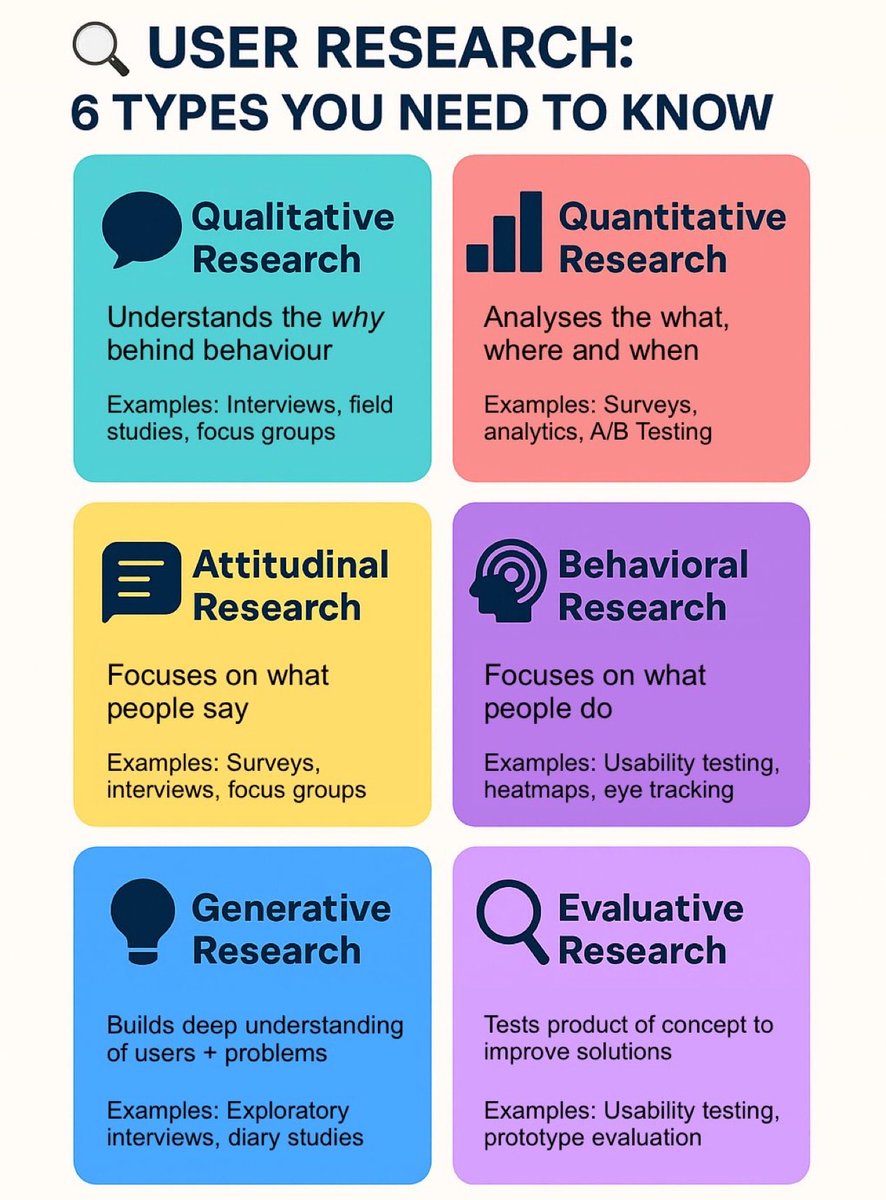
User Research: 6 Types You Need to Know 🙌 FREE Cheatsheet attached 🔖 To fully understand users, it’s important to apply different research approaches. Each method uncovers unique insights, and together they provide a complete picture of user needs and behaviours. 1. Qualitative Research – Understands the why behind behaviour. Examples: Interviews, field studies, focus groups 2. Quantitative Research – Analyses the what, where, and when. Examples: Surveys, analytics, A/B testing 3. Attitudinal Research – Focuses on what people say. Examples: Surveys, interviews, focus groups 4. Behavioural Research – Focuses on what people do. Examples: Usability testing, heat maps, eye tracking 5. Generative Research – Builds a deep understanding of users and problems. Examples: Exploratory interviews, diary studies 6. Evaluative Research – Tests a product or concept to refine and improve solutions. Examples: Usability testing, prototype evaluation ➡️ Using a mix of these methods ensures your design decisions are grounded in evidence, not assumptions. #UXResearch #UserExperience #UXDesign
UX Links tweet media
English
2
9
32
903
UX Links
UX Links@uxlinks·
Learn about the Key UX research methods, how and when to use them! 🙌 What are UX research methods? User experience (UX) research methods are different ways of generating insights about your users, their behavior, motivations, and needs. You can use methods like user interviews, surveys, focus groups, card sorting, usability testing to identify user challenges and turn them into opportunities to improve the user experience. UX research methods include user interviews, card sorting, surveys, usability testing, and more. We’ll go into more detail about the top methods and when to use them later in this chapter. If you'd prefer a quick overview, check out the video below. Or, keep reading for an in-depth guide to each method (plus a bonus technique). Overview: The most common types of user research Qualitative vs. quantitative All research methods are either quantitative or qualitative. Qualitative research focuses on capturing subjective insights into users' experiences. It aims to understand the underlying reasons, motivations, and behaviors of individuals. Quantitative research, on the other hand, involves collecting and analyzing numerical data to identify patterns, trends, and significance. It aims to quantify user behaviors, preferences, and attitudes, allowing for generalizations and statistical insights. Attitudinal vs. behavioral Attitudinal research is about understanding users' attitudes, perceptions, and beliefs. It delves into the 'why' behind user decisions and actions. It often involves surveys or interviews where users are asked about their feelings, preferences, or perceptions towards a product or service. It's subjective in nature, aiming to capture people's emotions and opinions. Behavioral research is about what users do rather than what they say they do or would do. This kind of research is often based on observation methods like usability testing, eye-tracking, or heat maps to understand user behavior. Generative vs. evaluative Generative research is all about generating new ideas, concepts, and insights to fuel the design process. You might run brainstorming sessions with groups of users, card sorting, and co-design sessions to inspire creativity and guide the development of user-centered solutions. On the other hand, evaluative research focuses on assessing the usability, effectiveness, and overall quality of existing designs or prototypes. Once you’ve developed a prototype of your product, it's time to evaluate its strengths and weaknesses. You can compare different versions of a design or feature through A/B testing—ensuring your design meets user needs and expectations. The best UX research type? The best research type varies depending on your project; what your objectives are, and what stage you’re in. Ultimately, the ideal type of research is one which provides the insights required, using the available resources. For example, if you're at the early ideation or product discovery stage, generative research methods can help you generate new ideas, understand user needs, and explore possibilities. As you move to the design and development phase, evaluative research methods and quantitative data become crucial. #UX #UI #UXDesign #UIDesign #ProductDesign
UX Links tweet media
English
1
7
30
1.4K
UX Links
UX Links@uxlinks·
The Product Design Journey: From Idea → Impact 🙌 Great products aren’t accidents. They’re built through a process: 1️⃣ Research with empathy 2️⃣ Define the problem 3️⃣ Ideate boldly 4️⃣ Prototype fast 5️⃣ Test + learn 6️⃣ Launch & refine ✨ Design isn’t just steps—it’s a mindset: human-centered, iterative, and purpose-driven. #UX #DesignThinking
UX Links tweet media
English
3
9
55
2.3K
UX Links
UX Links@uxlinks·
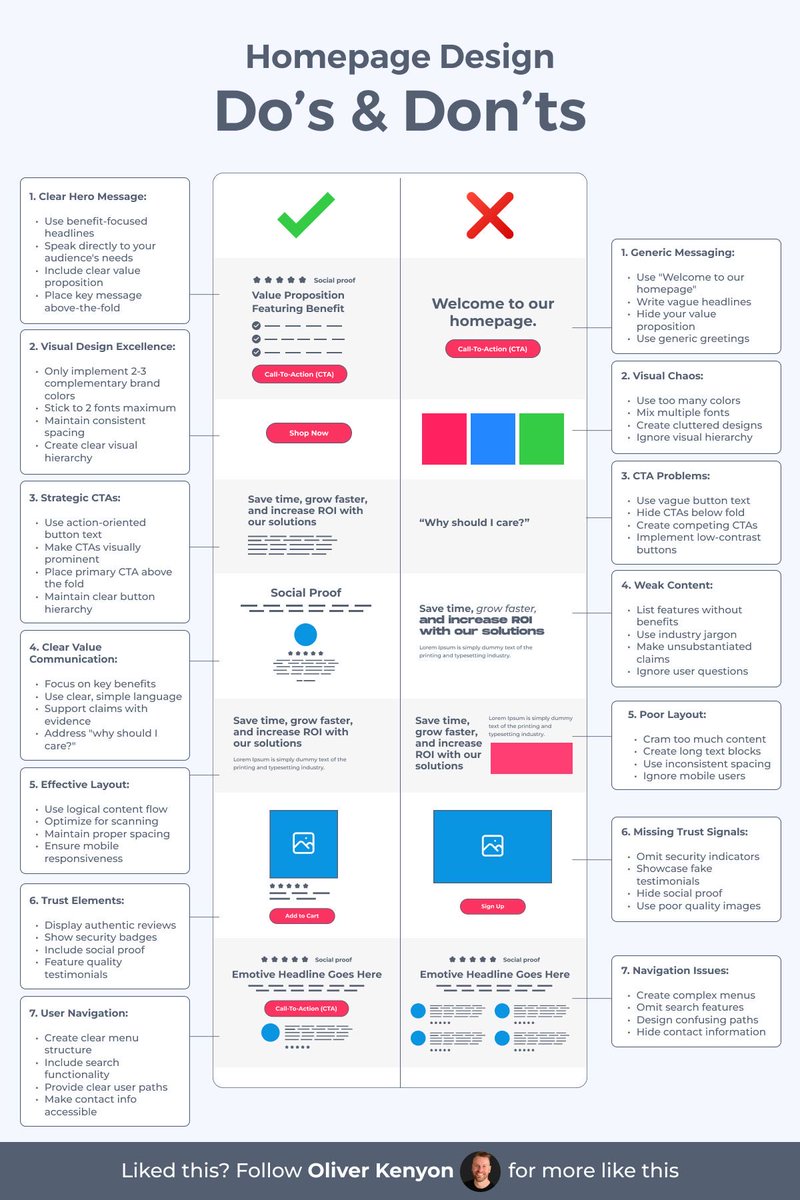
A good homepage doesn’t explain everything — it makes people want to keep scrolling 🙌 Do the left. Avoid the right 😎 Save to Bookmarks for reference 🔖 #UX #UI #UIDesign #UXDesign
UX Links tweet media
English
1
5
22
971
UX Links
UX Links@uxlinks·
20 Excellent FREE Illustration Resources for your next design project 🙌 Save to Bookmarks for reference 🔖 1. absurd .design 2. blackillustrations .com 3. drawkit .com 4. humaaans .com 5. undraw .co 6. opendoodles .com 7. freebiesupply .com 8. manypixels .co 9. icons8 .com/illustrations 10. lukaszadam .com/illustrations 11. stubborn .fun 12. storyset .com 13. draftss .com 14. freevector .com 15. icons8 .com 16. blush .design 17. iradesign .io 18. icons8 .com 19. openpeeps .com 20. vectorian .net Thanks for your support @uxlinks #UX #UI #UXDesign #UIDesign #ProductDesign
English
1
4
17
1.2K
UX Links
UX Links@uxlinks·
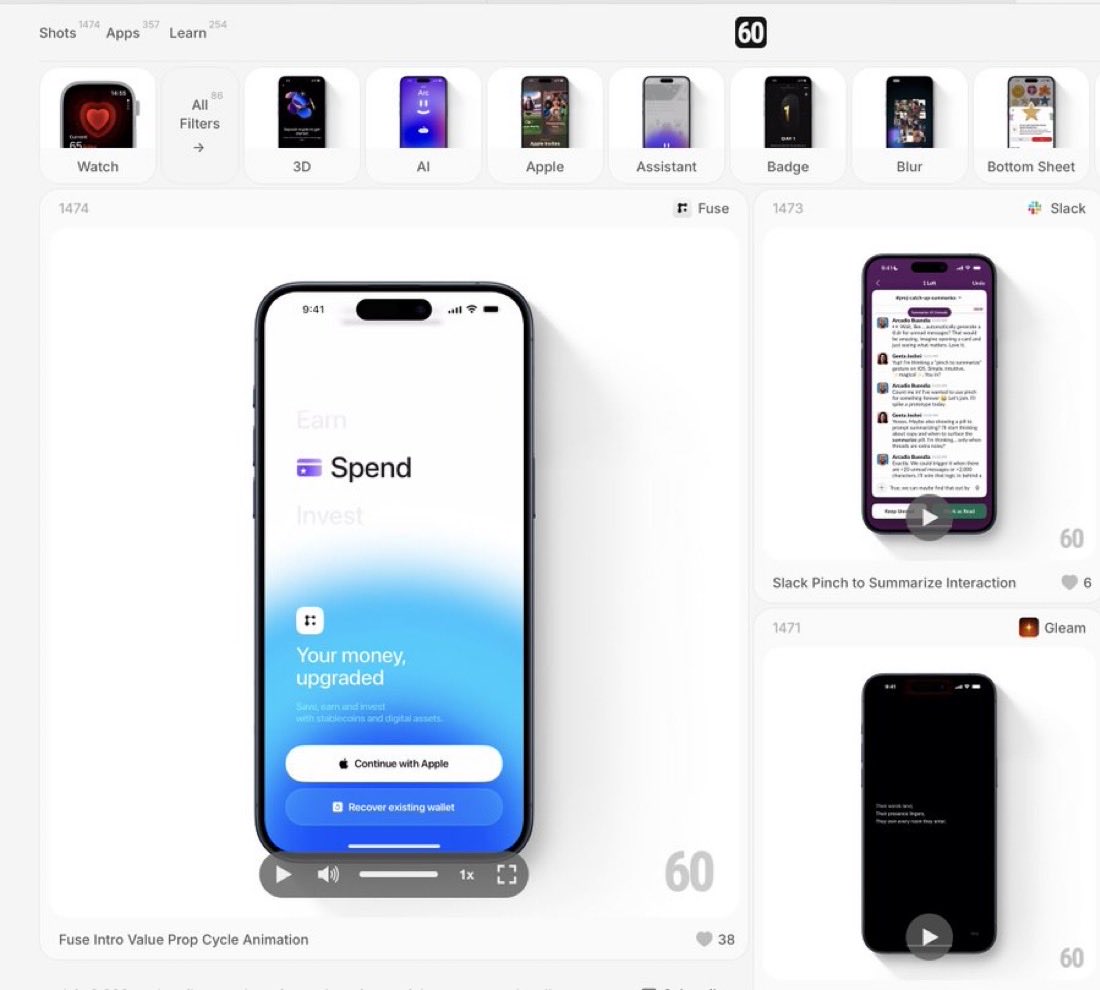
Excellent Design Inspiration to boost your next mobile design project 🙌 Save to Bookmarks 🔖 60fps is a curated collection of UI/UX animation and interaction design details from the world’s best iOS, android and web apps #UX #UI #UXDesign #UIDesign #ProductDesign #Animation
UX Links tweet media
English
4
6
41
1.8K
UX Links
UX Links@uxlinks·
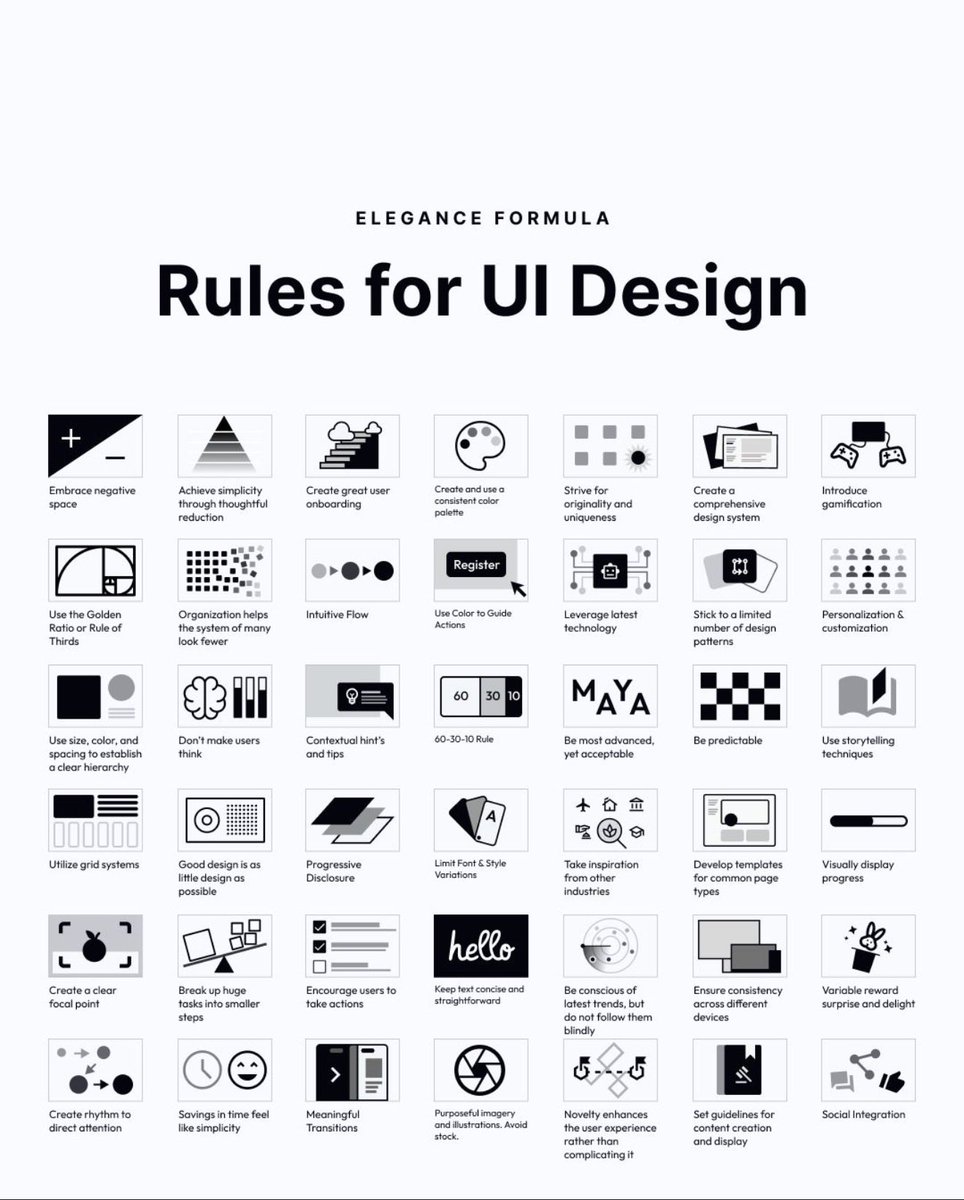
58 rules for beautiful UI design 🙌 Save to bookmarks for reference 🔖 Hierarchy. Simplicity. Predictability. Progressive disclosure. Meaningful transitions. A solid reminder that great interfaces are systems — not decoration. #UX #UI #UXDesign #UIDesign #ProductDesign
UX Links tweet media
English
11
69
526
16.7K