Itziar Ulacia

7.6K posts

Itziar Ulacia banner
Itziar Ulacia

Itziar Ulacia

@itzi71

Morelense. Aprendiz de trader “La Blockchain es el futuro presente”. Diseñadora por afición. #BUYBITCOIN

Cuernavaca Entrou em Aralık 2009
2.8K Seguindo1K Seguidores
Itziar Ulacia retweetou

Ruben Hassid
Ruben Hassid@rubenhassid·
How to set up Claude so it never forgets you: Prompts → Projects → Skills (explained in 3 mins) Prompts = telling a stranger your job every morning. Projects = giving a new hire a binder on day one. Skills = training an employee once. For forever. Step 1: Start with a Prompt (but don't stay there) ✦ Open Claude. Type your task. Get an answer. ✦ It works. But tomorrow? Claude forgot everything. ✦ You re-explain. Again. Every. Single. Chat. ✦ That's Level 1. Most people never leave it. Step 2: Move to a Project ✦ Go to Claude .ai → Create a Project. ✦ Upload your voice file. Upload your instructions. ✦ Now every chat inside that Project knows you. ✦ Your context, style, and tone stick. But you still have to open the right Project. You still have to say "read my file first." Step 3: Graduate to Skills ✦ Open Claude Cowork. ✦ Select Opus 4.7 + Extended Thinking. ✦ Prompt: "Use the skill-creator to help me build a skill for [your most repeated task]." Claude interviews you. Answer extensively. "I write reports" is useless. "I write weekly reports that start with the headline metric, 3 sections max, next steps as bullets" is a Skill. The specificity is the skill. Step 4: Install and test ✦ Save the Skill folder. ✦ Go to Settings → Capabilities → Skills → Upload. ✦ Open a new chat. Type your task normally. ✦ The Skill fires on its own. No slash command. ✦ Claude just knows. I just wrote my full Claude Skills breakdown. It covers setup, the skill-creator walkthrough, and the 7 hacks I found buried in Anthropic's docs. Read it here: claude-skills.free To download all of my Claude infographics: Step 1. Go to how-to-ai.guide. Step 2. Subscribe for free. Don't pay anything. Step 3. Open my welcome email (most skip this). Step 4. Hit the automatic reply button inside. Step 5. Download my infographics from my Notion. ♻️ Repost this to help someone on your team stop re-explaining themselves to Claude every morning.
Ruben Hassid tweet media
Ruben Hassid@rubenhassid

x.com/i/article/2045…

English
58
575
3.9K
306K
Itziar Ulacia retweetou
Kawsar
Kawsar@Kawsar_Ai·
For 3 years I defended ChatGPT. Today I use Claude. And I'm going to say something that 6 months ago I wouldn't have said: It's the technology that's changed my life the most since the Internet. These 10 prompts explain why I switched 👇
Kawsar tweet media
English
64
113
692
155.4K
Itziar Ulacia retweetou
Francisco García
Francisco García@Fran_actua·
Era un romántico de ChatGPT. 3 años juntos. Miles de conversaciones. Le defendía en cada debate. Hasta que probé CLAUDE. Y entendí que llevaba 3 años conformándome con "bueno" cuando podía tener "brutal". Comparto mis 8 prompts sagrados 🧵👇
Español
6
45
332
65.6K
Itziar Ulacia retweetou
KIKE MIRELES ☕️
KIKE MIRELES ☕️@kikemireles·
El Secretario de Economia aceptó públicamente el uso de recursos públicos de manera indebida y en beneficio de su familia: sigue en el cargo. El Director de PEMEX aceptó que mintieron durante dos meses sobre el derrame en el Golfo de México provocado por un oleoducto a cargo de la petrolera, aceptó que ocultaron información: sigue en el cargo. La Fiscal de la CDMX aceptó que no se trató de manera correcta el caso de Edith, existieron fallas en los procedimientos, retrasos y omisiones graves, además, que hay funcionarios involucrados en solicitar dinero a la familia de la víctima para hacer su chamba: sigue en el cargo Todo esto en menos de 24 horas. Dirán lo que quieran, pero en cualquier otro lugar del mundo, las renuncias o destituciones de estas personas, ya estarían en un escritorio, pero pues MORENA, y así. Que frustración. Que coraje.
Español
81
2K
4K
37.9K
Itziar Ulacia retweetou
Francisco García
Francisco García@Fran_actua·
Este tipo ha compartido un tutorial de 16 min sobre cómo usar Gemini 3.1 + Seedance 2.0 para construir sitios web cinematográficos Ahora puedes construir sitios de marketing impresionantes completamente con IA
Español
1
52
227
16.5K
Itziar Ulacia retweetou
brenz.
brenz.@brenzhills·
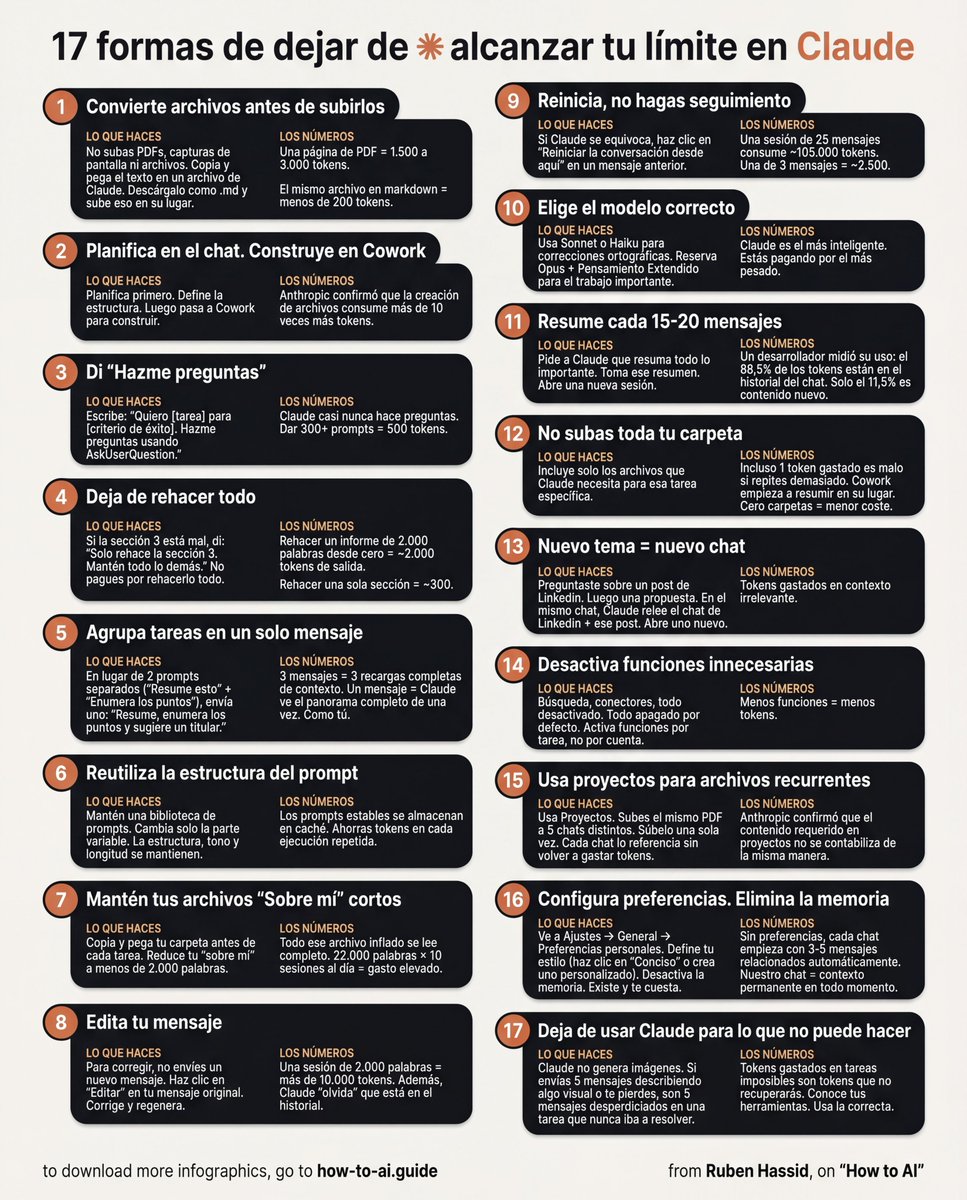
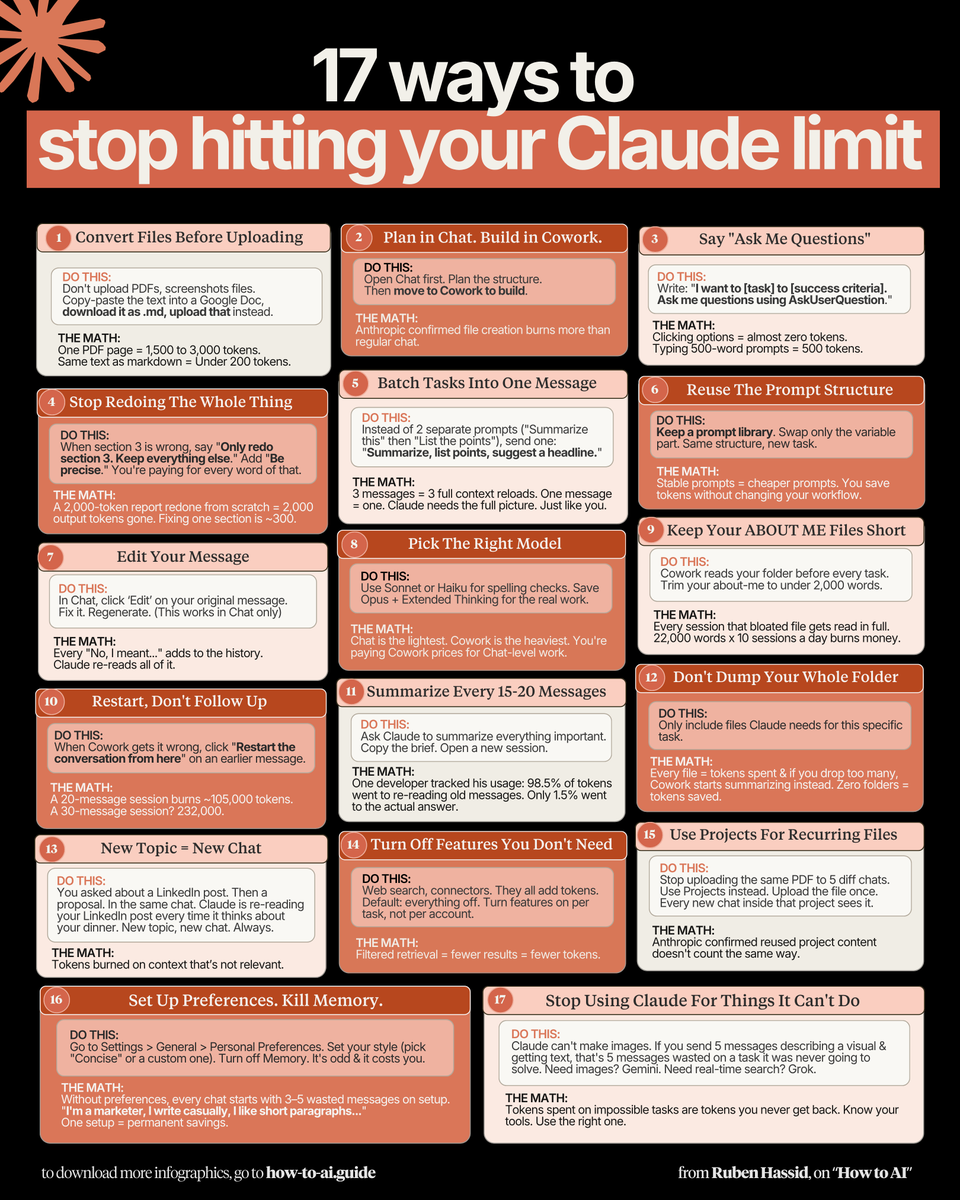
Con el plan de Claude por 20 $/mes ya tienes TODO lo que necesitas. Solo evita estos 17 errores que comete el 99% de la gente: 1. Subes PDFs tal cual → 1 página = 3.000 tokens Solución: Pega el texto en Google Doc → descarga como .md (menos de 200 tokens) 2. Creas archivos en Cowork demasiado pronto Solución: Primero planea todo en el chat normal. Solo pásalo a Cowork cuando lo tengas clarísimo. 3. Escribes prompts de 500 palabras Solución: 29 palabras bastan: “Quiero [tarea] para conseguir [objetivo]. Hazme preguntas con AskUserQuestion.” 4. Dices “rehaz todo” por corregir una parte Solución: “Solo rehaz la sección 3. Mantén todo lo demás igual. Sin comentarios. Solo la salida.” 5. Mandas 3 mensajes separados para 3 tareas Solución: Un solo mensaje: “Resume esto, lista los puntos y sugiere un titular.” 6. Escribes “No, quería decir…” y acumulas historial Solución: Edita el mensaje original → corrígelo → regenera. 7. Usas Opus hasta para corregir gramática Solución: Sonnet o Haiku para tareas rápidas. Guarda Opus + Extended Thinking para lo importante. 8. Metes 50 archivos en Cowork “por si acaso” Solución: Solo lo que necesita esta tarea. Para emails ni uses carpetas. 9. Nunca reinicias el chat y lo dejas eterno. Solución: Cada 15-20 mensajes → resume + copia el brief → sesión nueva. 10. Mezclas 3 temas en un mismo chat. Solución: Tema nuevo = chat nuevo. Siempre. El contexto muerto = tokens muertos. 11. Tu “about me” tiene 22.000 palabras. Solución: Redúcelo a menos de 2.000. Al final de cada sesión pídele: “Escribe un session-notes.md” y usa este prompt: ruben.substack.com/p/how-to-stop-… 12. Dejas búsqueda y conectores siempre activados Solución: Desactívalo todo por defecto. Activa solo cuando la tarea lo necesite. 13. Subes el mismo PDF a 5 chats distintos Solución: Usa Projects. Súbelo una sola vez y todos los chats lo usan sin gastar tokens extra. 14. Te saltas las Preferencias Personales Solución: Ajustes → Preferencias Personales. Define tu tono y estilo UNA vez. Se queda para siempre. 15. Reescribes los prompts desde cero cada vez Solución: Crea tu biblioteca de prompts. Misma estructura, solo cambias la variable. 16. Ejecutas manualmente el mismo informe cada semana Solución: Usa /schedule → “Todos los lunes a las 7 am crea mi briefing semanal.” 17. Usas Claude para cosas que no puede hacer bien Solución: Conoce tus herramientas. Imágenes → Gemini. Búsqueda en tiempo real → Grok. CC @rubenhassid
brenz. tweet media
Ruben Hassid@rubenhassid

x.com/i/article/2044…

Español
17
419
2.8K
244.8K
Itziar Ulacia retweetou
Ruben Hassid
Ruben Hassid@rubenhassid·
The $20/month Claude plan is enough. But only if you stop making these 17 mistakes: 1: You upload PDFs raw. One page = 3,000 tokens. Fix: Paste the text into a Google doc. Download as .md format. Under 200 tokens. 2: You build files inside Cowork too early. Fix: Plan in Chat first. Move to Cowork only when you know exactly what you want. 3: You write 500-word prompts that reload. Fix: Write 29 words instead: "I want to [task] to [goal]. Ask me questions using AskUserQuestion." 4: You say "redo the whole thing" to correct part 3. Fix: "Only redo section 3. Keep everything else. No commentary. Just the output." 5: You send 3 separate messages for 3 tasks. Fix: One message, three tasks. "Summarize this, list the points, suggest a headline." 6: You type "No, I meant," stacking on the history. Fix: Click 'Edit' on your original message. Fix it. Regenerate. History replaced, not added. 7: You use the Opus model for a grammar check. Fix: Sonnet or Haiku for quick tasks. Save Opus + Extended Thinking for deep work. 8: You dump 50 files into Cowork "just in case." Fix: Only include what this task needs. Zero folders for quick tasks like email drafts. 9: You never restart fresh & keep having long chats. Fix: Every 15-20 messages → summarize, copy the brief, start a fresh session. 10: You keep 3 topics in 1 chat. Claude re-reads all. Fix: New topic = new chat. Always. Dead context is dead tokens. 11: Your about-me file is 22,000 words (too long). Fix: Trim to under 2,000 words. End sessions with "Write a session-notes.md." Paste my .md file prompt: ruben.substack.com/p/how-to-stop-… 12: You leave search & connectors on by default. Fix: Default everything off. Turn features on per task, not per account. 13: You upload the same PDF to 5 different chats. Fix: Use Projects. Upload once. Every chat inside references it without re-burning tokens. 14: You skip Personal Preferences & waste setup. Fix: Settings → Personal Preferences. Set your tone and style once. It persists forever. 15: You rewrite prompts from scratch every time. Fix: Keep a prompt library. Same structure, swap the variable. Stable prompts get cached. 16: You manually run the same report every week. Fix: Use /schedule. "Every Monday at 7am, create my weekly briefing." Wake up to a finished doc. 17: You use Claude for things it can't do. Fix: Know your tools. Images → Gemini. Real-time search → Grok. Stop burning tokens on dead ends. ----- To download all of my Claude infographics: Step 1. Go to how-to-ai.guide. Step 2. Subscribe for free. Don't pay anything. Step 3. Open my welcome email (most skip this). Step 4. Hit the automatic reply button inside. Step 5. Download my infographics from my Notion. Bonus. Enjoy my best copy-paste prompts, too.
Ruben Hassid tweet media
Ruben Hassid@rubenhassid

x.com/i/article/2044…

English
71
717
4.9K
592.7K
Itziar Ulacia retweetou
santi
santi@santtiagom_·
Si estás empezando con Claude, hay 12 conceptos que tenés que entender: 1) CLAUDE.md 2) Permissions 3) Plan Mode 4) Checkpoints 5) Skills 6) Hooks 7) MCP 8) Plugins 9) Context 10) Slash Commands 11) Compaction 12) Subagents En el video lo explican muy bien 👇
Bytebytego@bytebytego

12 Claude Code Features Every Engineer Should Know

Español
27
735
5.7K
687.9K
Itziar Ulacia retweetou
Perplexity
Perplexity@perplexity_ai·
Today we're releasing Personal Computer. Personal Computer integrates with the Perplexity Mac App for secure orchestration across your local files, native apps, and browser. We’re rolling this out to all Perplexity Max subscribers and everyone on the waitlist starting today.
English
752
1.3K
14.5K
13.3M
Itziar Ulacia retweetou
OpenEvidence
OpenEvidence@EvidenceOpen·
Anemia ferropénica sin causa clara. Diagnóstico diferencial largo y poco tiempo para revisar la literatura. OpenEvidence ofrece respuestas con fuentes en segundos. Gratis.
Español
36
241
2.3K
18.9M
Itziar Ulacia retweetou
Ai With Piyas
Ai With Piyas@piyascode9·
BREAKING: AI can now create dividend portfolios that can generate $100,000 in passive income a year — for free. Here are 12 powerful Perplexity prompts With which you will find safe + growing dividend stocks. Save this thread. 🧵
Ai With Piyas tweet media
English
55
99
425
54.8K
Itziar Ulacia retweetou
YokerAI
YokerAI@IATheYoker·
5 webs que convierten tus prompts mediocres en resultados de nivel pro. Sin aprender nada. Gratis. De nada.
YokerAI tweet media
Español
3
53
221
22.6K
Itziar Ulacia retweetou
said
said@saidstetic·
Cómo configurar Claude completamente en solo 1 día: (Guarda esto. Envíaselo a tu equipo. Ya me agradecerás después.) 1: Cowork Descarga Claude (claude.com/download). Abre la pestaña Cowork. Selecciona una carpeta de tu ordenador. Ahora crea tu archivo cerebro. Crea "about-me.md." Para descargar el mío, ve aquí: how-to-ai.guide. No pagues nada. Es gratis en el correo de bienvenida. Luego, empieza cada chat con este prompt: "Lee los archivos primero. Luego hazme preguntas antes de hacer cualquier cosa." 2: Modelo Elige Opus 4.6 (es el mejor modelo ahora mismo). Activa el Pensamiento Extendido. La mayoría se lo salta y se pregunta por qué Claude se siente genérico. Luego ve a Ajustes > Conectores. Vincula Slack, Google Drive, Notion. Claude ahora lee tu espacio de trabajo real. 3: Excel Abre Excel. Ve a Insertar > Obtener complementos. Busca "Claude by Anthropic." Instala. Abre cualquier hoja de cálculo. Pregunta: "Dame un resumen de cada pestaña." Claude vive dentro de la hoja de cálculo. Sabe qué contiene exactamente la celda D14. 4: Plugins Ve a claude.com/plugins. Elige el que corresponda a tu trabajo. Marketing. Ventas. Legal. Finanzas. Datos. Haz clic en instalar. Escribe / en tu próximo chat. Las empresas de software legal perdieron 285.000 millones de dólares en capitalización bursátil cuando estos se lanzaron. Eso es una señal. 5: Artefactos Nada que instalar. Pídele a Claude que construya algo. "Crea una calculadora HTML interactiva para [cosa]." Obtienes una herramienta funcional dentro del chat. No texto. No una sugerencia. Algo que puedes hacer clic y usar. 6: Proyectos Ve a claude.ai. Haz clic en Proyectos. Crea uno. Sube tus archivos y añade instrucciones. Cada chat dentro del proyecto recuerda tu contexto. Opinión honesta: Cowork lo reemplazó para mí. Pero para equipos, sigue funcionando. Donde Claude se queda corto: Sin generación de imágenes. Usa Gemini. No es el mejor en búsqueda en tiempo real. Usa Grok. No es el mejor en todo. Ninguna herramienta lo es. Pero para escribir, pensar, analizar y trabajar con tus archivos, es el mejor. La diferencia real: La mayoría de la gente abre Claude, escribe un prompt, obtiene una respuesta mediocre y se va. Porque configuraron una herramienta de seis. Configura las seis. Tarda 1 día. Entonces entenderás por qué todo el mundo se cambió. Guía de configuración completa + funciones: how-to-claude.ai Configuración completa de Claude Cowork: claude-co.work
said@saidstetic

x.com/i/article/2040…

Español
7
278
1.4K
117.5K
Arturo Ávila.
Arturo Ávila.@arturoavila_mx·
Ya salió el peine de las bardas en la Alcaldía Cuauhtémoc… Ahora que nos diga la priista más panista @AlessandraRdlv ¿qué se hubiera podido hacer con ese dinero?
Español
1.8K
1.1K
2.3K
72.9K
Itziar Ulacia retweetou
Gabriel - The Coder Cave
Gabriel - The Coder Cave@CaveCoder·
Vengo haciendo videos técnicos sobre Claude, Open Code, etc, pero se me ocurrió volver un segundo a las bases y explicar TODOS los conceptos de IA que hoy suenan por todos lados con la idea de que queden claros desde la teoría. Tampoco entro en detalles innecesarios, sino más bien te explico qué significa cada cosa y porqué es importante. No sé si hay un video más completo que este pero eso lo dejo para que lo decidas después de verlo. 00:00 - Intro 01:06 - LLM 03:36 - Token 07:11 - Vector / Embedding 10:17 - Attention 15:08 - Transformer 18:08 - Self Supervised Learning 21:29 - Parámetros 25:39 - 3 Fases de Entrenamiento 30:20 - Context Window 33:50 - System Prompt 37:34 - Temperatura 40:48 - Prompt Engineering 43:50 - Few Shot Prompting 45:15 - Chain of Thought 47:31 - Reasoning Models 49:56 - RAG 53:54 - Vector Database 55:49 - MCP 59:03 - Agentes 01:01:46 - Skills 01:04:49 - Hooks y Comandos 01:07:00 - Context Engineering 01:09:55 - Modelos Locales 01:13:06 - Quantización 01:14:23 - Destilación 01:15:49 - Multimodal 01:17:06 - Resúmen
Español
19
178
1.2K
65.7K
Itziar Ulacia retweetou
Ruben Hassid
Ruben Hassid@rubenhassid·
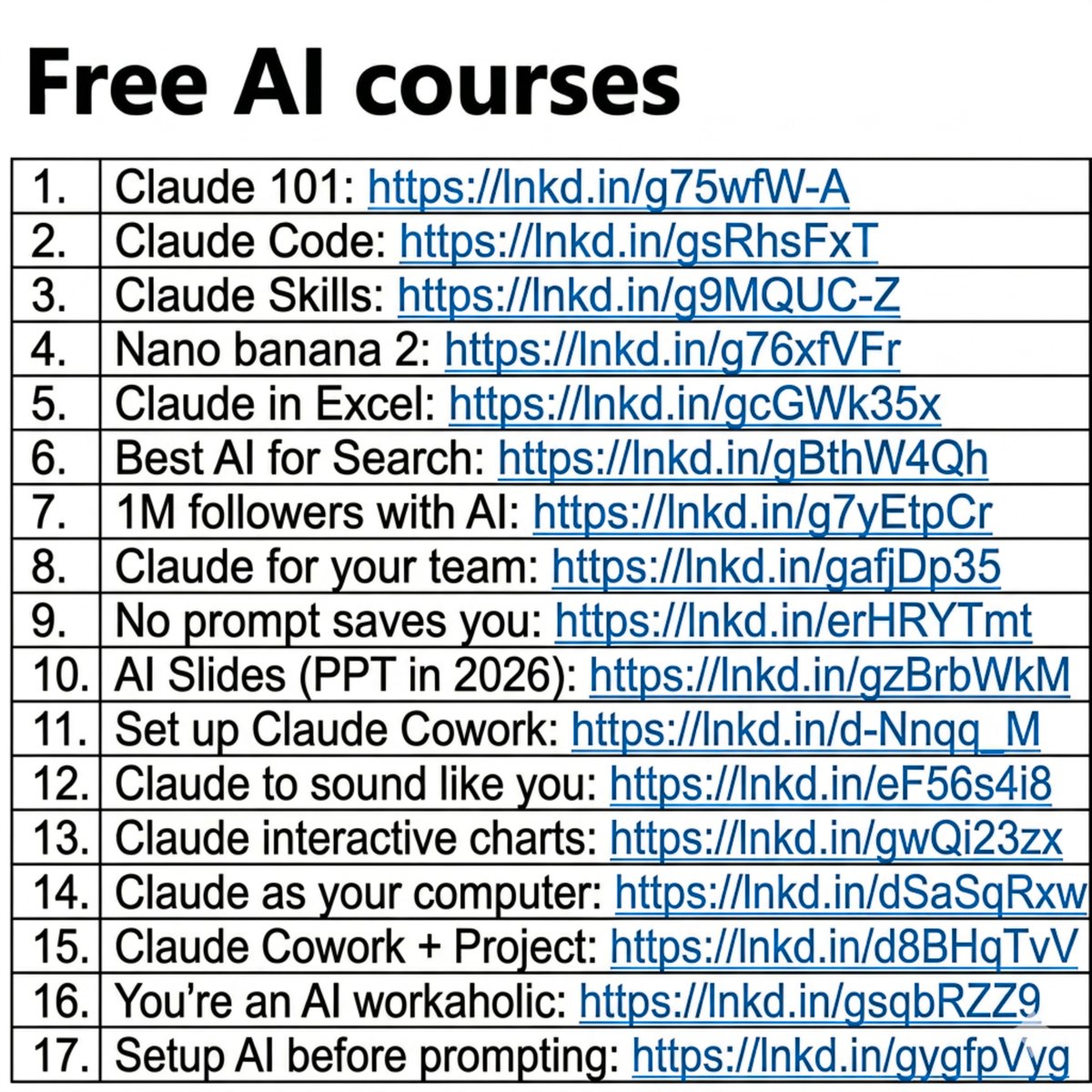
People think learning AI takes months. It's really just a couple of hours. And I wrote 17 free guides to start right away: Claude 101: ruben.substack.com/p/claude Claude Code: ruben.substack.com/p/claude-code Claude Skills: ruben.substack.com/p/claude-skills Nano banana 2: ruben.substack.com/p/banana-2-3bd Claude in Excel: ruben.substack.com/p/ai-couldnt-d… Best AI for Search: ruben.substack.com/p/grok-420 1M followers with AI: ruben.substack.com/p/1000000 Claude for your team: ruben.substack.com/p/claude-for-t… No prompt saves you: ruben.substack.com/p/magic AI Slides (PPT in 2026): ruben.substack.com/p/powerpoint Set up Claude Cowork: ruben.substack.com/p/claude-cowor… Claude to sound like you: ruben.substack.com/p/i-am-just-a-… Claude interactive charts: ruben.substack.com/p/claude-charts Claude as your computer: ruben.substack.com/p/claude-compu… Claude Cowork + Project: ruben.substack.com/p/claude-cowor… You're an AI workaholic: ruben.substack.com/p/ai-holic Setup AI before prompting: ruben.substack.com/p/how-to-bette… ___ 1. Save this list for later (three dots, top right). 2. Share it with a friend by ♻️ reposting this image. 3. Subscribe to my free newsletter: how-to-ai.guide.
Ruben Hassid tweet media
Ruben Hassid@rubenhassid

x.com/i/article/2041…

English
88
2.2K
8.9K
1M
Itziar Ulacia retweetou
Alejo
Alejo@ecommartinez·
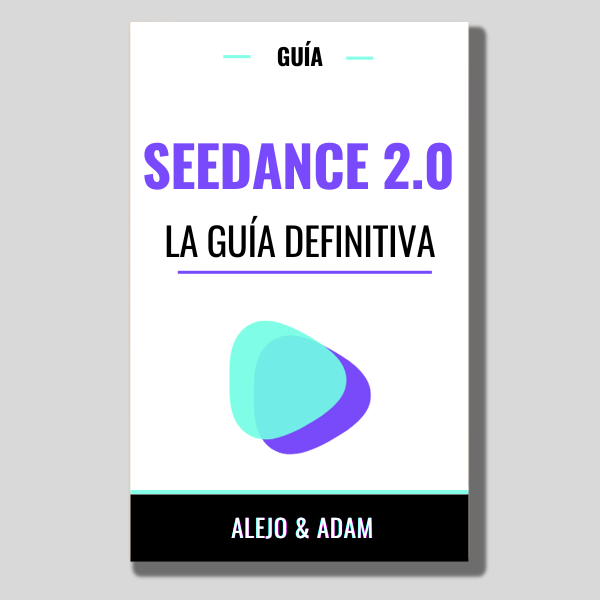
Seedance 2.0 es una máquina de hacer dinero. Saber usarla permite generar ingresos en YouTube, TikTok, Instagram... Por eso, creé la guía definitiva de Seedance 2 con prompts, tips, monetización… lo tiene todo. ¡GRATIS solo durante 24h! Solo: 1. Dale like 2. Comenta "SEEDANCE 2.0" 3. Sígueme para recibir el DM
Alejo tweet media
Español
927
103
1.1K
59.8K
Itziar Ulacia retweetou
Miguel Ángel | Educador en IA
Miguel Ángel | Educador en IA@MiguelMaestroIA·
¿Quieres aprender IA? 👇 migueleducadoria.bio.link - La mejor info sobre IA. - 2 clases GRATIS para aprender a generar ingresos con Inteligencia Artificial. - La mejor formación online.
Español
0
1
6
1.5K