
Master V รีทวีตแล้ว
Master V
10.2K posts


Master V
@VERMONSEIDEL
🌟 @thewingersbaby🌹 Tech+ Music+Forex
WingersWorldwide, Kenya เข้าร่วม Temmuz 2010
975 กำลังติดตาม421 ผู้ติดตาม

Master V รีทวีตแล้ว

They don't want you to know Claude can analyze any stock like a wall street analyst for free.
Here are 10 prompts you need to know about:

English
Master V รีทวีตแล้ว

This post literally breaks down the 3-stage plan to turn your life around in 90 days:
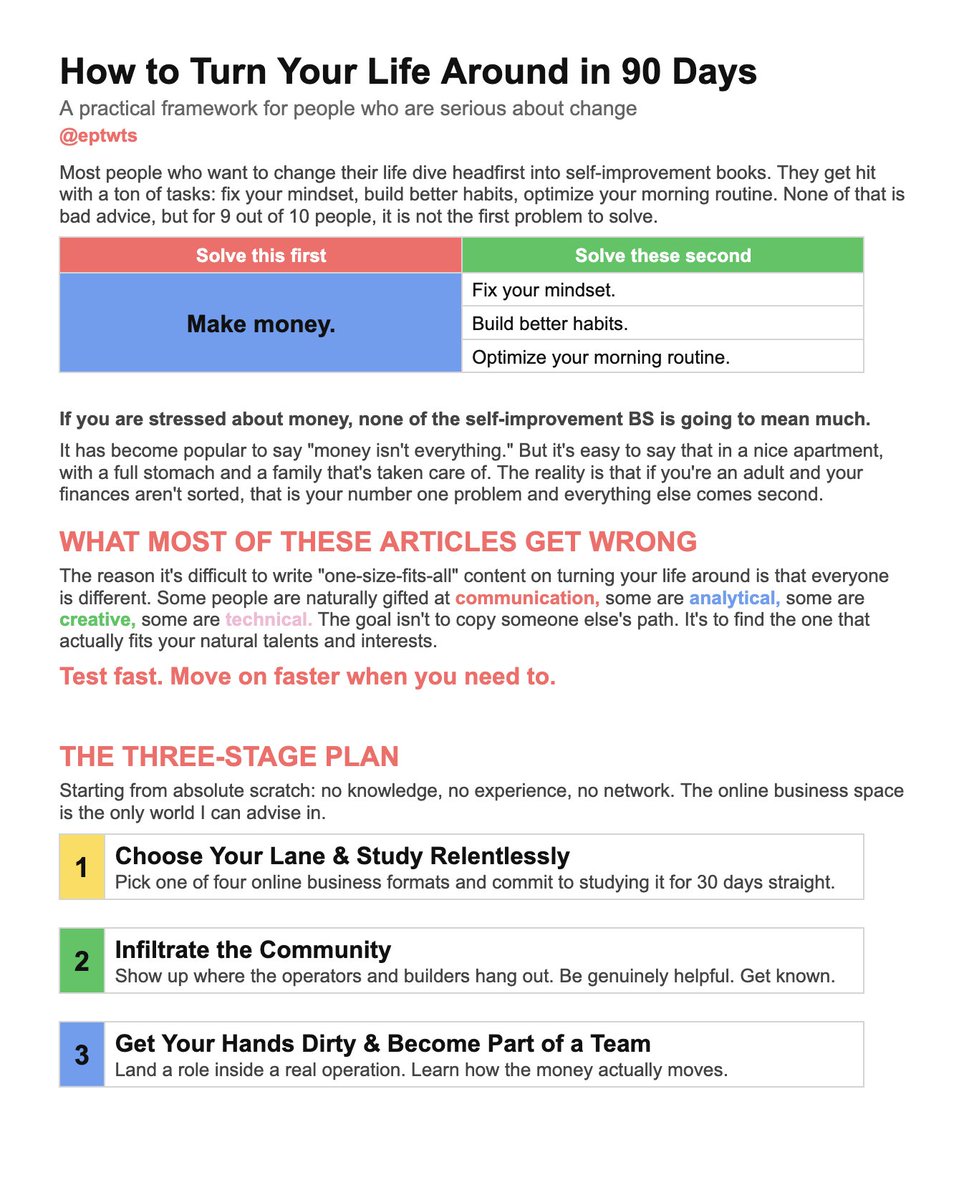
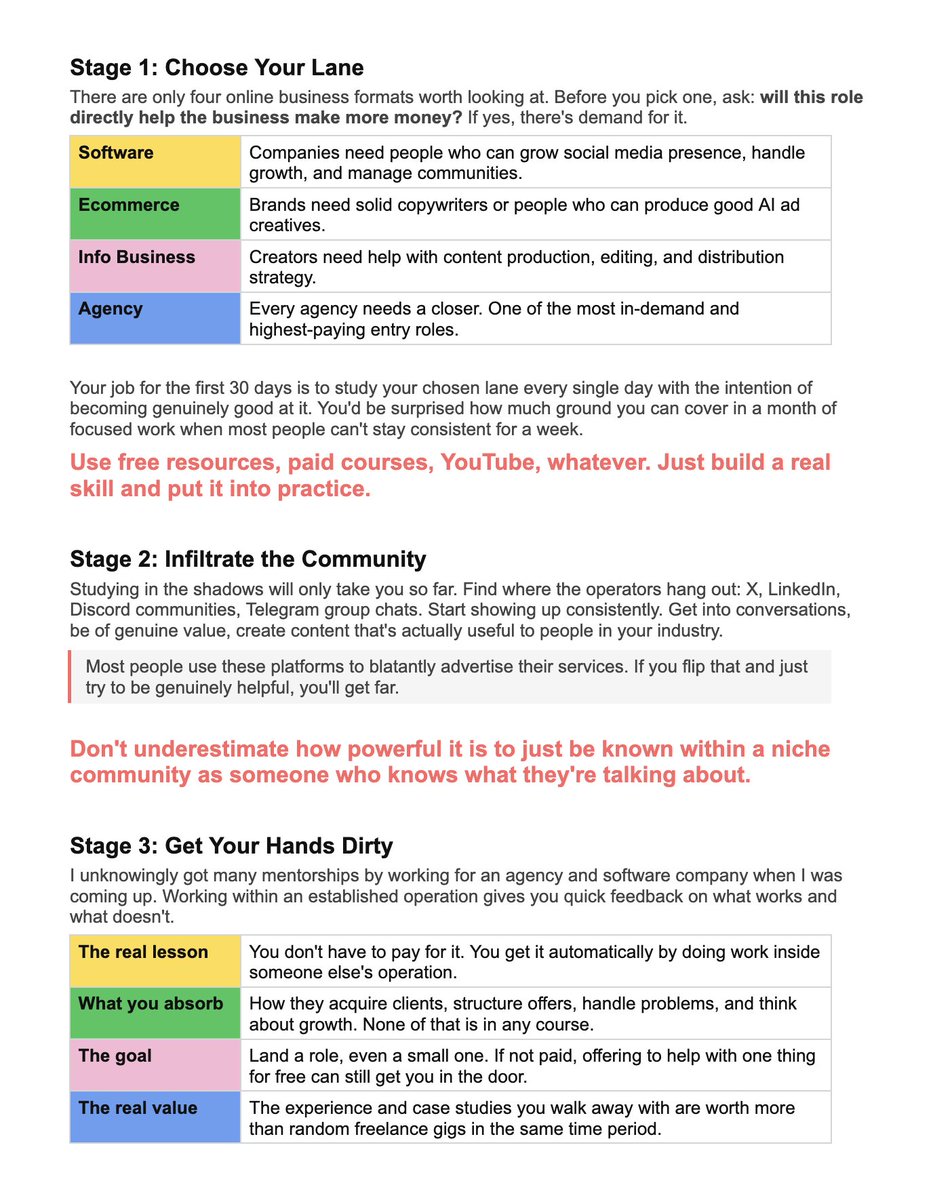

EP@eptwts
English
Master V รีทวีตแล้ว

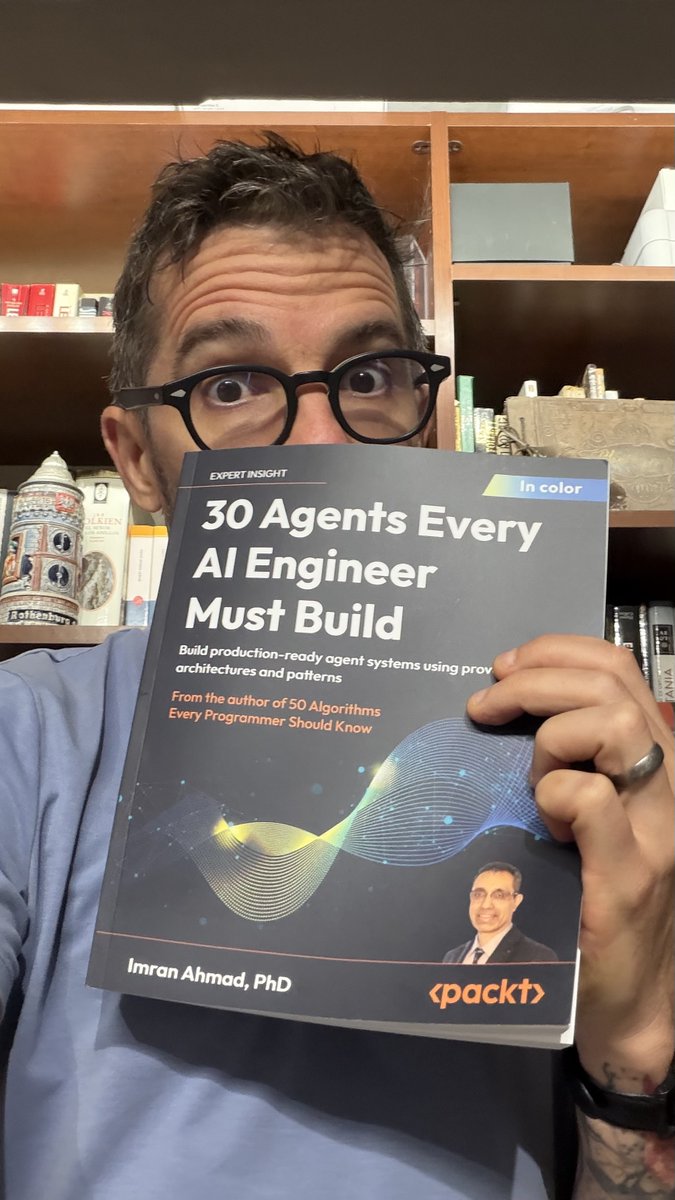
30 agents every AI Engineer must build.
This is the most comprehensive and practical book on AI Engineering that I've ever seen.
I can't think of a single use case that they didn't cover here:
1. The autonomous decision-making agent
2. The planning agent
3. The memory-augmented agent
4. The knowledge retrieval agent
5. The document intelligence agent
6. The scientific research agent
7. The tool-using agent
8. The agentic workflow system
9. The data analysis agent
10. The verification and validation agent
11. The general problem solver agent
12. The code generation agent
13. The security-hardened agent
14. The self-improving agent
15. The conversational agent
16. The content creation agent
17. The recommendation agent
18. The vision language agent
19. The audio processing agent
20. The physical world sensing agent
21. The ethical reasoning agent
22. The explainable agent
23. The healthcare intelligence agent
24. The scientific discovery agent
25. The financial advisory agent
26. The legal intelligence agent
27. The education intelligence agent
28. The collective intelligence agent
29. The embodied intelligence agent
30. The domain-transforming integration agent
I also read 50 Algorithms Every Programmer Should Know by Imran. Same vibe.
Here is the Amazon link: amzn.to/4t5ystE
English
Master V รีทวีตแล้ว

Most people use Claude like Google.
That's why they stay stuck at basic prompts.
No workflows.
No automation.
No real leverage.
Here's how to actually build a Claude system in 7 days👇
📌 DAY 1–2: Stop using Chat mode
Chat = quick questions.
Projects = ongoing work.
Cowork = deep execution.
Most people never leave Chat.
That's the lowest-leverage mode Claude has.
If you're not using Cowork, you're missing 90% of the value.
📌 DAY 2–3: Build your Claude OS
Create a simple structure:
→ ABOUT ME — your identity, tone, writing rules
→ PROJECTS — one folder per active project
→ TEMPLATES — repeatable structures
→ OUTPUTS — Claude writes only here
Random prompting becomes a system.
📌 DAY 3–4: Replace prompts with files
Stop writing from scratch every time.
Two files will outperform 50+ random prompts:
→ about-me.md
→ anti-ai-style.md
Consistency beats creativity. Every time.
📌 DAY 4–5: Let Claude think for you
Stop telling Claude what to do.
→ Let it generate options
→ Let it rank ideas
→ Let it plan execution
You shift from operator to decision-maker.
📌 DAY 5–6: Add tools
Connect Claude to your actual stack:
→ Google Docs
→ Slack
→ Notion
Now Claude doesn't just answer.
It works inside your workflow.
📌 DAY 6–7: Automate everything
→ Schedule tasks
→ Run workflows automatically
→ Wake up to completed work
You're not "using AI" anymore.
You're running a system.
The gap between Claude users is growing.
Some people are still asking it one-off questions.
Others have built an operator that runs while they sleep.
That advantage compounds.
Every. Single. Week.
Most people won't build the system.
Because they're still:
- Asking random one-off questions
- Treating every prompt like a fresh start
- Using Chat when they should be using Cowork
Do this instead:
1. Save this post (you'll come back to it)
2. Pick day one — start there today
3. Build one layer before moving to the next
Sequential. Systematic. No excuses.

English
Master V รีทวีตแล้ว
🚀Most people use Claude like ChatGPT…
That’s why they never unlock its real power.
Here’s the exact system to go from beginner → advanced in 7 days :🧵👇
1️⃣ Download the desktop app (not the website)
Claude works BEST inside its desktop environment.
Why?
→ Full features
→ Better file handling
→ Real workflow integration
Skip mobile. Think like a builder, not a browser user.
2️⃣ Understand Claude modes (this is where most fail)
Don’t treat Claude like a chatbot.
Use it like a system:
→ Chat = quick questions
→ Projects = recurring workflows
→ Cowork = deep work with files
→ Code = dev-only
💡 Real power = Cowork + Projects
3️⃣ Build your folder system (non-negotiable)
Create a structure like:
→ ABOUT ME
→ PROJECTS
→ TEMPLATES
→ CLAUDE OUTPUTS
Rule:
Claude writes ONLY in outputs.
Everything else = reference.
This keeps your AI organized like a pro.
4️⃣ Create 2 core files (your secret weapon)
📄 about-me.md
→ Who you are
→ Your goals
→ Your preferences
📄 anti-ai-style.md
→ Remove robotic tone
→ Force natural writing
💡 This alone 10x improves outputs.
5️⃣ Stop writing random prompts ❌
Use ONE master template instead:
→ Clear instruction
→ Context
→ Output format
Then reuse it for everything.
Consistency > creativity.
6️⃣ Let Claude prompt YOU
Flip the workflow:
→ Give rough idea
→ Let Claude ask questions
→ You approve
→ It executes
💡 You become the decision-maker, not the typer.
7️⃣ Install ONE plugin (don’t overcomplicate)
Pick based on your goal:
→ Marketing
→ Data
→ Legal
→ Research
Start simple. Scale later.
8️⃣ Connect your tools (game changer)
Integrate:
→ Google Docs
→ Slack
→ Notion
Now Claude can:
→ Search
→ Pull data
→ Work across apps
This is where it becomes a “coworker”.
9️⃣ Build ONE real project
Don’t learn randomly.
Create something like:
→ Content system
→ Business workflow
→ Research pipeline
💡 Learning = building.
🔟 Schedule your first automation
Use scheduling:
→ Daily reports
→ Content drafts
→ Task summaries
Wake up → Work already done.
That’s the endgame.
⚡ Final truth:
Claude isn’t a chatbot.
It’s an operating system.
Most people never realize this.
Cc : Author

English
Master V รีทวีตแล้ว

Master V รีทวีตแล้ว

This 50-minute lecture by Jeff Bezos will teach you more about business than a 2-year MBA program:
English
Master V รีทวีตแล้ว


Master V รีทวีตแล้ว

Master V รีทวีตแล้ว
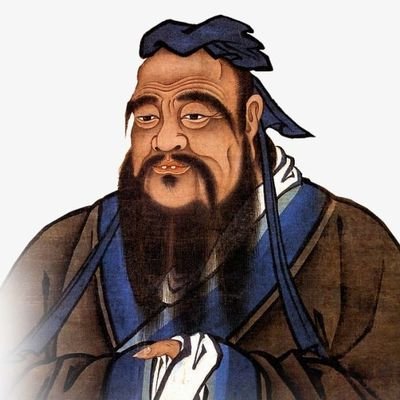
"The universe will assist you when you are acting in love."
English
Master V รีทวีตแล้ว
RAG is not just one technique, it is an entire ecosystem of intelligence.
From context-aware assistants to domain-specific systems, here are 16 types of RAG models shaping the next wave of AI innovation -
1. Standard RAG
The foundation of all RAG systems - combines retrieval and generation for question answering and knowledge synthesis.
2. Agentic RAG
Empowers AI agents to retrieve and act autonomously, perfect for assistants that need dynamic, tool-based reasoning.
3. Graph RAG
Uses knowledge graphs for relational reasoning - ideal for expert systems in law, medicine, and semantic search.
4. Modular RAG
Breaks retrieval, reasoning, and generation into independent components - enabling collaborative, scalable AI workflows.
5. Memory-Augmented RAG
Adds persistent external memory for context retention, powering long-term chatbots and personalized experiences.
6. Multi-Modal RAG
Processes text, images, and audio together - perfect for video summarization, captioning, and multi-modal AI tools.
7. Federated RAG
Enables privacy-preserving retrieval from decentralized sources, used in healthcare and secure enterprise systems.
8. Streaming RAG
Performs real-time retrieval and generation, ideal for financial dashboards, live feeds, and social media monitoring.
9. ODQA RAG (Open-Domain QA)
Handles large, diverse datasets - ideal for search engines and intelligent virtual assistants.
10. Contextual Retrieval RAG
Maintains session-level awareness, great for conversational AI and customer support chatbots.
11. Knowledge-Enhanced RAG
Integrates structured domain data, useful for legal, educational, and professional knowledge applications.
12. Domain-Specific RAG
Custom-tailored for specific industries - like finance, healthcare, or legal analytics.
13. Hybrid RAG
Combines multiple retrieval approaches, bridging structured and unstructured data for high precision.
14. Self-RAG
Introduces self-reflection to refine its own answers, enabling AI models to fact-check and improve reasoning autonomously.
15. HyDE RAG (Hypothetical Document Embeddings)
Generates hypothetical documents to guide retrieval, excellent for complex or niche query contexts.
16. Recursive / Multi-Step RAG
Performs multiple retrieval-generation loops, enabling advanced problem-solving and reasoning chains.
From simple retrievals to self-improving AI reasoning loops, RAG is evolving fast.
Which type do you think will dominate enterprise AI systems in 2026?
Cc : Shalini
GIF
English
Master V รีทวีตแล้ว
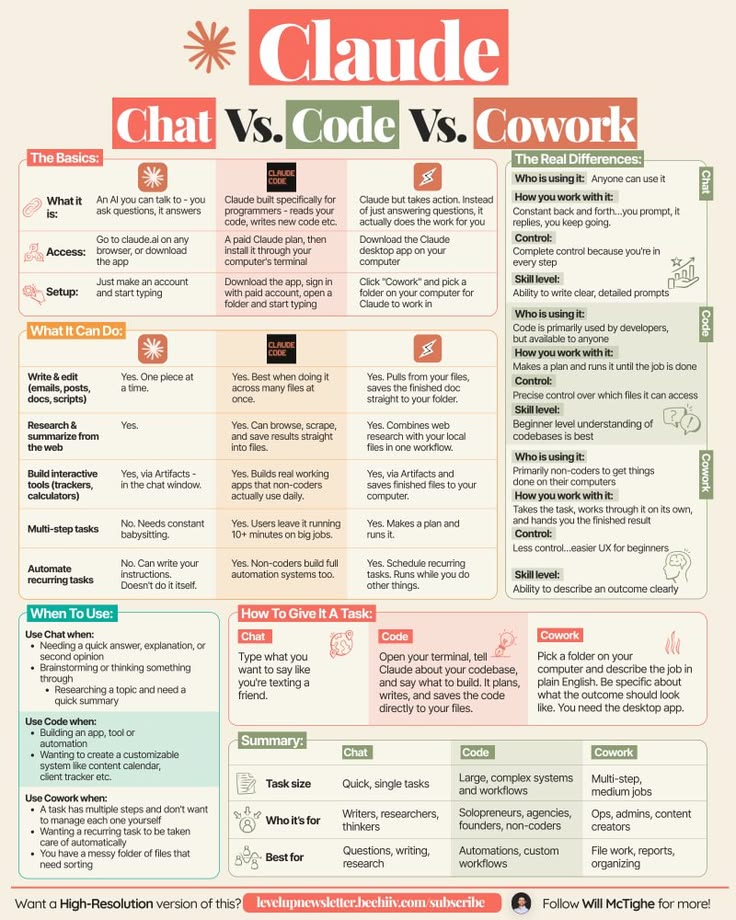
Master V รีทวีตแล้ว

Claude Difference Explained Well 📘📚
Krishna Agrawal@Krishnasagrawal
The next wave of AI won’t be about bigger models. It’ll be about tighter control. Whoever masters reliability at scale will define the space.
English
Master V รีทวีตแล้ว
12 AI Skills to Master in 2026 📚📘

Krishna Agrawal@Krishnasagrawal
This feels like a real shift in AI architecture. Not another LLM tweak a system built specifically for memory. If this works as promised (persistent, proactive recall, near-zero hallucinations), it changes how apps actually remember users. Signed up. engramme.com #AI #LargeMemoryModels #Memory
English
Master V รีทวีตแล้ว

AI has stopped being a feature and started being the foundation.
We're excited about a new wave of startups rebuilding software, services, and silicon— and pushing AI into the physical world.
ycombinator.com/rfs

English
Master V รีทวีตแล้ว
Here are the 3 Core Pillars of Every AI Agent's Context
Here's why MCP, RAG and Skills are now unavoidable...
Before we dive in, here's why all 3 exist in the first place:
Every AI Agent struggles with 3 core problems:
- Connecting to external tools requires writing custom API code every time
- Answering accurately from knowledge it was never trained on
- Repeating the same instructions in prompts; wasting tokens on every single call
MCP, RAG, and Skills were each built to solve exactly one of these problems.
📌 1\ MCP (Model Context Protocol)
MCP eliminates the need to write custom API integration code every time your agent needs to connect to an external tool.
How it works:
- User sends a query → MCP Client selects the right server
- LLM processes the request and routes it to the MCP Server
- Server (Slack, Qdrant, Brave Search) responds with the relevant data
- Final output is returned back to the user
Key insight: Without MCP, every new tool connection means new custom code. With MCP, your agent plugs into any server through one standardized protocol.
Use when: You want your agent to access external tools and services without rebuilding integrations from scratch each time.
📌 2\ RAG (Retrieval Augmented Generation)
RAG gives your agent memory-enabled retrieval, so it reasons over knowledge it was never trained on, instead of hallucinating answers.
How it works:
- Data sources are chunked → converted into embeddings
- Stored as dense vectors inside a Vector DB
- User query triggers a search → most relevant chunks are retrieved
- Retrieved info + query + system prompt → fed into the LLM → Output
Key insight: Without RAG, agents confidently make things up. With RAG, they retrieve first, then reason.
Use when: You want your agent to reason over large, dynamic knowledge bases with accuracy and context.
📌 3\ Agent Skills
Skills stop your agent from wasting tokens by repeating the same instructions in every single prompt.
How it works:
- User query → LLM sends a Skill Request to the Skill Manager
- Skill Manager retrieves the right skill using stored prompts and actions
- Tools like Git, Docker, Python Interpreter, and Shell are triggered
- Skill data flows back to the LLM → Final Output is delivered
Key insight: Without Skills, you bloat every prompt with repeated instructions. With Skills, your agent loads only what it needs, exactly when it needs it.
Use when: You want reusable, token-efficient actions your agent can execute without being re-instructed every time.
Save 💾 ➞ React 👍 ➞ Share ♻️
cc : Rakesh Gohel
GIF
English
Master V รีทวีตแล้ว

🚗 SCHEDULED VEHICLE MAINTENANCE GUIDE.
Staying on top of scheduled maintenance ensures optimal vehicle performance, safety, and longevity. After the prescribed service period, always follow the recommended maintenance intervals.
PETROL ENGINE MAINTENANCE PROCEDURE🎁⚙️
Routine Service Checklist
-Check Spark Plugs,
Inspect every 8,000 km
Replace every 100,000 km
-Replace air filter element as needed (typically every service or based on condition)
-Renew Engine Oil & Oil Filter.
-Inspect the Drive / Serpentine Belts
Inspect for wear, cracks, and proper tension
-Check Engine Coolant
Replace every 3 years or 45,000 km (whichever comes first)
-Check Battery condition regularly
Replace approximately every 3 years for EFB,AGM can last up-to 6 years💯.
-Check and Replace Brake Fluid every 15,000 km (or annually, depending on usage)
-Check Tyres tread wear and condition.
-Rotate tires at every service.
-Inspect brake pads and replace when worn.
DIESEL ENGINE MAINTENANCE PROCEDURE⚙️🎁
Routine service checklist🎖️
Service Interval: Every 8,000 km or 5000 km on the odometer.🏎️
-Engine Oil (vehicles below 100,000 on the odometer,use 5w30,vehicles above 100,000kms on the odometer,use 5w40) .For vehicles with dpf,use oil with low ash content ACEA C2/C3.
-Replace oil filter, air filter, and cabin filter.
-Inspect injectors and sealing washers for leaks or wear.
-Replace Fuel filter regularly to maintain fuel system efficiency.
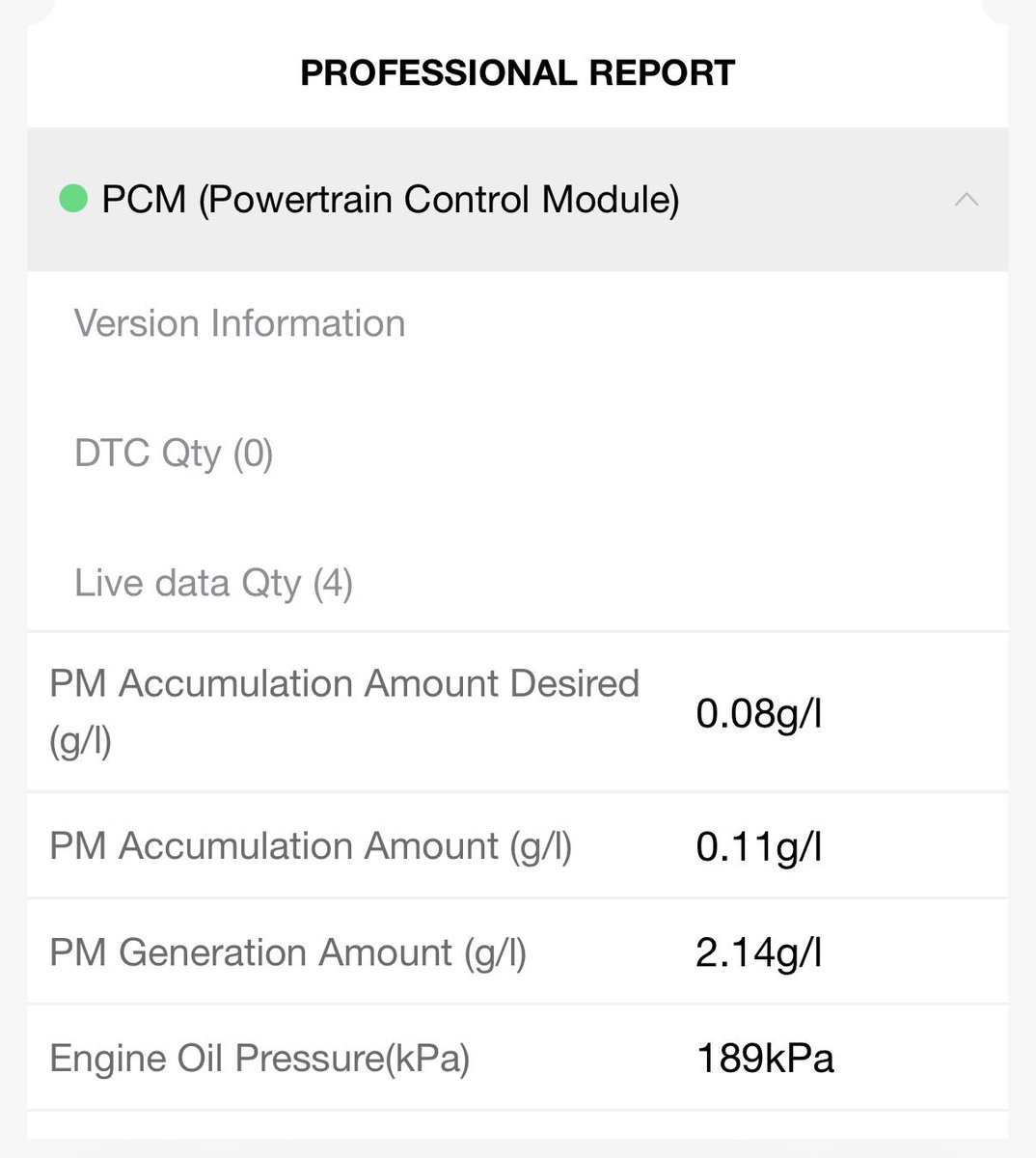
-Check Engine Oil Pressure to make sure the lubrication system is in good operating condition.
-Inspect for carbon deposits and clean if necessary.
-Check the Diesel Particulate Filter (DPF)
To Monitor soot accumulation.
Ensure it does not exceed 2.5g threshold (or manufacturer spec)
-Reset oil/service indicator after maintenance.
A maintenance monitor or service reminder system like the one at potent-dynamics.com can help notify you when the next service is due,Which is after every 6 months🔥⚙️

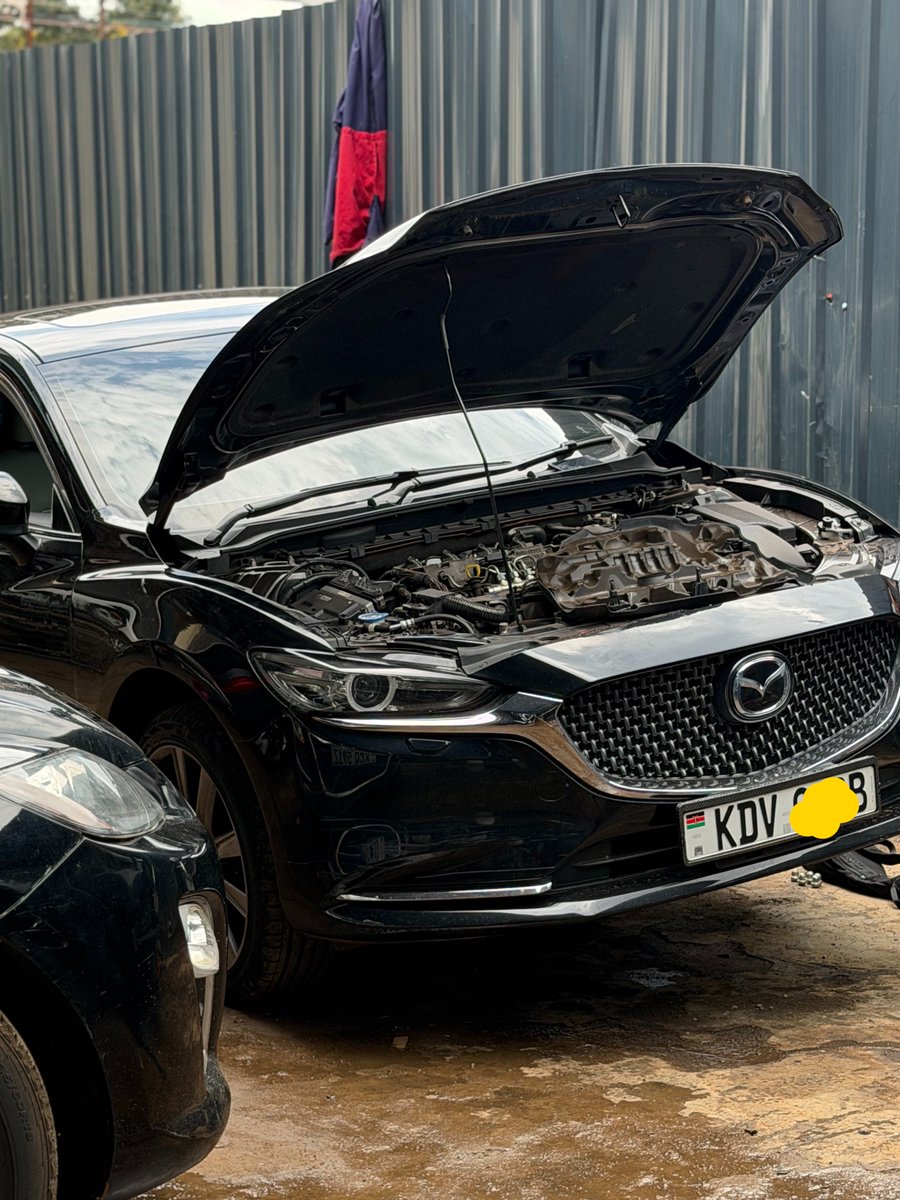

English
Master V รีทวีตแล้ว

Master V รีทวีตแล้ว

The man has 4 offices:
The King
The Priest
The Husband &
The Father.
Dear men, always remember this.
English