
Mark Moeykens

8.3K posts

Mark Moeykens banner
Mark Moeykens

Mark Moeykens

@BigMtnStudio

📙 FREE SwiftUI book: https://t.co/PhiMceUTB5

Salt Lake City, UT เข้าร่วม Ocak 2017
203 กำลังติดตาม15.8K ผู้ติดตาม
Mark Moeykens
Mark Moeykens@BigMtnStudio·
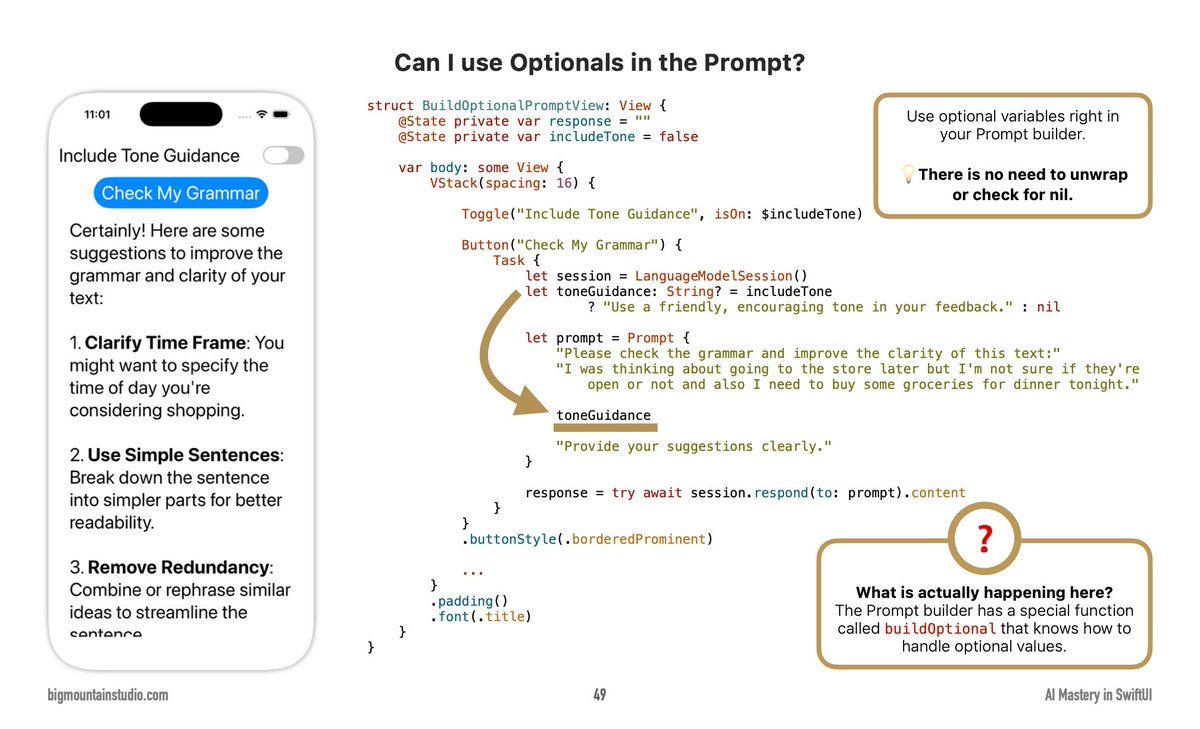
❓Can I use optional variables in my Prompt builder? 💡Yes! Use optional variables directly in your Prompt builder with no need to unwrap or check for nil. The buildOptional function handles optional values automatically. 👉Free #SwiftUI picture book at bigmtn.studio
Mark Moeykens tweet media
English
0
0
6
396
Mark Moeykens
Mark Moeykens@BigMtnStudio·
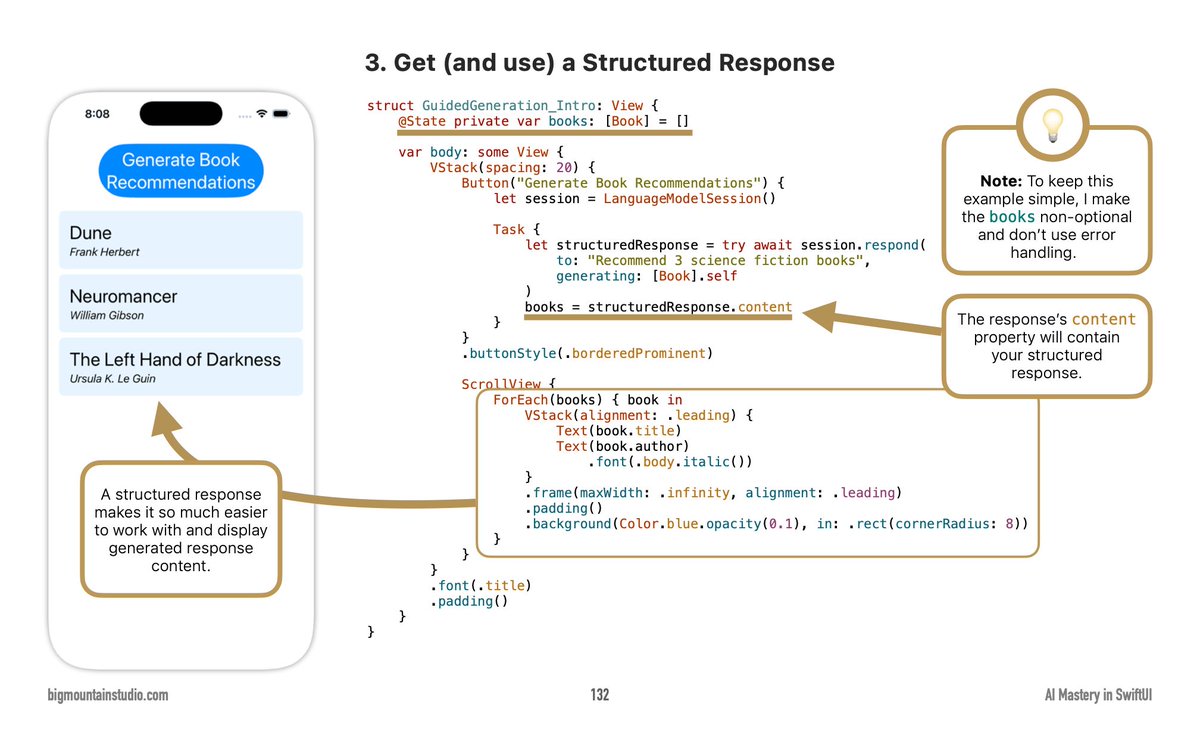
❓How do I get structured data from an AI model in SwiftUI? 💡Use the @Generable macro on your response struct, pass it to the model's generating parameter, then access response.content property to display the structured data in your UI. 👉Free #SwiftUI picture book at bigmtn.studio
Mark Moeykens tweet media
English
0
0
1
236
Mark Moeykens
Mark Moeykens@BigMtnStudio·
❓How do I optimize my language model for a fixed prompt? 💡You can prewarm your model with that specific prompt using the prewarm() function, which improves performance when you know the prompt in advance. 👉Free #SwiftUI picture book at bigmtn.studio
Mark Moeykens tweet media
English
0
1
6
375
Mark Moeykens
Mark Moeykens@BigMtnStudio·
📝Just a note on this. The Grid is something the AI doesn’t seem to reach for as a layout solution. It’ll try HStacks in VStacks, usually. ✨So an instruction in your steering/skill docs might be helpful, something like: Even Column Spacing: When columns need equal spacing across rows, prefer Grid views over HStack with manual Spacers or fixed frames: •Non-repeating rows (static, varied content): Use Grid with GridRow for precise column alignment. •Repeating rows (dynamic lists, data-driven content): Use LazyVGrid/LazyHGrid with GridItem(.flexible()).
English
0
0
1
215
Mark Moeykens
Mark Moeykens@BigMtnStudio·
❓How can I align views in a Grid layout in SwiftUI? 💡Yes, you can use the .alignment modifier on the Grid to control the overall alignment, and the .gridCellAnchor modifier to override the alignment for specific cells. 👉Free #SwiftUI picture book at bigmtn.studio
Mark Moeykens tweet media
English
1
3
25
1.9K
Mark Moeykens
Mark Moeykens@BigMtnStudio·
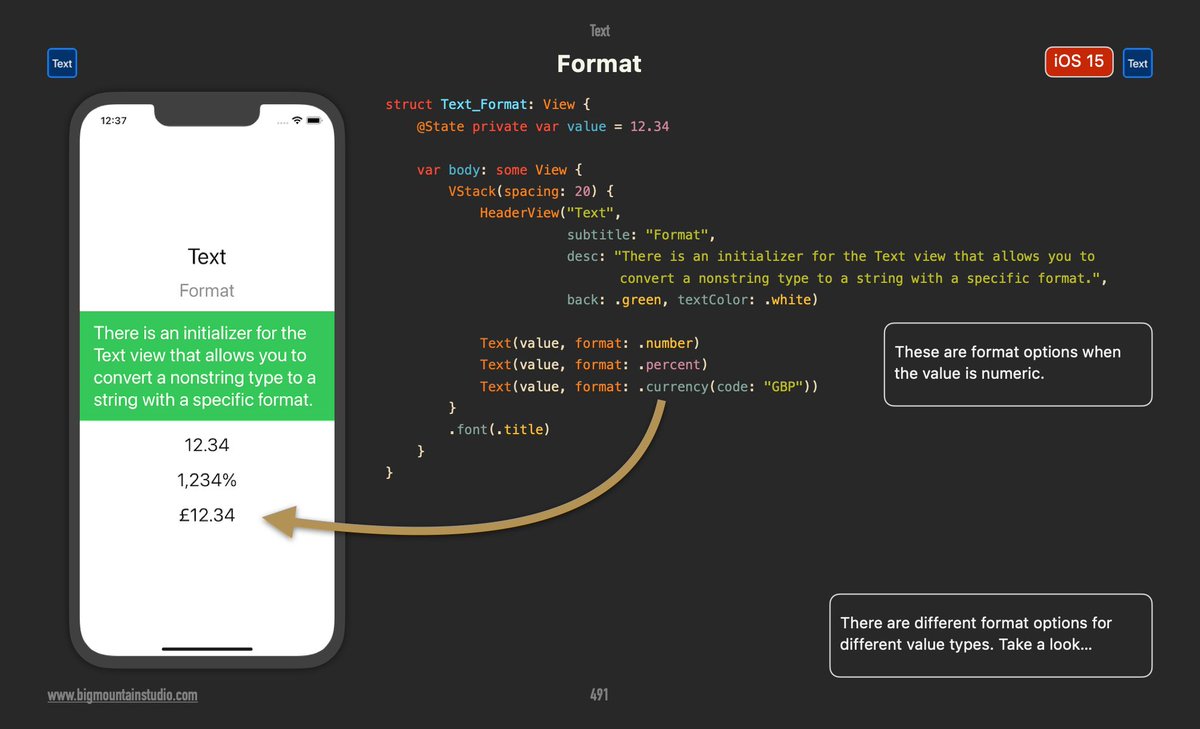
❓What's one way to format numbers as currency in SwiftUI? 💡Use the Text view with format parameter - Text(value, format: .currency(code: "GBP")) displays values like £12.34. 👉Free #SwiftUI picture book at bigmtn.studio
Mark Moeykens tweet media
English
0
0
4
490
Mark Moeykens
Mark Moeykens@BigMtnStudio·
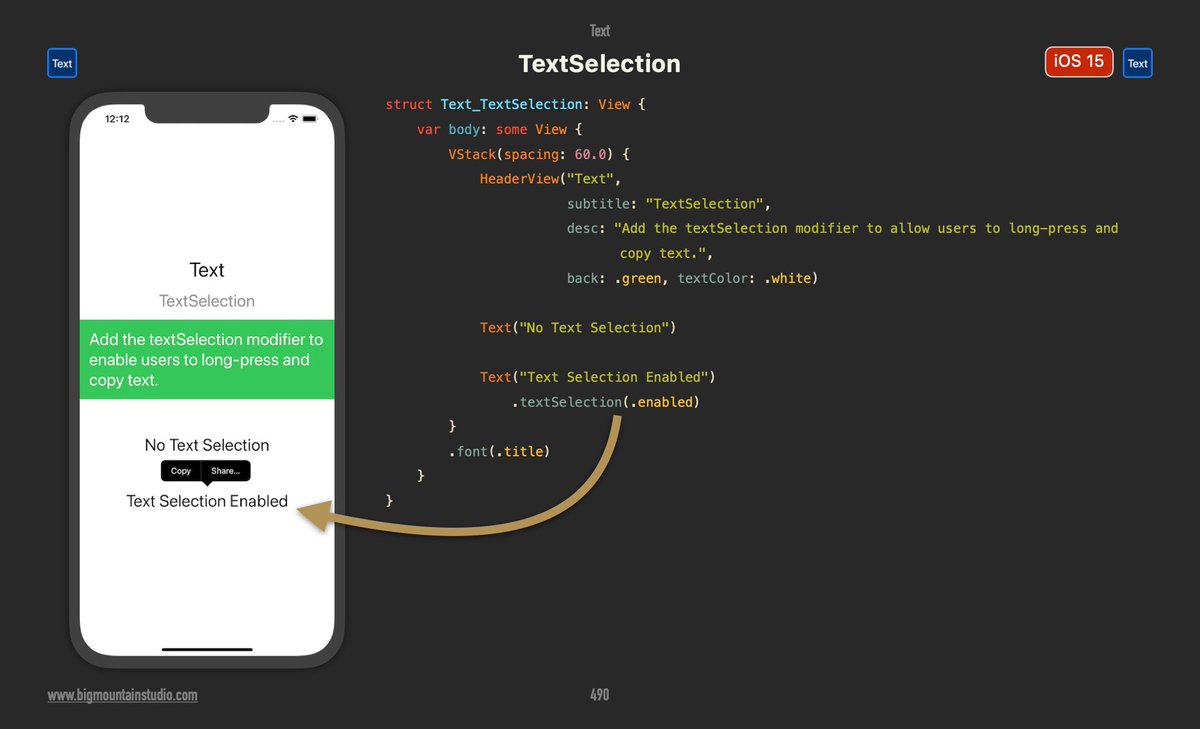
❓How do I enable text selection in SwiftUI? 💡Use the .textSelection(.enabled) modifier on your Text views to allow users to long-press and copy text from your app. 👉Free #SwiftUI picture book at bigmtn.studio
Mark Moeykens tweet media
English
1
1
15
931
Mark Moeykens
Mark Moeykens@BigMtnStudio·
❓How do I use an array in a prompt with SwiftUI? 💡The PromptBuilder has a built-in buildArray() function that automatically handles arrays, so you can pass them directly to your prompt without needing to iterate through them manually. 👉Free #SwiftUI picture book at bigmtn.studio
Mark Moeykens tweet media
English
2
2
9
1.2K
Mark Moeykens
Mark Moeykens@BigMtnStudio·
❓When should I use single-turn (one-shot) interactions with SwiftUI AI (LanguageModelSession)? 💡Create a new LanguageModelSession each time when it doesn't require state management of past interactions. 👉Free #SwiftUI picture book at bigmtn.studio
Mark Moeykens tweet media
English
0
1
5
484
Mark Moeykens
Mark Moeykens@BigMtnStudio·
❓How do I use symbols in SwiftUI? 💡You can use the Image view with systemName parameter to load SF Symbols like "cloud.sun.fill" and customize with foregroundStyle modifier. 👉Free #SwiftUI picture book at bigmtn.studio
Mark Moeykens tweet media
English
0
1
8
580
Mark Moeykens
Mark Moeykens@BigMtnStudio·
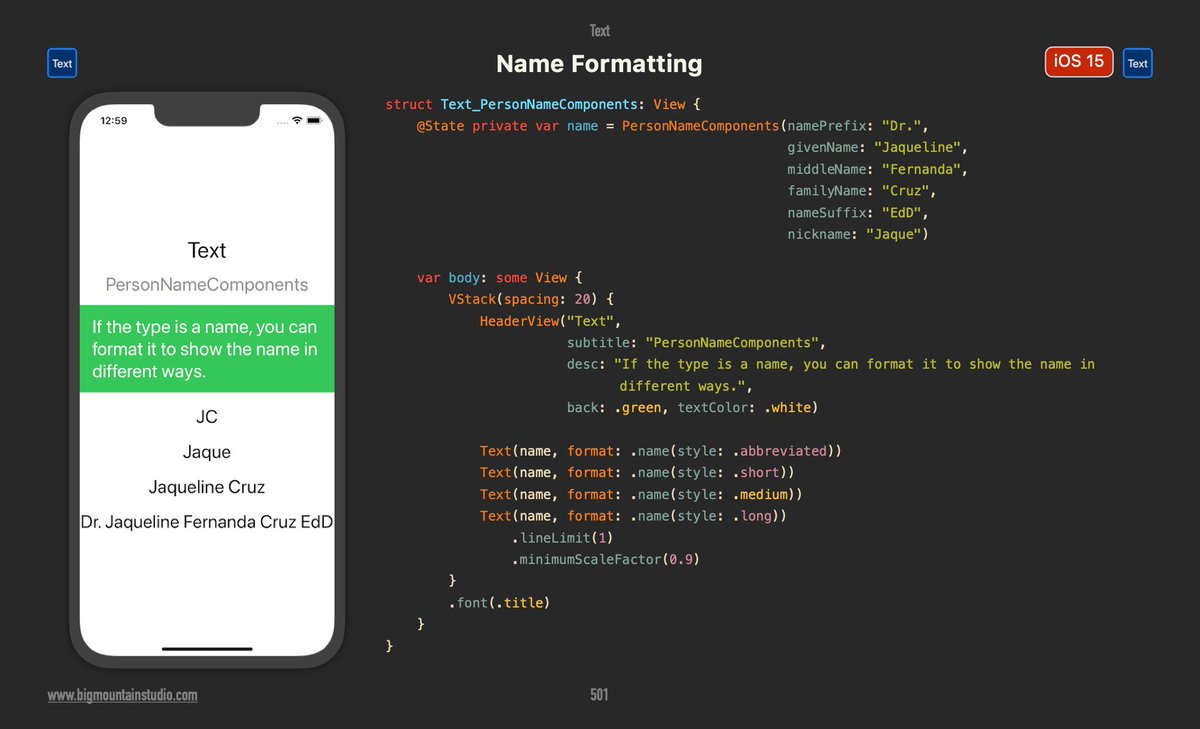
❓How can I format person names differently in SwiftUI? 💡Use the .name(style:) formatter with options like .abbreviated, .short, .medium, and .long to display names in various formats from initials to full formal names. 👉Free #SwiftUI picture book at bigmtn.studio
Mark Moeykens tweet media
English
0
1
3
484
Mark Moeykens
Mark Moeykens@BigMtnStudio·
❓How do I wrap images with text in SwiftUI? 💡You can concatenate images and text using Text() + Text(Image("systemName")) to create inline icons with your text content. 👉Free #SwiftUI picture book at bigmtn.studio
Mark Moeykens tweet media
English
0
2
8
554
Mark Moeykens
Mark Moeykens@BigMtnStudio·
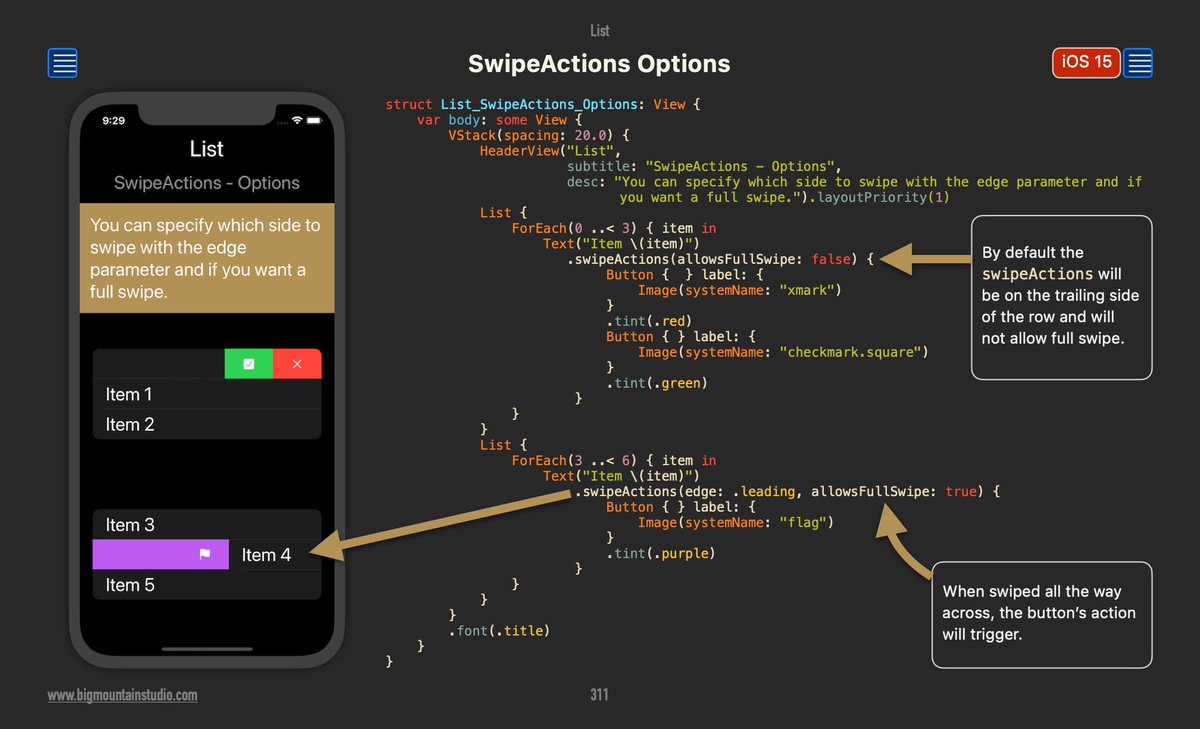
❓How do I implement swipe actions in SwiftUI lists? 💡You can use .swipeActions() with parameters for edge (trailing or leading) and allowsFullSwipe to create customizable swipe gestures with buttons. 👉Free #SwiftUI picture book at bigmtn.studio
Mark Moeykens tweet media
English
0
1
13
899
Mark Moeykens
Mark Moeykens@BigMtnStudio·
❓Can I use if/else statements in SwiftUI prompts? 💡Yes! The Prompt builder has internal functions like buildEither that handle if/else conditions, making it perfect for screens with toggles and conditional logic. 👉Free #SwiftUI picture book at bigmtn.studio
Mark Moeykens tweet media
English
0
2
8
873
Mark Moeykens
Mark Moeykens@BigMtnStudio·
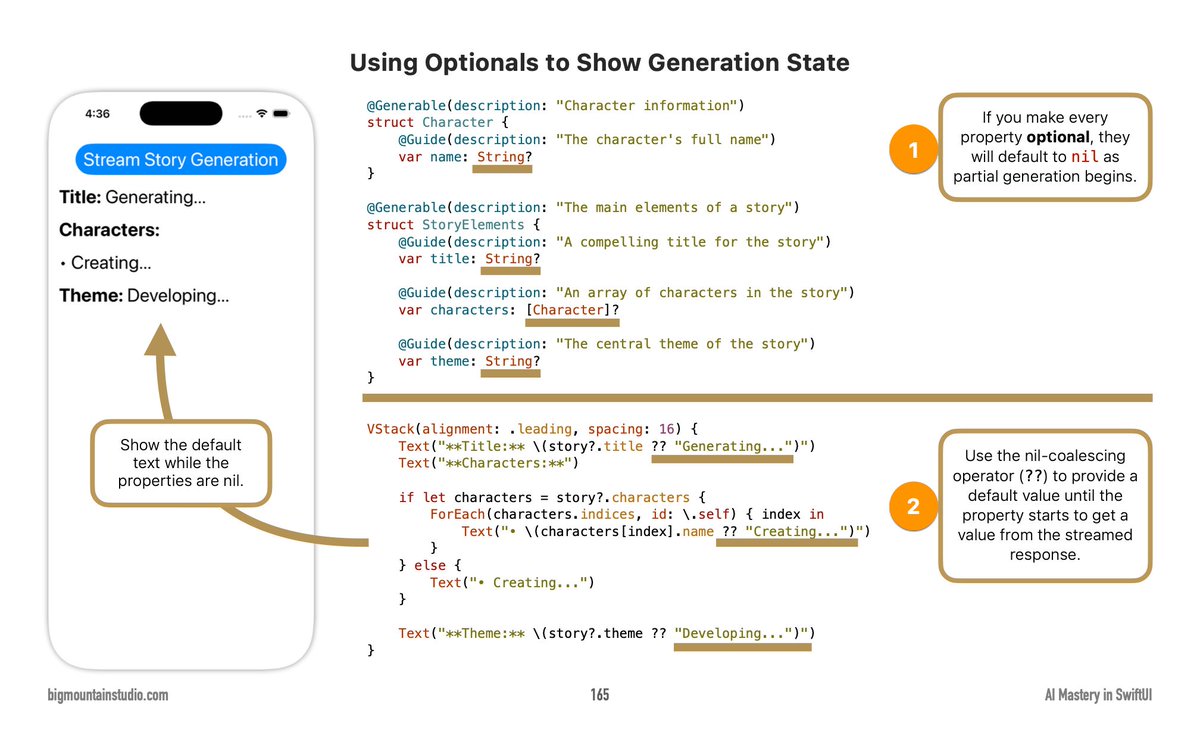
❓How do I show placeholder text while streamed properties load in SwiftUI? 💡Make properties optional and use the nil-coalescing operator (??) to display default text until the streamed response populates the values. 👉Free #SwiftUI picture book at bigmtn.studio
Mark Moeykens tweet media
English
0
3
9
902
Mark Moeykens
Mark Moeykens@BigMtnStudio·
❓How do I work with structured responses from AI in SwiftUI? 💡Use the respond method with a generating parameter to get structured data, then access the content property to display your generated response in your UI. 👉Free #SwiftUI picture book at bigmtn.studio
Mark Moeykens tweet media
English
0
1
6
459
Mark Moeykens
Mark Moeykens@BigMtnStudio·
📱You never realize how much you rely on being able to paste into the Simulator until Apple breaks it in the latest Xcode release. ❓Does anyone have any workarounds?
English
6
0
15
3K
Mark Moeykens
Mark Moeykens@BigMtnStudio·
@DrCarleeknikov @rocketsim_app I might have to look into that. My current workaround is signing into iCloud on the Simulator and pasting data into my Reminders app and waiting for it to sync on the Simulator and then copying from the Simulator Reminders app into our app. Such a pain. 😞
English
1
0
0
127
Mark Moeykens
Mark Moeykens@BigMtnStudio·
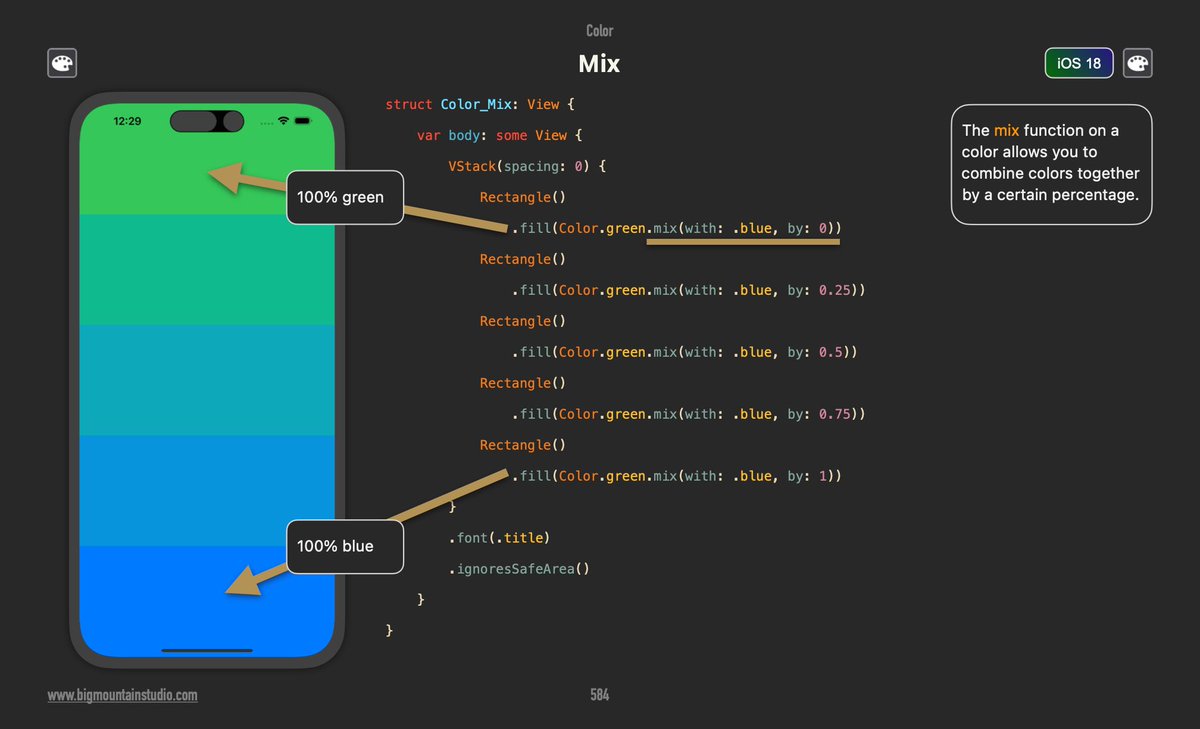
❓How do I gradually mix colors in SwiftUI? 💡Use the .mix() function on colors with a percentage value. For example: Color.green.mix(with: .blue, by: 0.5) creates a 50/50 blend between green and blue. 👉Free #SwiftUI picture book at bigmtn.studio
Mark Moeykens tweet media
English
0
5
17
1.6K