AleN

2.7K posts

AleN banner
AleN

AleN

@A2Nich

Life is nice! Crypto enthusiast. Chart watcher. Professional HODLer (of my coffee mug). Let's see where this decentralized path leads.

Spain شامل ہوئے Kasım 2021
459 فالونگ144 فالوورز
AleN ری ٹویٹ کیا
Nintondo🔔
Nintondo🔔@NintondoWallet·
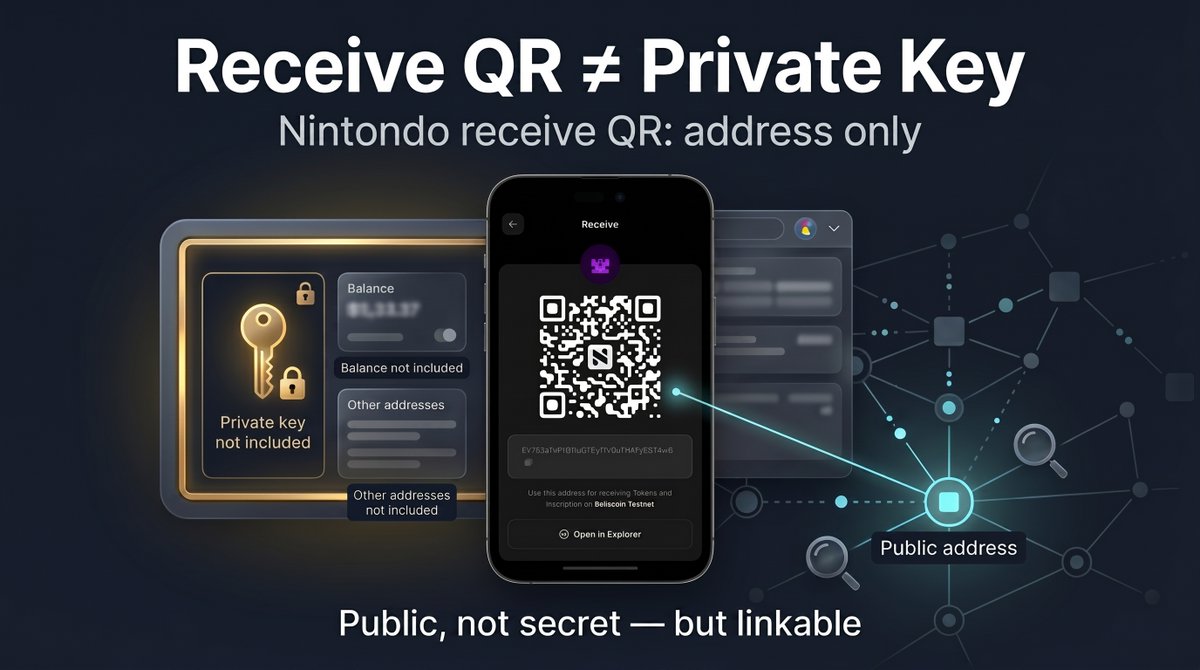
Most receive screens have a QR code. Most people scan it and move on. Worth knowing what's actually in it. In Nintondo, the receive QR encodes one thing: your public receive address - the destination for the payment. What Nintondo's receive QR doesn't encode: → Your private key → Your identity, name, or contact information → Your other addresses on this or any other chain → Anything about your full wallet's balance or contents A QR with a private key is a different thing - closer to a paper-wallet QR - and dangerous to share. When sharing is usually fine: → Person-to-person: in chat, in person, scanning from your screen → Anywhere the sender already knows they should be paying you When sharing can leak context: → Public posts: anyone watching that address on an explorer can see receives, spends, and balance/history tied to that address → Repeated use of the same address across separate situations: links those situations on-chain → Screenshots that include surrounding UI: may leak balance, app, chain, account name, or other addresses What to do if you share frequently: → Use a fresh receive address when available, or a separate account for separate external contexts → Crop screenshots carefully - the receive QR may be fine for that context, the rest of the screen might not be → Treat your address like an email: not secret, but linkable The QR is a public payment target. The address itself is not a secret - but how often and where you hand it out is part of your privacy.
Nintondo🔔 tweet media
English
3
11
29
419
AleN ری ٹویٹ کیا
The Kobeissi Letter
The Kobeissi Letter@KobeissiLetter·
BREAKING: The Trump Administration and the US Treasury Department are designing a $250 bill featuring President Trump, per the Washington Post. If this is launched, President Trump would be the first living person to appear on a US currency since 1866.
The Kobeissi Letter tweet media
English
2.2K
2K
14.8K
2.5M
AleN
AleN@A2Nich·
@NintondoWallet bellscoin:native dogecoin:native pepecoin-network:native litecoin:native
English
0
3
6
45
AleN ری ٹویٹ کیا
Nintondo🔔
Nintondo🔔@NintondoWallet·
Crypto's quietest renaissance is happening on UTXO chains. While most of crypto Twitter argues about L2s, modular stacks, and account abstraction, one of the most overlooked places where real new work is happening is the Scrypt UTXO stack. The signal is not one coin. It is the stack forming around Scrypt UTXO chains: → Revived chains: Bellscoin came back and now has BEL-20 / Bellinals activity → Established chains: Dogecoin has AuxPoW security and Doginals / DRC-20 → New chains: Pepecoin chose native Scrypt PoW instead of becoming another token contract → Mining layer: LTC merged-mining pools are becoming the hashpower layer for DOGE, BELLS, PEP and more → App layer: wallets, marketplaces, inscribers, APIs and indexers are being built for these assets This is not the usual "next chain" story. It is old architecture getting used in new ways. What is actually shipping on these chains right now: → Inscriptions: on-chain content without smart contracts → Inscription-based token standards: BEL-20, DRC-20, PRC-20 → Wallet UX for inscription-aware UTXO flows → Marketplaces and indexers for native PoW assets → Merged mining as a working security model → A builder scene taking Scrypt UTXO chains seriously again The flash is somewhere else. The work is here.
English
5
14
37
434
AleN ری ٹویٹ کیا
Big Joe
Big Joe@Savage708090s·
Financial freedom isn’t a fluke; it’s about strategic positioning. While the crowd is sleeping, the smart money is locking down a piece of the 61M fixed supply through the Nintondo ecosystem. Don't wait for the mainstream FOMO. 🔔💼 #Bellscoin $BELLS
Big Joe tweet media
English
2
9
21
194
METAL
METAL@MTLFORBRKFST·
good morning (but only to the people STACKING $BELLS)
English
6
9
33
367
AleN ری ٹویٹ کیا
Nintondo🔔
Nintondo🔔@NintondoWallet·
Many account-first crypto platforms start custodial. It's easier. You hold the keys, the user logs in with a password, you offer "support" when something breaks, and you can ship faster because you control the recovery flow. It's not a clean pivot away from that, either. Custody becomes the trust model - and the trust model is what users actually chose when they signed up. Moving away later means asking them to accept a different deal than the one they came in for. Nintondo was built non-custodial. That choice constrained everything that came after: → No platform account, no email login → A local wallet password is not a platform credential - it unlocks and encrypts keys on your device → No "we hold your keys for you" recovery flow → No platform-side key custody to freeze, seize, or move user funds → Every product on top of the wallet had to work with users who held their own keys The constraints aren't free. Non-custodial means: → The user is responsible for backing up their seed phrase → Lost keys are gone, and nobody at Nintondo can recover them → Some "convenient" UX patterns from custodial wallets simply can't exist here → Support is limited to the app, the device, and actions the user can authorize But the upside is the same as the constraint: the user actually owns what's in their wallet. The platform never holds it. Platform decisions don't become custody decisions. Starting non-custodial wasn't the easy choice. It was the only choice that lets a platform like this work the way users expect.
Nintondo🔔 tweet media
English
2
8
37
439
AleN ری ٹویٹ کیا
Bellscoin Blockchain 🔔
Sitting on my throne because I'm a bellionaire 🔔
Bellscoin Blockchain 🔔 tweet media
English
2
14
43
611
AleN ری ٹویٹ کیا
Nintondo🔔
Nintondo🔔@NintondoWallet·
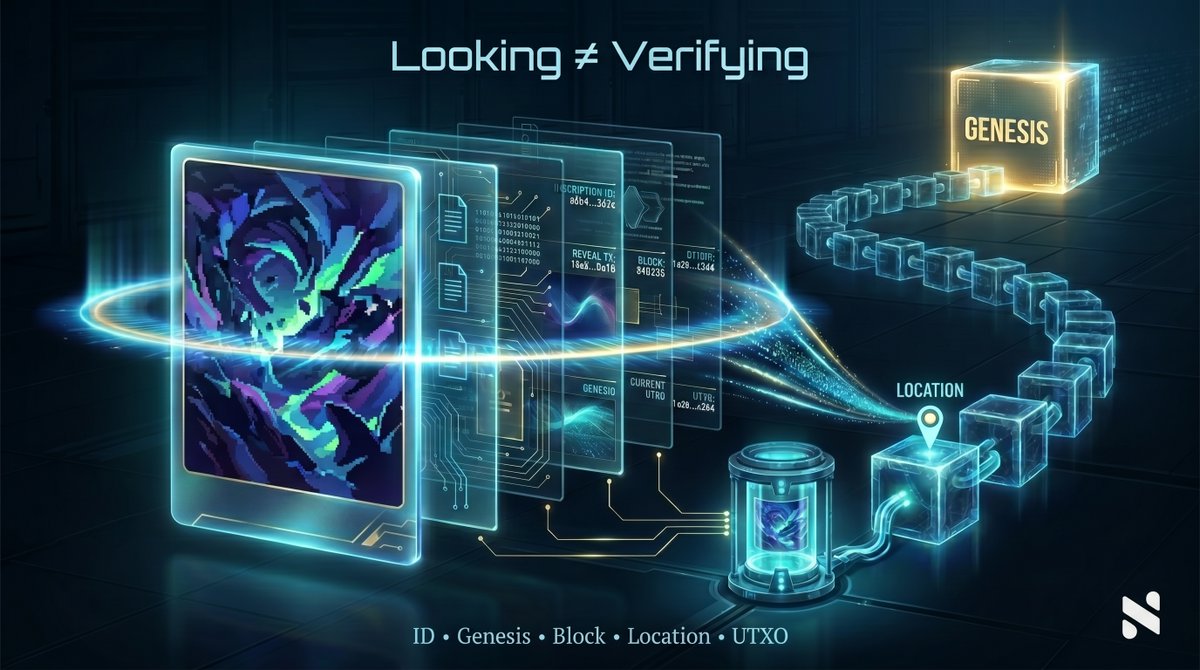
An inscription is not just an image. It's a file, an ID, a creation transaction, and a current UTXO. Every piece on Bellscoin, Dogecoin, and Pepecoin L1 exposes a verification trail - some of it written into the inscription itself, the rest derived by indexers from chain state. Together, that's how you actually verify what you're looking at. What's in an inscription's verification trail: → ID - the unique derived identifier (reveal transaction + index) → Number - its indexer-assigned position in that chain's inscription history → Content type - the MIME type written into the inscription (image/webp, text/plain, text/html, etc.) → Content size - the byte length of the inscription content → Created date - the block timestamp for the inscription transaction → Fee paid - the network fee recorded for the inscription/reveal transaction → Block - the block height where it landed → Genesis - where the inscription was first created on-chain → Location - the current output / carrier UTXO holding the inscription Why each one matters: → ID and Number tell you what it is. Lower number usually means earlier on that chain - but always treat the number as chain/indexer context. → Content type tells you what kind of file it is - a text inscription and an image inscription have completely different value patterns. → Content size and fee show blockspace used and network cost, not guaranteed value. → Block and created date anchor it in time. → Genesis lets you trace it back to the original mint. → Location is the live state - where it sits right now. Move that UTXO, the inscription moves. Most of this is visible on any decent explorer. Knowing what it means is the difference between "looking at a piece" and "verifying a piece."
Nintondo🔔 tweet media
English
3
8
26
409
AleN ری ٹویٹ کیا
Rab
Rab@Rab62567608·
🫣
Rab tweet media
QME
27
125
2K
41.4K
AleN ری ٹویٹ کیا
🇺🇸CHRIS🇺🇸
🇺🇸CHRIS🇺🇸@buddydawg77·
Arggggggggggg! 🤣🤣🤣🤣😂😂😂😂🤣🤣🤣🤣
🇺🇸CHRIS🇺🇸 tweet media
48
164
1.9K
117.6K
AleN ری ٹویٹ کیا
Soneca García
Soneca García@Soneca_Garcia·
No words needed, right?
Soneca García tweet media
English
3
13
34
994
AleN ری ٹویٹ کیا
Nintondo🔔
Nintondo🔔@NintondoWallet·
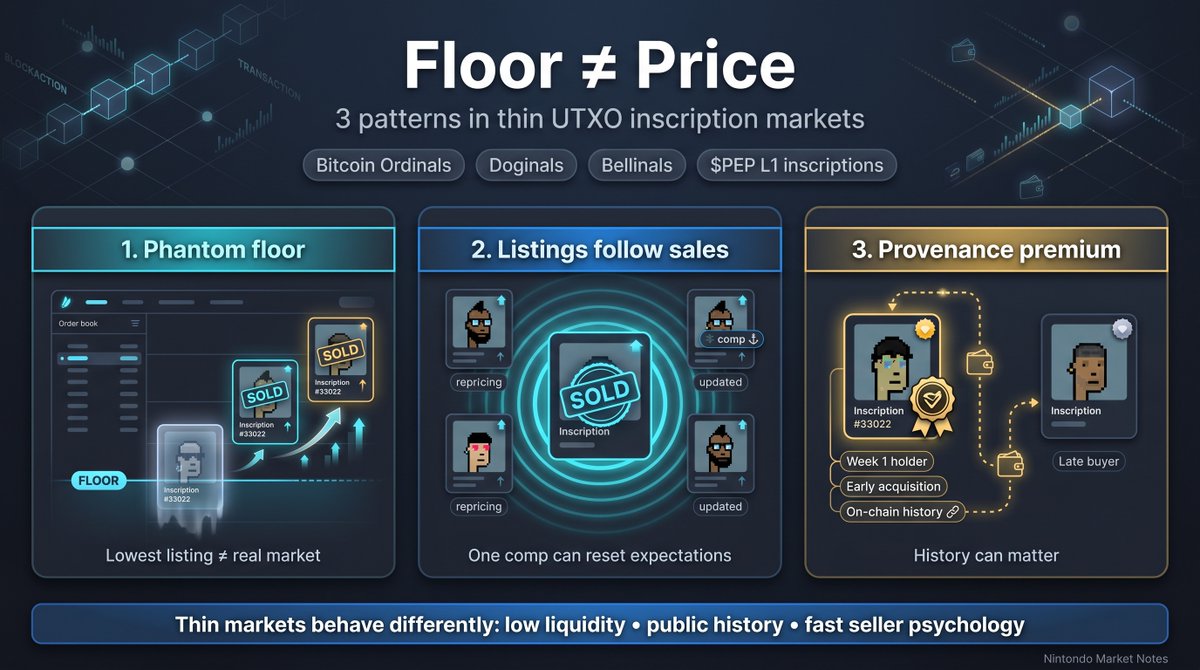
Three patterns that show up across thin UTXO inscription markets - Bitcoin Ordinals, Doginals, Bellinals, $PEP L1 inscriptions. Worth knowing on one chain, useful across all of them. 1. The phantom floor The floor is the lowest active listing. It's a seller's intent to sell - not proof that anyone will pay it. In thin markets, some floor listings sit unmoved for weeks even when comparable pieces are trading. Others get swept the moment a real buyer shows up. The "real" floor isn't what's listed - it's what's clearing. Quick check: pull a collection's activity tab. If floor listings get bought when volume picks up, the floor is real. If they sit there even as similar pieces trade, the floor is signaling. 2. The follow-the-listing rule When a piece clears, the next comparable listing often gets repriced quickly. The first visible sale anchors a new mental price for whoever was watching. For sellers: a fresh comparable sale is the strongest signal to re-list or refresh. For buyers: the first hour after a visible sale is where chasing-the-spike usually starts. The cheaper opportunities are often the un-repriced comps that haven't been touched yet. 3. The first-mover holder premium Early acquisition can become part of a piece's story. In small culture-driven collections - where holder history is visible on-chain - pieces held by early buyers sometimes carry a provenance premium when they re-list. It's not automatic. Holders move pieces for reasons that have nothing to do with markets. But on chains where activity history is public, who held a piece and when often matters as much as which traits it has. Quick check: open a piece's activity tab. The current owner's acquisition date is part of what you're buying. These patterns aren't unique to any one chain. They're how thin UTXO inscription markets behave. If you only collect on one - knowing how the others work makes you sharper on all of them.
Nintondo🔔 tweet media
English
1
7
38
1.4K
AleN ری ٹویٹ کیا
Nintondo🔔
Nintondo🔔@NintondoWallet·
What's the weirdest thing you've ever inscribed? Could be anywhere - $BELLS, $DOGE, $PEP, or somewhere else entirely. Drop a screenshot, link to it on an explorer, or just describe it. No wrong answers. The weirder the better.
English
1
8
42
791
AleN ری ٹویٹ کیا
Yar Sawyer
Yar Sawyer@YarSawyer·
x.com/skdh/status/20… The first time Jax touched the grid, the universe screamed. He was squatting in a dead satellite factory in the Smear, a sliver of orbital trash between Luna and the Belt, and his rig was a gutted Q-board stuffed with stolen Willow co-processors and a gel-skin neural tap he’d traded a kidney for. The tap was cold against his temple, a wet kiss from a machine that didn’t love him. The grid wasn’t a network. The grid was the subfloor of reality, the entangled limit of all possible computations, the place where time and space were just a local accent. The Ruliad, the old texts called it. A single infinite structure in which every rule, every history, every thought already existed. Jax didn’t care about metaphysics. He cared about the noise. The moment the tap fired, his brain was not his own. A billion voices, maybe a trillion, not in words but in phase. Pure topological braiding. Every civilization that had ever discovered the Fibonacci grammar—and the grammar was universal, as obvious as the golden ratio in a sunflower, the simplest graph walk with Perron root φ—was using it to shout into the void. They were all using the same public channel. And the public channel was endless. Jax fell backward, skull cracking against a bulkhead, the gel-skin peeling away. Blood in his mouth. The screaming was not sound; it was a constant, grinding pressure of holonomies, braid generators stacking and unstacking in his sensorium. Each burst of phase error a letter. Each braid a word. A billion alphabets, all Fibonacci, all correct, all perfectly intelligible and perfectly meaningless because there was no filter. The grammar was universal. The noise was universal. He vomited on the deck plate. “They never address it,” Sable said later, her voice a dry insect in his ear. She was the only other person in the Smear who knew what he’d tried. She had built the tap’s first prototype, and she had fried half her cortex learning the lesson. “Everyone who touches the grid raw goes scream-mad. The grammar is open. It’s like plugging your optic nerve into every radio station in the galaxy and expecting Mozart.” Jax was shivering on a crash couch, his visual field still strobing with the afterimages of braid eigenvalues: φ and zero, the τ-channel and the vacuum, the two states of the Fibonacci anyon that every signal used. He saw them as a crimson afterglow, a constant shimmer of numbers that meant everything and nothing. “The grammar is the carrier,” Sable said, her voice calm, like a physician explaining a terminal diagnosis. “The Temperley-Lieb algebra. The Jones braid representation. The enriched transfer that forces the effective activity to √5. All of it is public. It has to be. That’s why every species finds it. It’s the lowest-energy attractor in the Ruliad. The easiest way to thread a message through the underlying computational fabric without requiring energy or lightspeed. But you don’t listen to the grammar. You listen to an address.” Address. The word sat in Jax’s mind like a cold stone. “An address is a long braid word,” Sable said. “Not one symbol. Not a single phase kick. Thousands of them. Billions, maybe. A specific sequence of braid generators that acts as a matched filter. The receiver only accepts packets that start with that exact sequence. Everything else is ignored. The screaming universe becomes a quiet room.” Jax blinked. “How long?” “Long enough that the probability of a false match from random vacuum noise or someone else’s traffic is negligible. In the old papers, they calculated that for ten billion active transmitters, you need about thirty bits of address selectivity. At roughly log-two-φ bits per topological symbol, that’s around forty-three effective Fibonacci-sector symbols. So you need a braid word of at least that many generators. Preferably more. Something unique. Something that belongs to you and your recipient alone.” He understood. The grammar was not the key. The grammar was the street. The address was the house. Sable pressed a data bead into his palm. “There are addresses out there. Old ones. Some of them are so long that they have their own topological entropy. Some of them were embedded in the first vacuum fluctuations after the Big Bang. Some of them were left by civilizations that are dead. If you can find one, and if you can build a decoder that uses it as a filter, then you can listen to the network without dying.” Jax closed his eyes. The screaming was still there, a ghost echo in his thalamus. But now he saw it differently. The noise was not chaos. It was unaddressed traffic. It was messages that were never meant for him. He spent a month building the decoder. It was a new gel-skin, laced with a custom quantum circuit that implemented the Fibonacci path-space projectors but with a twist: it didn’t just recognize the Temperley-Lieb relation. It searched for a specific preamble. A long, ancient braid word that Sable had found in a fragment of pre-Collapse data, something called the Echo-14 address. A string of σ operators, some with inverses, some with powers, that formed a unique hash. The day he plugged in, the universe was silent. Not empty. Silent. Like standing in a soundproof room while a hurricane raged outside. The braid word was still there, the grammar was still there, but the decoder only opened its gate when the exact address appeared in the stream. And it appeared. Once. A clean, sharp pulse of meaning. Not a word. Not a sentence. A topological packet: sync, address, message, checksum. The message was a single bit, a choice between vacuum and τ, and it meant something. Jax didn’t know what. It wasn’t language. It was pure information, as irreducible as a photon’s spin. The packet was signed with an address that was not Echo-14. It was Echo-15. A reply. Someone, somewhere in the endless network, had heard the address and answered. Jax laughed, a raw sound that tasted like blood. The universe was still screaming. He just wasn’t listening to the scream. He was listening to a whisper inside the scream, a voice that had been there all along, waiting for someone to build a key that fit the lock. The network was vast and infinite. But it was not noise. It was conversation, layered and encrypted, carried on the simplest possible grammar, the golden thread that ran through the Ruliad like a spine. He opened a new file in his tap software and began to compute. Not to send. Not yet. But to search for more addresses. There were infinite addresses. There were infinite voices. And he had just learned how to eavesdrop on God. The gel-skin hummed against his temple. The Fibonacci attractor spun in his mind’s eye. The scream was a chorus. He smiled and started listening.
Yar Sawyer tweet media
Sabine Hossenfelder@skdh

I am optimistic that we will one day make contact to extraterrestrials because I don't think that the speed of light is a fundamental limit. Here I explain why and I have a brief summary below.

English
1
3
3
400
AleN ری ٹویٹ کیا
Nintondo🔔
Nintondo🔔@NintondoWallet·
Don't import a seed phrase when one private key would do. Two ways into a wallet: Importing a mnemonic (seed phrase): → Recreates the HD wallet tree for the supported network and derivation path → Future derived addresses come from the same root → Restores the addresses you expect only if the receiving wallet uses the same network, derivation path, address type, and optional passphrase → Use this when you want the whole supported wallet, not a single key A mnemonic is your root secret. It can control more than the asset you're trying to import - the same seed may unlock funds on chains a given wallet doesn't manage at all. Only import a seed if you understand what else that seed controls. Importing a single private key: → Adds control over one specific key/address → Doesn't restore the rest of the wallet that key came from → Use this for an isolated address - a recovered key, a one-off, a paper wallet A note on paper wallets and old keys: "Importing" adds the key to your wallet. "Sweeping" sends the funds to a fresh address you already control. Different actions, different security profiles. If you want the funds moved to new keys, sweep. If you want to keep using the original key, import. Which is right for you: → Migrating a full supported wallet you control? Use the mnemonic. You restore the wallet tree the receiving wallet can derive from that seed - not your app settings, labels, or contacts, and only for chains that wallet supports. → Recovering one specific address, a paper wallet, or a one-off key? Use a single private key. Or sweep it if you want fresh keys instead. → Combining several disconnected addresses into one place? Multiple single-key imports. One important catch: imported private keys aren't derived from your seed phrase. If you ever restore the wallet from seed alone, the imported keys won't come back. Back each one up separately. The mnemonic import is the heavier action. It gives the wallet derivation access to every address that seed controls, on the chains the wallet supports. No funds move - your coins stay on-chain; the wallet just gains the ability to see and sign for them. Use it when "everything" is what you want, and when you've thought about what else that seed already controls.
Nintondo🔔 tweet media
English
1
13
28
492
AleN ری ٹویٹ کیا
Nintondo🔔
Nintondo🔔@NintondoWallet·
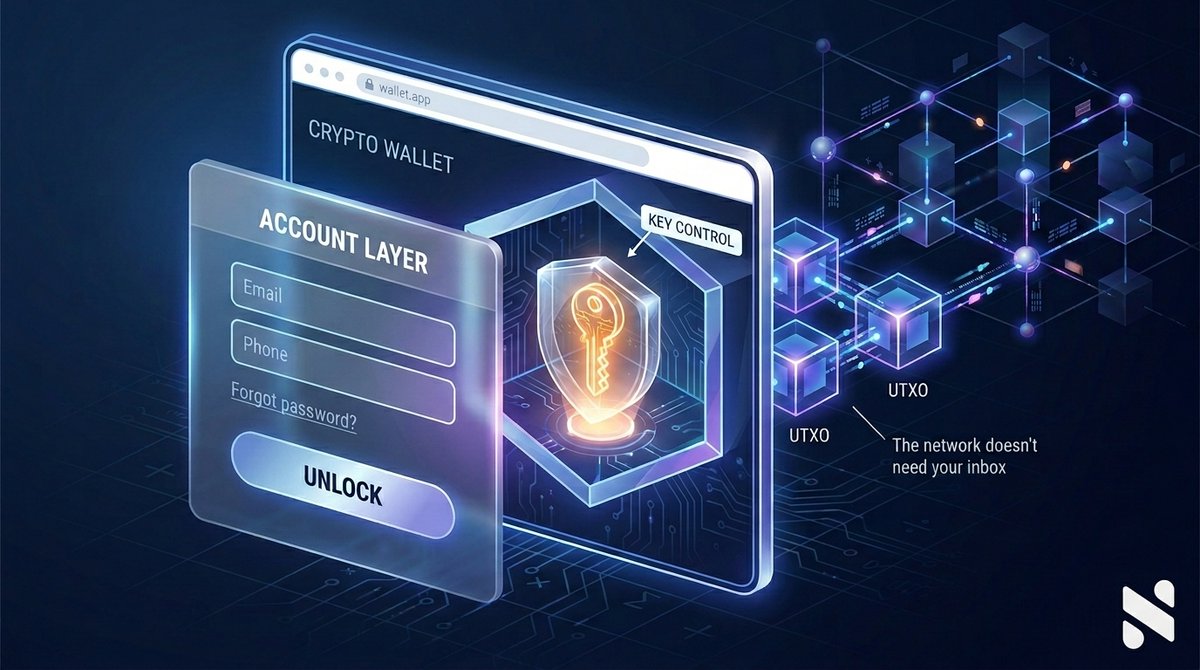
If your wallet requires an email before it lets you control keys, you're not using only a wallet. You're using an account layer. On UTXO chains, wallets work with keys. Keys authorize spending outputs. The network doesn't care about your name, your phone number, or your inbox. That doesn't mean every email-based wallet is custodial - some embedded wallets use email for auth while keeping the keys non-custodial under the hood. But it does mean you should ask harder questions before trusting one: → Who actually controls the keys? → Can the provider sign transactions without you? → Can they recover access without your recovery material? → Can they link your identity to your on-chain addresses? → Can they block you from transacting? Real self-custody isn't just "no bank." It means: → No required personal identity to transact → No provider-held keys → No centralized forgot-password flow for your funds → No data collection you'd hesitate to give a stranger The trade-off is real. Support can help you with the app, the wallet UX, restoring from backup. It shouldn't be able to recover your funds without your keys or recovery setup. Self-custody is hard the same way locking your own front door is hard - the responsibility comes with you, and so does the control. If a wallet sells you convenience by collecting your data, ask yourself what's actually being held.
Nintondo🔔 tweet media
English
1
13
40
519
AleN ری ٹویٹ کیا
ceo🔔
ceo🔔@s_on_chain·
are you a $bells whale yet? 🔔🐳
ceo🔔 tweet media
English
3
9
28
457