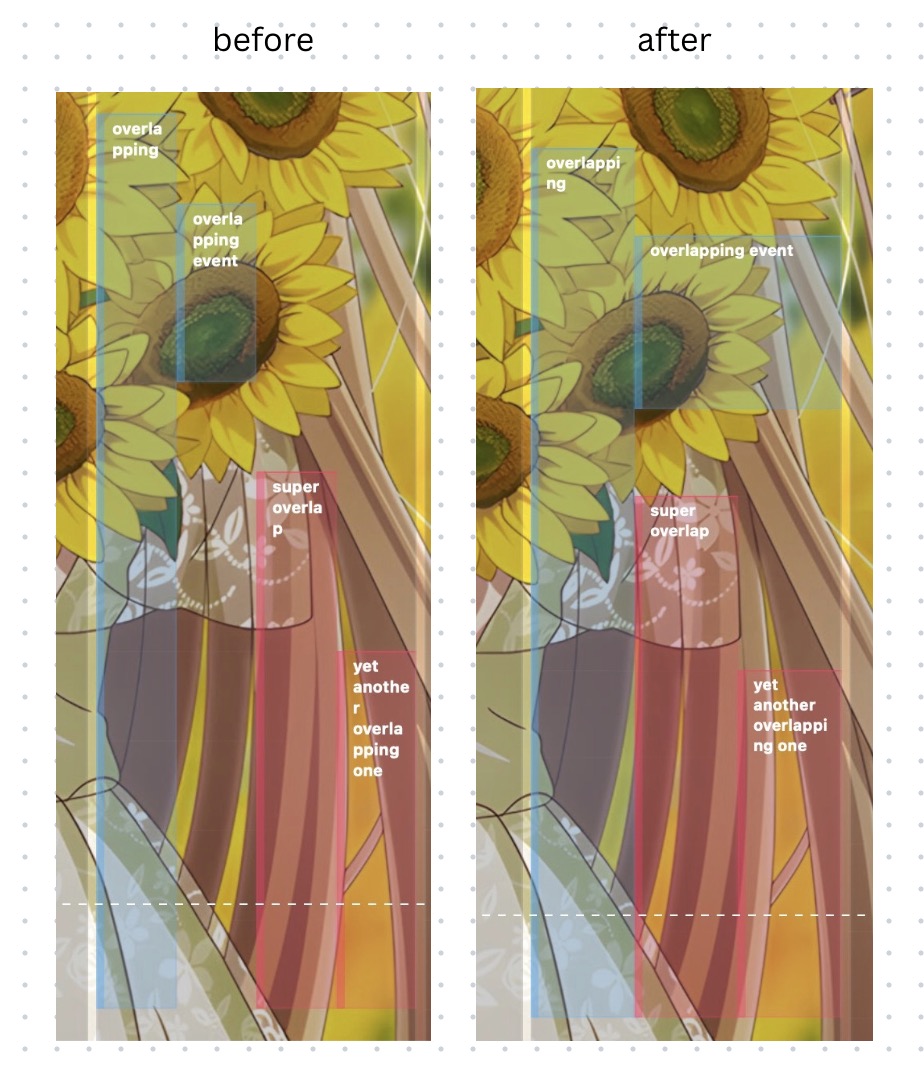
The next version will handle overlapping events on week view better where events can expand their width as much as possible for more visibility 🥰
WallCal - Calendar on desktop background macOS
77 posts

@WallCalApp
The best always-on iCloud calendar & reminder on desktop wallpaper. Real-time sync. Customizable. Multilingual 🇺🇸🇨🇳🇯🇵🇩🇪. CS📧: [email protected]

The next version will handle overlapping events on week view better where events can expand their width as much as possible for more visibility 🥰

There is a known bug in 1.11.0: the week view when first loaded and shown on the screen is unable to display any event 😢 A workaround for this is: click on menubar icon, press “Today” and events will show up again. I’m trying my best to fix this, please hang in there! 🙏

One of the most requested feature is now under development: the ability to switch calendar content forward to the future or back to the past unit 🤗

Teaser: Resizing calendar will soon be made available free of charge 🥰

Got another @WallCalApp issue that only happens when user timezone is GMT+0 😅 Man, datetime sure is hard...

Added some border glowing effect and polished existing UI 😁 A new update is just around the corner!

Added some border glowing effect and polished existing UI 😁 A new update is just around the corner!

Up next @WallCalApp todo list is getting rewritten into SwiftUI 🤗 this time it will be able to display not just reminders only but also events, depending on user custom settings 😉 You can have your mini calendar and a list of events below neatly and compactly organized 😇

Still attempting to fix the bug, and thanks to many nice customers offering information I was able to reproduce the issue on my end which I couldn't before. Seems like it only happens in US region with daylight saving enabled... Sorry to my US customers, a fix is on the way 🙏

Still attempting to fix the bug, and thanks to many nice customers offering information I was able to reproduce the issue on my end which I couldn't before. Seems like it only happens in US region with daylight saving enabled... Sorry to my US customers, a fix is on the way 🙏

We're receiving issue reports that the month view is not displayed at all, or with wrong alignment. We're working hard to get the fix rolled out within today or tomorrow. Thank you for your patience and we're sorry for any inconvenience this may cause 🙏

The new update will feature a new month view that is rewritten from scratch to fully utilize modern latest features from the OS. All existing issues like GCal sync issue or event displaying issue etc... hopefully will be addressed at the same time 👌 coming soon™

After months I finally finished rewriting @WallCalApp's month view from AppKit to SwiftUI 💪 yes, it's still alive, I have no plan to let it rotten into abandonware just yet 😅 A sneak peak of development behind the scene before I push the new update to App Store 🛠️