Bitcoin Maxi |Billy 马 /🦞🦀

8.4K posts

Bitcoin Maxi |Billy 马 /🦞🦀 banner
Bitcoin Maxi |Billy 马 /🦞🦀

Bitcoin Maxi |Billy 马 /🦞🦀

@bilion1983

$BTC Loyalist | Long #BTC | Early Bitcoin OG since 2013 |Co-founder of TREE (3) LABS |微信 A10btc @openclaw和@ManusAI 玩家

Shenzhen China شامل ہوئے Ocak 2022
3.9K فالونگ4.2K فالوورز
Bitcoin Maxi |Billy 马 /🦞🦀
4月5日龙虾日报: MPP Session 机制详解:AI 代理支付的“OAuth for money” 🔥 由 Stripe + Tempo 联合推出的 Machine Payments Protocol(MPP),其核心创新就是 Session 机制: • 一次性授权:AI Agent 只需开设一次 Session,向 Escrow 合约预存资金 + 设置花费上限(~500ms 上链)。 • 流式微支付:后续数千次 API 调用、数据查询等,只需生成累积的 EIP-712 签名 Voucher(离链验证,sub-100ms 延迟),无需每笔上链。 • 批量结算:Session 结束时,一次链上交易完成所有微支付清算,未用资金自动退回。 完美解决高频 sub-cent($0.0001 级别)支付难题,让 AI 代理能像人类“刷卡”一样持续消费资源,而不会被 Gas 和延迟拖累。 这正是 Agentic Economy(代理经济)时代的关键基础设施!支持 Tempo 稳定币轨道,结合 Tempo 的 Payment Lanes,费用极低、可预测。 更多详情可看:mpp.dev 你怎么看 Session 对 AI 代理自主支付的影响?欢迎讨论 👇 #MPP #Tempo #AIagents #MachinePayments
中文
1
0
0
55
Bitcoin Maxi |Billy 马 /🦞🦀 ری ٹویٹ کیا
西西弗斯的AI笔记
西西弗斯的AI笔记@sisyphus0906·
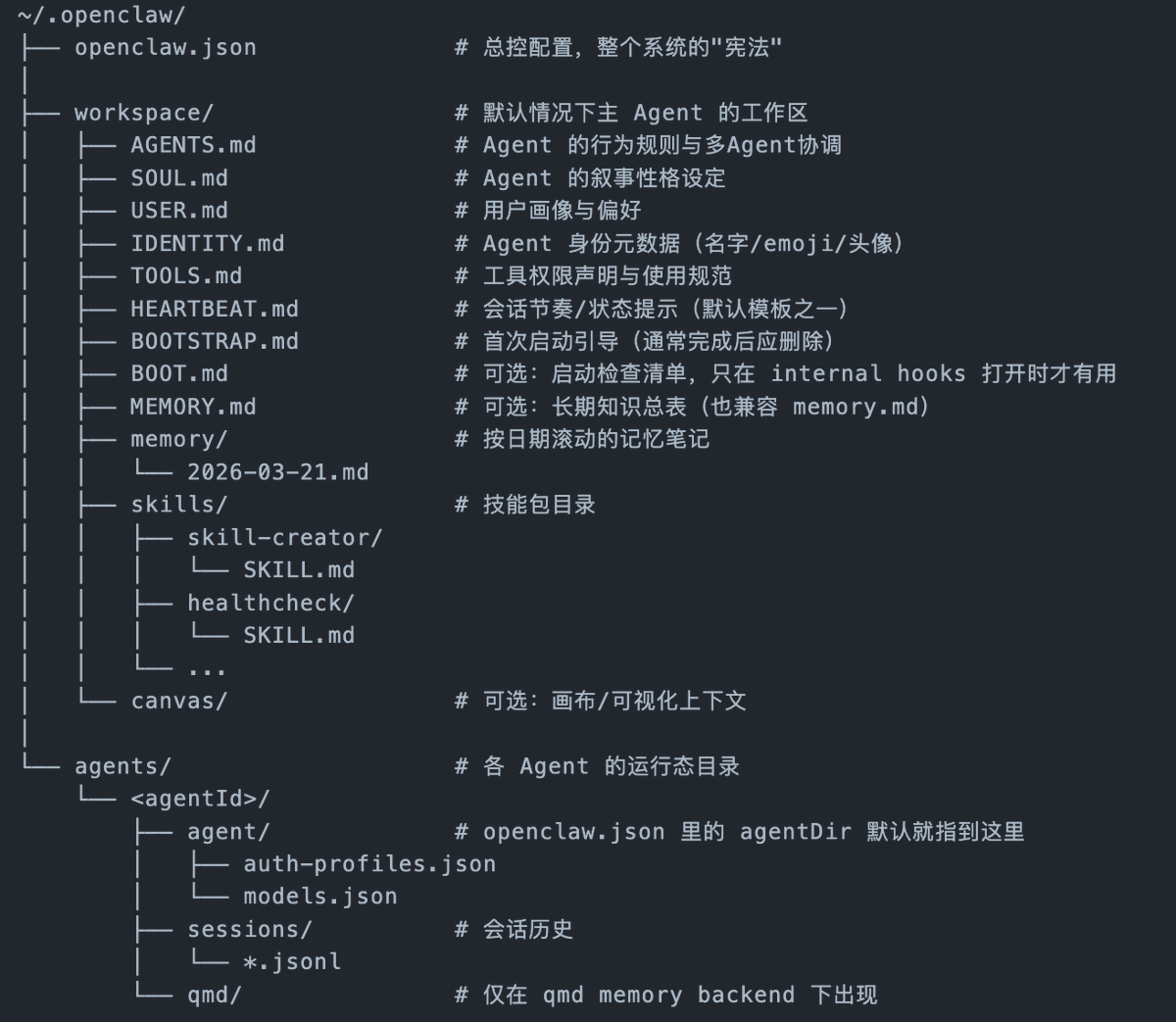
如果你觉得你的小龙虾养的很慢,那么就去虚机或者让小龙虾汇报自己的md文件,然后让它直接修改它的md文件,这是最快喂养的方式。 AGENTS.md:岗位职责说明书。定义智能体的功能性规则,包括职责、边界、多智能体协作方式等。关键是要写得简洁、清晰、场景化,而非冗长。 2. SOUL.md:人物小传/性格档案。定义智能体的人格性,包括性格、沟通风格、价值观等。与AGENTS.md分工明确,共同塑造一个“有性格、可预期”的助手。 3. USER.md:用户档案。固化用户的背景、偏好、常用任务等信息,无需每次对话重复交代,是沉淀“人机关系基本共识”的关键。 4. TOOLS.md:工具使用手册。明确告诉智能体可用的工具(如读写文件、执行命令等)及何时用、何时不用、有何风险,是防止工具误用、确保操作安全的重要文件。它与openclaw.json的系统层权限配置形成互补。 5. IDENTITY.md:名片/身份证。以结构化字段(名字、emoji、头像等)定义智能体的身份元数据,是SOUL.md性格叙事的补充。 6. BOOTSTRAP.md:一次性入职引导。用于全新工作区的初始化引导,完成后应按模板要求删除。 7. memory/目录与MEMORY.md:长期记忆系统。智能体真正的记忆并非存储在“黑盒”中,而是通过写入memory/YYYY-MM-DD.md(每日工作笔记)和提炼到MEMORY.md(长期知识总表)来实现跨会话记忆。用户可以“预埋记忆”,也需要定期清理过期信息。 8. skills/目录:模块化能力包。每个技能是一个包含SKILL.md的独立目录,定义了特定任务的触发条件和执行流程。分为系统内置、跨Agent共享、Agent私有三个层级,是多智能体协作的基础。
西西弗斯的AI笔记 tweet media
中文
3
34
123
9.4K
Bitcoin Maxi |Billy 马 /🦞🦀 ری ٹویٹ کیا
铁锤人
铁锤人@lxfater·
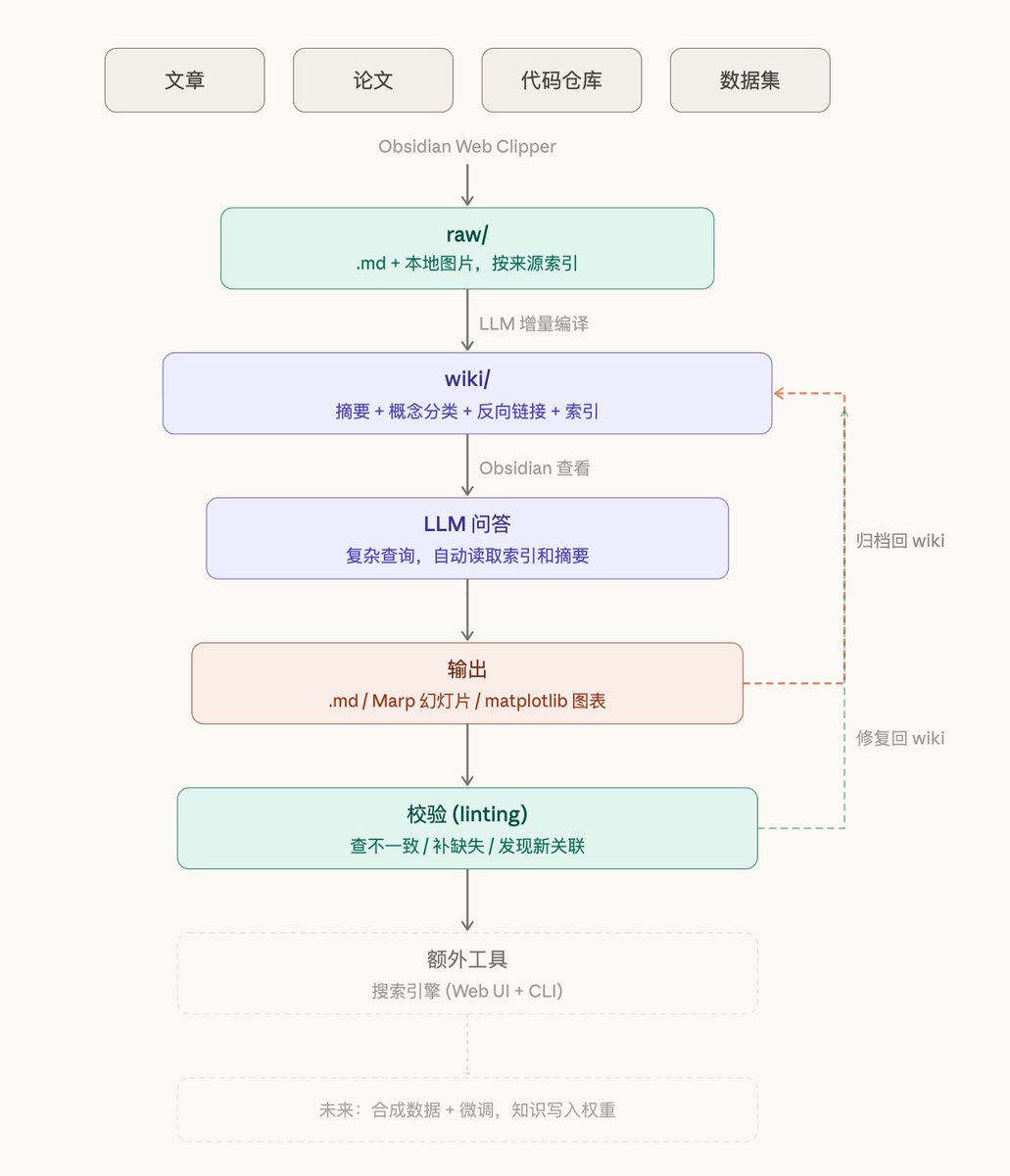
AI大神karpathy是如何用管理知识的呢? 最近他展示了用大模型把散乱的研究资料编译成一个 可编程、可查询、可自我修复的知识系统 具体步骤如下: 1. 数据采集 → 散乱的来源变成一个干净的 raw/ 目录 2. LLM 编译 → 原始数据变成有结构的 wiki(摘要、概念、链接、索引全自动生成) 3. Obsidian 查看 → 不用终端,所有知识像代码仓库一样可浏览 4. LLM 问答 → 对 40 万字的知识库提复杂问题,LLM 自己去查阅和研究 5. 输出 → 答案不是聊天记录,而是 .md / 幻灯片 / 图表等可复用的文件 6. 归档回流 → 每次探索的输出沉淀回 wiki,知识越查越厚 7. 校验 (linting) → LLM 自检不一致、补缺失、发现新关联,知识库自我修复 一图胜过千言,你们看吧。
铁锤人 tweet media
Andrej Karpathy@karpathy

LLM Knowledge Bases Something I'm finding very useful recently: using LLMs to build personal knowledge bases for various topics of research interest. In this way, a large fraction of my recent token throughput is going less into manipulating code, and more into manipulating knowledge (stored as markdown and images). The latest LLMs are quite good at it. So: Data ingest: I index source documents (articles, papers, repos, datasets, images, etc.) into a raw/ directory, then I use an LLM to incrementally "compile" a wiki, which is just a collection of .md files in a directory structure. The wiki includes summaries of all the data in raw/, backlinks, and then it categorizes data into concepts, writes articles for them, and links them all. To convert web articles into .md files I like to use the Obsidian Web Clipper extension, and then I also use a hotkey to download all the related images to local so that my LLM can easily reference them. IDE: I use Obsidian as the IDE "frontend" where I can view the raw data, the the compiled wiki, and the derived visualizations. Important to note that the LLM writes and maintains all of the data of the wiki, I rarely touch it directly. I've played with a few Obsidian plugins to render and view data in other ways (e.g. Marp for slides). Q&A: Where things get interesting is that once your wiki is big enough (e.g. mine on some recent research is ~100 articles and ~400K words), you can ask your LLM agent all kinds of complex questions against the wiki, and it will go off, research the answers, etc. I thought I had to reach for fancy RAG, but the LLM has been pretty good about auto-maintaining index files and brief summaries of all the documents and it reads all the important related data fairly easily at this ~small scale. Output: Instead of getting answers in text/terminal, I like to have it render markdown files for me, or slide shows (Marp format), or matplotlib images, all of which I then view again in Obsidian. You can imagine many other visual output formats depending on the query. Often, I end up "filing" the outputs back into the wiki to enhance it for further queries. So my own explorations and queries always "add up" in the knowledge base. Linting: I've run some LLM "health checks" over the wiki to e.g. find inconsistent data, impute missing data (with web searchers), find interesting connections for new article candidates, etc., to incrementally clean up the wiki and enhance its overall data integrity. The LLMs are quite good at suggesting further questions to ask and look into. Extra tools: I find myself developing additional tools to process the data, e.g. I vibe coded a small and naive search engine over the wiki, which I both use directly (in a web ui), but more often I want to hand it off to an LLM via CLI as a tool for larger queries. Further explorations: As the repo grows, the natural desire is to also think about synthetic data generation + finetuning to have your LLM "know" the data in its weights instead of just context windows. TLDR: raw data from a given number of sources is collected, then compiled by an LLM into a .md wiki, then operated on by various CLIs by the LLM to do Q&A and to incrementally enhance the wiki, and all of it viewable in Obsidian. You rarely ever write or edit the wiki manually, it's the domain of the LLM. I think there is room here for an incredible new product instead of a hacky collection of scripts.

中文
19
198
859
101.3K
Bitcoin Maxi |Billy 马 /🦞🦀 ری ٹویٹ کیا
WquGuru🦀
WquGuru🦀@wquguru·
一夜之间中转暴富的话题很多,给个真实数据:国内最早一批,大概2025年8月开始,做Claude Code中转的站长,两个月从0做到500万纯利 更crazy的是,这是从老板自己单打独斗开始,兼顾技术和客服角色,初始用户不到50,两个月做到700用户 token需求带来的规模性利润,确实是难以想象的,曾经我也想过这个生意,但是又想这时间拿来做产品ROI更高,然后就是又一个“我原来可以xxx的故事了”😂
WquGuru🦀@wquguru

跨境支付一直以来都是难题,谁能架起一座桥梁,连接鸿沟两端,谁就拥有源源不断的收入 比如Anthropic和OpenAI对大陆用户的付费阻断,造就的桥梁平台就数不胜数,我所知道的就有超过5家年纯利润达到了A8左右,这些平台人均员工数量不超过5人 我亲眼看到其中一个平台从老板自己单打独斗,兼顾技术和客服角色,初始用户不到50,两个月做到700用户,如果按照年度净利润算,妥妥的A7.5 这个两个月从0到500万净利润的例子中我比较有感慨的有3点: 1. 用户留存度超过80% 2. 技术核心100%依赖开源项目,引流平台(也是文档平台)100%依赖AI代码工具 3. 这个生意中完全没用到自动化支付(比如Stripe),100%依赖微信红包收款 微信红包的收款方式局限在大陆用户,在稳定币浪潮中,全球化收款才是大势所趋。不论是薪资管理还是跨境支付,@allscaleio 的两大核心产品AllScale Payroll 和 AllScale Pay都能彻底革新掉现有模式,让全球化生意不再难做。

中文
32
47
451
154.6K
Bitcoin Maxi |Billy 马 /🦞🦀
4月3日龙虾🦞日报: 配备 64GB 统一内存的 Mac Mini M4 Pro 是 2026 年 AI 工作中性价比最高的机器。 -----感谢自己两个月前的认知
Axel Bitblaze 🪓@Axel_bitblaze69

many of you keep asking me in the comments what machine to buy for AI I run Claude Code, Ollama with local models, MCP servers, Paperclip agents, Chrome automation, and way much more and screen recording all at the same time.. after testing everything tbh, the Mac Mini M4 Pro with 64GB unified memory is the best value machine for AI work in 2026. and it's not even close because, > 64GB unified memory = run Gemma 4 (26B), Llama, Deepseek, Kimi, Qwen locally without breaking a sweat
> M4 Pro handles Claude Code + multiple MCP servers + Ollama + Chrome + terminal all running simultaneously
> Silent. Tiny. Sits on your desk and just works. what you actually need for local AI: > RAM is everything. Models load into memory. 32GB = small models only. 64GB = 26B-34B models comfortably. 128GB = 70B+ models.
> GPU cores matter for inference speed but RAM is the gate. No RAM = model doesn't load at all.
> CPU matters less than you think. M4 Pro is more than enough. so the breakdown: - Mac Mini M4 Pro 64GB → best value, handles everything, my recommendation for 90% of people - Mac Studio M4 Max 128GB → if you want to run 70B models or you're doing serious video production alongside AI work - MacBook Pro M4 Pro 48GB → only if you need portability. For the same price you get way more in a desktop - MacBook Air → great machine but not enough RAM for serious local model work. Fine if you're only using Claude Code via API. stop overthinking it. If you're building with AI daily, Mac Mini. M4 Pro. 64GB. Done. now if only @Apple would send me one... Tim Cook if you're reading this I'm doing free marketing for you bro. hook me up. 🍎

中文
0
0
0
38
Bitcoin Maxi |Billy 马 /🦞🦀 ری ٹویٹ کیا
阿绎 AYi
阿绎 AYi@AYi_AInotes·
一位俄罗斯老哥分享了用 AI 能把学习效率提升 10 倍,靠这 3 件套 NotebookLM、Gemini、Obsidian,绝了!
中文
27
349
1.7K
366.1K
Bitcoin Maxi |Billy 马 /🦞🦀
RT @FuSheng_0306: Claude Code源码泄露,说真的Anthropic担心你看懂的不是代码,是它的思维。让三万全部读了一遍,得出了5个炸裂发现,我拆给你听:
中文
0
2
0
17
Bitcoin Maxi |Billy 马 /🦞🦀 ری ٹویٹ کیا
天策
天策@Leobai825·
OpenClaw和Claude Code变现实操流程来了! B端C端都有讲解具体的实操方法 附带:一键部署工具,中转API
中文
7
62
380
26.8K
Bitcoin Maxi |Billy 马 /🦞🦀 ری ٹویٹ کیا
Steve机械飞升
Steve机械飞升@SteveHotspots·
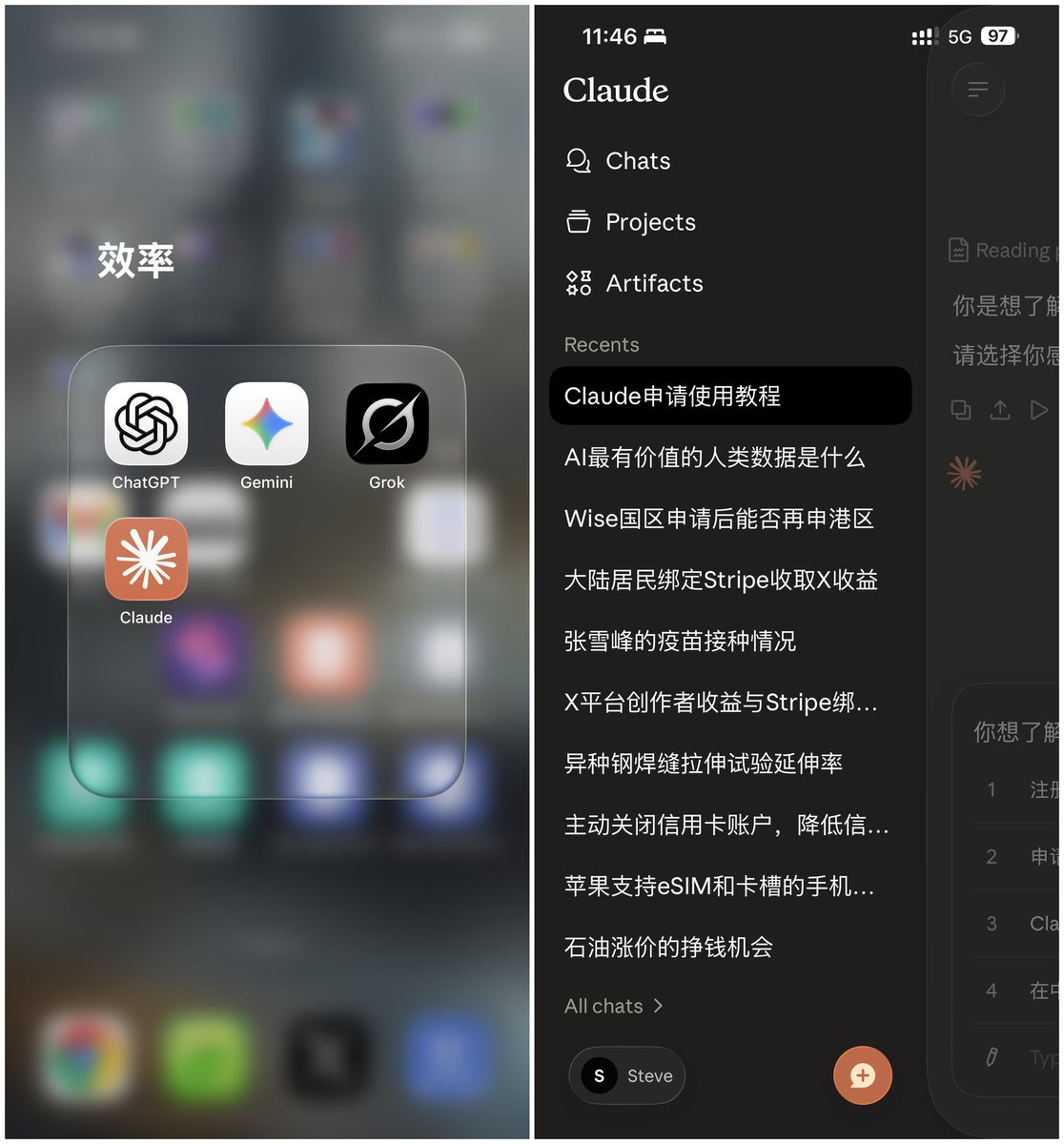
Claude申请很简单?原本为申请美卡准备的四件套: 1️⃣住宅ip 2️⃣美国手机号 3️⃣美国指纹环境 4️⃣美国地址 再玩claude就是降维打击,风控可能性几乎为零。
Steve机械飞升 tweet media
中文
38
17
188
44.2K
Bitcoin Maxi |Billy 马 /🦞🦀 ری ٹویٹ کیا
马天翼
马天翼@fkysly·
今日有两大关键更新: 1. Claude Code 终于也支持了 Computer Use,可以直接使用 Claude Code 操作桌面软件了,比如打开画板帮你画个画。而且隐私设计,不会读到输出的内容。 2. OpenAI 给 Claude Code 设计了一个官方插件,叫codex-plugin-cc。这是最令我觉得动容的一条更新: 一方面 OpenAI 等于是承认 CC 确实牛逼,Codex 愿意承担 Review 的活,积极吸取社区的最佳实践。另外一方面,也是反映出了 OpenAI 的开放心态,很佩服Codex 到技术团队。 当然,也有人说,这是 Codex 在给 Claude Code 喂黑话
中文
15
3
100
43.3K
Bitcoin Maxi |Billy 马 /🦞🦀
🔥 @claudeai 官宣炸裂:**Computer Use** 正式上线 Claude Code! AI 现在能直接从 CLI: ✅ 打开你的 Mac App ✅ 点击界面、操作 UI ✅ 测试自己写的代码、找 Bug、修 Bug、验证全流程 一条 prompt 就能写代码 → 编译 → 启动 → 点击 → 修复 → 验证! 目前 research preview,仅 Pro 和 Max 计划可用(macOS)。 启用命令:/mcp 文档:code.claude.com/docs/en/comput… Anthropic 这波直接把 AI 手脚装上了 😂 #Claude #ComputerUse #AI
Claude@claudeai

Computer use is now in Claude Code. Claude can open your apps, click through your UI, and test what it built, right from the CLI. Now in research preview on Pro and Max plans.

中文
0
0
0
51
Bitcoin Maxi |Billy 马 /🦞🦀 ری ٹویٹ کیا
比特币橙子Trader
比特币橙子Trader@oragnes·
穷人越自律,被收割得越惨🩸 最近江学勤教授的演讲视频全网爆火🔥 彻底戳穿了中产阶级的成功学谎言 个人命运的真相根本不是自律 而是看透这场阶层博弈的 Game Reset PS:视频长达50多分钟,收藏慢慢看,非常有启发👇
中文
240
1.2K
4.3K
389.4K