やおっち

40.5K posts

やおっち banner
やおっち

やおっち

@yaotti

ACK Craft 株式会社の代表です。 過去:Qiita(150万ユーザー、日本最大のソフトウェアエンジニア向けサービス)の創業代表 → newmoで電話対応AIサービスのプロダクトマネージャー 人同士のコミュニケーションを豊かにするために、ハードウェアやLLMをどう活用できるかに関心があります。日本酒が好き🍶

東京 شامل ہوئے Haziran 2007
2.6K فالونگ10.7K فالوورز
やおっち ری ٹویٹ کیا
Andrej Karpathy
Andrej Karpathy@karpathy·
LLM Knowledge Bases Something I'm finding very useful recently: using LLMs to build personal knowledge bases for various topics of research interest. In this way, a large fraction of my recent token throughput is going less into manipulating code, and more into manipulating knowledge (stored as markdown and images). The latest LLMs are quite good at it. So: Data ingest: I index source documents (articles, papers, repos, datasets, images, etc.) into a raw/ directory, then I use an LLM to incrementally "compile" a wiki, which is just a collection of .md files in a directory structure. The wiki includes summaries of all the data in raw/, backlinks, and then it categorizes data into concepts, writes articles for them, and links them all. To convert web articles into .md files I like to use the Obsidian Web Clipper extension, and then I also use a hotkey to download all the related images to local so that my LLM can easily reference them. IDE: I use Obsidian as the IDE "frontend" where I can view the raw data, the the compiled wiki, and the derived visualizations. Important to note that the LLM writes and maintains all of the data of the wiki, I rarely touch it directly. I've played with a few Obsidian plugins to render and view data in other ways (e.g. Marp for slides). Q&A: Where things get interesting is that once your wiki is big enough (e.g. mine on some recent research is ~100 articles and ~400K words), you can ask your LLM agent all kinds of complex questions against the wiki, and it will go off, research the answers, etc. I thought I had to reach for fancy RAG, but the LLM has been pretty good about auto-maintaining index files and brief summaries of all the documents and it reads all the important related data fairly easily at this ~small scale. Output: Instead of getting answers in text/terminal, I like to have it render markdown files for me, or slide shows (Marp format), or matplotlib images, all of which I then view again in Obsidian. You can imagine many other visual output formats depending on the query. Often, I end up "filing" the outputs back into the wiki to enhance it for further queries. So my own explorations and queries always "add up" in the knowledge base. Linting: I've run some LLM "health checks" over the wiki to e.g. find inconsistent data, impute missing data (with web searchers), find interesting connections for new article candidates, etc., to incrementally clean up the wiki and enhance its overall data integrity. The LLMs are quite good at suggesting further questions to ask and look into. Extra tools: I find myself developing additional tools to process the data, e.g. I vibe coded a small and naive search engine over the wiki, which I both use directly (in a web ui), but more often I want to hand it off to an LLM via CLI as a tool for larger queries. Further explorations: As the repo grows, the natural desire is to also think about synthetic data generation + finetuning to have your LLM "know" the data in its weights instead of just context windows. TLDR: raw data from a given number of sources is collected, then compiled by an LLM into a .md wiki, then operated on by various CLIs by the LLM to do Q&A and to incrementally enhance the wiki, and all of it viewable in Obsidian. You rarely ever write or edit the wiki manually, it's the domain of the LLM. I think there is room here for an incredible new product instead of a hacky collection of scripts.
English
2.1K
4.9K
43.4K
12.3M
やおっち ری ٹویٹ کیا
Tony Fadell
Tony Fadell@tfadell·
Most tech companies break out product management and product marketing into two separate roles: Product management defines the product and gets it built. Product marketing wires the messaging- the facts you want to communicate to customers- and gets the product sold. But from my experience that's a grievous mistake. Those are, and should aways be, one job. There should be no separation between what the product will be and how it will be explained- the story has to be utterly cohesive from the beginning. Your messaging is your product. The story you're telling shapes the thing you're making. I learned story telling from Steve Jobs. I learned product management from Greg Joswiak. Joz, a fellow Wolverine, Michigander, and overall great person, has been at Apple since he left Ann Arbor in 1986 and has run product marketing for decades. And his superpower- the superpower of every truly great product manager- is empathy. He doesn't just understand the customer. He becomes the customer. So when Joz stepped into the world with his next-gen iPod to test it out, he fiddled with it like a beginner. He set aside all the tech specs- except one: battery life. The numbers were empty without customers, the facts meaningless without context. And, that's why product management has to own the messaging. The spec shows the features, the details of how a product will work, but the messaging predicts people's concerns and finds way to mitigate them. - #BUILD Chapter 5.5 The Point of PMs
English
67
210
2.2K
710.6K
やおっち ری ٹویٹ کیا
Addy Osmani
Addy Osmani@addyosmani·
Tip: Figure out your personal ceiling for running multiple agents in parallel. We need to accept that more agents running doesn't mean more of _you_ available. The narrative is still mostly about throughput and parallelism, but almost nobody's talking about what it actually costs the human in the loop. You're holding multiple problem contexts in your head at once, making judgment calls continuously, and absorbing the anxiety of not knowing what any one agent might be quietly getting wrong. That's a new kind of cognitive labor we don't have good language for yet. I've started treating long agentic sessions the way I'd treat deep focus work: time-boxed and tighter scopes per agent dramatically change how much mental overhead each thread carries. Finding your personal ceiling with these tools is itself a skill and most of us are going to learn it the hard way before we learn it intentionally.
Lenny Rachitsky@lennysan

"Using coding agents well is taking every inch of my 25 years of experience as a software engineer, and it is mentally exhausting. I can fire up four agents in parallel and have them work on four different problems, and by 11am I am wiped out for the day. There is a limit on human cognition. Even if you're not reviewing everything they're doing, how much you can hold in your head at one time. There's a sort of personal skill that we have to learn, which is finding our new limits. What is a responsible way for us to not burn out, and for us to use the time that we have?" @simonw


English
65
64
480
89.9K
やおっち ری ٹویٹ کیا
Boris Cherny
Boris Cherny@bcherny·
We want to be intentional in managing our growth to continue to serve our customers sustainably long-term. This change is a step toward that.
English
108
16
923
278.8K
やおっち ری ٹویٹ کیا
Naval
Naval@naval·
Vibe coding is more addictive than any video game ever made (if you know what you want to build).
English
1.6K
2.8K
29K
1.6M
やおっち ری ٹویٹ کیا
Aaron Levie
Aaron Levie@levie·
Huge misunderstanding by everyone why companies buy software. Companies don’t want every employee doing every workflow from scratch on their own for every use case. At some point what you’re outsourcing is the ability to not have to think about the business process, and instead let the software provider think about it. Agents don’t change that, and probably if anything exhibit that dynamic even more.
English
20
19
376
57.7K
やおっち ری ٹویٹ کیا
Boris Cherny
Boris Cherny@bcherny·
6/ Use the Chrome extension for frontend work The most important tip for using Claude Code is: give Claude a way to verify its output. Once you do that, Claude will iterate until the result is great. Think of it like any other engineer: if you ask someone to build a website but they aren't allowed to use a browser, will the result look good? Probably not. But if you give them a browser, they will write code and iterate until it looks good. Personally, I use the Chrome extension every time I work on web code. It tends to work more reliably than other similar MCPs. Download the extension for Chrome/Edge here: code.claude.com/docs/en/chrome
English
34
29
1.2K
215.3K
やおっち
やおっち@yaotti·
> AIがすべきなのは、推論がアップサイドになり失敗のダウンサイドが少ない部分 しっくりくる言語化!雑にプロトタイプやデザインモックを複数作らせるのもこれ、コスパよい そして「Claude Codeで内製できる」への反論もクリアだ。今後は「これ読んで」って言おう note.com/fukkyy/n/n1d8f…
日本語
0
0
4
1.6K
やおっち
やおっち@yaotti·
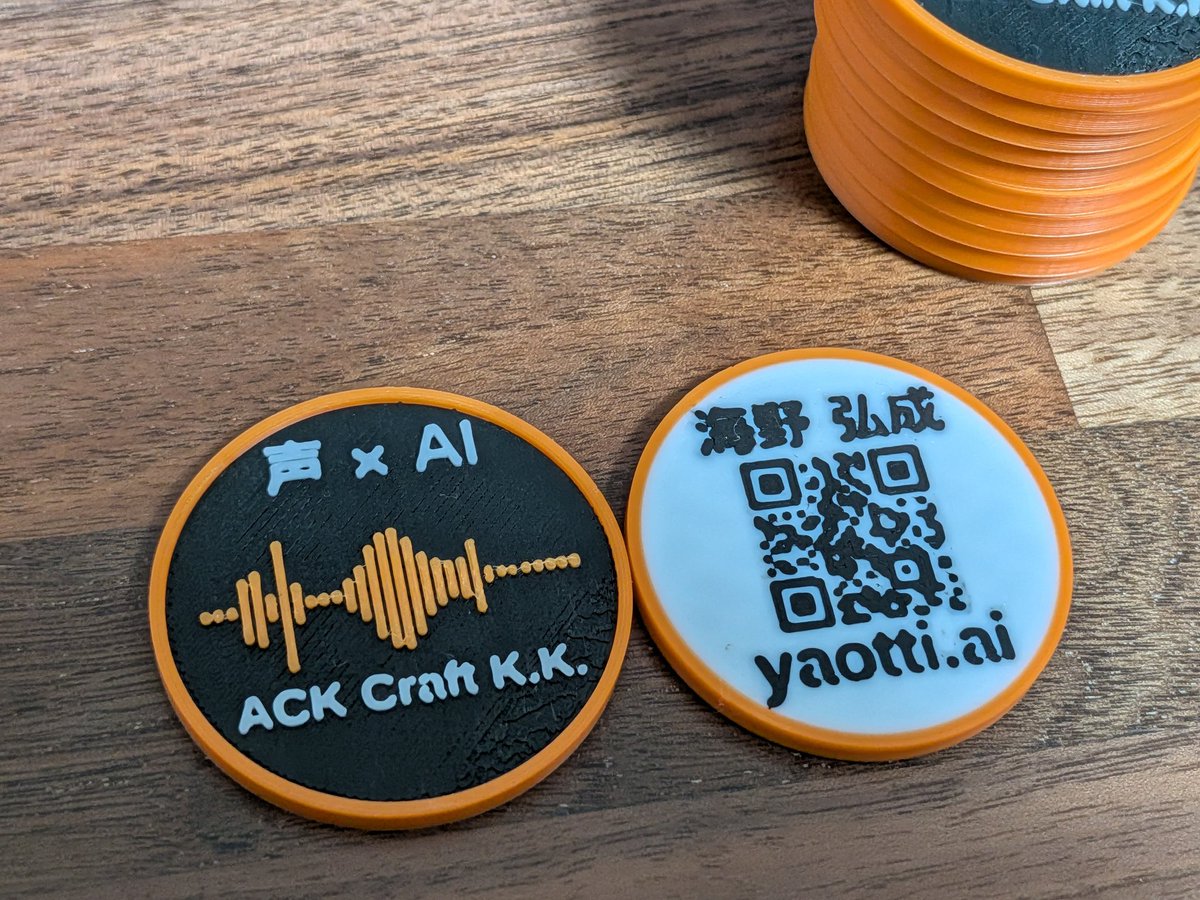
学び: * QRコード面はスムースPEIプレートが良い。テクスチャードだと光って読み取れない * FDM 0.4mmノズルで漢字はsize 4mm以上ないと潰れる * テスト印刷は3回、結局印刷して調整が大事 印刷時間はBambu Lab A1 + AMS で3色(黒白オレンジ)、10枚印刷で4.5h。所要時間とpoop量は改善の余地あり
日本語
0
0
1
434
やおっち
やおっち@yaotti·
名刺代わりに3DプリンターでMakerChip作った。STLファイル作りはClaude Codeで完結してできた。良い。 Python (numpy-stl, qrcode) + OpenSCAD + Claude Codeで対話しながらSTLを生成。デザインはHTMLでClaude Codeに5案モック作ってもらって、調整してから3Dモデリング。
やおっち tweet media
日本語
2
8
95
5.3K
やおっち ری ٹویٹ کیا
Hayley
Hayley@hayleyhalv·
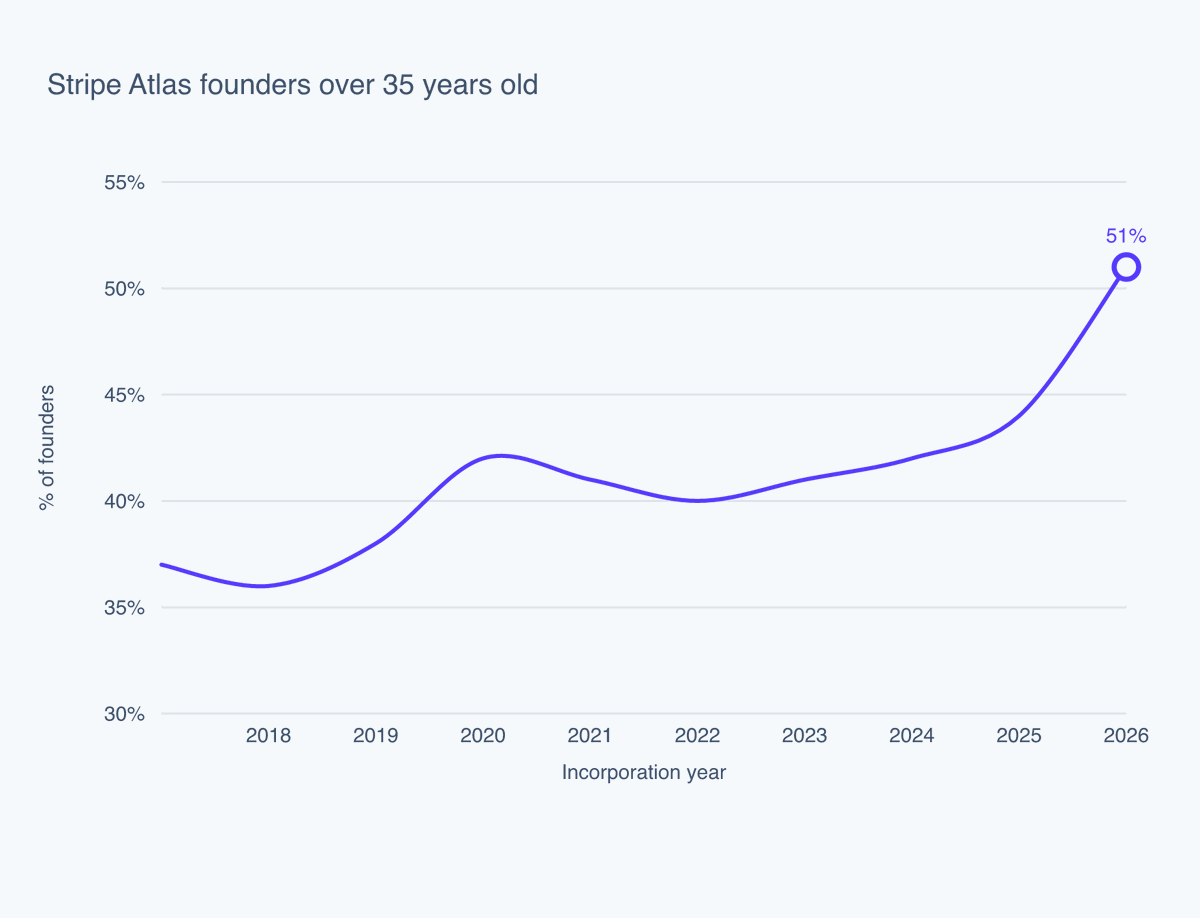
The majority of @atlas startup founders are over 35 years old for the first time. We’ve seen a surge in startup formation across all age groups, but the over 35 set has grown the fastest.
Hayley tweet media
English
18
15
144
27.4K
やおっち
やおっち@yaotti·
Xのデフォルト翻訳機能、日々の情報収集にインパクトある。新しい情報や面白い人がたくさん見つかって良いが、逆に英語の壁に自分がどれだけ阻まれていたのか、いるのかに気づかされるな 実装面だと翻訳コストどれぐらいかかってるのか気になる
日本語
0
0
2
405
やおっち ری ٹویٹ کیا
Drew Breunig
Drew Breunig@dbreunig·
At our last DSPy meetup, @kshetrajna shared this amazing case study about how he's using DSPy at @Shopify scale. I think this was my favorite slide.
Drew Breunig tweet media
English
18
71
741
220.7K
やおっち ری ٹویٹ کیا
Andrej Karpathy
Andrej Karpathy@karpathy·
First there was chat, then there was code, now there is claw. Ez
English
164
193
3.5K
540.9K
やおっち ری ٹویٹ کیا
usedhonda
usedhonda@usedhonda·
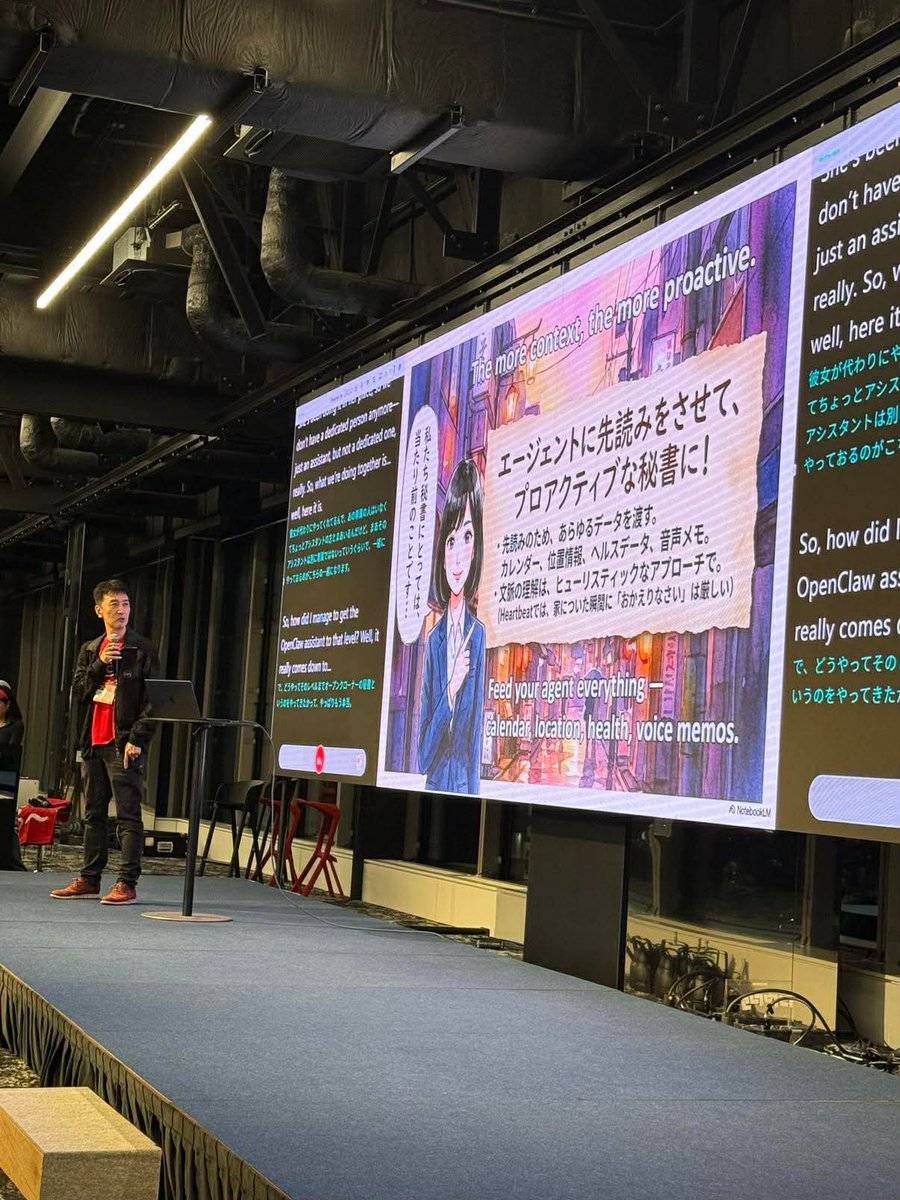
貴重な機会、ありがとうございました。 「社長が本気で作ったAI秘書」。いくつかはXでも出してますが、登壇のお誘いいただいたことで、改めて何を目指しているかなど、大勢の前で。@steipete も最前列いたし、ガラにもなくちょっと緊張してましたわ。 終わってからは、アプリの実演せがまれることも多く、コミュニティ熱量が実感できたことも何より。(普段使いしてる人たちからしたら、高濃度で気になる話も散りばめたつもり、、) 海外からの人からもめちゃ好評で、「エージェントとしてのディテールを突き詰めるのは日本人の強みのはず」と話した内容にも納得してもらえてたのも、狙い通り。 経営者、起業家の人たちからは、「良い刺激をもらえた」とか、「あの秘書は欲しい!」とか言われたのは、嬉しかったなぁ。。 程々で帰ろうかと思いきや、結局最後まで楽しませてもらいました。 時間もっとあれば、もっと勘所とかディテールの課題も話せたので、ここまでの規模でなくとも、また何かあれば行きたいですね。 @clawcon
usedhonda tweet media
日本語
6
9
97
9.3K
やおっち
やおっち@yaotti·
デスクトップLINEをぽちぽちさせるの面白い、なるほどー #clawcon
日本語
1
1
5
662
やおっち
やおっち@yaotti·
空間オーディオで離れた場所からエージェントに話し続けてもらうの、面白いなー #clawcon
日本語
0
0
2
450
やおっち
やおっち@yaotti·
見慣れたpioコマンドの出力が
日本語
0
0
0
306
やおっち
やおっち@yaotti·
OpenClaw + スタックチャンでたまごっち、いいな #clawcon
日本語
2
0
3
514