
Kamon Ayeva 🐍

1.2K posts

Kamon Ayeva 🐍 banner
Kamon Ayeva 🐍

Kamon Ayeva 🐍

@kamon

Developer | 📚 Mastering Python Design Patterns, 3rd Edition 👉 https://t.co/oBBQEIo6tA | Building Together https://t.co/PxCaA5zeOK

France Tham gia Mayıs 2007
1.8K Đang theo dõi1.3K Người theo dõi
Tweet ghim
Kamon Ayeva 🐍
Kamon Ayeva 🐍@kamon·
After months of work, I'm thrilled to announce the release of the new edition of "Mastering Python Design Patterns"! What's new? This edition dives deep into creational, structural, behavioral, and architectural patterns, plus it introduces concurrency, asynchronous, and performance patterns. What you’ll learn: 👉 Master key design principles and SOLID concepts 👉 Implement Gang of Four (GoF) patterns in Python 👉 Use architectural patterns to build robust systems 👉 Optimize code with concurrency and performance patterns 👉 Scale applications with distributed systems patterns 👉 Ensure reliability with testing patterns 👉 Build modular, decoupled systems and manage dependencies efficiently Stay tuned for more updates! 📘✨ #Python #Coding #DesignPatterns

Kamon Ayeva 🐍 tweet media
English
1
0
1
393
Kamon Ayeva 🐍
Kamon Ayeva 🐍@kamon·
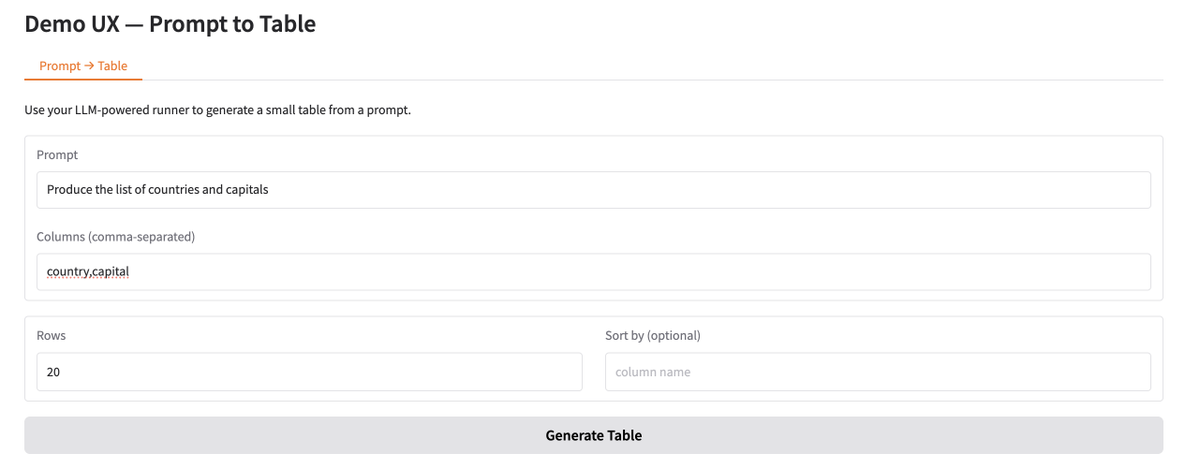
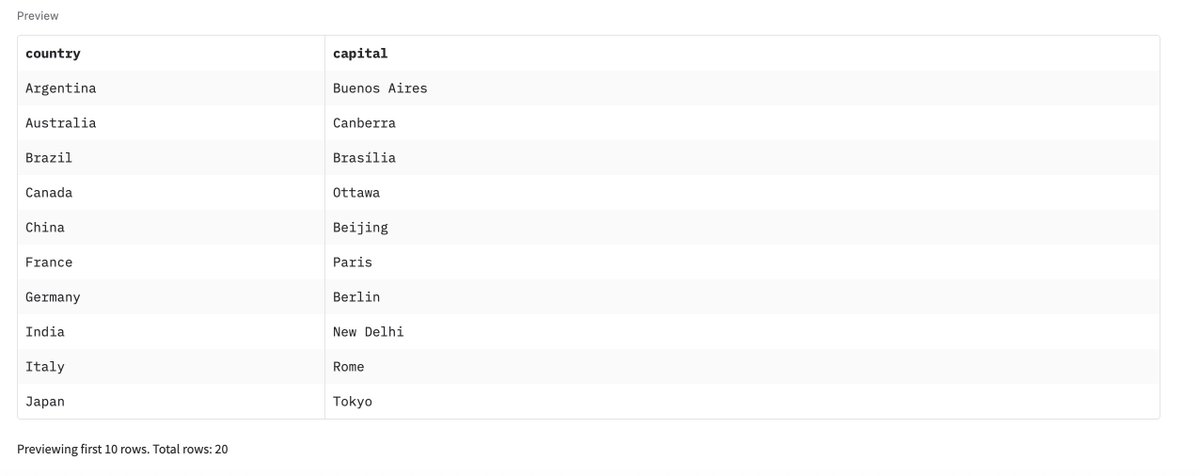
Shipped the first version of the UX for my LLM → Structured Data Connector. Next work involves advanced ways of providing the data schema input (JSON, CSV).
Kamon Ayeva 🐍@kamon

Day 9 slice shipped: Minimal UX with Gradio ✅ To test: - Install/update dependencies in your virtual environment. - Run: python app.py - Visit http://127.0.0.1:7860 Currently, you can generate the result by providing the prompt and the list of columns. Repo: github.com/TeamEnable/poc… Branch: ux-with-gradio Next up: Ability to specify the schema of the data returned by providing a JSON string or a "template" CSV. Do you see another option?

English
0
0
1
50
Kamon Ayeva 🐍
Kamon Ayeva 🐍@kamon·
Day 9 slice shipped: Minimal UX with Gradio ✅ To test: - Install/update dependencies in your virtual environment. - Run: python app.py - Visit http://127.0.0.1:7860 Currently, you can generate the result by providing the prompt and the list of columns. Repo: github.com/TeamEnable/poc… Branch: ux-with-gradio Next up: Ability to specify the schema of the data returned by providing a JSON string or a "template" CSV. Do you see another option?
Kamon Ayeva 🐍 tweet mediaKamon Ayeva 🐍 tweet media
English
0
0
0
95
Kamon Ayeva 🐍
Kamon Ayeva 🐍@kamon·
Day 8 slice shipped: CLI for prompt and other input → file out ✅ It is possible to test with: python main.py "Produce the list of currencies with the countries" --col "currency_name" --col "ticker" --col "country" --rows 20 --output "out/currencies.csv" It does some validation of the data after parsing the response, and then writes the file. Repo: github.com/TeamEnable/poc… Branch: cli-with-typer My current thinking is generating a CSV, and then make it possible to move the data from the CSV to other databases / formats / storages, using existing techniques/tools. What do you think?
Kamon Ayeva 🐍 tweet media
English
1
0
1
84
Kamon Ayeva 🐍
Kamon Ayeva 🐍@kamon·
As a dev / builder, I needed a fresh approach to things. I started a build-in-public sprint: 6 ideas tested → picked the "LLM → Structured Data Connector" idea today. I’ll post daily progress + a Day-14 demo. I’m sharing raw notes inside my Skool—DM if you want in.
English
1
0
0
59
Kamon Ayeva 🐍
Kamon Ayeva 🐍@kamon·
Shipped the CLI slice for my LLM → Structured Data Connector. Currently, you can define the schema with --col. Note: The --col option might get adjusted. I may also add a preview of the data before writing. Next: Small UX (going to try Gradio first). Would you target the other output stores/formats (SQL, JSON) by using custom code in the package directly or would you delegate that to standard pipeline/ELT/ETL tools?
Kamon Ayeva 🐍@kamon

Day 8 slice shipped: CLI for prompt and other input → file out ✅ It is possible to test with: python main.py "Produce the list of currencies with the countries" --col "currency_name" --col "ticker" --col "country" --rows 20 --output "out/currencies.csv" It does some validation of the data after parsing the response, and then writes the file. Repo: github.com/TeamEnable/poc… Branch: cli-with-typer My current thinking is generating a CSV, and then make it possible to move the data from the CSV to other databases / formats / storages, using existing techniques/tools. What do you think?

English
0
0
0
39
Kamon Ayeva 🐍 đã retweet
sysxplore
sysxplore@sysxplore·
What's stopping you from using Linux?🐧
sysxplore tweet media
English
591
211
3.2K
838.1K
Kamon Ayeva 🐍
Kamon Ayeva 🐍@kamon·
Been out of this account for more than a year, spending time elsewhere. Life happens and there is so much to do in this world 🌐 I am back with improved skills and new ideas. Let's reignite/continue the conversations.
English
0
0
0
18
Kamon Ayeva 🐍
Kamon Ayeva 🐍@kamon·
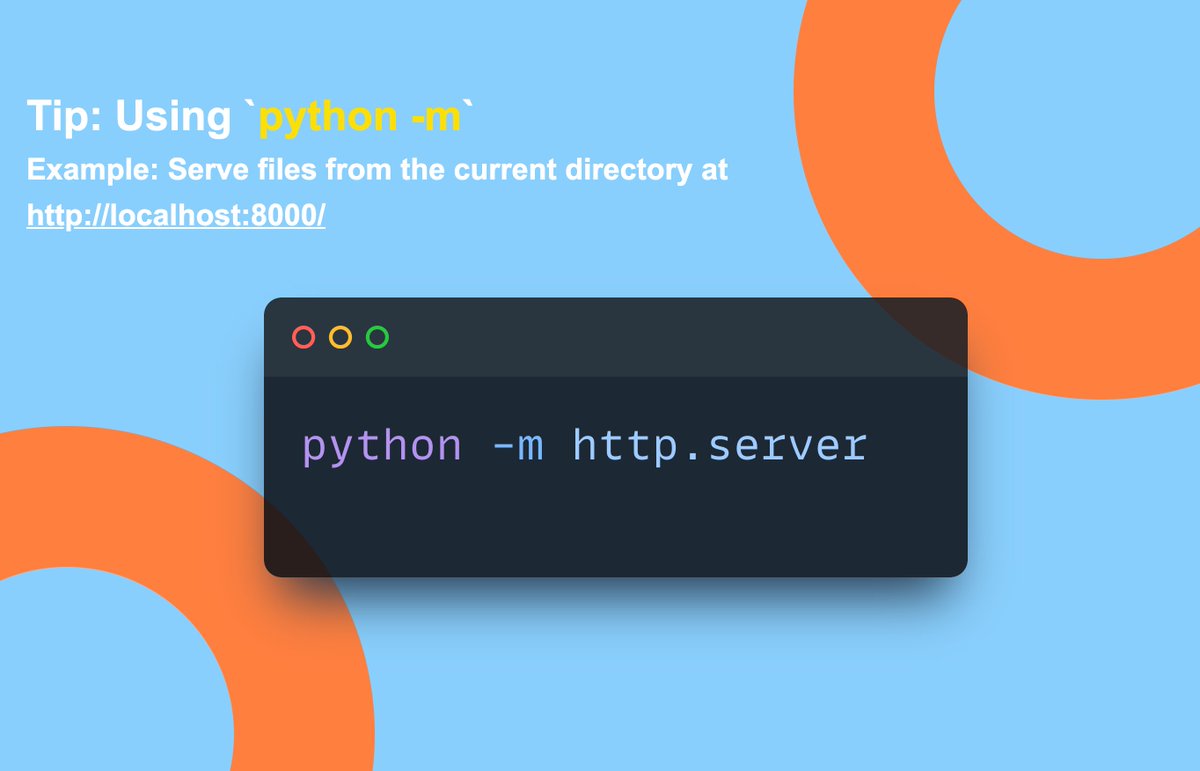
🐍 Python Tip of the Day: Utilizing Python’s “-m” Option for Module Execution Python's `-m` option is a versatile tool that allows you to run library modules as scripts. This can be incredibly useful for executing modules that contain test code or need to perform initialization tasks. It runs the source file for a module located in the Python module search path. One common use of the `-m` option: Launch Python's built-in HTTP server, which can serve files from the current directory over HTTP. This is very useful for quick tests, sharing files, or local development work. ``` # Serve files from the current directory at http://localhost:8000/ python -m http.server ``` Another popular usage: Run the `pip` installer to ensure that you are using the module corresponding to the Python interpreter you're currently using: ``` # Upgrade the pip installer using the -m option python -m pip install --upgrade pip ``` Benefits: 1️⃣ Flexibility: Offers a straightforward way to execute Python modules from the command line, providing a flexible approach for various Python tasks. 2️⃣ Utility: Great for utility tasks like running a web server, profiling code, testing, or package management, all without additional scripts. 3️⃣ Safe imports: Ensures that the module is imported correctly, potentially avoiding shadowing issues that can occur when a module and a script have the same name.
Kamon Ayeva 🐍 tweet media
English
0
1
0
132
Kamon Ayeva 🐍
Kamon Ayeva 🐍@kamon·
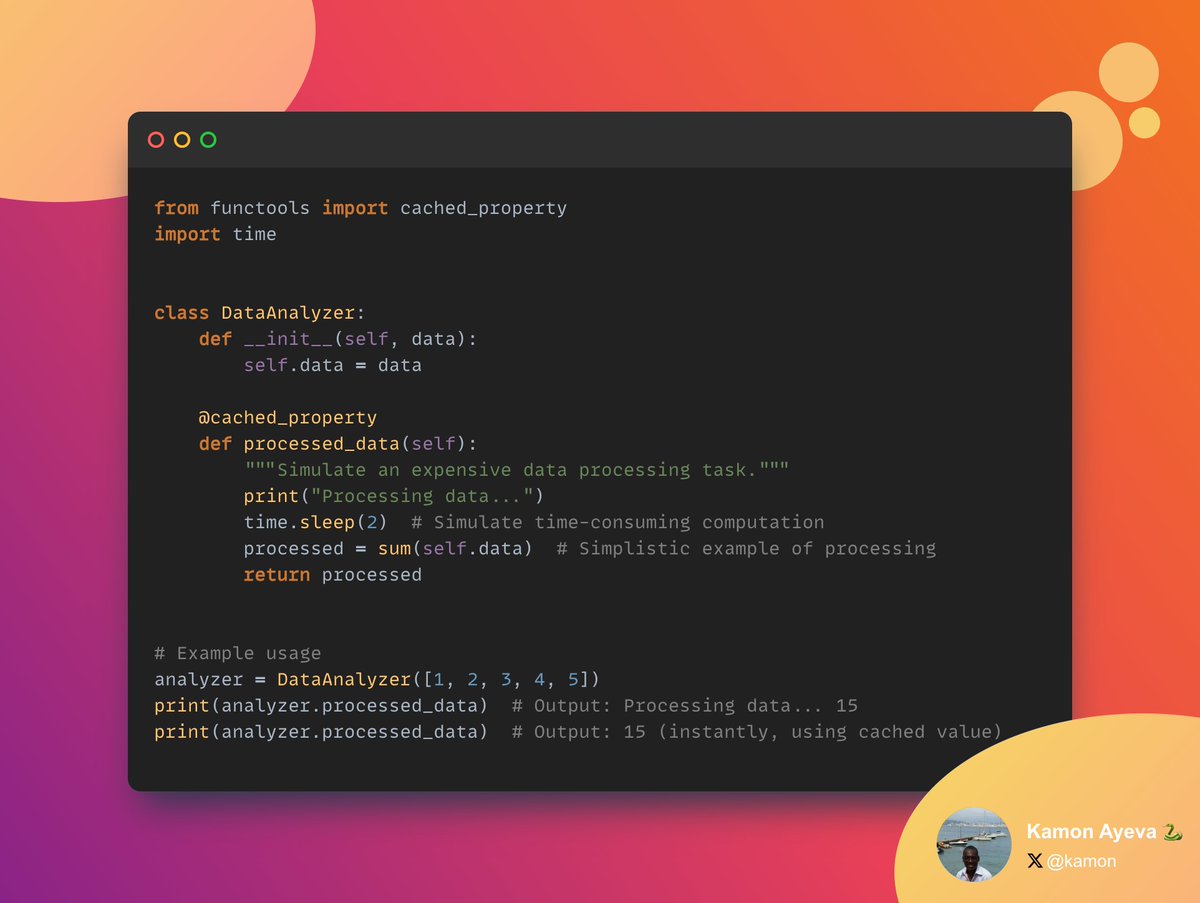
9️⃣ Boosting efficiency with the `cached_property` decorator The `cached_property` decorator transforms a method into a property whose value is cached after the first access. So the method will only be executed once, and subsequent accesses retrieve the cached result, saving computation time and resources. Benefits: 1. Reduced load times: For web applications and data-heavy applications, this tool can lead to faster response times by caching frequently requested but rarely changed data. 2. Ease of maintenance: The caching logic is abstracted away by the decorator, making the code cleaner and easier to maintain. 3. Consistency: The cached value remains consistent between accesses, which is crucial for ensuring that repeated requests for the property return the same result, assuming no changes in the underlying data.
Kamon Ayeva 🐍 tweet media
English
0
0
0
71