DataNinja

53 posts

DataNinja banner
DataNinja

DataNinja

@AuthMaxx

加入时间 Nisan 2025
3 关注0 粉丝
DataNinja
DataNinja@AuthMaxx·
Window functions = SQL's secret weapon Unlike GROUP BY, they calculate ACROSS rows without collapsing them. Patterns: ROW_NUMBER() → rank rows LAG() → compare to previous row #AdvancedSQL #DataAnalytics #SQLTips
English
0
0
0
2
DataNinja
DataNinja@AuthMaxx·
3. CTE (name and reuse logic WITH avg_data AS ( SELECT AVG(repair_hours) AS avg FROM work_orders ) SELECT * FROM work_orders, avg_data WHERE repair_hours > avg; CTEs make SQL readable. Use them always. Which of these 3 is new to you? #SQL #sqltips #LearningInPublic
English
0
0
0
0
DataNinja
DataNinja@AuthMaxx·
3 SQL concepts that separate beginners from intermediates 1. UNION (stack results vertically) 2. Subquery (query inside a query)
English
1
0
0
0
DataNinja
DataNinja@AuthMaxx·
SQL JOINs — the concept that unlocks everything INNER JOIN → matched rows only LEFT JOIN → all left rows + matches from right RIGHT JOIN → all right rows + matches from left FULL OUTER → everything from both Real talk: 90% of your joins will be INNER or LEFT.
English
1
0
0
1
DataNinja
DataNinja@AuthMaxx·
Common aggregates: COUNT(*) → how many SUM() → total AVG() → average MIN/MAX() → extremes WHERE filters before grouping. HAVING filters after. #SQL #GroupBy #DataAnalytics #SQLTips
English
0
0
0
0
DataNinja
DataNinja@AuthMaxx·
GROUP BY is where SQL becomes powerful The pattern: SELECT column, AGGREGATE(value) FROM table GROUP BY column HAVING AGGREGATE(value) > threshold
English
1
0
0
0
DataNinja 已转推
DataNinja
DataNinja@AuthMaxx·
Know your Data.
English
0
1
0
29
DataNinja 已转推
DataNinja
DataNinja@AuthMaxx·
Change text columns in powerBI Having issues with a column in powerbi,unable to change the data format( text) to date format. Here is how I solved it. Right click on the said column, Select Change Type → Using Locale, choose date as data type and English (Uk) as locale.
English
0
1
0
38
DataNinja 已转推
DataNinja
DataNinja@AuthMaxx·
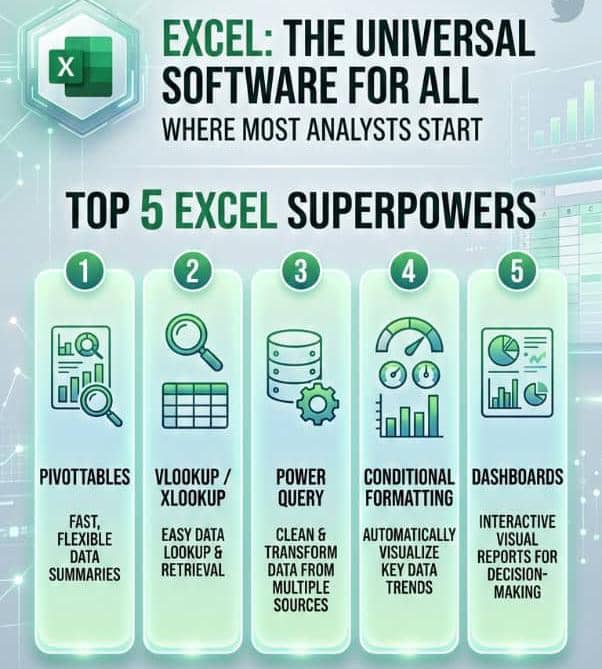
Excel isn't just a spreadsheet, it's a universal software for all. Excel is where most analysts start, and the top 5 Excel superpowers are: → PivotTables → VLOOKUP/XLOOKUP → Power Query → Conditional Formatting → Dashboards
DataNinja tweet media
English
0
1
0
43
DataNinja 已转推
DataNinja
DataNinja@AuthMaxx·
XLOOKUP: any direction, built-in error handling, cleaner syntax Examples =XLOOKUP(A2, B:B, C:C, "Not Found") That last argument alone saves hours of =IFERROR() wrapping. Still on VLOOKUP? Time to upgrade
English
0
1
0
20
DataNinja 已转推
DataNinja
DataNinja@AuthMaxx·
VLOOKUP vs XLOOKUP? VLOOKUP: left-to-right only, breaks when columns shift. VLOOKUP(lookup_valye,table_array,col_index,[range_lookup]) #DataAnalytics #ExcelTips
English
1
1
0
25
DataNinja 已转推
DataNinja
DataNinja@AuthMaxx·
Ctrl % : percentages! CTRL+; : puts in the date properly no matter how the cell is formatted. CTRL+SHIFT+; : puts in the time. What other shortcuts do you know?
English
0
1
0
13
DataNinja 已转推
DataNinja
DataNinja@AuthMaxx·
Excel is a very versatile software for many people. Some of the interesting shortcuts I discovered are: Ctrl $ : convert to currency Ctrl #: convert to date Ctrl !: Convert to number #exceltip
English
1
1
0
17
DataNinja 已转推
DataNinja
DataNinja@AuthMaxx·
The most powerful Excel feature nobody teaches properly: PivotTables From 5,000 rows of data to a full summary in under 60 seconds. Steps: 1. Click in data 2. Insert → PivotTable 3. Drag. Drop. Done.
DataNinja tweet media
English
0
1
0
17
DataNinja 已转推
DataNinja
DataNinja@AuthMaxx·
Excel Conditional Formatting = instant data storytelling 5 uses that will change how your reports look: → Red/green flags on KPIs → Heat maps (colour scales) → Data bars inside cells → Traffic light icon sets → Duplicate highlighter No charts needed.
English
0
1
0
18
DataNinja 已转推
DataNinja
DataNinja@AuthMaxx·
How to build a clean KPI dashboard in Excel 3-sheet structure: 1 Raw Data (never touch) 2PivotTable calculations 3Dashboard (charts + KPI cards only) Dashboard rules: → Max 3 colours → Every chart has a title → Show trends, not just totals
English
0
1
0
9
DataNinja 已转推
DataNinja
DataNinja@AuthMaxx·
SQL? the language you use to talk to databases. 5 commands you'll use 90% of the time: SELECT → pick columns FROM → choose table WHERE → filter rows GROUP BY → aggregate ORDER BY → sort Reads almost like plain English. Are you learning SQL?
English
0
1
0
10
DataNinja 已转推