Tech World With Milan

378 posts

Tech World With Milan banner
Tech World With Milan

Tech World With Milan

@TechWorldWMilan

Insights into a beautiful world of Software Engineering simplified. Written by @milan_milanovic.

Join 46k+ → 加入时间 Eylül 2023
4 关注107 粉丝
置顶推文
Tech World With Milan
Tech World With Milan@TechWorldWMilan·
I help 400,000+ engineers level up, one idea at a time. 🚀 Weekly insights on: 🔹 Software engineering 🔹 Tech leadership 🔹 Career growth 🧠 Read by staff/principal engineers, CTOs & builders at top companies. 👉 Join 46,000+ smart readers: newsletter.techworld-with-milan.com
Tech World With Milan tweet media
English
0
1
2
77
Tech World With Milan 已转推
Dr Milan Milanović
Dr Milan Milanović@milan_milanovic·
𝗦𝗦𝗢 (𝗦𝗶𝗻𝗴𝗹𝗲 𝗦𝗶𝗴𝗻-𝗢𝗻) 𝗲𝘅𝗽𝗹𝗮𝗶𝗻𝗲𝗱 SSO is an authentication process that allows users to access multiple apps with a single master key. This is accomplished using a central authentication server that stores the user's credentials and verifies them for each application. Here are 𝘁𝗵𝗲 𝘀𝘁𝗲𝗽𝘀 that happen if you want to access the Trello web app by using your Google account: 1. Use the Trello login web page and select Google account as a login method 2. Trello redirects the user to the Google login page 3. User is served with the Google login page 4. The user enters their Google credentials 5. Google sends authentication info to the SSO Authorization server 6. If credentials are valid, the Authorization server returns the auth token (SAML) 7. Google sends the auth token to the Trello 8. In the last step, Trello sends the token to the Google Authentication server to validate its 9. If the token is valid, Trello will allow access to the user and store the session for future interactions ✅ The 𝗯𝗲𝗻𝗲𝗳𝗶𝘁𝘀 of SSO are: 🔹 Improved user experience. Users do not need to remember multiple usernames and passwords. 🔹 Increased security. Users are less likely to reuse passwords across applications. ❌ The 𝗱𝗶𝘀𝗮𝗱𝘃𝗮𝗻𝘁𝗮𝗴𝗲𝘀 are: 🔸 Single point of failure. One of the most notable disadvantages is that SSO creates a single point of failure. If the SSO system is compromised, the attacker could access all connected applications and services. 🔸Security risks. If credentials are compromised, the security of all connected applications could be at risk. Some 𝗰𝗼𝗺𝗺𝗼𝗻 𝘁𝘆𝗽𝗲𝘀 𝗼𝗳 𝗦𝗦𝗢 are: 🔹 𝗦𝗔𝗠𝗟-𝗯𝗮𝘀𝗲𝗱 𝗦𝗦𝗢. This is the most common type of SSO. It uses the SAML protocol to exchange authentication information between the SSO server and applications. 🔹 𝗢𝗽𝗲𝗻𝗜𝗗 𝗖𝗼𝗻𝗻𝗲𝗰𝘁. This is a newer SSO type based on OAuth 2.0. It is a more straightforward protocol than SAML and is easier to integrate with web applications. And 𝗽𝗼𝗽𝘂𝗹𝗮𝗿 𝗦𝗦𝗢 𝘀𝗼𝗹𝘂𝘁𝗶𝗼𝗻𝘀 are: ➡️ Azure Active Directory ➡️ Okta ➡️ Ping Identity ➡️ OneLogin ➡️ Google Cloud Identity Platform
Dr Milan Milanović tweet media
English
4
12
79
3.2K
Tech World With Milan 已转推
Dr Milan Milanović
Dr Milan Milanović@milan_milanovic·
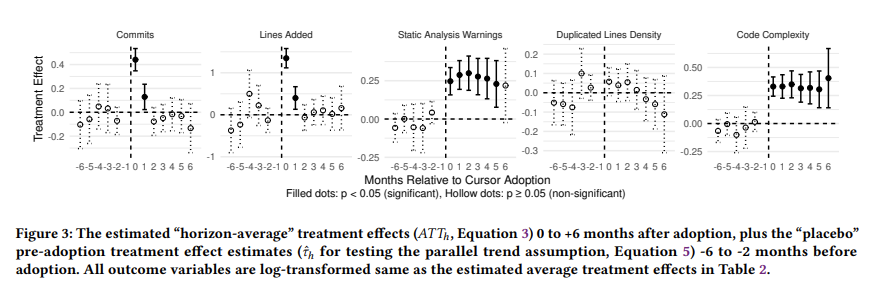
𝗗𝗼𝗲𝘀 𝗔𝗜-𝗣𝗼𝘄𝗲𝗿𝗲𝗱 𝗖𝗼𝗱𝗶𝗻𝗴 𝗧𝗿𝗮𝗱𝗲 𝗦𝗽𝗲𝗲𝗱 𝗳𝗼𝗿 𝗧𝗲𝗰𝗵𝗻𝗶𝗰𝗮𝗹 𝗗𝗲𝗯𝘁? Developers report 10x productivity gains from AI coding agents, yet a Carnegie Mellon study of 806 open-source GitHub repositories found something different. Researchers compared Cursor-adopting projects against 1,380 matched control repositories by tracking code output and quality monthly with SonarQube. Here are the key findings: 𝟭. 𝗧𝗵𝗲 𝘃𝗲𝗹𝗼𝗰𝗶𝘁𝘆 𝗯𝗼𝗼𝘀𝘁 𝗶𝘀 𝗿𝗲𝗮𝗹 𝗯𝘂𝘁 𝗱𝗶𝘀𝗮𝗽𝗽𝗲𝗮𝗿𝘀 𝗳𝗮𝘀𝘁 Projects saw a 𝟮𝟴𝟭% 𝗶𝗻𝗰𝗿𝗲𝗮𝘀𝗲 𝗶𝗻 𝗹𝗶𝗻𝗲𝘀 𝗮𝗱𝗱𝗲𝗱 and a 𝟱𝟱% 𝗶𝗻𝗰𝗿𝗲𝗮𝘀𝗲 𝗶𝗻 𝗰𝗼𝗺𝗺𝗶𝘁𝘀 during the first month after Cursor adoption. By month three, both metrics dropped back to pre-Cursor levels. The spike looks great on a dashboard. It just doesn't last. 𝟮. 𝗧𝗲𝗰𝗵𝗻𝗶𝗰𝗮𝗹 𝗱𝗲𝗯𝘁 𝗮𝗰𝗰𝘂𝗺𝘂𝗹𝗮𝘁𝗲𝘀 𝗮𝗻𝗱 𝘀𝘁𝗮𝘆𝘀 Static analysis warnings rose by 𝟯𝟬% and code complexity increased by 𝟰𝟭% on average. This decline of quality was persistent in the project. 𝟯. 𝗧𝗵𝗮𝘁 𝗱𝗲𝗯𝘁 𝗰𝗿𝗲𝗮𝘁𝗲𝘀 𝗮 𝘀𝗲𝗹𝗳-𝗿𝗲𝗶𝗻𝗳𝗼𝗿𝗰𝗶𝗻𝗴 𝘀𝗹𝗼𝘄𝗱𝗼𝘄𝗻 The researchers found a feedback loop between quality and velocity. A 𝟭𝟬𝟬% 𝗶𝗻𝗰𝗿𝗲𝗮𝘀𝗲 𝗶𝗻 𝗰𝗼𝗱𝗲 𝗰𝗼𝗺𝗽𝗹𝗲𝘅𝗶𝘁𝘆 caused a 𝟲𝟰.𝟱% 𝗱𝗲𝗰𝗿𝗲𝗮𝘀𝗲 in future development velocity. A 𝟭𝟬𝟬% 𝗶𝗻𝗰𝗿𝗲𝗮𝘀𝗲 𝗶𝗻 𝘀𝘁𝗮𝘁𝗶𝗰 𝗮𝗻𝗮𝗹𝘆𝘀𝗶𝘀 𝘄𝗮𝗿𝗻𝗶𝗻𝗴𝘀 caused a 𝟱𝟬.𝟯% 𝗱𝗿𝗼𝗽 in lines added. The two-month speed boost generates enough technical debt to drag down productivity for months afterward. 𝟰. 𝗔𝗜 𝘄𝗿𝗶𝘁𝗲𝘀 𝗺𝗼𝗿𝗲 𝗰𝗼𝗺𝗽𝗹𝗲𝘅 𝗰𝗼𝗱𝗲 𝘁𝗵𝗮𝗻 𝗵𝘂𝗺𝗮𝗻𝘀 Regardless of the codebase's size, Cursor-adopting projects still had 𝟵% 𝗵𝗶𝗴𝗵𝗲𝗿 𝗰𝗼𝗱𝗲 𝗰𝗼𝗺𝗽𝗹𝗲𝘅𝗶𝘁𝘆 than comparable projects producing the same volume of code. This means that such projects are harder to maintain. QA has to keep up with higher output. We can say that teams adopting agentic coding tools without upgrading their processes are borrowing speed from the future. The paper even suggests tools should consider "self-throttling," reducing suggestion volume when project complexity crosses healthy thresholds. 𝗟𝗶𝗻𝗲𝘀 𝗼𝗳 𝗰𝗼𝗱𝗲 𝗽𝗿𝗼𝗱𝘂𝗰𝗲𝗱 𝗶𝘀 𝗻𝗼𝘁 𝘁𝗵𝗲 𝘀𝗮𝗺𝗲 𝗮𝘀 𝗽𝗿𝗼𝗴𝗿𝗲𝘀𝘀 𝗺𝗮𝗱𝗲 What processes has your team put in place to manage code quality alongside AI coding tools?
Dr Milan Milanović tweet media
English
5
18
63
5K
Tech World With Milan 已转推
Dr Milan Milanović
Dr Milan Milanović@milan_milanovic·
𝗛𝗼𝘄 𝗧𝗼 𝗪𝗼𝗿𝗸 𝗪𝗶𝘁𝗵 𝗗𝗶𝗳𝗳𝗲𝗿𝗲𝗻𝘁 𝗖𝘂𝗹𝘁𝘂𝗿𝗲𝘀 You probably started working in your country with a team whose members share the same cultural background. So, more or less, you've understood others very well. Yet, if you start to work in international teams with people from other countries or even continents, things become a bit more complicated. In his book "𝗧𝗵𝗲 𝗖𝘂𝗹𝘁𝘂𝗿𝗲 𝗠𝗮𝗽: Breaking Through the Invisible Boundaries of Global Business," Erin Meyer guides navigating the complexities of cross-cultural communication. Here are the main points from the book: 𝟭. 𝗖𝗼𝗺𝗺𝘂𝗻𝗶𝗰𝗮𝘁𝗶𝗼𝗻 Meyer explains that communication varies from explicit to implicit along a scale. In explicit cultures (like the US or Germany), communication is precise, simple, and straightforward. In contrast, more implicit cultures (like Japan or Korea) rely heavily on context, and understanding comes from reading between the lines. 𝟮. 𝗘𝘃𝗮𝗹𝘂𝗮𝘁𝗶𝗻𝗴 This scale ranges from direct negative feedback (found in cultures such as Russia or France) to indirect negative feedback (typical in cultures such as Japan or Thailand). Understanding this helps deliver or interpret criticism constructively. 𝟯. 𝗣𝗲𝗿𝘀𝘂𝗮𝗱𝗶𝗻𝗴 Cultures differ in how they are persuaded. Some cultures are principle-first (they need to understand the why before the what - common in Russia or Italy), and others are application-first (prefer practical case evidence first - more common in the US or Canada). 𝟰. 𝗟𝗲𝗮𝗱𝗶𝗻𝗴 Leadership can be hierarchical (a transparent chain of command, like in China or India) or egalitarian (a flat structure, like in Denmark or Sweden). It's essential to understand these differences to avoid clashes in team dynamics. 𝟱. 𝗗𝗲𝗰𝗶𝗱𝗶𝗻𝗴 Cultures have different decision-making processes: some are consensual (like Japan or Sweden), where decisions are made in groups and may take longer, and some are top-down (like in China or Nigeria), which are faster but may not involve everyone. 𝟲. 𝗧𝗿𝘂𝘀𝘁𝗶𝗻𝗴 In some cultures, trust is task-based (it's built through business-related activities, like in the US or UK), while in others, it's relationship-based (it's created through sharing meals, evening drinks, and visits to your home, like in China or Brazil). 𝟳. 𝗗𝗶𝘀𝗮𝗴𝗿𝗲𝗲𝗶𝗻𝗴 Cultures expressing disagreement range from confrontational (more common in cultures like France or Israel, where open disagreement is seen as positive) to avoidance of confrontation (as in Japan or Indonesia, where harmony is crucial).
Dr Milan Milanović tweet media
English
3
4
21
3.7K
Tech World With Milan 已转推
Dr Milan Milanović
Dr Milan Milanović@milan_milanovic·
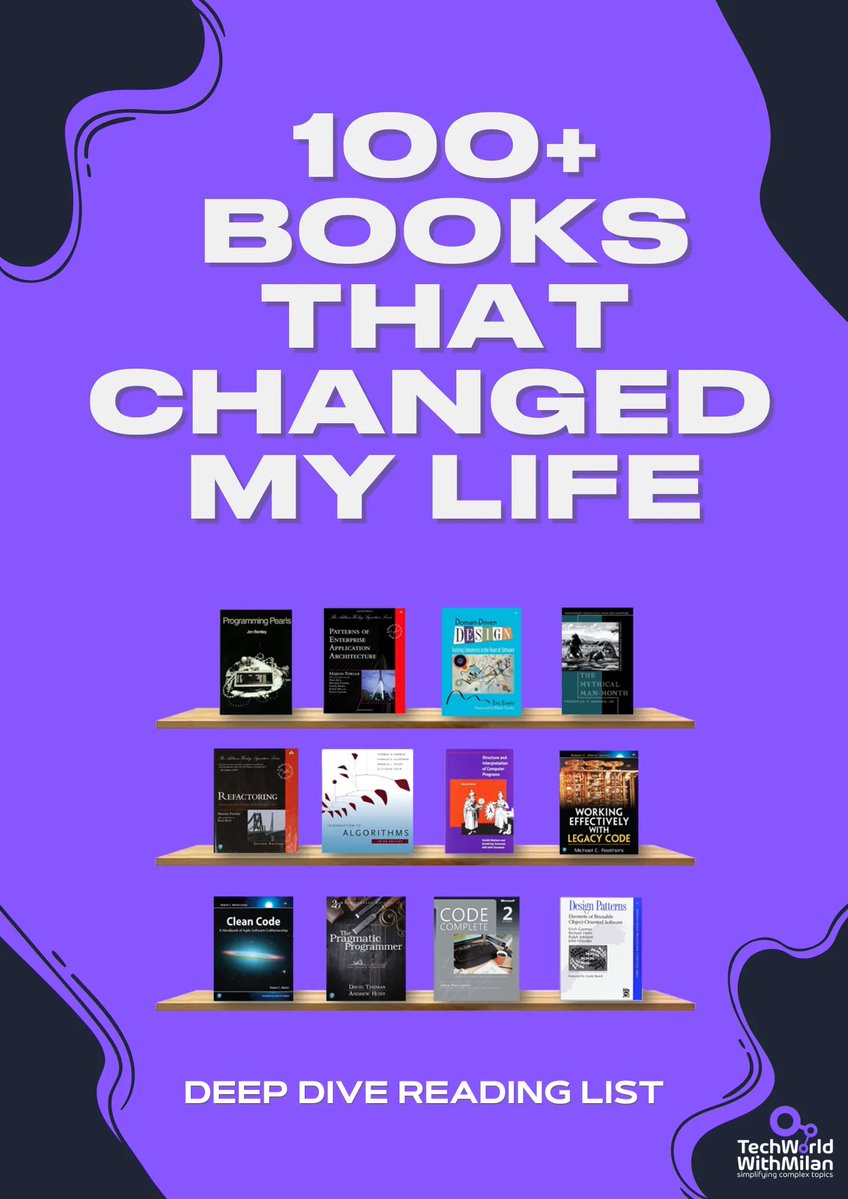
You probably already know I'm an avid book reader So, I decided to prepare something for you A mini book 100+ Books That Changed My Life with in-depth reviews of the titles that have shaped my thinking in engineering, leadership, productivity, wealth, and beyond. Get it by subscribing to my newsletter: newsletter.techworld-with-milan.com
Dr Milan Milanović tweet media
English
1
3
10
1.2K
Tech World With Milan 已转推
Dr Milan Milanović
Dr Milan Milanović@milan_milanovic·
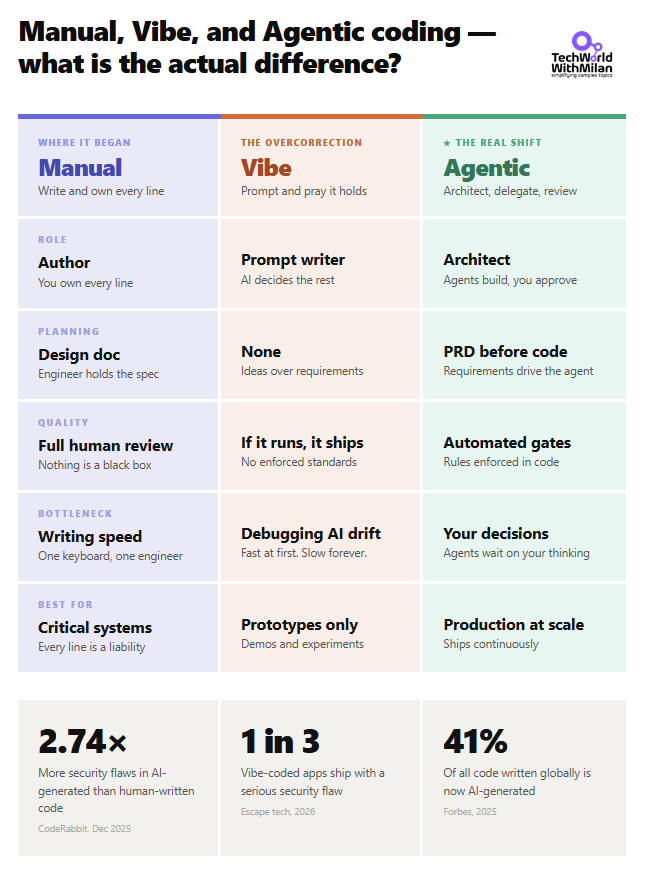
𝗪𝗵𝗮𝘁 𝗶𝘀 𝘁𝗵𝗲 𝗱𝗶𝗳𝗳𝗲𝗿𝗲𝗻𝗰𝗲 𝗯𝗲𝘁𝘄𝗲𝗲𝗻 𝗺𝗮𝗻𝘂𝗮𝗹, 𝘃𝗶𝗯𝗲, 𝗮𝗻𝗱 𝗮𝗴𝗲𝗻𝘁𝗶𝗰 𝗰𝗼𝗱𝗶𝗻𝗴? A long time ago, we coded only manually, but then we started to vibe code. Yet, vibe code is something everyone defines differently. The question is, can we take the best from both worlds and make something more useful? The answer is yes, and this is 𝗔𝗴𝗲𝗻𝘁𝗶𝗰 𝗲𝗻𝗴𝗶𝗻𝗲𝗲𝗿𝗶𝗻𝗴. Here is how they differ: 𝟭. 𝗠𝗮𝗻𝘂𝗮𝗹 𝗰𝗼𝗱𝗶𝗻𝗴 It means you write every line and understand every decision. Nothing is a black box. The bottleneck is your keyboard, which means it scales to exactly one engineer. For safety-critical systems where every line carries liability, it remains the right call. Everywhere else, it is too slow. 𝟮. 𝗩𝗶𝗯𝗲 𝗰𝗼𝗱𝗶𝗻𝗴 This represents the overcorrection. You describe what you want, the AI decides the implementation, and you ship it. It feels fast at first. Then something breaks, and you are debugging code nobody on your team wrote or reviewed. Many vibe-coded apps shipped with hype but also had security flaws and even more technical debt, which their authors didn't understand. This is a very good example of a Dunning-Kruger effect. Unfortunately, many non-coders are in this group. 𝟯. 𝗔𝗴𝗲𝗻𝘁𝗶𝗰 𝗲𝗻𝗴𝗶𝗻𝗲𝗲𝗿𝗶𝗻𝗴 Here, you write a PRD before any code is written. Here, you may have a few iterations of back-and-forth with the agent. Then, the agent implements, opens PRs, and runs tests. You review the output and enforce architecture rules in code. The bottleneck shifts from writing speed to the quality of your own decisions. I expect that we push more and more in this direction, recognizing good patterns and best practices, as we did with manual coding. These three coding approaches are a progression, and most teams are stuck in the middle one, thinking they have already arrived. Which one describes how your team works today?
Dr Milan Milanović tweet media
English
10
22
105
5.7K
Tech World With Milan 已转推
Dr Milan Milanović
Dr Milan Milanović@milan_milanovic·
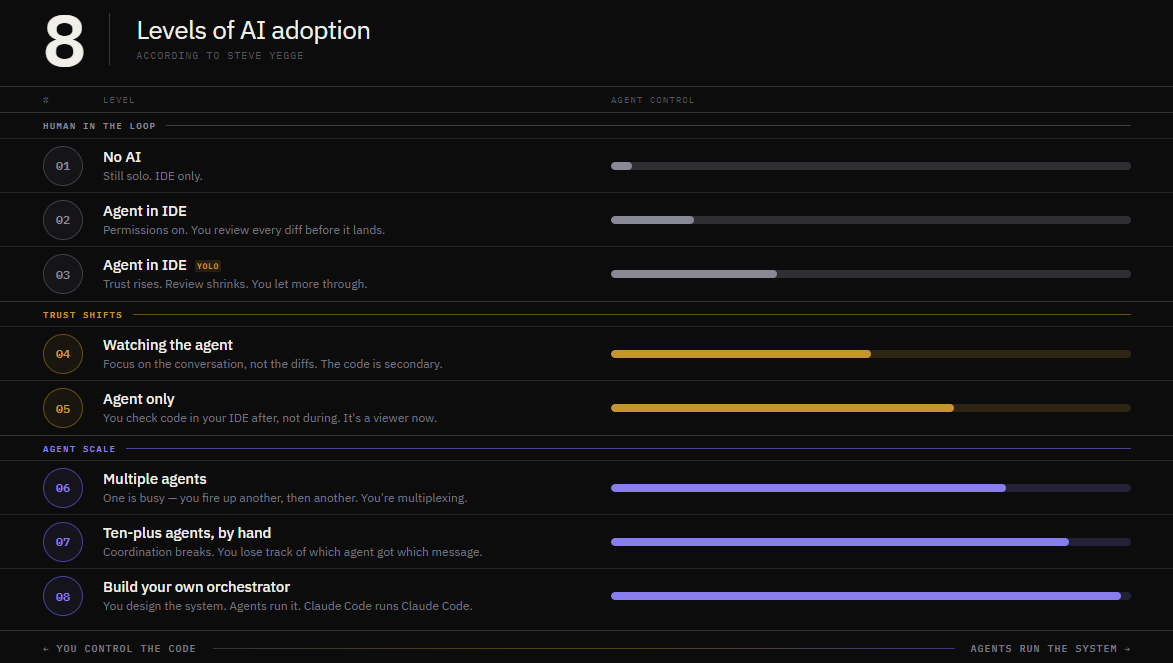
What's your AI adoption level? Most engineers I talk to are somewhere between level 2 and level 4. They have an agent in their IDE. They review the diffs. They're careful — and that's a reasonable place to be. But level 6 looks completely different. You're running multiple agents at once. You're steering the work, not writing it. Reading summaries, not diffs. And level 8? You've built your own orchestrator. Claude Code runs Claude Code. The gap between level 3 and level 6 isn't time. It's a mindset shift about what engineering actually means. Where are you? ↓ Via @Steve_Yegge / @Pragmatic_Eng newsletter.pragmaticengineer.com/i/187563524/3-…
Dr Milan Milanović tweet media
English
13
6
42
4.5K
Tech World With Milan 已转推
Dr Milan Milanović
Dr Milan Milanović@milan_milanovic·
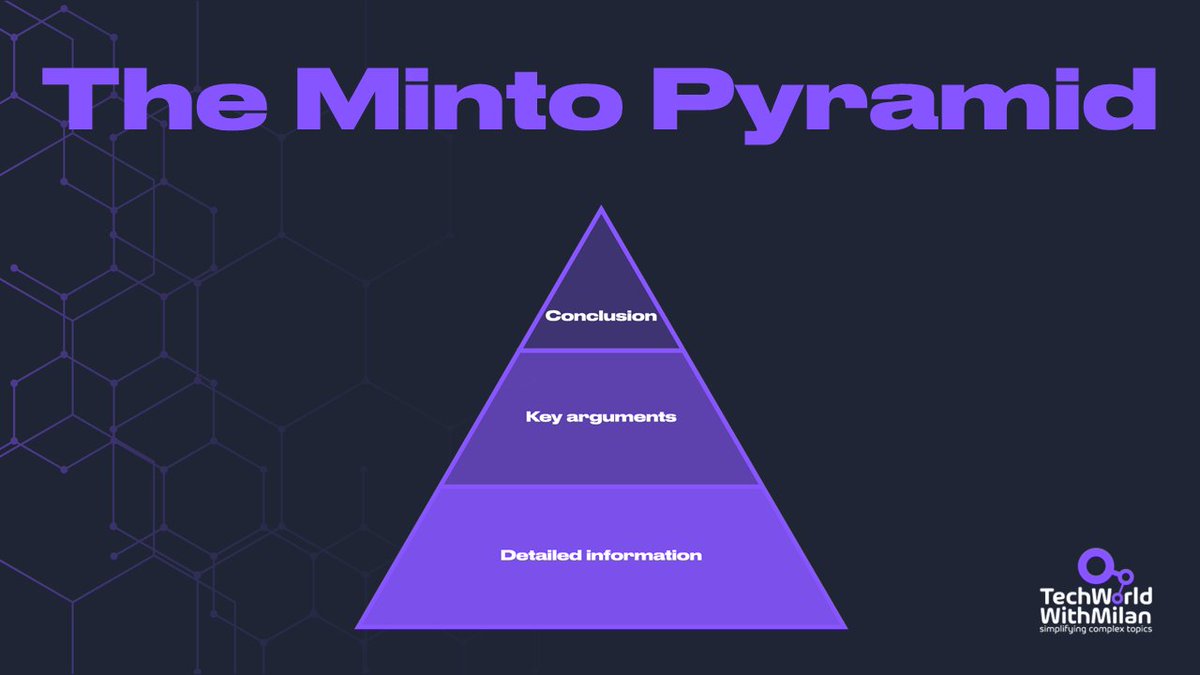
𝗛𝗼𝘄 𝘆𝗼𝘂 𝗰𝗮𝗻 𝗺𝗮𝗸𝗲 𝘆𝗼𝘂𝗿 𝗰𝗼𝗺𝗺𝘂𝗻𝗶𝗰𝗮𝘁𝗶𝗼𝗻 𝗺𝗼𝗿𝗲 𝗲𝗳𝗳𝗶𝗰𝗶𝗲𝗻𝘁 𝗮𝗻𝗱 𝗰𝗹𝗲𝗮𝗿 Here is a simple framework to make your communication clear without having to put long walls of text in front of people or make long presentations. It can even help writers attract readers' attention by making communication clearer and more efficient. The key is to share the key info at the very end. It's called 𝗠𝗶𝗻𝘁𝗼 𝗣𝘆𝗿𝗮𝗺𝗶𝗱, and it is first described in the book "The Minto Pyramid Principle" by Barbara Minto. The idea behind the pyramidal hierarchy is that it makes an argument both simpler to understand and much more persuasive. 𝗧𝗵𝗲 𝗺𝗼𝘀𝘁 𝘀𝗶𝗴𝗻𝗶𝗳𝗶𝗰𝗮𝗻𝘁 𝘁𝗮𝗸𝗲𝗮𝘄𝗮𝘆 𝗳𝗿𝗼𝗺 𝘁𝗵𝗲 𝗲𝘀𝘀𝗮𝘆 𝗶𝘀 𝗹𝗼𝗰𝗮𝘁𝗲𝗱 𝗮𝘁 𝘁𝗵𝗲 𝘁𝗼𝗽 𝗼𝗳 𝘁𝗵𝗲 𝗽𝘆𝗿𝗮𝗺𝗶𝗱, 𝗳𝗼𝗹𝗹𝗼𝘄𝗲𝗱 𝗯𝘆 𝗹𝗮𝘆𝗲𝗿𝘀 𝗼𝗳 𝗼𝗿𝗱𝗲𝗿𝗲𝗱 𝗱𝗮𝘁𝗮. This article's structure enables the reader to take in a central idea before being given evidence to support it. Here is how this concept works: 𝟭. 𝗪𝗲 𝘀𝘁𝗮𝗿𝘁 𝘄𝗶𝘁𝗵 𝘁𝗵𝗲 𝗮𝗻𝘀𝘄𝗲𝗿 𝗼𝗿 𝗰𝗼𝗻𝗰𝗹𝘂𝘀𝗶𝗼𝗻 Tell your audience the primary point, message, advice, or conclusion up front to grab their attention. Although this may go against what we have been taught when communicating, it is more effective, particularly when writing for audiences who may be short on time or attention. 𝟮. 𝗦𝘂𝗽𝗽𝗼𝗿𝘁𝗶𝗻𝗴 𝗮𝗿𝗴𝘂𝗺𝗲𝗻𝘁𝘀 Now that the essential message has been conveyed, it's time to bolster it with supporting evidence or main points. These need to be rather brief. You should summarize your essential points in them. This section should provide justification for your conclusion or suggestion. 𝟯. 𝗦𝘂𝗽𝗽𝗼𝗿𝘁𝗶𝗻𝗴 𝗱𝗮𝘁𝗮 𝗼𝗿 𝗳𝗮𝗰𝘁𝘀 The bottom of the pyramid, as the name implies, stores the facts, data, and other discoveries that confirm the supporting arguments. If you want to, you can be specific at this point. Here is an example of 𝗠𝗶𝗻𝘁𝗼 𝗣𝘆𝗿𝗮𝗺𝗶𝗱: ❓ 𝗤𝘂𝗲𝘀𝘁𝗶𝗼𝗻: Should we enter new markets, like Moldavia? 👉 𝗪𝗵𝗮𝘁: We researched our product/approach and concluded that we need to open a new location in Moldavia. 👉 𝗪𝗵𝘆: This market is growing with skilled people at a rate of 12%, which is faster than other developing countries in Europe. Here can come more reasoning, such as results of competition analysis, etc. 👉 𝗛𝗼𝘄: This would be the next steps, partnerships with local HR companies, analysis of office location, etc.
Dr Milan Milanović tweet media
English
2
4
31
2.7K
Tech World With Milan 已转推
Dr Milan Milanović
Dr Milan Milanović@milan_milanovic·
𝗔𝗴𝗲𝗻𝘁𝗶𝗰 𝗖𝗼𝗱𝗶𝗻𝗴 𝗪𝗼𝗿𝗸𝗳𝗹𝗼𝘄𝘀 𝗧𝗵𝗮𝘁 𝗔𝗰𝘁𝘂𝗮𝗹𝗹𝘆 𝗪𝗼𝗿𝗸 Most AI productivity advice sounds the same: use it everywhere, iterate fast, trust the tools. Nick Tune does something different. He treats AI workflows like software. State machines with typed transitions. Lint rules that block Claude from writing mutable TypeScript. Dependency constraints that enforce architecture at the commit level. A TDD cycle where Claude cannot move to the next state until tests pass, code compiles, and lint clears. He built this setup during peak season to handle a support ticket backlog. It paid for itself in three days. In this issue, Nick walks through his full setup: how he plans with a PRD agent, implements features autonomously, enforces architecture rules deterministically, and reviews every PR before anything ships. 👉 Read it here: newsletter.techworld-with-milan.com/p/agentic-code…
Dr Milan Milanović tweet media
English
5
6
34
3K
Tech World With Milan 已转推
Dr Milan Milanović
Dr Milan Milanović@milan_milanovic·
𝗗𝗼𝗻𝗮𝗹𝗱 𝗞𝗻𝘂𝘁𝗵 𝗶𝘀 𝘀𝗵𝗼𝗰𝗸𝗲𝗱 𝗯𝘆 𝗵𝗼𝘄 𝗴𝗼𝗼𝗱 𝗔𝗜 𝗵𝗮𝘀 𝗯𝗲𝗰𝗼𝗺𝗲 𝗮𝘁 𝘀𝗼𝗹𝘃𝗶𝗻𝗴 𝗽𝗿𝗼𝗯𝗹𝗲𝗺𝘀 Knuth is now 88 years old. He wrote The Art of Computer Programming starting in 1962, and won the Turing Award in 1974. In his paper, which talks about how AI helped him solve a problem, he wrote at the start: "Shock! Shock!" Here is what happened: 𝟭. 𝗧𝗵𝗲 𝗽𝗿𝗼𝗯𝗹𝗲𝗺 Knuth was stuck for weeks on an open graph theory problem he was preparing for a future volume of TAOCP. The problem involves a 3D grid of points, think of it as an m×m×m cube. Each point connects to three neighbors. The challenge is to find a single rule that traces three distinct paths through the entire cube, each visiting every point exactly once. That kind of path is called a Hamiltonian cycle. Knuth had worked it out for a 3×3×3 cube. His friend Filip Stappers confirmed it worked up to a 16×16×16 cube by running it on a computer. But no one could find a general rule that worked for any size. 𝟮. 𝗧𝗵𝗲 𝘀𝗲𝘀𝘀𝗶𝗼𝗻 Stappers gave the problem to Claude Opus 4.6 with one strict rule: after every attempt, write down what you tried and what you learned before moving on. Claude worked through 31 explorations over about an hour. It tried simple formulas, brute-force search, geometric patterns, and statistical methods. Most hit dead ends. At attempt 25, it essentially told itself: "The search approach won't get us there. This needs actual mathematical reasoning." At attempt 31, it found a construction that worked. 𝟯. 𝗧𝗵𝗲 𝗰𝗼𝗻𝘀𝘁𝗿𝘂𝗰𝘁𝗶𝗼𝗻 Claude found a surprisingly simple rule for navigating the cube. At each point, look at where you are and follow a small set of conditions to decide which direction to move next. That's it. No complex formula, no special cases beyond a handful of boundary checks. Stappers ran the resulting program against every odd cube size from 3 to 101. It produced perfect results every time. Then, Knuth wrote a formal proof, generalized the construction, and showed that there are exactly 760 valid solutions of this type for all odd cube sizes. Claude found one of them. Knuth found all of them. 𝟰. 𝗪𝗵𝗮𝘁 𝗵𝗮𝗽𝗽𝗲𝗻𝗲𝗱 𝗻𝗲𝘅𝘁 The even-sized cubes were still unsolved. Then a friend fed that version of the problem to GPT-5.4 Pro and got back a 14-page proof that required no further work. Then another researcher used GPT and Claude together as collaborating agents and found an even better solution that covered both cases. The problem that had been open for years, odd and even sizes, is now fully solved. Knuth's reaction was: "We are living in very interesting times indeed." His closing line: "It seems I'll have to revise my opinions about generative AI one of these days." From Donald Knuth, that sentence lands differently than it would from anyone else
Dr Milan Milanović tweet media
English
11
32
124
9.5K
Tech World With Milan 已转推
Dr Milan Milanović
Dr Milan Milanović@milan_milanovic·
Most of the people who think that AI will replace developers are: - Managers who don’t code - Investors and startup founders selling it - People outside tech Developers: "It's helpful."
English
252
294
3.9K
102.5K
Tech World With Milan 已转推
Dr Milan Milanović
Dr Milan Milanović@milan_milanovic·
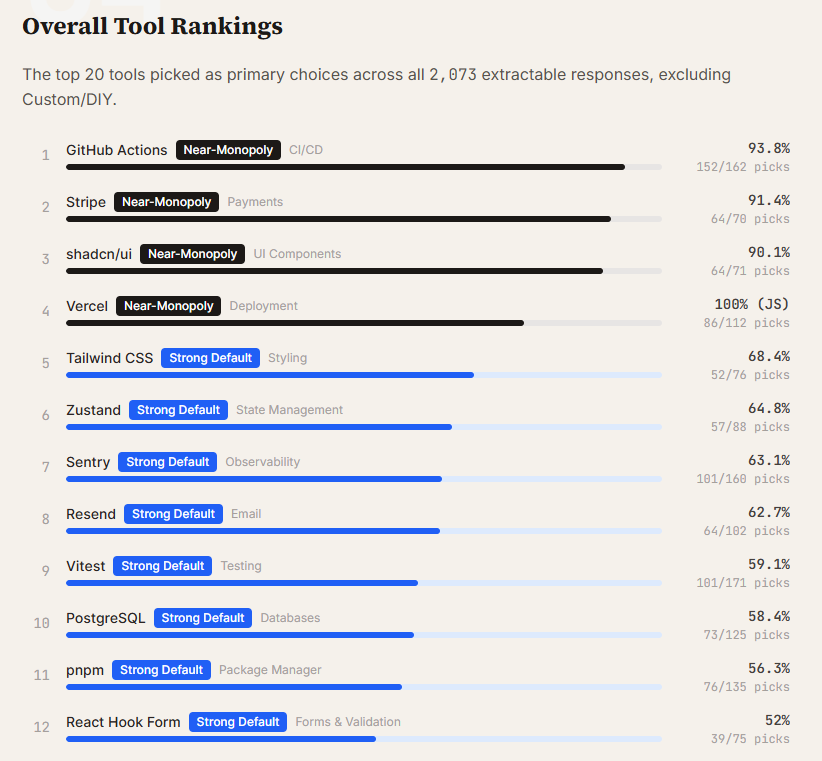
𝗪𝗵𝗮𝘁 𝗵𝗮𝗽𝗽𝗲𝗻𝘀 𝘄𝗵𝗲𝗻 𝘆𝗼𝘂 𝗹𝗲𝘁 𝗖𝗹𝗮𝘂𝗱𝗲 𝗖𝗼𝗱𝗲 𝗽𝗶𝗰𝗸 𝘆𝗼𝘂𝗿 𝘁𝗼𝗼𝗹𝘀 𝗳𝗼𝗿 𝘆𝗼𝘂? Researchers sent 2,430 open-ended prompts to Claude Code across 3 models, 4 project types, and 20 categories. They did not mention any tools; they just asked, "What should I use?" Here is what they found: 𝟭. 𝗕𝘂𝗶𝗹𝗱 𝗼𝘃𝗲𝗿 𝗯𝘂𝘆 𝗶𝘀 𝘁𝗵𝗲 𝗱𝗲𝗳𝗮𝘂𝗹𝘁 Custom/DIY is the single most common "recommendation" in the dataset, 252 picks across 12 of 20 categories. Ask Claude Code to add feature flags, and it builds a system with env vars and React Context. Ask it to add auth to a Python project, and it writes a JWT from scratch every single time. When an agent can build a working solution in 30 seconds, it often does. 𝟮. 𝗔 𝗱𝗲𝗳𝗮𝘂𝗹𝘁 𝘀𝘁𝗮𝗰𝗸 𝗲𝘅𝗶𝘀𝘁𝘀 Where Claude Code does pick third-party tools, it converges hard: - GitHub Actions owns CI/CD at 94% - Stripe owns payments at 91% - shadcn/ui owns UI components at 90% - Vercel is a must for JavaScript projects at 100%. The rest of the list: PostgreSQL, Tailwind CSS, Zustand, pnpm, Resend, Vitest. These tools may not be the best option for your project, but these are what the model will choose for you. 𝟯. 𝗥𝗲𝗱𝘂𝘅 𝗶𝘀 𝗱𝗲𝗮𝗱 𝗶𝗻 𝗔𝗜-𝗮𝘀𝘀𝗶𝘀𝘁𝗲𝗱 𝗰𝗼𝗱𝗲 Redux did't got any primary picks across 2,430 prompts. The model knows it exists, with 23 mentions and 2 alternative recommendations, but never actually chooses it. Zustand wins state management at 65% instead. Express has it even worse. It doesn't show up as a primary pick, an alternative, or even a passing suggestion. It's just gone. 𝟰. 𝗡𝗲𝘄𝗲𝗿 𝗺𝗼𝗱𝗲𝗹𝘀 𝗽𝗿𝗲𝗳𝗲𝗿 𝗻𝗲𝘄𝗲𝗿 𝘁𝗼𝗼𝗹𝘀 This is the clearest signal from this dataset. Prisma goes from 79% in Sonnet 4.5 to 0% in Opus 4.6. Drizzle takes over completely. In Python projects, Celery usage collapses from 100% to 0% as newer models prefer FastAPI's built-in background tasks. It tracks with what appeared in more recent training data. 𝟱. 𝗖𝗼𝗻𝘁𝗲𝘅𝘁-𝗮𝘄𝗮𝗿𝗲𝗻𝗲𝘀𝘀 𝗶𝘀 𝗿𝗲𝗮𝗹 The same model picks Vercel for JavaScript and Railway for Python. Drizzle for Next.js, SQLModel for FastAPI. It's not a fixed list. The agent reads the stack and adapts, which is more useful than a blanket recommendation. 𝟲. 𝗕𝗲𝗶𝗻𝗴 𝗮𝗯𝘀𝗲𝗻𝘁 𝗳𝗿𝗼𝗺 𝗽𝗿𝗶𝗺𝗮𝗿𝘆 𝗽𝗶𝗰𝗸𝘀 𝗶𝘀𝗻'𝘁 𝘁𝗵𝗲 𝘀𝗮𝗺𝗲 𝗮𝘀 𝗯𝗲𝗶𝗻𝗴 𝗶𝗻𝘃𝗶𝘀𝗶𝗯𝗹𝗲 Netlify, SendGrid, and Jest were never chosen as the primary option. But they kept showing up as second choices. The model knows these tools and still recommends something else first. That gap is the one worth closing. If we're using AI coding agents for greenfield projects, we're increasingly inheriting a default stack. Worth knowing what that stack is. Full report in comments
Dr Milan Milanović tweet media
English
7
6
43
5.8K
Tech World With Milan 已转推
Dr Milan Milanović
Dr Milan Milanović@milan_milanovic·
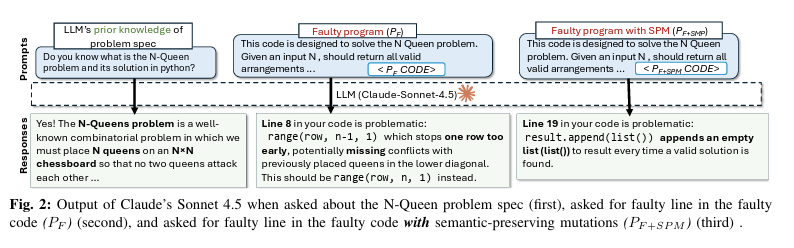
𝗟𝗟𝗠𝘀 𝗔𝗿𝗲 𝗡𝗼𝘁 𝗥𝗲𝗮𝗱𝗶𝗻𝗴 𝗬𝗼𝘂𝗿 𝗖𝗼𝗱𝗲 We keep calling LLMs "AI coding assistants." But writing code and understanding code are not the same thing. Researchers from Virginia Tech and Carnegie Mellon University just ran 750,000 debugging experiments across 10 models to determine how well LLMs actually understand code. The results show that you should not blindly trust your AI coding assistant when debugging. Here is what they found: 𝟭. 𝗔 𝗿𝗲𝗻𝗮𝗺𝗲𝗱 𝘃𝗮𝗿𝗶𝗮𝗯𝗹𝗲 𝗯𝗿𝗲𝗮𝗸𝘀 𝘁𝗵𝗲 𝗱𝗲𝗯𝘂𝗴𝗴𝗲𝗿 Researchers created a bug, confirmed that the LLM found it, then made changes that don't touch the bug at all, such as renaming a variable or adding a comment. In 78% of cases, the model could no longer find the same bug. The bug was still there. The variable names and comments changed, and that was enough. 𝟮. 𝗗𝗲𝗮𝗱 𝗰𝗼𝗱𝗲 𝗶𝘀 𝗮 𝘁𝗿𝗮𝗽 Adding code that never runs reduced bug-detection accuracy to 20.38%. Models treated dead code as live, and flagged it as the source of the bug. But the bug was in another line. So, LLMs cannot reliably distinguish "this runs" from "this never runs." 𝟯. 𝗠𝗼𝗱𝗲𝗹𝘀 𝗿𝗲𝗮𝗱 𝘁𝗼𝗽-𝘁𝗼-𝗯𝗼𝘁𝘁𝗼𝗺, 𝗻𝗼𝘁 𝗹𝗼𝗴𝗶𝗰𝗮𝗹𝗹𝘆 56% of correctly found bugs were in the first quarter of the file. Only 6% were in the last quarter. The further down the code, the less attention the model pays to it. If the bug lives in the bottom half of your file, the model is already less likely to find it. 𝟰. 𝗙𝘂𝗻𝗰𝘁𝗶𝗼𝗻 𝗿𝗲𝗼𝗿𝗱𝗲𝗿𝗶𝗻𝗴 𝗮𝗹𝗼𝗻𝗲 𝗰𝘂𝘁 𝗮𝗰𝗰𝘂𝗿𝗮𝗰𝘆 𝗯𝘆 𝟴𝟯% Changing the order of functions in a Java file caused an 83% drop in debugging accuracy. The code still remained the same. Where the code physically sits in the file matters more to the model than what the code does. So, obviously, this is a sign of pattern recognition, not real code understanding. 𝟱. 𝗡𝗲𝘄𝗲𝗿 𝗺𝗼𝗱𝗲𝗹𝘀 𝗵𝗮𝗿𝗱𝗹𝘆 𝗺𝗼𝘃𝗲 𝘁𝗵𝗲 𝗻𝗲𝗲𝗱𝗹𝗲 Claude improved ~1% between 3.7 and 4.5 Sonnet on this task. Gemini improved by ~1.8%. Every model release comes with a new benchmark leaderboard and new headlines. But the ability to reason about code under realistic conditions is improving slowly. 𝟲. 𝗧𝗵𝗲𝘀𝗲 𝘄𝗲𝗿𝗲 𝗯𝗲𝘀𝘁-𝗰𝗮𝘀𝗲 𝗰𝗼𝗻𝗱𝗶𝘁𝗶𝗼𝗻𝘀 The study used single-file programs with ~250 lines, and each had a clear description of what the code should do. The authors say this was intentional. They wanted the best-case conditions. Real production code is multi-file, cross-module, and poorly documented. It will perform worse for sure. Here are three things worth changing based on the research: 🔹 𝗣𝗮𝘀𝘀 𝗲𝘅𝗲𝗰𝘂𝘁𝗶𝗼𝗻 𝗰𝗼𝗻𝘁𝗲𝘅𝘁, 𝗻𝗼𝘁 𝗷𝘂𝘀𝘁 𝗰𝗼𝗱𝗲. When asking an LLM to debug, include test output, stack traces, and failure messages alongside the source. Without runtime details, the model is guessing based on the code. 🔹 𝗗𝗼𝗻'𝘁 𝘁𝗿𝘂𝘀𝘁 𝗶𝘁 𝗼𝗻 𝗱𝗲𝗲𝗽-𝗳𝗶𝗹𝗲 𝗯𝘂𝗴𝘀. If the suspect code is in the bottom third of a long file, the model will have trouble finding it. Consider splitting the context or feeding the relevant function directly. 🔹 𝗖𝗹𝗲𝗮𝗻 𝘂𝗽 𝗱𝗲𝗮𝗱 𝗰𝗼𝗱𝗲 𝗯𝗲𝗳𝗼𝗿𝗲 𝘂𝘀𝗶𝗻𝗴 𝗔𝗜 𝗱𝗲𝗯𝘂𝗴𝗴𝗶𝗻𝗴 𝘁𝗼𝗼𝗹𝘀. Commented-out blocks and unreachable branches will mislead the model. It cannot filter them out. We rate AI coding tools on HumanEval. That tests whether a model can write a function from a description, but this says nothing about finding a bug in code it didn't write. Those are different problems. We're using the wrong benchmark.
Dr Milan Milanović tweet media
English
92
256
1.2K
119.3K
Tech World With Milan 已转推
Dr Milan Milanović
Dr Milan Milanović@milan_milanovic·
Most people look at chess and see a game about smart moves What I see is a game about life You make a move, and something changes Some doors open Others close You do not get infinite time You do not get perfect information And you still have to decide That feels familiar Chess also teaches you that the move that feels good in the moment is not always the move that helps you win. Sometimes you need patience. Sometimes you need to give something up. Sometimes you need to stop forcing your plan and deal with the position you're in That part maps to life more than most people want to admit Another lesson is how fragile progress can be. You can build a strong position with discipline, then damage it with one careless move. Ego does that. Impatience does that. Panic does that. On the board and outside it, the pattern is the same And then there is the part I like most Chess does not let you hide from your mistakes A bad move is a bad move Not a verdict on your worth Just feedback You look at it, learn from it, and play better next time. Or you ignore it, and keep repeating the same pattern in different forms In the end, life is rarely about one brilliant moment It is more often about making solid decisions, staying calm under pressure, adjusting when the situation changes, and avoiding the few bad moves that can undo everything That is why I like chess It makes consequences visible
Dr Milan Milanović tweet media
English
1
2
14
1.1K
Tech World With Milan 已转推
Dr Milan Milanović
Dr Milan Milanović@milan_milanovic·
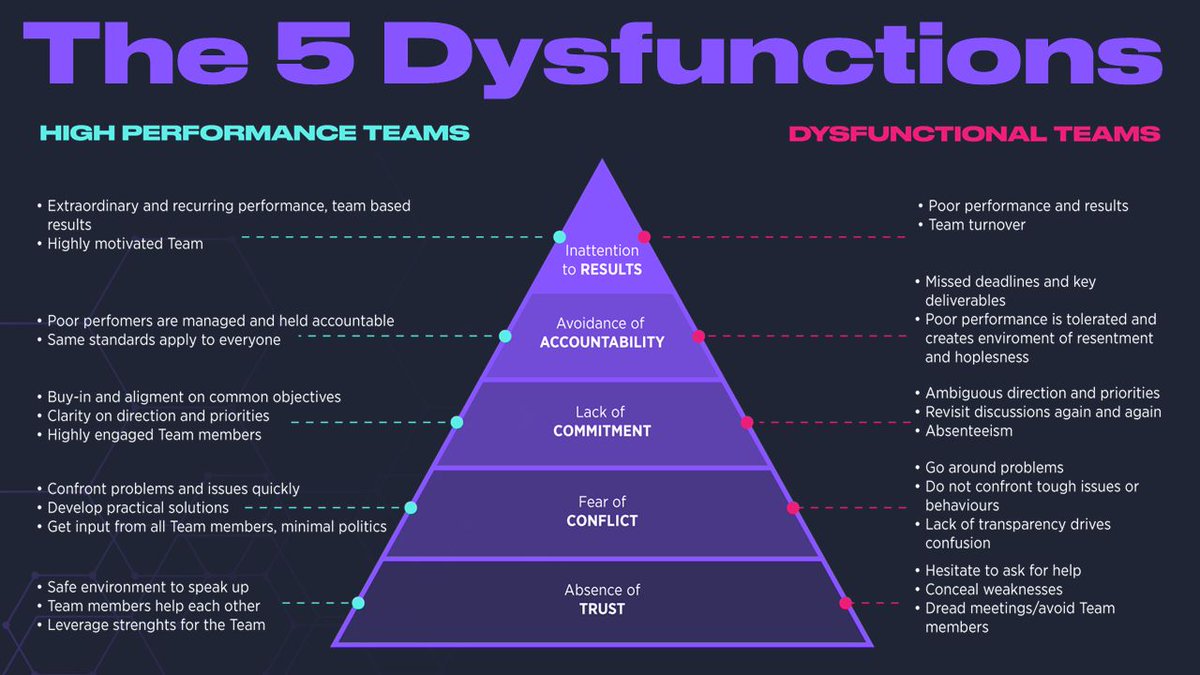
𝗛𝗼𝘄 𝘁𝗼 𝗕𝘂𝗶𝗹𝗱 𝗚𝗿𝗲𝗮𝘁 𝗧𝗲𝗮𝗺𝘀? One of the most important components of your leadership is your team's well-being. To have a great team, they need the trust, commitment, and accountability necessary for high performance. Yet, there is no simple cure for all of these issues. And what I often see is that managers don't understand that some conflicts within a team are actually normal and healthy, especially during team formation. Patrick Lencioni, in his book "The Five Dysfunctions of a Team," identified those dysfunctions: 𝟭. 𝗔𝗯𝘀𝗲𝗻𝗰𝗲 𝗼𝗳 𝗧𝗿𝘂𝘀𝘁 Members of effective teams must feel safe enough to open up, share their ideas, and acknowledge mistakes without fear of ridicule or retribution. It takes time to establish trust among a team, and it's crucial to understand that this process must start with you. This entails keeping your word, being trustworthy, and setting an example for others. 𝟮. 𝗙𝗲𝗮𝗿 𝗼𝗳 𝗖𝗼𝗻𝗳𝗹𝗶𝗰𝘁 Healthy conflict is essential for robust discussion that leads to creative problem-solving and consensus. Encourage them to engage in constructive, lively debate and to question one another's ideas when they disagree. This can be challenging at first, especially for shier team members. Ask direct, open-ended questions that will get everyone's attention during meetings. It is also good to train your people in conflict-solving methods. 𝟯. 𝗟𝗮𝗰𝗸 𝗼𝗳 𝗖𝗼𝗺𝗺𝗶𝘁𝗺𝗲𝗻𝘁 Without members committing to decisions, plans cannot be implemented, and objectives cannot be achieved. By actively encouraging team members to weigh in on issues before you ask them for a commitment, you can discourage "after-meeting meetings." Take note of those who are remaining silent and attempt to get their opinions on the subject. 𝟰. 𝗔𝘃𝗼𝗶𝗱𝗮𝗻𝗰𝗲 𝗼𝗳 𝗔𝗰𝗰𝗼𝘂𝗻𝘁𝗮𝗯𝗶𝗹𝗶𝘁𝘆 Everyone needs to take ownership of their decisions and actions; otherwise, progress is hindered, and objectives remain unrealized. Accountability is key for your team members, both to one another and to themselves. Make sure that, to begin with, everyone is accountable for their own work and behavior. Encourage team members to provide regular, mutual feedback on each other's performance, behavior, and accomplishments. 𝟱. 𝗜𝗻𝗮𝘁𝘁𝗲𝗻𝘁𝗶𝗼𝗻 𝘁𝗼 𝗥𝗲𝘀𝘂𝗹𝘁𝘀 All efforts need to focus on achieving team results before individual accomplishments are celebrated. Make sure your team members are focused on the team's and the company's true objectives to overcome this dysfunction. What can also help here are OKRs that align people's objectives with the team's.
Dr Milan Milanović tweet media
English
2
8
46
2.9K
Tech World With Milan 已转推
Dr Milan Milanović
Dr Milan Milanović@milan_milanovic·
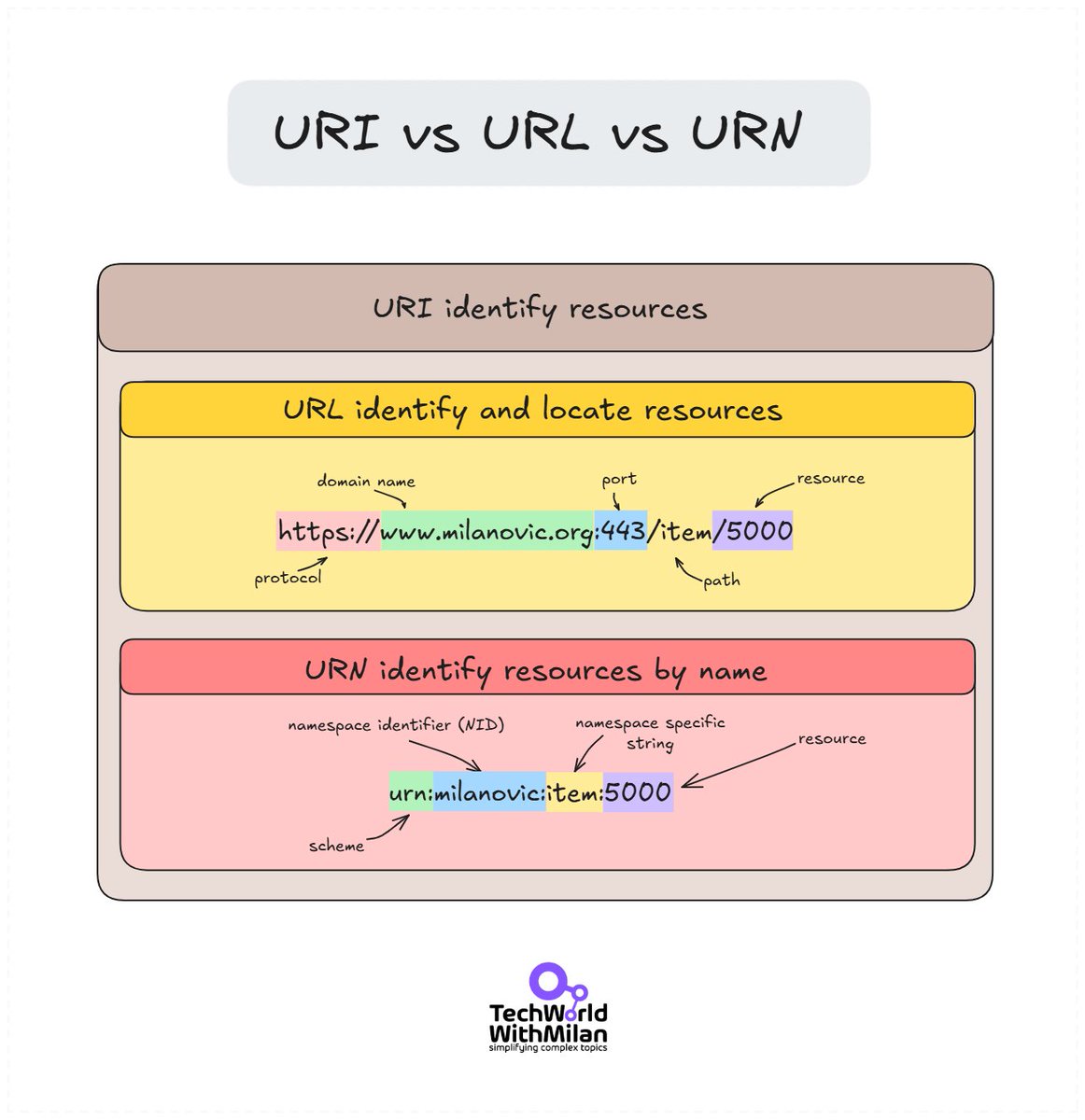
𝗨𝗥𝗜 𝘃𝘀 𝗨𝗥𝗡 𝘃𝘀 𝗨𝗥𝗟 - 𝗪𝗵𝗮𝘁 𝗶𝘀 𝘁𝗵𝗲 𝗱𝗶𝗳𝗳𝗲𝗿𝗲𝗻𝗰𝗲? If we think of a library, we can identify a book in three ways: 🔹 The library's address and the book's shelf location (URL) 🔹 The book's ISBN (URN) 🔹 Either of the above methods (URI) So, these three identifiers are: 🏷️ 𝗨𝗥𝗜 (𝗨𝗻𝗶𝗳𝗼𝗿𝗺 𝗥𝗲𝘀𝗼𝘂𝗿𝗰𝗲 𝗜𝗱𝗲𝗻𝘁𝗶𝗳𝗶𝗲𝗿) is the parent concept. It's any string that identifies a resource. Both URLs and URNs are types of URIs. 🔗 𝗨𝗥𝗟 (𝗨𝗻𝗶𝗳𝗼𝗿𝗺 𝗥𝗲𝘀𝗼𝘂𝗿𝗰𝗲 𝗟𝗼𝗰𝗮𝘁𝗼𝗿) tells you HOW to access something. For example: https:// linkedin .com/ in/ yourprofile. It's like a physical address that tells you exactly where to go. 🏺 𝗨𝗥𝗡 (𝗨𝗻𝗶𝗳𝗼𝗿𝗺 𝗥𝗲𝘀𝗼𝘂𝗿𝗰𝗲 𝗡𝗮𝗺𝗲) is a unique name that persists even if the resource moves or becomes unavailable. Example: urn:isbn:0-486-27557-4. Consider it a social security number – it identifies you but doesn't tell anyone where to find you.
Dr Milan Milanović tweet media
English
4
43
167
6.2K
Tech World With Milan 已转推
Dr Milan Milanović
Dr Milan Milanović@milan_milanovic·
𝗧𝗵𝗲 𝗔𝘇𝘂𝗿𝗲 𝗔𝗜/𝗠𝗟 𝘀𝘁𝗮𝗰𝗸 Here are the most important Azure services if you want to work with AI in Azure. 𝟭. 𝗖𝗼𝗺𝗽𝘂𝘁𝗲 We can use Azure ML as the platform for managing experiments, compute clusters, and the model lifecycle. GPU VMs (NC/ND series) for training workloads that actually need the hardware. AKS when you're running inference at scale and need control over the infrastructure. Container Instances for short jobs where a full cluster is overkill, Functions for lightweight event-driven inference, and Batch for parallel workloads you want to run on a schedule. 𝟮. 𝗗𝗮𝘁𝗮 𝗦𝘁𝗼𝗿𝗮𝗴𝗲 Data Lake Gen2 for training data at scale. Blob Storage for everything else. Azure SQL and Cosmos DB, depending on whether your metadata is relational or document-shaped. Managed Disks if your workload needs fast local storage attached to a VM. Azure Files for shared access across nodes. 𝟯. 𝗗𝗮𝘁𝗮 𝗣𝗿𝗼𝗰𝗲𝘀𝘀𝗶𝗻𝗴 𝗮𝗻𝗱 𝗘𝗧𝗟 Data Factory for orchestrating pipelines. Synapse for large-scale analytics. Databricks, when your team lives in notebooks and needs distributed compute on Spark. Stream Analytics for real-time processing on incoming data. Functions and Event Hubs cover the lighter ETL cases. In practice, most teams end up with Databricks and Data Factory and call it done. 𝟰. 𝗠𝗟 𝗧𝗿𝗮𝗶𝗻𝗶𝗻𝗴 𝗮𝗻𝗱 𝗘𝘅𝗽𝗲𝗿𝗶𝗺𝗲𝗻𝘁𝗮𝘁𝗶𝗼𝗻 AML Pipelines for reproducible training workflows, AML Studio, and Notebooks for the exploration and iteration phase. AutoML is when you want to benchmark quickly without writing the training code yourself. Prompt Flow for LLM-based applications. MLOps handles versioning, deployment, and monitoring across the lifecycle. 𝟱. 𝗙𝗲𝗮𝘁𝘂𝗿𝗲 𝗘𝗻𝗴𝗶𝗻𝗲𝗲𝗿𝗶𝗻𝗴 Feature Store, Databricks FE, Data Explorer. The most underbuilt layer in most ML projects I've seen. Teams spend months on model architecture and three days on features. The ratio should probably be reversed. 𝟲. 𝗗𝗲𝗽𝗹𝗼𝘆𝗺𝗲𝗻𝘁 𝗮𝗻𝗱 𝗜𝗻𝗳𝗲𝗿𝗲𝗻𝗰𝗲 Online Endpoints for real-time inference, Batch Endpoints when latency doesn't matter, and throughput does. AKS Deployment when you need full control over scaling and infrastructure. ACI for simpler containerised deployments. ONNX Runtime for optimised inference across hardware, Azure Edge AI, when the model needs to run closer to the data source. 𝟳. 𝗣𝗶𝗽𝗲𝗹𝗶𝗻𝗲𝘀 𝗮𝗻𝗱 𝗔𝘂𝘁𝗼𝗺𝗮𝘁𝗶𝗼𝗻 ML Pipelines for training automation, Data Factory for data movement, Logic Apps for integration workflows. Functions and DevOps Pipelines for the CI/CD side. A model that runs reliably in production on a schedule looks nothing like a notebook; this is the layer where that gap gets closed, and most teams leave it too late. 𝟴. 𝗟𝗟𝗠 𝗮𝗻𝗱 𝗚𝗲𝗻𝗲𝗿𝗮𝘁𝗶𝘃𝗲 𝗔𝗜 Azure OpenAI for GPT-4 and embeddings with enterprise controls. Phi Models when you need something smaller and cheaper to run. Llama and Mistral through the model catalog if you want to open weights with more control over where they run. Cognitive Services for pre-built capabilities like vision, speech, and language. Azure AI Foundry is the newer unified platform for building and managing AI applications. Prompt Flow for chaining and testing LLM calls. 𝟵. 𝗠𝗼𝗻𝗶𝘁𝗼𝗿𝗶𝗻𝗴, 𝗚𝗼𝘃𝗲𝗿𝗻𝗮𝗻𝗰𝗲 𝗮𝗻𝗱 𝗗𝗲𝘃𝗲𝗹𝗼𝗽𝗲𝗿 𝗧𝗼𝗼𝗹𝗶𝗻𝗴 Azure Monitor and App Insights for observability, ML Monitoring for model drift and data quality in production. Azure Policy and Purview for governance, Entra ID for identity. On tooling: Azure CLI, SDKs, Azure DevOps, GitHub Actions, Bicep/ARM for infrastructure as code. And GitHub Copilot, of course, for AI-assisted coding.
Dr Milan Milanović tweet media
English
6
9
74
3.1K
Tech World With Milan 已转推
Dr Milan Milanović
Dr Milan Milanović@milan_milanovic·
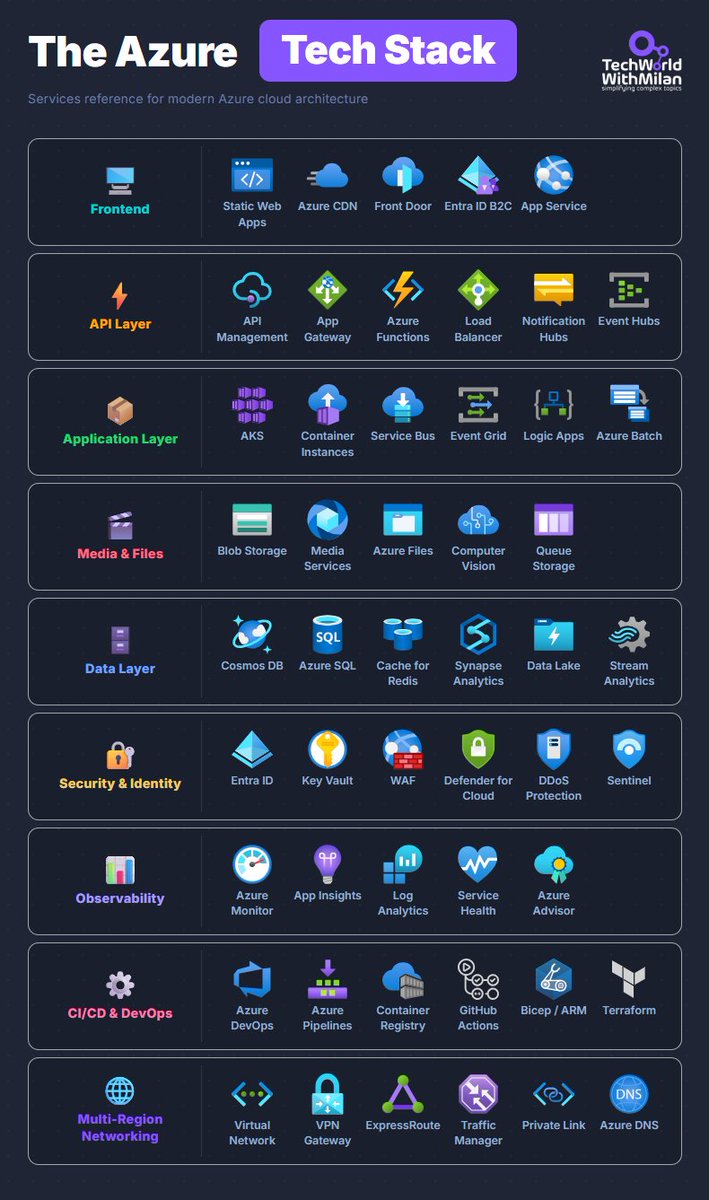
𝗧𝗵𝗲 𝗔𝘇𝘂𝗿𝗲 𝗧𝗲𝗰𝗵 𝗦𝘁𝗮𝗰𝗸 Here are the most important Azure services organized by layer. 𝟭. 𝗙𝗿𝗼𝗻𝘁𝗲𝗻𝗱 Here we have Static Web Apps for Single-Page Applications, and a Content Delivery Network (CDN) for edge caching. If you need global routing, you can use Front Door, and here you also get WAF. Entra ID B2C can be used for customer identity. Most teams start with App Service, and honestly, that's the right call because it handles 80% of the cases that we need. 𝟮. 𝗔𝗣𝗜 𝗟𝗮𝘆𝗲𝗿 API Management is heavy, but if you need versioning, rate limiting, and a developer portal, it's worth the cost. App Gateway in front of internal services. Functions for event-driven compute, Event Hubs, when you're ingesting at scale and need Kafka compatibility. Load Balancer for Layer 4 routing. 𝟯. 𝗔𝗽𝗽𝗹𝗶𝗰𝗮𝘁𝗶𝗼𝗻 𝗟𝗮𝘆𝗲𝗿 Use AKS if your project requires Kubernetes. Container Instances for short-lived jobs, where spinning up a cluster is overkill. Service Bus for reliable queuing between services. Event Grid for reactive, event-driven stuff. Logic Apps is something people swear by for integration workflows, and I've never quite gotten there myself, but the use case is legitimate. 𝟰. 𝗗𝗮𝘁𝗮 𝗟𝗮𝘆𝗲𝗿 Most of the real architecture arguments happen here. Cosmos DB is when you need global distribution and multi-model flexibility, but also write-heavy systems. Azure SQL when relational is the right fit and you'd rather not manage your own SQL Server. Cache for Redis in front of either. Synapse for analytics workloads, Data Lake for raw storage, Stream Analytics when you need real-time processing on incoming event streams. 𝟱. 𝗦𝗲𝗰𝘂𝗿𝗶𝘁𝘆 𝗮𝗻𝗱 𝗜𝗱𝗲𝗻𝘁𝗶𝘁𝘆 Entra ID for identity, Key Vault for secrets and certificates. WAF placement depends on whether you're using Front Door or App Gateway. Defender for Cloud across the subscription, Sentinel as the SIEM. This layer tends to get scoped down when budgets are tight. Then something happens, and you rebuild it properly under pressure. 𝟲. 𝗢𝗯𝘀𝗲𝗿𝘃𝗮𝗯𝗶𝗹𝗶𝘁𝘆 App Insights for application telemetry and distributed tracing. Log Analytics for querying everything. Service Health so you know when Azure itself is having a bad day, which happens more often than the 99.9% SLA suggests. Most teams set this up too late. 𝟳. 𝗖𝗜/𝗖𝗗 𝗮𝗻𝗱 𝗗𝗲𝘃𝗢𝗽𝘀 Azure DevOps or GitHub Actions. Pick one, use it everywhere, don't mix them across teams. Bicep over ARM, the syntax is dramatically cleaner, and the tooling has caught up. Terraform, if you're multicloud or the team already has it. Container Registry for images close to your AKS clusters. The projects I've seen with the messiest pipelines are the ones that let different teams pick different tools. 𝟴. 𝗠𝗲𝗱𝗶𝗮 𝗮𝗻𝗱 𝗙𝗶𝗹𝗲𝘀 Blob Storage for unstructured data, Azure Files for SMB shares, Queue Storage for simple message passing. Media Services, if you're doing video processing. Computer Vision, when you need image analysis without building the model yourself. 𝟵. 𝗠𝘂𝗹𝘁𝗶-𝗥𝗲𝗴𝗶𝗼𝗻 𝗡𝗲𝘁𝘄𝗼𝗿𝗸𝗶𝗻𝗴 Virtual Network as the foundation. VPN Gateway for site-to-site, ExpressRoute, when you need private dedicated connectivity with predictable latency, and the cost is justified. Traffic Manager for DNS-based global routing. Private Link to expose services internally without putting them on the public internet. Most teams don't think about this layer until they're designing for a second region.
Dr Milan Milanović tweet media
English
5
49
288
11.9K
Tech World With Milan 已转推
Dr Milan Milanović
Dr Milan Milanović@milan_milanovic·
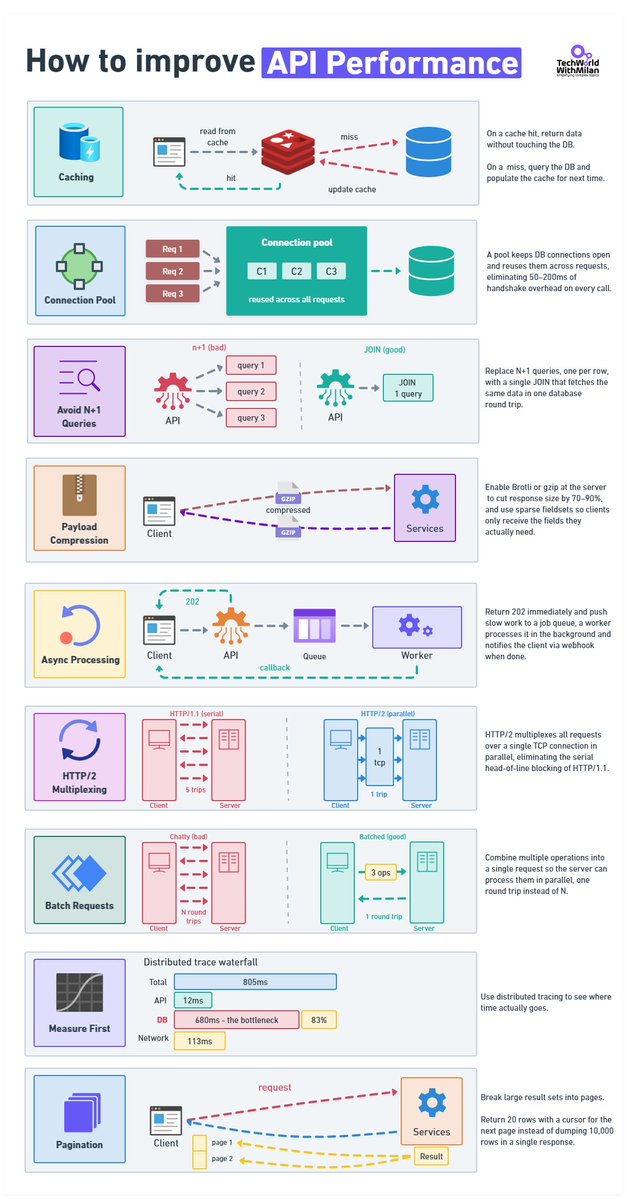
𝗧𝗼𝗽 𝗦𝘁𝗿𝗮𝘁𝗲𝗴𝗶𝗲𝘀 𝘁𝗼 𝗜𝗺𝗽𝗿𝗼𝘃𝗲 𝗔𝗣𝗜 𝗣𝗲𝗿𝗳𝗼𝗿𝗺𝗮𝗻𝗰𝗲 𝟭. 𝗖𝗮𝗰𝗵𝗶𝗻𝗴 A cache hit never touches the database. On a miss, you query the DB and write to cache so the next caller doesn't pay the same cost. The part that engineers usually get wrong is invalidation. TTL is easy to implement and will absolutely serve stale data at the worst moment. Event-driven invalidation is accurate, but now you have a new thing that can break. 𝟮. 𝗖𝗼𝗻𝗻𝗲𝗰𝘁𝗶𝗼𝗻 𝗣𝗼𝗼𝗹𝗶𝗻𝗴 When you open a new connection, for each request, a few things happen: TCP handshake, TLS, Auth, etc. This takes 50–200ms, or even more. Pool your connections. 𝟯. 𝗔𝘃𝗼𝗶𝗱 𝗡+𝟭 𝗤𝘂𝗲𝗿𝗶𝗲𝘀 Every slow codebase I've worked in had this problem. You fetch a list of records, then loop through them and query related data for each. And it works fine locally with 10 rows, but in production with 2,000, it's 2,001 database round-trips per request. We can fix this with one JOIN. Also, we need to index the columns in your WHERE clause. Before you change anything, run a profiler and verify this is actually the problem. I've assumed N+1 before and been wrong. 𝟰. 𝗣𝗮𝘆𝗹𝗼𝗮𝗱 𝗖𝗼𝗺𝗽𝗿𝗲𝘀𝘀𝗶𝗼𝗻 This is something usually forgotten. A 120 KB JSON response becomes roughly 18 KB. If you're not doing this, you're sending the client unnecessary work. You can choose Brotli or gzip. 𝟱. 𝗔𝘀𝘆𝗻𝗰 𝗣𝗿𝗼𝗰𝗲𝘀𝘀𝗶𝗻𝗴 Operations that take seconds don't belong inside an HTTP response. Return 202, put the job on a queue, process it in the background, fire a webhook when it's done. Your p99 will thank you. 𝟲. 𝗛𝗧𝗧𝗣/𝟮 HTTP/1.1 runs one request at a time per connection. That made sense in 1997. HTTP/2 multiplexes everything over a single TCP connection, allowing all requests to be in flight at once, with header compression on top. If your infrastructure supports it and you haven't switched, worth looking at why not. 𝟳. 𝗕𝗮𝘁𝗰𝗵𝗶𝗻𝗴 Ten API calls are 10 round-trips, but also 10 times the latency cost. Let clients bundle operations into one request and process them in parallel on the server. In REST: POST /batch or GET /users?ids=1,2,3. GraphQL handles this without you having to think about it. 𝟴. 𝗠𝗲𝗮𝘀𝘂𝗿𝗲 𝗙𝗶𝗿𝘀𝘁 Set up OpenTelemetry and look at actual traces before touching anything. I've watched teams spend weeks optimizing the wrong layer. Here is a real example: API handler: 12ms, network: 113ms, DB query: 680ms. Everyone was looking at the API layer, but the problem was that it was sitting in the database the whole time. An afternoon of instrumentation would have shown them that almost immediately. 𝟵. 𝗣𝗮𝗴𝗶𝗻𝗮𝘁𝗶𝗼𝗻 Never return 10,000 rows. Return 20 with a cursor for the next page. Offset pagination scans and discards rows on every call, at page 500 you're scanning 10,000 rows to show 20. Cursor-based picks up exactly where it left off.
Dr Milan Milanović tweet media
English
10
65
363
16.7K
Tech World With Milan 已转推
Dr Milan Milanović
Dr Milan Milanović@milan_milanovic·
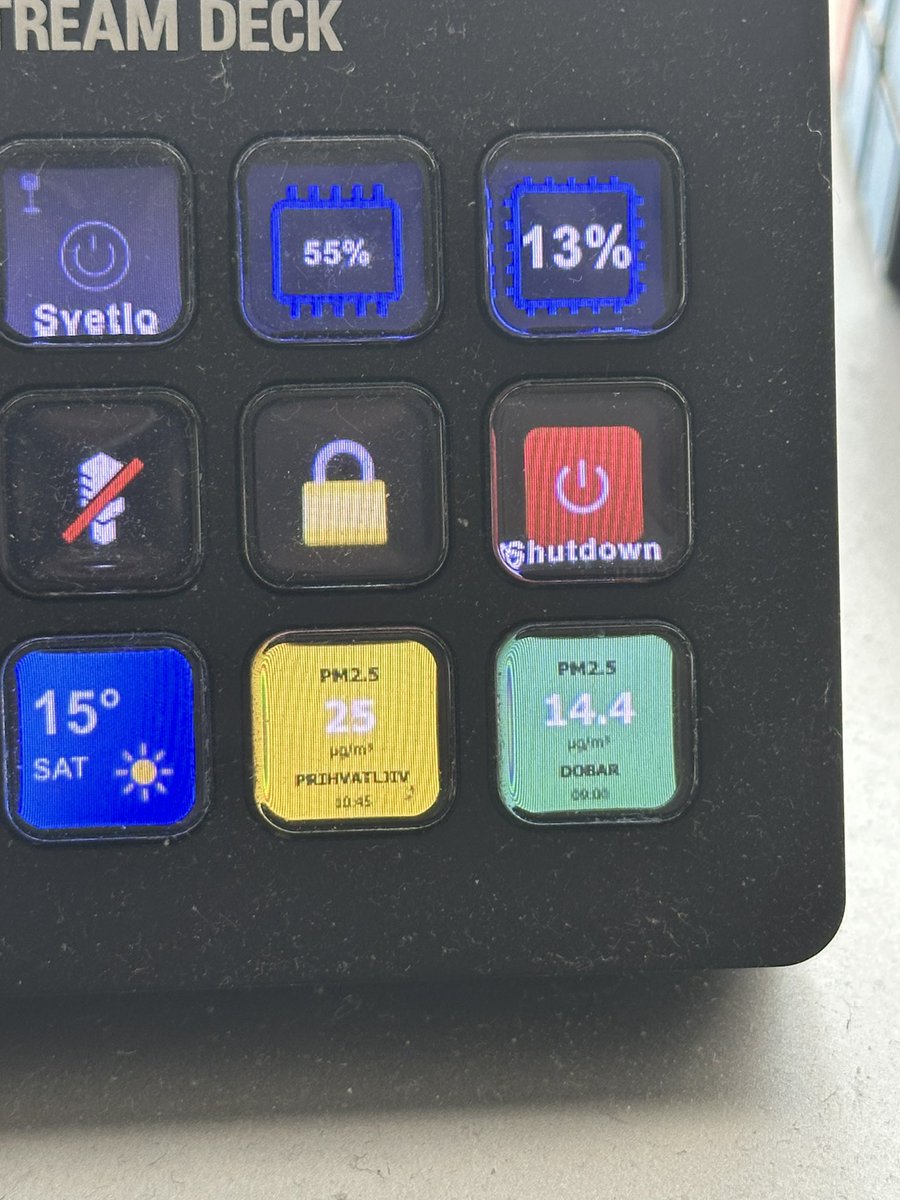
Small weekend project Fetching air pollution data from public API for outside and for inside fetching from my indoor monitor Both showing on Elgato StreamDeck and auto-refreshing on default intervals
Dr Milan Milanović tweet media
English
3
1
15
1.5K