Post
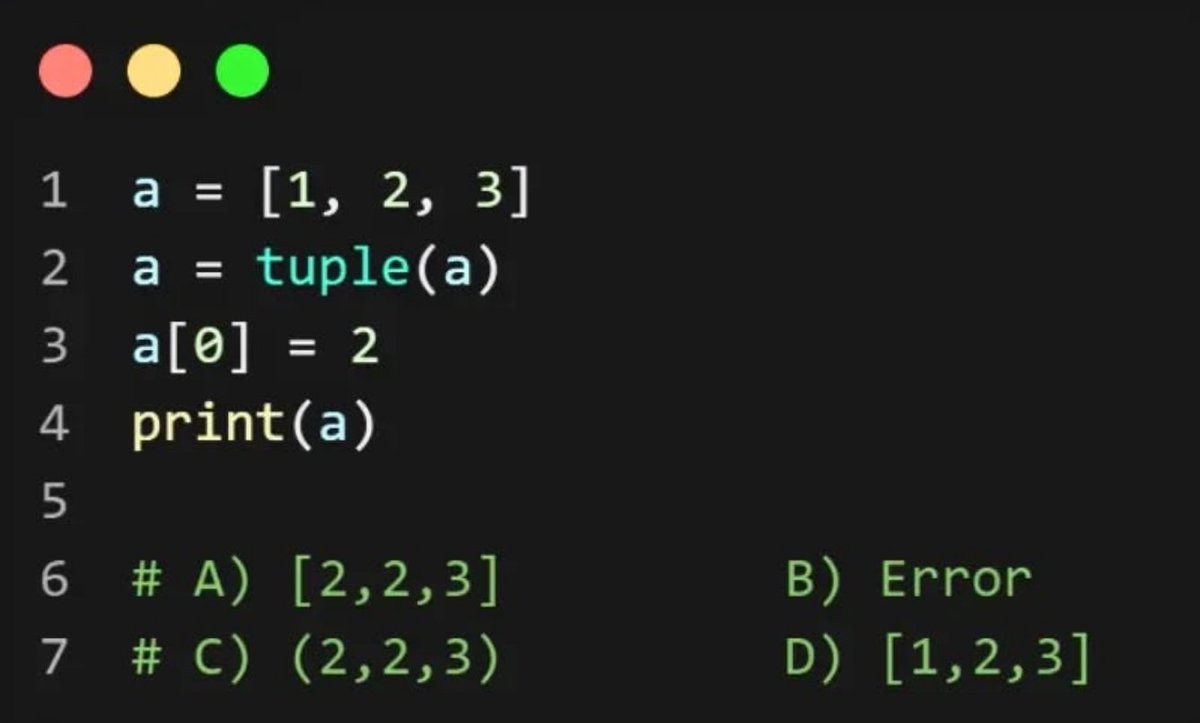

Answer: B) Error
The immutability trap!
› a = tuple(a) converts list to tuple (1, 2, 3)
› a[0] = 2 tries to modify the tuple
› TypeError: tuples are immutable and can't be changed
› Line 3 never runs, so no print
For beginners: Tuples can't be modified after creation. Use lists when you need to change elements!
English

@Python_Dv Answer: B). Error
The provided Python code will result in a TypeError because it attempts to modify an immutable object.
The first line, a = [1, 2, 3], creates a list. Lists are mutable, which means their elements can be changed, added, or removed.
The second line, a = tuple(a),
English

@Python_Dv B. Error.
Tuple are immutable. Meaning you can not change elements of tuple data type.
English






@Python_Dv The output with Python 3.14.0 is:
Traceback (most recent call last):
File "/home/toshi/wk/python/scratch/test_tuple.py", line 5, in <module>
a[0] = 2
~^^^
TypeError: 'tuple' object does not support item assignment
English

@Python_Dv Possible error as variable name and data be identical ✖️✍🏼
English