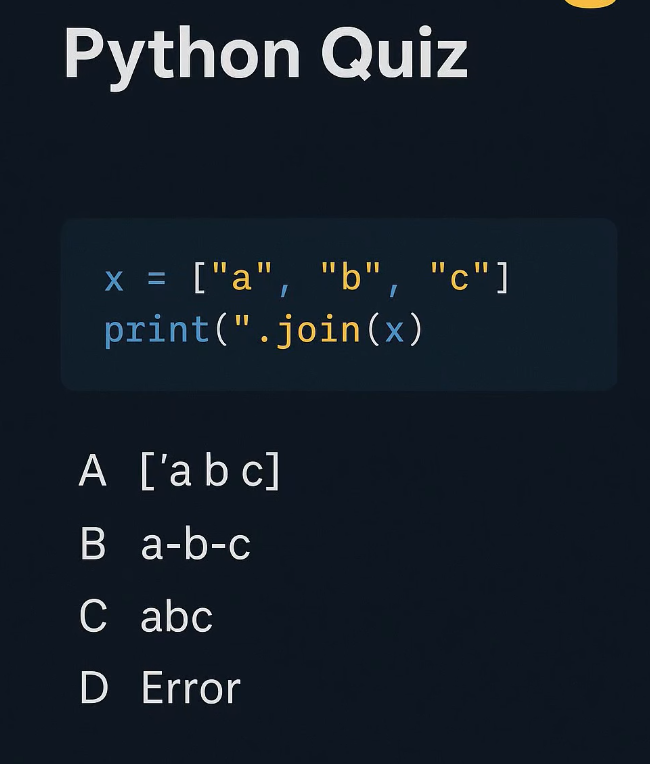
Answer: B) a.b.c
Step by step:
› ".".join(x) uses "." as the separator
› It goes BETWEEN elements, not around them
› "a" + "." + "b" + "." + "c" = "a.b.c"
For beginners:
Why .join() over loops? A loop like s += '.' + el adds a dot at the END too. Use .join() when you need separators only BETWEEN items!
@PythonPr The answer is C: abc.
Why is this the answer?
The code uses the .join() method, which is a powerful way to concatenate (combine) elements of a list into a single string. Here is the breakdown:
The List: x = ["a", "b", "c"] is a list containing three separate string elements.
Correct answer: C – abc
Explanation:
"".join(x) joins all elements of the list using an empty string as the separator.
x = ["a", "b", "c"]
The separator is "" (nothing between items)
So Python concatenates the elements directly:
"a" + "" + "b" + "" + "c" → "abc"
That is why the output is:
abc
@PythonPr There are two errors:
Missing closing quote for the string "."
Missing closing parenthesis for print()
Because of this, Python raises a SyntaxError.
output= Error