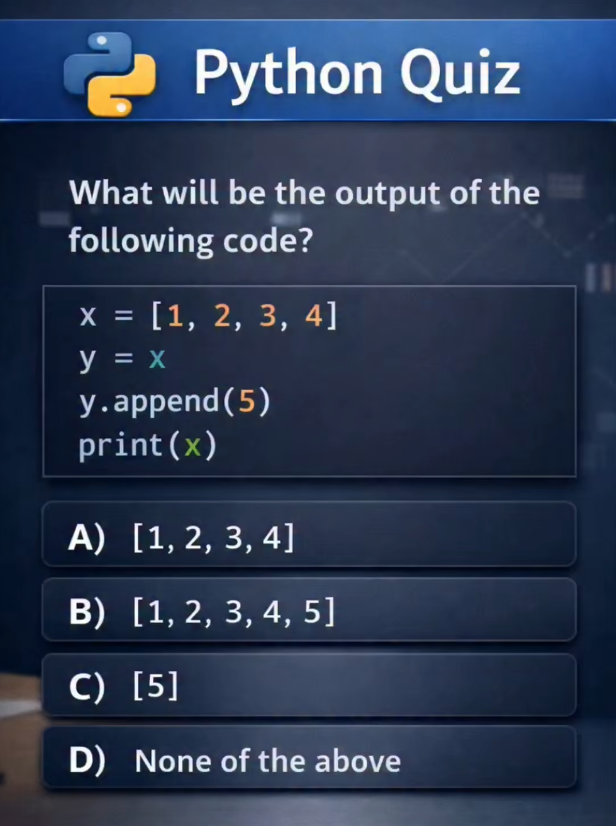
B) [1, 2, 3, 4, 5]
The trap: in Python, variables are references—labels on the boxes, not the boxes themselves.
› Both x and y point to the same list.
› y.append(5) modifies that shared list.
› x sees the change too.
› Result: [1, 2, 3, 4, 5]
For beginners: want separate lists? Use y = x.copy() or y = x[:].
@PythonPr The correct answer is B [1, 2, 3, 4, 5]
In Python, assignment (y = x) for mutable objects like lists creates a reference, not a copy. Both x and y point to the same list in memory.
Therefore, y.append(5) mutates that single shared list, and print(x) shows the updated list.
@PythonPr Answer: (B) [1, 2, 3, 4, 5]
In Python, when you assign one variable to another where both refer to a mutable object like a list, you are not creating a copy of the list. Instead, both variables, x and y in this case, become references to the same object in memory.
@PythonPr Output: B — [1, 2, 3, 4, 5]
y doesn’t copy the list; it references the same object as x.
So y.append(5) mutates the original list, and x reflects the change.
Classic example of mutable objects + shared references in Python.
@PythonPr I'm not so sure I'd describe this as a quiz - seems more like an exercise to test our understanding of Python code. Can we discuss the code itself and work through it?
@PythonPr B) [1,2,3,4,5] is the correct answer.
First qe assgin a value x to a list then variable is changed then append add the element in the last of the list.