1/ Auto mode = no more permission prompts
Opus 4.7 loves doing complex, long-running tasks like deep research, refactoring code, building complex features, iterating until it hits a performance benchmark.
In the past, you either had to babysit the model while it did these sorts of long tasks, our use --dangerously-skip-permissions.
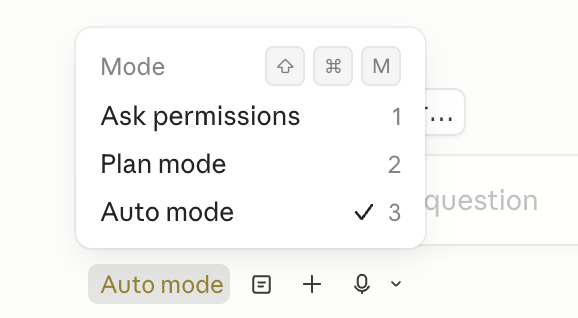
We recently rolled out auto mode as a safer alternative. In this mode, permission prompts are routed to a model-based classifier to decide whether the command is safe to run. If it's safe, it's auto-approved.
This means no more babysitting while the model runs. More than that, it means you can run more Claudes in parallel. Once a Claude is cooking, you can switch focus to the next Claude.
Auto mode is now available for Opus 4.7 for Max, Teams, and Enterprise users. Shift-tab to enter auto mode in the CLI, or choose it in the dropdown in Desktop or VSCode.
2/ The new /fewer-permission-prompts skill
We've also released a new /fewer-permission-prompts skill. It scans through your session history to find common bash and MCP commands that are safe but caused repeated permission prompts.
It then recommends a list of commands to add to your permissions allowlist.
Use this to tune up your permissions and avoid unnecessary permission prompts, especially if you don't use auto mode.
code.claude.com/docs/en/permis…
3/ Recaps
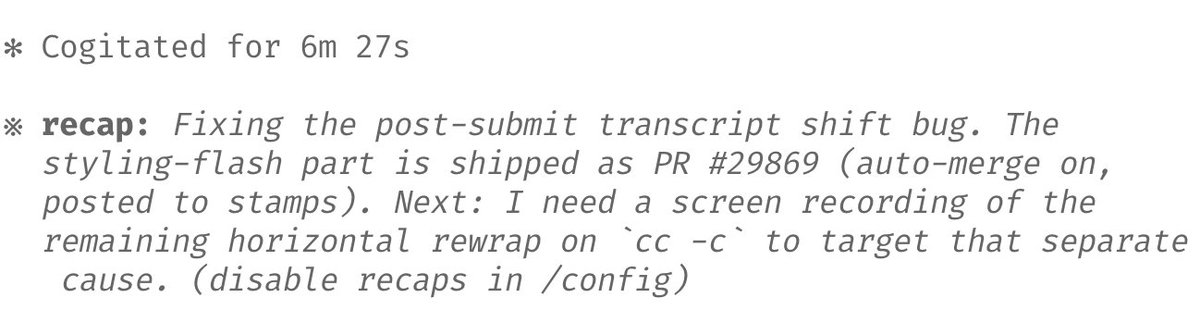
We shipped recaps earlier this week, to prep for Opus 4.7. Recaps are short summaries for what an agent did & what's next.
Very useful when returning to a long-running session after a few minutes or a few hours.
4/ Focus mode
I've been loving the new focus mode in the CLI, which hides all the intermediate work to just focus on the final result. The model has reached a point where I generally trust it to run the right commands and make the right edits. I just look at the final result.
/focus to toggle on/off.
5/ Configure your effort level
Opus 4.7 uses adaptive thinking instead of thinking budgets. To tune the model to think more/less, we recommend tuning effort.
Use lower effort for faster responses and lower token usage. Use higher effort for the most intelligence and capability.
Personally, I use xhigh effort for most tasks, and max effort for the hardest tasks. Max applies to just your current session; other effort levels are sticky and persist for your next session also.
/effort to set your effort level.