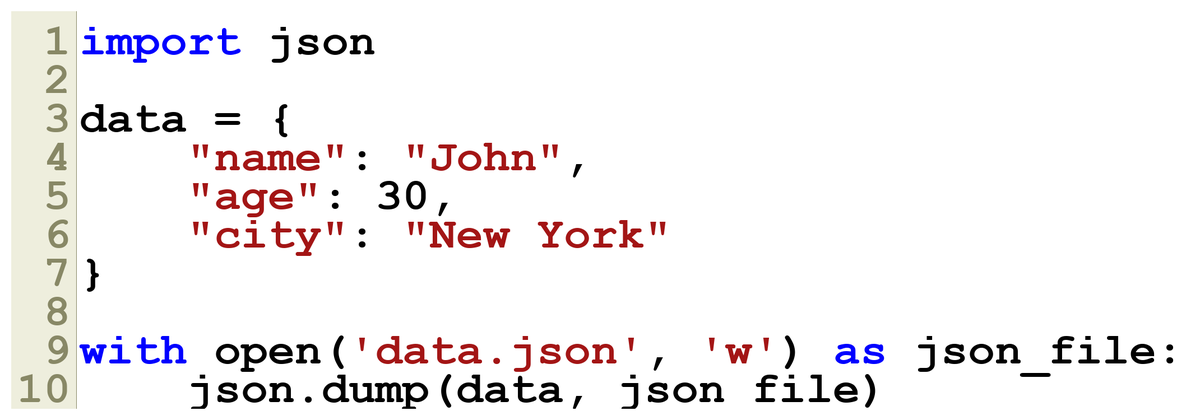
🗃️ JSON is a common data format used for APIs, configurations, and more in Python. Let's explore how to create and manipulate JSON files using Python's built-in `json` module. Perfect for beginners! Follow along with @YourPythonFun 👇
👨💻 Code sample: Creating a JSON file using Python.
- Use `json.dump()` to write data to `data.json`
- Handle the file with `with` to ensure it's properly closed
- Simple & effective for data storage!
✨ Reading a JSON file is just as easy.
Use `json.load(file)` within a `with` statement to load JSON data into a Python dictionary. This makes data manipulation straightforward and efficient! 💡 #PythonTips
🔍 Here’s how you extract data from a JSON file in Python. Simple, right?
With one simple line, `json.load()` converts JSON data into a Python dictionary for easy access!
#CodingForAll 🎉
🚨 Error handling is crucial! Use `try-except` blocks when opening files to manage errors like `FileNotFoundError`.
Always validate JSON data/schema to prevent unexpected crashes. Stay safe! 🛡️ #CodeSmart
📝 Best Practices:
- Use context managers (`with`) to handle file I/O
- Validate and sanitize JSON inputs
These practices will help keep your JSON file operations smooth and error-free. 🚀