Brian Ratliff
701 posts

Brian Ratliff
@BrierRat
Bringing AI to mechanical engineering | Claude CAD
Portland, OR انضم Haziran 2011
468 يتبع496 المتابعون
تغريدة مثبتة


@BrierRat Make a script to randomly assign a selection of colors to all parts.
You’ll be glad you did.
English

What do you guys think, should I add colors to my homebrewed CAD viewer? I feel like my profile might be looking a bit monochrome.
On one hand, basically every CAD design I've done in my career has been in this particular shade of gray. At some point it's tradition. I've built literally thousands of CAD parts--I've just never really cared about colors unless it's interfering with viewing the part. And sometimes, I'll admit, lots of colors seems a bit gaudy and not very useful except for presentation.
On the other hand, it seems all the new AI-CAD floating around has been splashed with color. Is this the trend now?
Cool thing about building your own AI-native viewer is you get to add the exact features you want. And only those features you need.


English

I had a similar moment with Claude. I had a simple part, a block with an arced top which I put a slotted cut diagonally across the arced top. Asked Claude Code to read and manipulate the STEP code directly. It did that a few times, changing the slot angle and width by modifying vertex points, etc usi my greps. But at a point, I got bored and gave it a mod which I knew would break topology. Claude examined the request, saw it would break topology, went and coded the part up in Cadquery and made the change, regenerated the STEP, on its own, without my intervention.
Color me impressed. That’s when I started leaning hard to my Claude CAD system.
English

@BrierRat It seems that way. I was surprised! I had to make a couple quick drawings to get it to make the Zeiss dovetail, but putting together parts from other models was impressive.
English

@faraz_r_khan I would give build123d a try. I think the problem with python freecad is it might be one abstraction removed.
You are using a python script to operate freecad operating on the OCCT kernel. Using build123d or cadquery and you have a script operating directly on the OCCT kernel
English

@BrierRat Interesting! Share it when you get a chance. I tried it 4 months ago so maybe it’s better now or the integration with 123 is better than python freecad?
English

This is a challenge in the AI-augmented CAD space. How do you get past dancing bear demos? Get to the point where people say, aha, this makes my life as a design engineer easier?
That’s why all the demos of Claude CAD I post here are buildable.
kumikumi (Ankkala)@ankkala
Dancing Bear is a good analogy I found for AI outputs. Suppose there's a circus and people go there to see The Dancing Bear. People don't go because the dance is good. It isn't. It may actually be kind of terrible. What matters is that the bear dances at all.
English

@BuildingDeeply My main problem is squaring cosmetic colors with the functional colors of labeling faces, since the face labeling is a big part of how the user communicates with Claude over the MCP
English

@BrierRat Easy answer: yes, of course add color. Just make it optional, and with useful user controls.
English

@AndresMilioto I have had Claude suggest McMaster part numbers for screws it wants. But McMaster won’t let Claude download the models
English

@ShabaniBetim That said, it’s a bit different than CAD. Many relationships are just handled in the code. Relationships are just reusing variables used to build the features
English

@ShabaniBetim Not as such. This was built as solid bodies. Build123d and OCCT supports relationship constraints, but here I’m more testing geometric reasoning. With an agent, it’s a little unnecessary, since the agent can manually keep things together if parameters shift.
English

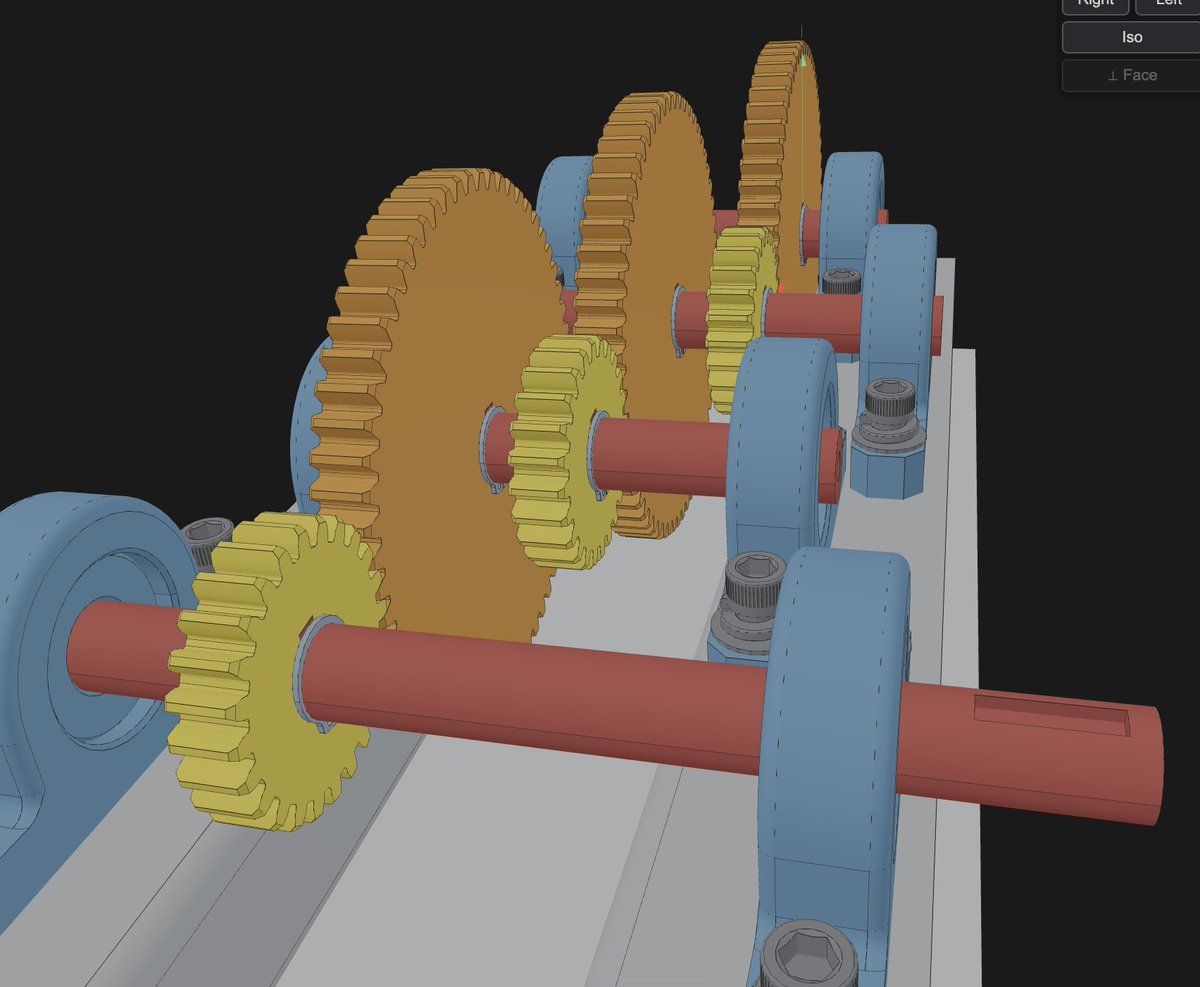
Oh, there are a bunch of skill files behind this as well. And surprisingly, yes, Claude is pretty up on gear ratios and standards. The STEP sketch gave ratios, it asked what gear tooth ratio I’d prefer and built it to spec. It even assumes specifications—saw the shaft was in mm, built ISO standard keyways into the gears and shaft.
English

Interesting. Did you add other magic other than telling Claude to “use build123d”? I was unable to make it do anything useful with python-freecad. It made pretty things - but not useful and not to specifications at all. I think converting specification to something meaningful is an actual tool that needs building. For example - does Claude correctly understand gear ratios or number of teeth in your application? Super curious!
English

@faraz_r_khan I used a STEP file export from Shapr3d. It was just a bunch of extruded cylinders which Claude then interprets as gears and shafts. The build is in build123d, so fully parametric.
English

So since this is a different viewer it starts by using a screenshot of your shapr3d design? I’ve tried something similar with solidworks and a plugin but using screenshots simply didn’t work for me with solidworks api or freecad python api. What’s the additional magic here? Can it change the gearbox to your specs?
English

@AndresMilioto McMaster Carr apparently doesn’t like Claude (or any AI) to browse its website, so I do it manually. This seems like something that’s automatable, but one thing at a time
English

That’s the loose idea. I feel like the tight integration of my viewer with the MCP server and Claude is an advantage (rather than bolting on an MCP to normal CAD). This build went together particularly smoothly. Not sure if it’s Opus 4.8, the subject matter, or the skills making an impression, but it was smooth this time around.
English

I've been having decent luck with opus 4.8 using the fusion mcp server. There are some footguns there though. The whole taking screenshots and trying to discern geometry from that is not ideal. I've had it get confused because it left sketch line visibility on. 😂
Are you planning on turning your accumulated skills/tools into a legit product?
English

@ShirodkarKirtan @svankina13 There’s a bit of a method and a bunch of skills files involved, not a one-shot prompt
English

@BrierRat @svankina13 which prompt did you use here for Claude code generation for build123d
English