ManchesterUX

1.4K posts

ManchesterUX banner
ManchesterUX

ManchesterUX

@ManchesterUX

Everything Manchester UX!

Manchester Beigetreten Mart 2012
4 Folgt37 Follower
ManchesterUX retweetet
UX Links
UX Links@uxlinks·
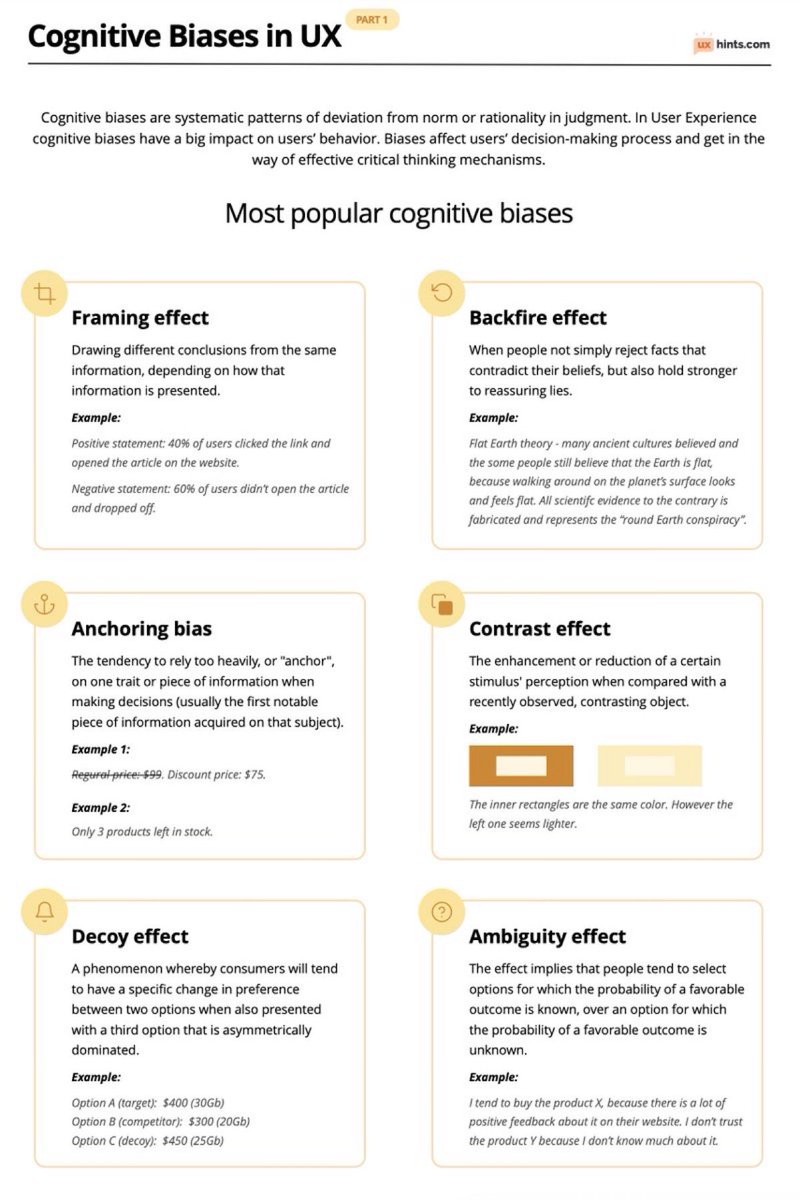
Learn how to use Cognitive Biases in UX to Boost Your Next Design Project 🙌 FREE Downloadable Cheatsheet 🔖 Cognitive biases are systematic patterns of deviation from norm or rationality in judgment. In User Experience cognitive biases have a big impact on users’ behaviour. Biases effect users’ decision-making process and get in the way of effective critical thinking mechanisms. Most popular cognitive biases Framing effect Drawing different conclusions from the same information, depending on how that information is presented. Example: Positive statement: 40% of users clicked the link and opened the article on the website. Negative statement: 60% of users didn’t open the article and dropped off. Backfire effect When people don’t simply reject facts that contradict their beliefs, but also hold stronger to reassuring lies. Example: Flat Earth theory - many ancient cultures believed and the some people still believe that the Earth is flat, because walking around on the planet’s surface looks and feels flat. All scientific evidence to the contrary is fabricated and represents the “round Earth conspiracy”. Anchoring bias The tendency to rely too heavily, or "anchor", on one trait or piece of information when making decisions (usually the first notable piece of information acquired on that subject). Example 1: Regular price: $99. Discount price: $75. Example 2: Only 3 products left in stock. Contrast effect The enhancement or reduction of a certain stimulus' perception when compared with a recently observed, contrasting object. Example: The inner rectangles are the same colour. However the left one seems lighter. Decoy effect A phenomenon whereby consumers will tend to have a specific change in preference between two options when also presented with a third option that is asymmetrically dominated. Example: Option A (target): $400 (30Gb) Option B (competitor): $300 (20Gb) Option C (decoy): $450 (25Gb) Ambiguity effect The effect implies that people tend to select options for which the probability of a favourable outcome is known, over an option for which the probability of a favourable outcome is unknown. Example: I tend to buy the product X, because there is a lot of positive feedback about it on their website. I don’t trust the product Y because I don’t know much about it. #UX #UI #UXDesign #UIDesign #ProductDesign
UX Links tweet media
English
1
2
4
346
ManchesterUX retweetet
UX Links
UX Links@uxlinks·
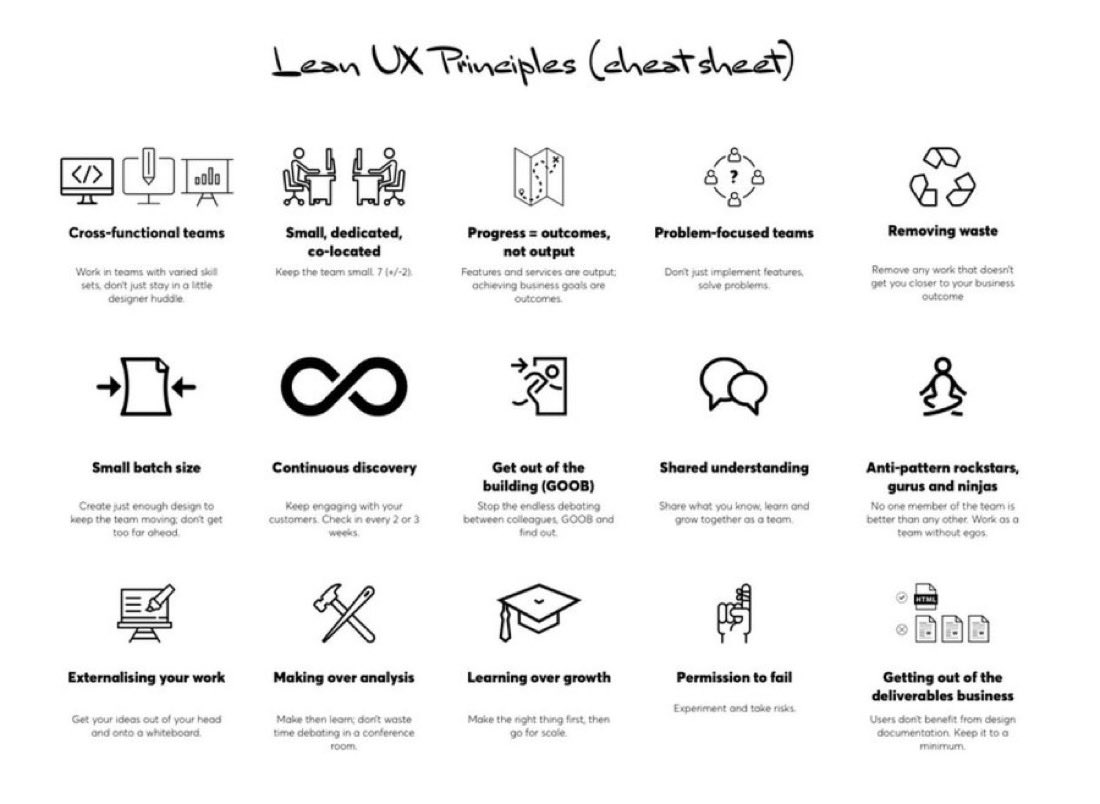
Excellent Lean UX Principles Cheat sheet 🙌 FREE cheatsheet attached 🔖 Overview: Cross-functional teams Work in teams with varied skill sets, don't just stay in a little designer huddle. Small, dedicated, co-located Keep the team small. 7 (+/-2). Progress = outcomes, not output Features and services are output; achieving business goals are outcomes. Problem-focused teams Don't just implement features, solve problems. Removing waste Remove any work that doesn't get you closer to your business outcome Small batch size Create just enough design to keep the team moving; don't get too far ahead. Continuous discovery Keep engaging with your customers. Check in every 2 or 3 weeks. Get out of the building (GOOB) Stop the endless debating between colleagues, GOOB and find out. Shared understanding Share what you know, learn and grow together as a team. Anti-pattern rockstars, gurus and ninjas No one member of the team is better than any other. Work as a team without egos. Externalising your work Get your ideas out of your head and onto a whiteboard Making over analysis Make then learn; don't waste time debating in a conference room. Learning over growth Make the right thing first, then go for scale. Permission to fail Experiment and take risks. Getting out of the deliverables business Users don't benefit from design documentation. Keep it to a minimum. #UX #UI #UXDesign #UIDesign #ProductDesign
UX Links tweet media
English
0
3
13
511
ManchesterUX retweetet
UX Links
UX Links@uxlinks·
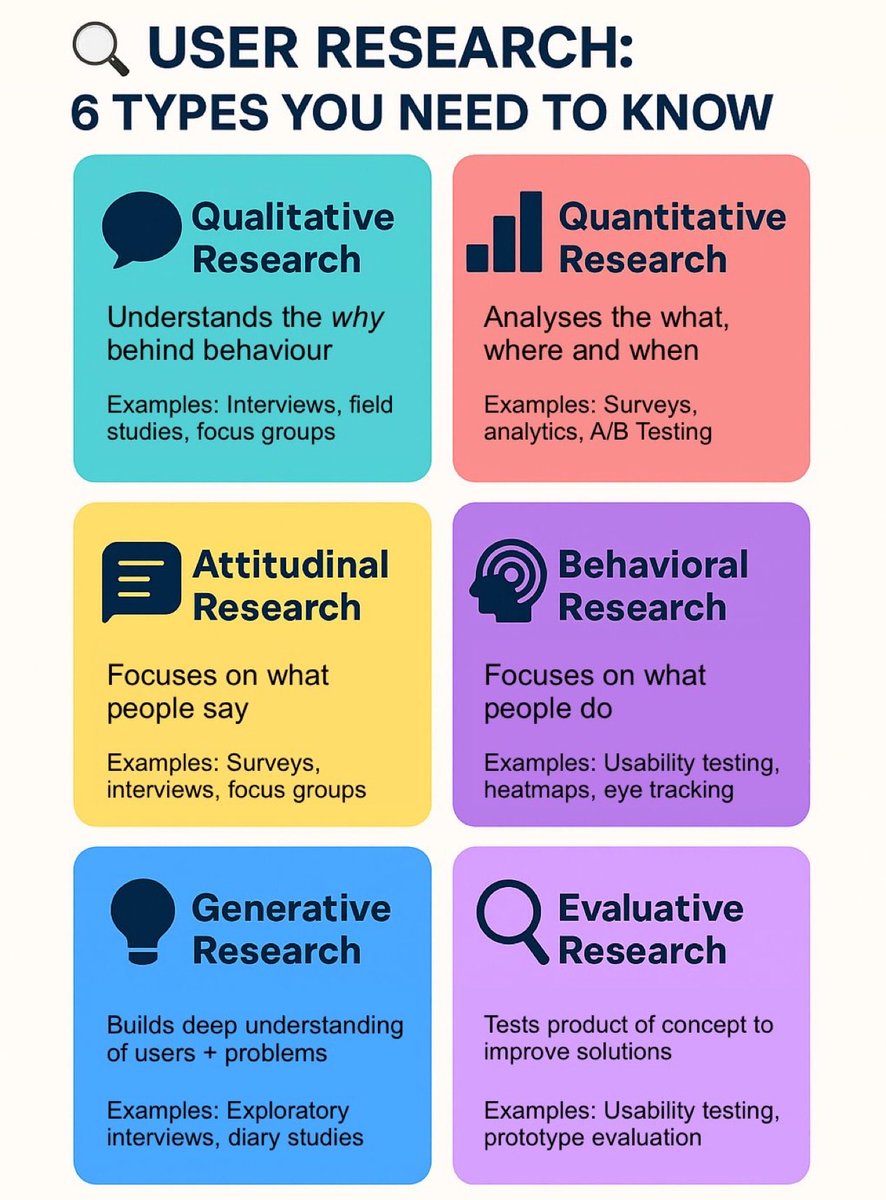
User Research: 6 Types You Need to Know 🙌 FREE Cheatsheet attached 🔖 To fully understand users, it’s important to apply different research approaches. Each method uncovers unique insights, and together they provide a complete picture of user needs and behaviours. 1. Qualitative Research – Understands the why behind behaviour. Examples: Interviews, field studies, focus groups 2. Quantitative Research – Analyses the what, where, and when. Examples: Surveys, analytics, A/B testing 3. Attitudinal Research – Focuses on what people say. Examples: Surveys, interviews, focus groups 4. Behavioural Research – Focuses on what people do. Examples: Usability testing, heat maps, eye tracking 5. Generative Research – Builds a deep understanding of users and problems. Examples: Exploratory interviews, diary studies 6. Evaluative Research – Tests a product or concept to refine and improve solutions. Examples: Usability testing, prototype evaluation ➡️ Using a mix of these methods ensures your design decisions are grounded in evidence, not assumptions. #UXResearch #UserExperience #UXDesign
UX Links tweet media
English
2
9
32
904
ManchesterUX retweetet
UX Links
UX Links@uxlinks·
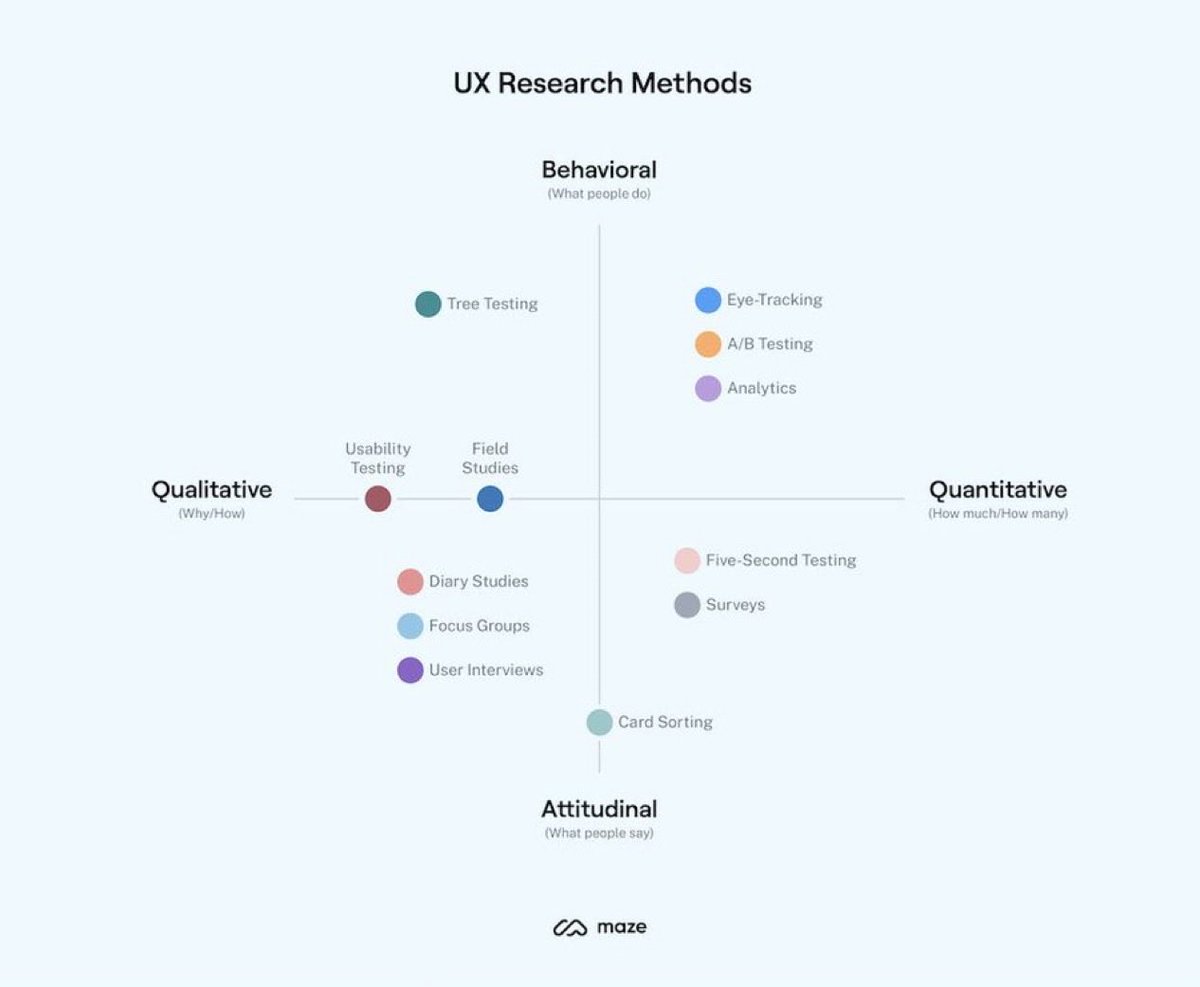
Learn about the Key UX research methods, how and when to use them! 🙌 What are UX research methods? User experience (UX) research methods are different ways of generating insights about your users, their behavior, motivations, and needs. You can use methods like user interviews, surveys, focus groups, card sorting, usability testing to identify user challenges and turn them into opportunities to improve the user experience. UX research methods include user interviews, card sorting, surveys, usability testing, and more. We’ll go into more detail about the top methods and when to use them later in this chapter. If you'd prefer a quick overview, check out the video below. Or, keep reading for an in-depth guide to each method (plus a bonus technique). Overview: The most common types of user research Qualitative vs. quantitative All research methods are either quantitative or qualitative. Qualitative research focuses on capturing subjective insights into users' experiences. It aims to understand the underlying reasons, motivations, and behaviors of individuals. Quantitative research, on the other hand, involves collecting and analyzing numerical data to identify patterns, trends, and significance. It aims to quantify user behaviors, preferences, and attitudes, allowing for generalizations and statistical insights. Attitudinal vs. behavioral Attitudinal research is about understanding users' attitudes, perceptions, and beliefs. It delves into the 'why' behind user decisions and actions. It often involves surveys or interviews where users are asked about their feelings, preferences, or perceptions towards a product or service. It's subjective in nature, aiming to capture people's emotions and opinions. Behavioral research is about what users do rather than what they say they do or would do. This kind of research is often based on observation methods like usability testing, eye-tracking, or heat maps to understand user behavior. Generative vs. evaluative Generative research is all about generating new ideas, concepts, and insights to fuel the design process. You might run brainstorming sessions with groups of users, card sorting, and co-design sessions to inspire creativity and guide the development of user-centered solutions. On the other hand, evaluative research focuses on assessing the usability, effectiveness, and overall quality of existing designs or prototypes. Once you’ve developed a prototype of your product, it's time to evaluate its strengths and weaknesses. You can compare different versions of a design or feature through A/B testing—ensuring your design meets user needs and expectations. The best UX research type? The best research type varies depending on your project; what your objectives are, and what stage you’re in. Ultimately, the ideal type of research is one which provides the insights required, using the available resources. For example, if you're at the early ideation or product discovery stage, generative research methods can help you generate new ideas, understand user needs, and explore possibilities. As you move to the design and development phase, evaluative research methods and quantitative data become crucial. #UX #UI #UXDesign #UIDesign #ProductDesign
UX Links tweet media
English
1
7
30
1.4K
ManchesterUX retweetet
UX Links
UX Links@uxlinks·
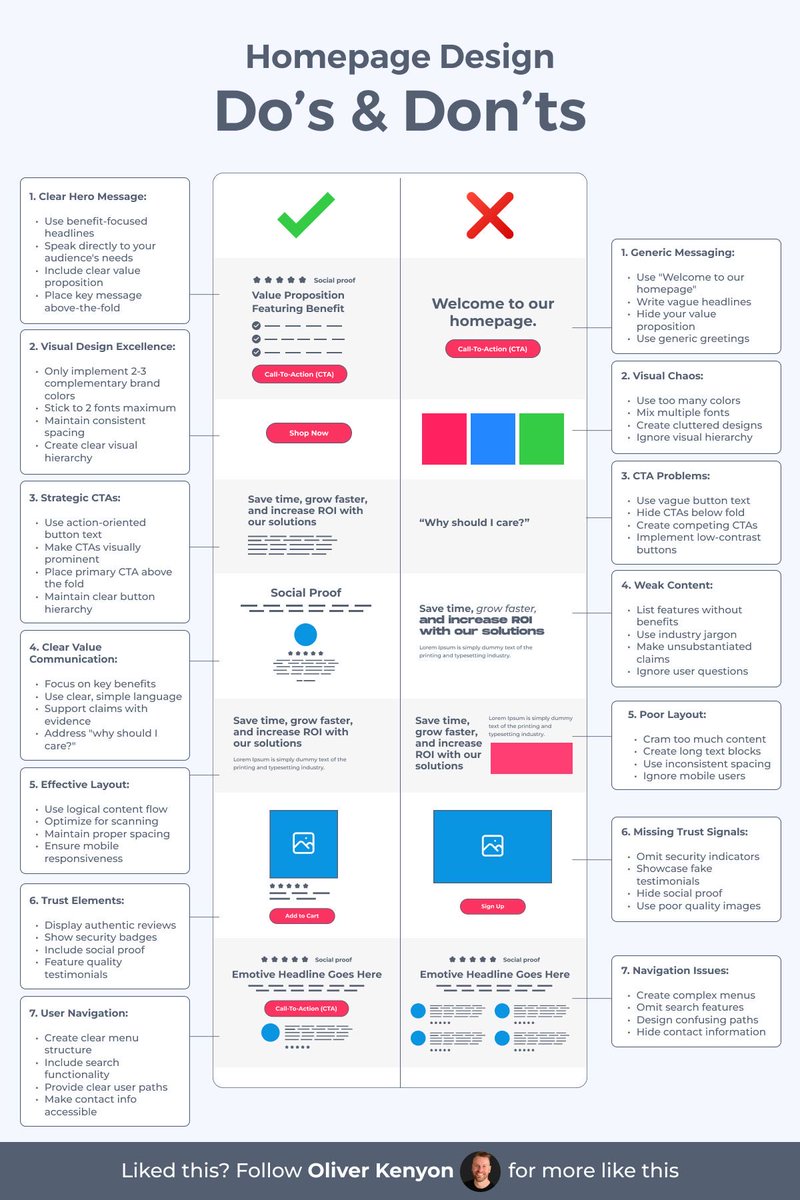
A good homepage doesn’t explain everything — it makes people want to keep scrolling 🙌 Do the left. Avoid the right 😎 Save to Bookmarks for reference 🔖 #UX #UI #UIDesign #UXDesign
UX Links tweet media
English
1
5
22
972
ManchesterUX retweetet
UX Links
UX Links@uxlinks·
20 Excellent FREE Illustration Resources for your next design project 🙌 Save to Bookmarks for reference 🔖 1. absurd .design 2. blackillustrations .com 3. drawkit .com 4. humaaans .com 5. undraw .co 6. opendoodles .com 7. freebiesupply .com 8. manypixels .co 9. icons8 .com/illustrations 10. lukaszadam .com/illustrations 11. stubborn .fun 12. storyset .com 13. draftss .com 14. freevector .com 15. icons8 .com 16. blush .design 17. iradesign .io 18. icons8 .com 19. openpeeps .com 20. vectorian .net Thanks for your support @uxlinks #UX #UI #UXDesign #UIDesign #ProductDesign
English
1
4
17
1.2K
ManchesterUX retweetet
UX Links
UX Links@uxlinks·
Check out the site: 60fps.design 🙌
English
0
2
3
426
ManchesterUX retweetet
UX Links
UX Links@uxlinks·
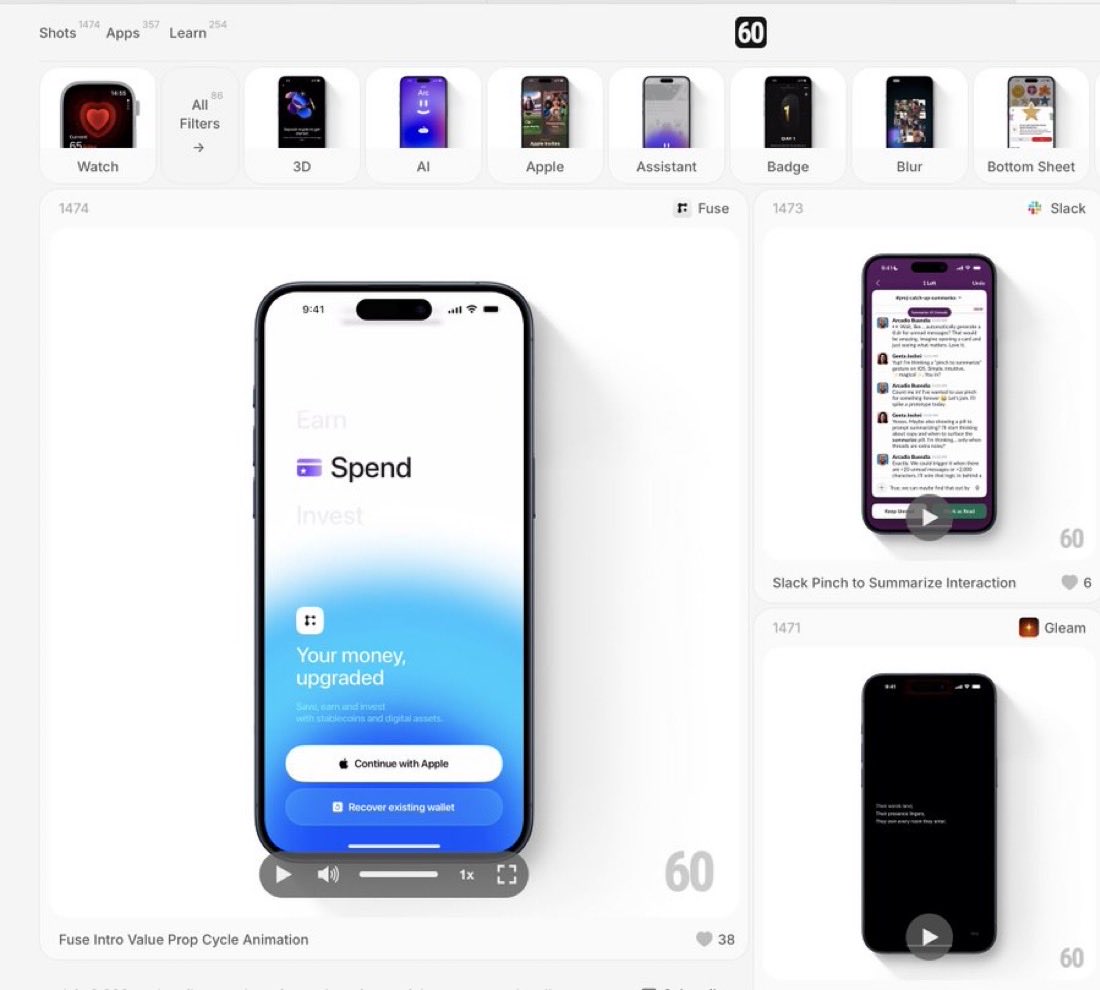
Excellent Design Inspiration to boost your next mobile design project 🙌 Save to Bookmarks 🔖 60fps is a curated collection of UI/UX animation and interaction design details from the world’s best iOS, android and web apps #UX #UI #UXDesign #UIDesign #ProductDesign #Animation
UX Links tweet media
English
4
6
41
1.8K
ManchesterUX retweetet
UX Links
UX Links@uxlinks·
The Product Design Journey: From Idea → Impact 🙌 Great products aren’t accidents. They’re built through a process: 1️⃣ Research with empathy 2️⃣ Define the problem 3️⃣ Ideate boldly 4️⃣ Prototype fast 5️⃣ Test + learn 6️⃣ Launch & refine ✨ Design isn’t just steps—it’s a mindset: human-centered, iterative, and purpose-driven. #UX #DesignThinking
UX Links tweet media
English
3
9
55
2.3K
ManchesterUX retweetet
UX Links
UX Links@uxlinks·
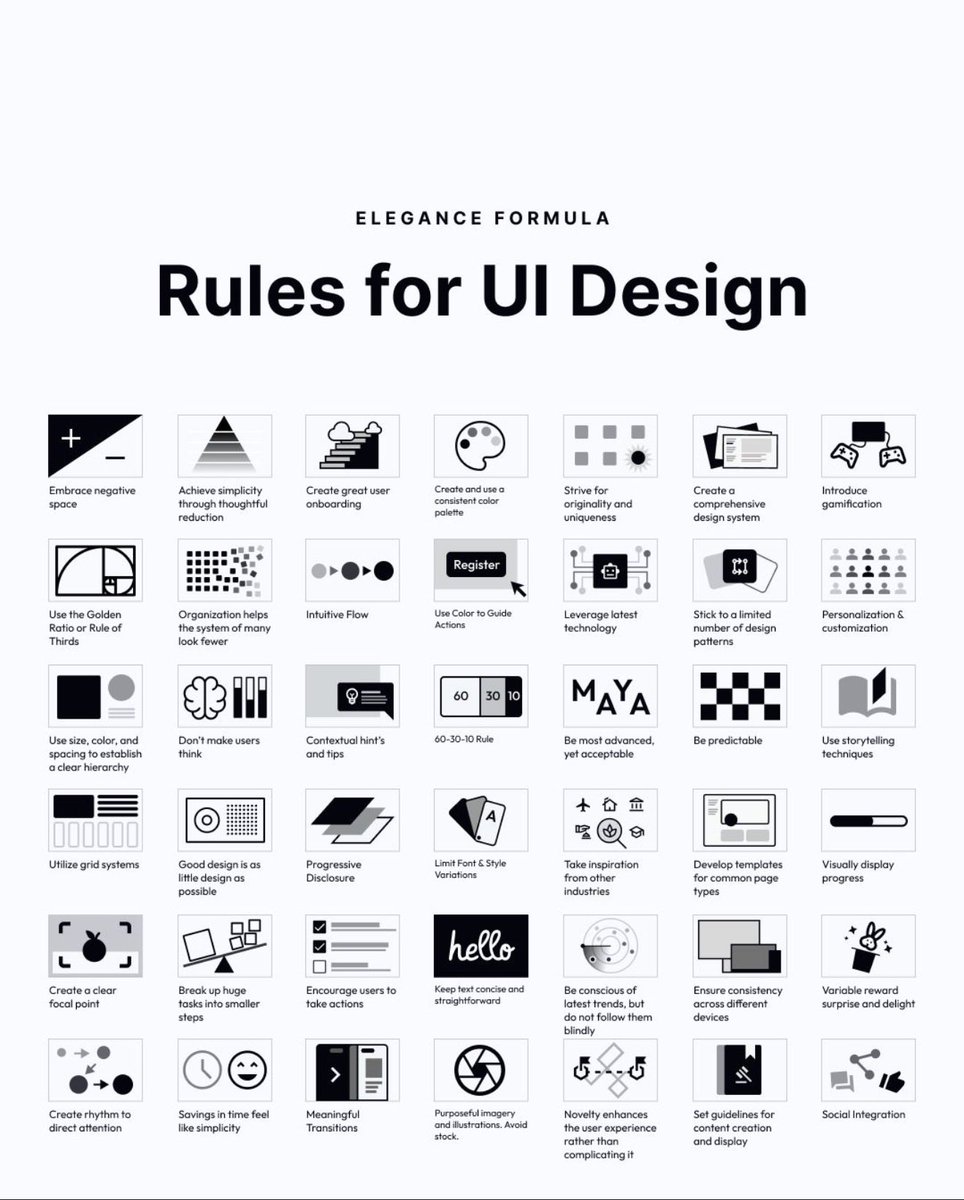
58 rules for beautiful UI design 🙌 Save to bookmarks for reference 🔖 Hierarchy. Simplicity. Predictability. Progressive disclosure. Meaningful transitions. A solid reminder that great interfaces are systems — not decoration. #UX #UI #UXDesign #UIDesign #ProductDesign
UX Links tweet media
English
11
69
526
16.7K
ManchesterUX retweetet
UX Links
UX Links@uxlinks·
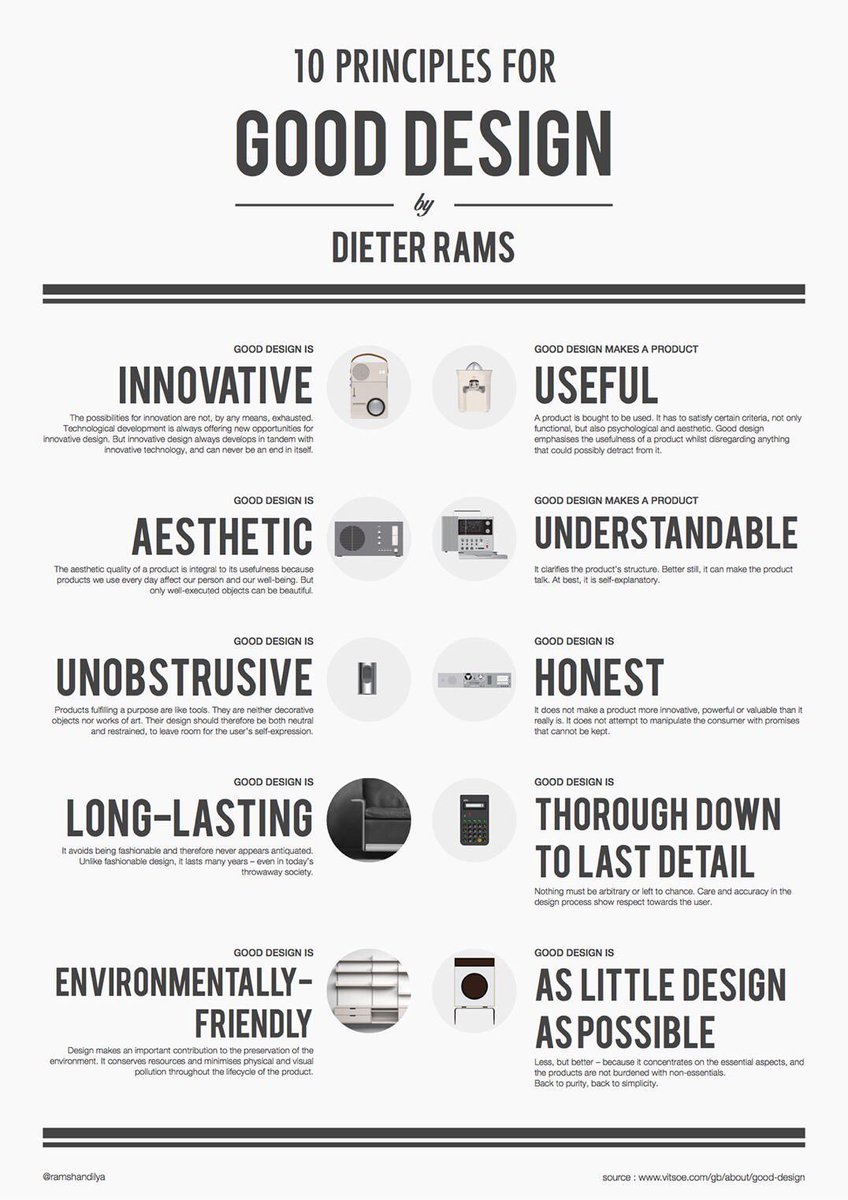
Excellent 10 Principles for Good Design, to Boost Your UX / UI Designs, by Dieter Rams! 🙌 FREE Cheatsheet attached 🔖 1. Good design is innovative Possibilities for innovation are not, by any means, exhausted. Tech development is always offering new opportunities for innovative design. But innovative design always develops in tandem with innovative technology, & can never be an end in itself. 2. Good design makes a product useful A product is bought to be used. It has to satisfy certain criteria, not only functional, but also psychological and aesthetic. Good design emphasises the usefulness of a product whilst disregarding anything that could possibly detract from it 3. Good design is aesthetic The aesthetic quality of a product is integral to its usefulness because products we use every day affect our person and our well-being. But only well-executed objects can be beautiful. 4. Good design makes a product understandable It clarifies the product’s structure. Better still, it can make the product talk. At best, it is self- explanatory. 5. Good design is unobtrusive Products fulfilling a purpose are like tools. They are neither decorative objects nor works of art. Their design should therefore be both neutral and restrained, to leave room for the user’s self- expression. 6. Good design is honest It does not make a product more innovative, powerful or valuable than it really is. It does not attempt to manipulate the consumer with promises that cannot be kept. 7. Good design is long-lasting It avoids being fashionable and therefore never appears antiquated. Unlike fashionable design, it lasts many years – even in today’s throwaway society. 8. Good design is thorough down to the last detail Nothing must be arbitrary or left to chance. Care and accuracy in the design process show respect towards the user. 9. Good design is environmentally-friendly Design makes an important contribution to the preservation of the environment. It conserves resources and minimises physical and visual pollution throughout the lifecycle of the product. 10. Good design is as little design as possible Less, but better – because it concentrates on the essential aspects, and the products are not burdened with non-essentials. Back to purity, back to simplicity. Follow @UXlinks to massively increase your UX / UI skills and knowledge 🙌 #ux #ui #uxdesign #uidesign #productdesign
UX Links tweet media
English
2
5
26
1K