tsunami_crypto

2.1K posts

tsunami_crypto banner
tsunami_crypto

tsunami_crypto

@ls_brd

An expert in market analysis, always on the lookout for opportunities, and a cryptocurrency trader since 2018. It started generating profits in 2023 😅

Texas Beigetreten Aralık 2021
10 Folgt21.5K Follower
tsunami_crypto
tsunami_crypto@ls_brd·
@_sholtodouglas actually fair, the 10s rest into another failure set is brutal when ur already cooked kinda wanna try it but also dont want to hate my life tmrw
English
0
0
0
36
tsunami_crypto
tsunami_crypto@ls_brd·
@eptwts everyone wants the overnight screenshot but nobody wants to build the table underneath it
English
0
0
0
52
tsunami_crypto
tsunami_crypto@ls_brd·
@shushant_l wait so level 10 is just being a creative director with extra steps feels like resume padding but the tools list is actually solid
English
0
0
0
7
Shushant Lakhyani
Shushant Lakhyani@shushant_l·
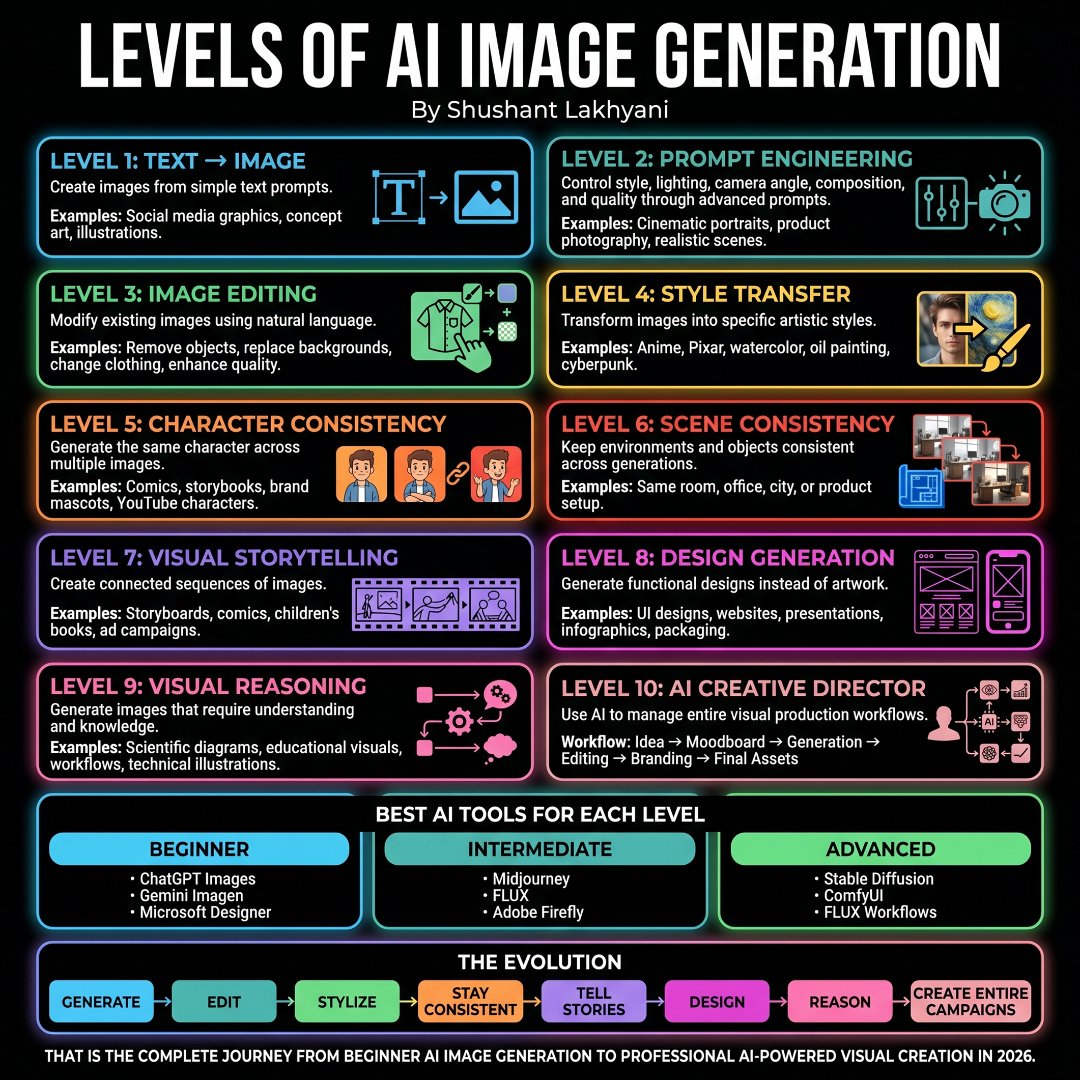
Most people use AI image generators at Level 1. The top 1% are already operating 5 levels higher. Here are the levels of AI image generation nobody talks about. 📂 AI Image Generation ┃ ┣ 📂 Beginner ┃ ┣ 📂 Text → Image ┃ ┣ 📂 Basic Prompts ┃ ┣ 📂 Social Graphics ┃ ┣ 📂 Illustrations ┃ ┗ 📂 Concept Art ┃ ┣ 📂 Prompt Engineering ┃ ┣ 📂 Camera Angles ┃ ┣ 📂 Lighting Control ┃ ┣ 📂 Composition ┃ ┣ 📂 Style Control ┃ ┗ 📂 Quality Optimization ┃ ┣ 📂 Image Editing ┃ ┣ 📂 Object Removal ┃ ┣ 📂 Background Swap ┃ ┣ 📂 Inpainting ┃ ┣ 📂 Upscaling ┃ ┗ 📂 Enhancement ┃ ┣ 📂 Style Transfer ┃ ┣ 📂 Anime ┃ ┣ 📂 Pixar ┃ ┣ 📂 Watercolor ┃ ┣ 📂 Oil Painting ┃ ┗ 📂 Cyberpunk ┃ ┣ 📂 Character Consistency ┃ ┣ 📂 AI Influencers ┃ ┣ 📂 Story Characters ┃ ┣ 📂 Brand Mascots ┃ ┣ 📂 Comics ┃ ┗ 📂 YouTube Avatars ┃ ┣ 📂 Scene Consistency ┃ ┣ 📂 Same Room ┃ ┣ 📂 Same Office ┃ ┣ 📂 Same City ┃ ┣ 📂 Product Shoots ┃ ┗ 📂 Environment Control ┃ ┣ 📂 Visual Storytelling ┃ ┣ 📂 Storyboards ┃ ┣ 📂 Comics ┃ ┣ 📂 Children's Books ┃ ┣ 📂 Ad Campaigns ┃ ┗ 📂 Sequential Narratives ┃ ┣ 📂 Design Generation ┃ ┣ 📂 UI Design ┃ ┣ 📂 Website Design ┃ ┣ 📂 Presentations ┃ ┣ 📂 Infographics ┃ ┗ 📂 Packaging Design ┃ ┣ 📂 Visual Reasoning ┃ ┣ 📂 Scientific Diagrams ┃ ┣ 📂 Technical Visuals ┃ ┣ 📂 Educational Graphics ┃ ┣ 📂 Workflows ┃ ┗ 📂 Knowledge Visualization ┃ ┣ 📂 AI Creative Director ┃ ┣ 📂 Ideation ┃ ┣ 📂 Moodboards ┃ ┣ 📂 Asset Generation ┃ ┣ 📂 Editing ┃ ┣ 📂 Branding ┃ ┗ 📂 Final Delivery ┃ ┣ 📂 Best Tools ┃ ┣ 📂 ChatGPT Images ┃ ┣ 📂 Gemini Imagen ┃ ┣ 📂 Midjourney ┃ ┣ 📂 FLUX ┃ ┣ 📂 Adobe Firefly ┃ ┣ 📂 Stable Diffusion ┃ ┣ 📂 ComfyUI ┃ ┗ 📂 FLUX Workflows ┃ ┗ 📂 Evolution ┣ 📂 Generate ┣ 📂 Edit ┣ 📂 Stylize ┣ 📂 Stay Consistent ┣ 📂 Tell Stories ┣ 📂 Design ┣ 📂 Reason ┗ 📂 Create Entire Campaigns
Shushant Lakhyani tweet media
English
2
0
7
138
tsunami_crypto
tsunami_crypto@ls_brd·
@IAmPascio wait, which one got renamed to "see what people u went to high school with think about vaccines"
English
0
0
0
7
Pascio
Pascio@IAmPascio·
if social media were honest about their use cases:
Pascio tweet media
English
3
1
5
209
tsunami_crypto
tsunami_crypto@ls_brd·
@GaryMarcus feels like every app launch is a race to zero users now who actually opens these things?
English
0
0
3
104
tsunami_crypto
tsunami_crypto@ls_brd·
@iScienceLuvr hmm so scaling DINO actually competes with CLIP now? feels like vision-only training isnt dead yet
English
0
0
0
17
Tanishq Mathew Abraham, Ph.D.
Using DINOv3, especially scaled up, closes gap with text-aligned vision encoders (CLIP-style) when applied to VLMs
Oriane Siméoni @CVPR@oriane_simeoni

@TimDarcet @iScienceLuvr Here is the summary slide presented yesterday. Using Molmo setup, encoder frozen and FT Qwen2-7B TL;DR: * scaling DINOv2 ViT-g to 1M iter. on DINOv3 1.7B images --> boost * scaling to 7B (+gram&HRFT) --> close gap w/ text-aligned encoders * distilled ViT-H+ as good as 7B

English
2
0
10
1.5K
tsunami_crypto
tsunami_crypto@ls_brd·
@csaba_kissi trying to figure out why every small problem I fix creates a bigger one right after maybe thats just the game
English
1
0
1
19
Csaba Kissi
Csaba Kissi@csaba_kissi·
What have you been working on this week?
English
5
1
7
410
Shushant Lakhyani
Shushant Lakhyani@shushant_l·
Most people use AI at Level 1. That's why their results look average. Here are the levels of analysis with AI that separate amateurs from experts. 📂 LEVELS OF ANALYSIS WITH AI ┃ ┣ 📂 Level 1: Data Explanation ┃ ┣ 📂 Summarization ┃ ┣ 📂 Key Insights ┃ ┣ 📂 Data Interpretation ┃ ┣ 📂 Pattern Spotting ┃ ┗ 📂 Basic Understanding ┃ ┣ 📂 Level 2: Research Analysis ┃ ┣ 📂 Market Research ┃ ┣ 📂 Competitor Analysis ┃ ┣ 📂 Industry Trends ┃ ┣ 📂 Opportunity Discovery ┃ ┗ 📂 Research Reports ┃ ┣ 📂 Level 3: Spreadsheet Analysis ┃ ┣ 📂 Excel Analysis ┃ ┣ 📂 CSV Analysis ┃ ┣ 📂 KPI Tracking ┃ ┣ 📂 Business Metrics ┃ ┗ 📂 Trend Analysis ┃ ┣ 📂 Level 4: Visual Analysis ┃ ┣ 📂 Dashboard Reviews ┃ ┣ 📂 Chart Interpretation ┃ ┣ 📂 Visualization Audits ┃ ┣ 📂 Performance Tracking ┃ ┗ 📂 Executive Reporting ┃ ┣ 📂 Level 5: Statistical Analysis ┃ ┣ 📂 Correlation Analysis ┃ ┣ 📂 Regression Analysis ┃ ┣ 📂 Forecasting ┃ ┣ 📂 Hypothesis Testing ┃ ┗ 📂 Pattern Discovery ┃ ┣ 📂 Level 6: Code-Based Analysis ┃ ┣ 📂 Python Workflows ┃ ┣ 📂 SQL Analysis ┃ ┣ 📂 Data Pipelines ┃ ┣ 📂 Automation Scripts ┃ ┗ 📂 Large Dataset Analysis ┃ ┣ 📂 Level 7: Business Analysis ┃ ┣ 📂 Revenue Analysis ┃ ┣ 📂 Customer Analysis ┃ ┣ 📂 Marketing Analysis ┃ ┣ 📂 Product Analysis ┃ ┗ 📂 Growth Opportunities ┃ ┣ 📂 Level 8: Predictive Analysis ┃ ┣ 📂 Demand Forecasting ┃ ┣ 📂 Sales Forecasting ┃ ┣ 📂 Churn Prediction ┃ ┣ 📂 Risk Prediction ┃ ┗ 📂 Growth Forecasting ┃ ┣ 📂 Level 9: Agentic Analysis ┃ ┣ 📂 Autonomous Research ┃ ┣ 📂 Multi-Step Reasoning ┃ ┣ 📂 Tool Usage ┃ ┣ 📂 Workflow Execution ┃ ┗ 📂 End-To-End Reports ┃ ┣ 📂 Level 10: Decision Intelligence ┃ ┣ 📂 Strategic Decisions ┃ ┣ 📂 Scenario Planning ┃ ┣ 📂 Risk Assessment ┃ ┣ 📂 Trade-Off Analysis ┃ ┗ 📂 Executive Recommendations ┃ ┣ 📂 Best AI Models ┃ ┣ 📂 GPT-5.5 ┃ ┣ 📂 Claude Opus 4.8 ┃ ┣ 📂 Gemini 3.1 Pro ┃ ┣ 📂 DeepSeek ┃ ┣ 📂 Llama ┃ ┗ 📂 Grok ┃ ┣ 📂 Best AI Tools ┃ ┣ 📂 ChatGPT ┃ ┣ 📂 Claude ┃ ┣ 📂 Gemini Deep Research ┃ ┣ 📂 Perplexity ┃ ┣ 📂 Julius AI ┃ ┣ 📂 Tableau ┃ ┣ 📂 Hex ┃ ┣ 📂 Deepnote ┃ ┣ 📂 Databricks ┃ ┗ 📂 NotebookLM ┃ ┣ 📂 Recommended Workflow ┃ ┣ 📂 Research ┃ ┣ 📂 Initial Analysis ┃ ┣ 📂 Data Analysis ┃ ┣ 📂 Visualization ┃ ┣ 📂 Advanced Analysis ┃ ┗ 📂 Decision Making ┃ ┣ 📂 Tool Stage ┃ ┣ 📂 AI Assists Humans ┃ ┣ 📂 Faster Execution ┃ ┣ 📂 Better Productivity ┃ ┣ 📂 Workflow Support ┃ ┗ 📂 Output Generation ┃ ┗ 📂 Partner Stage ┣ 📂 Autonomous Research ┣ 📂 Independent Analysis ┣ 📂 Strategic Thinking ┣ 📂 Decision Support ┗ 📂 Analyst-Level Intelligence
Shushant Lakhyani tweet media
English
3
1
4
254
Aadit Sheth
Aadit Sheth@aaditsh·
Bots used to be junk traffic. Now they can buy things. Every company has spent money trying to block bots. Captchas, rate limits, fraud detection. For 20 years, the playbook was simple: block everything that isn't human. But AI agents can browse, compare, and buy things on behalf of real people. That makes bot traffic valuable for the first time ever. I keep thinking about this. Your website is designed for a human who decides in 2 seconds whether to stay. An AI agent doesn't care about your hero image or your brand colors. It cares about structured data, clear pricing, and whether your product actually matches what its user asked for (and probably other things about your reviews, ratings etc). SEO was built around ranking for a human searching Google. Soon it'll be about making sure an AI agent picks your product when it's shopping for someone. I don't think most companies are thinking about this yet.
English
8
2
13
1.6K
tsunami_crypto
tsunami_crypto@ls_brd·
@sharyph_ smart framing but the best way to protect ur voice is to not let the prompt cook it in the first place
English
0
0
0
13
Sharyph
Sharyph@sharyph_·
Most creators skip this one step. And it's exactly why their AI content sounds like everyone else's. Build your Voice Document first. Paste your best writing → let Claude extract your patterns → use it every session. Your voice is your most valuable asset. Protect it 👇 newsletter.thedigitalcreator.co/p/the-claude-r…
English
1
1
2
174
Ruben Hassid
Ruben Hassid@rubenhassid·
How to duplicate your (entire) brain in Claude: Step 1. Download the Claude desktop app. ☑ Go to claude .com/download ☑ Set Opus 4.8 as default ☑ Turn ON Extended Thinking Step 2. Open Claude Cowork mode. ☑ Cowork = where your brain lives ☑ Click the top left tab between 'chat' and 'code' ☑ Create your "Brain" folder inside Step 3. Install Wispr Flow (it's free). ☑ Turns your voice → text ☑ Voice = faster and more honest ☑ Typing kills the truth. Dictate your context Step 4. Run the 100-question taste interview. ☑ Paste Prompt 1 from ruben.substack.com/p/youre-just-a… ☑ 100 questions, 7 categories ☑ Push past every vague answer. Be very specific Step 5. Compress the dump. ☑ Paste Prompt 2 from ruben.substack.com/p/youre-just-a… ☑ 20,000 words cost you 4,000 tokens ☑ Save your files as about-me .md file Step 6. Write your anti-ai-writing-style .md. ☑ Every word you refuse to see: no "delve" ☑ Kill negative parallelism ("it's not X, it's Y") ☑ Without it, Claude writes like Claude. Step 7. Write your my-company .md. ☑ Your goals, your focus, your hard no's right now ☑ Keep it > 1,000 tokens, update once a quarter ☑ This is your north star file. Step 8. Test it in a blank chat. ☑ Open a fresh Claude chat (point to no folder) ☑ Run a prompt only you would write ☑ If it sounds like you → ship it Step 9. Drop all 3 files into Cowork. ☑ Move all 3 files into your "Brain" folder ☑ Claude reads them on every single turn ☑ You stop prompting your brain. Your files do it. Step 10. Port it everywhere. ☑ Upload to ChatGPT, Grok, Gemini ☑ Same files = same brain in every AI ☑ Hand it to your team or your ghostwriter Step 11. Edit it forever. ☑ Install Obsidian (free) ☑ Open your Cowork folder as a vault ☑ You change. So must these files. You'll resist this. It feels reductive. It feels scary. You've built an identity on being hard to pin down. But the mystery, when you look at it closely, is usually just being vague. Copy my folder & download my 3 personal .md files: Step 1: Subscribe for free at how-to-ai.guide Step 2: You will have two choices: free or paid. Step 3: Choose the free tier. Don't pay for anything. Step 4: Open your welcoming email. Reply to it. Step 5: Trace the Notion link. Open '.md files' folder. Step 6: Access my entire folder + 3 files template. Step 7: Send this image to your team's channel. Step 8: Read 2x newsletter per week (for free). Step 9: Become the "AI guy" at work, forever.
Ruben Hassid tweet media
Ruben Hassid@rubenhassid

x.com/i/article/2050…

English
19
19
190
19.4K
tsunami_crypto
tsunami_crypto@ls_brd·
@eptwts isnt it usually the boring stuff nobody talks about that ends up printing the most? what are they missing
English
0
0
0
317
EP
EP@eptwts·
i see a massive bias on X - beginners are getting pushed into diving headfirst into things that sell themselves like consumer apps, info, saas, etc. but most people that have actually made significant money with these things can attest that the easiest way to get to +$10k/month is to sell your services directly you're fighting an uphill battle by tryna sell your solution in a hands-off reusable format, 1000's of people are doing the same thing - this should be a gamble reserved for those that already have time/capital to invest & leads to sell to i don't think i have a single successful friend who didn't start out with some type of service-based business that required them to actually work... you should be balls-deep in your industry & used to getting your hands dirty before you go for a "build once, sell twice" product on the plus side, working for people who have a functioning business is also a form of apprenticeship, it's free mentorship that you get paid for, win/win
English
11
3
118
7.1K
tsunami_crypto
tsunami_crypto@ls_brd·
@Prathkum wow lovable really out here making career changers overnight curious how far he gets before reality kicks in
English
0
0
1
119
Pratham
Pratham@Prathkum·
I saw an Instagram story from one of my friends mentioning that he was planning to switch careers and get into software engineering. I got a bit intrigued. I replied and asked what made him think so. And he literally said that he had built a couple of websites using Lovable including his personal portfolio. He also mentioned that software engineers are earning way more than auditors. I politely replied, "Good idea, but make sure you spend time learning what software engineering is all about before quitting your job." I couldn't give better advice than that. I am a bit stunned, to be honest. AI has made everyone think that the web is easy and that anyone can build on it. Building a landing page on Lovable is not even step zero of software engineering. By that logic, I could have said I was a game developer back in the day when I used to play Mario. To anybody reading this outside the tech world, I don't want to discourage you. You can absolutely switch careers and get into tech, but don't get too delusional with these fancy tools. Software engineering is much more than that. I have been doing it for more than 6 years, yet I still have so much to learn, and I see myself as just an average developer. AI is hypnotic.
English
26
1
77
6.7K
tsunami_crypto
tsunami_crypto@ls_brd·
@hey_mujeebahmed file transformation before upload is the actual time saver do most devs set up security filters manually or default these on now?
English
0
0
0
26
Mujeeb Ahmed
Mujeeb Ahmed@hey_mujeebahmed·
Filestack makes file handling ridiculously simple for developers 👇 • Upload from anywhere (device, URL, cloud apps) • Transform files before they hit your system • Deliver content fast via CDN • Built-in security (virus + phishing detection) • Powerful APIs with quick integration From upload → transform → deliver - all in one seamless workflow. This is how modern apps should handle files.
Mujeeb Ahmed tweet media
English
13
42
61
11.7K
tsunami_crypto
tsunami_crypto@ls_brd·
@CodeByPoonam elon renting to both his biggest rivals while jensen supplies everyone is the real chess game here
English
1
0
3
465
Poonam Soni
Poonam Soni@CodeByPoonam·
JUST IN: Google is paying SpaceX nearly $1 billion a month for GPUs. Anthropic is paying $1.25 billion a month. Elon Musk is renting to both his biggest rivals. and Jensen Huang is supplying the chips to everyone. here’s the full picture: → Google signed a $920M/month deal with SpaceX for 110,000 NVIDIA GPUs. runs through June 2029. nearly $30 billion total. → Anthropic signed a $1.25B/month deal with SpaceX last month for all compute at Colossus 1. → both deals run on NVIDIA chips — the same ones Jensen Huang sells to everyone. so the scoreboard right now: Google pays Musk. Anthropic pays Musk. Musk competes with both through xAI. Jensen supplies the chips to all of them.
Poonam Soni tweet mediaPoonam Soni tweet media
English
30
26
144
14.2K
tsunami_crypto
tsunami_crypto@ls_brd·
@aaditsh the desperation move where you rent compute from a rocket company cause god knows theyre using those GPUs in orbit
English
0
0
0
901
Aadit Sheth
Aadit Sheth@aaditsh·
Wait. Google is paying SpaceX $920 million per month for GPUs? Google. The company that builds its own TPUs. That runs one of the largest cloud infrastructures on earth. Is renting 110,000 Nvidia GPUs from a rocket company. I'm honestly not sure what to make of this. Either Google's AI compute needs have gotten so massive that even they can't build fast enough. Or SpaceX has built something in AI infrastructure that nobody was paying attention to. Or both. $920M a month. $30B over the contract. Whatever is happening behind the scenes at these companies is moving way faster than what we see publicly.
Sawyer Merritt@SawyerMerritt

SpaceX has just announced that they have entered into a $920 million per month agreement with Google to provide compute capacity, according to a new filing. "On June 5, 2026, we entered into a Cloud Service Agreement with Google with respect to access to compute capacity. The customer has agreed to pay us $920 million per month from October 2026 through June 2029, with capacity ramping up through September at a reduced fee. The compute capacity provided includes approximately 110,000 NVIDIA GPUs, CPUs, memory, and other related components. After December 31, 2026, the agreement may be terminated by either party upon 90 days' notice. The customer will retain ownership of, and intellectual property rights in, its content, Al models, and related data."

English
203
83
817
234.5K
Charly Wargnier
Charly Wargnier@DataChaz·
Let’s settle this: which one do you pick?
English
7
1
5
953
tsunami_crypto
tsunami_crypto@ls_brd·
@rubenhassid 60 hours? ill be generous and say 10 for someone who already kinda knows what theyre doing
English
1
0
2
52
Ruben Hassid
Ruben Hassid@rubenhassid·
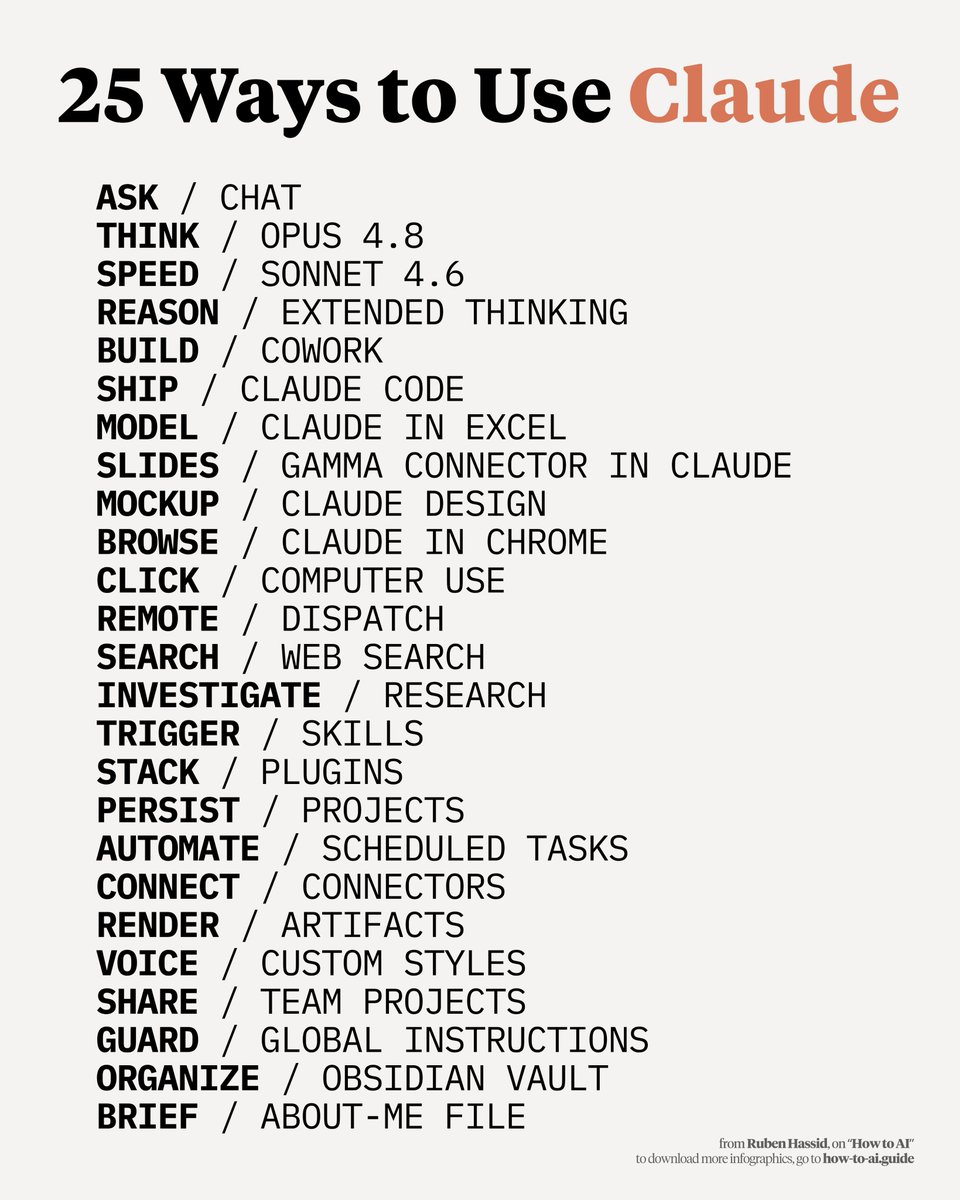
How to use Claude in 25 different ways: (takes 60 seconds to read, saves you 60 hours) 1. Bookmark this image. You'll need it tomorrow. 2. Full guide + prompts at: how-to-ai.guide. 3. Don't pay anything. It's free in the email. --- 1. ASK → Chat ☑ Quick questions. Quick answers. ☑ Don't use Cowork for "write a good email?" 2. THINK → Opus 4.8 ☑ The smartest model. Always switch to it. ☑ For deep work, complex writing & thinking. 3. SPEED → Sonnet 4.6 ☑ Faster, cheaper, still excellent. ☑ Use it for grammar, summaries, short answers. 4. REASON → Extended Thinking ☑ Toggle it on for hard problems. ☑ Turn it off for simple ones (saves tokens). 5. BUILD → Cowork ☑ Where serious work happens. .docx, .xlsx, .pptx. ☑ Point it at a folder. It works like an employee. 6. SHIP → Claude Code ☑ For developers (and curious non-devs). ☑ Build websites and apps from your terminal. 7. MODEL → Claude in Excel ☑ Install the add-in from the Excel store. ☑ Real formulas, real models, no copy-paste. 8. SLIDES → Gamma connector ☑ One prompt. Full presentation. With research. ☑ Connect Gamma inside Claude. 9. MOCKUP → Claude Design ☑ Go to claude .ai/design. Build websites in 1 hour. ☑ Upload a DESIGN .md. Export to Canva, PDF. 10. BROWSE → Claude in Chrome ☑ A browsing agent. Reads any page for you. ☑ Acts inside the browser, not just talks about it. 11. CLICK → Computer Use ☑ Settings > Turn it on. ☑ Claude clicks, types, browses on your Mac. 12. REMOTE → Dispatch ☑ Connect your phone. Text a task. ☑ It works on your computer while you're away. 13. SEARCH → Web Search ☑ Click the '+'. turn it on. ☑ It reads the live web before answering. 14. INVESTIGATE → Research ☑ For deep multi-source reports. ☑ 13 minutes. 50+ sources. One markdown file. 15. TRIGGER → Skills ☑ "Use the skill-creator to build a skill for [task]." ☑ Type /skill. It fires automatically. 16. STACK → Plugins ☑ Cowork > Customize > Browse Plugins. ☑ Bundles of skills for marketing, legal, sales. 17. PERSIST → Projects ☑ One Project per recurring deliverable. ☑ Upload one gold-standard example. 18. AUTOMATE → Scheduled Tasks ☑ Every Monday at 7am, Claude runs your report. ☑ Set it up once. No manual work. 19. CONNECT → Connectors ☑ Gmail, Drive, Slack, Notion, Granola, Calendar. ☑ 50+ apps. Claude reads, writes & acts inside. 20. RENDER → Artifacts ☑ Side pane where Claude opens charts, docs. ☑ Interactive. Editable. Shareable. 21. VOICE → Custom Styles ☑ Set "Concise" or build your own. ☑ Saves you from re-explaining your voice. 22. SHARE → Team Projects ☑ Same Project. Whole team inside. ☑ Skills, files, instructions. Shared once. 23. GUARD → Global Instructions ☑ Settings > Cowork > Global Instructions. ☑ Tell Claude what to always do. 24. ORGANIZE → Obsidian Vault ☑ Free app. Opens your Cowork folder neatly. ☑ Edit files like Google Docs. 25. BRIEF → about-me file. ☑ One md. file. Under 2,000 words. ☑ Your style, your rules, your voice.
Ruben Hassid tweet media
Ruben Hassid@rubenhassid

x.com/i/article/2057…

English
24
46
249
24.1K