Manmeet

43 posts

Manmeet banner
Manmeet

Manmeet

@manmeetdesign

I design websites that look great & convert better Building fast, modern & scalable web experiences

Beigetreten Ekim 2018
64 Folgt13 Follower
Angehefteter Tweet
Manmeet
Manmeet@manmeetdesign·
Just completed my first project on #Contra ! 🎉 Starting on a new platform is never easy, but every journey begins with one client, one project, and one opportunity. Looking forward to connecting with more amazing clients on Contra. 🚀 #Framer #WordPress #WebsiteDesign
English
0
0
4
58
Manmeet
Manmeet@manmeetdesign·
@framer Hello Magicians! Happy to connect @manmeet-singh/" target="_blank" rel="nofollow noopener">framer.com/@manmeet-singh/
English
0
0
0
41
Framer
Framer@framer·
Who needs some followers? Drop your @framer community profile below so everyone knows who you are!
English
262
9
161
9.7K
Manmeet
Manmeet@manmeetdesign·
@framer We are already there… waiting for it 🫡
English
0
0
0
219
Bala
Bala@BuiltWithBala·
@manmeetdesign @framer I think due to they are working on Big Update 3.0. After today it may speed up as it’s releasing today
English
1
0
2
85
Manmeet
Manmeet@manmeetdesign·
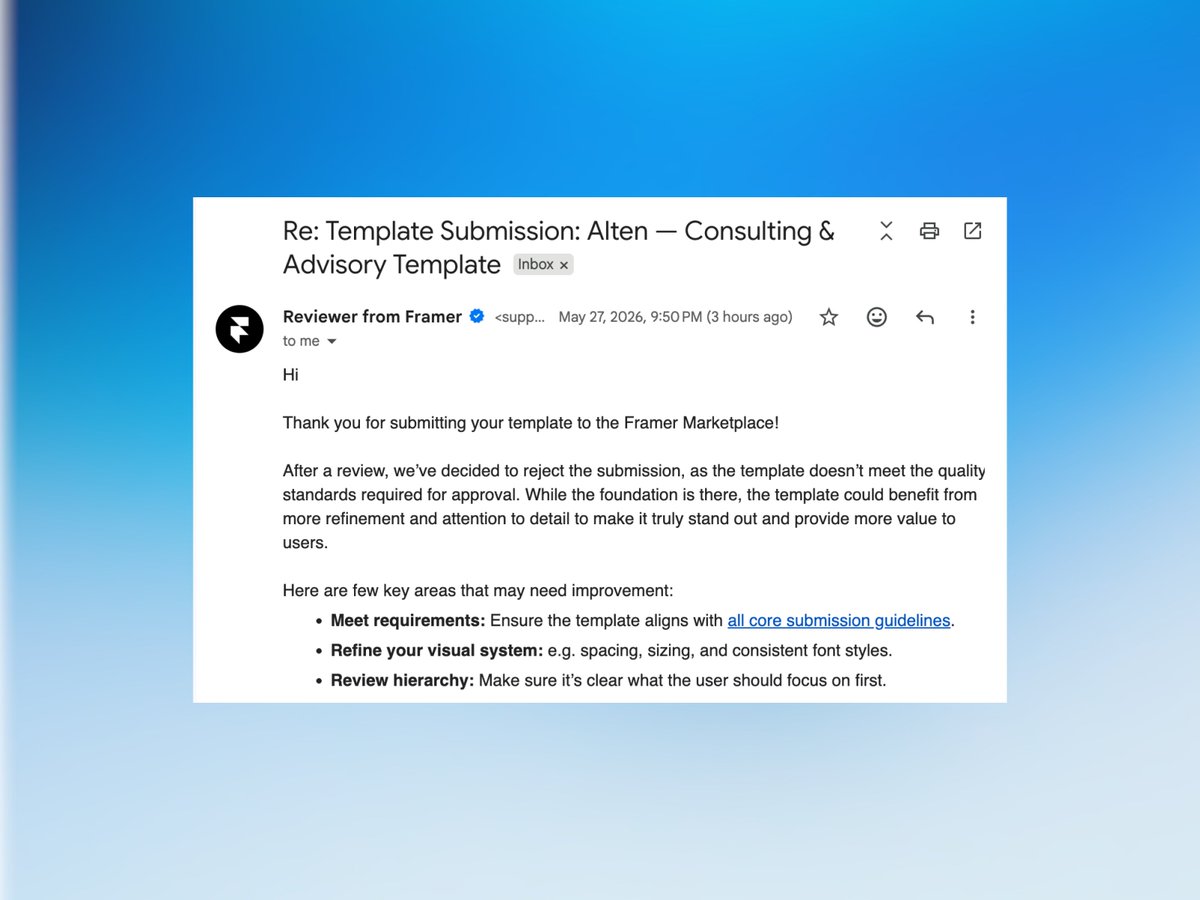
Hey Framer creators 👋 Quick question — I submitted a template to the Framer Marketplace a little over 3 weeks ago and haven’t received any feedback or update yet. For those who have had templates approved recently, is this a normal review timeline, or would you recommend sending a follow-up/reminder to the Framer team? Just trying to understand the current process and expectations. Thanks in advance! 🙏 #Framer #FramerTemplate #WebDesign @aandreug @framer
Manmeet tweet media
English
7
0
13
1.9K
Ryan Hayward
Ryan Hayward@theryanhayward·
Tue, 16 June 🇺🇸 PST - 10:30AM 🇬🇧 BST - 6:30PM 🇪🇺 CEST - 7:30PM 🇮🇳 IST - 11:00PM 🇦🇺 AEST - 3:30AM (Wed) Join 👉 youtube.com/watch?v=6guteI…
YouTube video
YouTube
English
1
0
5
751
Ryan Hayward
Ryan Hayward@theryanhayward·
oMG OmG omg it's happening 🥳 the biggest @Framer update ever launches Wednesday we'll explore it together LIVE on my Youtube Times below 👇
Ryan Hayward tweet media
English
9
0
55
2.5K
Manmeet
Manmeet@manmeetdesign·
@heyshivang_ @framer Ah I see. Yes 4th week has been started, so I hope we will have reply from them this week. 🤞
English
0
0
1
101
Shivang Singh
Shivang Singh@heyshivang_·
@manmeetdesign @framer They have a large number of submissions so it's taking around 4 weeks these days. You should get a response soon.
English
1
0
1
148
Manmeet
Manmeet@manmeetdesign·
@itsmitadesign Don’t worry and be strong! My templates are rejected 3 times and last Saturday I submitted my 4th template. Let’s see. Stay positive 😊🙏🏻
English
1
0
1
37
Mita
Mita@itsmitadesign·
Framer rejected my 1st template on the exact same day I submitted my 2nd. Didn't even let me process it 🥹 Anyway - fixing template 1 tomorrow and building template 3 after that.
Mita tweet media
English
22
0
41
1.8K
Ryan Hayward
Ryan Hayward@theryanhayward·
🚨 i'm hosting a free @framer workshop TODAY 🚨 learn to go from beginner → expert - 3pm CT comment "FRAMER" and I'll DM you the link 👇
English
72
6
66
3.6K
Manmeet
Manmeet@manmeetdesign·
@viktoroddy Really nice! When do you think you’ll upload the tutorial video on YouTube for this?
English
0
0
0
135
Viktor Oddy
Viktor Oddy@viktoroddy·
Access ALL prompts for stunning animated websites in one click: motionsites.ai PROMPT TO RECREATE THIS LANDING PAGE --- **Create a React + Vite + Tailwind CSS v4 landing page for "WISA" -- a premium football/soccer organization website. The page has a scroll-driven video background, 3 content sections, and a glassmorphism footer. Use ONLY these dependencies: react 19, motion (framer-motion v12+), gsap, lucide-react, tailwindcss v4 with @tailwindcss/vite plugin. The design is dark, cinematic, minimal, with Manrope (sans) and JetBrains Mono (mono) fonts.** --- ### GLOBAL SETUP **package.json dependencies (exact):** ``` react, react-dom ^19.0.0 motion ^12.23.24 gsap ^3.14.2 lucide-react ^0.546.0 tailwindcss ^4.1.14 @tailwindcss/vite ^4.1.14 @vitejs/plugin-react ^5.0.4 vite ^6.2.0 ``` **vite.config.ts:** Use `@tailwindcss/vite` plugin + `@vitejs/plugin-react`. Alias `@` to project root. **index.html:** Standard HTML5. Include `` in head. **src/index.css -- EXACT:** ```css @import url('@400;500;600;700&family=Manrope:wght@300;400;500;600;700&display=swap" target="_blank" rel="nofollow noopener">fonts.googleapis.com/css2?family=Je…'); @import "tailwindcss"; @theme { --font-sans: "Manrope", ui-sans-serif, system-ui, sans-serif; --font-mono: "JetBrains Mono", ui-monospace, SFMono-Regular, monospace; } @keyframes flyOutRight { 0% { transform: translateX(0); } 100% { transform: translateX(250%); } } @keyframes flyInLeft { 0% { transform: translateX(-250%); } 100% { transform: translateX(0); } } .animate-fly-out { animation: flyOutRight 0.5s cubic-bezier(0.4, 0, 0.2, 1) forwards; } .animate-fly-in { animation: flyInLeft 0.5s cubic-bezier(0.4, 0, 0.2, 1) forwards; } @keyframes flyOutUp { 0% { transform: translateY(0); } 100% { transform: translateY(-150%); } } @keyframes flyInUp { 0% { transform: translateY(150%); } 100% { transform: translateY(0); } } .animate-fly-out-up { animation: flyOutUp 0.4s cubic-bezier(0.4, 0, 0.2, 1) forwards; } .animate-fly-in-up { animation: flyInUp 0.4s cubic-bezier(0.4, 0, 0.2, 1) forwards; } ``` These define 4 keyframe animations: - `flyOutRight / flyInLeft` (250% translateX, 0.5s) -- for the arrow button hover - `flyOutUp / flyInUp` (150% translateY, 0.4s) -- for nav text hover - All use `cubic-bezier(0.4, 0, 0.2, 1)` easing with `forwards` fill mode --- ### COMPONENT: ScrollReveal (`src/components/ScrollReveal.tsx` + `ScrollReveal.css`) **ScrollReveal.css:** ```css .scroll-reveal { margin: 0; } .scroll-reveal-text { display: flex; flex-wrap: wrap; margin: 0; } .word { display: inline-block; white-space: pre; } ``` **ScrollReveal.tsx:** A GSAP-powered word-by-word scroll reveal component. - Props: `children` (string), `scrollContainerRef?`, `enableBlur` (default true), `baseOpacity` (default 0.1), `baseRotation` (default 3), `blurStrength` (default 4), `containerClassName`, `textClassName`, `rotationEnd` (default "bottom bottom"), `wordAnimationEnd` (default "bottom bottom") - Splits children text by whitespace into `` elements using `useMemo` - Three GSAP ScrollTrigger animations: 1. **Rotation**: Container rotates from `baseRotation` degrees to 0, origin "0% 50%", scrub true, trigger start "top bottom", end = `rotationEnd` 2. **Opacity**: Each `.word` fades from `baseOpacity` to 1, stagger 0.05, scrub true, trigger start "top bottom-=20%", end = `wordAnimationEnd` 3. **Blur** (if `enableBlur`): Each `.word` goes from `blur(blurStrength px)` to `blur(0px)`, same stagger/trigger as opacity - Renders: `

{splitText}

` - Cleanup: kills all ScrollTrigger instances on unmount --- ### COMPONENT: Reveal (inline in App.tsx) A motion.div wrapper for viewport-triggered fade-in: ```tsx function Reveal({ children, delay = 0, className = "" }) { return ( {children} ); } ``` Easing is `[0.16, 1, 0.3, 1]` (ease-out-expo style). --- ### COMPONENT: NavItem (inline in App.tsx) A hover-animated navigation link with vertical text fly animation: - Uses a `cycle` counter state (useState(0)) - On `mouseEnter` and `mouseLeave`: increment cycle - When `cycle === 0` (initial, no hover yet): render single `` with `text-white/64` and `group-hover:text-white transition-colors duration-300` - When `cycle > 0`: render TWO spans keyed by cycle -- one with `.animate-fly-out-up` (exits upward), one absolute-positioned with `.animate-fly-in-up` (enters from below) - Container: `` with `relative overflow-hidden group flex items-center justify-center py-1` --- ### MAIN APP (src/App.tsx) - ARCHITECTURE **Video URL constant:** ``` const VIDEO_URL = 'd8j0ntlcm91z4.cloudfront.net/user_38xzZboKV…'; ``` **State & Refs:** - `arrowCycle` (useState(0)) -- for arrow button hover animation, same pattern as NavItem - `videoRef` (useRef HTMLVideoElement) - `videoContainerRef` (useRef HTMLDivElement) - `isLoaded` (useState false) -- tracks when video is ready - `screen3Ref` (useRef HTMLDivElement) -- reference to footer section for scroll calculation - `scrollY` from motion's `useScroll()` - `headerY` = `useTransform(scrollY, [0, 500, 800], [0, 0, -150])` -- header slides up and out after scrolling past 500px --- ### SCROLL-DRIVEN VIDEO - CRITICAL IMPLEMENTATION **Effect 1: Video Loading** ```tsx useEffect(() => { const video = videoRef.current; if (!video) return; const handleCanPlay = () => setIsLoaded(true); video.addEventListener('canplaythrough', handleCanPlay); video.load(); return () => video.removeEventListener('canplaythrough', handleCanPlay); }, []); ``` **Effect 2: Scroll-to-Video-Scrub (with the `video.seeking` guard)** ```tsx useEffect(() => { if (!isLoaded) return; const video = videoRef.current; if (!video || !video.duration) return; const handleScroll = () => { if (!screen3Ref.current || video.seeking) return; // ^^ CRITICAL: "video.seeking" check tells the browser: "Only update the video // frame when you've completely finished rendering the previous one." // Without this guard, rapid scroll events queue up competing .currentTime assignments, // causing visible frame tearing, flickering, and dropped frames. The browser's // internal seek operation is asynchronous -- setting .currentTime while a previous // seek is still in progress gets silently ignored or causes visual glitches. // By checking video.seeking, we skip scroll events that arrive before the prior // frame has been decoded and painted, resulting in smooth, tear-free scrubbing. const rect = screen3Ref.current.getBoundingClientRect(); const absoluteTop = window.scrollY + rect.top; const stopScroll = Math.max(1, absoluteTop - (window.innerHeight * 0.2)); const scrollFraction = Math.max(0, Math.min(1, window.scrollY / stopScroll)); video.currentTime = scrollFraction * video.duration; }; window.addEventListener('scroll', handleScroll, { passive: true }); handleScroll(); return () => window.removeEventListener('scroll', handleScroll); }, [isLoaded]); ``` The scroll fraction maps from 0 (top of page) to 1 (when the footer section is 20% of viewport height from top). This means the video plays through its full duration as the user scrolls from top to the footer. --- ### SECTION 0: LOADING SCREEN Shown when `!isLoaded`. Fixed fullscreen, z-50, black bg, centered: - "LOADING" text: `text-[10px] font-mono tracking-widest mb-4 text-white/50` - Progress bar below: `w-64 h-[1px] bg-white/10 mt-8 overflow-hidden` with inner `h-full bg-white w-1/3 animate-pulse` --- ### LAYER STRUCTURE The entire page is layered: 1. **Fixed video background** (`fixed inset-0 z-0 bg-black`) -- video is absolutely centered with cover behavior using `transform: translate(-50%, -50%)`, `minWidth/minHeight: 100%`, `objectFit: cover` 2. **Fixed header** (z-20) -- animated with motion, slides out via `headerY` transform 3. **Scrollable content** (`relative z-10 pointer-events-none`) -- all sections flow here, with `pointer-events-auto` on interactive areas --- ### SECTION 1: HERO (Screen 1) Container: `w-[90%] mx-auto h-screen flex flex-col py-8 md:py-12 lg:py-16 pb-12` Inner main: `flex-1 w-full pointer-events-auto flex flex-col md:grid md:grid-cols-12 md:grid-rows-[1fr_auto] gap-y-8 md:gap-y-0 md:gap-x-8` **Grid layout (desktop 12-col, 2-row):** 1. **Heading** (bottom-left): `md:row-start-2 md:col-start-1 md:col-span-8 flex items-end` - H1: `text-[clamp(2.5rem,6vw,5rem)] leading-[1.05] font-medium tracking-tight text-white whitespace-nowrap` - Text: "Championing" `
` "The Pitch Of Legends" - Wrapped in `` 2. **Description paragraph** (center-right): `md:row-start-1 md:col-start-8 md:col-span-5 flex flex-col justify-center items-start md:items-end text-left md:text-right` - Paragraph: `text-[clamp(1rem,1.6vw,1.375rem)] text-white/64 leading-[1.3] font-normal max-w-[460px] relative -top-[90px]` - Text: "Advanced preparation and training of world-class football teams for leagues, tournaments, and trophies. **We bring the trophy closer to your cabinet.**" (bold part is `font-semibold text-white`) - Wrapped in `` 3. **CTA Button** (bottom-right): `md:row-start-2 md:col-start-8 md:col-span-5 flex items-end justify-start md:justify-end` - Two-part button with 1px gap (`flex items-stretch gap-1 group cursor-pointer`) - **Text part**: `px-8 py-5 bg-white/8 backdrop-blur-[80px]` -> on group-hover: `bg-white`. Text: "EXPLORE OUR STADIUMS" in `font-mono text-[12px] tracking-[-0.01em] text-white/90` -> hover: `text-black` - **Arrow part**: `px-6 bg-white/8 backdrop-blur-[80px]` -> hover: `bg-white`. Contains `` (lucide, w-5 h-5) with the same fly-out/fly-in animation pattern as NavItem but horizontal (`.animate-fly-out` / `.animate-fly-in`) - `arrowCycle` state drives the animation, same increment pattern on mouseEnter/mouseLeave - Wrapped in `` --- ### SECTION 1.5: SPACER `
` -- 200px empty gap --- ### SECTION 2: SCROLL-REVEAL TEXT + 3-COLUMN GRID Container: `w-[90%] mx-auto min-h-screen flex flex-col justify-center py-8 md:py-12 lg:py-16 pointer-events-auto` Inner: `max-w-[1200px] w-full` **ScrollReveal component usage:** ```tsx Complete Football Programs For Professional Player Development. We Build The Foundations For Next-Generation Strikers, Midfielders, And Star Defenders. ``` **3-Column Grid below** (`mt-24 grid grid-cols-1 md:grid-cols-12 gap-12 md:gap-8`): 1. **Col 1 (md:col-span-4)**: Globe SVG (71x43 wireframe globe) + WISA logo SVG (157x25, scaled to h-[18px] w-auto) side by side with `gap-4`. Below: tagline "Winning the future on pitch" in `text-[11px] font-mono tracking-widest text-white/60 uppercase leading-relaxed`. Wrapped in `` 2. **Col 2 (md:col-span-4)**: H3 "Performance Analytics / Facilities" (`text-xl font-medium text-white`), paragraph below (`text-[15px] text-white/80 leading-relaxed`). Wrapped in `` 3. **Col 3 (md:col-span-4)**: H3 "Matchday Premium / Fan Experiences!" same styling, paragraph same styling. Wrapped in `` --- ### SECTION 2.5: SPACER Another `h-[200px]` spacer --- ### SECTION 3: FOOTER (ref={screen3Ref}) This is the scroll endpoint for the video scrub calculation. Wrapped in `pointer-events-auto`. **Footer container**: `width: 90%, margin: 0 auto, paddingBottom: 64px` (inline styles) **Inner card** (glassmorphism): `backgroundColor: rgba(26, 26, 26, 0.6)`, `backdropFilter: blur(80px)`, `WebkitBackdropFilter: blur(80px)`, `border: 1px solid rgba(255, 255, 255, 0.1)`, `padding: clamp(32px, 4vw, 64px)` -- all inline styles **CTA Section** (top of footer card): - Flexbox wrap, `alignItems: flex-end`, `justifyContent: space-between`, `gap: 40px` - Bottom border: `1px solid rgba(255, 255, 255, 0.1)`, `paddingBottom: clamp(48px, 4vw, 80px)` - H2: "Ready To Score / Your Winning Season?" -- `fontSize: clamp(2rem, 4.5vw, 3.5rem)`, `fontWeight: 500`, `letterSpacing: -0.02em`, `lineHeight: 1.05` - Button: Same two-part pattern (text + arrow) but with white bg / black text, `padding: 20px 32px` and `20px 24px`. Text: "START YOUR SEASONS" in `font-mono, 12px, -0.01em tracking, bold 700` **Footer Links Grid** (`paddingTop: clamp(48px, 4vw, 64px)`): - CSS Grid: `repeat(auto-fit, minmax(160px, 1fr))`, `gap: clamp(32px, 3vw, 48px)` - 4 columns: 1. **Brand**: WISA logo SVG (h:14px) + tagline paragraph (13px, rgba white 0.4, maxWidth 220) 2. **Company**: Header "COMPANY" (10px mono, 0.1em tracking, rgba white 0.3) + links: About, Rosters, Press, Contact (14px, rgba white 0.6) 3. **Services**: Header "SERVICES" same style + links: Coaching, Training Camp, Fitness, Tryout 4. **Connect**: Header "CONNECT" same style + links: LinkedIn, X / Twitter, YouTube, Newsletter **Copyright Bar** (`marginTop: 56, paddingTop: 32, borderTop: 1px solid rgba white 0.1`): - Flex wrap space-between - Left: "2026 WISA. ALL RIGHTS RESERVED." (11px mono, rgba white 0.25, 0.1em tracking) - Right: PRIVACY | TERMS links (same styling, gap-24px) --- ### FIXED HEADER `` with: - `style={{ y: headerY }}` -- slides out after scroll 500-800px - `initial={{ opacity: 0, y: 20 }}`, `animate={{ opacity: 1 }}`, easing `[0.16, 1, 0.3, 1]`, duration 0.8 - Classes: `fixed top-0 left-1/2 -translate-x-1/2 z-20 w-[90%] flex items-center justify-between pointer-events-auto py-4 md:py-6 lg:py-8` **Left: WISA Logo SVG** (157x25, white, 4 paths spelling "WISA") **Right: Navigation bar** (`hidden lg:flex items-stretch bg-[#1A1A1A]/40 backdrop-blur-[80px]`): - Nav links container: `flex items-center justify-between px-6 font-mono text-xs tracking-[-0.01em] w-[480px]` - 5 NavItem components: LEAGUES, STADIUMS, TRAINING, COMPETITIONS, TICKETS - CTA button: `bg-white text-black px-6 py-5 font-mono text-xs leading-4 font-bold tracking-[-0.01em] hover:bg-gray-200 transition-colors w-[148px]` -- text "BUY MATCH PASS" --- ### SVG ASSETS **WISA Logo** (used 3 times -- header, section 2, footer): 157x25 viewBox, 4 white paths. The paths spell "W I S A" in a custom typeface. **Globe icon** (used in section 2 col 1): 71x43 viewBox, wireframe globe with horizontal/vertical/meridian lines, stroke white, no fill. Both SVGs are inlined directly. They are too detailed to describe -- copy the exact path data from the source code above. --- ### KEY DESIGN TOKENS SUMMARY | Token | Value | |-------|-------| | Font sans | Manrope 300-700 | | Font mono | JetBrains Mono 400-700 | | Background | Pure black (#000) | | Text primary | white | | Text secondary | white/64 (rgba 255,255,255,0.64) | | Text muted | white/60, white/50, white/40, white/25 | | Glass bg | #1A1A1A at 40% opacity | | Glass blur | 80px | | Glass border | rgba(255,255,255,0.1) | | Button bg | white/8 -> white on hover | | Spacing rhythm | 90% viewport width container, clamp-based responsive values | | Easing (motion) | [0.16, 1, 0.3, 1] | | Easing (CSS) | cubic-bezier(0.4, 0, 0.2, 1) |
English
1
8
61
8.9K
Viktor Oddy
Viktor Oddy@viktoroddy·
GPT Image 2 + Seedance 2 + Claude Prompt below ↓
Français
27
78
1K
57.9K
Manmeet
Manmeet@manmeetdesign·
@EthanDriskill Bro, if possible, please join Claude and completely dominate the coding and design space Every client keeps talking about it, and I’m seriously facing a shortage of design projects these days. 😂
English
0
0
1
27
Ethan Driskill
Ethan Driskill@EthanDriskill·
I was fired by Spotify today. I thought the disco ball app icon looked fun and cool but everyone hated it. I wanted to go a little crazy with the shimmer and sparkles but the design change made it look like the app was updating and we hit all time lows with app use and the executive team went into full panic mode. If you’re looking for a designer who wants to make things pop, I’m looking for something new. Thanks!
English
174
38
1.4K
795K
Manmeet
Manmeet@manmeetdesign·
@the0teo Very nice and clean design
English
0
0
0
14
Manmeet
Manmeet@manmeetdesign·
@KrisAnfalova Nice design, where I can see full design?
English
0
0
1
28
Kris Anfalova
Kris Anfalova@KrisAnfalova·
Running my design X account feels like playing New Game+. I post like I have a 100,000+ audience. Mostly because I do, just on my other platforms. 😅 Starting fresh here is humbling, but we don't lower the bar. Zero fluff, just pure human craft.
English
8
0
52
1.1K
Anton Drukarov
Anton Drukarov@AntonDrukarov·
Time for a little giveaway for my friends! To win a free copy of my latest Althea @framer template: 1. Like this post 2. Drop a comment Tomorrow, I’ll randomly pick 5 winners. Don’t forget to follow me so I can send you a DM. Let’s go! Template link below 👇
English
65
2
156
4.9K
Kanishk Dubey
Kanishk Dubey@xlauncherx7·
@iremgeldry @framer I take around 2-3 months just to build my basic templates, don’t know why I am that slow
English
4
0
3
294
Irem
Irem@iremgeldry·
How do you speed up your template creation process? Any tips, @framer community? How long does it usually take you to build a multi-page website? For me, it sometimes feels like it takes forever 😅
English
17
1
43
2K