The Official F1® Help Channel

38.2K posts
The Official F1® Help Channel banner
The Official F1® Help Channel

The Official F1® Help Channel

@F1Help

Question? Problems? We are here to help!
Se unió Temmuz 2009
261 Siguiendo94.2K Seguidores
The Official F1® Help Channel
@RussiaXDanielle Hey there. Thank you very much for your question. Please send an email to our customer support team via this email address: general@en.formula1.com and they can discuss this with you. Thank you very much - OB
English
0
0
0
38
The Official F1® Help Channel
@F1Database Hey there. Thank you for this information and feedback, we will ensure that this gets passed on to our technical team, so that they can look into this. Thanks very much - OB
English
0
0
0
23
Ingo
Ingo@F1Database·
@F1Help 2nd Race and still No Teamradio and Audi and Ferrari have the Same Red color in Driver Tracket
English
1
0
0
111
Formula Climate
Formula Climate@formulaclimate·
@F1 @F1Help these single decimal leader gaps are not helpful to show!!! We cannot tell whose has overtake with this graphic!!!! We need multi-decimal intervals!!! Please fix this for Japan…. #ChineseGP
English
1
0
0
181
The Official F1® Help Channel
@Andrewperez0307 Hey there. Our team will eventually get to your email, but unfortunately we aren't able to provide a timeline on exactly when this will be. Thanks very much for your patience - OB
English
0
0
1
42
Andrés Pérez
Andrés Pérez@Andrewperez0307·
@F1Help So are u guys gonna solve it or tell me how to solve it? 😐
English
1
0
0
36
The Official F1® Help Channel
@op7rai Hey there. Thanks very much for your feedback, we will ensure that this is passed forward to our technical/graphics team. Unfortunately, we cannot currently provide an update on when or if these changes may be made, but thank you so much for your patience. Have a great weekend!
English
2
0
6
1.2K
kimi
kimi@op7rai·
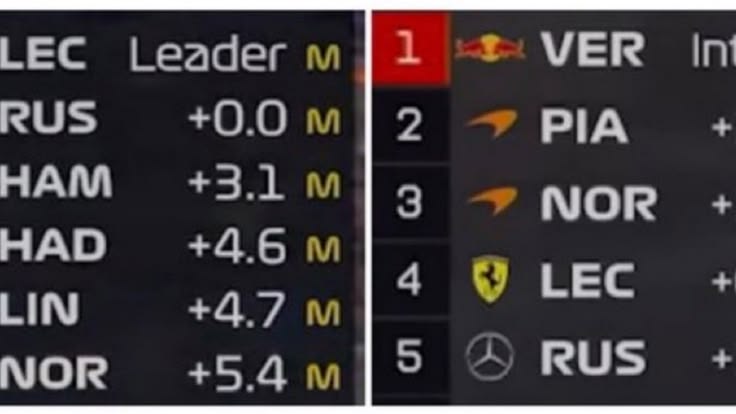
Hi @F1Help! As a loyal F1 TV Premium subscriber, I'm disappointed with the recent 'simplified' timing graphics. F1 is a sport of thousandths of a second, but we now see rounded single decimals instead of the classic 0.001s precision. Please bring back the technical depth! #F1TV
kimi tweet media
English
2
0
17
1.3K
Mike O'Leary
Mike O'Leary@mikejoeoleary·
Disappointed F1 fan here. 2026 regs have ruined the racing quality, but F1 TV won’t even hear complaints. Chatbot loops on “Sorry, I didn’t understand,” then “Contact Us” vanishes after forced app update. @F1 @F1Help fix the racing AND your broken support! #F1 #F1TV #F12026
English
3
0
1
438
The Official F1® Help Channel
@davemusing Hey there. Thank you very much for letting us know this. Our team are working on a fix ahead of the Japanese Grand Prix. Thanks very much, have a great weekend! - OB
English
0
0
1
50
Dave
Dave@davemusing·
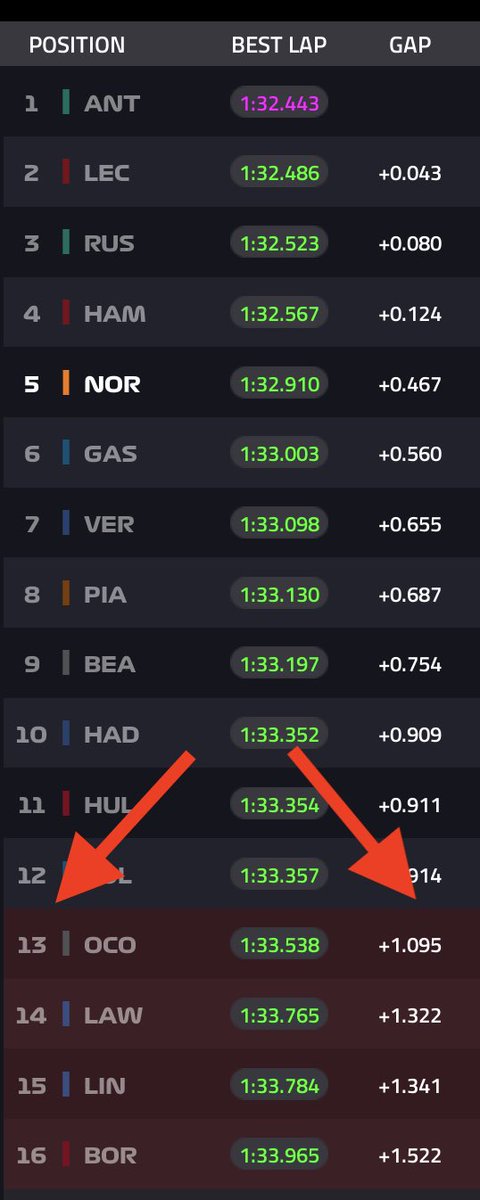
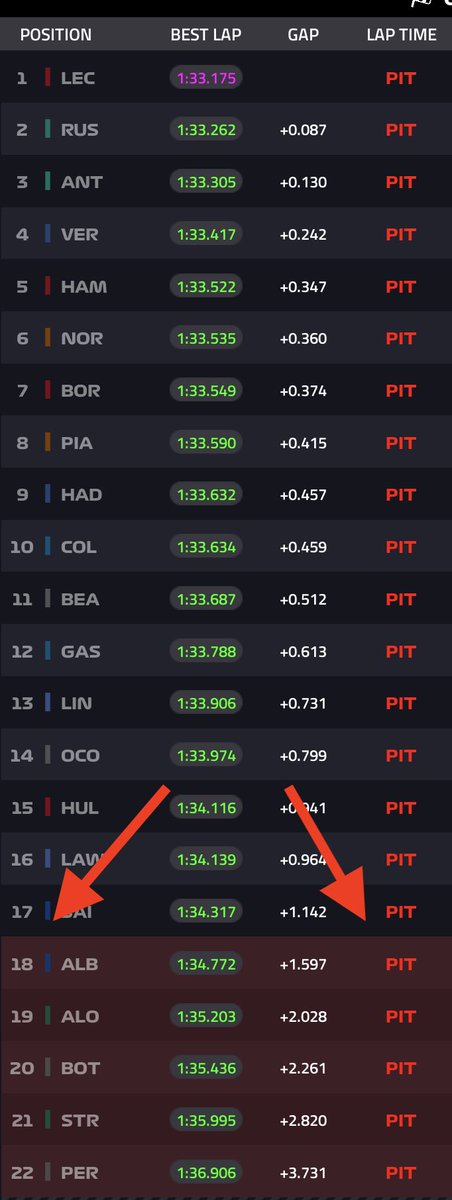
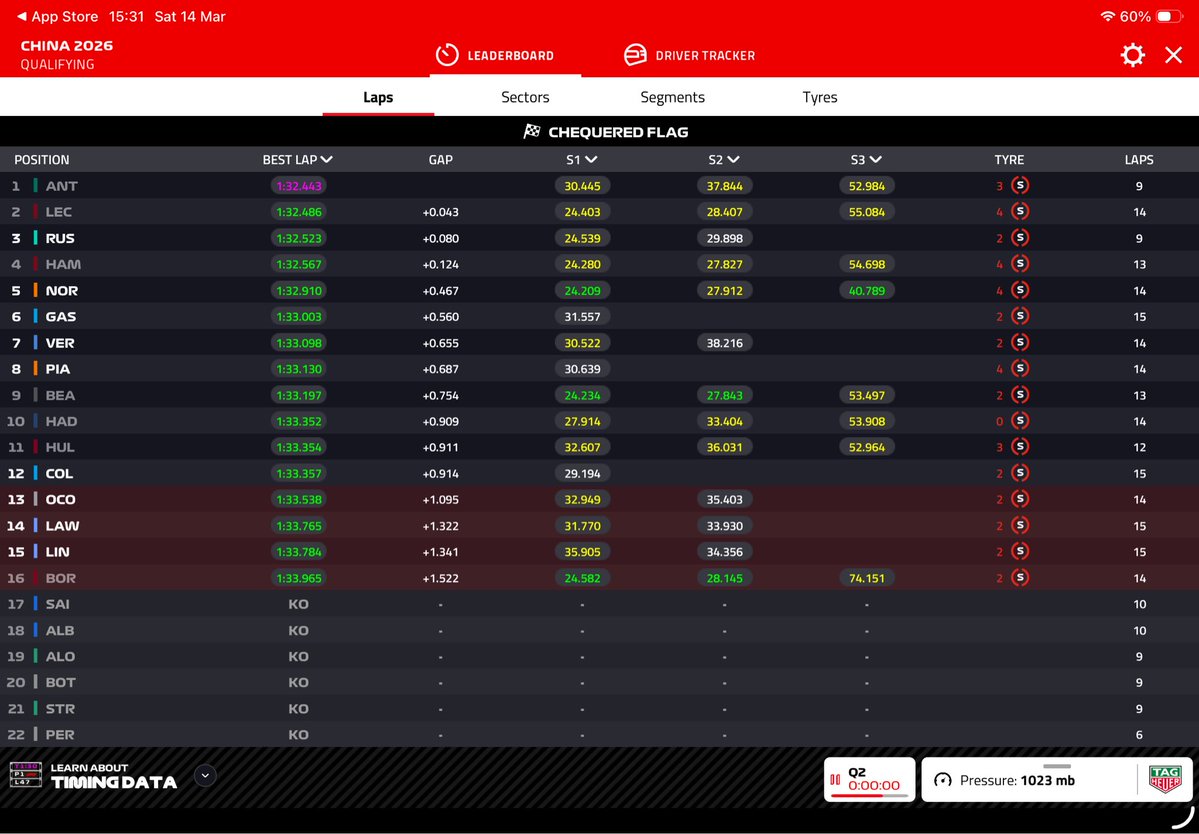
@F1Help Hello there! The live timing in the app highlights the bottom 5 being knocked out in Q1, instead of the bottom 6, and then the bottom 4 in Q2 🐞
Dave tweet mediaDave tweet media
English
1
0
0
49
F1 GPGuide
F1 GPGuide@GPGuide·
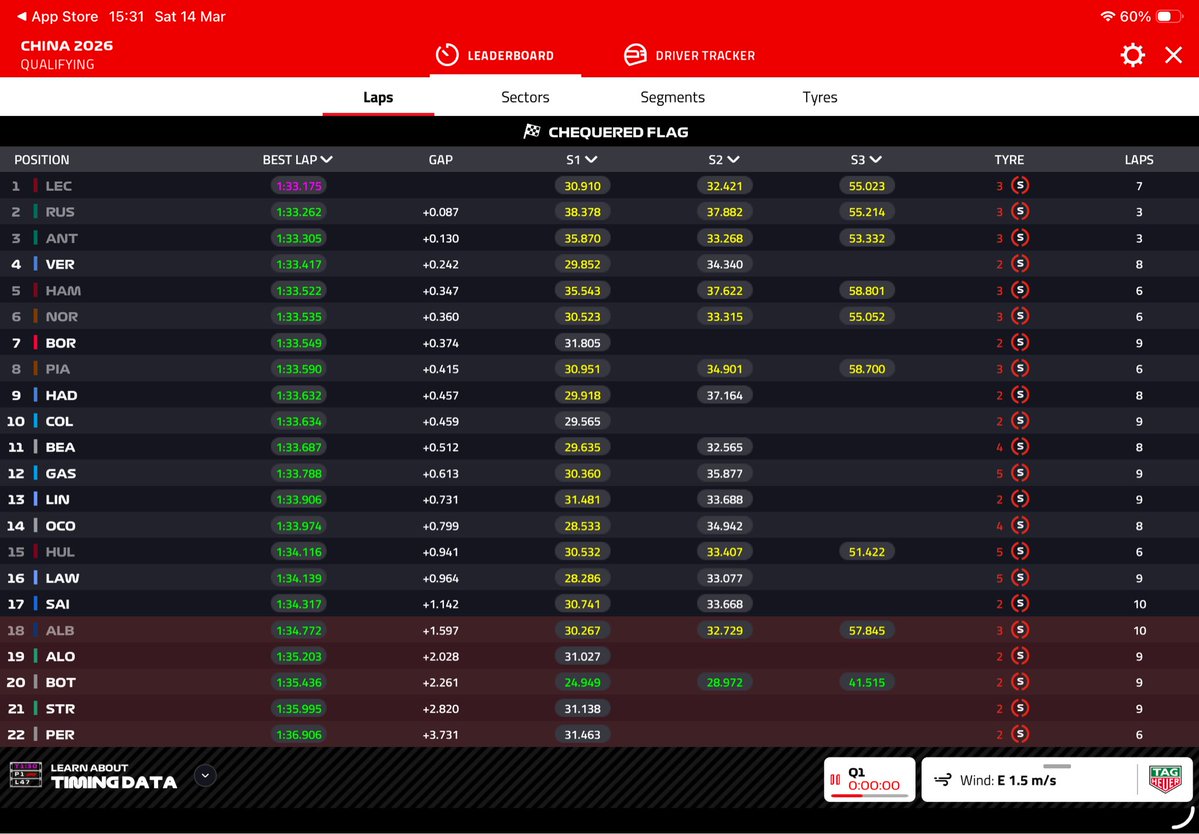
@F1Help … and in Q2, the Live Timing is highlighting only FOUR cars in the “Drop Zone” !!! (Click to view full image) Come on guys … this is #F1 !! Did no one test these tables once 2 cars were added to the runners !! Some poor software development … #F1 #ChineseGP🇨🇳🥢
F1 GPGuide tweet media
English
1
0
1
269
The Official F1® Help Channel
@nukes1602 Hey there. Sorry to hear this. Please try going into the settings and disabling the Multiview feature, and then try casting again. Once this has been disabled, you may also need to refresh your stream or app. Thank you very much - OB
English
0
0
1
167
nukes
nukes@nukes1602·
@F1Help Hello When casting I can’t switch to English International audio. Only English (F1 TV commentary) works. I want Sky commentary but it’s unavailable during casting. I’ve restarted my devices but the issue remains. Any help?
English
1
0
0
93
The Official F1® Help Channel
@GPGuide Hey there. Thank you very much for providing us with this information, our team are looking into this now. Thanks very much - OB
English
0
0
0
213
F1 GPGuide
F1 GPGuide@GPGuide·
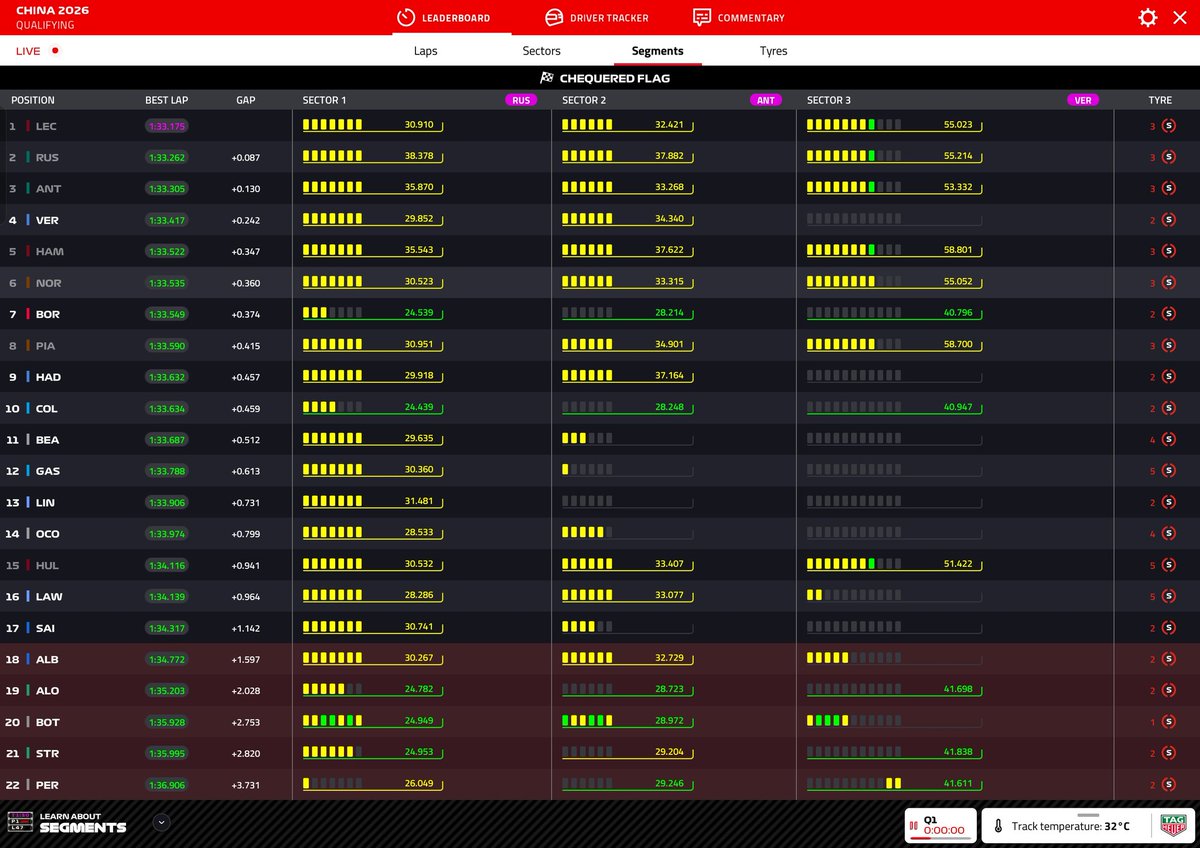
@F1Help - Please note that your web-based Live Timing code is still incorrect, as it is highlighting FIVE cars in the elimination zone as opposed to SIX !! (Click to view full image) Also informed you last week, but not fixed!! #F1 #ChineseGP🇨🇳🥢
F1 GPGuide tweet media
English
1
1
1
269
The Official F1® Help Channel
@DarioMac Hey there. Thank you very much for providing us with this information, our team are looking into this now. Thanks very much - OB
English
0
0
1
32
Dario108
Dario108@DarioMac·
@F1Help Bug report 🙃 ...The app is only highlighting 5 cars being eliminated, but in 2026 it's the slowest 6 cars that get eliminated in Q1.
Dario108 tweet media
English
1
0
0
69
The Official F1® Help Channel
@kiedon Hey there. Thank you very much for your feedback, we will ensure this is passed forward to our team. Thanks very much, have a great weekend! - OB
English
0
0
1
39
Jeroen Donkervoort
@F1Help please turn down the engine sound on the team radio (#3 car) it is almost impossible to hear the voices of Max and GP. Thanks in advance.
Hof van Twente, Nederland 🇳🇱 English
2
0
0
83
The Official F1® Help Channel
@SteadyMJ Hey there. If you select 'Track FX' in the audio track selection, then it will remove commentary but maintain the track sounds. Thank you very much - OB
English
1
0
0
65
FIA Bro
FIA Bro@SteadyMJ·
@F1Help can we get an option to mute commentary but still keep the background sound of the cars?
English
1
0
0
42
The Official F1® Help Channel
@kunalashah Hey there. We would suggest removing the Multiviewer app, as it is unsupported by F1 TV. This is why you may be experiencing issues. The Multiviewer app may connect to F1 TV, but it is not supported as it is a third-party application. Thank you very much - OB
English
1
0
0
156
Kunal Shah
Kunal Shah@kunalashah·
Guys, you have the "connect MultiViewer" option & you don't know what it does. I have the MultiViewer app already, yes. When I click on "connect" it links to the desktop app and says "connected". However, no radio showing up there. The F1 multiview option has a poor interface, btw.
English
1
0
0
149
Kunal Shah
Kunal Shah@kunalashah·
Hey @F1Help, you radio channels aren't firing for the SQ broadcast. I had a few drivers and now NO DRIVER shows up.
English
1
0
33
2.6K
The Official F1® Help Channel
@Teutoos Hey there. Sorry to hear this. Please try clearing cache and data, and if this doesn't work, please try uninstalling and re-installing the app. Thank you very much - OB
English
0
0
0
51