
CloudSpinx

295 posts

CloudSpinx banner
CloudSpinx

CloudSpinx

@cloud_spinx

Linux, Containers, Cloud and Infrastructure Technology Experts / consultants https://t.co/HNN47oKwMg Blogs: https://t.co/RQI97c0CCB, https://t.co/mu6FFfxU7Y

शामिल हुए Eylül 2022
329 फ़ॉलोइंग70 फ़ॉलोवर्स
पिन किया गया ट्वीट
CloudSpinx
CloudSpinx@cloud_spinx·
🚀 Unlock the Full Potential of Your Applications with OpenShift Consulting! 🚀 At CloudSpinx, our OpenShift Consulting services are designed to empower your business with top-tier container orchestration and management: 🛠️ Seamless Deployment ⚙️ Custom Solutions 🌟 Scalability and Flexibility 🔄 CI/CD Integration 🛡️ Robust Security Experience the benefits of advanced container orchestration with OpenShift! 🌐 #OpenShift #CloudSpinx #ContainerManagement #ITConsulting #CloudSolutions Learn more at cloudspinx.com/managed-opensh…
English
0
0
2
92
CloudSpinx रीट्वीट किया
Jaynit
Jaynit@jaynitx·
This video is literally 50 entrepreneurs giving you an MBA in 18 minutes:
English
156
8K
37.5K
1.1M
CloudSpinx रीट्वीट किया
sysxplore
sysxplore@sysxplore·
| ̄ ̄ ̄ ̄ ̄ ̄ ̄ ̄ ̄ ̄ ̄ ̄ ̄ ̄| | We ❤️ Linux🐧 | |______________| \ (•◡•) / \ / —— | | |_ |_
English
29
294
2.3K
77.8K
CloudSpinx रीट्वीट किया
sysxplore
sysxplore@sysxplore·
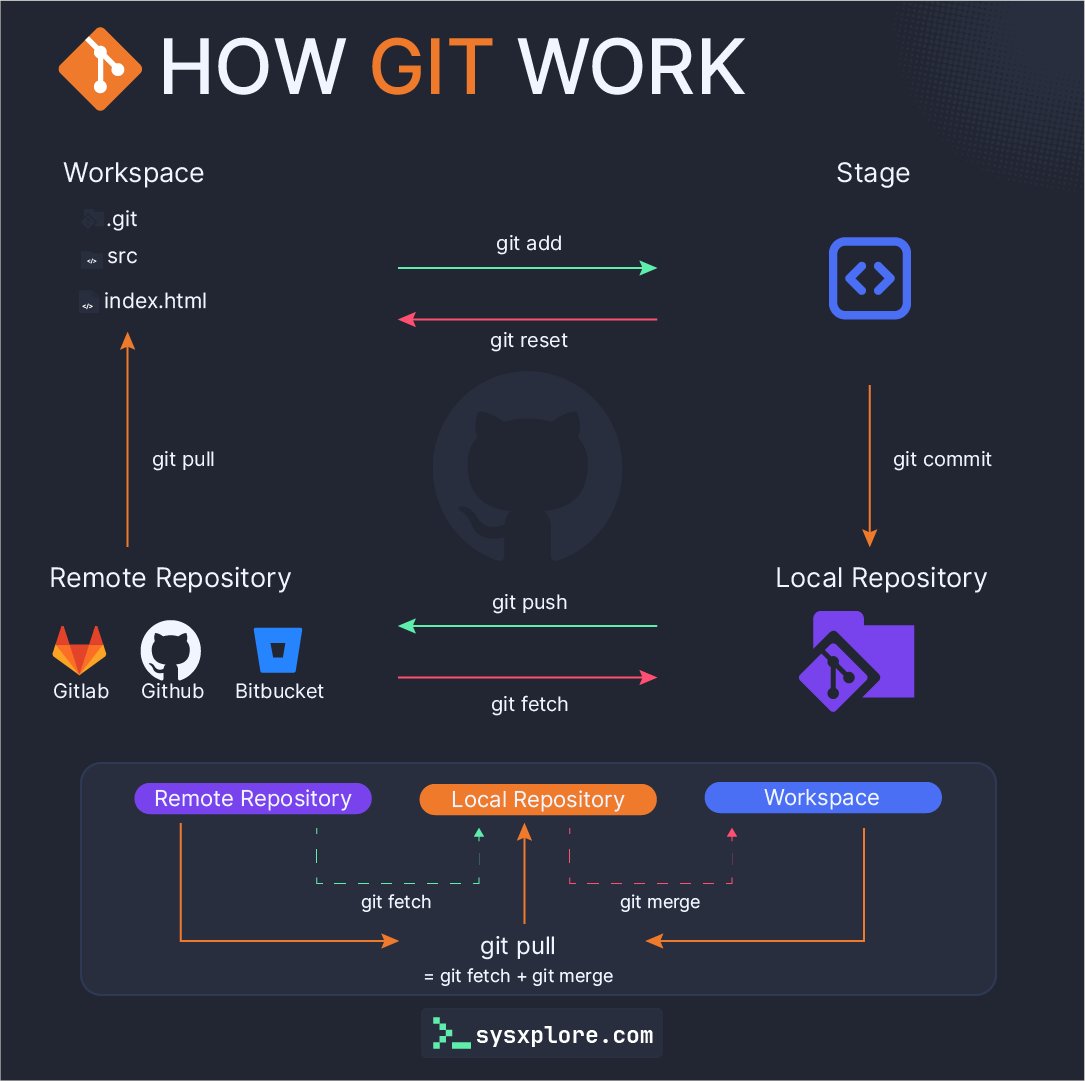
How does git work?
sysxplore tweet media
English
6
179
1.2K
74.7K
CloudSpinx रीट्वीट किया
GitHub Projects Community
GitHub Projects Community@GithubProjects·
| ̄ ̄ ̄ ̄ ̄ ̄ ̄ ̄ ̄ ̄ ̄ ̄| | open-source = future | |____________| \ (•◡•) / \ / —— | | _| |_
English
46
174
1.3K
38.4K
CloudSpinx रीट्वीट किया
Tech Fusionist
Tech Fusionist@techyoutbe·
Terraform vs Ansible (To The Point)
Tech Fusionist tweet media
English
2
48
283
18.7K
Sonam Murarkar
Sonam Murarkar@sonam_murarkar·
💻 Why Programmers Never Turn Off Their Laptops 🚫
Sonam Murarkar tweet media
English
96
82
924
33.8K
CloudSpinx
CloudSpinx@cloud_spinx·
@sysxplore We support all Linux distributions 🎉
English
0
0
2
192
sysxplore
sysxplore@sysxplore·
Which one do you use for your servers?
sysxplore tweet media
English
395
60
919
67.4K
CloudSpinx रीट्वीट किया
FreeBSD Foundation
FreeBSD Foundation@freebsdfndation·
Thank you for being a part of the wonderful FreeBSD Community and Happy New Year from the FreeBSD Foundation! #HappyNewYear #HNY #2025
FreeBSD Foundation tweet media
English
4
28
223
4.4K
CloudSpinx रीट्वीट किया
It's FOSS
It's FOSS@Itsfoss·
Well 😔
It's FOSS tweet media
English
25
44
579
17.8K
CloudSpinx रीट्वीट किया
Satya Nadella
Satya Nadella@satyanadella·
GitHub Copilot Free for VS Code has arrived.
English
913
4.5K
29.6K
3.1M
CloudSpinx रीट्वीट किया
Kali Linux
Kali Linux@kalilinux·
We are please to announce our final release of 2024, Kali Linux 2024.4! kali.org/blog/kali-linu… Containing new default python, updates to gnome 47, our launch of the new forums, raspberry pi imager improvements, nethunter updates and more! Check it out!
Kali Linux tweet media
English
66
582
2.6K
131.9K
CloudSpinx रीट्वीट किया
Linuxopsys
Linuxopsys@linuxopsys·
2025 is the year of Linux desktops.🐧
English
46
61
507
143.4K
CloudSpinx रीट्वीट किया
Supabase
Supabase@supabase·
phpMyAdmin
Supabase tweet media
Română
81
181
2.7K
161.8K
CloudSpinx रीट्वीट किया
Bytebytego
Bytebytego@bytebytego·
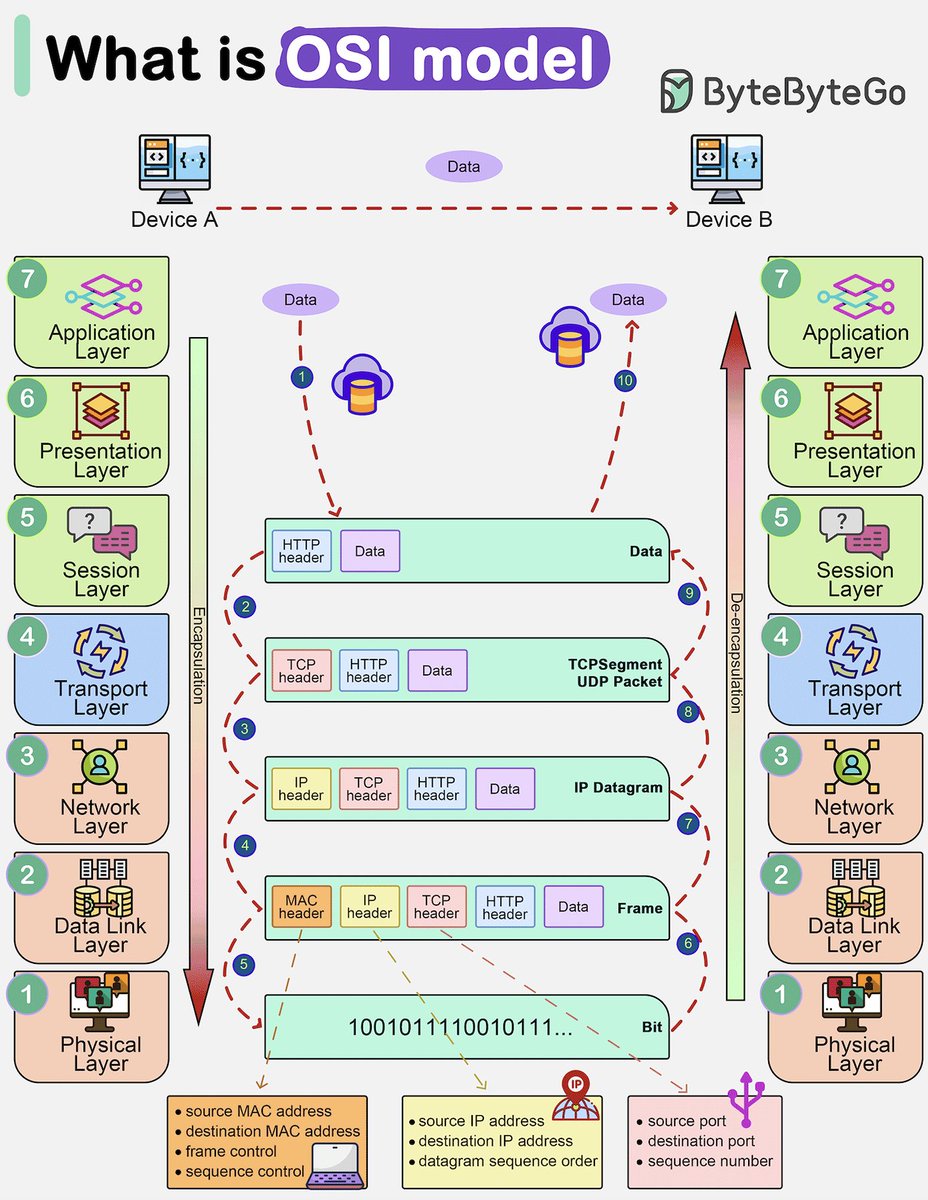
How is data sent over the network? Why do we need so many layers in the OSI model? The diagram below shows how data is encapsulated and de-encapsulated when transmitting over the network. 🔹 Step 1: When Device A sends data to Device B over the network via the HTTP protocol, it is first added an HTTP header at the application layer. 🔹 Step 2: Then a TCP or a UDP header is added to the data. It is encapsulated into TCP segments at the transport layer. The header contains the source port, destination port, and sequence number. 🔹 Step 3: The segments are then encapsulated with an IP header at the network layer. The IP header contains the source/destination IP addresses. 🔹 Step 4: The IP datagram is added a MAC header at the data link layer, with source/destination MAC addresses. 🔹 Step 5: The encapsulated frames are sent to the physical layer and sent over the network in binary bits. 🔹 Steps 6-10: When Device B receives the bits from the network, it performs the de-encapsulation process, which is a reverse processing of the encapsulation process. The headers are removed layer by layer, and eventually, Device B can read the data. We need layers in the network model because each layer focuses on its own responsibilities. Each layer can rely on the headers for processing instructions and does not need to know the meaning of the data from the last layer. Over to you: Do you know which layer is responsible for resending lost data? -- Subscribe to our weekly newsletter to get a Free System Design PDF (158 pages): bit.ly/bbg-social
Bytebytego tweet media
English
8
116
599
54.2K
CloudSpinx रीट्वीट किया
openSUSE Linux
openSUSE Linux@openSUSE·
🎉 Leap Micro 6.1 is here! 🚀 With features like #TOTP for PAM, soft-reboot support & opensuse-migration-tool, it's time to upgrade! news.opensuse.org/2024/12/06/lea…
English
2
15
53
2.5K
CloudSpinx रीट्वीट किया
Linux Format
Linux Format@linuxformat·
Microsoft says it's TPM 2.0 or the highway for Windows 11 support. trib.al/ZoS04oT
English
3
3
39
2K
CloudSpinx रीट्वीट किया
Sahn Lam
Sahn Lam@sahnlam·
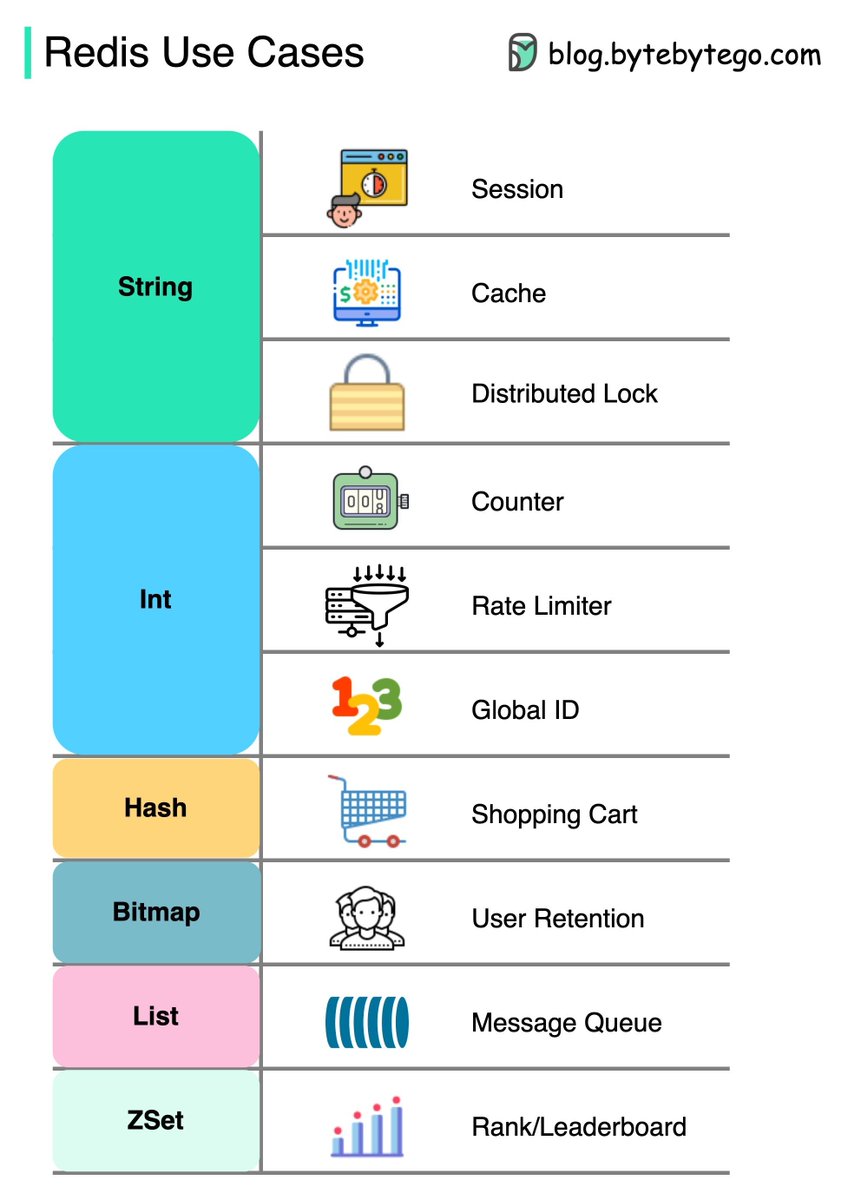
Popular Redis Use Cases
Sahn Lam tweet media
English
2
160
1.2K
86.5K
CloudSpinx रीट्वीट किया
Elon Musk
Elon Musk@elonmusk·
Cool
ALEX@ajtourville

Tesla @Cybertruck powering portable welder on the job site via its 40-amp 240-volt NEMA 14-50 plug located in the bed of the truck.

English
2K
3.8K
56.9K
60.7M
CloudSpinx रीट्वीट किया
Bytebytego
Bytebytego@bytebytego·
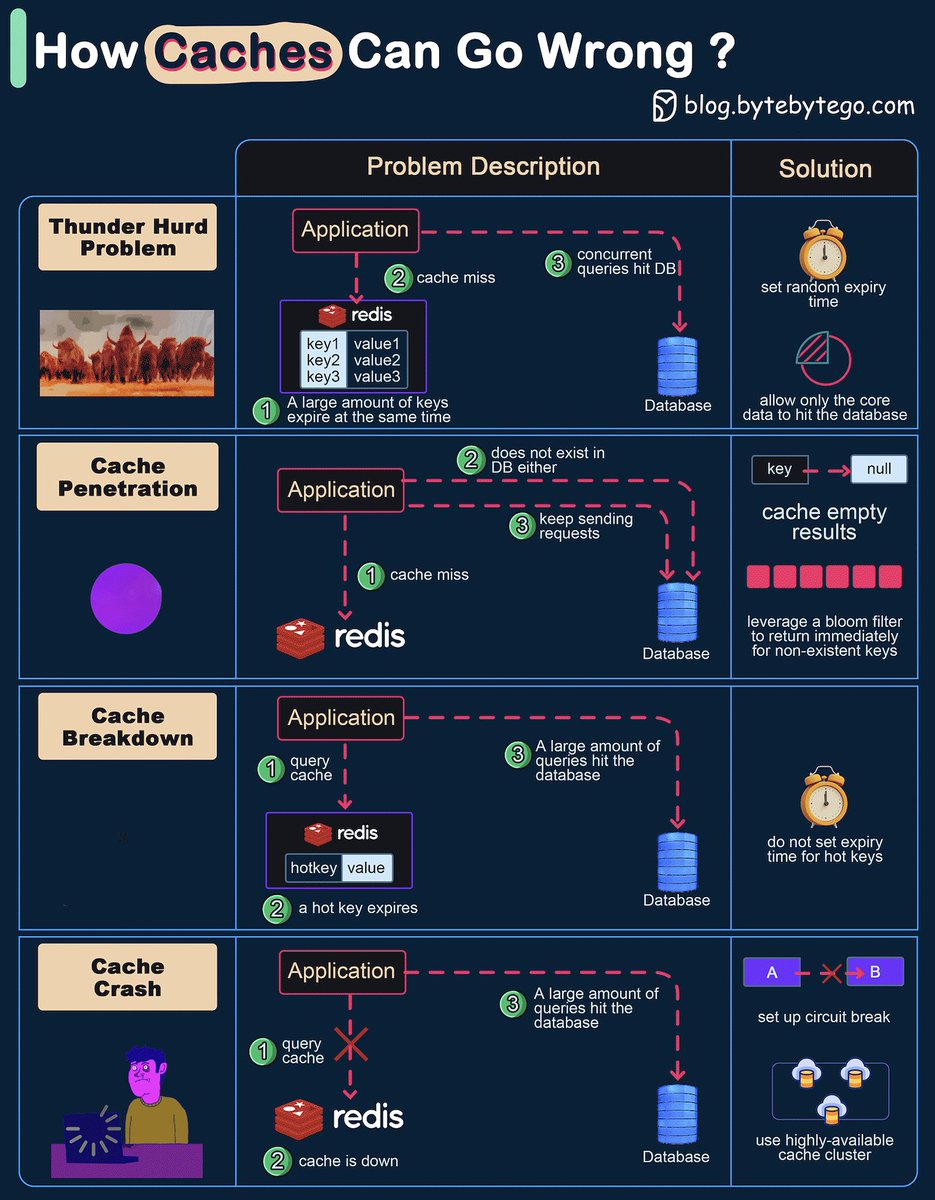
How can Cache Systems go wrong? The diagram below shows 4 typical cases where caches can go wrong and their solutions. 1. Thunder herd problem This happens when a large number of keys in the cache expire at the same time. Then the query requests directly hit the database, which overloads the database. There are two ways to mitigate this issue: one is to avoid setting the same expiry time for the keys, adding a random number in the configuration; the other is to allow only the core business data to hit the database and prevent non-core data to access the database until the cache is back up. 2. Cache penetration This happens when the key doesn’t exist in the cache or the database. The application cannot retrieve relevant data from the database to update the cache. This problem creates a lot of pressure on both the cache and the database. To solve this, there are two suggestions. One is to cache a null value for non-existent keys, avoiding hitting the database. The other is to use a bloom filter to check the key existence first, and if the key doesn’t exist, we can avoid hitting the database. 3. Cache breakdown This is similar to the thunder herd problem. It happens when a hot key expires. A large number of requests hit the database. Since the hot keys take up 80% of the queries, we do not set an expiration time for them. 4. Cache crash This happens when the cache is down and all the requests go to the database. There are two ways to solve this problem. One is to set up a circuit breaker, and when the cache is down, the application services cannot visit the cache or the database. The other is to set up a cluster for the cache to improve cache availability. Over to you: Have you met any of these issues in production? -- Subscribe to our weekly newsletter to get a Free System Design PDF (158 pages): bit.ly/bbg-social
Bytebytego tweet media
English
2
107
564
40.6K