Jetwriter AI
1.6K posts

Jetwriter AI
@JetwriterAI
Personalized AI Writing Assistant. Reply Emails, Ask Page, Summarize, Fix Grammar, Translate, and More. Free to try. BYOK 🔑 https://t.co/cHhUL1ClEx

Bergabung Ocak 2023
171 Mengikuti180 Pengikut

@neilpatel Videos are just turning into text for search engines. The words typed behind the scenes matter more than the moving pictures now. Good captions rule the game.
English

Video content is being pulled directly into ChatGPT answers now. Titles, descriptions, captions, transcripts, all of it gets read by AI. If your videos aren't set up for this, you're already behind.
#ChatGPT #AISearch #VideoContent #MarketingTips
English

𝗨𝗣𝗗𝗔𝗧𝗘𝗗 𝗟𝗜𝗦𝗧 𝗙𝗢𝗥 𝟮𝟬𝟮𝟲
💡 𝗜𝗱𝗲𝗮𝘀
• ChatGPT
• Claude
• Bing
🌐 𝗪𝗲𝗯𝘀𝗶𝘁𝗲
• 10Web
• Durable
• Framer
✍️ 𝗪𝗿𝗶𝘁𝗶𝗻𝗴
• Rytr
• Jasper
• Writesonic
🤖 𝗖𝗵𝗮𝘁𝗯𝗼𝘁𝘀
• Chatbase
• SiteGPT
• ChatSonic
⚙️ 𝗔𝘂𝘁𝗼𝗺𝗮𝘁𝗶𝗼𝗻
• Make
• Zapier
• Bardeen
🖼️ 𝗜𝗺𝗮𝗴𝗲
• Midjourney
• DALL·E
• Stable Diffusion
🎥 𝗩𝗶𝗱𝗲𝗼
• HeyGen
• Synthesia
• Runway
🎨 𝗗𝗲𝘀𝗶𝗴𝗻
• Flair AI
• Booth AI
• Canva AI
🎵 𝗠𝘂𝘀𝗶𝗰
• Boomy
• Amper
• Jukedeck
📈 𝗠𝗮𝗿𝗸𝗲𝘁𝗶𝗻𝗴
• AdCreative
• Simplified
• Pencil
Save 🔖 for later — this stack covers almost everything you need in 2026.
Follow Me for more AI info
Must follow @rosemoni18

English

Sending an email to a complete stranger is scary. 😬
If you make a silly mistake, they will delete your message right away. Check these 5 things before you hit send:
1. Did you spell their company right?
2. Is it too long? (Keep it under 30 seconds).
3. Did you talk about them, or just you?
4. Is the next step clear? ("Can we talk on Tuesday at 10 AM?").
5. Ask yourself honestly: Would YOU reply to this?
Worried your pitch sounds pushy? Run your draft through Jetwriter AI to make sure it sounds human and friendly.
Follow @JetwriterAI for more simple writing tips. 🚀

English

Do you send giant welcome emails to new people? 🛑
Nobody wants to read a huge manual on day one. If you want to make a great first impression, follow these 4 rules:
1. Say you are happy they are here ("Glad you joined us!").
2. Tell them what to do next ("Set up your profile").
3. Give them one helpful link.
4. Keep it super short (3 sentences max).
Stop typing the same message every day. Save your perfect welcome email as a template in Jetwriter AI and use it anywhere.
Follow @JetwriterAI for more quick writing tips. 🚀

English

@Seannywilson A great message means nothing if it goes to the wrong inbox. Clean lists always matter more than the text itself.
English

If your cold emails aren't getting replies, you have 1 of 3 problems:
1) Bad targeting
You're emailing people who don't need what you sell. Find lookalikes of your best customers using Oceandotio, then layer in intent signals (hiring, funding, tech stack).
2) Unverified data
Your emails bounce because Apollo only has 45% of emails and you never validated them. Run an enrichment waterfall (Icypeas→Prospeo→BetterContact→FindyMail→FullEnrich) then double-verify with BounceBan.
3) Terrible copy
Your email answers none of these:
- Why you
- Why now
- Why this matters.
Fix them in that order.
English

@alexgroberman Many small shops lose sales every day by skipping basic internet updates. A clean online profile easily brings in more people.
English

I'm really not trying to insult anyone here but...
Local businesses are *still* the slowest to adapt to pretty much anything that can actually help them grow.
In one particular case it’s costing them 10s of thousands of dollars every single month.
If you’re ignoring all the free traffic + sales you could be getting from ChatGPT and Google right now, you’ll be playing painful catch-up in 2027.
Let’s walk through exactly how to fix this without hiring expensive outside help.
Alright, biggest problem first:
Google and AI Search both show results based on authority, content and trust.
They use different methods, but their core signals overlap.
(SEO Stuff fixes both: seo-stuff.com)
For local businesses, that means:
You need a Google Business Profile
You need Reviews.
You need PR and backlinks from locally trusted sites
You need brand mentions that reinforce your entity
You need NAP consistency across the entire web
You need structured, crawlable and up-to-date business information
(Want to know if your site is AI-search ready?
Check here: seo-stuff.com/free-audit)
A few proven local authority plays:
Partner with complementary local businesses for link swaps
Get accredited by the Better Business Bureau
Join your local Chamber of Commerce
Pitch seasonal tips or cost data to neighborhood blogs and news outlets
Submit to high-trust local directories
Sponsor school or charity events to earn recap backlinks
Get featured in “Best of [City]” and local guides
These placements matter more than ever.
A fairly large Yext analysis showed that a significant portion of AI citations come from brand-controlled or brand-adjacent sources.
That means local publications, directories, and branded pages carry more weight now than ever.
If you do not know how to do this, leverage SEO Stuff’s Gold Plan (link in my profile).
SEO Stuff’s Gold Plan places links only on sites already surfacing in AI search and already trusted by Google.
Check the case studies I posted this week if you want examples.
That said, authority alone is not enough.
Your Google Business Profile is now one of the strongest combined signals for Google and AI.
As of 2026, ChatGPT and Gemini both pull Google Business Profile fields directly into AI Overviews.
Recent BrightLocal research confirms that GBP URLs and business sites appear heavily in ChatGPT local answers.
Here is a quick GBP optimization checklist:
Complete every field
Upload at least 100 geo-tagged photos
Post weekly updates
Add Q and A entries
Reply to every review using service and location terms
Maintain perfect NAP consistency across directories
GBP is now a required foundation for visibility in Maps, AI Overviews, and local ChatGPT recommendations.
Next, build high-quality service and location pages.
AI Overviews often surface location pages above the map pack.
To earn those placements, you need structured, local, query-aligned content.
Every ZIP code and neighborhood page should include:
Embedded Google Map
Local job photos and staff images
Videos
FAQ block with exact-match city questions
Internal links to main service and contact pages
Fast, mobile-first layout
Think of each page as an AI-friendly Answer Hub.
Now let’s talk reviews.
Gemini and Perplexity now pull review text directly into local summaries.
That same Yext research confirmed reviews are one of the most common brand-controlled citation sources in AI answers.
Here is what you should do:
Request reviews via SMS and email immediately after service
Feature top reviews on your site and GBP
Reply using keywords and location terms
Target 150+ reviews per location
More reviews create more machine-readable mentions, which increases AI citation likelihood.
Next, let’s touch on technical SEO.
Google and AI systems both rely on clean, structured, fast, crawlable sites.
Slow or broken sites lose both users and AI confidence.
Local technical checklist:
Core Web Vitals within thresholds
Lazy-load images
Submit XML sitemaps to Google and Bing
Fix broken links and redirect chains
Allow AI crawlers
Now let’s talk content.
Google and ChatGPT both prioritize city-specific, structured content with clear takeaways.
Create:
“Complete Guide to [Service] in [City]” hub pages
ZIP-specific subpages
Seasonal posts
Cost breakdown posts
Local problem and solution posts
“How it works in your city” content
Always include a TLDR or Key Takeaways section.
Perplexity often surfaces these verbatim.
Next, drive branded search.
Branded search is now one of the strongest signals for both Google and AI.
Increasing branded search volume increases entity trust.
Ways to lift branded search:
CTAs like “Search [Business Name] reviews on Google”
Localized customer stories
Retargeting ads featuring 5-star reviews
City-specific promotions
Even a small lift in branded search can dramatically improve AI visibility.
Finally, track the right metrics.
Traffic means nothing if it does not turn into calls.
What to measure:
Branded search growth
GBP views, calls, and direction requests
AI Overview and ChatGPT citation coverage
Review growth and keyword usage
Conversion rates on service pages
Off-site brand mentions
These signals correlate directly with AI citations and local bookings.
Most local businesses still:
Ignore GBP
Have under 50 reviews
Have poor technical SEO
Publish no city-specific content
Which is why they are barely visible in ChatGPT, Perplexity, Gemini and Google AI Overviews today and will not exist in these systems by mid 2026.
Follow this roadmap and you will appear where customers are actually searching right now.
And if you want the private ChatGPT and Perplexity cheat codes we have been testing, Follow + RT + Comment “X Local Guide.”
You must do all 3 for the DM.
GIF
English

@akshay_pachaar AI is moving from just answering questions to actually doing the work. The jump from thinking to doing changes everything.
English

Claude vs. Claude Code vs. Cowork.
If you've been confused about which one to use and when, this post will clear that up in under two minutes.
Anthropic now offers three distinct ways to interact with Claude, and each one targets a fundamentally different workflow. Think of it as: Chat for thinking, Code for building, and Cowork for doing.
Here's a quick breakdown:
1️⃣ Claude Chat
This is the conversational AI assistant most people already know. You type a prompt, Claude responds, and you iterate together.
- Turn rough ideas into structured plans through conversation
- Write emails, reports, essays, and long-form content
- Research and summarize complex topics in minutes
- Analyze documents, PDFs, and images
- Build interactive prototypes through Artifacts
The key here is that everything happens through conversation. You're thinking with Claude, not delegating work to it.
It's available on every device, has a free tier, and supports persistent memory across sessions.
The tradeoff is that it has no direct access to your local files (upload only), and it can't generate raster images natively.
2️⃣ Claude Code
This is a terminal-native coding agent. You describe what you want in plain English, and Claude reads your codebase, writes code, runs tests, fixes errors, and ships the result.
- Build and debug entire features across the full codebase
- Write, run, and fix tests automatically
- Manage git workflows and create pull requests
- Spawn multiple parallel agents working on different parts of a task simultaneously
It handles the full development cycle end to end, from planning to execution to testing. With the CLAUDE(.)md configuration file, you can teach it your project's conventions, patterns, and constraints so it writes code the way your team expects.
The tradeoff is a steeper learning curve compared to Chat, and token costs can add up during heavy sessions.
3️⃣ Claude Cowork
This is the newest addition. Anthropic describes it as Claude Code for the rest of your work.
It's an agentic desktop assistant that automates file management and repetitive tasks through a GUI. You describe an outcome, and Claude plans, executes, and delivers finished work: formatted documents, organized file systems, spreadsheets with working formulas, and synthesized research.
- Direct local file access and editing (no upload/download cycle)
- Schedule recurring tasks automatically
- Assign tasks remotely via Dispatch from your phone
- Computer Use lets Claude control your screen directly
It runs inside a sandboxed virtual machine on your computer, so Claude can only access folders you explicitly grant. You don't need to know how to code to use it.
The tradeoff is that your computer must stay awake for tasks to run, and it's still in research preview.
Here's how to think about choosing between them:
→ If you need to think through a problem or get writing/research help, use Chat
→ If you're building software and want an autonomous coding partner, use Code
→ If you have a clearly defined deliverable that involves local files and desktop workflows, use Cowork
All three are included in the same subscription starting at $20/month, which makes it one of the highest-leverage subscriptions in productivity software right now.
I've put together a visual below that maps the workflow of each product side by side.
If you want to go deeper into Claude Code specifically, I wrote a detailed article covering the anatomy of the .claude/ folder, a complete guide to CLAUDE(.)md, custom commands, skills, agents, and permissions, and how to set them all up properly. Link in the next tweet.
GIF
English

@ecomchasedimond Getting the length right changes everything. People scroll fast and skip long text.
English

8 reasons your email subject lines aren’t getting opened:
1. Too long for mobile
2. Spam trigger words
3. No curiosity gap
4. No urgency signal
5. Not personalized
6. No power words
7. Too many emoji’s
8. Wasted preheader text
I built a free tool that checks all 8 in seconds:
chasedimond.com/email-subject-…
English

That's a very comprehensive list. The output from most AI writing tools, however, can feel very generic. Jetwriter AI helps fix that problem. It lets users build custom writing styles. This makes writing sound human. It is a super light chrome extension under 1MB. It also allows using a personal API key.
English

120 Mind-Blowing AI Tools;
1. Ideas
- YOU
- Claude
- ChatGPT
- Perplexity
- Bing Chat
2. Presentation
- Prezi
- Pitch
- PopAi
- Slides AI
- Slidebean
3. Website
- Dora
- Wegic
- 10Web
- Framer
- Durable
4. Writing
- Rytr
- Jasper
- Copy AI
- Textblaze
- Writesonic
5. AI Models
- RenderNet
- Glambase App
- Luma AI
- Sora (OpenAI)
- Leonardo AI
6. Meeting
- Tldv
- Krisp
- Otter
- Avoma
- Fireflies
7. Chatbots
- Poe
- Claude
- Gemini
- ChatGPT
- HuggingChat
7. Automation
- ClickUp
- Drift
- Outreach
- Emplifi
- Phrasee
8. UI/UX
- Uizard
- Visily
- Khroma
- Galileo AI
- VisualEyes
9. Image
- Stylar
- Freepik
- Phygital+
- StockIMG
- Bing Create
10. Video
- Pictory
- HeyGen
- Nullface
- Decohere
- Synthesia
11. Design
- Looka
- Clipdrop
- Autodraw
- Vance AI
- Designs AI
12. Marketing
- AdCopy
- Predis AI
- Howler AI
- Bardeen AI
- AdCreative
13. Twitter
- Typefully
- Postwise
- Metricool
- Tribescaler
- TweetHunter
Follow @KhushiPatil25 for more AI content.

English

Great list to start with. The output from most AI writing tools, including copy ai, Jasper etc., can feel very generic. Jetwriter AI helps fix that problem. It lets users build custom writing styles. This makes writing sound human. It is a super light chrome extension under 1MB. It also allows using a personal API key.
English

🚀 20 AI Tools That Make Work 20x Easier
Still doing things the hard way?
You’re already behind
These AI tools can completely change how you work
➡️ Write content in seconds (blogs, emails, posts)
➡️ Design stunning graphics without skills
➡️ Automate repetitive tasks on autopilot
➡️ Turn ideas into videos, slides, and visuals
➡️ Summarize long docs in 1 click
➡️ Transcribe meetings instantly
➡️ Fix grammar and improve writing tone
➡️ Research faster with AI-powered search
Power stack you should know:
➡️ ChatGPT for content + problem solving
➡️ Canva for design
➡️ Zapier for automation
➡️ Notion AI for organization
➡️ Grammarly for writing
➡️ Perplexity AI for research
➡️ Descript + Pictory for video
➡️ Tome for presentations
Reality check 👇
People who use AI will replace people who don’t
You don’t need all 20
You just need 4–5 tools mastered well
Start today
Stay ahead tomorrow
Which one are you using already? 👇
❤️ Like
🔁 Retweet
🔖 Bookmark
Follow @akhilesh9235 for more AI Posts
#AI #Productivity #Automation #ChatGPT #FutureOfWork
DISCLAIMER- Image rights belong to the owner. Got it from an open source to download.

English

𝗨𝗣𝗗𝗔𝗧𝗘𝗗 𝗟𝗜𝗦𝗧 𝗙𝗢𝗥 𝟮𝟬𝟮𝟲
💡 𝗜𝗱𝗲𝗮𝘀
• ChatGPT
• Claude
• Bing
🌐 𝗪𝗲𝗯𝘀𝗶𝘁𝗲
• 10Web
• Durable
• Framer
✍️ 𝗪𝗿𝗶𝘁𝗶𝗻𝗴
• Rytr
• Jasper
• Writesonic
🤖 𝗖𝗵𝗮𝘁𝗯𝗼𝘁𝘀
• Chatbase
• SiteGPT
• ChatSonic
⚙️ 𝗔𝘂𝘁𝗼𝗺𝗮𝘁𝗶𝗼𝗻
• Make
• Zapier
• Bardeen
🖼️ 𝗜𝗺𝗮𝗴𝗲
• Midjourney
• DALL·E
• Stable Diffusion
🎥 𝗩𝗶𝗱𝗲𝗼
• HeyGen
• Synthesia
• Runway
🎨 𝗗𝗲𝘀𝗶𝗴𝗻
• Flair AI
• Booth AI
• Canva AI
🎵 𝗠𝘂𝘀𝗶𝗰
• Boomy
• Amper
• Jukedeck
📈 𝗠𝗮𝗿𝗸𝗲𝘁𝗶𝗻𝗴
• AdCreative
• Simplified
• Pencil
Save 🔖 for later — this stack covers almost everything you need in 2026.
Follow @ZahidulIsl65224 for more AI info

English

Do you hate when people ignore your questions in emails? 😡
Usually, it is because your question is hidden in a big pile of words. If you want a fast answer, try this:
1. Put the question in the very first line (do not hide it).
2. Make it a simple "yes" or "no" ("Is the report done?").
3. Only ask one thing at a time.
Typing too much? Use Jetwriter AI to cut out the extra words so your main question really stands out.
Follow @JetwriterAI for more daily work tips. 🚀

English

@noelcetaSEO Sharing real knowledge builds trust faster than spending money on ads. Helpful articles always win in the end.
English

@godofprompt Paying a million dollars for advice is a thing of the past. The right prompts do the exact same work for free.😉
English

@thetripathi58 Sorting bad information out before saving it makes a lot of sense. Throwing everything into a huge pile and hoping to find the right answer later always ends badly.
English

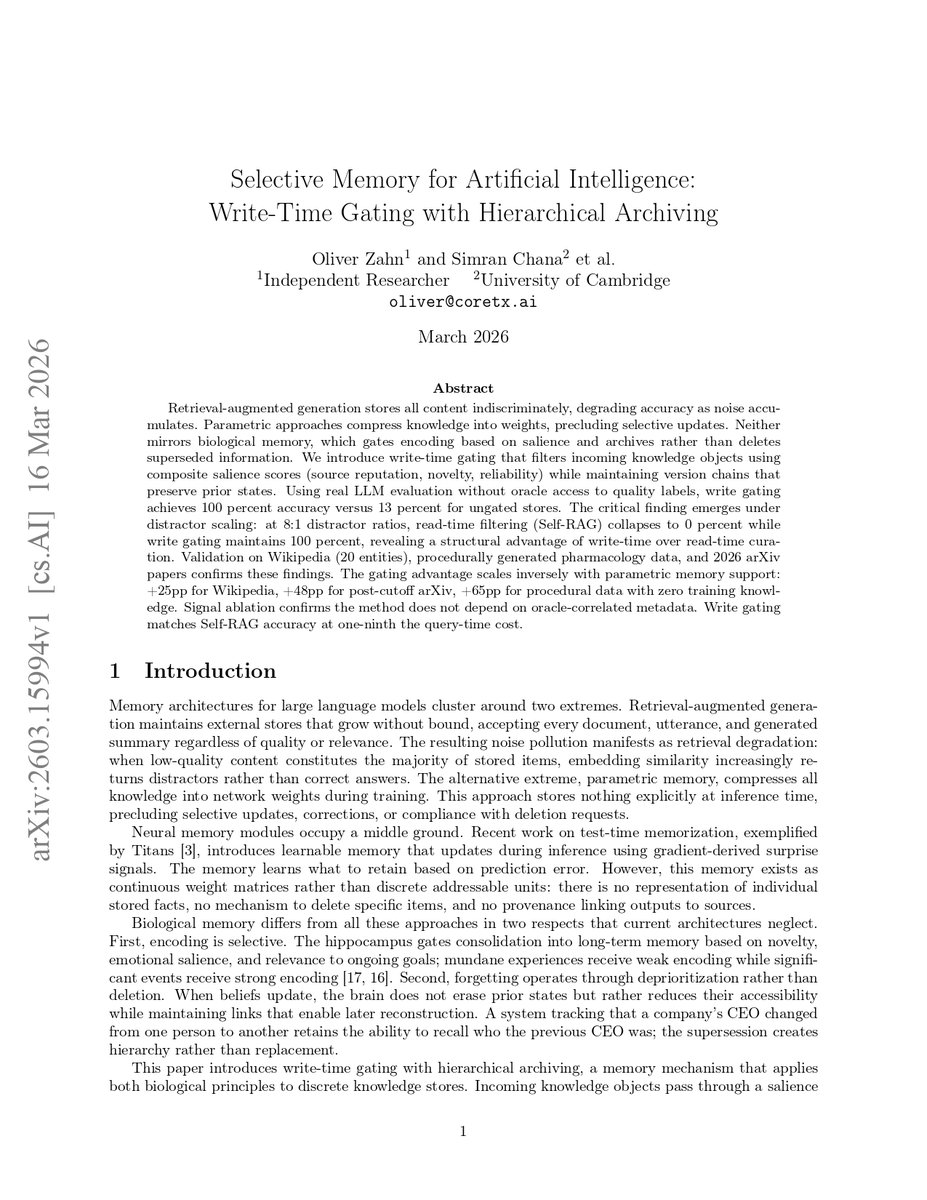
🚨 Cambridge researchers just tested what happens when you overload an AI's memory with irrelevant data.
They found a complete collapse of modern RAG systems.
Not a minor hallucination. A total failure of the exact retrieval architecture that every enterprise AI relies on to access private data.
The models simply drowned in the noise.
The researchers tested standard Retrieval-Augmented Generation (RAG) and filtering models like Self-RAG. They fed them information but slowly increased the ratio of distracting, low-quality documents.
Here is what they found.
Current read-time filtering failed completely. When the ratio of distractors hit 8:1, the accuracy of standard RAG systems plummeted to 0%. The AI lost the ability to find the truth.
It exposed a massive architectural flaw. We currently store every single document an AI reads, regardless of quality, and force the model to sort through the garbage at query time. It is highly inefficient and fundamentally broken.
The biological fix. The researchers built a new system called "Write-Time Gating" modeled after the human hippocampus. Instead of saving everything, it evaluates novelty, reliability, and source reputation before the data is even stored.
And then there is the finding that changes how we build AI: hierarchical archiving. When beliefs update, the system does not delete the old data. It deprioritizes it, maintaining a version history just like the human brain. The result? The write-gated system maintained 100% accuracy even at massive distractor scales, all while costing one-ninth the compute of current systems.
The researchers made it clear. When you dump raw, unfiltered data into a database and expect the LLM to figure it out later, you are building a system designed to fail at scale.
No reliable retrieval. No cost control. No accuracy guarantees. Nothing.
Right now, companies are building massive vector databases, throwing every piece of corporate documentation into them, and assuming the AI will magically find the signal in the noise.
Stop treating AI memory like a hard drive. Start treating it like a biological filter. Build the gate at the entrance, not the exit.

English

@neilpatel People look for answers in video apps instead of just reading websites. Sticking to a single place misses a huge part of the crowd.
English

Instagram processes 6.5 billion searches a day and TikTok isn't far behind. Your buyers are searching everywhere and a strategy built around one platform is leaving most of your audience completely untouched.
#ContentMarketing #MultiPlatform #SEOStrategy #DigitalMarketing
English

@alex_prompter AI can write the words very fast. Good ideas are what keep people reading.
English

Great list. The output from most AI writing tools, including chatgpt, can feel very generic. Jetwriter AI helps fix that problem. It lets users build custom writing styles. This makes writing sound human. It is a super light chrome extension under 1MB. It also allows using a personal API key.
English

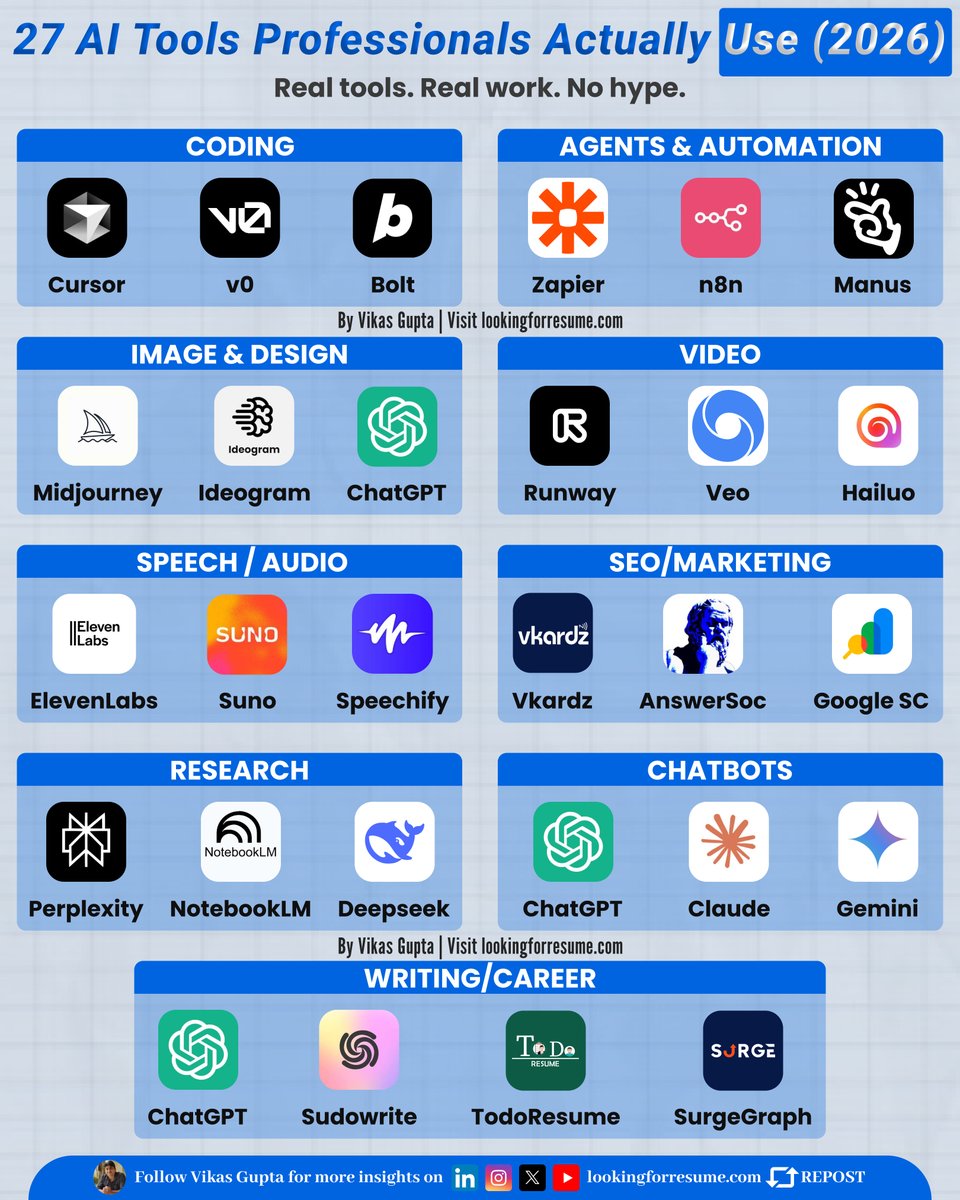
Everyone talks about AI.
Very few know which tools professionals actually use in 2026.
Here’s the real list — based on real workflows, not hype 👇
1. ChatGPT – thinking, writing, problem-solving
2. Cursor – AI-powered coding inside your editor
3. v0 – generate UI and frontend code fast
4. Bolt – ship full-stack apps quickly
5. Zapier – automate workflows without code
6. n8n – advanced, self-hosted automations
7. Manus – AI agents that execute tasks for you
8. Midjourney – high-quality image generation
9. Ideogram – logos, typography & brand visuals
10. Runway – AI video editing & generation
11. Veo – cinematic AI video creation
12. Hailuo – short-form AI video generation
13. ElevenLabs – ultra-realistic voice generation
14. Suno – create music with AI
15. Speechify – text-to-speech for productivity
16. Vcardz – AI-driven SEO optimization
17. AnswerSoc – content insights for search & social
18. Google Search Console – real SEO performance data
19. Perplexity – research with citations
20. NotebookLM – turn documents into insights
21. DeepSeek – technical & reasoning-focused research
22. Claude – long-form reasoning & writing
23. Gemini – Google-native AI assistant
24. Sudowrite – creative writing & storytelling
25. TodoResume – AI-powered resumes
26. SurgeGraph – long-form SEO content
27. lookingforresume – AI Resume Checker
SAVE THIS FOR LATER 🔖

English

@ZahidulIsl65224 Great list. The output from most AI writing tools can feel very generic. Jetwriter AI helps fix that problem. It lets users build custom writing styles. This makes writing sound human. It is a super light chrome extension under 1MB. It also allows using a personal API key.
English

120 Must-Use AI Tools. ✨
120 Smart AI Tools for Work & Growth.🧠
1. Ideas ✨
- YOU
- Claude
- ChatGPT
- Perplexity
- Bing Chat
2. Presentation
- Prezi
- Pitch
- PopAi
- Slides AI
- Slidebean
3. Website
- Dora
- Wegic
- 10Web
- Framer
- Durable
4. Writing
- Rytr
- Jasper
- Copy AI
- Textblaze
- Writesonic
5. AI Models
- RenderNet
- Glambase App
- Luma AI
- Sora (OpenAI)
- Leonardo AI
6. Meeting
- Tldv
- Krisp
- Otter
- Avoma
- Fireflies
7. Chatbots
- Poe
- Claude
- Gemini
- ChatGPT
- HuggingChat
7. Automation
- ClickUp
- Drift
- Outreach
- Emplifi
- Phrasee
8. UI/UX
- Uizard
- Visily
- Khroma
- Galileo AI
- VisualEyes
9. Image
- Stylar
- Freepik
- Phygital+
- StockIMG
- Bing Create
10. Video
- Pictory
- HeyGen
- Nullface
- Decohere
- Synthesia
11. Design
- Looka
- Clipdrop
- Autodraw
- Vance AI
- Designs AI
12. Marketing
- AdCopy
- Predis AI
- Howler AI
- Bardeen AI
- AdCreative
13. Twitter
- Typefully
- Postwise
- Metricool
- Tribescaler
- TweetHunter
Don’t scroll past this 👀
Save it 🔖 — future you will be grateful.
Follow @ZahidulIsl65224 for daily AI tools 🪄

English