

Reed Taylor
66 posts

📖SEEDANCE 2.0 OUTPUTS LOOK DIFFERENT WHEN YOU CHANGE ONE THING ABOUT THE INPUT
Most people open the same tool and walk away with completely different results. The input is why.
That gap starts before you open Seedance. It starts in how you write the input.
A normal prompt hands the model a subject and lets it guess the rest. A JSON prompt removes the guessing entirely — camera position, atmospheric layers, light temperature, motion behavior, texture priority, color finish. The model stops interpreting and starts executing.
The ancient Hindu temple courtyard at night — normal prompt gives you dramatic architecture with decent atmosphere. JSON gives you wet stone reflecting torch flames across the ground, a low ground-level camera crawling toward the entrance, storm clouds pressing down on the tower above, and a color grade so cold and dark it makes the fire feel like the only warmth left in the world. One output is a location. The other is a scene with weight.
The divine energy vortex spiraling above the temple — normal prompt gives you a visible effect. JSON gives you a slow inward pull toward a single beam of light at the center, ash and debris orbiting the spiral at different speeds, the temple barely visible through the motion blur, and a sound design opening that the visual tells you exactly how to build. The frame doesn't just show the vortex. It makes you feel what's inside it.
• Step 1 — Write the emotional core of your scene in one sentence before you describe anything visual
• Step 2 — Take that sentence to Claude and ask for a full JSON: subject detail, environment layers, camera start position and movement arc, key light source and direction, secondary atmospheric light, particle or debris behavior, motion tempo, and color grade finish
• Step 3 — Paste the JSON into Seedance 2.0 without editing it first. Run four generations and compare
• Step 4 — Take the output that feels shot rather than rendered into your editor. Build the sound design around what the image is already telling you
The model has always been capable of this output. Most people just never gave it a complete brief.
📥Tomorrow I'm covering the one that surprised me the most this month.
🔖All the details are already pinned. The work starts when you stop scrolling.
Zentrix⌚️@ZentrixHQ
English

📱 One tap… and you're no longer in your room. 🎮⚡
From a bored scroll to an all-out gaming adrenaline rush, this storyboard-to-video transformation feels like stepping into another universe.
Created with GPT Image 2 + Seedance 2.0 on Pixazo. 🔥
Comment "GAME" for the exact workflow + prompts 👇
#Pixazo #AIvideo #Gaming #GPTImage2 #Seedance2
English

FREE SEEDANCE ACCESS WITH ALMOST NO CENSORSHIP JUST DROPPED.
And people are going to sleep on it.
LTX is running a promo right now that gives you 100,000 free tokens when you sign up.
That’s enough for around 20 full 15-second AI videos.
Not 3-second demos.
Not low-res tests.
Actual generations.
The best part?
You can use it for Seedance-style videos with way fewer annoying blocks than most AI video tools.
No watermark-heavy nonsense.
No tiny free trial.
No “pay first to test it properly.”
Here’s how to claim it:
> Go to: app . ltx . studio
> Create a free account
> Open the redeem page:
ltx . studio / redeem ? code = LTXFF2026
> Activate the code: Get 100,000 tokens
Generate around 20 videos
This is basically a free Seedance testing window before everyone starts burning paid credits again.
100k tokens.
~20 videos.
Way fewer filters.
Free AI video generations while the promo is still alive.
0xTria@0xTria
English
@0xTria Failed to redeem all from the subscriptions and developers consul
English
@neal_k_patel @romanzubenko Is for creative video, looking for something like warp history Kling something far out, text to video on demand need 5-8 minutes is that possible yet?
English

@romanzubenko it's very real - we never charge for output tokens and only $0.05/1M for input
English
Introducing ScaleDown
15x cheaper. 63x faster. 5.1% more accurate than GPT-5.4 Mini.
Task-specific SLMs for the 70-80% of AI workloads that don't need a frontier model.
From NeurIPS '25 to scaledown.ai
English
@yyfz321021 Could not get it to run on the pod after 2 hours and 20$ of nothing working.
English

We open-sourced everything: inference, training, and weights.
Hope this makes low-resource interactive video/world generation easier to reproduce, modify, and build on.
GitHub: github.com/yyfz/Warp-as-H…
English
A surprisingly simple low-resource recipe for Genie-style interactive, explorable world generation:
1 video and 1 GPU to train. 1 GPU to infer.
Promising results. Open problems remain: memory, quality decay, physics. But the barrier is lower.
See demo: yyfz.github.io/warp-as-histor…
English
@wildmindai Tried to run it last night could not get it on the pod
English

Warp-as-History - it’s a way to give AI vids precise camera directions after training on just one single video.
- Insane efficiency
- prescribe exact camera paths and the video follows them perfectly
- tricks the model into thinking the camera movement is just "memory" from a previous frame
- automatically recognizes when the camera sees a new angle and hallucinates the missing bg details naturally
it can even pull off basic camera following on models that haven't been trained for it yet
yyfz.github.io/warp-as-histor…
English
@ism_sol What is time to produce. LTX is at 30 second video in only 7 seconds. I’ll check it 🙏🏻
English

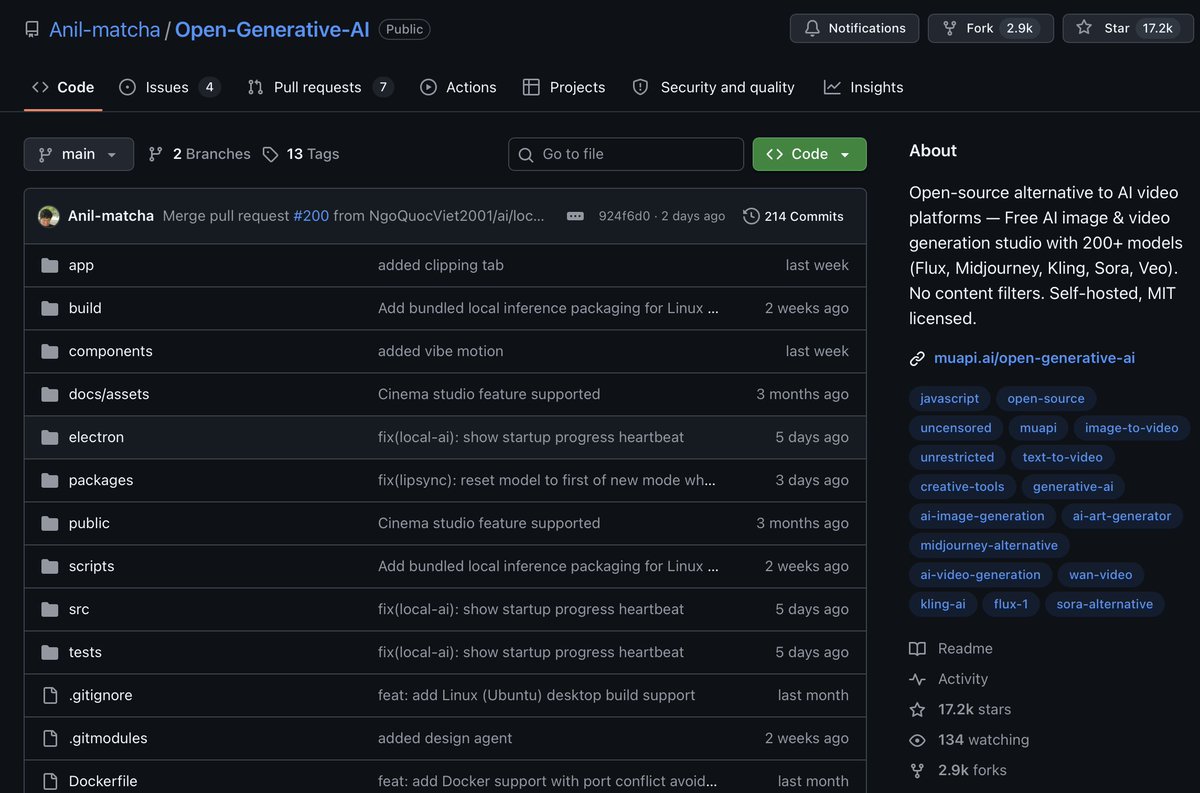
MENDING INI DARIPADA BAYAR SEEDANCE 2.0 BULANAN
🎥
gua nemu bro versi GRATIS buat generative AI video & image
namanya Open Generative AI
Github repo nya gua taro di komen
Fiturnya nih :
> bisa text to video & image to video
> bisa connect ke Claude Code dan Codex
> 100% gratis selamanya
> ada 200+ image and video model di satu tempat
> bisa atur cinematic kamera (lens, focal length, aperture)
> bisa upload sampai 14 foto referensi sekaligus
> buka riwayat image/video yg pernah dibuat
> bisa pake hp juga (web version)
> gaada paywall
> gaada ads & setup gampang
cobain dah, semoga membantu ya 🤗
Indonesia
@ingi_erlingsson @ComfyUI @ltx_model @thesystms @Alibaba_Wan @Meta @OpenAI @suno @AdobeAE How easy is it to have just one face like that speaking for 1 minute 15 seconds on a background nothing fancy or too artistic. Some filters? I can find the right platform. Have the head and the audio to sync. What do you recommend.
English

Human in the loop 🤖
Made in @ComfyUI with a laundry list of tools: @ltx_model 2.3 + @thesystms FLW LoRA, @Alibaba_Wan 2.2 I2V + T2V, Florence2, @Meta Sapiens2, @OpenAI GPT Image 2.0, @suno , @AdobeAE
English

Claude Code can ship a 45-second animated explainer ad in 30 minutes.
No video editor needed, just CC + skills.
Here's how I made this video for @SoteriSkin 👇
1. /plan Concept Brief (Claude Code)
I handwrite a concept brief, then chat with the agent to iterate on it.
The agent gathers any raw materials we might need - context about the brand, product images, end card, etc.
The concept brief details the concept, characters, visual style, script, etc
2. /prepare a moodboard (CC + GPT Image 2 + ElevenLabs)
After reviewing the script, generate:
- character reference images
- voiceover samples for the characters / narrator
- the storyboard (scene by scene grid)
- a few keyframe scenes
3. /generate Keyframes for each scene (CC uses Nano Banana or GPT Image 2)
Uses the character references from the previous step to generate keyframes for each scene.
I probably should have done a round of iteration at this step – there's some character drift and the pH meter representation could have been better.
4. /animate Keyframe → Animated Clip (CC uses Fal Seedance)
Generate 2-4 representative scenes first to see a preview. If it looks good, then generate everything.
5. /stitch (CC + ffmpeg + ElevenLabs)
- Stitch clips together with hard cut
- Add a music score + SFX
- Sync clips to the VO
- Add captions
- Review and edit timing / pacing issues
6. /watch the final cut and review it
- as a video editor for technical errors (mismatched voiceover and visuals, AI hallucinations, etc)
- as a viewer (ICP).
I delegate most of the review to the agent because it catches more things and keeps me out of the loop as much as possible.
It also fixes any issues found in the review.
That's it.
This video took me 30 minutes because I have already created skills for everything I described above.
Some day, this will be < 5 minutes.
I just review and chat to provide direction and feedback.
The skills do all the technical work.
7. /learn
Extracts learnings and updates the skills.
This final step is really important.
It turns this process into a closed loop system that makes the next video much easier to create because all the learnings from the human-in-the-loop process get encoded into code.
Skills are code too.
If you want access to the skill, drop a comment, and I'll DM it to you (must be following).
If you want to make AI video ads like this, DM me.
English

New: LongCat just dropped an excellent open-source talking-avatar model (probably SOTA) + MIT licensed 🔥
Made a Hugging Face Space for it and it's very impressive. So many cool products to build with it: AI tutors with a face, dubbing pipelines, talking-head coding agents (imagine Claude Code with a face), NPC dialogue, etc...
Sharing the Hugging Face (free) demo below 👇
Victor M@victormustar
Making an AI Genie that checks what I'm doing, he's roasting me hard 😭😭
English
@boshigao2016 So this works with Claude you can like give Claude your prompt for like an avatar from a movie and it will create the video in Claude with this. What about sound?
English

🚨 Tired of short 5-10 second video clips that die after one prompt and zero real interaction?
Meet LongLive — the 100% FREE, open-source infinite video generation infrastructure from NVIDIA Labs (NVlabs) that crushes every short-video tool.
One framework does it all:
✅ Real-time interactive generation: keep prompting sequentially and the video continues forever from the first frame
✅ 60-second+ videos generated live with user control (no more “generate & wait”)
✅ Attention Sink + KV-recache tech for true long-context video
✅ LongLive 2.0 with NVFP4 quantization → up to 45.7 FPS inference
✅ Multi-shot support, autoregressive training, works with models like SANA-Video
1.3K+ GitHub stars already, ICLR 2026 accepted paper, and exploding in the AI video community.
Stop being stuck in short-video jail. Generate infinite, interactive, real-time video like the future is here.
👉 Run it now: github.com/NVlabs/LongLive
#LongLive #NVlabs #OpenSourceAI #InfiniteVideo #AIVideoGeneration #VideoAI #NVIDIAAI #LongVideo
English

I'm excited to announce I'm joining the design team at Anthropic to work on their consumer products!
English
California Crimal Syndicate be gone with yo self. Pratt te tat tat take it ova like that
English
@HilaShmuel thank you. Im looking for the cheat code on how to best work it. Should I dump my massive project in one folder and let it research it to access it later? or do I add one at time. is there any resources for guiding me?
English

Meet Cabinet: Paper Clip + KB. for quite some time I've been thinking how LLMs are missing the knowledge base - where I can dump CSVs, PDFs, and most important - inline web app. running on Claude Code with agents with heartbeats and jobs runcabinet.com
Andrej Karpathy@karpathy
LLM Knowledge Bases Something I'm finding very useful recently: using LLMs to build personal knowledge bases for various topics of research interest. In this way, a large fraction of my recent token throughput is going less into manipulating code, and more into manipulating knowledge (stored as markdown and images). The latest LLMs are quite good at it. So: Data ingest: I index source documents (articles, papers, repos, datasets, images, etc.) into a raw/ directory, then I use an LLM to incrementally "compile" a wiki, which is just a collection of .md files in a directory structure. The wiki includes summaries of all the data in raw/, backlinks, and then it categorizes data into concepts, writes articles for them, and links them all. To convert web articles into .md files I like to use the Obsidian Web Clipper extension, and then I also use a hotkey to download all the related images to local so that my LLM can easily reference them. IDE: I use Obsidian as the IDE "frontend" where I can view the raw data, the the compiled wiki, and the derived visualizations. Important to note that the LLM writes and maintains all of the data of the wiki, I rarely touch it directly. I've played with a few Obsidian plugins to render and view data in other ways (e.g. Marp for slides). Q&A: Where things get interesting is that once your wiki is big enough (e.g. mine on some recent research is ~100 articles and ~400K words), you can ask your LLM agent all kinds of complex questions against the wiki, and it will go off, research the answers, etc. I thought I had to reach for fancy RAG, but the LLM has been pretty good about auto-maintaining index files and brief summaries of all the documents and it reads all the important related data fairly easily at this ~small scale. Output: Instead of getting answers in text/terminal, I like to have it render markdown files for me, or slide shows (Marp format), or matplotlib images, all of which I then view again in Obsidian. You can imagine many other visual output formats depending on the query. Often, I end up "filing" the outputs back into the wiki to enhance it for further queries. So my own explorations and queries always "add up" in the knowledge base. Linting: I've run some LLM "health checks" over the wiki to e.g. find inconsistent data, impute missing data (with web searchers), find interesting connections for new article candidates, etc., to incrementally clean up the wiki and enhance its overall data integrity. The LLMs are quite good at suggesting further questions to ask and look into. Extra tools: I find myself developing additional tools to process the data, e.g. I vibe coded a small and naive search engine over the wiki, which I both use directly (in a web ui), but more often I want to hand it off to an LLM via CLI as a tool for larger queries. Further explorations: As the repo grows, the natural desire is to also think about synthetic data generation + finetuning to have your LLM "know" the data in its weights instead of just context windows. TLDR: raw data from a given number of sources is collected, then compiled by an LLM into a .md wiki, then operated on by various CLIs by the LLM to do Q&A and to incrementally enhance the wiki, and all of it viewable in Obsidian. You rarely ever write or edit the wiki manually, it's the domain of the LLM. I think there is room here for an incredible new product instead of a hacky collection of scripts.
English
Reed Taylor がリツイート

The last time a candidate was able to communicate at this level, we know what happened.
Spencer Pratt@spencerpratt
They not like us
English