The Data Digest

385 posts

The Data Digest banner
The Data Digest

The Data Digest

@DigestData

가입일 Haziran 2018
433 팔로잉481 팔로워
vidIQ
vidIQ@vidIQ·
How many videos have you uploaded to YouTube?
English
134
9
134
13.8K
vidIQ
vidIQ@vidIQ·
🚨🚨THUMBNAIL AUDITS🚨🚨 1. Drop a link to your YouTube video. 2. I'll score the thumbnail 1-10. I'll be responding all day today.
vidIQ tweet media
English
308
11
286
38.1K
The Data Digest
The Data Digest@DigestData·
@selcukorkmaz Does that mean that 3. Residuals are the remaining "errors" or variance that cannot be explained by the fixed effects and random effects (hospitals) but are unique to each individual in the study?
English
1
0
0
259
Selçuk Korkmaz
Selçuk Korkmaz@selcukorkmaz·
Understanding Mixed Effects Models: A Simple Example Imagine researchers are testing a new drug to lower blood pressure. They give the drug to patients in 10 different hospitals and measure how much each patient’s blood pressure drops after taking the drug. Now, two things can affect the results: 1. Fixed effects: These are the main things the researchers are interested in, like: • Whether the drug works, • The patient’s age or gender, • The dose of the drug. 2. Random effects: These are differences that come from the hospitals themselves: • Some hospitals may have better equipment. • Some doctors might be more experienced. • Some hospitals may treat more severe cases. The patients from the same hospital might have more similar results just because they’re treated in the same environment. A mixed effects model allows researchers to: • Study the fixed effect of the drug: Does it lower blood pressure overall? • Account for the random effect of hospital differences: Some hospitals might naturally have better or worse outcomes, and we don’t want that to bias the results. By using a mixed effects model, the researchers avoid falsely thinking the drug doesn’t work just because one hospital had unusually bad outcomes or overestimating its power because one hospital had great results. In short: Mixed effects models help doctors and scientists separate what’s due to the treatment (the drug) from what’s due to the setting (the hospital), making their conclusions more trustworthy.
Selçuk Korkmaz tweet media
English
4
62
298
17.5K
The Data Digest
The Data Digest@DigestData·
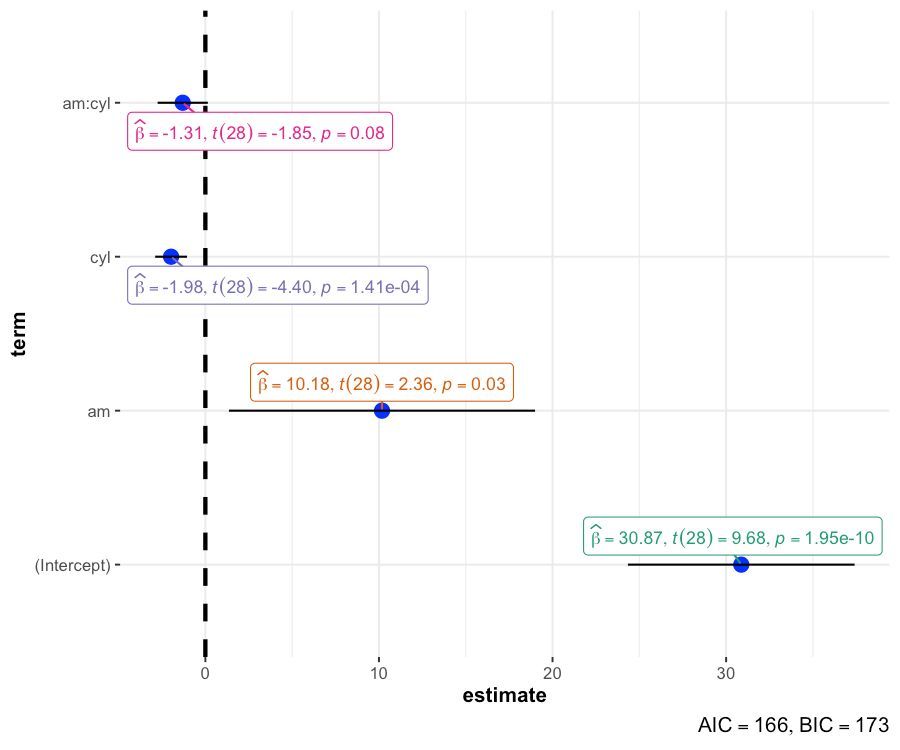
@JoachimSchork Looks very clean and informative indeed! Also great to see that the am:cyl estimate CI95 overlaps with 0, hence the p-value > 0.05 However the most important factor for mpg is wt, explaining 74,46% of the variance alone. am, cyl etc. correlate with wt in the mtcars dataset.
English
0
0
0
72
Joachim Schork
Joachim Schork@JoachimSchork·
Easily interpret regression models with clear visualizations! The ggcoefstats() function from the ggstatsplot package generates dot-and-whisker plots, providing essential statistical details for models saved in a tidy data frame. ✔️ Visualize Model Estimates: Each plot displays dots representing regression coefficients, with whiskers showing their confidence intervals (default is 95%). This allows you to assess the strength and direction of effects. ✔️ Detailed Statistical Labels: Labels attached to each dot provide additional information, including estimates, t-statistics, and p-values, offering a comprehensive view of the regression analysis. ✔️ Diagnostic Information: Captions include model diagnostics such as AIC and BIC values, which are useful for comparing model performance. Lower AIC and BIC values generally indicate a better model fit. ✔️ Customizable ggplot2 Output: The plots are fully compatible with ggplot2, letting you tweak and modify themes, colors, and other elements using the same familiar syntax. The visualization shown here is from the package website, demonstrating how ggcoefstats() effectively conveys statistical information through dot-and-whisker plots: github.com/IndrajeetPatil… Want to enhance your skills in creating insightful visualizations with ggplot2 and its extensions? Join my online course, “Data Visualization in R Using ggplot2 & Friends!” Further details: statisticsglobe.com/online-course-… #DataAnalytics #Rpackage #RStats #DataScientist #Statistics #ggplot2
Joachim Schork tweet media
English
1
13
111
4.4K
The Data Digest
The Data Digest@DigestData·
No worries, I am glad I saw the post. Helped me to brush up on type1/type2 error distinction and I did not even know what F1 score is and how Precisions is defined. The fastml package looks really powerful. I will check it out when I dive deeper into tidymodels, or is that the wrong order? What would you recommend.
English
1
0
0
65
Selçuk Korkmaz
Selçuk Korkmaz@selcukorkmaz·
Good point. Since this is a toy example, the results aren’t final. The ranger-RF model may improve with proper tuning like parameter optimization. But still, in real heart disease screening, sensitivity should be the priority. Even in early tests. It is important to keep that in mind.
English
1
0
1
124
Selçuk Korkmaz
Selçuk Korkmaz@selcukorkmaz·
Just used fastml to compare logistic regression (glm/glmnet) and random forest (ranger/randomForest) on the Framingham dataset. Repeated CV + Bayesian tuning (20 iter) with early stopping, MICE imputation, and upsampling made model selection easy. 🚀 library(fastml) data(framingham) custom_tune <- list( rand_forest = list(ranger = list(mtry = c(2, 5), min_n = c(3, 10))), logistic_reg = list(glm = list(penalty = c(0.0, 1.0))) ) model <- fastml( data = framingham, label = "TenYearCHD", algorithms = c("rand_forest", "logistic_reg"), algorithm_engines = list( rand_forest = c("ranger", "randomForest"), logistic_reg = c("glm", "glmnet") ), resampling_method = "repeatedcv", folds = 5, repeats = 3, use_default_tuning = TRUE, tuning_strategy = "bayes", tuning_iterations = 20, tune_params = custom_tune, balance_method = "upsample", early_stopping = TRUE, impute_method = "mice", event_class = "second", seed = 42 ) summary(model)
Selçuk Korkmaz tweet mediaSelçuk Korkmaz tweet mediaSelçuk Korkmaz tweet media
English
5
26
157
15.7K
The Data Digest
The Data Digest@DigestData·
She was also the best performing woman in the Titled Tuesday rapid tournaments on chess com last year. With an average score of 6.82 in 37 participations. A 9 game winning streak and a best place of 37. Win White 59.8%, Win Black 50.5% Average opponent rating she defeated: 2579 More 2024 analysis: youtu.be/DXj3AHEMIRI
YouTube video
YouTube
English
0
0
0
33
The Data Digest
The Data Digest@DigestData·
@chesscom_in @ArjunErigaisi That means he is outperforming his 2024 results already. There he could not win a tournament in 39 tries and his longest winning streak was 9 games. 2024 stats: max score 9.5 (median 8), Win ⚪ 68%, Win ⚫ 66.5%. More 2024 analysis here: youtu.be/DXj3AHEMIRI
YouTube video
YouTube
English
0
0
0
33
Chess.com - India
Chess.com - India@chesscom_in·
🇮🇳 GM Arjun Erigaisi missed the first round and then went on to win the Late Titled Tuesday tournament with a perfect 10/10! He defeated Karthikeyan Murali, Aravindh Chithambaram, Pranesh, Praggnanandhaa and Magnus Carlsen in the process! Congratulations @ArjunErigaisi 👏
Chess.com - India tweet media
English
4
28
401
5.9K
The Data Digest
The Data Digest@DigestData·
@R_Graph_Gallery I am one of the 34% because I already write code like the AFTER-image 😇. Not 100% but with tab and Enter R is doing most of the formatting already. But thanks for pointing out Air and formatter package. Will give it a try soon.
English
1
0
0
112
Yan Holtz
Yan Holtz@R_Graph_Gallery·
🚨 66% of R and Python users do NOT use a formatter 😳 A formatter takes messy code and automatically improves its layout: ✅ Better indentation ✅ Proper spacing ✅ Reasonable line length Poll and explanation in my latest post: 👉 blog.yan-holtz.com
Yan Holtz tweet media
English
1
6
50
2.8K
The Data Digest
The Data Digest@DigestData·
@micosapiens711 @AmazfitGlobal @ZeppGlobal Awesome :) I have a fitbit and it also tracks sleep. REM, deepsleep, overall duration and wake-time, and then builds an overall index. When I hit the gym to hard or to late in the day, I have trouble sleeping, but long walks outside or runs in the morning help a lot sleepwise.
English
1
0
1
120
The Data Digest
The Data Digest@DigestData·
Because the challenge category is time series, I’m showing life expectancy vs. GDP for 140 countries from 1952 to 2007. As countries develop economically, people also live longer lives.
The Data Digest tweet media
English
0
0
3
99
The Data Digest
The Data Digest@DigestData·
Day 23 (Log_Scale | Time series) #30daychartchallenge There are many ways to show continuous & skewed data on a log scale in #rstats 📉 1️⃣ Transform directly in aes(x = log10(gdpPercap)) 2️⃣ Use scale_x_log10() 3️⃣ Use scale_x_continuous(transform = "log10") 4️⃣ Or go with coord_trans(x = "log10") I like scale_x_log10(), because you can specify the breaks and labels with: breaks = c(250, 500, 1000, 2500, 5000, ...), labels = scales::dollar_format() Also, annotation_logticks(sides = "b") is a great way to show where key log steps lie. #dataviz #ggplot2
The Data Digest tweet media
English
1
0
5
267
The Data Digest
The Data Digest@DigestData·
Day 23 (Log_Scale | Time series) #30daychartchallenge There are many ways to show continuous & skewed data on a log scale in #rstats 📉 1️⃣ Transform directly in aes(x = log10(gdpPercap)) 2️⃣ Use scale_x_log10() 3️⃣ Use scale_x_continuous(transform = "log10") 4️⃣ Or go with coord_trans(x = "log10") I like scale_x_log10(), because you can specify the breaks and labels with: breaks = c(250, 500, 1000, 2500, 5000, ...), labels = scales::dollar_format() Also, annotation_logticks(sides = "b") is a great way to show where key log steps lie. #dataviz #ggplot2
The Data Digest tweet media
English
0
0
3
108
The Data Digest
The Data Digest@DigestData·
@nastengraph I like these double log charts to visualize power-law relationships. I think body mass vs. heart rate also leads to a straight line. As does log(heart rate) vs. life expectancy for mammals.
English
1
0
1
37
Anastasiya
Anastasiya@nastengraph·
#30DayChartChallenge – Log Scale I wanted to create something similar to the famous scatterplot from Edward Tufte’s book Beautiful Evidence. For me, it’s the best showcase of the log scale. Creating the images was the hardest part.
Anastasiya tweet media
English
2
0
11
358