
고정된 트윗
Prince
978 posts


Prince
@Princelight_
Web Developer | Digital Marketing Consultant | Artificial Intelligence. Helped 700+ Clients | Mentored 105+ Students. 7 Years Experience. Whatsapp: 08089158949.
Nigeria 가입일 Ekim 2019
2.9K 팔로잉1.5K 팔로워

30 Must Know Terms in Claude
__________
Claude is moving faster than most people can learn it.
So I made a simple 30-term map to catch up in 5 minutes:
1. Models
Opus = deep thinking, strategy, writing
Sonnet = daily work, editing, workflows
Haiku = quick, cheap, lightweight tasks
2. Core Apps
Chat = basic Claude interface
Projects = your workspace for repeat work
Claude Code = for developers and builders
3. Newer Surfaces
Claude Design = build visuals and websites
Claude in Excel = work inside spreadsheets
Claude in Chrome = browse and take action
4. Context & Memory
Projects = task-specific context
Custom Instructions = project-level rules
Memory = remembers useful details across chats
5. Outputs
Artifacts = docs, code, apps, previews
Markdown = Claude's clean output format
CLAUDE.md = instruction file for Claude Code
6. Skills System
Skills = reusable workflows
SKILL.md = instructions behind a skill
Plugins = skills + connectors bundled together
7. Connections
Connectors = Claude linked to your apps
Computer Use = Claude clicks and types
Dispatch = run tasks from mobile to desktop
8. Power Modes
Extended Thinking = better reasoning
Research = deep reports
Web Search = live internet results
9. Smart Helpers
Scheduled Tasks = recurring Claude actions
Global Instructions = default working style
AskUserQuestion = structured input from you
10. Foundations
Prompt = what you ask
Style = how Claude responds
Vibecoding = building by prompting
Most people don't need to learn everything.
But if you understand this map, Claude stops feeling like "just another chatbot" and starts becoming a real work system.
I'm building a full Claude learning library for non-technical professionals.
1. Follow @Princelight_
2. Save the post.
3. Repost to your network.
____________________________

English

Most people learn prompts.
Very few learn AI Engineering.
That’s the difference between:
using AI
and
building AI systems.
Here’s the complete AI Engineering Master Tree 🌲
━━━━━━━━━━━━━━━
📂 AI Engineering
┃
┣ 📂 Foundations ⚙️
┃ ┣ Python
┃ ┣ APIs
┃ ┣ JSON
┃ ┣ Git
┃ ┣ Linux
┃ ┗ Cloud Basics
┃
┣ 📂 LLM Fundamentals 🧠
┃ ┣ Tokens
┃ ┣ Context Windows
┃ ┣ Embeddings
┃ ┣ Attention
┃ ┣ Fine-Tuning
┃ ┗ Inference
┃
┣ 📂 Prompt Engineering ✍️
┃ ┣ Zero-Shot
┃ ┣ Few-Shot
┃ ┣ Chain of Thought
┃ ┣ Structured Outputs
┃ ┣ System Prompts
┃ ┗ Prompt Chaining
┃
┣ 📂 RAG 🔎
┃ ┣ Chunking
┃ ┣ Embeddings
┃ ┣ Vector Databases
┃ ┣ Retrieval
┃ ┣ Re-ranking
┃ ┗ Citations
┃
┣ 📂 AI Agents 🤖
┃ ┣ Tool Calling
┃ ┣ Memory
┃ ┣ Planning
┃ ┣ Multi-Agent Systems
┃ ┣ Reflection
┃ ┗ Agent Workflows
┃
┣ 📂 Model Providers 🌐
┃ ┣ OpenAI
┃ ┣ Anthropic
┃ ┣ Google
┃ ┣ Meta
┃ ┣ Mistral
┃ ┗ DeepSeek
┃
┣ 📂 Frameworks 🛠️
┃ ┣ LangChain
┃ ┣ LlamaIndex
┃ ┣ CrewAI
┃ ┣ AutoGen
┃ ┣ Haystack
┃ ┗ PydanticAI
┃
┣ 📂 Databases 🗄️
┃ ┣ PostgreSQL
┃ ┣ Redis
┃ ┣ Pinecone
┃ ┣ Weaviate
┃ ┣ Qdrant
┃ ┗ Chroma
┃
┣ 📂 Deployment ☁️
┃ ┣ Docker
┃ ┣ Kubernetes
┃ ┣ Serverless
┃ ┣ CI/CD
┃ ┣ Monitoring
┃ ┗ Scaling
┃
┣ 📂 Evaluation 📊
┃ ┣ Hallucinations
┃ ┣ Benchmarks
┃ ┣ Tracing
┃ ┣ Human Feedback
┃ ┣ Observability
┃ ┗ Guardrails
┃
┣ 📂 Production AI 🚀
┃ ┣ Security
┃ ┣ Cost Optimization
┃ ┣ Caching
┃ ┣ Rate Limits
┃ ┣ Governance
┃ ┗ Reliability
┃
┗ 📂 Mastery 🏆
┣ AI Chatbots
┣ AI Search Engines
┣ AI Copilots
┣ Voice Agents
┣ Autonomous Agents
┗ AI Products
Most developers stop at:
“prompt engineering.”
Real AI engineers understand:
→ retrieval
→ orchestration
→ evaluation
→ deployment
→ observability
→ distributed systems
That’s where production AI actually happens.
Learn these layers and you’ll already be ahead of 90% of AI developers.
Save this roadmap for later 🌲
#AI #LLM #AIAgents #AIEngineering #GenAI #MachineLearning #BuildInPublic

English
AI is changing everything faster than most people expected.
The people winning in 2026 will not just use AI casually.
They will understand how to work with it strategically.
That’s why these AI skills matter more than ever:
• Prompt Engineering
• AI Workflow Automation
• AI Agents
• RAG Systems
• Multimodal AI
• AI Tool Integration
• LLM Optimization
You don’t need to become an AI engineer overnight.
Start with one skill.
Practice daily.
Build real projects.
Stay ahead while others are still watching from the sidelines.
The biggest opportunity right now is not replacing humans with AI.
It’s humans using AI better than everyone else.
Which AI skill are you focusing on in 2026?
#AI #ArtificialIntelligence #ChatGPT #AITools #Automation #Tech #FutureOfWork #Innovation

English

@Princelight_ the honest answer is that most people get caught up in the preconceived notion of what an ai engineer should be, rather than focusing on actually building something. your roadmap looks solid for a practical approach to getting started with ai engineering.
English
You do NOT need a CS degree to become an AI Engineer.
You need 1 thing:
To build.
Here's the roadmap I'd follow if I started today:
☑ Learn Python
Then:
☑ APIs
☑ GitHub
☑ JSON
☑ Basic DSA
Resources:
→ CS50
→ freeCodeCamp
→ Corey Schafer
→ w3schools.com
Next:
Learn how AI actually works.
☑ Machine Learning
☑ Neural Networks
☑ LLMs
☑ Embeddings
☑ Vector Databases
Resources:
→ Andrew Ng
→ 3Blue1Brown
→ DeepLearning.AI
Then stop consuming.
Start building.
Projects:
→ AI Resume Reviewer
→ AI Chatbot
→ AI Research Agent
→ AI Interview Coach
Now learn:
☑ OpenAI API
☑ Claude API
☑ RAG
☑ Agents
☑ MCP
☑ Workflows
Most people stay in tutorial mode.
Don't.
Build publicly.
Post:
→ What you learned
→ What broke
→ How you fixed it
Your GitHub becomes your resume.
Your projects become your proof.
And your consistency becomes your advantage.
Save this roadmap now {3 dots, top right} !!
AI is moving fast.
But the opportunity is even faster.
Start small. Ship weekly.
That's how AI Engineers are made.
Follow @Princelight_ for more !
🔁 Repost it to reach more people.

English

Pythonを学ぶ必要があります。これから始めるならCS50、freeCodeCamp、Corey Schafer、w3schools.comの資源を利用してください。AIの仕組みを学びましょう。機械学習、ニューラルネットワーク、LLMs、埋め込み、ベクトルデータベースについてです。そして、積極的にプロジェクトを構築していきましょう。GitHubがあなたの履歴書となり、プロジェクトが証明となり、積極性があなたの強みとなります。AIエンジニアになる手順を保存してください!
日本語

@Princelight_ And how long will it take from being a rookie to start building 6 months or 1 year
English


AI builders, devtool founders & SaaS people 👋
Looking to #connect with people building weird things with AI.
especially into:
🧱 B2B SaaS
⚡ AI coding agents
🤖 Cursor, Claude Code & Codex
🖥️ terminals, MCPs & workflows
🚀 AI-native products
I’m currently building an AI code editor:
terminal-first, multi-agent, BYOK, worktrees, persistent context, visual diffs, rollback, cleaner UX.
drop what you’re building.
I’ll reply to every serious builder.

English
How to Learn Claude in 12 Days
(This will save you 2+ hours every day)
Most people use Claude like a chatbot.
Ask a question. Get an answer. Repeat.
Big mistake.
Claude is becoming an operating system for knowledge work.
Here's a 12-day roadmap based on real Claude workflows:
☀️ DAY 1: Build CLI Tools
Goal: Turn ideas into working tools.
→ Open Claude Code
→ Describe a tool in plain English
→ Let Claude generate and run it
No frameworks. No boilerplate. Just describe → build.
☀️ DAY 2: Create an MCP Server
Goal: Give Claude new capabilities.
→ Pick a tool or API you use often
→ Define endpoints and authentication
→ Let Claude generate the server
Now Claude can interact with your systems directly.
☀️ DAY 3: Build a Personal RAG
Goal: Make Claude remember your knowledge.
→ Upload notes, docs, and PDFs
→ Connect Google Drive, Notion, or Gmail
→ Ask questions across everything
Your second brain becomes searchable.
☀️ DAY 4: Understand Any Codebase
Goal: Learn unfamiliar code fast.
→ Drop in a GitHub repo
→ Ask for architecture breakdowns
→ Follow guided walkthroughs
Hours of reading become minutes.
☀️ DAY 5: Practice Interviews
Goal: Improve faster than studying alone.
→ Pick a role
→ Choose an interview type
→ Let Claude act as interviewer
Get feedback after every answer.
☀️ DAY 6: Automate the Browser
Goal: Stop doing repetitive web tasks.
→ Tell Claude what you need
→ Let it navigate websites
→ Complete tasks automatically
Research becomes delegation.
☀️ DAY 7: Tailor Every Resume
Goal: Apply smarter.
→ Paste a job description
→ Upload your resume
→ Ask Claude to optimize for ATS
Customized applications in minutes.
☀️ DAY 8: Schedule Cloud Routines
Goal: Work while you sleep.
→ Create recurring tasks
→ Schedule reports or research
→ Wake up to completed work
Productivity without active effort.
☀️ DAY 9: Design Faster
Goal: Go from idea to visual.
→ Describe a landing page
→ Describe a pitch deck
→ Let Claude generate drafts
Blank-page syndrome disappears.
☀️ DAY 10: Run Multi-Agent Reviews
Goal: Get multiple perspectives.
→ Assign different review roles
→ Let agents inspect code independently
→ Compare recommendations
One review becomes many.
☀️ DAY 11: Use Auto Mode
Goal: Delegate entire workflows.
→ Give Claude a specification
→ Let it plan, code, test, and review
→ Ship end-to-end
You manage outcomes, not steps.
☀️ DAY 12: Build Custom Skills
Goal: Create reusable expertise.
→ Save recurring workflows
→ Turn prompts into commands
→ Reuse them forever
Your best workflows become one-click actions.
Most people use Claude for answers.
Power users use Claude for systems.
The difference isn't intelligence.
It's setup.
Do this instead of scrolling:
→ Save this post
→ Start Day 1 today (10 minutes)
→ Complete one day at a time
→ Come back in 12 days
You'll never use AI the same way again. 🚀

English
How to Learn Claude in 12 Days
(This will save you 2+ hours every day)
Most people use Claude like a chatbot.
Ask a question. Get an answer. Repeat.
Big mistake.
Claude is becoming an operating system for knowledge work.
Here's a 12-day roadmap based on real Claude workflows:
☀️ DAY 1: Build CLI Tools
Goal: Turn ideas into working tools.
→ Open Claude Code
→ Describe a tool in plain English
→ Let Claude generate and run it
No frameworks. No boilerplate. Just describe → build.
☀️ DAY 2: Create an MCP Server
Goal: Give Claude new capabilities.
→ Pick a tool or API you use often
→ Define endpoints and authentication
→ Let Claude generate the server
Now Claude can interact with your systems directly.
☀️ DAY 3: Build a Personal RAG
Goal: Make Claude remember your knowledge.
→ Upload notes, docs, and PDFs
→ Connect Google Drive, Notion, or Gmail
→ Ask questions across everything
Your second brain becomes searchable.
☀️ DAY 4: Understand Any Codebase
Goal: Learn unfamiliar code fast.
→ Drop in a GitHub repo
→ Ask for architecture breakdowns
→ Follow guided walkthroughs
Hours of reading become minutes.
☀️ DAY 5: Practice Interviews
Goal: Improve faster than studying alone.
→ Pick a role
→ Choose an interview type
→ Let Claude act as interviewer
Get feedback after every answer.
☀️ DAY 6: Automate the Browser
Goal: Stop doing repetitive web tasks.
→ Tell Claude what you need
→ Let it navigate websites
→ Complete tasks automatically
Research becomes delegation.
☀️ DAY 7: Tailor Every Resume
Goal: Apply smarter.
→ Paste a job description
→ Upload your resume
→ Ask Claude to optimize for ATS
Customized applications in minutes.
☀️ DAY 8: Schedule Cloud Routines
Goal: Work while you sleep.
→ Create recurring tasks
→ Schedule reports or research
→ Wake up to completed work
Productivity without active effort.
☀️ DAY 9: Design Faster
Goal: Go from idea to visual.
→ Describe a landing page
→ Describe a pitch deck
→ Let Claude generate drafts
Blank-page syndrome disappears.
☀️ DAY 10: Run Multi-Agent Reviews
Goal: Get multiple perspectives.
→ Assign different review roles
→ Let agents inspect code independently
→ Compare recommendations
One review becomes many.
☀️ DAY 11: Use Auto Mode
Goal: Delegate entire workflows.
→ Give Claude a specification
→ Let it plan, code, test, and review
→ Ship end-to-end
You manage outcomes, not steps.
☀️ DAY 12: Build Custom Skills
Goal: Create reusable expertise.
→ Save recurring workflows
→ Turn prompts into commands
→ Reuse them forever
Your best workflows become one-click actions.
Most people use Claude for answers.
Power users use Claude for systems.
The difference isn't intelligence.
It's setup.
Do this instead of scrolling:
→ Save this post
→ Start Day 1 today (10 minutes)
→ Complete one day at a time
→ Come back in 12 days
You'll never use AI the same way again. 🚀
English
How to Learn Claude in 12 Days
(This will save you 2+ hours every day)
Most people use Claude like a chatbot.
Ask a question. Get an answer. Repeat.
Big mistake.
Claude is becoming an operating system for knowledge work.
Here's a 12-day roadmap based on real Claude workflows:
☀️ DAY 1: Build CLI Tools
Goal: Turn ideas into working tools.
→ Open Claude Code
→ Describe a tool in plain English
→ Let Claude generate and run it
No frameworks. No boilerplate. Just describe → build.
☀️ DAY 2: Create an MCP Server
Goal: Give Claude new capabilities.
→ Pick a tool or API you use often
→ Define endpoints and authentication
→ Let Claude generate the server
Now Claude can interact with your systems directly.
☀️ DAY 3: Build a Personal RAG
Goal: Make Claude remember your knowledge.
→ Upload notes, docs, and PDFs
→ Connect Google Drive, Notion, or Gmail
→ Ask questions across everything
Your second brain becomes searchable.
☀️ DAY 4: Understand Any Codebase
Goal: Learn unfamiliar code fast.
→ Drop in a GitHub repo
→ Ask for architecture breakdowns
→ Follow guided walkthroughs
Hours of reading become minutes.
☀️ DAY 5: Practice Interviews
Goal: Improve faster than studying alone.
→ Pick a role
→ Choose an interview type
→ Let Claude act as interviewer
Get feedback after every answer.
☀️ DAY 6: Automate the Browser
Goal: Stop doing repetitive web tasks.
→ Tell Claude what you need
→ Let it navigate websites
→ Complete tasks automatically
Research becomes delegation.
☀️ DAY 7: Tailor Every Resume
Goal: Apply smarter.
→ Paste a job description
→ Upload your resume
→ Ask Claude to optimize for ATS
Customized applications in minutes.
☀️ DAY 8: Schedule Cloud Routines
Goal: Work while you sleep.
→ Create recurring tasks
→ Schedule reports or research
→ Wake up to completed work
Productivity without active effort.
☀️ DAY 9: Design Faster
Goal: Go from idea to visual.
→ Describe a landing page
→ Describe a pitch deck
→ Let Claude generate drafts
Blank-page syndrome disappears.
☀️ DAY 10: Run Multi-Agent Reviews
Goal: Get multiple perspectives.
→ Assign different review roles
→ Let agents inspect code independently
→ Compare recommendations
One review becomes many.
☀️ DAY 11: Use Auto Mode
Goal: Delegate entire workflows.
→ Give Claude a specification
→ Let it plan, code, test, and review
→ Ship end-to-end
You manage outcomes, not steps.
☀️ DAY 12: Build Custom Skills
Goal: Create reusable expertise.
→ Save recurring workflows
→ Turn prompts into commands
→ Reuse them forever
Your best workflows become one-click actions.
Most people use Claude for answers.
Power users use Claude for systems.
The difference isn't intelligence.
It's setup.
Do this instead of scrolling:
→ Save this post
→ Start Day 1 today (10 minutes)
→ Complete one day at a time
→ Come back in 12 days
You'll never use AI the same way again. 🚀

English
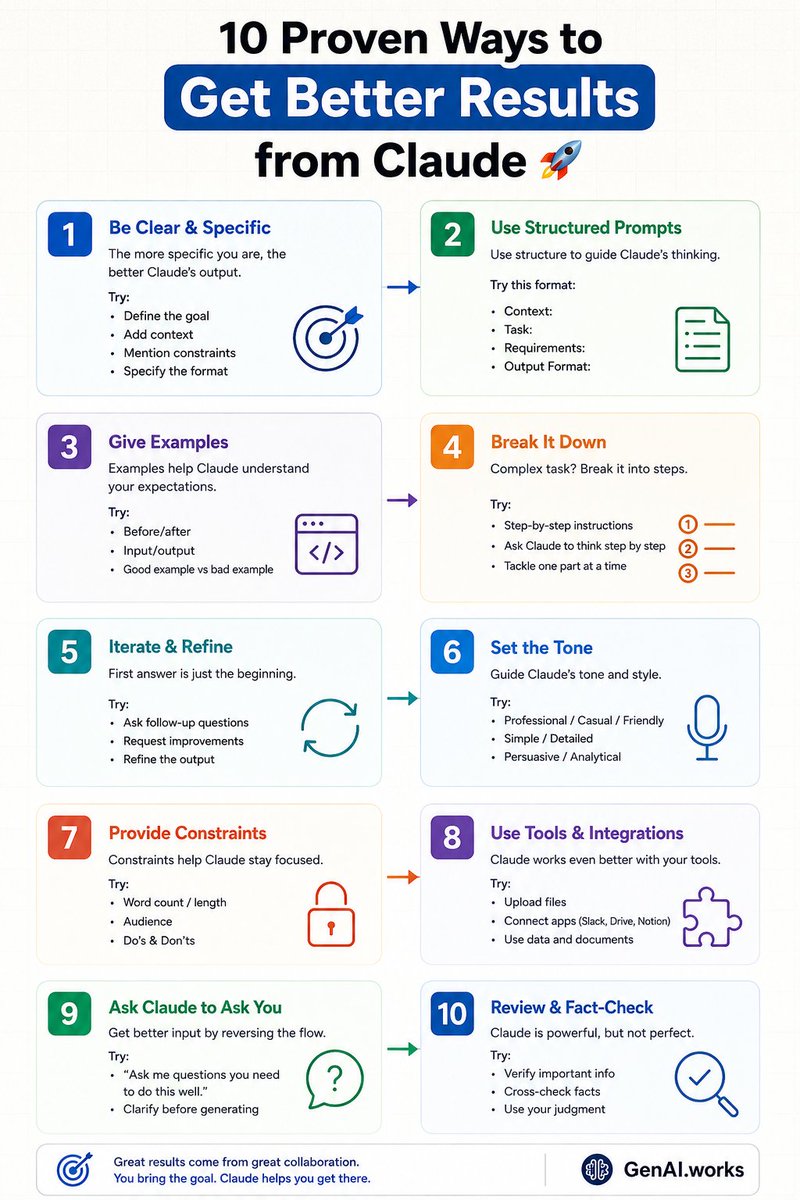
10 Proven Ways to Get Beter Results from Claude 🚀
1️⃣ Be clear & specific
2️⃣ Use structured prompts
3️⃣ Give examples
4️⃣ Break tasks into steps
5️⃣ Iterate & refine
6️⃣ Set the tone
7️⃣ Add constraints
8️⃣ Use integrations
9️⃣ Let Claude ask questions
Better prompts → Better outputs
English