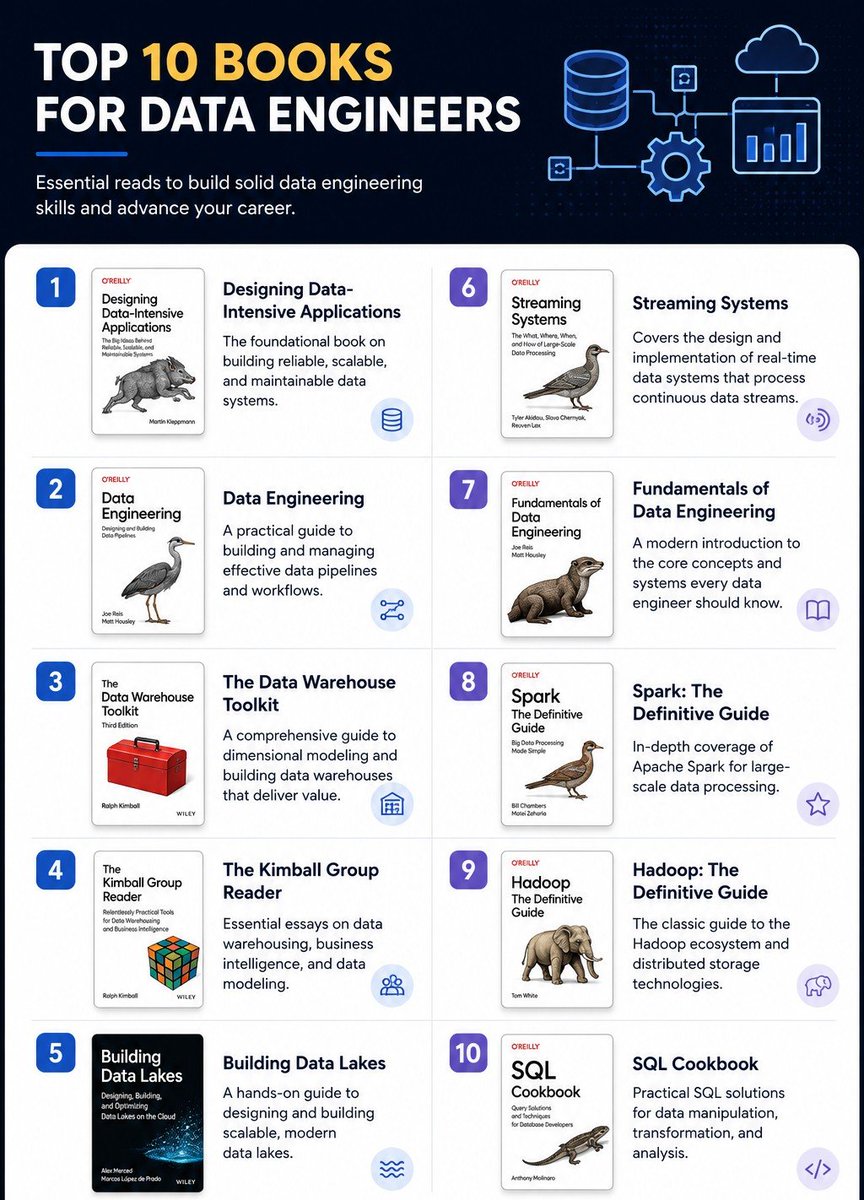
How to become a 10x software engineer (in 2026). Read these 10 books:
TechP
19.8K posts

@Tech_p001
Data Engineer in Training Python | SQL | PySpark | Databricks | Docker | Kafka | Technical Writer | Comp Engineering student..


How to become a 10x software engineer (in 2026). Read these 10 books:


🚀 Python Basics Part 7 🐍🔥 APIs, Web Scraping & Automation with Python Now that you've learned Python fundamentals, OOP, and essential libraries, it's time to use Python for real-world automation. This is where Python becomes incredibly powerful 💻 In this part, you'll learn: ✅ APIs ✅ JSON Data ✅ Web Scraping ✅ Task Automation ✅ Python Bots ✅ Real-World Use Cases 🧠 1. What is an API? API stands for Application Programming Interface. An API allows different applications to communicate with each other. Examples: 🌦 Weather Apps 💳 Payment Gateways 📱 Mobile Applications 🤖 AI Applications Instead of manually collecting data, you can request it through an API. 🌐 2. Working with APIs The most popular library for API requests is "requests". *Install:* `pip install requests` *Import:* `import requests` Simple API Request: import requests response = requests.get("api.example.com/data") print(response.status_code) 📌 Output:* 200 ✔ 200 means the request was successful. 📦 3. Understanding JSON Data Most APIs return data in JSON format. *Example JSON:* { "product": "Laptop", "price": 50000, "available": true } *Convert JSON into Python:* data = response.json() print(data) *🔍 4. What is Web Scraping?* Web Scraping means extracting data from websites automatically. *Used for:* ✔ Price Tracking ✔ News Collection ✔ Job Listings ✔ Research Projects *Popular Libraries:* BeautifulSoup, requests *Install:* `pip install beautifulsoup4` *🌐 5. Simple Web Scraping Example* import requests from bs4 import BeautifulSoup page = requests.get("example.com") soup = BeautifulSoup(page.text, "html.parser") print(soup.title.text) This extracts the webpage title. *⚠ 6. Important Note About Web Scraping* Always: ✔ Read website policies ✔ Respect rate limits ✔ Avoid excessive requests ✔ Use scraping responsibly Some websites prohibit automated scraping. *🤖 7. Task Automation with Python* Automation means letting Python perform repetitive tasks. *Examples:* 📂 File Organization 📧 Email Processing 📊 Report Generation 📁 Data Cleaning 📄 Excel Automation *Example:* for number in range(1, 6): print(f"Generating Report {number}") *📑 8. Working with Excel Files* Using Pandas: import pandas as pd data = pd.read_excel("sales.xlsx") print(data.head()) *Common Tasks:* ✔ Read Excel Files ✔ Update Data ✔ Create Reports ✔ Export Results *⏰ 9. Scheduling Tasks* Python can run tasks automatically at specific times. *Example Use Cases:* ✔ Daily Reports ✔ Data Backups ✔ Reminder Systems ✔ Automated Notifications *Popular Libraries:* schedule, time *🤖 10. Building Simple Bots* Python is often used to create bots. *Examples:* ✔ Chat Bots ✔ Notification Bots ✔ Social Media Bots ✔ Customer Support Bots *Typical Workflow:* User Input → Processing → Response *💼 Real-World Automation Examples* *Data Analyst* ✔ Automate Excel Reports ✔ Fetch API Data ✔ Clean Datasets *Web Developer* ✔ Integrate Third-Party APIs ✔ Build Backend Services *AI Engineer* ✔ Collect Training Data ✔ Connect AI Models with APIs *Business Professional* ✔ Automate Daily Tasks ✔ Generate Reports Automatically *🛠 Beginner Practice Projects* ✅ Weather Information App ✅ News Aggregator ✅ Currency Converter ✅ Website Title Extractor ✅ Automated Report Generator *🔥 Common Beginner Mistakes* ❌ Ignoring API documentation ❌ Hardcoding values everywhere ❌ Not handling errors ❌ Sending too many requests too quickly ❌ Scraping websites without checking rules 💬 Double Tap ❤️ For More 🚀


Hi, I'm Ben. I know you don't know me but.... let me introduce myself. I'm a Technical Email Marketing and Lifecycle Marketing Specialist who helps businesses acquire, engage, and retain customers through data-driven email marketing. I design and build responsive email templates, develop automated customer journeys, optimize deliverability, and create lifecycle campaigns that drive engagement and revenue. I enjoy combining strategy with technical execution to create email experiences that perform. I work with platforms like Salesforce Marketing Cloud, Braze, Iterable, Klaviyo, HubSpot, Mailchimp, Customer. io, and Salesforce CRM, using analytics to continuously improve campaign performance. Whether it's designing high-converting emails, coding responsive templates, building complex automations, or optimizing the customer lifecycle, I enjoy solving marketing problems that create measurable business impact. You need any help with your e-commerce and saas customer journeys flow Send me a DM. Quote this tweet and tell us what you do.