Robert Mitchell 리트윗함
Robert Mitchell
360 posts

Robert Mitchell
@RoberrtMitchell
📸 Founder of https://t.co/zARj5W3nYn 📖 Partner of https://t.co/5yvygV1mJW 🙌 Currently working on free resources to help founders 📅 Started Posting 3/6/26
Saturn 🪐 가입일 Aralık 2021
56 팔로잉18 팔로워
Robert Mitchell 리트윗함

@VadimStrizheus @claudeai That's for a mere human like yourself.
English

@trikcode German here. We mostly code in bits and bytes. Here is some German code I wrote. Presumably, it should look quite similar in English.

English

@rvdobuilds @trikcode It must be a common way for developers to improve their english
English

@trikcode I used to work with a Ukrainian software shop, they would discuss everything is Ukrainian until talking about code, then it would be a complete code shift into English.
English

another day, another batch of startups killed in the broad daylight

Claude@claudeai
Claude can now build interactive charts and diagrams, directly in the chat. Available today in beta on all plans, including free. Try it out: claude.ai

English
Robert Mitchell 리트윗함

@yongfook Portraits.com Baby. Follow along and watch along as our team grows this thing over the next year.
English

@birdabo Ready to see posts like this all over X:
"Guys, this new excel product is amazing, you can make numbers do things. No one talking about it."
English

years of not learning Excel is finally paying off.
Claude@claudeai
Claude for Excel and Claude for PowerPoint now sync together seamlessly. When you’ve got more than one file open, Claude shares the full context of your conversation between them. Pull data from spreadsheets, build out tables, and update a deck — without re-explaining a step.
English

@BacLeodiv This is day -1/365 of me growing my startup portraits.com
Follow along and want me blow this thing up!
English

@rubenhassid Step 1: Download Claude
Step 2: Tell Claude to set itself up
English

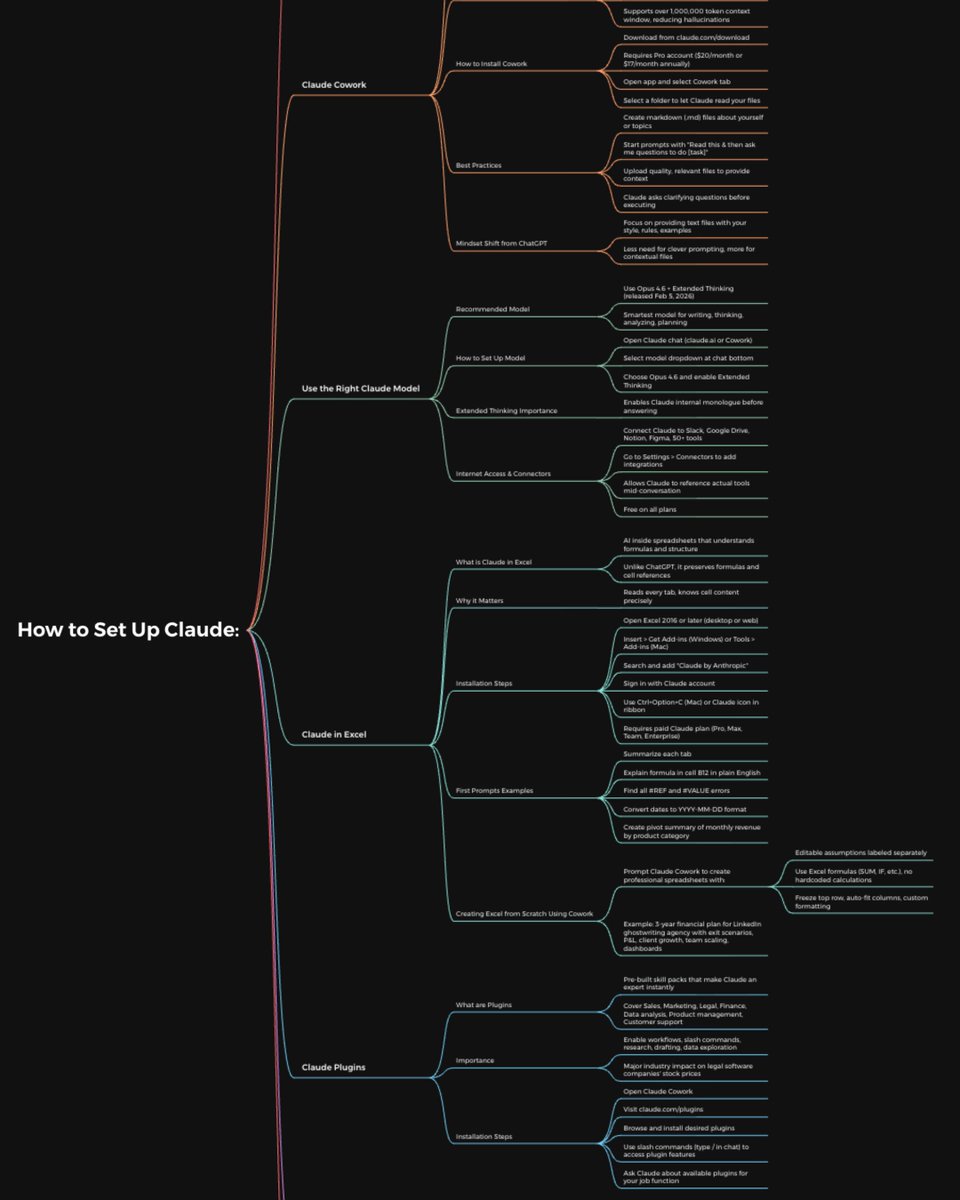
How to set up the Claude completely in just 1 day:
(Save this. Send it to your team. Thank me later.)
Tool 1: Cowork
Download Claude (claude .com/download).
Open the Cowork tab.
Select a folder from your computer.
Now build your brain file. Create "about-me .md."
To download mine, go here: how-to-ai.guide.
Don't pay anything. It's free in the welcome email.
Then, start every chat with this prompt:
"Read the files first. Then ask me questions before doing anything."
Tool 2: Model
Pick Opus 4.6 (it's the best model right now).
Turn on Extended Thinking.
Most skip this & wonder why Claude feels generic.
Then go to Settings > Connectors.
Link Slack, Google Drive, Notion.
Claude now reads your actual workspace.
Tool 3: Excel
Open Excel. Go to Insert > Get Add-ins.
Search "Claude by Anthropic." Install.
Open any spreadsheet. Ask: "Give me a summary of each tab." Claude lives inside the spreadsheet. It knows what D14 actually contains.
Tool 4: Plugins
Go to claude .com/plugins.
Pick the one as per your job.
Marketing. Sales. Legal. Finance. Data.
Click install. Type / in your next chat.
Legal software companies lost $285B in market cap when these dropped. That's a signal.
Tool 5: Artifacts
Nothing to install. Ask Claude to build something.
"Create an interactive HTML calculator for [thing]."
You get a working tool inside the chat. Not text. Not a suggestion. A thing you click and use.
Tool 6: Projects
Go to claude .ai. Click Projects. Create one. Upload your files and add instructions. Every chat inside the project remembers your context.
Honest take: Cowork replaced this for me.
But for teams, it still works.
Where Claude falls short:
No image generation. Use Gemini.
Not the best at real-time search. Use Grok.
Not the best at everything. No tool is.
But for writing, thinking, analyzing, and working with your files? It's the best.
The real difference:
Most people open Claude, type one prompt, get a mid response, and leave.
Because they set up one tool out of six.
Set up all six. It takes 1 day.
Then you'll understand why everyone switched.
Full setup guide + features: how-to-claude.ai
Full Claude cowork set up: claude-co.work
Follow for more @rubenhassid

Ruben Hassid@rubenhassid
English
Robert Mitchell 리트윗함

@codeby_abir “don’t copy and paste”
do this instead:
“copy and paste”
English
Robert Mitchell 리트윗함

here's a Claude prompt that will save you 2 hours this week. copy it. paste it. use it today.
"i'm going to paste my meeting notes below. extract the following and return them as a clean list:
action items (who owns it + deadline if mentioned)
decisions that were made
open questions that still need answers
ideas worth revisiting later
format each section with a header. keep it short. if something is unclear, flag it.
here are my notes: [paste your notes]"
that's it.
you just turned a 45-minute meeting into 4 organized lists in 30 seconds.
now imagine that running automatically after every single meeting without you lifting a finger.
that's what a workflow does. the prompt is step 1. the automation is step 2.
we show you both steps, every week, in our free newsletter.
English