Stop prompting AI to "make me a landing page."
200+ hours testing taught me this:
Generic prompts → pretty pages
My prompts → pages that sell
The pack includes:
→ 3D Landing Hero Section
→ Sentient 3D Core
→ Cyberpunk Volumetric Shaders
→ Microlender Protocol
→ Hyper-Futuristic MCP-2099
Like + reply "PROMPT" for the library.
(following required for DM)
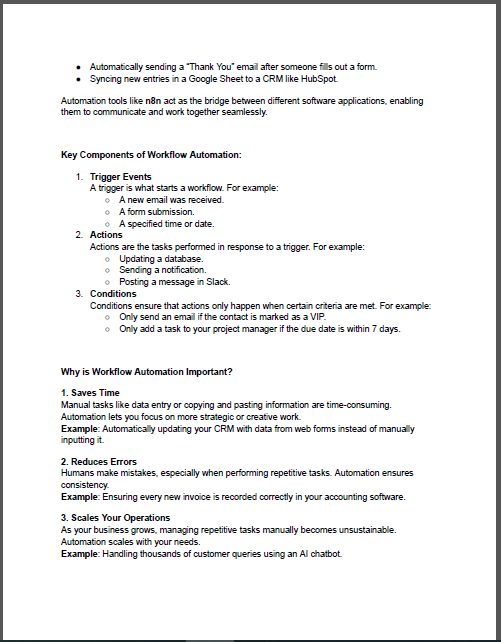
⚙️ 𝗧𝗵𝗲 𝗨𝗹𝘁𝗶𝗺𝗮𝘁𝗲 𝗻𝟴𝗻 𝗦𝘁𝗮𝗿𝘁𝗲𝗿 𝗞𝗶𝘁 (𝟮𝟬𝟮𝟱)
Ready to automate your workflows and connect AI with no-code power? 🤖
This guide covers everything you need to master 𝗻𝟴𝗻 from 𝘁𝗿𝗶𝗴𝗴𝗲𝗿𝘀, 𝗮𝗰𝘁𝗶𝗼𝗻𝘀, 𝗮𝗻𝗱 𝗻𝗼𝗱𝗲𝘀 to building smart, AI-driven automated systems.
Perfect for professionals who want to 𝗯𝗼𝗼𝘀𝘁 𝗽𝗿𝗼𝗱𝘂𝗰𝘁𝗶𝘃𝗶𝘁𝘆, 𝗲𝗳𝗳𝗶𝗰𝗶𝗲𝗻𝗰𝘆, 𝗮𝗻𝗱 𝘀𝗰𝗮𝗹𝗮𝗯𝗶𝗹𝗶𝘁𝘆 without writing complex code. 🚀
To get your copy 👇
1️⃣ Like & Repost
2️⃣ Comment “n8n”
3️⃣ Follow (so I can DM you the guide)
💡 Automation isn’t the future it’s the shortcut to it.
#n8n#Automation#AI#WorkflowAutomation#NoCode#AIIntegration#Productivity
🚀 Diving into Docker & Containerization My Learning Highlights!
Over the past few days, I’ve been exploring Docker, one of the most powerful tools in modern software deployment. 🐳
📨 Comment “PDF” for complete guide
@mischavdburg@mischavdburg
Haha, so true! Every IT pro can relate—smooth sailing is a myth! That’s why we’re all here, working together to make it more reliable. #ITLife
Universal Truths of DevOps
⚙️ The infrastructure you automated perfectly will be manually changed by someone bypassing your process
⚙️ The "temporary" workaround in your deployment script will still be there in 3 years
⚙️ The alert you configured will either never fire or wake you up 40 times for nothing
⚙️ The one person who understands the legacy deployment process will give notice tomorrow
⚙️ Your monitoring will be perfect except for the one metric that actually mattered during the outage
⚙️ The production issue will only happen when you're unreachable on a plane/hike/date
Most DevOps engineers skip these Linux commands until production breaks at midnight.
Here are the commands that saved me countless hours of panic.
Master the basics first. Get comfortable with ls, cd, pwd, mkdir, and rm.
Use grep to search logs when things break. Learn find to locate files fast.
Combine commands with pipes. ps aux | grep nginx shows exactly what is running.
Use systemctl to manage services. systemctl status checks health. systemctl restart fixes most issues.
Learn tail for live logs. tail -f /var/log/syslog watches errors in real time.
SSH keeps you connected. ssh-keygen and ssh-copy-id eliminate password fatigue.
Disk space kills servers. df -h shows available space. du -sh checks folder sizes.
Process management saves uptime. top and htop reveal CPU hogs. kill and killall stop runaway processes.
Permissions matter. chmod 600 protects private keys. chmod +x makes scripts executable.
Backups prevent disasters. tar czf backup.tar.gz /data compresses and saves. rsync syncs files efficiently.
The command line is not optional. It is your foundation for containers, Kubernetes, and cloud work.
Which Linux command do you wish you had learned earlier in your career?
FCK it. Here's all the sauce.
After shipping 100+ apps with @Lovable — I made the ULTIMATE Design Cheat Sheet.
Every prompt.
Every design system pattern.
Every cloud config + infra setup.
Every component standard + best practice we actually use to achieve world-class UI.
All in one doc.
Follow + comment "Cheat Sheet" and I'll DM it to you.
@livingdevops NGINX can be integrated with ModSecurity to serve as a Web Application Firewall (WAF), offering protection against a wide range of web application attacks. ModSecurity is an open-source, cross-platform WAF engine that analyzes HTTP traffic at Layer 7 and can detect, log, or block
As a DevOps engineer, we all use Nginx for one or another purpose.
But most don’t understand how powerful Nginx really is.
Here’s what happens when a request hits your Nginx server:
Nginx sits as your system’s entry point, listening on ports 80 and 443. When a request comes in, it instantly decides the best action based on your configuration.
- For static files like images or CSS, Nginx serves them directly from disk. Blazing fast with no backend needed.
- For dynamic requests, it acts as a reverse proxy. It forwards requests to your backend applications and waits for responses.
👉But here’s where it gets powerful:
- Load balancing across multiple backend servers with different strategies.
- TLS termination handling all SSL certificates and encryption.
- Response caching to serve repeated requests instantly.
- Rate limiting and IP blocking for security.
- Response compression to reduce bandwidth.
- Custom headers for CORS and security policies.
All of this is controlled by a single nginx.conf file. It reloads without downtime.
👉In Kubernetes environments, Nginx serves as an Ingress Controller. It manages and routes traffic to internal services based on paths and rules.
✅That’s why Nginx powers over 400 million websites. It’s not just a web server - it’s a complete traffic management solution.
You can land a six figure job using $200 hardware.
Building a homelab is the secret to landing tech jobs.
I'm now giving away my homelab course for free!
Comment "HOMELAB" and I'll DM it to you.
(Only works if you're following me)